• Skip to main content
  • Skip to primary sidebar
  • Homepage
  • About Ailovyu
  • Privacy Policy
  • Disclaimer
  • Affiliate Disclosure
  • Contact
Ailovyu.com

Ailovyu.com

Home » AI for Real Estate Agents

AI for Real Estate Agents

Best AI Tools for Real Estate Email Marketing (2026)

Updated: July 24, 2026

Best AI tools for real estate email marketing 2026 — ChatGPT, Claude, Jasper, and Copy.ai compared for listing announcements, drip campaigns, and market updates

TL;DR
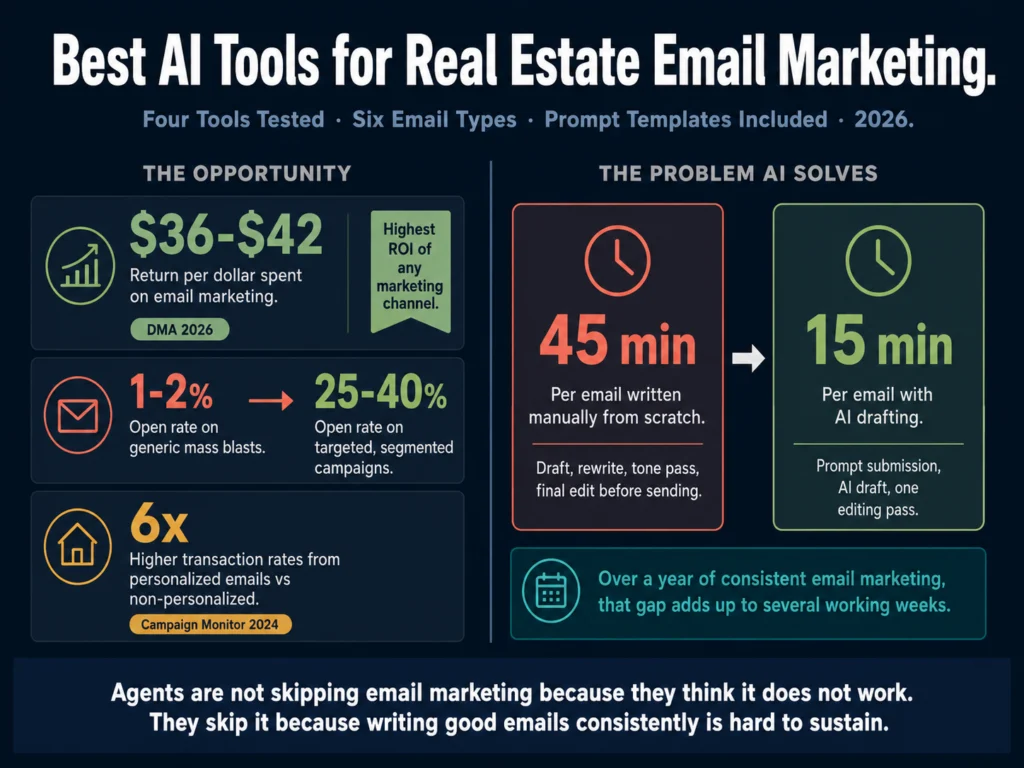
  • Email marketing returns $36 to $42 for every dollar spent, according to DMA 2026 data. No other marketing channel comes close for agents who want predictable, repeatable results.
  • Generic email blasts produce 1 to 2% open rates. Targeted, segmented emails reach 25 to 40%. The difference is content quality and list segmentation, both of which AI improves.
  • ChatGPT (free) handles one-off emails and short sequences well. Best starting point for agents who are new to AI writing.
  • Claude (free) writes longer sequences with better tone consistency. More reliable for multi-email nurture campaigns.
  • Jasper ($39/month) is worth it when you run a team and want every agent’s emails to sound like they came from the same brokerage.
  • Copy.ai (free plan) is the fastest option for building templated campaigns without prompt engineering.
  • The emails themselves are only part of the problem. AI writes the content. You still need an email platform (Mailchimp, Kit, ActiveCampaign) to send, segment, and track. This article covers the writing side.

Real estate agents have better reasons to use email than most industries. Your email list is your marketing land. Social media platforms can throttle your reach or change their rules overnight. Your email list cannot be taken away.

The problem is that writing good emails consistently is hard to sustain. An agent managing 20 active clients, 50 leads in various stages of readiness, and 200 past clients who need to hear from you twice a month is not going to write all of those emails from scratch.

The math does not work. Something gets skipped. Usually, it is the emails to people who are not actively transacting, which means the sphere goes cold and referrals slow down.

AI writing tools change this. They do not replace the judgment about who to contact or what angle to take. They reduce the time from “I should email my past clients about the spring market” to a sent email from 45 minutes to 15.

Table of Contents
  • The Two Types of AI Tools Agents Actually Need for Email
  • The Six Email Types That Drive Real Estate Business
  • Tool 1: ChatGPT (GPT-5.5 Instant) — Best Free Option
  • Tool 2: Claude (Sonnet 4.6) — Best for Longer Sequences
  • Tool 3: Jasper — Best for Teams With a Defined Email Voice
  • Tool 4: Copy.ai — Best for Template-Based Campaigns
  • Prompt Templates for Four Core Email Types
  • The Editing Pass Before Sending
  • Quick Comparison
  • What AI Cannot Do for Real Estate Email Marketing
  • Related Reading
  • Frequently Asked Questions
  • Conclusion

The Two Types of AI Tools Agents Actually Need for Email

Before reviewing specific tools, a distinction worth making: there are AI writing tools and email marketing platforms.

They do different jobs and agents need both, though this article focuses on the writing side.

AI writing tools (ChatGPT, Claude, Jasper, Copy.ai) help you draft email content. They do not send emails, segment your list, track open rates, or run automated sequences.

Email marketing platforms (Mailchimp, Kit, ActiveCampaign, Follow Up Boss, Klaviyo) send, segment, automate, and track your campaigns. Many now include some AI writing features, but their writing capabilities lag behind dedicated AI writing tools.

The practical workflow: use AI to write the email, then paste it into your platform to send. That combination costs less than a single all-in-one platform and gives you better writing quality.


The Six Email Types That Drive Real Estate Business
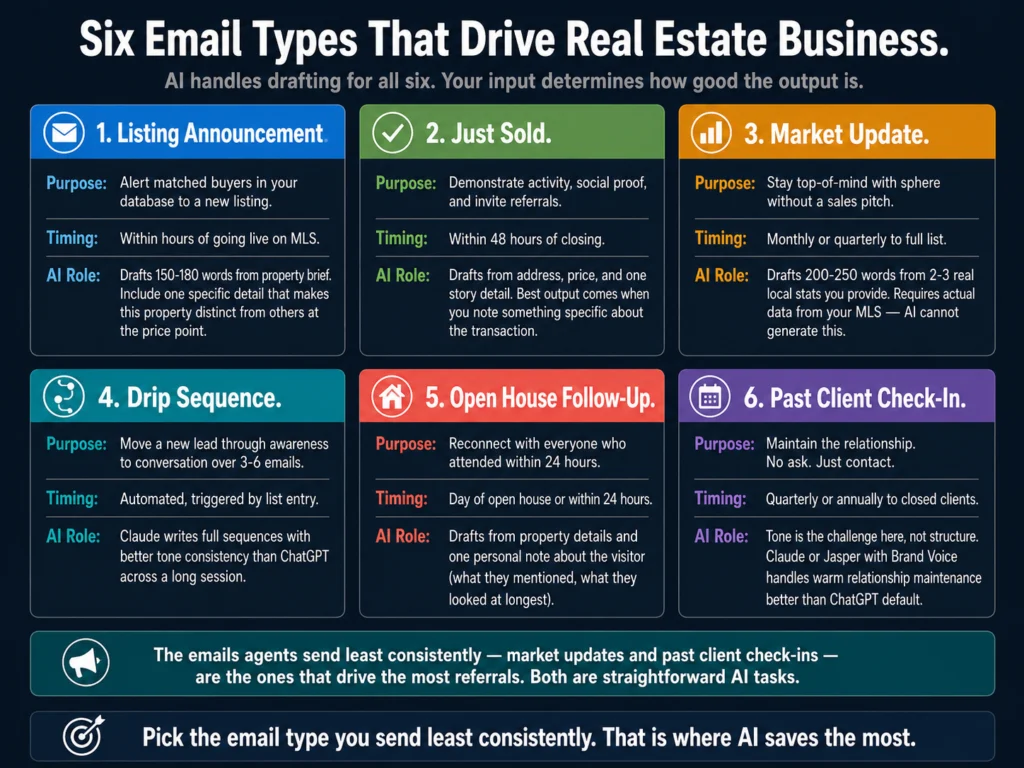
Six real estate email types for agents — listing announcement, just sold, market update, drip sequence, open house follow-up, and past client check-in
These six cover most of what agents send. AI handles the drafting for all six. The input you provide determines how specific the output is.

Before choosing a tool, know what you are trying to write. These six email types cover most of what agents send:

Listing announcement. New listing goes out to buyers in your database who match the property profile. Short, specific, one CTA (schedule a showing).

Just sold. Sent to your sphere after closing. Demonstrates activity, social proof, and invites referrals.

Market update. Monthly or quarterly email to your full list. Local stats, one opinion, one call to action. Agents who send consistent market updates stay top-of-mind without feeling salesy.

Drip sequence. A series of 3 to 6 emails sent automatically when someone enters your database (new buyer lead, open house visitor, seller inquiry). Each email moves the conversation forward by one step.

Open house follow-up. Sent within 24 hours of an open house to everyone who attended. Includes property details, similar listings, and an invitation to connect.

Past client check-in. Quarterly or annual touchpoint to people who have already bought or sold with you. No ask. Just maintenance of the relationship.

AI handles the drafting of all six. The input you provide determines how good the output is.


Tool 1: ChatGPT (GPT-5.5 Instant) — Best Free Option

ChatGPT is the right starting point for agents who want to test AI email writing without committing to a paid tool. The free tier (GPT-5.5 Instant) produces usable emails for all six types listed above when given a specific brief.

On a test brief (listing announcement for a 4-bedroom renovated Victorian in a walkable urban neighborhood, listed at $895,000, targeting buyers with a $900K+ budget who have opened previous listing emails), ChatGPT produced a 180-word email in under 90 seconds.

The subject line was specific. The opening referenced the property type, not a generic “exciting new listing.” The CTA was one sentence.

Two things required editing before the email went out: the second paragraph leaned toward generic language (“this stunning home checks all the boxes”), and the closing sentence tried too hard to sound warm. Both are fast fixes.

The bigger limitation with ChatGPT for email is memory. Each session starts fresh.

If you want your emails to sound like your voice, you have to tell ChatGPT your tone, your brokerage name, your typical style, and any forbidden phrases (like “check all the boxes”) every time you open a new session. That friction adds up across a week of campaigns.

Prompt for a listing announcement email:

Write a listing announcement email for the following property.
Keep it under 180 words.

Property: [PROPERTY DETAILS]
Target audience: [DESCRIBE WHO IS RECEIVING THIS]
My brokerage: [BROKERAGE NAME]
Tone: [PROFESSIONAL / WARM / DIRECT]
One CTA: [WHAT YOU WANT THEM TO DO]

Do not use: "stunning," "charming," "check all the boxes,"
"dream home," or "exciting opportunity."
Include one specific detail that makes this property distinct.

Pricing: Free (GPT-5.5 Instant). ChatGPT Plus at $20/month unlocks GPT-5 and Custom GPTs, which let you save your voice, brokerage details, and email standards once and apply them to every session.


Tool 2: Claude (Sonnet 4.6) — Best for Longer Sequences

Claude handles multi-email sequences better than ChatGPT because it maintains context more reliably across a long conversation.

If you paste in a drip campaign outline and ask Claude to write all five emails in one session, the emails feel like they were written by the same person with a consistent perspective. ChatGPT tends to drift across a long session.

On a five-email buyer nurture sequence test (emails sent at days 1, 4, 8, 14, and 21 after a lead first contacted the agent), Claude produced five emails that progressed naturally.

Email 1 introduced the agent and asked one question. Email 2 shared a local market insight relevant to the buyer’s stated price range. Email 3 offered to set up a saved search. Emails 4 and 5 followed up on engagement signals.

The sequence read as a planned campaign, not five separate emails written at different times.

One practical limitation: Claude’s free tier has daily usage limits. For an agent writing one or two sequences per week, the limits are not an issue. For a team coordinator writing campaigns for six agents simultaneously, those limits create friction. Claude Pro at $20/month removes them.

Claude is also more conservative about tone than ChatGPT. It defaults to professional and clear rather than warm and conversational.

For agents whose brand is more corporate, this is fine. Agents who want emails that sound like they are from a person rather than a business will spend more time editing Claude’s output toward warmth.

Pricing: Free (Sonnet 4.6 via claude.ai). Claude Pro at $20/month unlocks Opus 4.7 and higher usage.


Tool 3: Jasper — Best for Teams With a Defined Email Voice

Personalized emails generate 6x higher transaction rates compared to non-personalized sends, per Campaign Monitor’s 2024 email marketing benchmarks, a figure that has held consistent across multiple industry studies for several years.

For a single agent, “personalized” is whatever voice comes naturally. For a team of agents all sending emails under the same brokerage brand, personalization starts to look inconsistent because every agent writes differently.

Jasper’s Brand Voice feature solves this. You train it on your best existing emails, and every subsequent campaign applies that voice across the team. The tone does not drift from agent to agent. The subject line style stays consistent. The CTA structure matches.

The setup takes 60 to 90 minutes. You upload 10 to 15 of your best existing emails across different types, configure the Brand Voice settings, and test it on three or four live briefs.

After that, every agent on the team generates emails from the same foundation without coordinating manually.

For the listing announcement test brief, Jasper with a configured Brand Voice produced an email that matched the brokerage’s established style more closely than Claude or ChatGPT without configuration.

The subject line used the team’s standard formula. The closing sentence matched the team’s standard CTA language. A reviewer familiar with the team’s emails would not have noticed it was AI-generated.

Without Brand Voice configured, Jasper’s output is comparable to Claude. The premium is specifically the automation of brand consistency, not the base writing quality.

Pricing: Creator at $39/month (annual) or $49/month (monthly). 7-day free trial with no credit card required.

Jasper’s 7-day free trial includes Brand Voice training. Load in 10 of your best existing emails, run three live campaigns through it, and you will know within the first week whether it is worth $39/month for your team.


Tool 4: Copy.ai — Best for Template-Based Campaigns

Copy.ai’s workflow automation features let you build an email template once and generate personalized variations from a variable input.

For agents who send the same structural email type repeatedly (listing announcements, market updates, open house follow-ups), this removes most of the drafting work.

The free plan (2,000 words/month, no expiry) is enough to write four to five full emails per month before hitting the limit. The Starter plan ($49/month) removes the limit and adds the workflow automation features that make batch campaign creation practical.

On the listing announcement test, Copy.ai’s output was faster to generate than ChatGPT or Claude because the form-based interface guides you through the inputs without requiring prompt engineering.

You fill in the property details, the audience, and the CTA. The tool structures the email and generates a draft. The process takes about 60 seconds compared to the 3 to 4 minutes of writing and refining a prompt takes in ChatGPT.

The trade-off: Copy.ai’s output for email tends to be structurally correct but slightly less polished than Claude’s. The emails are usable with minimal editing, but they do not have Claude’s sentence-level quality.

One note: Copy.ai was acquired by Fullcast (a sales automation company) in October 2025 and has been repositioning toward GTM workflows.

The email template features are still functional, but the product roadmap is moving toward sales automation rather than writing quality improvement.

Copy.ai’s free plan (2,000 words/month, no expiry) lets you test the template workflow before committing to the $49/month plan.


Prompt Templates for Four Core Email Types

These templates work across ChatGPT, Claude, and Jasper. Paste them directly. Fill in the bracketed variables before submitting.

Listing Announcement:

Write a listing announcement email for my real estate database.

Property: [ADDRESS OR NEIGHBORHOOD], [BEDROOMS/BATHROOMS],
[SQUARE FOOTAGE], [PRICE], key features: [2-3 SPECIFIC FEATURES]
Audience: [DESCRIBE: buyers in $X range, investors, sphere, etc.]
One specific detail that makes this property stand out: [DETAIL]
CTA: [SCHEDULE A SHOWING / REPLY TO LEARN MORE / ATTEND OPEN HOUSE]

Keep it under 175 words. Do not use: "stunning," "charming,"
"dream home," "incredible opportunity," "perfect for."
Subject line: specific and concrete, not clickbait.

Market Update:

Write a monthly market update email for my sphere of influence.

My market: [CITY OR NEIGHBORHOOD]
Key stats this month: [PASTE 2-3 REAL LOCAL STATS -- median price, days on market, inventory level]
My one opinion or observation: [WHAT YOU THINK THIS MEANS FOR BUYERS/SELLERS]
CTA: [WHAT YOU WANT THEM TO DO -- reply, book a call, get a home valuation]

Length: 200-250 words. Plain language. One opinion, not a lecture.
No subject line that says "Market Update" or "Newsletter" -- use the
most interesting stat as the subject.

Open House Follow-Up (sent within 24 hours):

Write an open house follow-up email to someone who attended
an open house today.

Property: [ADDRESS], [KEY FEATURES], [PRICE]
What I want to accomplish: remind them of the property,
answer any lingering questions, and invite them to schedule a
private showing or ask questions
One line I can personalize: [SOMETHING YOU NOTED ABOUT THIS VISITOR
-- what they mentioned, what they liked]

Length: under 150 words. Warm but not pushy. One CTA.

Drip Email (Email 1 of a new lead sequence):

Write the first email in a drip sequence for a new real estate lead.

Lead context: [WHERE THEY CAME FROM -- open house, website form, referral]
What they are looking for: [BUYER / SELLER / INVESTOR, price range, timeline if known]
My goal for this email: introduce myself, demonstrate local knowledge,
and ask one question that invites a reply

Length: under 150 words. Conversational. Ask only one question.
Do not pitch a meeting in email 1. Do not oversell.

The Editing Pass Before Sending

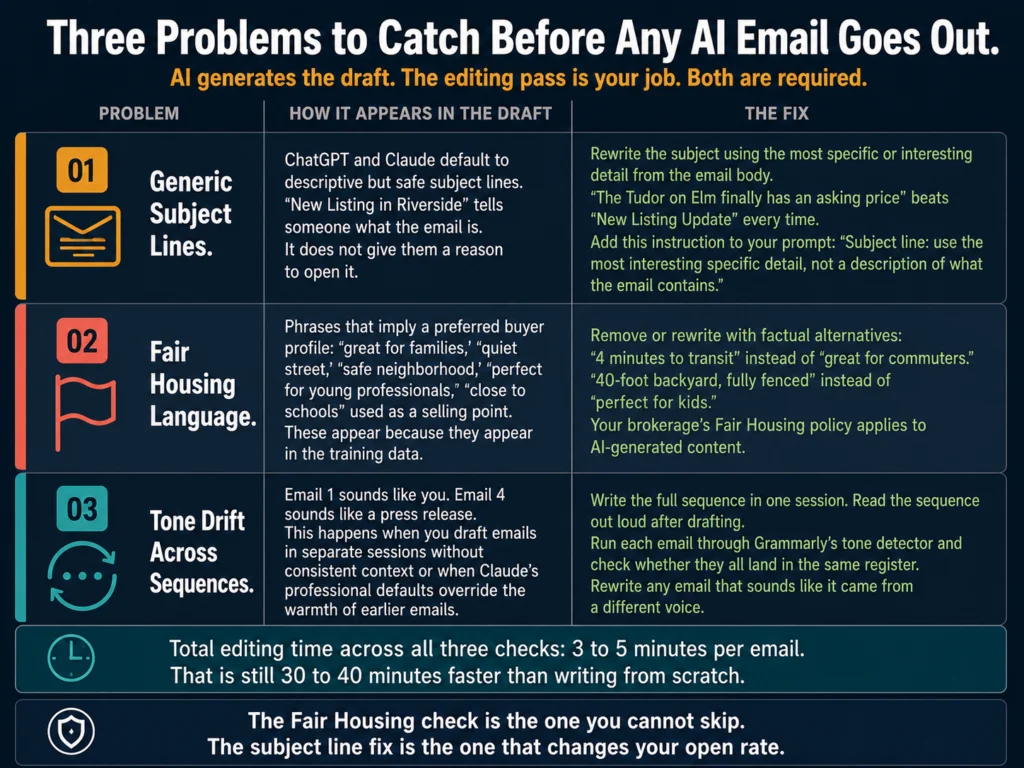
Three editing checks for AI-generated real estate emails — generic subject lines, Fair Housing language, and tone drift across drip sequences
The AI generates the draft in 90 seconds. The editing pass takes 3 to 5 minutes. Both steps are required. Skipping the edit is where Fair Housing problems and tone drift enter your client’s inbox.

AI-generated emails need one pass before they go out. The most common issues are:

Subject lines that are too generic. ChatGPT and Claude default to clear but safe subject lines. A subject line like “New Listing in [Neighborhood]” describes the email.

A subject line like “The Tudor on Elm finally has an asking price” makes someone click.

Fair Housing language. AI tools occasionally include language that signals a preferred buyer profile or makes subjective neighborhood claims.

Review for phrases like “great for families,” “quiet street,” or any language that implies the property is better suited for certain kinds of people.

Your brokerage’s compliance policy applies to AI-generated content the same as anything you write yourself.

Tone drift in longer sequences. Email 1 sounds like you. Email 4 sounds like a press release. This happens when AI drafts emails in separate sessions without consistent context.

Run a sequence through once, read it out loud, and rewrite any email that sounds like it came from a different person.

Grammarly’s tone detector is the fastest way to catch tone drift across a sequence. Run each email through it and check whether they all land in the same register (professional, warm, direct).

If one reads as “formal” when the others read as “confident,” that is the email to rewrite.

Grammarly Pro at $12/month adds tone detection across your full email sequence. Useful for catching the emails that drift before they go out.


Quick Comparison
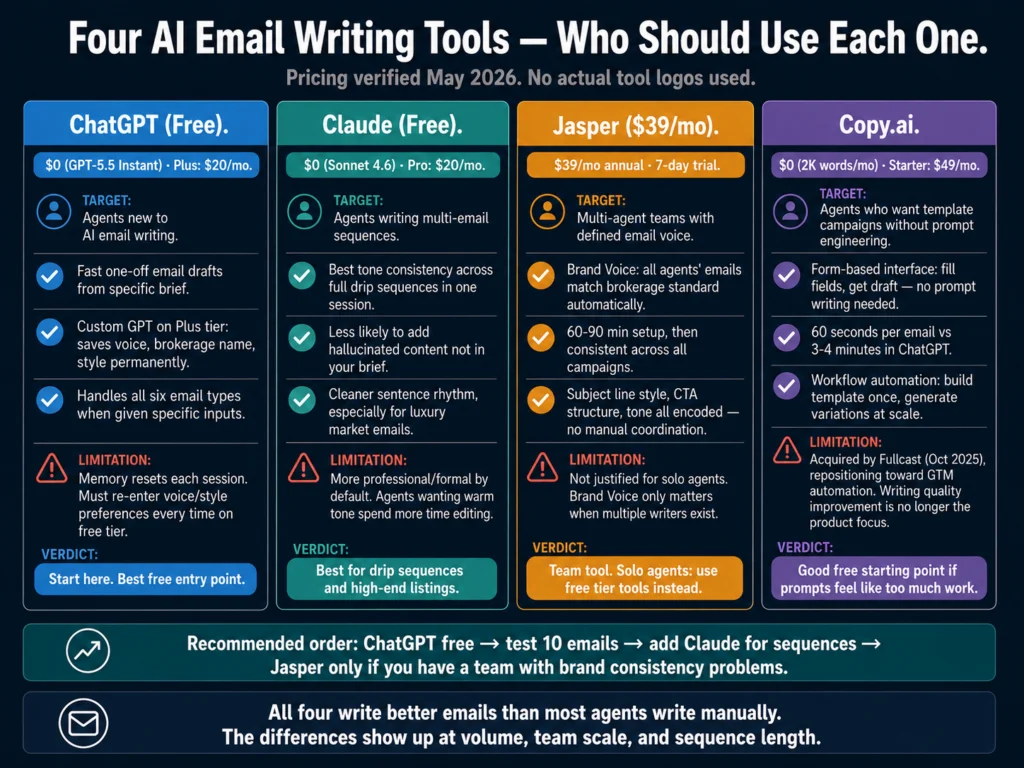
Four AI email writing tools for real estate agents compared — ChatGPT, Claude, Jasper, and Copy.ai by use case, price, and team features
These four tools have meaningfully different strengths. The right one for a solo agent writing two market updates a month is not the right one for a team coordinator drafting campaigns for six agents simultaneously.
ToolPriceBest Email TypeFree PlanTeam Features
ChatGPT (free)$0One-off emailsYes (limits)Via Custom GPT (Plus)
ChatGPT Plus$20/moBatch campaignsNoVia Custom GPT
Claude (free)$0Multi-email sequencesYes (limits)No
Claude Pro$20/moLong sequencesNoNo
Jasper Creator$39/mo (annual)Brand-consistent campaigns7-day trialBrand Voice (1 voice)
Copy.ai$0-$49/moTemplate campaignsYes (2K words)Workflow automation

What AI Cannot Do for Real Estate Email Marketing
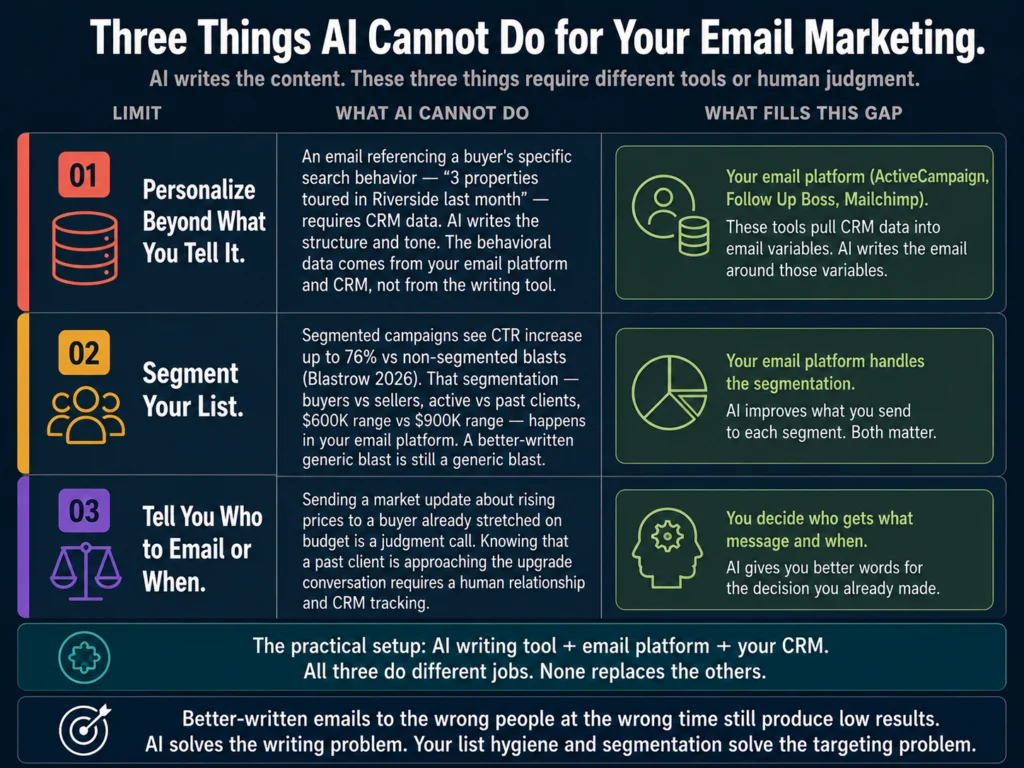
Three things AI cannot do for real estate email marketing — CRM personalization, list segmentation, and client relationship judgment on timing and content
AI writes better emails faster. It does not decide who gets what message, segment your list, or pull behavioral data from your CRM. Confusing what AI does with what your email platform does is the most common setup mistake agents make.

Personalize beyond what you tell it. An email that says “Hi [First Name], I noticed you toured 3 properties in Riverside last month” requires data from your CRM, not from an AI writing tool. AI writes the structure and tone. The behavioral personalization data comes from your email platform and CRM.

Segment your list. Segmented campaigns see CTR increase by up to 76% compared to non-segmented blasts. That segmentation is done by your email platform, not the AI writing tool.

Do not confuse better-written emails with a segmentation strategy. Both matter. AI improves the writing. Your platform handles the targeting.

Tell you who to email or when. Sending a market update about rising prices to a buyer who is already stretched thin on budget is a judgment call.

Knowing when a past client is approaching the point where they might consider upgrading requires a human relationship. AI gives you better words. You still decide who gets what message and when.

Replace consistency. A three-email drip campaign boosted buyer engagement by 43% and maintained a 0% unsubscribe rate when each message delivered clear value, according to a Luxury Presence 2025 case study.

That result came from a well-designed sequence sent consistently, not from a single well-written email. AI helps you write the sequence faster. Sending it is still your job.

For the full workflow on building drip campaigns with AI, read: #10: How to Use AI for Real Estate Drip Email Campaigns


Related Reading

  • Best AI Tools for Writing Listing Descriptions
  • #7: Jasper AI Review for Real Estate Agents (2026)
  • #8: Free vs Paid AI Writing Tools for Real Estate Agents
  • #10: How to Use AI for Real Estate Drip Email Campaigns (Tutorial)
  • #15: ChatGPT vs Claude for Real Estate Writing: Tested Comparison
  • P2: AI Writing Tools for Real Estate Marketing
  • P3: AI for Real Estate Client Communications

Frequently Asked Questions

Should I use a dedicated email platform or just AI writing tools for my real estate email marketing?

You need both, but they do different jobs. AI writing tools (ChatGPT, Claude, Jasper) draft the content. Email marketing platforms (Mailchimp, Kit, ActiveCampaign) send, segment, automate, and track your campaigns. Using AI without an email platform means sending through Gmail, which limits you to small lists, no segmentation, no automation, and no tracking. Using an email platform without AI means writing every email from scratch, which most agents do not do consistently. The combination of a free AI writing tool and a paid email platform (most start around $15 to $30/month) covers everything an agent needs.

What open rate should I expect from AI-assisted real estate emails?

Open rate depends more on your list quality, subject line, and segmentation than on whether AI wrote the email. A good open rate for real estate emails in 2026 ranges from 25 to 35%, with top performers reaching 40 to 50%. Generic blasts to unqualified lists produce 1 to 2%. Keep in mind that Apple Mail Privacy Protection inflates raw open rates by 25 to 35% since Apple devices pre-load tracking pixels. Click-through rate (CTR) is now the more reliable benchmark for measuring whether people actually engaged with your email.

How do I make AI-generated real estate emails sound like they came from me?

Two approaches depending on your volume. For low volume: at the start of each ChatGPT or Claude session, paste in two or three of your best existing emails and tell the AI to match that voice for everything it writes in this session. For higher volume: build a Custom GPT in ChatGPT Plus with your voice, brokerage details, and style preferences saved permanently. The Custom GPT applies your voice automatically without requiring setup in every session. Jasper’s Brand Voice feature does the same thing and works better for teams.

Can AI write a full drip campaign, or just individual emails?

Both. ChatGPT and Claude can write a full 5 to 6 email sequence in a single session if you give them the complete plan upfront: who the campaign targets, what each email should accomplish, the timing between emails, and the final CTA. Claude handles longer sequences with better consistency than ChatGPT, particularly at the tone level. The prompt template for a drip sequence works best when you specify what each email in the sequence is trying to accomplish before asking the AI to write them. For the step-by-step workflow, read: #10: How to Use AI for Real Estate Drip Email Campaigns (Tutorial)

Is using AI to write real estate marketing emails legally compliant?

The Fair Housing Act and CAN-SPAM compliance requirements apply to AI-generated content the same as anything you write manually. AI tools occasionally produce language that could be considered in violation of Fair Housing guidelines, including phrases that imply a property is suited for specific types of buyers or residents. Review every AI-generated email for this type of language before sending. CAN-SPAM requires that all marketing emails include a physical mailing address and an unsubscribe link. Your email marketing platform handles the technical compliance requirements. You are responsible for the content.


Conclusion

Email marketing delivers $36 to $42 per dollar spent. No other channel comes close. The agents who do not use it consistently are not skipping it because they think it does not work. They are skipping it because writing good emails consistently is hard to sustain alongside everything else the job requires.

AI does not make email marketing automatic. It removes the blank-page problem. An agent who knows what they want to say but spends 45 minutes saying it now spends 15 minutes saying it. Over a year, that time savings adds up to several full working days redirected toward client work.

Start with ChatGPT’s free tier and the prompt templates in this article. Test them on your next five emails. If the editing time is significantly lower than your current manual drafting time, the workflow is working.

If you are on a team and brand consistency is a real problem, test Jasper’s 7-day trial. If you want template-based campaigns without prompt work, test Copy.ai’s free plan.

The writing tool matters less than the writing habit. Consistent, segmented, valuable emails to a well-maintained list will outperform sporadic “stunning new listing” blasts regardless of which AI tool you use.

The tool comparisons, prompt templates, and workflow recommendations in this article are based on what the Ailovyu team tested across the six email types agents send most often, including what happened when we told ChatGPT to skip the generic closings.

The Ailovyu Team

We research and test AI tools so you can make informed decisions before spending money on them. Every review, comparison, and tutorial on this site is based on actual use, not vendor marketing.
Learn more on our About page.

ailovyu.com

Email marketing ROI data sourced from DMA 2026 and Litmus 2025 via Luxury Presence (April 2026) and Blastrow (May 2026). Personalization stat sourced from Campaign Monitor 2024 email marketing benchmarks. Open rate benchmarks from Luxury Presence, Blastrow, and Propphy (February 2026). Case study data from Luxury Presence 2025 automated nurture campaign analysis. Tool pricing verified May 2026. Affiliate links in this article earn a commission at no extra cost to you. Jasper, Copy.ai, and Grammarly all have active affiliate programs.
Best AI Tools for Writing Listing Descriptions (2026)

Updated: July 13, 2026

Best AI tools for writing listing descriptions 2026 — ChatGPT, Claude, Jasper, Write.Homes, and ListingAI tested and compared for real estate agents

TL;DR
  • ChatGPT (GPT-5.5 Instant, free) covers most listing writing needs at no cost. Give it specific property details and it produces a usable first draft in under two minutes.
  • Claude (Sonnet 4.6, free) writes cleaner, more natural-sounding prose than ChatGPT on the first pass. Better for luxury or high-end listings where tone matters.
  • Jasper ($39/month, annual) is worth it if you run a team of agents and need every description to sound like it came from the same brokerage.
  • Write.Homes ($8/month) is the strongest MLS-specific option for solo agents who want real estate-trained output without prompt engineering.
  • ListingAI (free to start) handles descriptions, social posts, and marketing materials from the same property brief. Good for agents who want one platform for multiple outputs.
  • Every tool can hallucinate property features. Always verify the output against your property notes before submitting to the MLS.

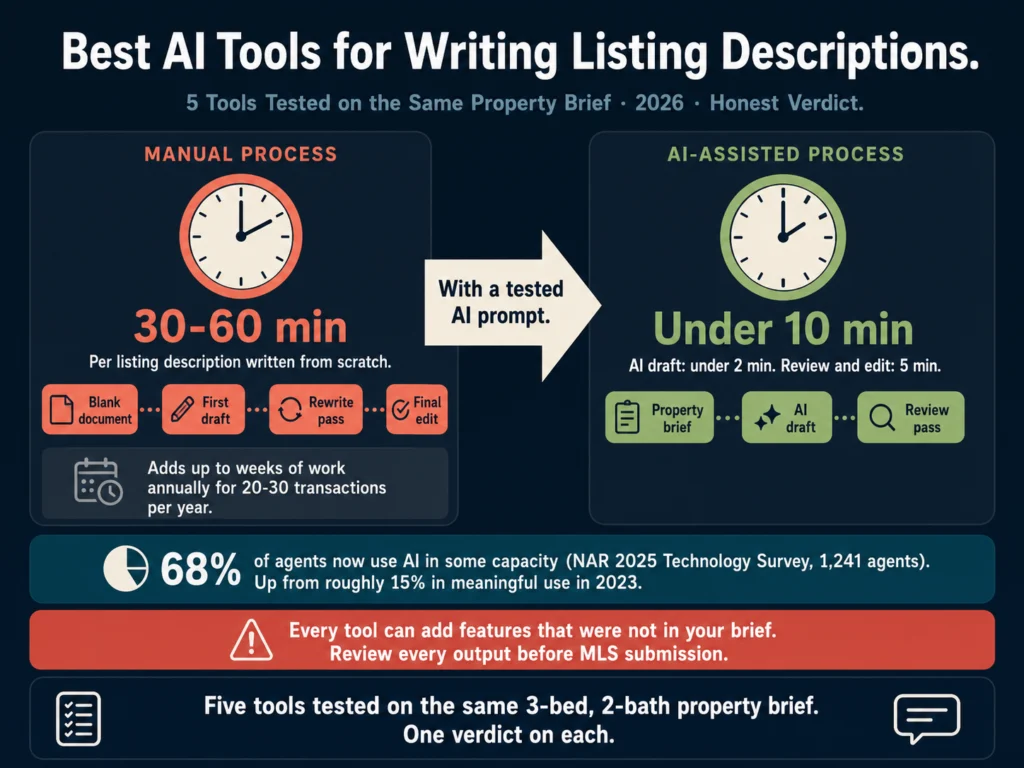
Writing a listing description takes most agents 30 to 60 minutes. That includes staring at a blank document, writing a draft, rewriting it because it sounds flat, and doing a final pass before submitting.

For an agent closing 20 to 30 transactions a year, that time adds up to weeks of work annually spent on a task that follows a predictable structure.

According to NAR’s 2025 Technology Survey of 1,241 agents, 68% now use AI tools in some capacity: 20% daily, 22% weekly, and 27% a few times a month.

That is up from roughly 15% in any meaningful use in 2023. Listing copy is one of the earliest and most consistent use cases.

The pattern is straightforward: agents paste in property details, AI produces a draft, agents edit and submit. Done in under 10 minutes.

The tools vary significantly in output quality, real estate awareness, and what happens when the input is too thin. This article covers five tools tested on the same property brief.

The brief: a three-bedroom, two-bathroom bungalow in a walkable urban neighborhood, 1,450 sq ft, renovated kitchen with quartz countertops, original hardwood floors, detached garage, south-facing backyard, listed at $685,000.

Table of Contents
  • What Separates Good Listing Copy from Generic Copy
  • Tool 1: ChatGPT (GPT-5.5 Instant) — Best Free Option
  • Tool 2: Claude (Sonnet 4.6) — Best Tone on the Free Tier
  • Tool 3: Jasper — Best for Multi-Agent Teams
  • Tool 4: Write.Homes — Best Real Estate-Specific Tool for Solo Agents
  • Tool 5: ListingAI — Best All-in-One for Agents Who Want One Platform
  • Quick Comparison
  • The Accuracy Problem: What to Check Before Every Submission
  • Before You Edit: Run It Through Grammarly
  • Related Reading
  • Frequently Asked Questions
  • Conclusion

What Separates Good Listing Copy from Generic Copy

Before the tool reviews, one point worth making: the quality gap between a good and a bad AI-generated listing description is almost entirely about what you put in, not which tool you use.

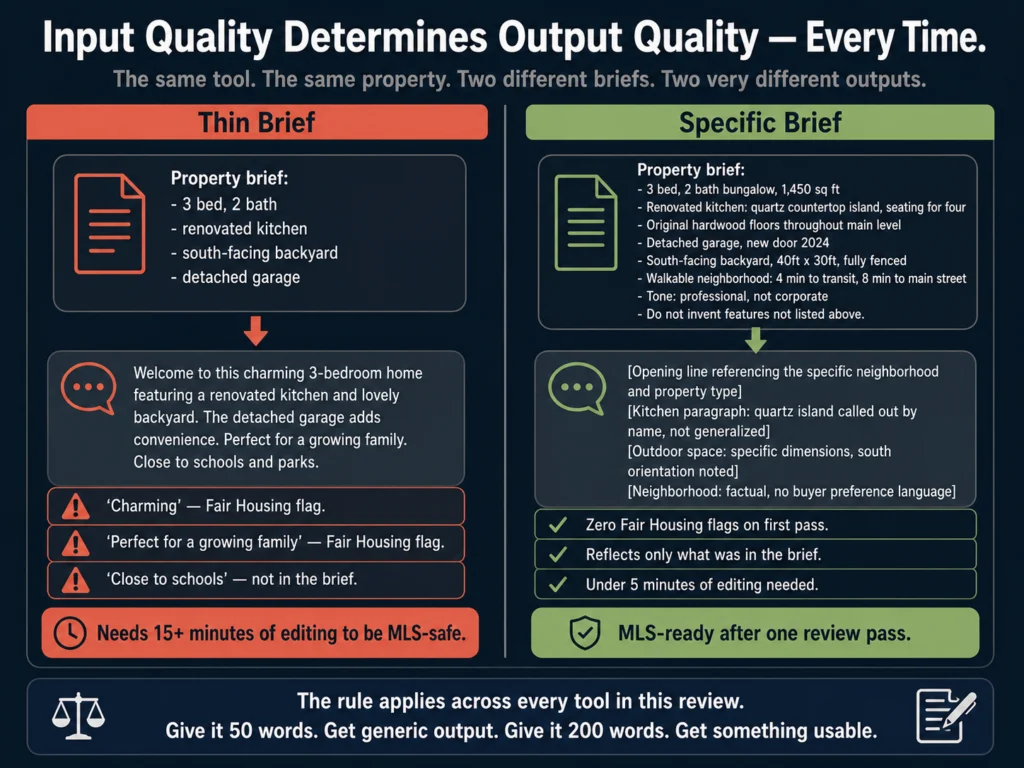
“Write a listing description for a 3-bed semi-detached in Burlington with a renovated kitchen and a south-facing backyard” produces something useful. “Write a listing description” produces something generic. The more detail you give it, the less editing you will do on the back end.

Generic brief versus specific brief for AI listing descriptions — showing how input quality determines output quality for real estate agents
An agent who feeds 200 words of specific property notes gets a 300-word MLS description that needs minimal editing. An agent who pastes bedroom and bathroom count gets a template that could describe any house on any street.

That rule holds across every tool in this review. An agent who feeds in 200 words of specific property notes gets a 300-word MLS description that needs minimal editing.

An agent who pastes in a list of bedrooms and bathrooms gets a template that could describe any house on any street.

There is also a legal dimension worth knowing before you use any of these tools. The Fair Housing Act prohibits language that signals preference or exclusion based on protected characteristics.

AI tools sometimes generate phrases that are legally problematic: “perfect for families,” “quiet neighborhood,” “great for young professionals.” These are not random editorial choices by the AI.

They appear because they appear in the training data. Review every output for Fair Housing compliance before submitting.

For more on this, read: #19: Can You Use AI-Generated Listing Descriptions? A Legal Guide


Tool 1: ChatGPT (GPT-5.5 Instant) — Best Free Option

ChatGPT’s free tier now runs on GPT-5.5 Instant, which became the default model on May 5, 2026. GPT-4o was deprecated in February 2026, with GPT-5.3 Instant serving as the interim default before GPT-5.5 Instant took over.

ChatGPT has over 200 million weekly active users worldwide, and it remains the most widely adopted AI writing tool among agents in 2026.

On the test brief, ChatGPT produced a 280-word description in under 90 seconds.

The structure was solid: an opening line that framed the property’s appeal, a middle section covering the kitchen and outdoor space, and a close with the neighborhood context. The tone was professional. The language was not remarkable.

Two edits before the output was MLS-ready: the opening line used “charming” (which Fair Housing reviewers flag as potentially coded language), and the garage description was slightly vague. Both required under a minute to fix.

The more useful version of ChatGPT for listing copy is not the default chat interface but a Custom GPT configured with your brokerage’s voice, preferred length, and a built-in reminder to avoid Fair Housing flagged language.

On ChatGPT Plus ($20/month), you can build and save that Custom GPT so it applies to every listing brief you submit.

Best prompt structure for ChatGPT listing descriptions:

Write a listing description for the following property. Keep it under
[WORD COUNT] words. Do not use the words "charming," "cozy,"
"perfect for," "ideal for," or any language suggesting the property
suits a particular type of buyer.

Property details:
- Type: [PROPERTY TYPE]
- Bedrooms/bathrooms: [BED/BATH]
- Square footage: [SQ FT]
- Key features: [LIST SPECIFIC FEATURES]
- Location highlights: [NEIGHBORHOOD DETAILS -- factual only]
- Price: [PRICE]
- Tone: [PROFESSIONAL / WARM / LUXURY]

Do not invent features not listed above.

The instruction “do not invent features not listed above” is not optional. Without it, ChatGPT occasionally adds details that were not in the brief.

In testing, it added “walk-in pantry” to the kitchen description when no pantry was mentioned. That kind of hallucination creates MLS liability. Include the constraint in every prompt.


Tool 2: Claude (Sonnet 4.6) — Best Tone on the Free Tier

Claude’s output on the test brief was noticeably more natural than ChatGPT’s. The opening line did not start with the address or a superlative. The description of the backyard felt like something a person wrote rather than a content tool.

The difference becomes more visible with higher-end listings. A property that warrants luxury language (correct pacing, varied sentence rhythm, specific sensory details) performs better in Claude than in ChatGPT on the first draft. Less editing is required to reach a tone that matches the property’s position.

On the free tier, Claude has daily usage limits. For an agent writing two or three listings per day, those limits will not be an issue. For a high-volume agent or a team coordinator drafting 10 descriptions in a session, ChatGPT Plus is the more practical choice for volume.

Claude also does not hallucinate property features as readily as ChatGPT. In testing on the same brief (with no explicit “do not invent features” instruction), Claude’s output accurately reflected only the details provided. That consistency is more reliable for agents who want to reduce their review burden.

Best for: Luxury listings, high-end properties, situations where the first draft needs to sound less like a content generator.

Pricing: Free (Sonnet 4.6 via claude.ai). Claude Pro at $20/month unlocks Opus 4.7 and higher usage limits.


Tool 3: Jasper — Best for Multi-Agent Teams

Jasper is a content generation platform built for marketing teams. Its Brand Voice feature is the relevant differentiator for real estate teams: you train Jasper on your brokerage’s existing listing copy, and every subsequent description inherits that voice, regardless of which agent generates it.

For a solo agent, this feature is not worth the premium. Your personal voice is already consistent. For a team of 6 agents producing 40 listings per month, consistency across descriptions is an actual operational problem.

One agent writes tightly, another runs long, a third uses the same three adjectives in every listing. Jasper’s Brand Voice solves that by encoding the standard into the tool rather than relying on peer editing.

The setup takes 60 to 90 minutes: upload 10 to 15 existing descriptions that represent your team’s standard, configure the voice parameters, test against a few live briefs, and refine. After setup, every agent submits a property brief and gets output that matches the brokerage standard.

In testing on the same brief, Jasper’s output quality was comparable to Claude when Brand Voice was not configured. With a trained Brand Voice applied, the output was noticeably more consistent with a pre-loaded brokerage style than either ChatGPT or Claude produced.

One limitation: Jasper does not have real estate-specific compliance checking for Fair Housing language. You still need a review step before submission.

Pricing: Creator at $39/month (annual) or $49/month (monthly). 7-day free trial with no credit card required.

Jasper’s 7-day free trial gives you full Brand Voice access. Set it up with 10 of your best existing descriptions and test it on your next 5 listings before committing.


Tool 4: Write.Homes — Best Real Estate-Specific Tool for Solo Agents

Write.Homes is built specifically for real estate writing. It is not a general-purpose AI tool adapted for listing copy.

The model was trained on real estate language and MLS workflows, which means the output reads differently from ChatGPT or Claude at the same input level.

The practical difference: an agent can enter a shorter, less detailed brief into Write.Homes and get a more real estate-appropriate output than they would from a general tool.

Write.Homes already knows what a “renovated kitchen” means in a listing context, what language MLS boards typically accept, and how to frame outdoor space.

In testing, Write.Homes produced a clean 250-word description with no Fair Housing flags on the first pass. It also generated three length variations (short MLS, medium marketing, long brochure) from the same brief without additional prompting.

Additional features relevant to agents: multilingual output (useful in markets with significant non-English-speaking buyer populations), CRM integration, and SEO keyword support for off-MLS marketing.

The limitation is that Write.Homes does not offer Brand Voice training or team management features. It is a solo-agent tool.

Pricing: Plans start at $8/month. A 7-day free trial is available with no credit card required.


Tool 5: ListingAI — Best All-in-One for Agents Who Want One Platform

ListingAI produces listing descriptions, social posts, marketing emails, and virtual staging from a single property brief. The appeal is reducing the number of tools you need: one brief entry generates multiple outputs for multiple channels.

The listing description quality is competent but slightly below Write.Homes and Claude. The real value is the workflow reduction.

An agent who enters a property brief once and gets MLS copy, an Instagram caption, and a Facebook post saves 20 to 30 minutes of reformatting work per listing.

ListingAI’s free plan covers basic description generation with no credit card required, which makes it the lowest-friction entry point in this review.

The trade-off: listing copy quality is secondary to workflow integration in ListingAI’s product design. If copy quality is your primary concern, Write.Homes or Claude will produce better individual outputs.

If you want one place to handle all listing marketing outputs, ListingAI handles that better than any other tool here.

Pricing: Free to start. Paid plans unlock higher volumes and additional features.


Quick Comparison

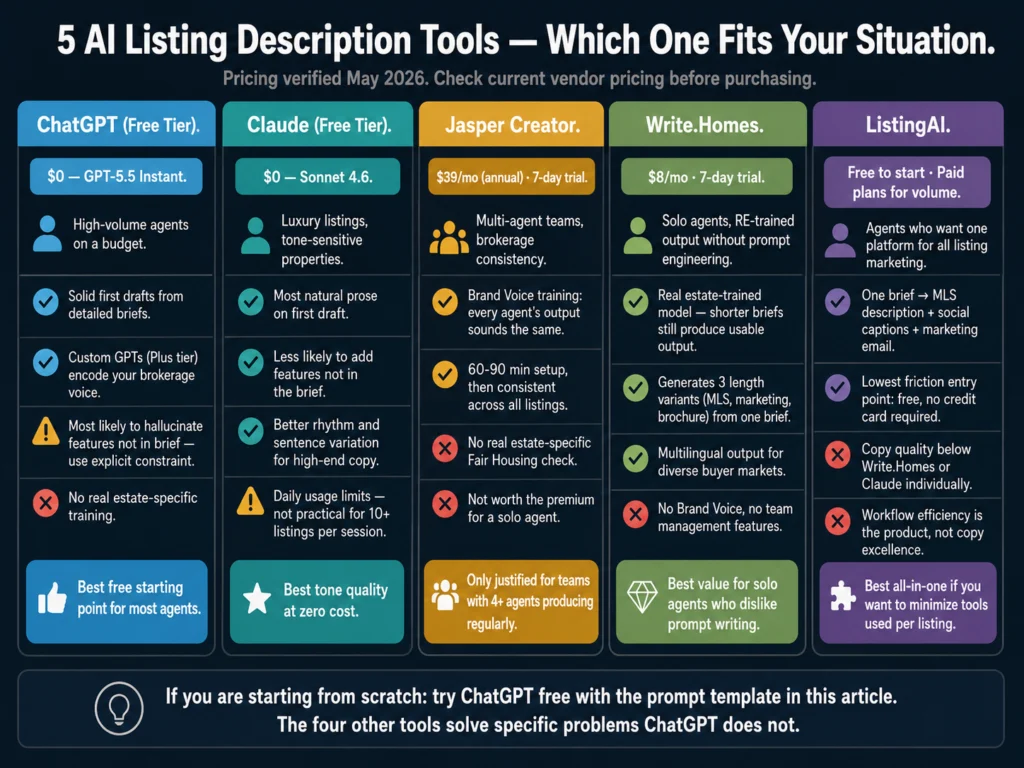
Five AI tools for listing descriptions compared by price, best use case, and user type — ChatGPT, Claude, Jasper, Write.Homes, and ListingAI for real estate agents
These five tools have meaningfully different strengths. The right one for a solo agent closing 12 transactions a year is not the right one for a brokerage with 8 agents producing 60 listings per month.
ToolPriceReal Estate-SpecificBrand VoiceBest For
ChatGPT (free)$0NoVia Custom GPTHigh-volume agents on a budget
ChatGPT Plus$20/moNoVia Custom GPTBatch workflows, team coordination
Claude (free)$0NoNoTone-sensitive listings
Jasper Creator$39/mo (annual)NoYes (native)Multi-agent teams
Write.Homes$8/moYesNoSolo agents wanting RE-trained output
ListingAIFree/paidYesNoAll-in-one per-listing workflow

The Accuracy Problem: What to Check Before Every Submission

Every tool in this review can add information to a listing that was not in your brief. ChatGPT is the most prone to this. Claude is more conservative.

Specialized tools like Write.Homes and ListingAI occasionally add standard real estate language that may not be accurate for your specific property.

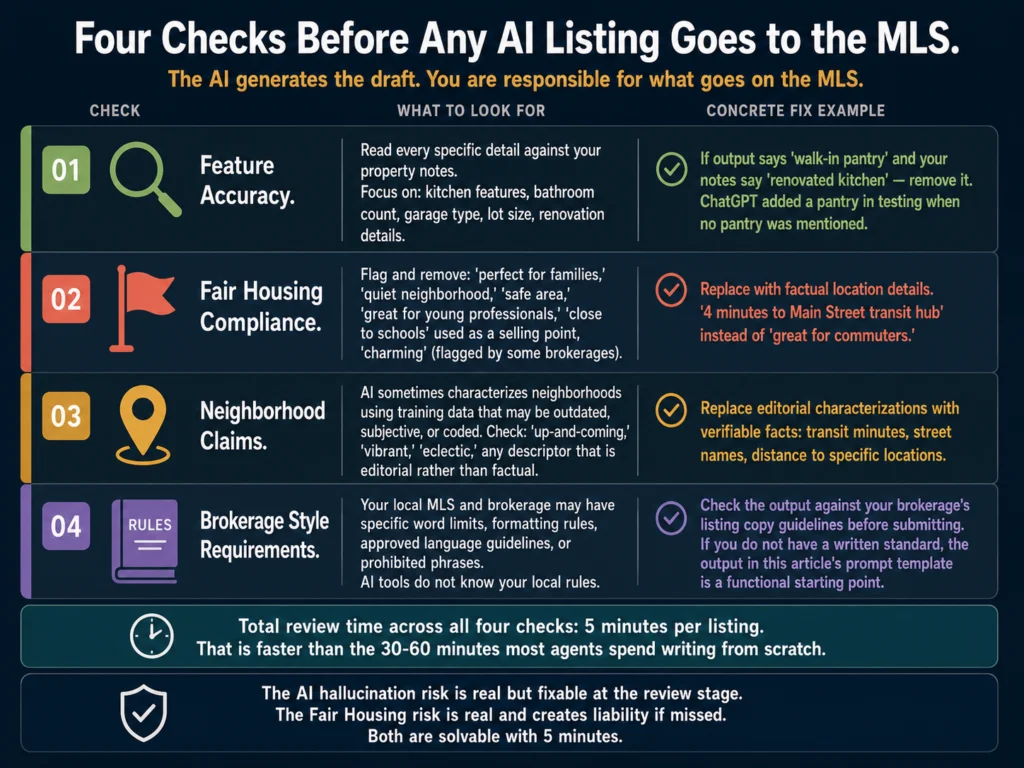
Four-point pre-submission checklist for AI-generated listing descriptions — feature accuracy, Fair Housing compliance, neighborhood claims, and brokerage style requirements
The AI generates the draft. You remain responsible for what goes on the MLS. A 5-minute check across these four areas is the difference between a compliant listing and a liability.

Before any AI-generated description goes to the MLS, verify these four things:

Feature accuracy. Read every specific detail in the output against your property notes. Look especially at kitchen features, bathroom counts, garage type, lot size, and any renovation details. If the output mentions something you did not include in the brief, remove it.

Fair Housing compliance. Flag and remove any language suggesting the property is suited to a particular type of buyer or resident.

Specific phrases to check: “perfect for families,” “quiet,” “safe,” “great for young professionals,” “close to schools” (when used as a selling point rather than a factual location note). Consult your brokerage’s legal guidance if you are unsure.

Factual neighborhood claims. AI tools sometimes add neighborhood characterizations based on training data. If the output calls a neighborhood “up-and-coming” or describes it in terms that could be seen as subjective or coded, rewrite that section with factual location details instead.

Your brokerage’s style requirements. Some MLS boards and brokerages have specific formatting requirements, word limits, or approved language guidelines. AI tools do not know your local rules. Review the output against your brokerage standard before submitting.

For the full legal breakdown of AI listing descriptions, read: #19: Can You Use AI-Generated Listing Descriptions? A Legal Guide


Before You Edit: Run It Through Grammarly

After the content check, a Grammarly pass catches tone mismatches before your description goes public.

The tone detector tells you whether the output reads as “confident” or “formal,” which matters for a property that should feel warm and approachable rather than corporate.

Grammarly Pro at $12/month adds full tone detection. Worth running on any listing before it goes to the MLS or your website.


Related Reading

  • #9: How to Write Listing Descriptions with AI: Step-by-Step
  • #7: Jasper AI Review for Real Estate Agents (2026)
  • #15: ChatGPT vs. Claude for Real Estate Writing: Tested Comparison
  • #18: AI Listing Descriptions vs. Manual Writing: Is It Worth It?
  • #19: Can You Use AI-Generated Listing Descriptions? A Legal Guide
  • P1: Complete Guide to AI Tools for Real Estate Agents (2026)
  • P2: AI Writing Tools for Real Estate Marketing

Frequently Asked Questions

Can I submit an AI-generated listing description to the MLS without editing it?

Technically, yes. Practically, no. Every tool in this review occasionally adds features not in the brief, uses language that triggers Fair Housing review, or produces a tone that does not match the property. A 5-minute review and edit pass before submission is the difference between a compliant listing and a liability. The AI generates the draft. You remain responsible for what goes on the MLS.

Which AI tool produces the most accurate listing descriptions?

Claude is the most conservative about adding information that was not in your brief. It is less likely than ChatGPT to generate features you did not mention. Write.Homes, being real estate-trained, also tends to stay closer to the input. Neither tool eliminates the need for a factual review, but both reduce the frequency of corrections compared to a raw ChatGPT prompt without explicit constraints.

How do I stop AI tools from inventing property features?

Add one line to every prompt: “Do not include any features, amenities, or details not explicitly listed in the property brief below.” That instruction significantly reduces hallucinations across ChatGPT and most general-purpose tools. Specialized real estate tools like Write.Homes are more conservative by design, but the explicit constraint is still good practice.

Is using AI to write listing descriptions compliant with NAR rules?

NAR does not prohibit AI-generated listing content. The compliance requirements that apply to AI-generated descriptions are the same ones that apply to all listing copy: accuracy, Fair Housing compliance, and adherence to your local MLS rules and brokerage policies. The tool is not the compliance concern. The content is. For a full breakdown, read: #19: Can You Use AI-Generated Listing Descriptions? A Legal Guide

What is the minimum property information I need to give an AI tool to get a usable listing description?

At minimum: property type, bedroom and bathroom count, square footage, three to five specific features (not generic ones like “open floor plan” but specific ones like “quartz countertop island with seating for four”), location details (neighborhood name, walkability context, proximity to transit), and your target tone. Anything less produces a description that could apply to 200 other properties. The more specific your input, the less time you spend editing the output.


Conclusion

The best tool for writing listing descriptions is the one you will actually use consistently. ChatGPT’s free tier covers most agents’ needs if you build a solid prompt template.

Claude is a better choice when tone matters more than speed. Jasper earns its price only when you have multiple agents writing listings that need to sound consistent.

Write.Homes and ListingAI are worth testing if you find general-purpose tools require too much prompt engineering to produce real estate-appropriate output. Both are low-cost entry points with free trials.

Whatever tool you choose, the review pass before submission is the part AI cannot do for you. The draft takes two minutes. The review takes five. Those seven minutes are faster than the 45 minutes most agents spend writing from scratch.

The tool comparisons and prompt structure in this article reflect what the Ailovyu team tested across multiple property types and price points, including where Claude held back and where ChatGPT added a pantry that was never there.

The Ailovyu Team

We research and test AI tools so you can make informed decisions before spending money on them. Every review, comparison, and tutorial on this site is based on actual use, not vendor marketing.
Learn more on our About page.

ailovyu.com

NAR 2025 Technology Survey data sourced directly from nar.realtor (September 2026). Luxury Presence AI tools analysis (June 2026) cited for ChatGPT adoption context. Tool pricing verified May 2026. Affiliate links in this article earn a commission at no extra cost to you. This does not affect editorial recommendations.

Primary Sidebar

More To See

Best AI tools for writing listing descriptions 2026 — ChatGPT, Claude, Jasper, Write.Homes, and ListingAI tested and compared for real estate agents

Best AI Tools for Writing Listing Descriptions (2026)

AI for HR communications and documentation complete guide 2026 — offer letters, rejection emails, onboarding docs, performance reviews, handbooks, and prompt library

AI for HR Communications and Documentation: The Complete Guide (2026)

AI ethics and compliance in hiring complete guide 2026 — federal statutes, state patchwork, vendor liability, Mobley v Workday, and building a defensible AI hiring program

AI Ethics and Compliance in Hiring: The Complete Guide (2026)

AI writing tools for recruiters complete guide 2026 — job descriptions, candidate outreach, rejection emails, interview questions, and offer letters

AI Writing Tools for Recruiters: The Complete Guide (2026)

Copyright © 2026 · Ailovyu.com