
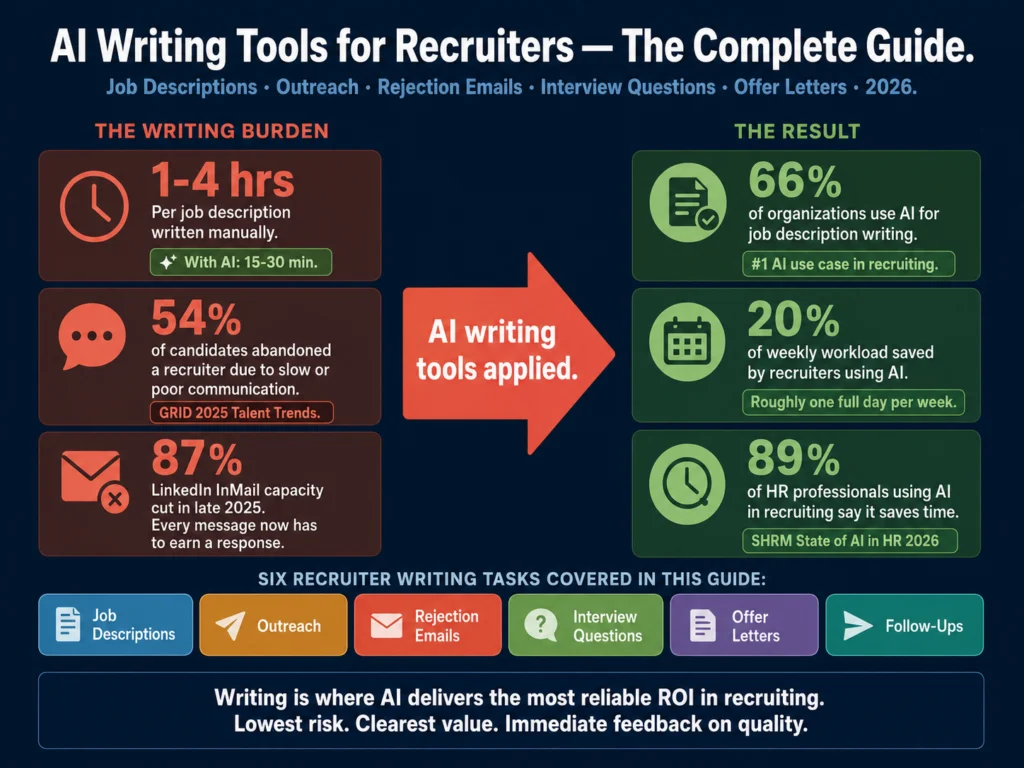
- Writing job descriptions is the #1 AI use case in recruiting, used by 66% of organizations, according to SHRM’s 2025 Talent Trends Survey. Screening, sourcing, and scheduling get more vendor attention. Writing is where most recruiting teams actually start.
- Recruiters using generative AI save roughly 20% of their weekly workload, about one full day per week, according to LinkedIn’s Future of Recruiting 2025 report. The savings concentrate in sourcing and outreach.
- 54% of candidates abandoned a recruiter because the process was too slow or lacked communication. AI-assisted writing directly addresses this by making high-quality candidate communications faster to produce.
- The four writing tasks where AI delivers the most value for recruiters: job descriptions, candidate outreach, rejection emails, and interview question sets. Each has a different prompt structure and different quality bar.
- The honest summary of what AI cannot do: it cannot supply the specific observation about a candidate that drives outreach response rates, and it cannot produce legally defensible language for offer letters without human legal review.
Most articles on AI in recruiting focus on sourcing and screening.
Those are the categories with the biggest vendor marketing budgets and the most dramatic efficiency claims. They are also the categories with the most legal risk, the most documented bias problems, and the most implementation complexity.
Writing is different. Writing job descriptions is the most common AI application in recruiting, used by 66% of organizations. Communicating with candidates is fourth, at 29%.
These are not experimental capabilities. They are the tasks recruiters reach for AI to handle first, because the use case is clear, the quality improvement is immediate, and the risk is manageable with a standard review process.
This guide covers the full recruiting writing workflow: what to write, which tools to use for each task, how to structure prompts that produce usable output, and where to draw the line between AI-assisted drafting and human-owned communication.
- Why Writing Is the Right Place to Start with AI in Recruiting
- The Six Writing Tasks Recruiters Do Most Often
- Choosing the Right AI Model for Recruiter Writing
- Part 1: Job Description Writing
- Part 2: Candidate Outreach
- Part 3: Rejection Emails
- Part 4: Interview Questions
- Part 5: Offer Letters
- Choosing Your Writing Tools: A Budget Guide for Recruiters
- Building a Shared Writing System That Scales
- What AI Writing Tools Cannot Do for Recruiters
- Common Mistakes Recruiters Make with AI Writing Tools
- The Full Writing-Focused Article Index
- Frequently Asked Questions
- Conclusion
Why Writing Is the Right Place to Start with AI in Recruiting
The SHRM data shows that organizations using AI in recruiting report an average of 20 to 40% lower cost-per-hire. That improvement does not come exclusively from screening speed.
A meaningful portion comes from communication quality: the job postings that attract better-fit applicants, the outreach messages that get higher response rates, and the rejection emails that protect employer brand.
54% of candidates gave up on a recruiter because the process was too slow or lacked sufficient communication, according to the GRID 2025 Talent Trends Report.
AI-assisted writing does not just save recruiter time. It reduces the candidate abandonment rate that comes from slow, low-quality communications that candidates read as disorganized.
The writing tasks that eat the most recruiter time are also the most repetitive: job descriptions follow a structure, rejection emails follow a structure, outreach messages follow a structure.
Structured tasks are where AI adds the most value. The judgment layer, deciding what goes into each document and whether the output is accurate and appropriate, stays with the recruiter.
The Six Writing Tasks Recruiters Do Most Often
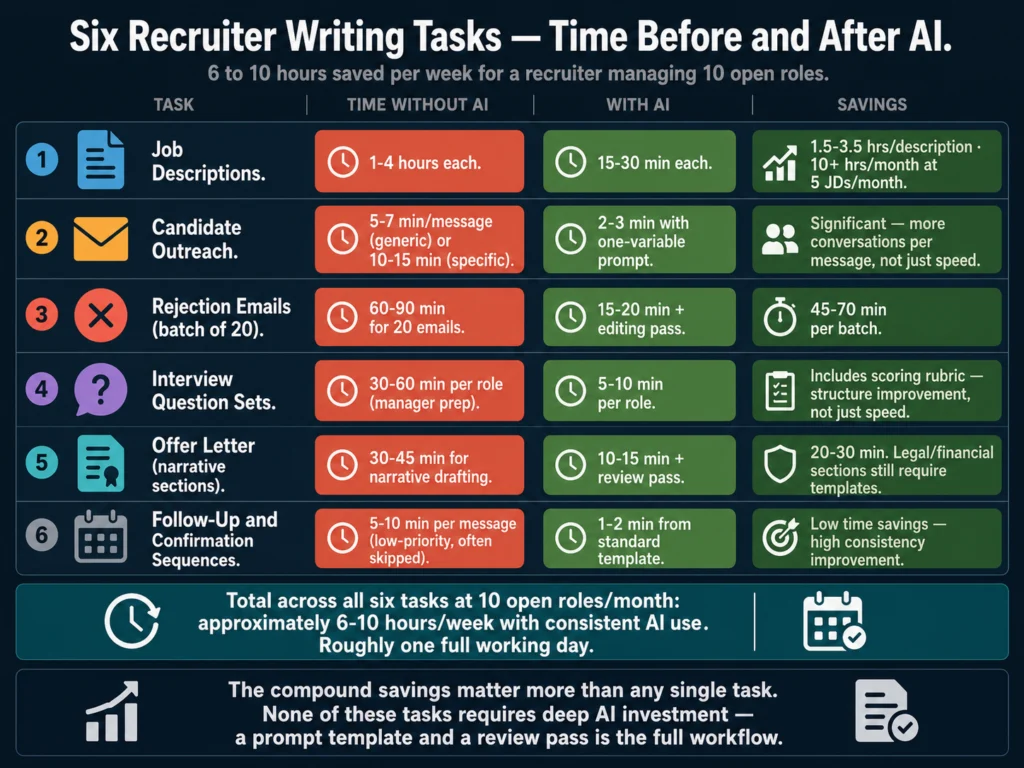
Ranked by frequency and time cost, these are the writing tasks where AI makes the biggest practical difference:
1. Job descriptions. The foundational recruiting document. One to four hours per description written manually. Fifteen to thirty minutes with a well-built prompt. Most organizations produce 5 to 30 new or updated job descriptions per month.
2. Candidate outreach messages. LinkedIn InMails and email outreach to passive candidates. Generic templates produce under 5% reply rates. Personalized messages produce 18 to 25%. AI handles the structure and tone. The recruiter supplies the specific observation about the candidate.
3. Rejection emails. High volume, tone-sensitive, legally relevant. AI generates well-structured rejection emails faster than manual drafting, but raw output tends toward generic phrases that undermine employer brand. The editing pass is not optional.
4. Interview question sets. Behavioral, situational, and technical questions per role. AI generates stronger and more balanced question sets than most managers produce under time pressure, especially when prompted to include scoring rubrics alongside each question.
5. Offer letters. The conversion document. AI handles the narrative sections well: the opening, the role description, the culture close. Financial and legal terms must come from verified templates, not AI generation.
6. Follow-up and confirmation sequences. Scheduling confirmations, stage-transition notifications, and post-interview follow-ups. Low cognitive load, high repetition. AI handles these cleanly with standard templates.
Choosing the Right AI Model for Recruiter Writing
Two AI models handle the majority of recruiter writing tasks effectively in 2026: Claude (Sonnet 4.6) and ChatGPT (GPT-5.5 Instant on the free tier, GPT-5.5 Thinking on Plus).
Both are covered in depth in the comparison guide below.
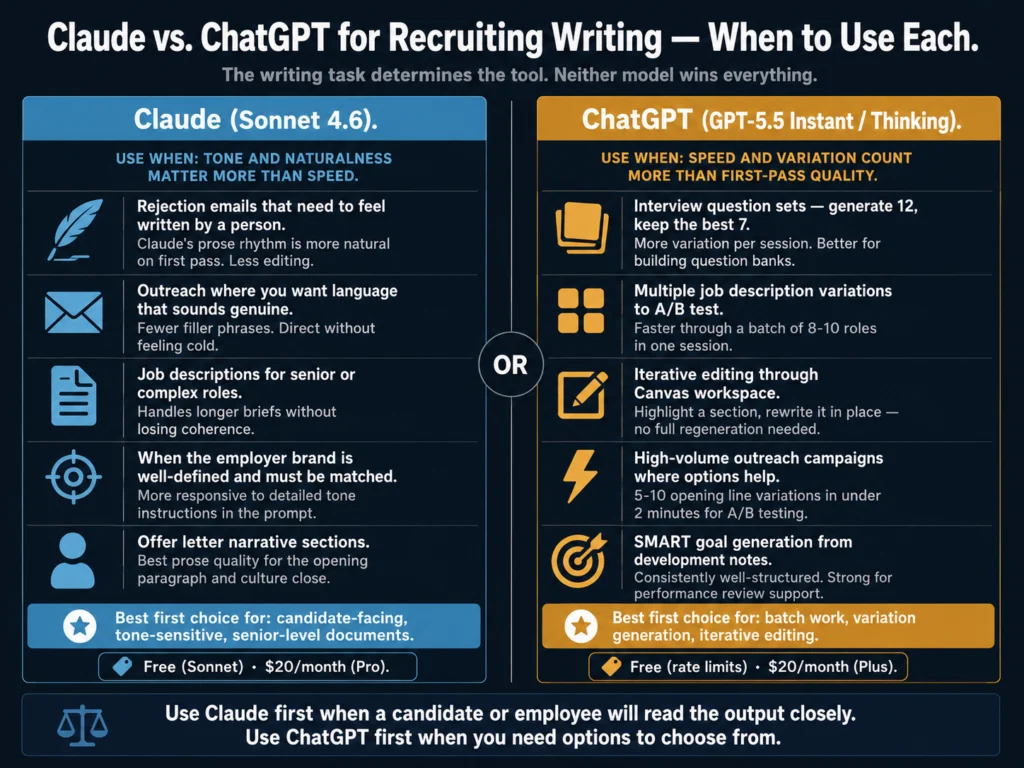
The short version for recruiters:
Use Claude when tone and naturalness matter more than speed. Rejection emails that need to feel human. Outreach messages where you want the language to sound like a person wrote it. Job descriptions where the employer brand is well-defined and the output needs to reflect it precisely.
Use ChatGPT when you need options and speed matters. Interview question sets where you want 12 questions to pick the best 7 from. Multiple job description variations to test. Batch drafting workflows where you need to move through 10 role briefs in one session.
Neither tool is universally better. The writing task determines the tool, not the other way around.
For the full tested comparison across five HR writing tasks, read: ChatGPT vs. Claude for HR Writing: Tested Comparison
Part 1: Job Description Writing
The job description is the first impression your organization makes on a candidate. It determines whether qualified people apply and whether the people who do apply are the ones you actually want.
A vague or generic job description is not a neutral document. It is an active cost: it attracts the wrong candidates, it extends your screening time, and it competes poorly against job posts from companies that invested in the writing.
Candidate matching is still used by recruiters, but its share is dropping, while writing job descriptions, managing candidate communication, and running recruitment marketing are all rising as key AI use cases. The shift reflects where recruiters are finding reliable ROI.
The Right Prompt Structure for Job Descriptions
The quality of your job description output is almost entirely determined by the quality of your input brief.
A minimal prompt (“write a job description for a marketing manager”) produces a generic document. A complete brief produces a usable first draft.
Your brief should include: job title and level, department and reporting structure, employment type and location, 6 to 8 specific responsibilities (not generic ones), 3 to 5 must-have qualifications, 2 to 3 nice-to-have qualifications, company size and industry, and one sentence about the role’s unique value to the candidate.
Full workflows and prompt templates:
- Best AI Tools for Writing Job Descriptions — tool comparison and use case testing
- How to Write 10 Job Descriptions in One Day Using AI — the batch workflow that cuts per-description time to 15 to 30 minutes
Bias in AI-Generated Job Descriptions
AI models reproduce biased language patterns from their training data.
A job description draft can contain gender-coded language (“competitive,” “aggressive,” “strong”), age-coded language (“digital native,” “recent graduate”), and unnecessary credential requirements, all without any human intending it.
Running an audit before posting takes 15 to 20 minutes and catches the most common AI-introduced bias patterns. Free tools handle most of the scan.
- How to Audit AI Job Posts for Bias Before Publishing — the six-step process with a printable checklist
- Can You Use AI-Generated Job Descriptions Legally? — the legal compliance requirements
Part 2: Candidate Outreach
Candidate outreach is where the gap between AI-assisted and non-AI-assisted recruiting teams is most visible in 2026. LinkedIn slashed its open InMail allowance by 87% in late 2025.
Recruiters who were sending generic templates at volume suddenly had fewer shots, and each one had to earn a response.
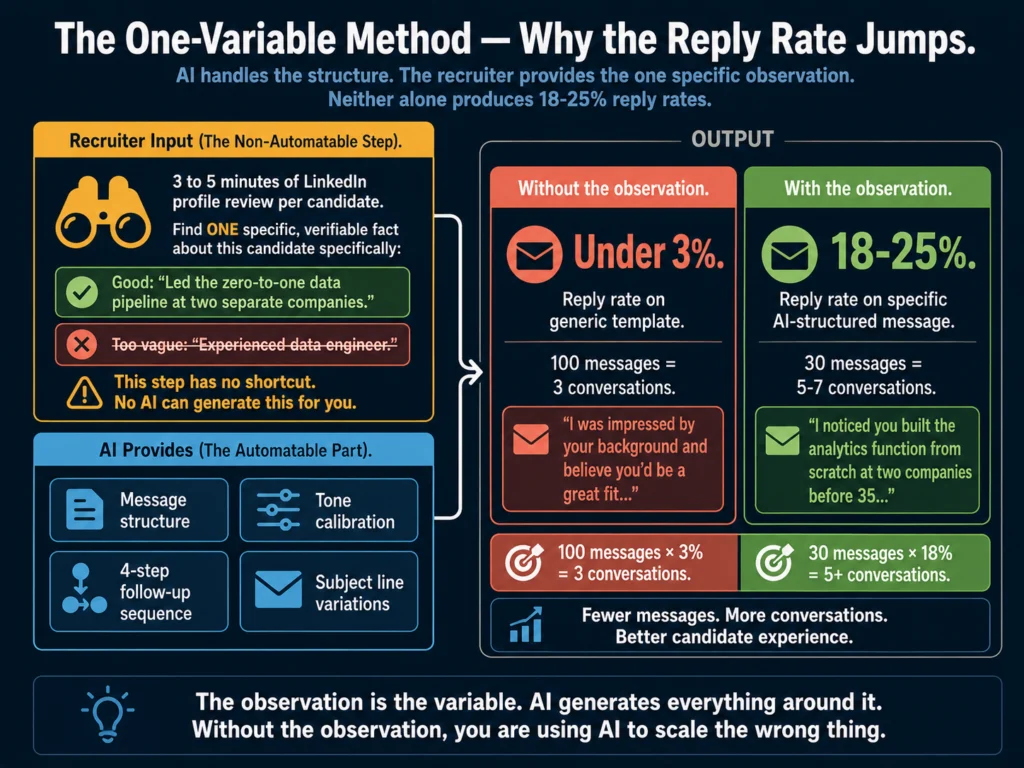
The reply rate data tells the whole story: generic templates produce under 5% reply rates. Well-researched, specific messages hit 18 to 25% from top performers. The tool is not the differentiator. The specific observation about the candidate is.
AI handles the structure, tone, and follow-up sequence. The recruiter supplies the one specific, verifiable fact about the candidate’s background that makes the message worth reading. That division of labor is the only approach that scales without sacrificing response rates.
The One-Variable Method
The most reliable AI outreach workflow in 2026: build a prompt template that requires one candidate-specific input before it generates a message. The specific observation about the candidate is the variable. AI generates the structure around it.
This approach produces response rates in the 18 to 25% range without requiring manual message drafting.
It requires 3 to 5 minutes of profile review per candidate to find the specific observation. That is the non-automatable step. It is also the step that drives the response.
Guides for outreach writing:
- Best AI Tools for Writing Candidate Outreach Emails — tool comparisons
- How to Write Candidate Outreach Emails with AI (Tutorial) — the step-by-step workflow with prompt templates for LinkedIn InMail, email, and follow-up sequences
Grammarly’s tone detector is worth running on candidate outreach before you send. Outreach that reads as “formal” or “sales-like” in Grammarly’s tone analysis will produce lower response rates than outreach that reads as “direct” and “warm.”
The free plan does not include tone detection. Grammarly Pro at $12/month adds it.
Grammarly Pro at $12/month is the editing layer worth adding to any outreach workflow. It tells you how the message actually reads before the candidate sees it.
Part 3: Rejection Emails
Rejection emails are the most underinvested communication in most recruiting workflows. They get sent at high volume, often with minimal thought, to candidates who will remember the experience. 72% of candidates who have a bad experience will tell friends, colleagues, and family about it.
AI makes rejection email quality a solved problem if used correctly. The constraints: raw AI output defaults to generic filler phrases (“we were impressed by your background,” “we will keep your resume on file”) that signal to candidates that no one thought about them specifically.
The editing pass removes these phrases. The final email sounds like a person wrote it.
The guide below covers four specific rejection scenarios with different prompt structures:
- How to Write Rejection Emails with AI (Without Sounding Robotic) — post-application, post-phone screen, post-interview, and final-round rejection prompts with before/after examples
Part 4: Interview Questions
Interview questions written without a structured framework tend to repeat across roles, focus on experience rather than evidence, and fail to produce comparable data across candidates.
AI with a good prompt generates better-structured, more competency-specific questions than most hiring managers produce manually.
The key: AI-generated interview questions need a scoring rubric alongside them to function as structured interviews.
A question without evaluation criteria is a conversation, not an assessment. Both Claude and ChatGPT generate rubrics when specifically prompted to.
Research consistently shows that structured, AI-assisted interview processes outperform unstructured ones significantly in assessment consistency.
Harvard Business Review describes unstructured interviews as “essentially worthless in forecasting job performance” compared to structured, rubric-based formats.
Teams that generate questions with AI and include scoring rubrics alongside each question are better positioned to defend hiring decisions against discrimination claims.
- Best AI Tools for Writing Interview Questions — framework-first guide with prompt templates for behavioral, situational, and technical questions
Part 5: Offer Letters
The offer letter is the final piece of recruiter writing and the one with the highest legal stakes. The average offer-to-acceptance rate is 69.3%, with strong teams hitting 85 to 90%. The written offer letter is one of the few conversion points recruiters directly control.
The distinction that matters: AI handles the narrative sections well (the opening, the role description, the culture close). Financial terms, legal language, at-will clauses, and non-compete language must come from verified legal templates, not AI generation.
AI models produce plausible-sounding financial terms and legal language that may be wrong for your specific situation.
- Best AI Tools for Writing Offer Letters — what AI handles, what it must not handle alone, and a prompt template for the narrative sections
Choosing Your Writing Tools: A Budget Guide for Recruiters
The right tool depends on your volume, your team size, and whether brand voice consistency is a documented problem.
Free tier (zero cost)
ChatGPT free (GPT-5.5 Instant) covers all six writing tasks adequately with a good prompt template. The constraint is rate limits during high-usage periods and the absence of Brand Voice automation.
For solo recruiters or small teams getting started with AI writing, the free tier is enough to demonstrate value before committing to a paid plan.
Grammarly free catches grammar, spelling, and basic clarity issues on all output. No tone detection at the free tier.
Claude free (Sonnet models) produces the most natural-sounding candidate communications of any free tool. Daily message limits are less generous than ChatGPT.
Minimal paid stack ($32/month)
ChatGPT Plus ($20/month) removes rate limits and provides GPT-5.5 Thinking for complex briefs and batch workflows, particularly useful when you are drafting 8 to 10 job descriptions in a single session or working with detailed role briefs that require more precise output.
Grammarly Pro ($12/month) adds tone detection, which matters specifically for candidate-facing communications where tone accuracy directly affects how the message lands.
This combination covers the writing needs of most individual recruiters or small talent acquisition teams without additional software spend.
- Free vs. Paid AI Tools for Small HR Teams — three detailed budget scenarios with specific upgrade triggers
Brand voice at scale ($39 to $59/month for Jasper)
When multiple recruiters are writing job descriptions and candidate communications independently, outputs drift toward different tones and registers. Jasper’s Brand Voice training encodes your employer brand in the tool and applies it automatically to every output, regardless of which team member generates it.
The case for Jasper is specifically about team-level consistency, not individual output quality. For a solo recruiter, ChatGPT Plus handles the job at half the cost. For a team of four, Jasper Pro ($59/month annual) addresses a real operational problem.
Jasper’s 7-day free trial includes full Brand Voice training. Test it on 5 to 10 job descriptions before deciding whether brand voice automation is worth the premium.
Copy.ai’s free plan (2,000 words/month, no expiry) is the right starting point if you want template-driven drafts for job descriptions and candidate communications without any upfront investment.
The 2,000-word monthly limit covers roughly 4 to 5 job descriptions. Note that Copy.ai was acquired by Fullcast (a sales automation company) in October 2025, and its development roadmap has shifted toward GTM workflows rather than writing quality improvements.
Copy.ai’s free plan (2,000 words/month, no expiry) is the fastest no-cost entry point to template-driven recruiting writing.
For the detailed comparison: Jasper vs. Copy.ai for HR Writing: Which Is More Practical?
Building a Shared Writing System That Scales
The difference between a recruiter who uses AI occasionally and a recruiting team that gets consistent value from it is systematic prompt management.
Individual recruiters build prompts that work and keep them in personal notes. Team members build slightly different prompts that produce inconsistent output.
Two months later, the job descriptions from different recruiters sound like they came from different companies.
The solution is a shared prompt library: a centralized, searchable collection of tested prompt templates that any team member can access and use. Building it takes about 4 hours. Maintaining it takes about 2 hours per quarter.
Full guidance on building and governing a prompt library: How to Build an AI Prompt Library for HR Teams
What AI Writing Tools Cannot Do for Recruiters
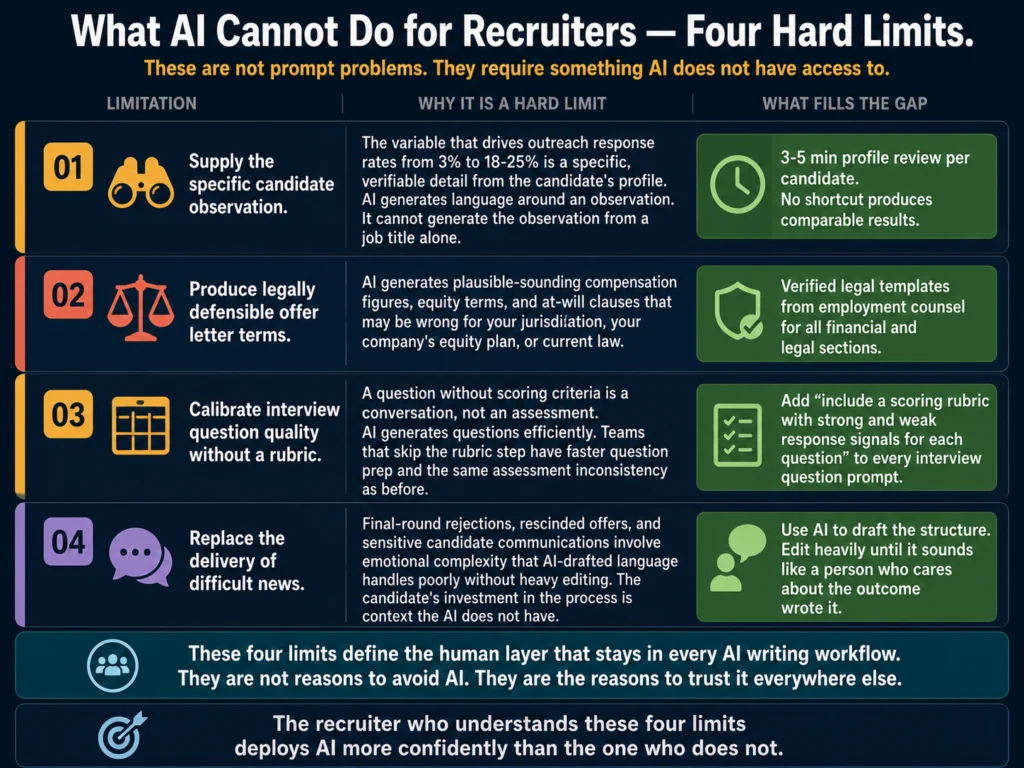
They cannot supply the specific observation about a passive candidate. The variable that drives outreach response rates from 3% to 18% to 25% is the specific, verifiable detail about the candidate’s background that signals you reviewed their profile.
AI generates language around an observation. It cannot generate the observation itself. That comes from 3 to 5 minutes of profile review per candidate. There is no automation path around it that produces comparable results.
They cannot produce legally defensible offer letter terms. Compensation figures, equity vesting schedules, at-will employment clauses, and non-compete language require legal review from your employment counsel.
AI produces plausible-sounding versions of these that may be wrong for your jurisdiction, your company’s specific equity plan, or current law. The narrative sections of an offer letter are safe to AI-draft. The legal and financial sections are not.
They cannot calibrate quality without a rubric. AI generates interview questions, but a question without a scoring rubric is not a structured interview.
Teams that generate questions with AI and skip the rubric step have faster question preparation and the same assessment inconsistency as before. The rubric is what produces the consistency improvement.
Both ChatGPT and Claude generate rubrics when you add that requirement to the prompt. The extra 30 seconds of prompt instruction changes the output significantly.
They cannot replace the delivery of difficult news. Rejection conversations after final rounds, rescinded offers, and other sensitive candidate communications involve emotional complexity that AI-drafted language handles poorly on its own.
Use AI to draft the structure and then edit heavily until the message sounds like it came from a person who cares about the outcome.
Common Mistakes Recruiters Make with AI Writing Tools
Using raw output without editing. AI drafts are starting points, not finished documents.
The phrases that make rejection emails feel robotic (“we were impressed by your background,” “we will keep your resume on file”), the generic filler in job descriptions (“fast-paced environment,” “passionate about”), and the mismatched tones that make outreach feel automated are all present in unedited AI output.
The editing pass is where the output becomes usable.
Optimizing for speed over specificity. The temptation is to use AI to send more outreach faster. The data does not support that approach. Sending 100 generic messages at a 3% reply rate produces 3 conversations.
Sending 30 specific messages at an 18% reply rate produces more than 5 conversations with half the volume and better candidate experience.
Skipping the bias audit on job descriptions. AI introduces bias patterns from its training data. A job description draft can contain gender-coded language, age-coded phrases, and unnecessary credential requirements that were not in the recruiter’s intent.
The audit takes 15 to 20 minutes. The full process is in: How to Audit AI Job Posts for Bias Before Publishing
Treating AI tool choice as the primary decision. The most important decision in AI writing is the prompt structure, not the tool. A mediocre prompt in Claude produces worse output than a strong prompt in ChatGPT free.
Time invested in building strong prompt templates returns more value than time spent evaluating premium AI tools.
The Full Writing-Focused Article Index
Job description writing
Interview questions
Candidate communications
- How to Write Rejection Emails with AI (Without Sounding Robotic)
- Best AI Tools for Writing Candidate Outreach Emails
- How to Write Candidate Outreach Emails with AI (Tutorial)
Offer letters
Writing tool comparisons
- ChatGPT vs. Claude for HR Writing: Tested Comparison
- Jasper AI Review for HR Professionals
- Free vs. Paid AI Tools for Small HR Teams
- Grammarly vs. Jasper for HR Writing: Which Should You Use?
- Jasper vs. Copy.ai for HR Writing: Which Is More Practical?
Workflow and systems
Compliance for writing
- Can You Use AI-Generated Job Descriptions Legally?
- How to Disclose AI Use in Your Hiring Process to Candidates
- How to Audit AI Job Posts for Bias Before Publishing
Related pillar guides
- Complete Guide to AI Tools for HR Professionals
- P3: AI Ethics and Compliance in Hiring: The Complete Guide
- P4: AI for HR Communications and Documentation: The Complete Guide
Frequently Asked Questions
Start with job descriptions, specifically with a batch of five real open roles you need to post. Build one complete prompt template using the P-C-T-F structure (Persona, Context, Task, Format). Test it on all five roles and note how much editing each draft requires. Refine the template based on what the editing reveals. By the fifth iteration, your template should produce drafts that require 5 to 10 minutes of editing rather than 15 to 20. Save that template in a shared Google Doc or Notion page where your team can use it. Total time investment: about 3 hours for the first batch, 30 minutes per batch after that.
Use AI for the structure and tone of candidate communications. Keep the specific details manual. A rejection email where AI generates the framing and a human adds the candidate’s name, the stage they reached, and one specific, genuine close reads as personal rather than automated. An outreach email where AI generates the structure and a human adds the one specific observation from the candidate’s profile performs in the 18 to 25% response rate range rather than under 5%. The rule, in short: AI for structure, human for specifics.
Specificity in the input and a requirements audit after the output. A job description that accurately describes the actual role, with specific responsibilities and genuinely necessary qualifications, attracts candidates who can do the job. A generic AI-generated description attracts a broad pool and leaves your screening problem unchanged. After generating the draft, run the requirements audit described in Article 24: ask whether each listed qualification would genuinely disqualify an otherwise excellent candidate. Remove anything that would not. The result is a shorter, more accurate requirements list that produces a better-qualified and often more diverse applicant pool.
Agencies using Bullhorn’s AI and automation features see 36% more placements per recruiter and a 22% higher fill rate. That is a platform-level measurement and includes automation beyond writing. For writing-specific improvements, the best-documented metric is candidate outreach response rates: the gap between generic templates (under 5%) and specific AI-assisted messages (18 to 25%) is consistent across multiple sources. For job descriptions, the measurable outcome is applicant pool quality, which is harder to track without structured scoring but visible in screening time per role.
Make the tool invisible in their existing workflow. A prompt library accessible from the tools they already use (a pinned Google Doc, a Notion page, a TextExpander shortcut) requires less behavior change than asking team members to open a new tool, navigate to a prompt template, and copy it. The prompt library in Article 19 covers this: the governance section addresses specifically how to make adoption stick without requiring ongoing enforcement. The short version: build the library, assign an owner, and run a quarterly review. Teams that adopt tools also need to see the output improvement. Show them a before/after comparison of a job description or outreach email in your first team meeting on the topic.
Conclusion
Writing is where AI delivers the most reliable ROI in recruiting in 2026. It is the use case with the clearest value proposition (faster, better quality), the lowest risk profile (no autonomous decisions), and the most immediate feedback loop (you can read the output and judge it).
The tools are available for free, or close to it. The prompt structures in the articles linked throughout this guide cover every major recruiter writing task.
The audit checklists are in Article 24. The compliance guides are in Articles 12 and 23.
What determines whether your team benefits from AI writing tools is whether you build a shared system that your team actually uses consistently, not which tool you choose.
A prompt library maintained in a Google Doc and used by every recruiter on your team delivers more value than the best AI tool opened occasionally by one person.
89% of HR professionals whose organization uses AI in recruiting say it saves them time or increases efficiency. The gap between that 89% and the teams who have not yet seen that result is almost always implementation, not technology. Build the system.
The technology is ready. Every workflow, prompt template, and tool recommendation in this guide (and across the 24 articles this pillar links to) reflects what the Ailovyu team has researched, tested, and refined specifically for in-house recruiters and talent acquisition teams.
We research and test AI tools so you can make informed decisions before spending money on them. Every review, comparison, and tutorial on this site is based on actual use, not vendor marketing.
Learn more on our About page.
Statistics from SHRM 2025 Talent Trends Survey, GRID 2025 Talent Trends Report, LinkedIn Future of Recruiting 2025, Bullhorn GRID 2026 Report, InCruiter AI in Recruitment 2026 (April 2026), Enboarder HR Leader Survey 2025, and dishertalent.com AI in Recruiting 2026 (February 2026). Affiliate links in this article earn a commission at no extra cost to you. Grammarly, Jasper, and Copy.ai each have active affiliate programs. Disclosures are included at each placement.