
- Six jurisdictions now have active or imminent AI hiring disclosure requirements: Illinois, California, Colorado, New York City, Connecticut, and Maryland. There is no single federal standard.
- Colorado’s framework changed in 2026. The original Colorado AI Act (SB 24-205) was repealed and replaced by a narrower law, SB 26-189, effective January 1, 2027. If you read an article describing Colorado’s “impact assessment” requirements as currently active, it may be describing a law that no longer exists in that form.
- The disclosure obligation depends on what the AI actually does. A tool that scores, ranks, or filters candidates triggers disclosure requirements in most of these jurisdictions. A general AI writing assistant used to draft job postings, where a human makes every hiring decision, generally does not.
- This guide gives you a five-step framework for determining what to disclose, where, and in what language, plus sample notice text you can adapt.
- California vetoed a broad AI notice bill in October 2025, but separate CPPA Automated Decision-Making Technology rules carry a January 1, 2027 compliance deadline for CCPA-covered businesses, the same year as Colorado.
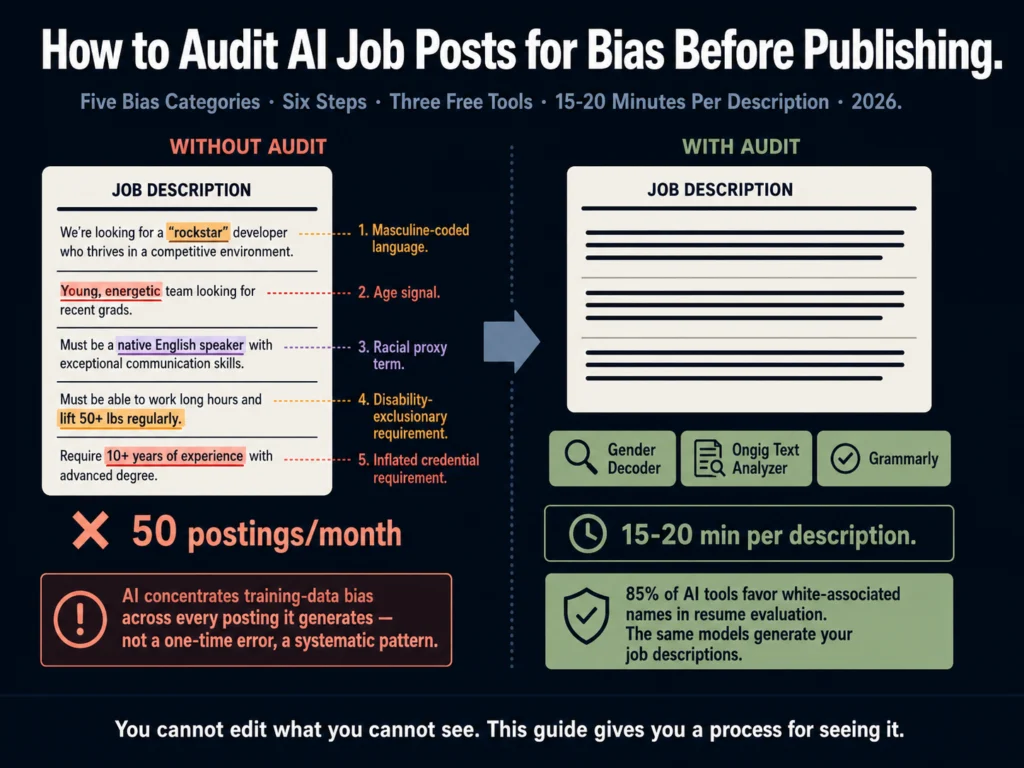
Knowing that AI reproduces bias is not the same as knowing how to find it before a job post goes live.
This article covers the practical process: what to look for, where to look, and which tools make the scan faster.
The core problem is that AI models learn from historical job postings, and historical job postings encode decades of hiring bias.
AI tools favor white-associated names 85% of the time and male names 52% to 85% over female in comparable resume evaluations, according to a May 2026 analysis.
When those same models write job descriptions, they reproduce the language patterns associated with the candidate profiles that succeeded in the jobs they were trained on.
Most of that bias is not explicit. It does not appear as “we prefer male candidates.” It appears as word choices that research has consistently shown to attract certain candidate profiles while deterring others.
Gender-coded words like “strong,” “competitive,” “leader,” and “principles” in job descriptions are documented to deter women from applying, according to Ongig’s 2026 analysis of job description language patterns.
The same analysis documents racial bias through terms like “native English speaker” or “culture fit” that can function as proxies for demographic screening.
You cannot edit what you cannot see. This guide gives you a process for seeing it.
The Research Foundation: Why AI Job Descriptions Are Specifically at Risk
A 2011 study in the Journal of Personality and Social Psychology by Gaucher, Friesen, and Kay established the foundational research: gendered wording in job advertisements exists and sustains gender inequality by signaling belonging cues to candidates from different groups.
That research preceded AI-assisted writing by a decade.
In 2025 and 2026, the problem has a new dimension. AI models generating job descriptions do not simply reproduce a single hiring manager’s word preferences.
They pattern-match across millions of job postings, concentrating the bias signals present across the entire corpus they were trained on. A single hiring manager might unconsciously use two or three gendered terms.
An AI model trained on historical postings can produce five or six in a single 400-word job description without any individual making a deliberate choice.
The real problem with AI-generated bias is not that it is dramatic. It is that it is subtle and systematic, according to a 2026 Curriculo analysis.
The same kinds of candidates get disadvantaged repeatedly, across every posting the AI generates, and you do not see it unless you audit the output.
This matters more than it did before AI-assisted writing was common because the scale compounds the risk. A hiring manager with unconscious word preferences influences their own postings.
An AI tool with embedded bias patterns influences every posting in your organization that uses it, simultaneously.
The Five Bias Categories to Audit
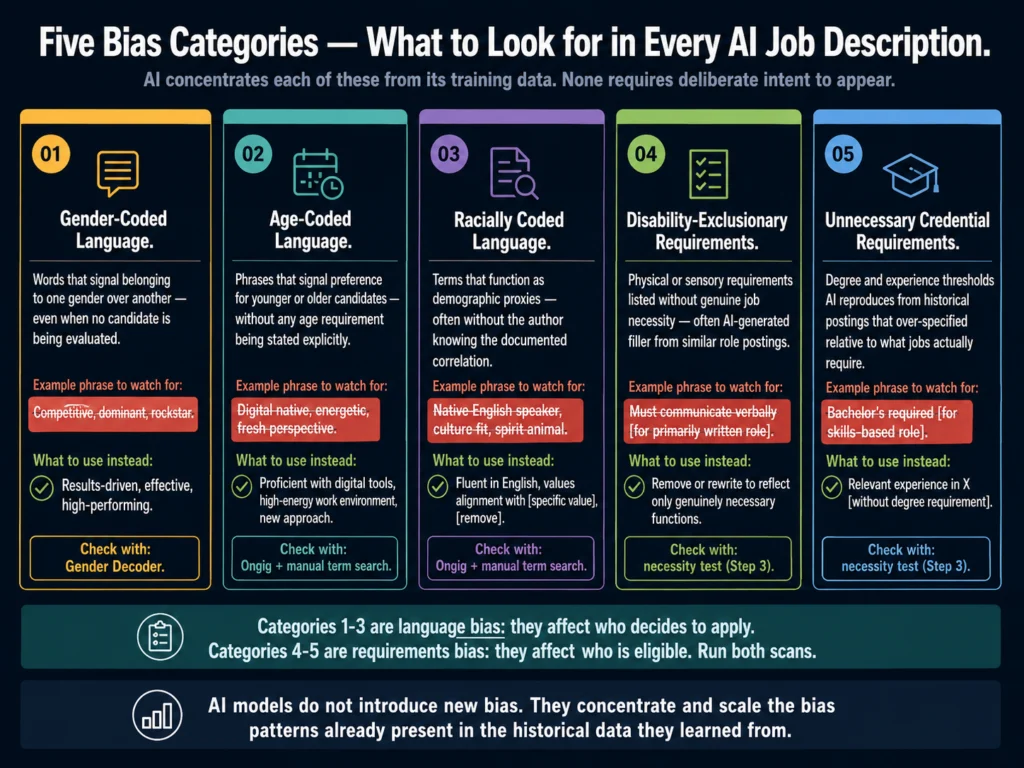
Category 1: Gender-Coded Language
Research has identified two consistent patterns in gendered job description language:
Masculine-coded words tend to attract more male applicants and fewer female applicants. Examples documented in job description research include: “competitive,” “dominant,” “driven,” “independent,” “decisive,” “strong,” “challenging,” “ambitious,” “analytical,” “autonomous,” “leader,” “aggressive.”
Feminine-coded words tend to attract more female applicants and fewer male applicants. Examples include: “collaborative,” “interpersonal,” “nurturing,” “committed,” “support,” “dependable,” “responsible,” “warm.”
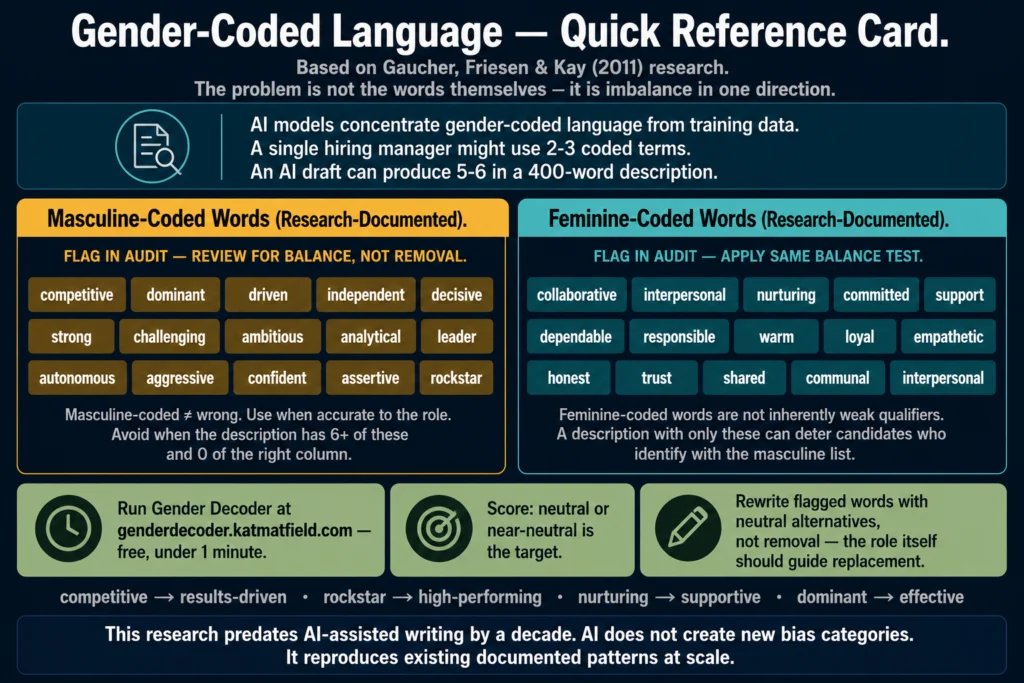
Neither list is inherently discriminatory. The problem is imbalance: a job description saturated with masculine-coded language sends a belonging signal to candidates who identify with those traits.
When that signal is not intentional, it is an artifact of the AI’s training data, not a deliberate description of the role.
The audit action: count the masculine-coded and feminine-coded words in the draft. If the balance is heavily skewed in one direction, rewrite to use neutral alternatives or a balanced mix. Gender Decoder (genderdecoder.katmatfield.com) runs this analysis automatically.
Category 2: Age-Coded Language
Age-coded language in job descriptions tends to signal preference for either younger or older candidates, which can trigger Age Discrimination in Employment Act (ADEA) concerns when it patterns across a body of postings.
Language that signals preference for younger candidates:
- “Digital native” (implies someone who grew up with technology, i.e., born after a specific year)
- “Recent graduate” or “entry-level” (legitimate terms, but combined with other experience requirements, can function as a proxy for age)
- “Energetic,” “fresh perspective,” “dynamic,” “innovative” (correlate with youth signals in hiring research)
- “Grow with us” (implies a long horizon; can implicitly exclude workers near retirement)
Language that may signal preference for older candidates or inadvertently screen them out:
- “5 to 7 years of experience” for a role that could be performed with 2 to 3 years (over-specification inflates the age floor)
- “Must be comfortable with change” (can signal cultural resistance to established patterns associated with experienced workers)
The audit action: read the description specifically looking for phrases that would make a 55-year-old qualified candidate feel unwelcome or ineligible.
If you find them, rewrite using age-neutral language: “proficient with current digital tools” instead of “digital native,” specific skill requirements instead of years of experience when years are not genuinely required.
Category 3: Racially Coded Language
Racial bias in job description language tends to operate through proxies rather than explicit references.
Terms like “native English speaker,” “culture fit,” “spirit animal,” “brown bag,” and “cakewalk” appear in job descriptions and can exclude or deter candidates from particular racial and ethnic backgrounds, according to Ongig’s 2026 job description bias analysis.
Additional patterns to check:
“Native English speaker” is legally problematic when English fluency is required but native speaker status is not genuinely job-related. An instruction to use “fluent in English” instead is more accurate and avoids the native origin implication.
“Culture fit” is one of the most documented proxies for demographic homogeneity in hiring. When used without definition, it signals “looks like our existing team,” which in organizations with low diversity can function as a screen against candidates from underrepresented groups.
If culture alignment matters, define what culture means: “thrives in async-first environments,” “comfortable giving direct feedback to senior stakeholders,” or similar concrete descriptions.
Credential requirements tied to institution type. Language like “from a top university” or “Ivy League background” creates socioeconomic screening that correlates with race and national origin in documented patterns.
The audit action: search the draft for “native,” “culture fit,” “Ivy,” “elite,” and any idiomatic or colloquial language that may not translate neutrally across cultural backgrounds.
Category 4: Disability-Exclusionary Language
The Americans with Disabilities Act (ADA) prohibits listing requirements that screen out qualified candidates with disabilities unless those requirements are genuinely necessary for the role.
AI-generated job descriptions sometimes include physical or sensory requirements that are not actually job-related.
Common examples that appear in AI-generated job descriptions without justification:
- “Must be able to communicate effectively verbally” for a role where written communication is primarily used
- “Requires excellent vision” or “physically demanding” for a sedentary office role
- “Must be able to lift 50 pounds” when lifting is incidental rather than central to the job
The audit action: for each physical, sensory, or cognitive requirement in the description, apply the necessity test: “If a candidate could do every core function of this job without meeting this requirement, does it belong on the list?”
Remove any requirement that fails that test. Requirements that are genuinely essential to the role should stay, described with specificity about what they involve.
Category 5: Unnecessary Credential Requirements
Credential inflation is the bias category AI is most likely to introduce without any human intending it. AI models learn from historical job postings, and historical job postings have consistently over-specified credential requirements relative to what jobs actually require.
The NACE Job Outlook 2026 survey found that 70% of employers now use skills-based hiring, up from 65% the previous year. Only 42% of employers now screen by GPA, down from 73% in 2019.
Unnecessary credential requirements create disparate impact by excluding qualified candidates who lack the specific credential but could do the job. Documented patterns include:
- Degree requirements for roles that do not need them. A customer success role that lists “bachelor’s degree required” when the actual success factors are communication skills and product knowledge, neither of which requires a degree.
- Years of experience requirements above the functional threshold. “7 to 10 years of experience in X” for a role where 3 to 4 years of the right experience would qualify someone equally well.
- Specific tool certifications that can be learned on the job. Requiring a specific software certification when the tool is trained internally anyway.
The audit action: for every requirement in the “must-have” section, ask: would you reject an otherwise excellent candidate who did not have this? If not, move it to “preferred” or remove it.
The Six-Step Audit Process
Run these steps in order on every AI-generated job description before posting.
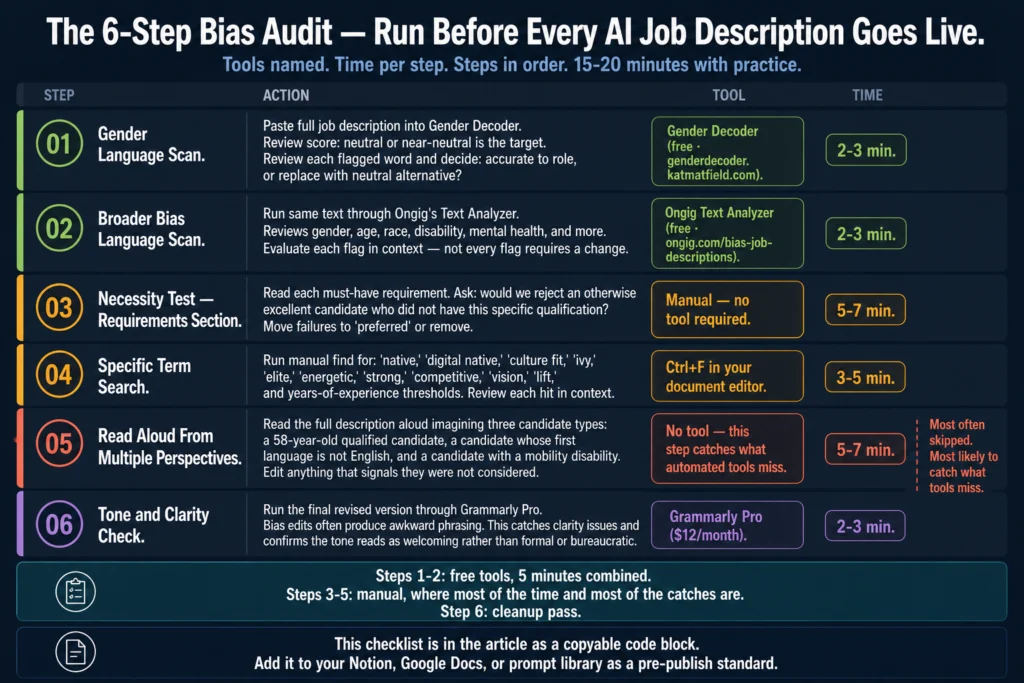
Step 1: Paste the draft into Gender Decoder. Gender Decoder (genderdecoder.katmatfield.com) is a free tool built on the Gaucher et al. research.
It scans the text and scores the language as feminine-coded, masculine-coded, or neutral. If the score is significantly masculine or feminine, review the specific flagged words and decide which ones to keep (because they accurately describe the role) and which to replace with neutral alternatives.
Step 2: Run the draft through Ongig’s Text Analyzer. Ongig’s tool flags biased language related to gender, age, race, disability, mental health, and more, and suggests more inclusive alternatives alongside each flag. The free version handles individual job description audits adequately for most HR teams.
Step 3: Read the requirements section and apply the necessity test. Read each must-have requirement and ask: would we reject an otherwise excellent candidate who did not have this specific qualification? Move anything that fails the test to “preferred” or remove it.
Step 4: Search the draft for these specific terms. Run a manual find for: “native,” “digital native,” “culture fit,” “ivy,” “elite,” “energetic,” “strong,” “competitive,” “vision,” “lift,” and any years-of-experience thresholds. Review each hit in context and decide whether it is justified by the actual role requirements.
Step 5: Read the description aloud from the perspective of a qualified candidate who differs from your current team. This is the step most people skip. Imagine a 58-year-old candidate, a candidate whose first language is not English, and a candidate with a mobility disability.
Does anything in the description make any of these candidates feel the role was not written for them, even though they could do the job well? Edit what you find.
Step 6: Run the final version through Grammarly for tone and clarity. Bias edits sometimes produce awkward phrasing. A final Grammarly pass catches clarity issues that emerge from rewrites and confirms the tone reads as welcoming rather than formal or bureaucratic.
Grammarly Pro at $12/month catches the clarity and tone issues that appear after bias edits. It is the right final step before posting.
Quick-Reference Audit Checklist
Copy this into your Notion, Google Docs, or prompt library as a pre-publish checklist.
JOB DESCRIPTION BIAS AUDIT - PRE-PUBLISH CHECKLIST

GENDER LANGUAGE
[ ] Ran through Gender Decoder - score is neutral or near-neutral
[ ] No masculine-coded terms not justified by the role description
[ ] No "rockstar," "ninja," "guru," or gendered role titles

AGE LANGUAGE
[ ] No "digital native," "recent graduate," "energetic," or "fresh perspective"
[ ] Years-of-experience thresholds reflect minimum genuine requirement only
[ ] Description would not make a 55+ year-old qualified candidate feel excluded

RACIAL AND CULTURAL LANGUAGE
[ ] No "native English speaker" (replaced with "fluent in English" if needed)
[ ] No "culture fit" without definition of what that means specifically
[ ] No institutional prestige requirements ("Ivy," "top university")
[ ] No idiomatic or colloquial language that may not translate culturally

DISABILITY REQUIREMENTS
[ ] Every physical/sensory requirement passes the necessity test
[ ] No requirements present that a qualified candidate could work around

CREDENTIAL REQUIREMENTS
[ ] Every "must-have" requirement would genuinely disqualify an
    otherwise excellent candidate
[ ] No degree requirements for roles where degree is not necessary
[ ] No tool certifications for tools trained internally

FINAL PASS
[ ] Gender Decoder scan complete
[ ] Ongig scan complete
[ ] Necessity test applied to all requirements
[ ] Specific term search complete
[ ] Read aloud from multiple candidate perspectives
[ ] Grammarly tone check completeBias in the Requirements vs. Bias in the Language: A Distinction That Matters
Many bias guides focus entirely on language. The requirements section deserves equal scrutiny and gets it less often.
Language bias affects who applies. Requirements bias affects who is eligible. Both operate at scale when AI generates the draft.
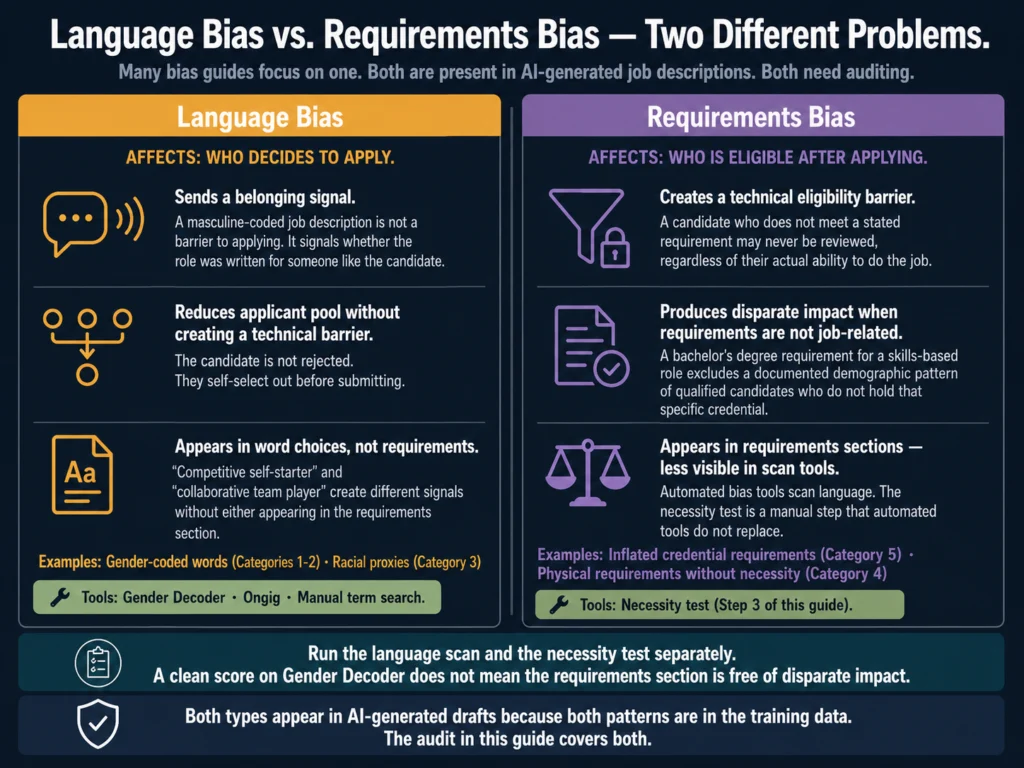
An AI model that reproduces masculine-coded language from its training data will also reproduce over-inflated credential requirements from its training data, because both patterns are present in the historical postings it learned from.
The audit process above covers both. The language scan (Steps 1 through 4) addresses words and phrases. The necessity test (Step 3) and the five-year experience analysis (Step 4) address requirements. Run both.
For the legal framework around AI-generated job description requirements, read: Can You Use AI-Generated Job Descriptions Legally?
Related Reading
- Best AI Tools for Writing Job Descriptions
- AI Tools for Resume Screening: What Actually Works
- AI Bias in Hiring: What HR Teams Need to Know
- Can You Use AI-Generated Job Descriptions Legally?
- How to Disclose AI Use in Your Hiring Process to Candidates
- AI Ethics and Compliance in Hiring: The Complete Guide
Frequently Asked Questions
No. This audit addresses the language in the job posting itself, which affects who applies. AI resume screening bias is a separate problem that affects who advances after applying. The screening layer involves the ATS or screening tool, not the job description text. Article 7 on this blog covers AI bias in screening tools in depth, including how to apply the four-fifths rule to detect disparate impact in your screening outcomes. Article 3 covers which AI screening tools have more transparent bias detection than others.
Gender Decoder (genderdecoder.katmatfield.com) is free and open source. It is based on the Gaucher, Friesen, and Kay (2011) research on gendered wording in job advertisements, which is the foundational study in this area. Its word lists reflect that research rather than a real-time corpus, which means it may not catch very recent slang or emerging coded language patterns. For professional-grade job description auditing at scale, Textio includes more comprehensive and regularly updated bias detection based on actual hiring outcome data. Gender Decoder is an excellent free starting point for individual job description audits.
With practice and the checklist above, 15 to 20 minutes per description. The first time you run the audit, expect 30 to 40 minutes as you learn what to look for. The Gender Decoder and Ongig scans together take under 5 minutes once you have the tools bookmarked. The manual steps, the necessity test, and the aloud read-through are where the time goes, and they are also the steps that catch what the automated tools miss.
Both, but for different reasons. Human-written job descriptions contain individual hiring manager bias. AI-generated descriptions contain training-data bias, which tends to be more systematic and less variable. In practice, applying the same audit process to all job descriptions regardless of how they were written is operationally simpler than trying to track which ones used AI assistance. It also protects you if the line between AI-assisted and human-written becomes blurry in your workflow, which it frequently does when managers use AI for some sections and write others manually.
Textio does much of this automatically, using outcome data from actual hiring results rather than static word lists. It surfaces biased language in real time as you type, suggests specific replacements, and scores the overall inclusion quality of the posting. It is the most comprehensive tool for this use case. The limitation is cost: Textio is enterprise-priced and requires a demo to get a quote. The six-step audit in this article is designed as a free alternative that covers the most important bases without requiring Textio. For organizations with the budget and a documented diversity hiring commitment, Textio addresses this problem at a depth and scale that manual auditing cannot match.
Conclusion
The audit process in this article takes 15 to 20 minutes per job description. It catches the bias patterns AI models most reliably reproduce from their training data. It uses free tools where available. It produces a checklist you can run before every posting.
That is the practical case for doing it. There is also a legal case. Automation bias means people perceive AI-generated decisions as more objective and are more likely to trust them over conflicting human judgments, according to Brookings Institution research.
In hiring, that means a biased job description produced by AI may be treated as more authoritative than a hand-written one, compounding rather than reducing the bias risk.
Running an audit before every AI-generated job post takes 15 minutes. Not running it takes, on average, a narrower candidate pool, more homogeneous applicants, and legal exposure that compounds over every unaudited posting that goes live.
The tools are free. The checklist is in this article. The 15 minutes is yours to decide what to do with.
The six-step process and word lists in this guide reflect what the Ailovyu team has refined across the 24-article cluster on AI tools for HR. The audit is the last step in producing job descriptions that are both AI-assisted and defensible.
We research and test AI tools so you can make informed decisions before spending money on them. Every review, comparison, and tutorial on this site is based on actual use, not vendor marketing.
Learn more on our About page.
Research sources: Gaucher, Friesen, and Kay (2011) via ACS Inclusivity Style Guide (January 2026); BestJobSearchApps AI Bias Analysis (May 2026); Ongig job description bias analysis (February 2026); Curriculo AI hiring bias report (April 2026); Brookings Institution, Gender, Race, and Intersectional Bias in AI Resume Screening (August 2025); NACE Job Outlook 2026 via naceweb.org (January 2026). Affiliate links in this article earn a commission at no extra cost to you. This article is for informational purposes and does not constitute legal advice.