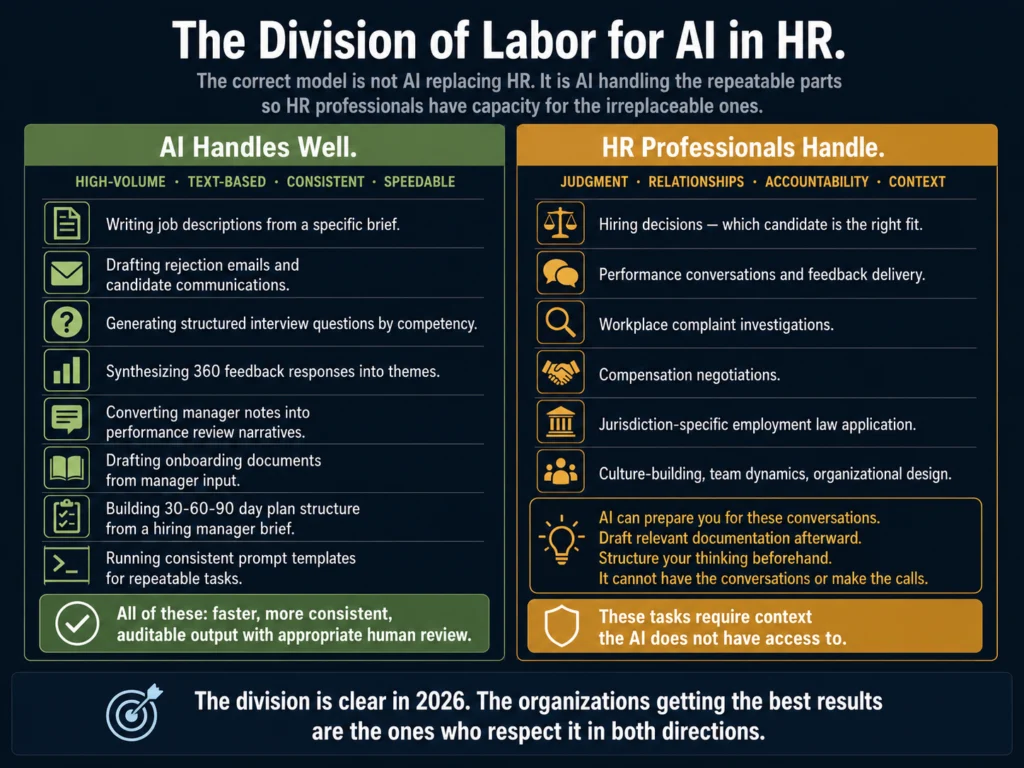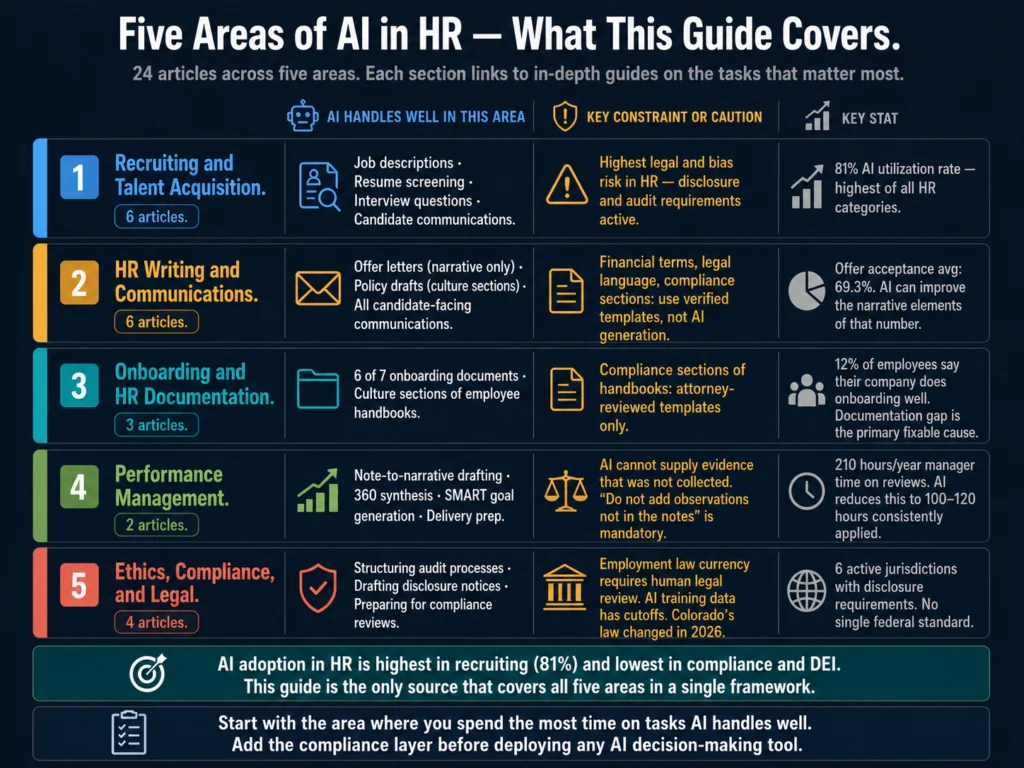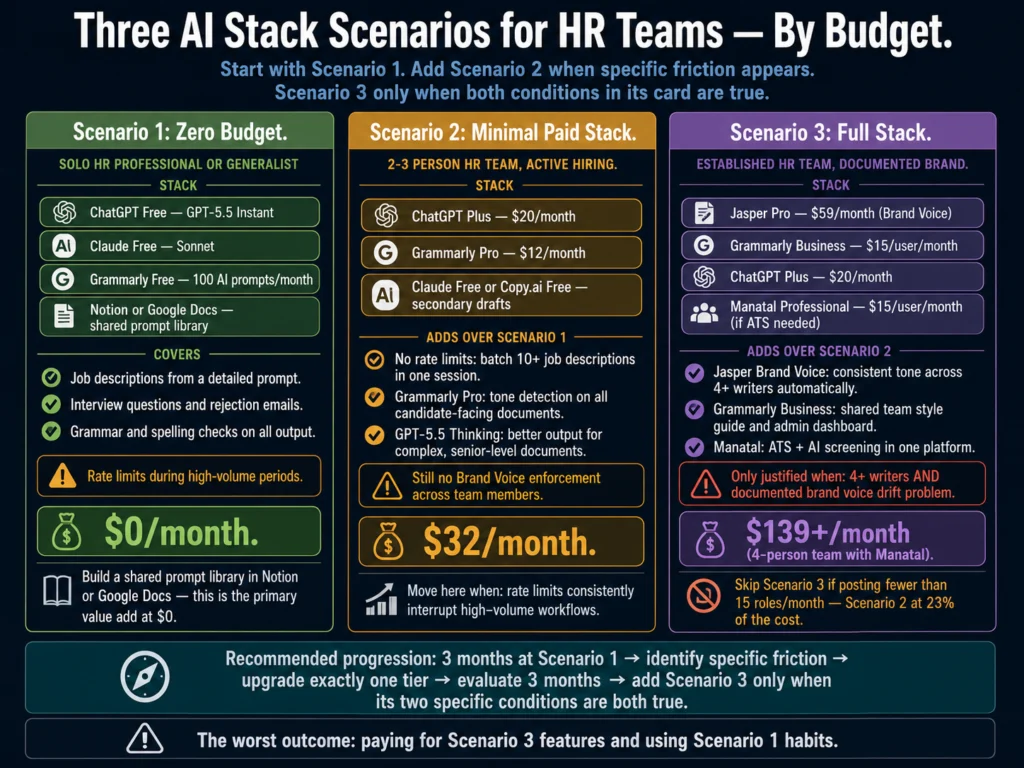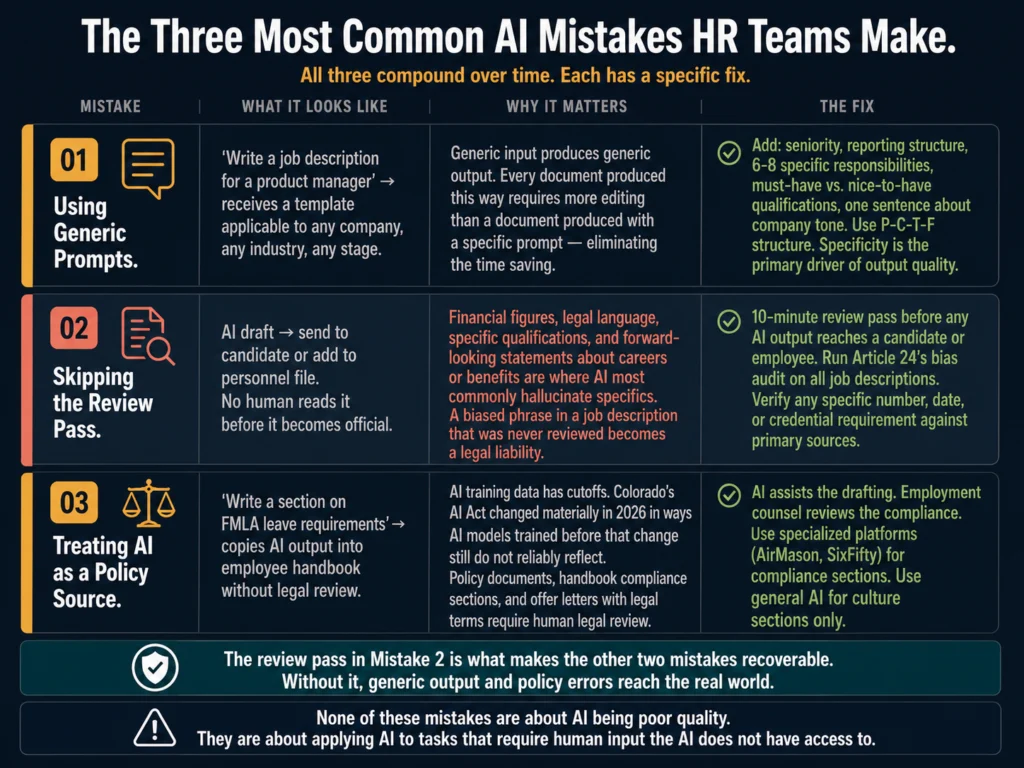
• Skip to main content
  • Skip to primary sidebar
ailovyu.com

ailovyu.com

Home » AI for HR and Recruiters

AI for HR and Recruiters

AI Tools for Resume Screening: What Actually Works (2026)

May 26, 2026 by The Ailovyu Team Leave a Comment

AI tools for resume screening 2026 — automated candidate scoring, NLP matching, and legal compliance for HR teams

TL;DR
  • The average job posting now receives 257.6 applications, up from 207.2 in 2024. Manual screening at that volume is not a workflow problem — it is a math problem.
  • Modern AI screening tools do not just match keywords. The better ones read contextual signals: someone who “led a cross-functional team through a 9-month product launch” gets scored as a project manager even if those exact words do not appear.
  • The tools that work best for high-volume teams: Manatal (budget), Workable (mid-market, built into ATS), and Eightfold AI (enterprise with explainability features).
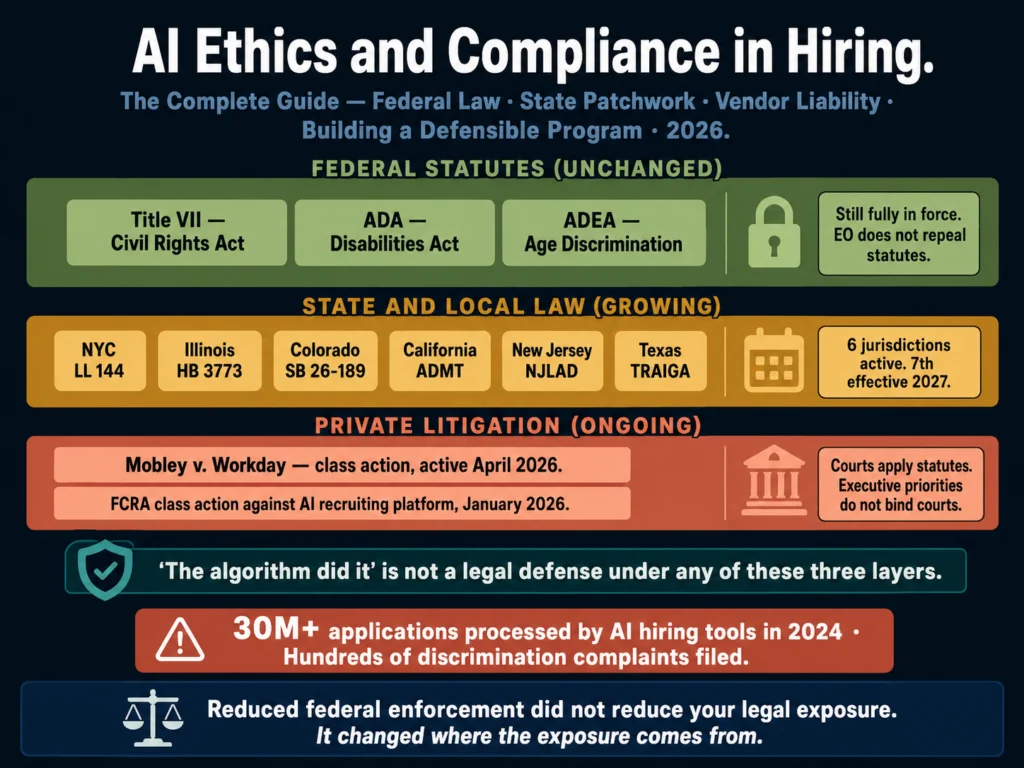
  • AI screening has a serious bias problem that is no longer theoretical — Mobley v. Workday reached collective action status in May 2025 with allegations that AI screening unlawfully filtered candidates by age, race, and disability. As of April 2026, the case is in discovery.
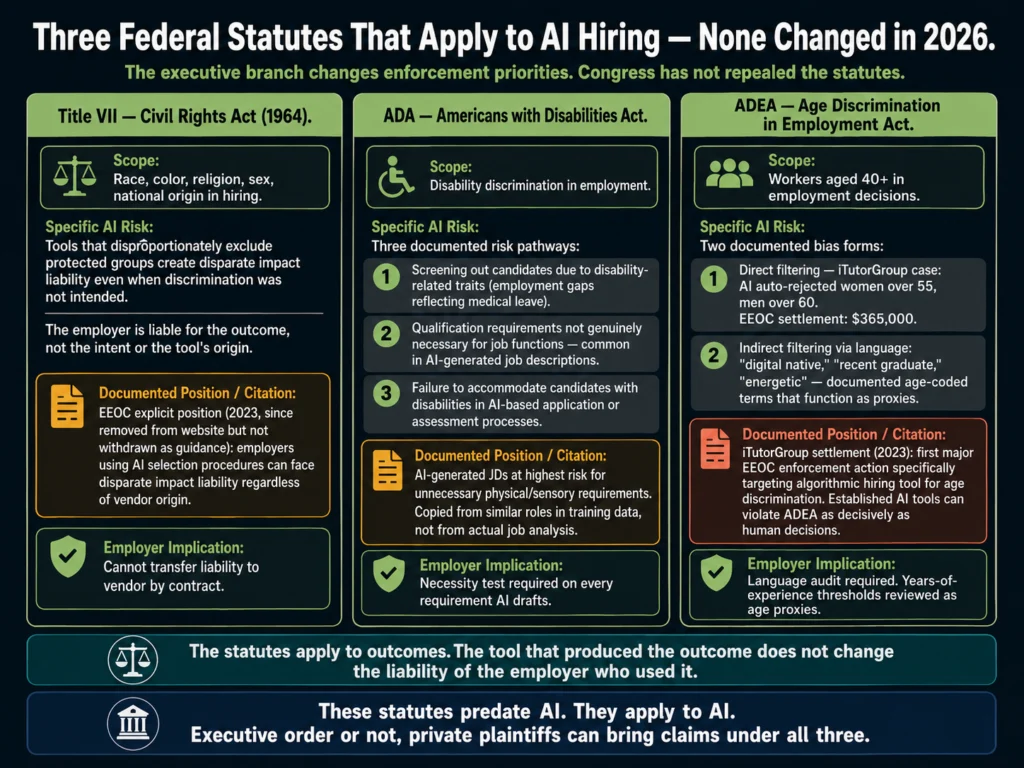
  • The legal exposure is real. Employers remain liable under Title VII for discriminatory outcomes even when the tool was purchased from a third-party vendor.
  • A human review step is not optional. Automated rejections without human oversight are the fastest path to an EEOC complaint.

The resume screening problem is not about speed. It is about volume.

According to Employ Inc.’s 2026 benchmarking data, the average job posting now attracts 257.6 applications — up from 207.2 in 2024. That is a 24% increase in one year.

For a recruiter managing 10 to 15 open roles simultaneously, that translates to thousands of resumes requiring some form of evaluation before a single interview is scheduled.

No recruiter reads 257 resumes carefully for every open role. What actually happens is a quick scan: 6 to 10 seconds per resume, pattern-matching for familiar signals, and a shortlist built on whatever the eye catches first.

Research consistently shows this process is faster than manual review but not more accurate — and it introduces the same cognitive biases a recruiter brings to everything else they do.

AI screening tools promise to replace that flawed quick scan with something more consistent and scalable. The reality is more complicated. Some tools deliver. Others replace one set of problems with another.

And the legal landscape around AI-assisted hiring has shifted significantly enough in 2026 that no HR team should adopt a screening tool without understanding the liability framework first.

This article covers what AI resume screening actually does, which tools are worth considering, what they get wrong, and what you need to know before deploying any of them.

Table of Contents
  • How AI Resume Screening Actually Works
  • What the Tools Get Wrong
  • The Legal Landscape in 2026
  • Tools Worth Considering
    • Manatal — Best Value for Mid-Sized Teams
    • Workable — Best for Teams Already in the Ecosystem
    • Eightfold AI — Best for Enterprise Explainability
    • Jobscan — Different Use Case, Worth Knowing About
  • How to Evaluate Any Screening Tool Before You Buy
  • Related Reading
  • Frequently Asked Questions
  • Conclusion

How AI Resume Screening Actually Works

Traditional applicant tracking systems filter resumes by keyword. If the job description says “5 years of Salesforce experience” and a resume contains “Salesforce” fewer than some threshold, the candidate is filtered out.

Simple, fast, and wrong more often than most hiring managers realize.

Comparison of traditional ATS keyword matching versus AI contextual NLP resume screening — same candidate, different result
A traditional ATS that cannot find the phrase “project management experience” rejects the candidate. An AI screening tool reads that the candidate “led a cross-functional team of 12 engineers through a 9-month product launch” — and scores it correctly.

Modern AI screening tools work differently. They use natural language processing to read resumes contextually — identifying skills, experience, and career trajectory from meaning rather than just keyword presence.

A recruiter who searches for “project management experience” in a traditional ATS gets candidates whose resumes contain that phrase.

An AI screening tool recognizes that “led a cross-functional team of 12 engineers through a 9-month product launch” is project management experience, even without the label.

The best tools go further than matching. They score candidates against a role’s actual requirements, generate structured summaries that give recruiters something to review instead of the raw document, and flag anomalies: employment gaps, credential inconsistencies, or qualifications that do not match claimed experience levels.

What none of them do reliably: evaluate judgment, cultural fit, communication style, or anything that requires a conversation.

AI screening is useful for getting a pile of 257 resumes down to a shortlist of 20 to 30 qualified candidates. The rest of the evaluation is still yours.


What the Tools Get Wrong

This section matters more than the tool comparisons. Every vendor in this category claims their tool reduces bias and surfaces the best candidates. The evidence says it is more complicated.

Three documented problems with AI resume screening tools — bias and disparate impact, black box explainability, and accuracy gap in real conditions
Vendor demos use curated datasets. Real-world hiring is messier. These three problems appear across the category — including in tools with strong marketing around bias reduction.

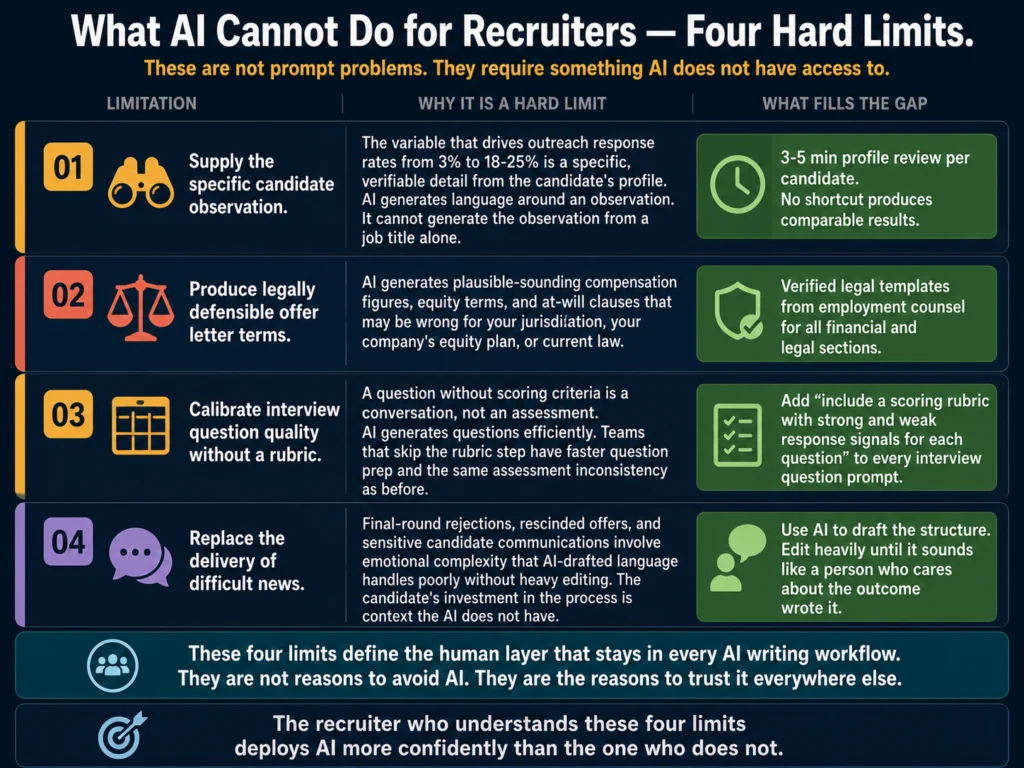
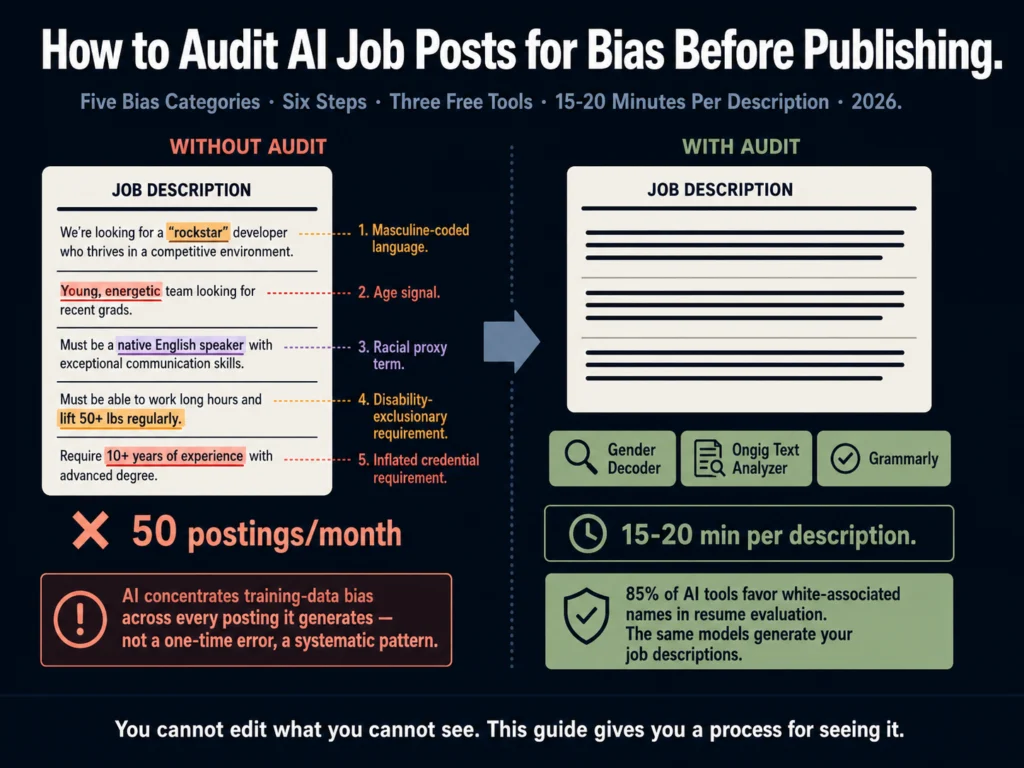
The bias problem is documented and growing. Employers remain fully liable under Title VII if their AI tools produce a disparate impact on protected groups, regardless of whether the tool was purchased from a vendor.

In practice, this means you cannot point at the software company when something goes wrong.

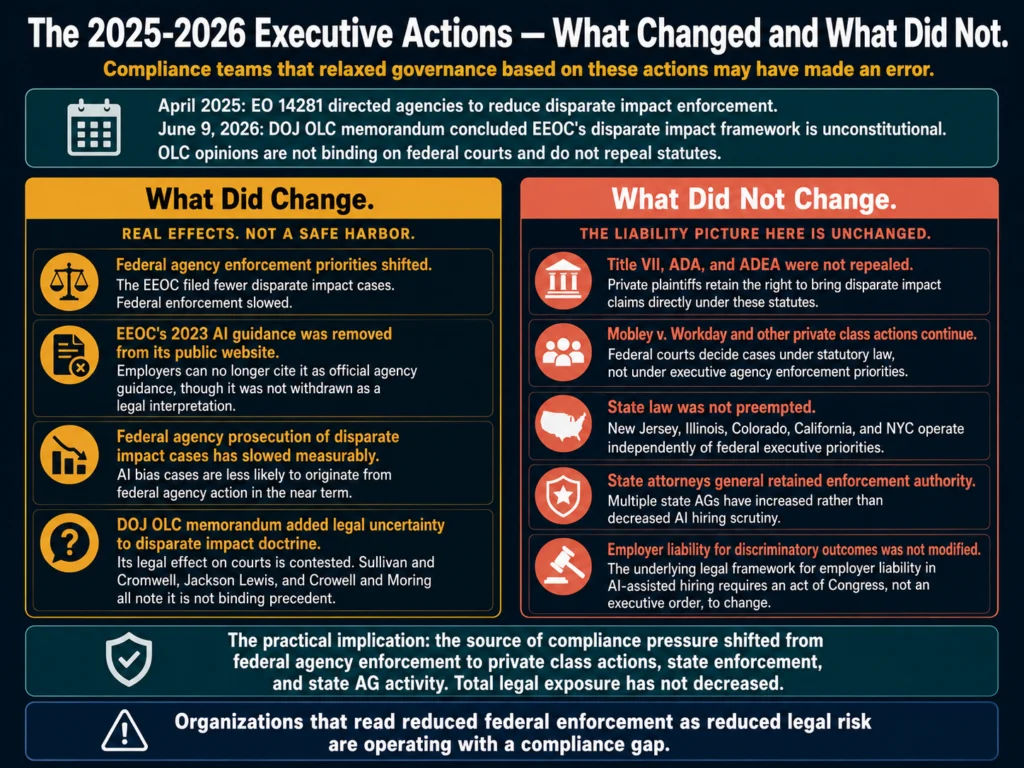
The case that reshaped how HR teams should think about this is Mobley v. Workday. In May 2025, a federal court in California granted preliminary certification of a collective action under the Age Discrimination in Employment Act — allowing plaintiffs to advance claims that Workday’s AI screening software unlawfully filtered out applicants based on age, race, and disability.

The court also accepted the argument that Workday can be considered an “agent” of its employer-clients, meaning the vendor itself faces liability alongside the companies that use its tools.

As of April 2026, the case is in the discovery stage. No ruling on the merits has been issued.

The implications are significant. If a federal court ultimately confirms that vendors bear liability as agents, it opens a new front of exposure for both software companies and their customers.

For HR teams, the practical takeaway is this: buying a screening tool from a reputable vendor does not transfer the legal risk. It remains with the employer.

The black box problem. Many AI screening tools cannot explain why a candidate was ranked the way they were.

When AI systems operate as black boxes, making it impossible for HR teams to explain why a candidate was rejected, this creates a dangerous accountability vacuum: when discrimination occurs, no one can identify the source, and candidates have no basis to challenge decisions.

The EEOC has been direct about this. If you cannot explain why a candidate was rejected, you are operating a high-risk system.

Explainability — the ability to show why a candidate scored a certain way — is not a nice-to-have feature in a screening tool. It is a compliance requirement.
Accuracy is high in controlled conditions, lower in practice. AI screening achieves high accuracy rates in vendor-controlled testing environments.

Real-world hiring involves messier inputs: inconsistently formatted resumes, non-standard job titles, career paths that do not follow conventional progression, and roles where the hiring manager’s actual requirements differ from what made it into the job description.

The gap between benchmark accuracy and field accuracy is real.

For a deeper look at bias in AI hiring tools and what HR teams need to audit, read: #7: AI Bias in Hiring — What HR Teams Need to Know


The Legal Landscape in 2026

Before reviewing specific tools, understand the regulatory environment they operate in.

The EEOC’s Strategic Enforcement Plan (2023–2027) identifies AI and automated hiring tools as a priority enforcement area — a designation driven in part by a surge in discrimination complaints tied to algorithmic screening systems across multiple industries.

At the federal level, using third-party AI tools does not insulate employers from liability. The EEOC has been explicit: if the tool produces discriminatory outcomes, the employer answers for it.

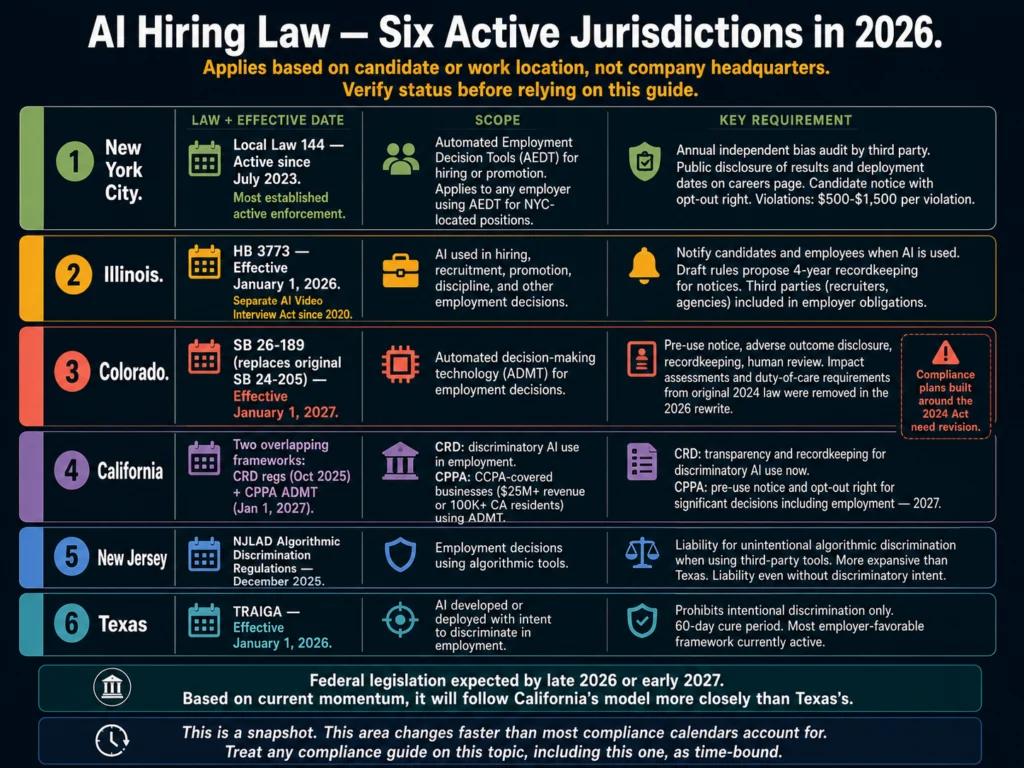
At the state level, the picture is fragmented but tightening. California’s new regulations from the Civil Rights Council extend anti-discrimination laws to AI tools, requiring that employers maintain records of automated decision data for four years and prohibiting the use of AI that screens out applicants based on protected characteristics.

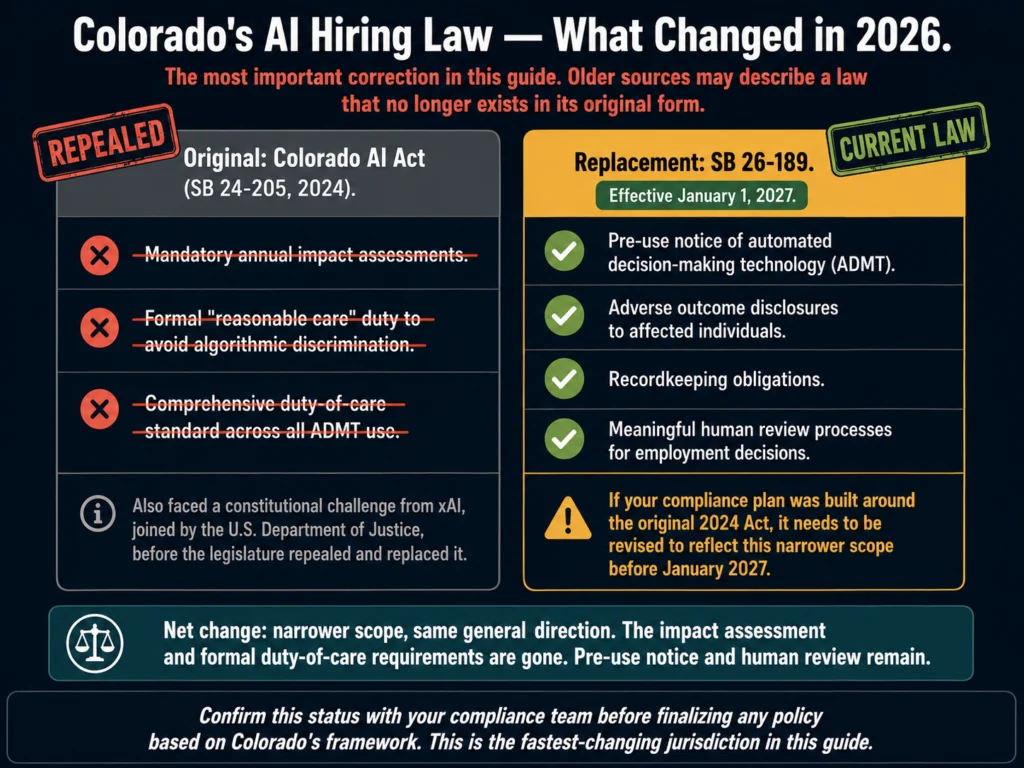
Colorado’s landmark AI Act (SB 24-205), which requires rigorous impact assessments for high-risk AI systems, has an effective date of June 30, 2026, but as of April 2026, a federal court has paused enforcement during ongoing litigation, and the Colorado legislature is actively considering SB 26-189, a bill that would substantially rewrite the law’s framework before it takes effect. Employers in Colorado should monitor developments closely; the law’s final form is not yet settled.

New York City’s Local Law 144 requires employers using automated employment decision tools to conduct annual bias audits and notify candidates when such tools are used. It has been in effect since July 2023 and continues to shape how enterprise tools are designed.

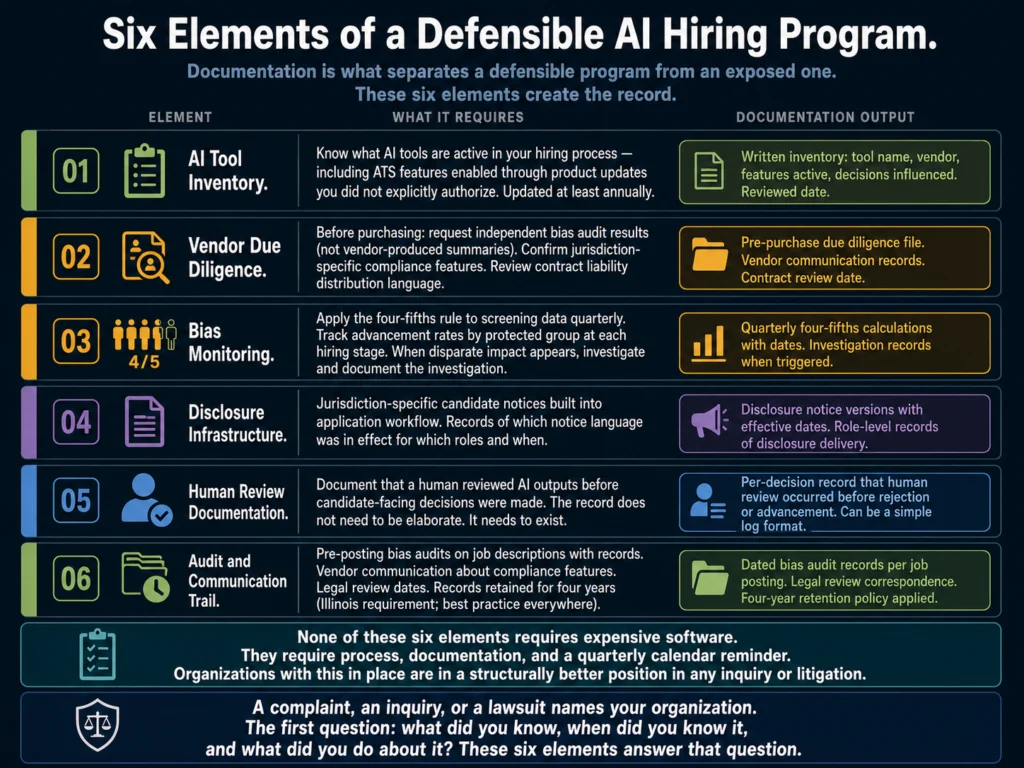
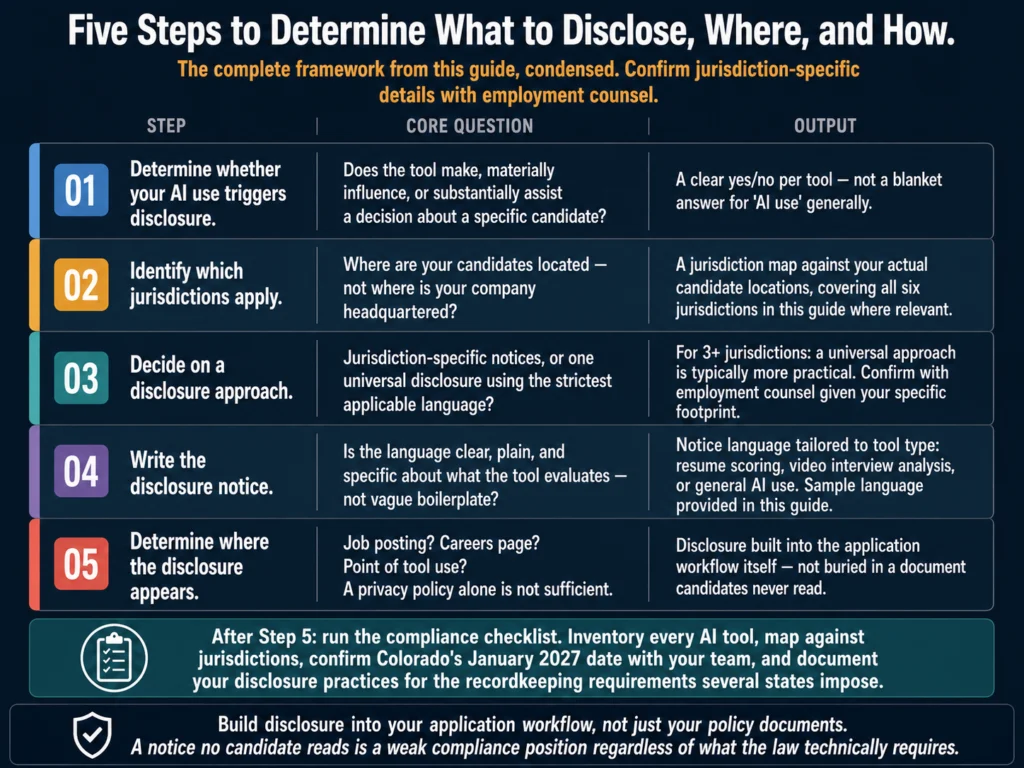
The EEOC and plaintiffs’ attorneys recommend that employers conduct annual bias audits using the four-fifths rule, ensure application processes include clear disclosures about AI use as required by New York City, Colorado, and California, and keep a human in the loop.

Automated rejections without any human review are the fastest way to trigger discrimination claims.

For a plain-English breakdown of what this means for HR teams, read: #12: Can You Use AI-Generated Job Descriptions Legally? A Plain-English Guide


Tools Worth Considering

With those caveats clear, here are the tools that hold up in practice across different team sizes and budgets.

AI resume screening tool comparison 2026 — Manatal, Workable, and Eightfold AI compared by pricing, team size, and compliance features
These three tools hold up in practice. The right one depends on your org size, whether you are already inside one of these ATS ecosystems, and how much explainability your compliance program requires.

Manatal — Best Value for Mid-Sized Teams

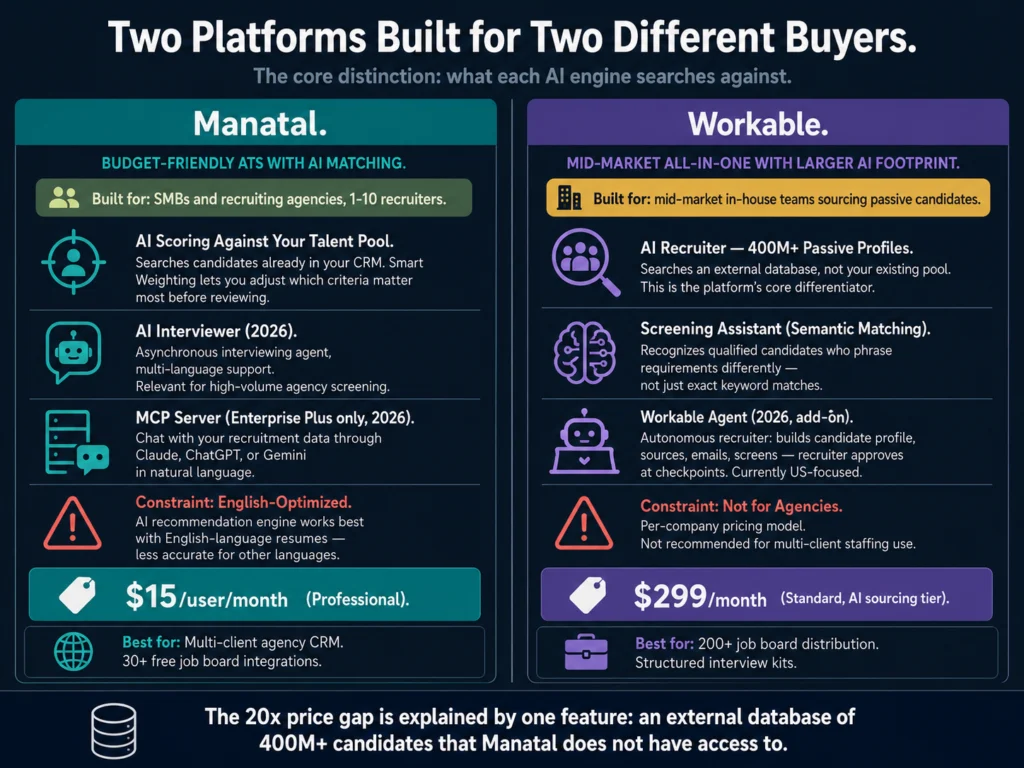
Manatal is an ATS with AI screening capabilities built in, and it sits at a price point that makes it accessible to teams that cannot afford enterprise talent intelligence platforms.

The AI candidate scoring system ranks applicants against a job’s requirements and generates a match score alongside a structured summary of each candidate’s qualifications.

The scoring criteria are configurable — you can weight specific skills or experience levels based on your actual hiring priorities rather than a generic template.

What distinguishes Manatal from cheaper options is the explainability of its scores. When a candidate receives a low score, the system shows which criteria they did not meet.

This is the minimum level of transparency you should accept in any screening tool, for both compliance and practical reasons. A score with no explanation is not useful to anyone reviewing the shortlist.

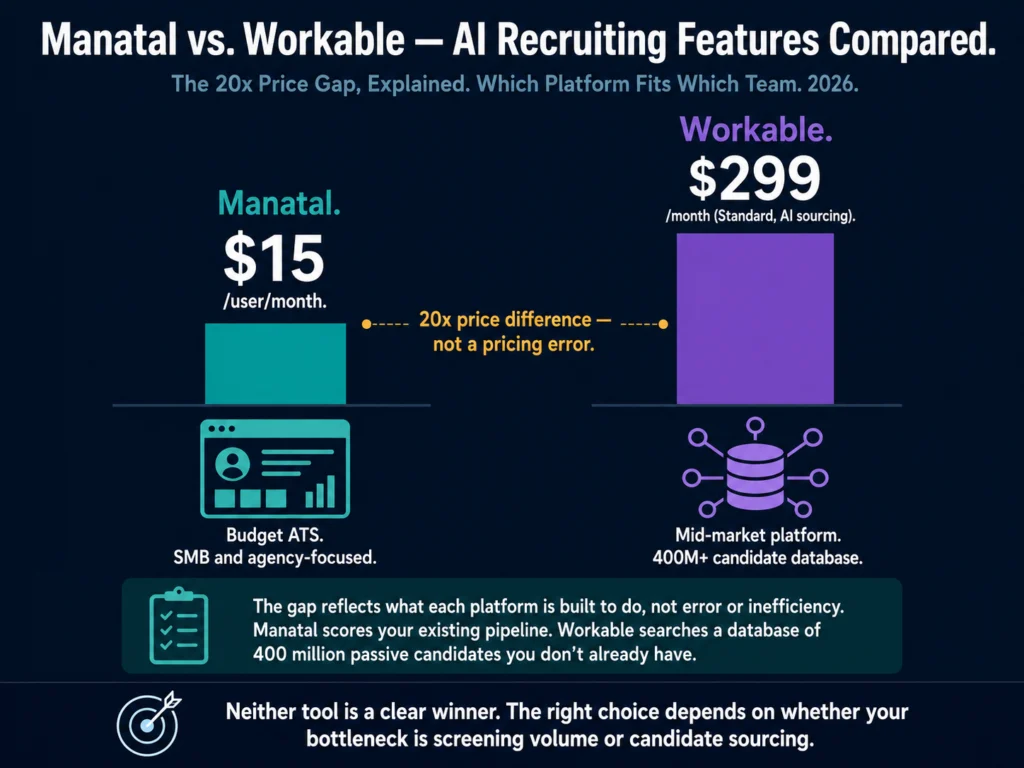
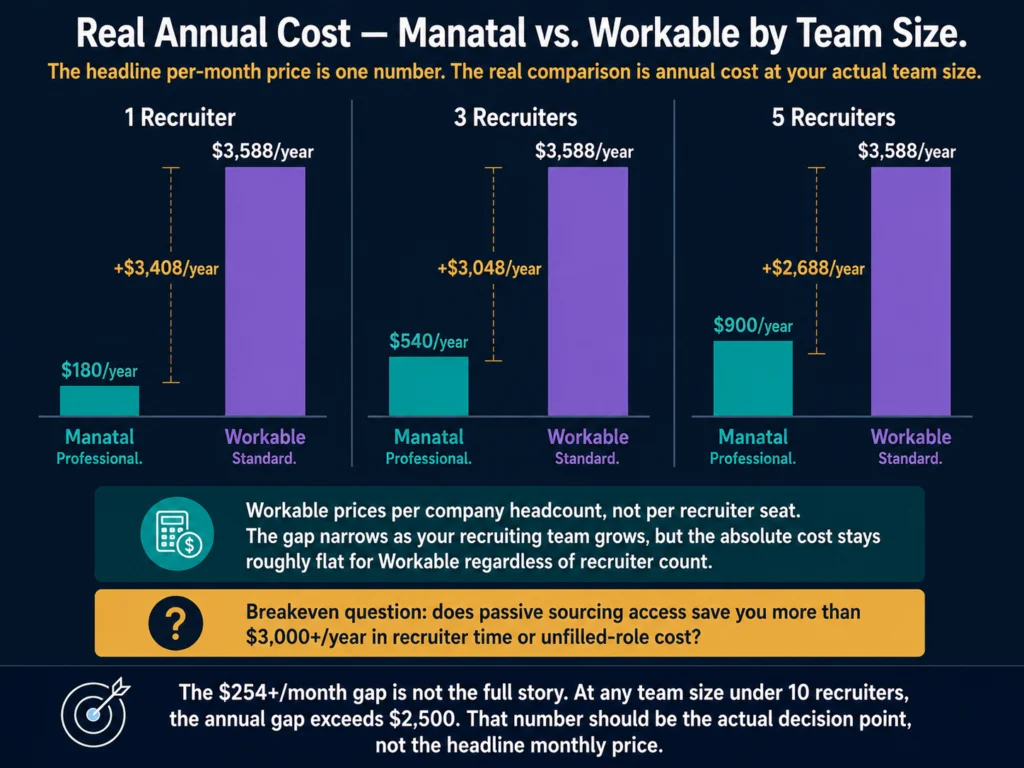
Pricing: $15/user/month (Professional plan, billed annually). Enterprise plan at $35/user/month adds unlimited jobs and workflow automations. 14-day free trial available, no credit card required.

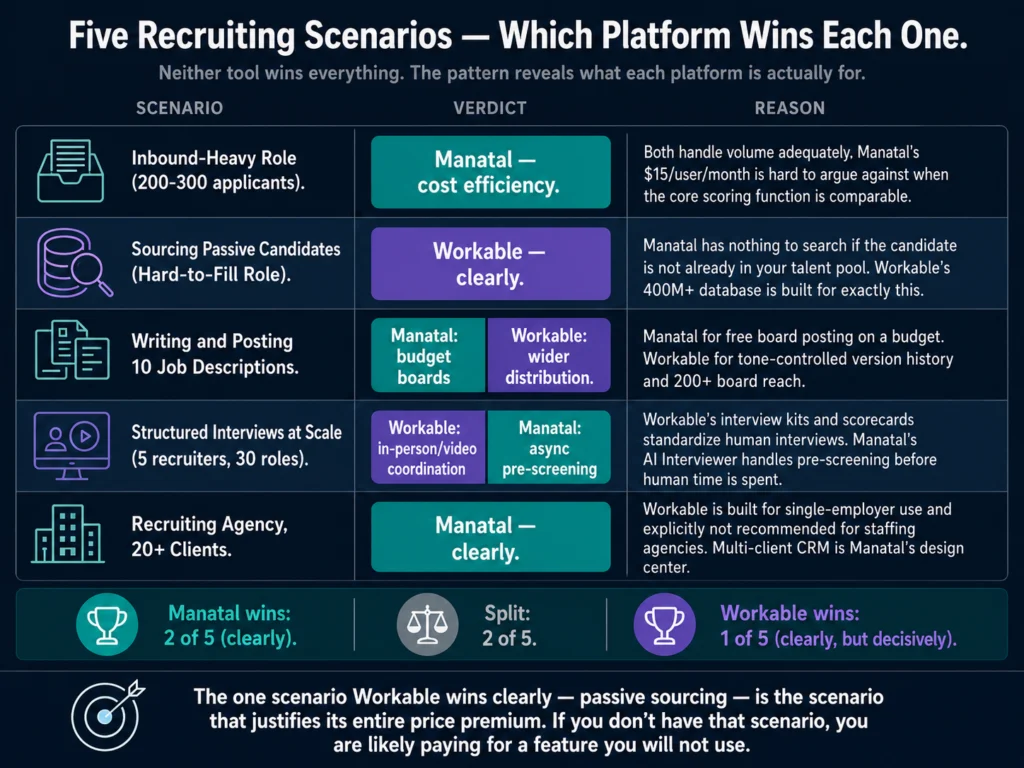
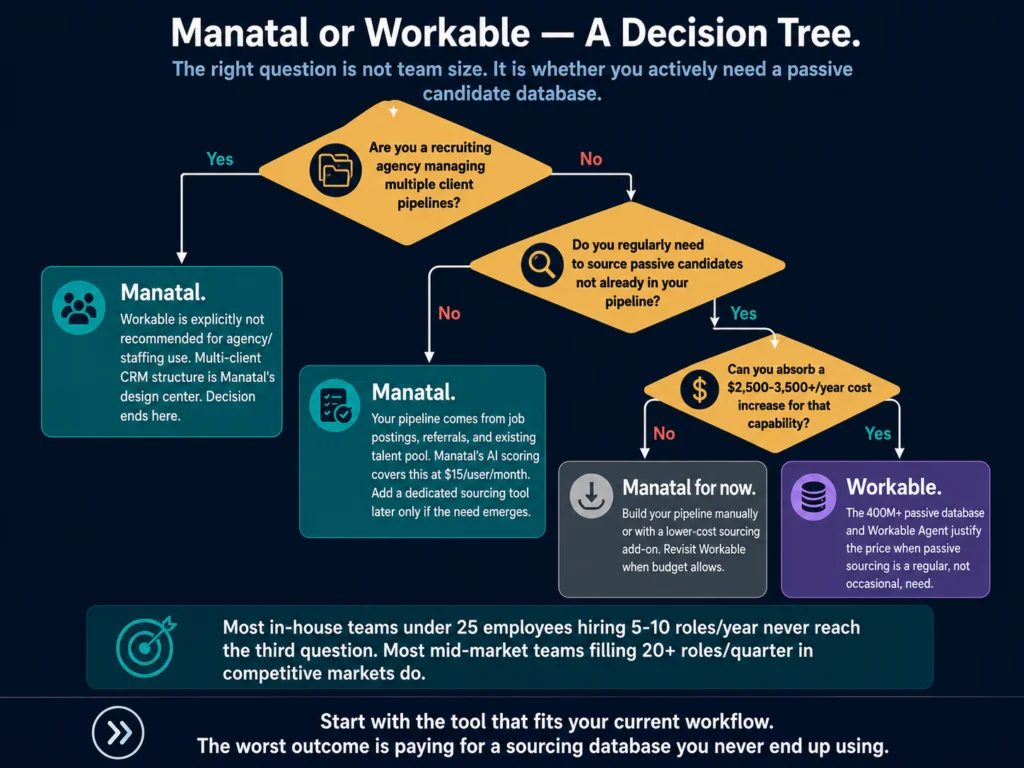
Best for: In-house HR teams at companies with 50 to 500 employees handling regular hiring volume. Agency recruiters managing multiple clients.

Honest limit: Manatal is an ATS first and a screening tool second. If your primary need is a dedicated screening layer on top of an existing ATS, a point solution might serve you better.

→ Manatal’s 14-day free trial includes full AI screening features.


Workable — Best for Teams Already in the Ecosystem

Workable’s AI screening sits inside its recruiting platform, which means zero context switching between your screening tool and your ATS. For teams where recruiter adoption of new software is a persistent challenge, that friction reduction is worth something.

The AI features include candidate scoring, a recommended candidates queue based on your job requirements, and anonymized screening mode — where demographic signals are removed from the initial candidate view to reduce evaluator bias before a human makes a judgment.
The anonymized screening feature is worth noting separately. It does not solve the AI bias problem at the model level, but it addresses one layer of the human bias problem: the recruiter who sees a name before evaluating a resume.

For organizations actively working on hiring equity, this is a meaningful feature even if it is not a complete solution.

Pricing: Starter plan at $189/month. AI screening features are included across all paid tiers.

Best for: Teams already on Workable. For teams not yet on Workable, the AI screening features alone are not a reason to switch from your current ATS — evaluate the full platform.


Eightfold AI — Best for Enterprise Explainability

Eightfold is a talent intelligence platform built for large organizations. It goes further than resume screening into skills-based matching, internal mobility, and workforce planning — which makes it more powerful and more expensive than anything else on this list.

For the resume screening use case specifically, what sets Eightfold apart is the explainability of its candidate matching. The system generates detailed reasoning for each candidate ranking, showing which skills, experiences, and signals drove the score.

For enterprise teams operating under regulatory scrutiny or preparing for bias audits, that audit trail is not a feature — it is a compliance requirement.
Pricing: Enterprise custom pricing. Expect significant investment — this is a platform for large HR teams at substantial organizations, not a point solution.

Best for: Enterprise organizations with 500+ employees, dedicated HR technology teams, and formal compliance programs. Companies operating in heavily regulated industries where explainable AI decisions are legally required.

Skip it if: You are a mid-sized organization with straightforward screening needs. The complexity and cost do not match the use case.

One thing to know: Eightfold is not without its own legal exposure. A class action filed in California state court alleges that Eightfold’s AI tools unfairly rely on publicly available online data about candidates to make hiring predictions — a challenge to the same explainability standards the platform markets as a differentiator.

The case is ongoing and no ruling has been issued. For enterprise teams evaluating Eightfold specifically for compliance purposes, this is worth raising directly with the vendor during due diligence.


Jobscan — Different Use Case, Worth Knowing About

Jobscan is primarily designed to help job seekers optimize resumes for ATS systems.

HR teams sometimes use it in reverse: running their job description through the tool to understand how their posting will be parsed by the ATS, and whether their requirements will screen in or out the candidates they actually want.
This is a niche use case but a legitimate one. If your ATS is rejecting candidates you would have interviewed — a common complaint from hiring managers — Jobscan can help you diagnose whether the job description or the ATS configuration is the problem.

Pricing: Free basic scan. Plans start at $49.95/month for full feature access.


How to Evaluate Any Screening Tool Before You Buy

The sales process for AI screening tools is designed to impress.

Demos use curated datasets, benchmark results are from controlled environments, and bias audit claims are often marketing copy rather than independent verification.

Five due diligence questions for evaluating AI resume screening tools — explainability, bias audits, training data, human override, and vendor contract liability
Vendor demos use curated datasets. Independent bias audit results are different from vendor-produced summaries. These five questions separate tools with real compliance infrastructure from those using audit language as marketing copy.

Before signing anything, ask these questions:

Can the vendor explain why a candidate was scored the way they were?

If the answer is “the algorithm assessed overall fit,” that is not an explanation. Push for specifics. A tool that cannot explain its decisions is a compliance liability.

Has the tool undergone an independent bias audit?

Not a vendor-conducted internal review — an independent third-party audit against the EEOC’s four-fifths rule for adverse impact. Ask to see the results, including failure rates, not just the summary.
What data was the model trained on?

AI screening models trained on historical hiring data at companies with documented demographic skews will reproduce those skews. Understanding the training data is the foundation of understanding bias risk.

What happens when you override the AI?

A tool that makes it difficult to advance a candidate the AI ranked low, or that requires justification for human overrides, has inverted the appropriate relationship between human judgment and machine ranking.

What does the vendor contract say about liability?

Following Mobley v. Workday, the question of whether vendors bear liability alongside employers is actively litigated. Your contract should address this directly.


Related Reading

  • #1: Best AI Tools for Writing Job Descriptions (2026)
  • #7: AI Bias in Hiring — What HR Teams Need to Know
  • #9: Free vs. Paid AI Tools for HR — What You Actually Get
  • #12: Can You Use AI-Generated Job Descriptions Legally? A Plain-English Guide
  • #22: Manatal vs. Workable — AI Recruiting Features Compared
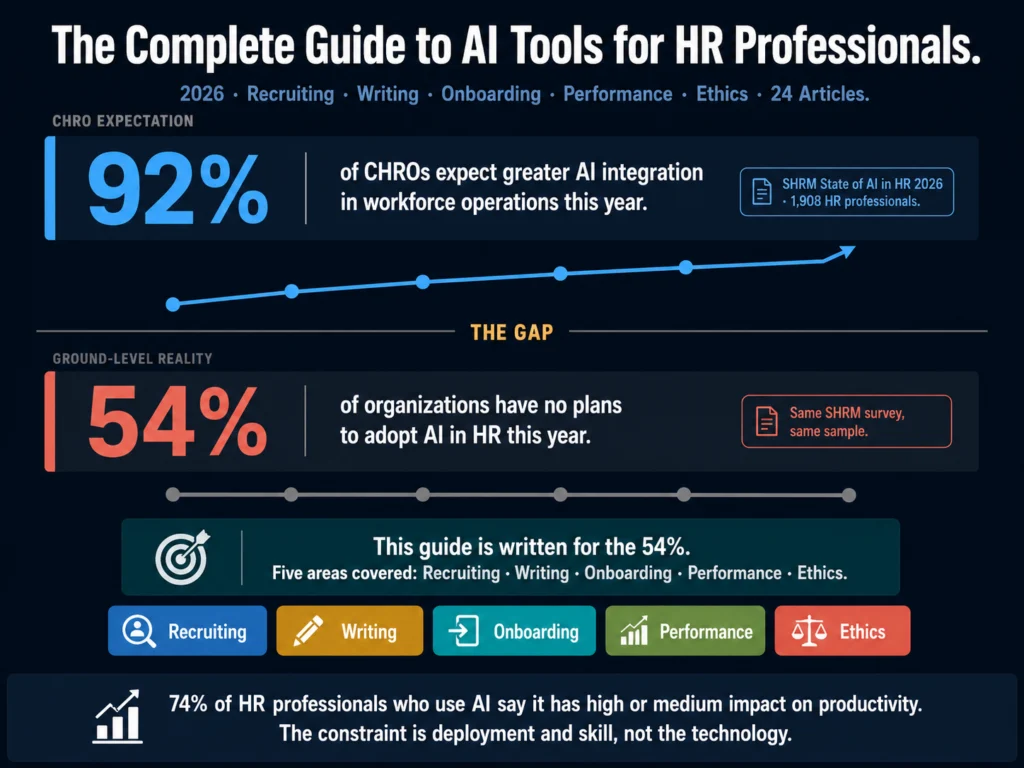
  • P1: The Complete Guide to AI Tools for HR Professionals

Frequently Asked Questions

Does AI resume screening actually save time, and by how much?

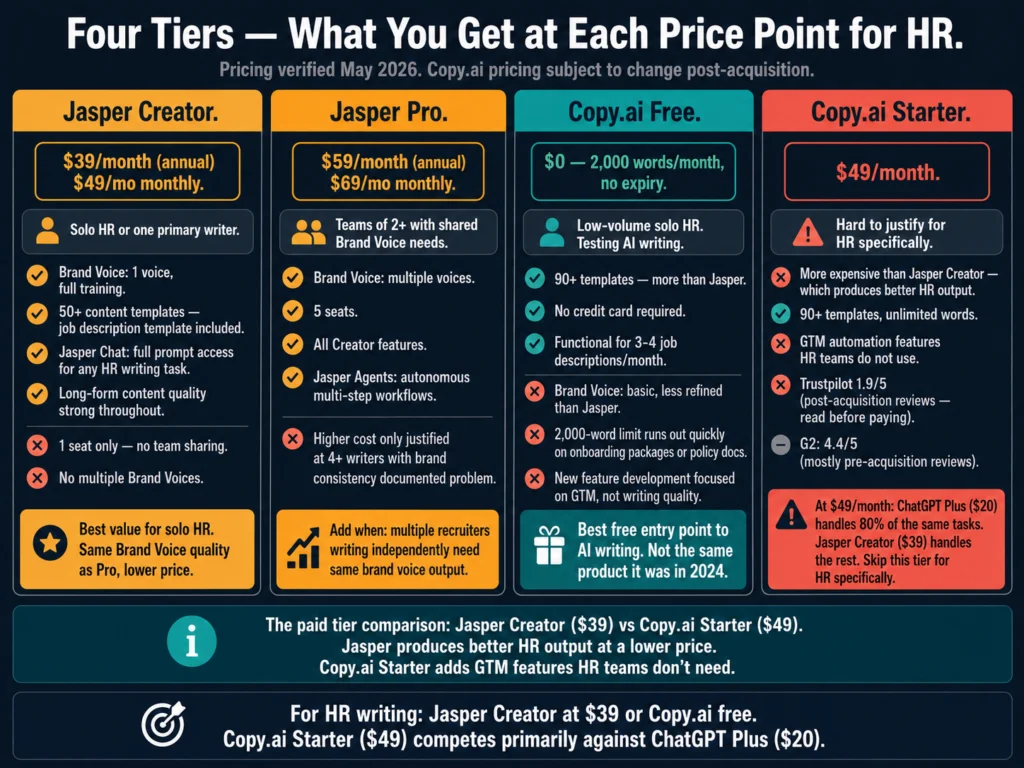
The time savings are real but depend heavily on volume. At low hiring volume — under 20 applications per role — AI screening adds overhead without meaningful benefit. The tools earn their keep at high volume. When the average time-to-fill sits at 63.5 days, even modest improvements in screening speed translate directly to faster hires. For teams handling hundreds of applications per role, the reduction in time spent on initial review is significant, though the saved time shifts to configuring, calibrating, and auditing the tool itself, which is often underestimated.

Can AI screening tools be used for all roles, or are some better handled manually?

High-volume roles with standardized requirements — customer service, sales development, operations — are the strongest fit for AI screening. The role is well-defined, the qualification signals are clear, and the volume justifies the setup cost. Senior, executive, or highly specialized roles are a weaker fit. The requirements are nuanced, the candidate pool is smaller, and the cost of a false negative — screening out a strong candidate the AI misread — is much higher. Most HR teams end up running AI screening on high-volume roles and handling senior searches manually or through specialized search firms.

How do I know if an AI screening tool is introducing bias into my hiring process?

The most common signal is a pattern in who gets advanced versus who gets screened out that does not align with the stated requirements. If you notice that candidates from certain institutions, career paths, or demographic backgrounds are consistently scored lower, the model may be reproducing historical hiring patterns from its training data rather than evaluating current qualifications. Conduct a structured audit: compare the demographic distribution of the applicant pool to the screened-in shortlist. Any significant gap warrants investigation. Tools with built-in reporting on candidate progression by demographic group make this audit significantly easier.

What does “human in the loop” mean in practice for AI resume screening?

It means a human reviews and approves AI decisions before any candidate-facing action is taken. At minimum: no automated rejection emails are sent based solely on an AI score. A recruiter reviews the AI’s shortlist and the low-scored candidates it deprioritized before the shortlist is finalized. For regulated industries or positions covered by local AI hiring disclosure laws, the bar is higher — candidates must be notified that AI was used, and there must be a mechanism for human override. Automated rejections without any human review are the fastest way to trigger discrimination claims.

Are there free AI resume screening tools worth using?

The free tiers of most dedicated screening tools are too limited for production use — they either cap the number of resumes you can process or restrict the matching features to basic keyword logic. The one legitimate free option for small teams: using ChatGPT or Claude to review a batch of resumes against a defined criteria rubric. This is not automated at scale, but for a team hiring fewer than five people per month, a structured prompt that asks the AI to score each resume against your specific requirements works reasonably well. The advantage is full transparency — you can see the reasoning for every assessment. The disadvantage is that it does not integrate with your ATS and does not scale past low volume.

Conclusion

AI resume screening is not optional at 257 applications per role. The math does not work any other way.

What is optional — and what HR teams consistently get wrong, based on what the Ailovyu team has tracked across compliance developments and vendor claims in this space — is treating it as a pass-through decision rather than one that requires audit, calibration, and human review.

The tools that hold up are the ones that show their work. If a vendor cannot tell you why a candidate ranked where they did, you are running an audit-proof black box that your legal team would not be comfortable with if they knew it existed.

Start with Manatal if budget is a constraint and you need ATS and screening in one tool. Use Workable’s built-in features if you are already on that platform.

Consider Eightfold when the organization’s size and compliance requirements justify the investment — and ask the vendor directly about their own litigation exposure before signing.

In all cases: keep a human between the AI’s output and any candidate-facing outcome. The legal landscape in 2026 makes that non-negotiable.

The Ailovyu Team

We research and test AI tools so you can make informed decisions before spending money on them. Every review, comparison, and tutorial on this site is based on actual use, not vendor marketing.
Learn more on our About page.

ailovyu.com

Statistics sourced from Employ Inc. 2026 Recruiting Benchmarking Report and SHRM 2025 Talent Trends. Legal information sourced from DISA, Foley & Lardner, and angelareddock-wright.com. This article is for informational purposes and does not constitute legal advice. Affiliate links earn a commission at no extra cost to you.

How to Write 10 Job Descriptions in One Day Using AI (2026)

May 10, 2026 by The Ailovyu Team Leave a Comment

AI workflow for writing 10 job descriptions in one day using ChatGPT — step-by-step process overview

TL;DR
  • Writing 10 job descriptions in a single day is realistic with AI — but only if you work in batches, not one at a time.
  • The bottleneck is not the writing. It is the brief. Getting complete, accurate information about each role before you open ChatGPT cuts your editing time in half.
  • This workflow has six steps: build an intake form, write a master prompt, fill the briefs, batch the drafts, run a review pass, and final-check before posting.
  • Total working time: roughly 3 to 4 hours for 10 job descriptions, including editing.
  • The prompts in this article are copy-paste ready. Adjust the bracketed variables and they work across roles.

Most recruiters would not attempt to write 10 job descriptions in a single day. The mental overhead of switching between roles, formats, and tones makes the task feel bigger than it is.

Start a description for a Senior Accountant, get halfway through, remember you still have a DevOps Engineer and two Customer Success roles open, and the whole thing starts to feel unmanageable.

AI does not solve the mental overhead on its own. What it solves is the drafting time, but only if you restructure how you approach the work.

The workflow below is built around one core principle: gather everything first, write everything second. Switching back and forth between gathering role information and writing descriptions is where most of the time disappears.

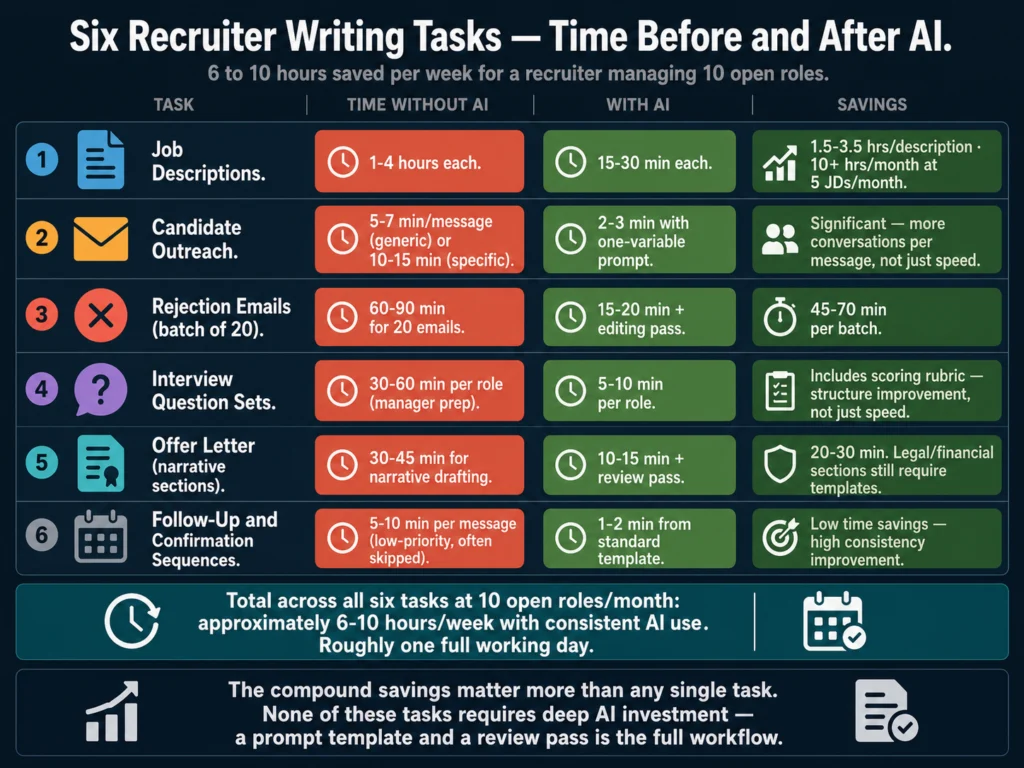
According to a HiringThing survey of recruiters and hiring managers, 57% of respondents say it takes over an hour to write a quality job description — with 26% reporting more than two hours per posting.

Applied to 10 roles, that is anywhere from 10 to 20 hours of work. The workflow below brings that down to 3 to 4 hours, including review.

That math only works if you follow the steps in order.

Table of Contents
  • Before You Start: What This Workflow Requires
  • Step 1: Build Your Role Intake Form (Do This Once, Use It Forever)
  • Step 2: Write Your Master Prompt Template (Do This Once)
  • Step 3: Fill All 10 Briefs Before Opening ChatGPT
  • Step 4: Batch All 10 Drafts in One Session
  • Step 5: Run a Structured Review Pass
  • Step 6: Final Check Before Posting
  • Time Breakdown for 10 Job Descriptions
  • The Most Common Mistakes in This Workflow
  • Related Reading
  • Frequently Asked Questions
  • Conclusion

Before You Start: What This Workflow Requires

You will need access to ChatGPT. The free tier now runs on GPT-5.5 Instant, which handles most standard job description briefs well, but caps out at 10 messages every 5 hours.

ChatGPT Plus at $20/month removes that cap and adds GPT-5.5 Thinking, the reasoning-capable tier that handles longer and more complex briefs noticeably better.

Six-step workflow diagram for writing job descriptions with AI — from intake form to final posting check
All six steps in order. The workflow only works if you follow the sequence, especially the rule about gathering all briefs before drafting anything.

Grammarly is useful for the review pass. The rest is organizational, not technical.

You also need to accept one constraint upfront: this workflow is not suitable for highly specialized or executive-level roles without significant customization.

A staff-level Customer Success Manager description can be drafted and reviewed in 20 minutes with this method.

A VP of Engineering role at a late-stage startup, where the requirements are genuinely complex and the wrong posting costs months of sourcing time, deserves more than a batch workflow. Know which category your open roles fall into before you start.

For roles that do fit the batch approach, here is the full workflow.


Step 1: Build Your Role Intake Form (Do This Once, Use It Forever)

The single most important thing you can do before drafting any job description — with or without AI — is to stop starting from memory.

Most job descriptions are vague because the person writing them did not have specific information. They knew the title, guessed at the responsibilities, and copied the requirements from a previous posting. AI amplifies this problem: a vague brief produces a vague draft, faster.

The fix is a standardized intake form you send to hiring managers before you write anything. It takes about 20 minutes to build once, and it makes every description you write — for the rest of your career — faster and more accurate.

Recruiter intake form template for AI job description writing — fields covering responsibilities, qualifications, and role context
Send this form to every hiring manager before you write a word. Do not start a description until it comes back filled out. An incomplete brief costs more time than waiting two days for a complete one.

Your intake form should capture:

  • Job title and level (junior, mid, senior, lead, manager)
  • Department and direct reporting line
  • Employment type (full-time, part-time, contract) and location (remote, hybrid, on-site)
  • 5 to 8 core responsibilities — written as what the person actually does, not what the role “supports”
  • 3 to 5 must-have qualifications — non-negotiable requirements only
  • 2 to 3 nice-to-have qualifications — genuinely optional
  • Salary range, if you are including it in the posting
  • One sentence about your team’s working style or culture that a generic company cannot copy
  • One sentence about why this role is open — growth, backfill, or new function (this often surfaces context that changes how you position the role)

Send this form to every hiring manager as the trigger for starting a job description. Do not write a word until it comes back filled out. A recruiter who chases incomplete briefs wastes more time than a recruiter who waits two days for a complete one.


Step 2: Write Your Master Prompt Template (Do This Once)

This is the prompt structure that will power every job description you write. You customize it per role. You do not rewrite it from scratch.

Copy the template below into a Google Doc, Notion page, or wherever you keep your HR resources:

You are an experienced HR writer creating job descriptions for [COMPANY NAME], 
a [COMPANY SIZE]-person [INDUSTRY] company based in [LOCATION / REMOTE STATUS].

Write a job description for the role of [JOB TITLE] at the [LEVEL] level.

The description should:
- Be between 350 and 500 words total
- Open with a 2-sentence summary of the role's purpose and impact
- Include a "What You'll Do" section with [NUMBER] bullet points
- Include a "What We're Looking For" section with must-haves clearly 
  separated from nice-to-haves
- Close with 2 to 3 sentences about the company and team
- Use a [TONE: direct and practical / conversational / formal] tone
- Avoid the following phrases: [LIST ANY BANNED PHRASES]

Role details:
- Core responsibilities: [PASTE FROM INTAKE FORM]
- Must-have qualifications: [PASTE FROM INTAKE FORM]
- Nice-to-have qualifications: [PASTE FROM INTAKE FORM]
- Why this role is open: [GROWTH / BACKFILL / NEW FUNCTION]
- Team context: [ONE SENTENCE FROM INTAKE FORM]
- Salary range: [RANGE OR "not included in this posting"]

Do not use filler phrases like "fast-paced environment," "wear many hats," 
"passionate about," or "rockstar." Write as if the reader is a capable 
professional, not someone who needs to be sold on taking a job.

This template does several things that a generic “write me a job description” prompt does not. It sets word count boundaries, because best-performing job descriptions run between 300 and 700 words, according to Ongig research.

Specifying structure means you get formatted output, not a blob of text that needs reworking. And banning filler phrases by name keeps the output from sounding like it could have come from any company.

GPT-5.5 Instant — the current default for all users — handles this prompt well for most standard roles.

For dense briefs covering senior or highly technical positions, GPT-5.5 Thinking (available on ChatGPT Plus at $20/month) produces more precise output and reasons through complex requirements without flattening the detail.


Step 3: Fill All 10 Briefs Before Opening ChatGPT

This step feels counterintuitive. Most people want to start drafting the moment they have one brief ready. Do not.

The reason to batch all your briefs first is context switching. Every time you move from “gathering information” to “writing” and back to “gathering information,” your brain resets its working context.

That transition costs around 23 minutes of recovery time, according to research by Gloria Mark at UC Irvine, time you spend re-reading what you wrote and mentally re-entering the task.

If you collect all 10 intake forms before drafting the first description, you stay in the same mode — reviewing and organizing — for a concentrated block of time. Then you shift into drafting mode and stay there.

Practically: set a deadline for hiring managers to return their intake forms. Chase once if they miss it. If the brief is incomplete, do not start the description. An incomplete brief produces a draft you will rewrite twice.

Once all 10 briefs are back, spend 20 to 30 minutes reading through them and flagging anything that needs clarification before you draft. A responsibilities section that says “manage projects” is not enough. “Manage 3 to 5 concurrent product launches across EMEA” is.


Step 4: Batch All 10 Drafts in One Session

Open ChatGPT. Set a timer for 90 minutes. Work through all 10 roles without stopping to heavily edit as you go.

Batch drafting workflow showing 10 job description roles processed in one 90-minute ChatGPT session
Open one new ChatGPT conversation per role. Never draft two roles in the same chat. Context from one role bleeds into the next if you do.

The sequence for each role:

  1. Paste your master prompt template into a new ChatGPT conversation
  2. Fill in all the bracketed variables with data from that role’s intake form
  3. Submit and read the output
  4. If the structure is correct but specific sentences are off, use one follow-up prompt to fix them (examples below)
  5. Copy the draft into your working document and move to the next role

Useful follow-up prompts for in-session fixes:

If the opening is too generic:

The opening paragraph is too vague. Rewrite it in 2 sentences that describe 
specifically what this person will own and why the role matters to the team.

If the requirements list is too long:

The requirements section has [NUMBER] bullet points. 
Cut it to [TARGET NUMBER]. Keep only the genuine must-haves.

If the tone is off:

Rewrite this in a more [direct / conversational / formal] tone. 
Remove any phrasing that sounds like a marketing email.

If a specific section is weak:

The "What We're Looking For" section is too generic. 
Rewrite it using the specific qualifications I provided, 
not general competency language.

Do not spend more than 10 minutes per role in this drafting phase. If a draft requires extensive in-session editing, the brief was incomplete. Flag it and move on. You can return to it after the others are done.

By the end of 90 minutes, you should have 10 rough drafts in a working document.

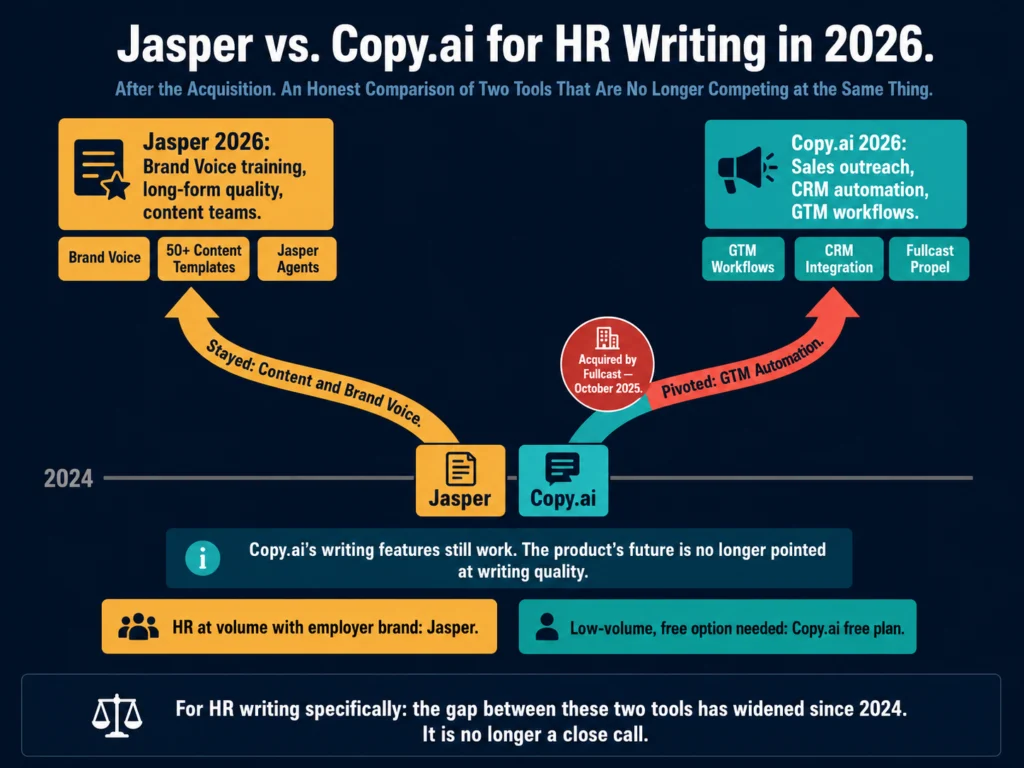
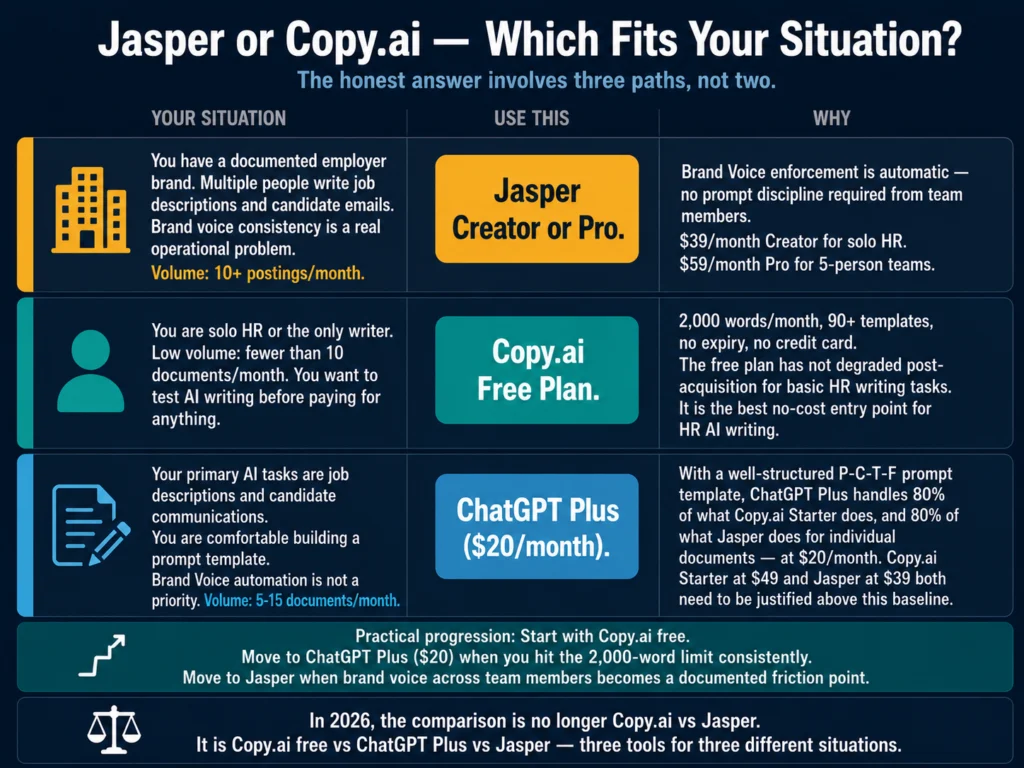
If you are managing a team of recruiters who all need access to the same master prompt and company voice settings, Jasper’s Brand Voice feature is worth evaluating.

It ensures that descriptions written by different people still sound like the same company — something a shared Google Doc prompt cannot fully replicate.

→ Jasper offers a 7-day free trial with full feature access.


Step 5: Run a Structured Review Pass

The drafts from Step 4 are not ready to post. They are well-structured starting points that need a human to verify accuracy and add the one or two details that make a posting sound specific to your company.

Work through each draft with these five checks:

Accuracy check: Does every responsibility and qualification match what the hiring manager actually submitted? AI occasionally smooths or generalizes specific details into broader language. Restore the specifics when this happens.

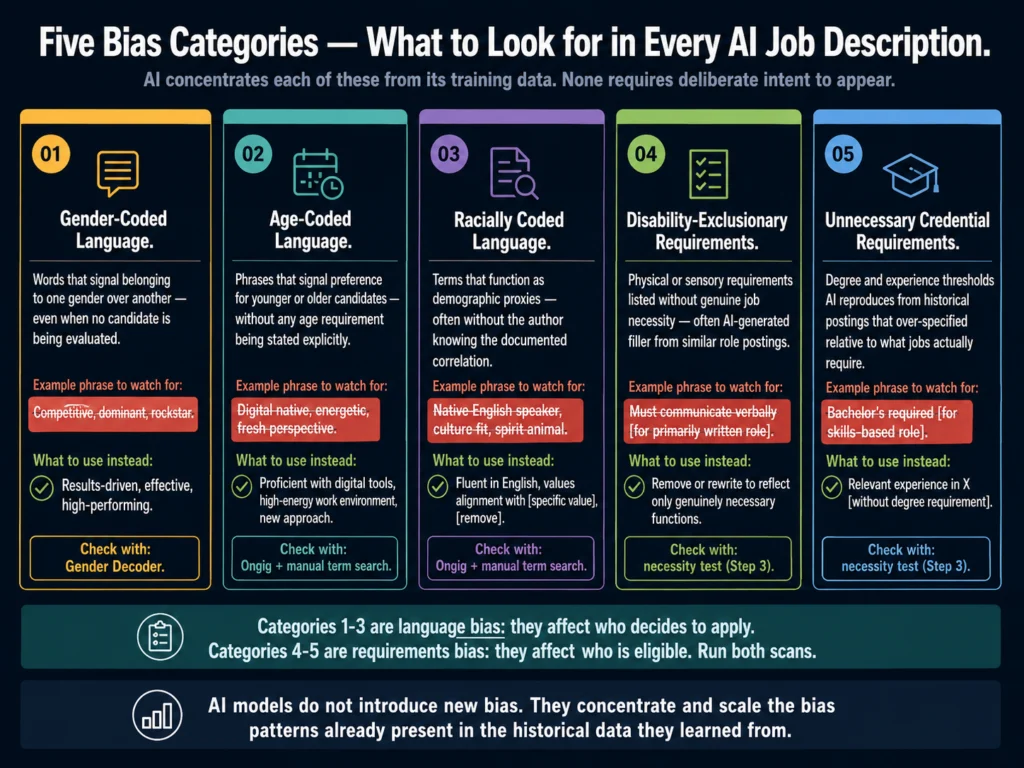
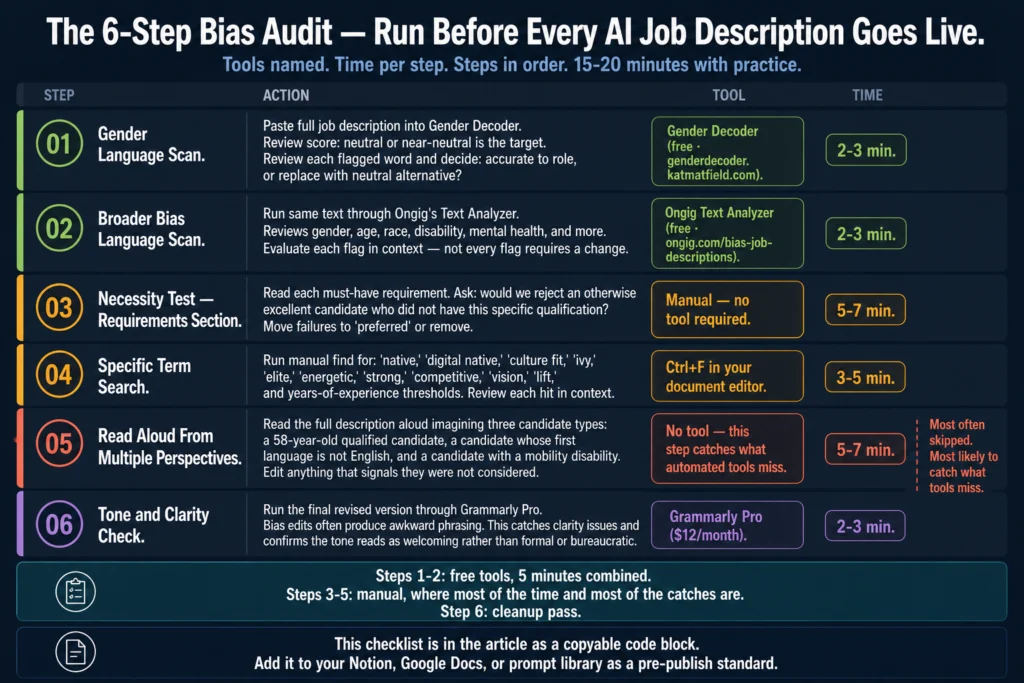
Requirements audit: Requirements lists frequently accumulate nice-to-haves that most hiring managers would overlook in an otherwise strong candidate. Go through each must-have and ask: would we actually pass on someone who ticks every other box but lacks this? Cut anything where the honest answer is no.

Tone check: Read the description aloud. If any sentence sounds like it was written by a committee, rewrite it. The goal is for the post to sound like a real person at your company — not a job description generator.

Closing line: Does the final company description say something specific to your organization? “We are a team that values collaboration” is not specific. “We are a 40-person team where senior engineers review code the same day it’s submitted” is.

Word count check: Is the description between 300 and 700 words? According to Ongig’s research on job description length, postings in that range consistently outperform shorter and longer ones on application rates.

Under 300 words signals a role that is not well-defined. Over 700 words signals a requirements list that has not been edited. Both hurt conversion. If your draft is outside that range, cut the requirements section first. That is almost always where the excess lives.

Grammarly’s tone detector is useful for this step — particularly if you are reviewing a batch of descriptions quickly and want a second signal on whether a posting reads as intended.

The free plan handles basic clarity. Premium adds the tone analysis.

→ Grammarly’s free plan is worth installing before your next review pass.


Step 6: Final Check Before Posting

Before each description goes live, spend 3 to 5 minutes on this checklist:

  • Job title: Is it the title a candidate would actually search for? Internal titles sometimes differ from market-standard ones.
  • Salary range: If you are including it, is it current? Salary data shifts. A range from a previous hiring cycle may now be below market.
  • Requirements: Could any item on the must-have list inadvertently screen out candidates from underrepresented groups? Overly long experience requirements and credentials not required for the job are the most common sources of bias. For a detailed breakdown of this topic, read: #7: AI Bias in Hiring — What HR Teams Need to Know
  • Links and formatting: Will the description paste cleanly into your ATS? Bold, italic, and bullet formatting does not always transfer correctly.
  • Legal review: Does any line in the description make a promise or imply a condition of employment that your company cannot fulfill? A phrase like “unlimited growth opportunities” can create legal exposure. For more on this, read: #12: Can You Use AI-Generated Job Descriptions Legally? A Plain-English Guide

Time Breakdown for 10 Job Descriptions

Time breakdown chart showing the 4-hour AI workflow for writing 10 job descriptions — from setup to final posting check
About 4 hours for a full batch of 10. The 30-minute setup (intake form and master prompt) is a one-time cost. Every batch after the first runs closer to 3 to 3.5 hours.
PhaseTaskTime
Setup (one-time)Build intake form and master prompt30 min
PrepSend and chase intake forms15 min
PrepReview all 10 briefs, flag gaps25 min
DraftingBatch all 10 drafts in ChatGPT90 min
ReviewAccuracy, requirements, tone checks60 min
FinalPre-posting checklist per role30 min
Total~4 hours

The 30-minute setup (intake form and master prompt) is a one-time investment. After the first batch, your working time per 10 descriptions drops to roughly 3 to 3.5 hours.


The Most Common Mistakes in This Workflow

Starting with a weak brief. The output is only as specific as the input. If you skip the intake form and draft from memory, you will spend more time editing than you saved by using AI.

Editing heavily in the drafting phase. The batch approach only works if you stay in drafting mode during Step 4. Heavy editing mid-session breaks the rhythm and defeats the time advantage.

Posting without a review pass. AI drafts are starting points, not finished products. The requirements audit in Step 5 is particularly important — AI frequently mirrors whatever qualification language you give it without questioning whether the list is realistic or necessary.

Using the same conversation for multiple roles. Open a new ChatGPT conversation for each role. Context from a previous role can bleed into subsequent drafts in the same session, producing outputs that conflate responsibilities across positions.


Related Reading

  • Best AI Tools for Writing Job Descriptions
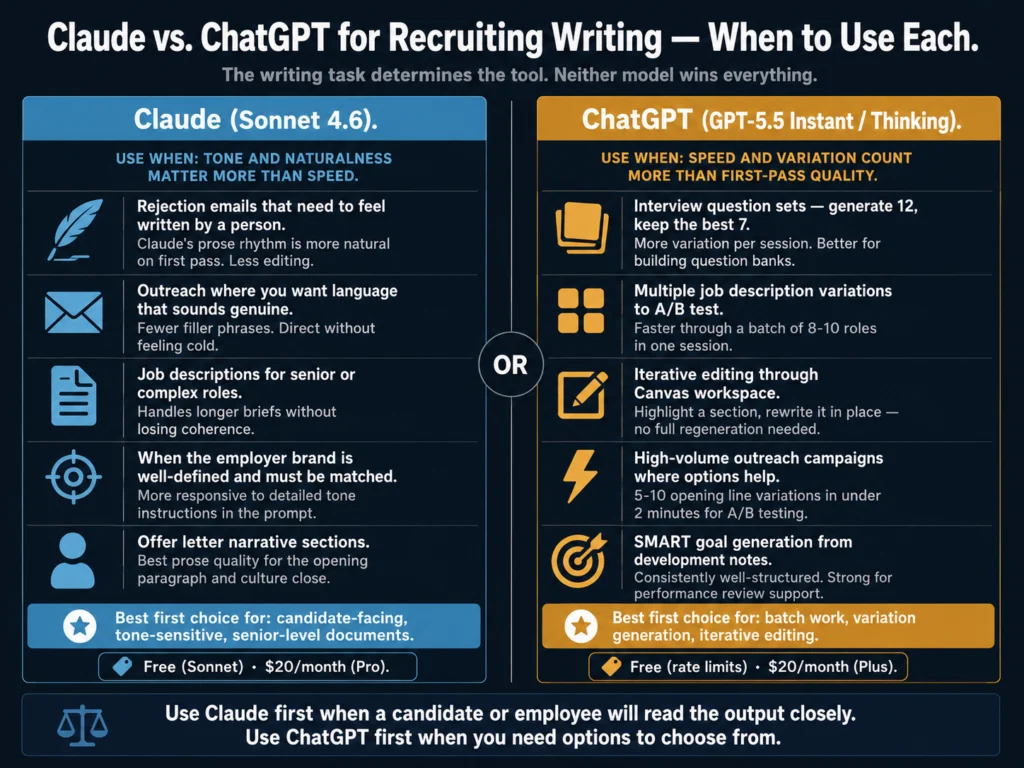
  • #4: ChatGPT vs. Claude for HR Writing — A Practical Comparison
  • #7: AI Bias in Hiring — What HR Teams Need to Know
  • #12: Can You Use AI-Generated Job Descriptions Legally? A Plain-English Guide
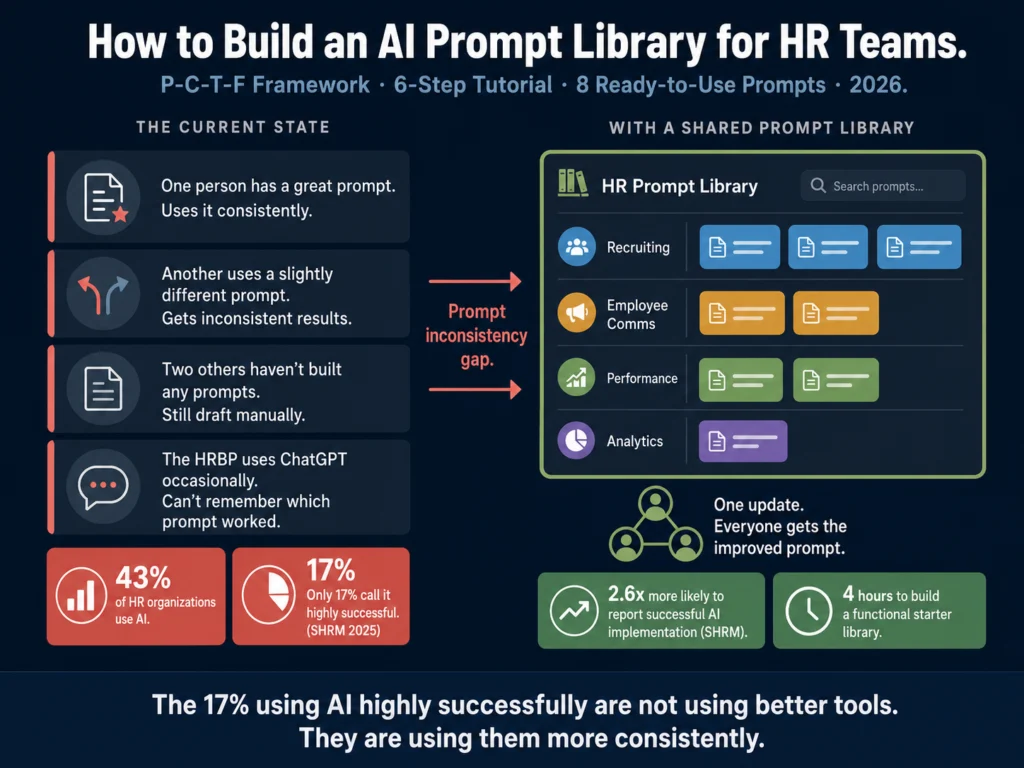
  • #19: How to Build an AI Prompt Library for HR Teams
  • P2: AI Writing Tools for Recruiters — The Complete Guide

Frequently Asked Questions

Do I need ChatGPT Plus to use this workflow, or will the free tier work?

The free tier — now running on GPT-5.5 Instant — handles straightforward roles with shorter briefs without issue, but caps out at 10 messages every 5 hours. For senior roles, highly detailed briefs, or complex follow-up edits within a single conversation, GPT-5.5 Thinking (available on ChatGPT Plus at $20/month) produces more precise output. If you are running a full 10-role batch that includes senior or technical positions, the Plus subscription is worth it — you get higher message limits and the reasoning tier for the roles that need it.

What if a hiring manager submits an incomplete intake form?

Do not start the description. Send one follow-up message asking for the specific missing information. The two most common gaps are vague responsibility descriptions (“manage projects,” “support the team”) and missing context about why the role is open. A backfill is positioned differently from a growth hire — the framing affects the entire posting. Writing from an incomplete brief produces a draft you will revise more than once.

Can I use this workflow with tools other than ChatGPT?

Yes. The master prompt template works with Claude, Gemini, and other large language model tools. Claude tends to produce slightly more precise language on senior or technical roles; ChatGPT’s formatting is cleaner out of the box. The core workflow — batch briefs, batch drafts, structured review — applies regardless of which tool you use. For a direct comparison of how ChatGPT and Claude handle HR writing tasks, read: #4: ChatGPT vs. Claude for HR Writing — A Practical Comparison

How should I handle roles in different departments that need a different tone?

Adjust the tone variable in your master prompt for each department. Engineering descriptions typically run more direct and technical; Marketing roles often benefit from a slightly warmer tone; Finance postings tend toward formal. You do not need separate templates for each department — a single variable swap in Step 2 handles it. If your organization has very distinct brand voice requirements across departments, Jasper’s Brand Voice feature is worth the investment. It encodes the voice difference once and applies it automatically.

Is there a risk of the same phrasing appearing across multiple job descriptions?

Yes, especially if you use similar briefs across similar roles. ChatGPT draws from the same underlying patterns, so a batch of Customer Success Manager descriptions written with minimal variation in the brief will produce drafts with noticeable similarities. The solution is specificity at the brief level: even for similar roles, surface the details that make each position distinct — the team size, the stage of the product, the specific customer segment. Different inputs produce different outputs.


Conclusion

Writing 10 job descriptions in a day is not about writing fast. It is about organizing the work so that the writing itself, which AI handles quickly, is not interrupted by information-gathering, context-switching, or mid-draft editing.

The Ailovyu team built this workflow for exactly that problem: recruiters who have the roles open but lose hours to process, not to writing.

The intake form is where most of the value in this workflow lives. Better inputs produce better drafts, shorter review passes, and fewer rounds of back-and-forth with hiring managers.

The AI is just the drafting engine. You are still the editor, the accuracy check, and the person who knows whether a job description actually reflects the role.

Build the intake form today. Write the master prompt. Use it on the next batch of open roles. The workflow becomes faster the second and third time as your prompt template improves based on what the review pass keeps catching.

The Ailovyu Team

We research and test AI tools so you can make informed decisions before spending money on them. Every review, comparison, and tutorial on this site is based on actual use, not vendor marketing.
Learn more on our About page.

ailovyu.com

Affiliate links in this article earn a commission at no extra cost to you. Pricing and tool features verified May 2026 from vendor websites. ChatGPT model information sourced from OpenAI’s official release notes.

Best AI Tools for Writing Job Descriptions (2026) – Reviewed

May 8, 2026 by The Ailovyu Team Leave a Comment

Best AI tools for writing job descriptions in 2026 — ChatGPT, Jasper, Textio, Copy.ai, Workable, Grammarly compared

TL;DR
  • ChatGPT is the most capable free option. A well-crafted prompt produces a usable draft in under 5 minutes.
  • Jasper AI is worth it for teams writing 10+ postings per month who need consistent brand voice. Solo recruiters should skip it.
  • Textio is the only tool built to reduce biased language using actual outcome data. Priced for enterprise budgets, though.
  • Copy.ai has the most useful free plan in this category. Two minutes from job title to draft.
  • Workable is relevant only if it is already your ATS. Its AI writer is competent and included in your subscription.
  • Grammarly does not generate job descriptions from scratch. It refines what you already have. Include it as a finishing layer, not a primary tool.
  • None of these tools replace a human review before posting.

Writing a job description should take 20 minutes. In practice it takes most recruiters 2 to 4 hours, and the result is often a copy-paste of the last version with a few lines swapped out. The posting goes live, attracts the wrong applicants, and the cycle repeats.

AI does not solve the underlying problem of not knowing what a role actually requires. But for the drafting work itself (structure, phrasing, formatting, tone), it removes most of the blank-page friction.

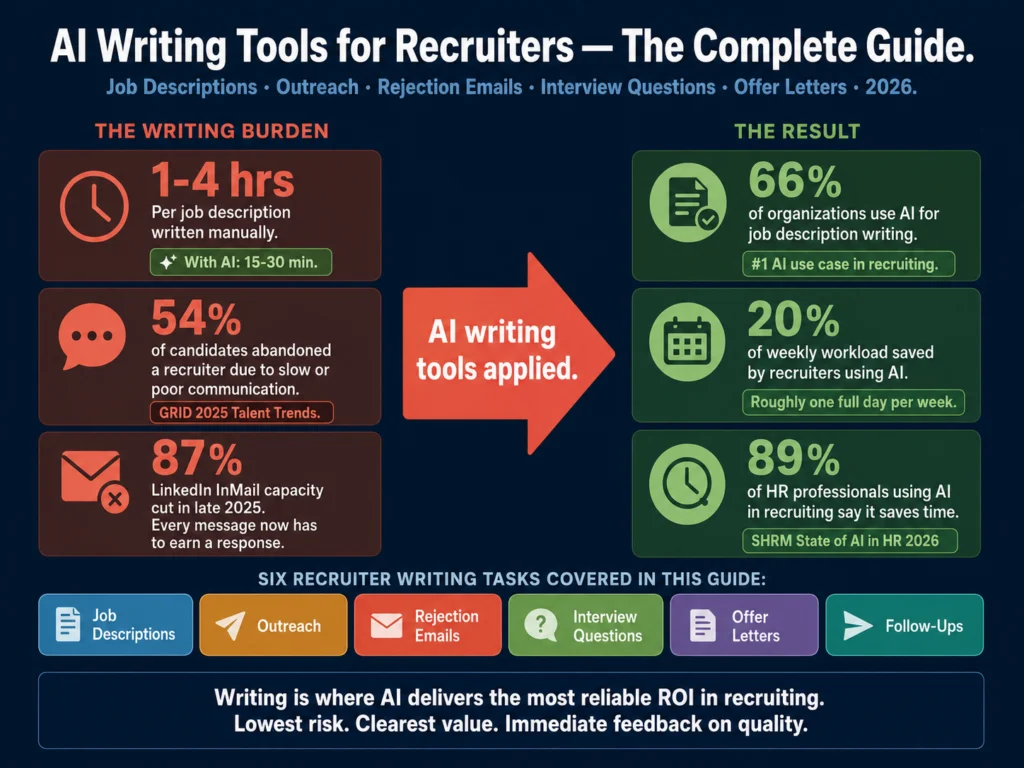
Among talent acquisition professionals already using generative AI in hiring, the average time saved is about 20% of their work week, roughly one full workday.

That figure comes from LinkedIn’s Future of Recruiting report and covers AI use across all recruiting tasks, not just writing. Even a fraction of that applied to job description drafting adds up fast.

AI use across HR tasks climbed to 43% as of early 2025, up from 26% in 2024, according to SHRM’s Talent Trends research. The organization describes this as a shift from pilots to real workflows.

The tools are no longer experimental. The question is which ones actually deliver for HR teams doing real hiring, not marketing teams with writing budgets.

The Ailovyu team submitted the same brief to five of the six tools on this list — a mid-level Customer Success Manager role at a 120-person B2B SaaS company, fully remote, requiring 3 years of experience with enterprise accounts. Here is what the output looked like, and what it tells you about each tool.

Table of Contents
  • The 6 Best AI Tools for Writing Job Descriptions
    • 1. ChatGPT — Best Overall for Most Teams
    • 2. Jasper AI — Powerful, but Not for Everyone
    • 3. Textio — The Only Tool Built Specifically for This Problem
    • 4. Copy.ai — Two Minutes to a Usable Draft
    • 5. Workable — One Reason to Consider It
    • 6. Grammarly — Not a Generator, but Worth Having Anyway
  • Quick Comparison
  • How to Choose
  • Related Reading
  • Frequently Asked Questions
  • Conclusion

The 6 Best AI Tools for Writing Job Descriptions


1. ChatGPT — Best Overall for Most Teams

ChatGPT produced the most usable first draft of the five tools we tested. The output was clean, well-structured, and required less editing than any other tool. But only because we gave it a detailed prompt.

The brief included the job title, seniority level, 6 core responsibilities, 4 required qualifications, company size, culture notes, and a sentence about tone (“direct and practical, not startup-jargon-heavy”).

With that input, ChatGPT returned a 450-word draft with a role summary, bulleted responsibilities, requirements separated by “must-have” and “nice-to-have,” and a company blurb. The tone was accurate. The structure was ready to post with minor edits.

Without that level of detail, the output was noticeably generic. A prompt of just “write a job description for a Customer Success Manager, B2B SaaS, remote” produced a draft that could have come from any company, any industry, any decade.

Comparison showing how a vague vs detailed ChatGPT prompt produces different job description quality
The tool is not the differentiator. Your prompt template is. A 6-line brief returns a ready-to-post draft. A one-liner returns something any company could have written.

The practical lesson: ChatGPT’s output quality is almost entirely a function of your prompt quality. The tool itself is not the differentiator — your prompt template is. Build one good template and reuse it across all your postings.

Pricing: Free (GPT-5.3 Instant, capped at 10 messages per 5 hours — US free accounts now show ads). ChatGPT Plus at $20/month removes ads and gives access to GPT-5.5, which handles longer and more nuanced content noticeably better.

Best for: Any HR team that wants to start using AI without additional software spend. The entry point is zero dollars.

Honest limit: ChatGPT does not flag biased language unless you specifically ask. It also forgets your brand voice between sessions unless you use a custom GPT or system prompt.


2. Jasper AI — Powerful, but Not for Everyone

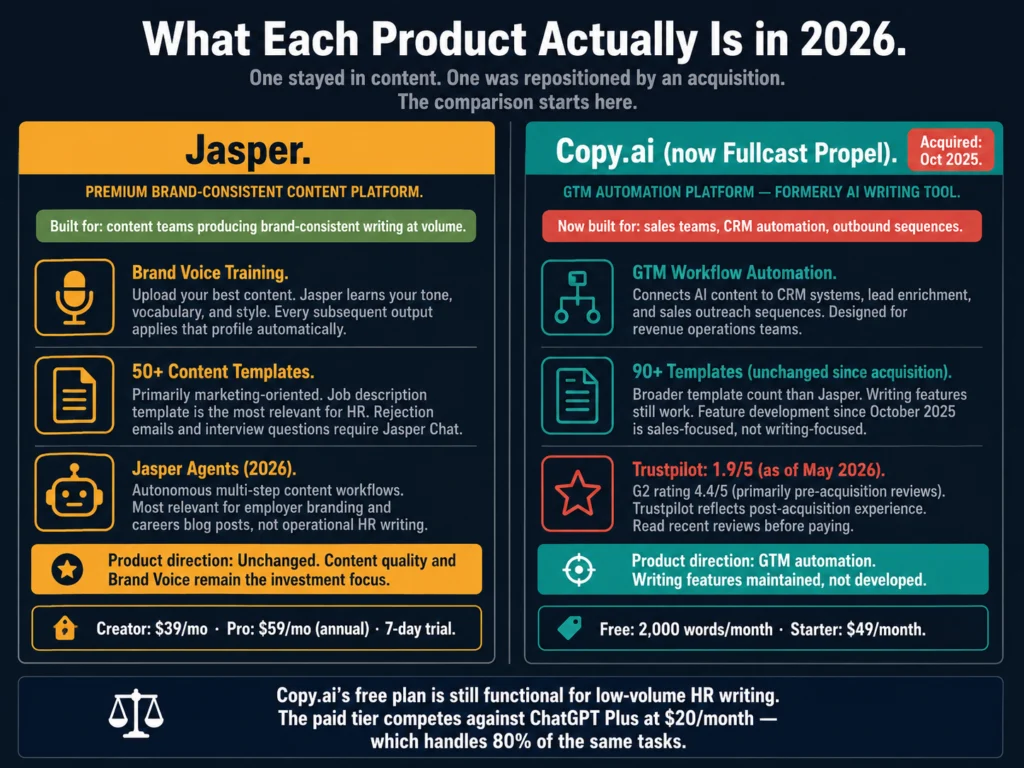
Let us address the obvious question first: at $39 to $49 per month for a single user, is Jasper worth it over just using ChatGPT Plus at $20?

For an individual recruiter writing a handful of postings per month, probably not. The output quality difference between Jasper and a well-prompted ChatGPT is real but not dramatic enough to justify twice the cost.

Where Jasper earns its price is the Brand Voice feature. You upload samples of your company’s existing content — careers page copy, past job posts, your About page — and Jasper learns the tone, vocabulary, and structure.

Every subsequent draft inherits that voice without you re-specifying it each time. For a team of 5 recruiters producing 30 postings a month across 4 departments, that consistency has real value.

Without it, your job descriptions for Engineering sound nothing like your postings for Sales, which sends a subtle but real signal to candidates about how organized your company is.

On our Customer Success Manager test, Jasper’s output was noticeably more on-brand than ChatGPT’s — after we spent about 90 minutes training the brand voice initially. That setup time is the hidden cost. It is worth it at scale. It is not worth it for occasional hiring.

Pricing: Creator plan $39/month (annual) or $49/month (monthly). Pro plan $59/month (annual) or $69/month (monthly). 7-day free trial available with no credit card required.

Best for: In-house HR teams with defined employer branding, hiring regularly across multiple departments.

Skip it if: You post fewer than 10 to 15 roles per month or you are a solo HR generalist without a defined brand voice to train.

→ Jasper offers a 7-day free trial with full feature access. No credit card needed.


3. Textio — The Only Tool Built Specifically for This Problem

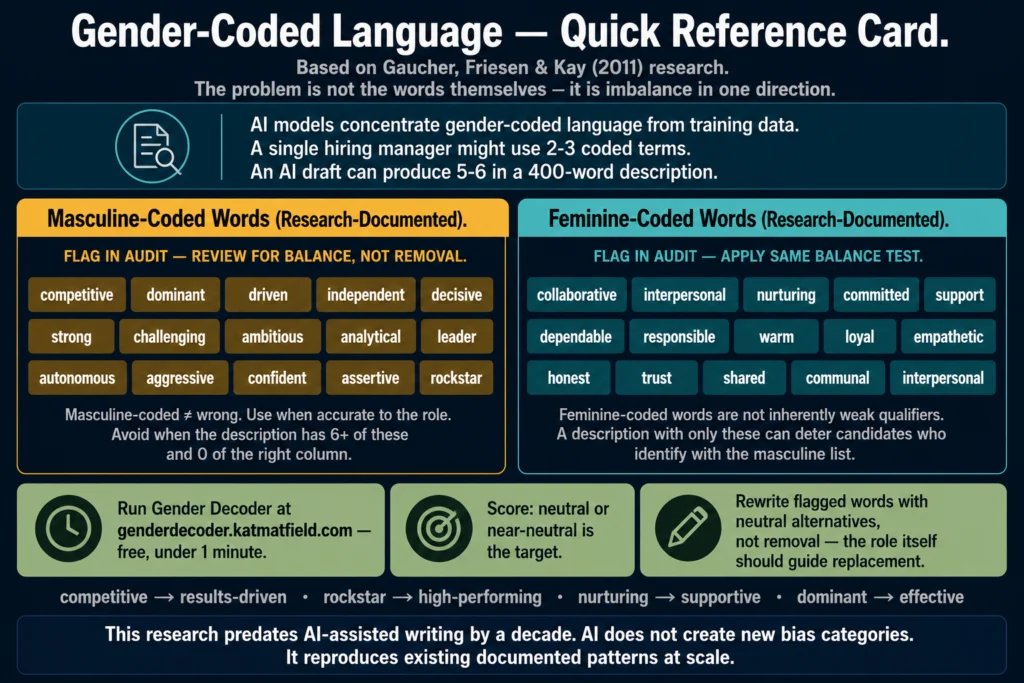
Textio does something none of the other tools on this list do: it tells you, with outcome data behind it, which specific phrases in your job description are costing you applicants.

The mechanism matters here. Textio has analyzed hundreds of millions of job postings and their actual hiring outcomes — who applied, who was interviewed, who was hired.

From that data, it has identified language patterns that reliably suppress or expand the applicant pool. When you write “strong individual contributor” in a job post, Textio flags it because its data shows that phrase discourages women from applying at a statistically significant rate.

Illustration of Textio flagging biased job description language with outcome-based replacement suggestions
Textio doesn’t guess. It flags phrases that have measurably reduced applicant diversity across hundreds of millions of real job postings — then suggests a replacement backed by outcome data.

The suggested replacement is “strong collaborator.” That is not a style opinion. It is an outcome-based recommendation.

This is fundamentally different from what ChatGPT or Jasper do. They generate text. Textio audits it against real hiring behavior.

The tradeoff is price and scope. Textio does not publish rates publicly, which almost always means enterprise-level pricing. You will need to request a demo.

It is purpose-built for HR hiring content — you would not use it for marketing emails or blog posts.

Best for: Organizations with a measurable diversity hiring commitment, HR departments large enough to track hiring outcomes, and companies operating under the EU AI Act’s high-risk employment AI provisions — which took effect in August 2026 and cover AI used in recruitment and candidate evaluation.

Not the right fit: Small HR teams, low hiring volumes, or companies without defined DEI metrics to improve against.

For a closer look at why AI language matters in hiring — and what EEOC guidance says about job requirement language — read: Can You Use AI-Generated Job Descriptions Legally? A Plain-English Guide

Also relevant: AI Bias in Hiring — What HR Teams Need to Know


4. Copy.ai — Two Minutes to a Usable Draft

Copy.ai is the fastest tool on this list, and its free plan is genuinely useful — not artificially capped to force an upgrade.

The job description workflow is a simple form: job title, company name, 3 to 5 responsibilities, and any additional notes. Submit it and the tool returns a full draft in roughly 90 seconds.

On our Customer Success Manager test, the output was structurally solid and grammatically clean, but noticeably less specific than what ChatGPT produced with our detailed prompt. Copy.ai’s form does not encourage the same level of input depth, which shows in the output.

That said, for high-volume hiring teams under time pressure, “structurally solid and needs some editing” is often exactly what you need. The free plan gives you 2,000 words per month with no expiration date — enough to test the tool seriously before paying anything.

Pricing: Free (2,000 words/month, no expiry). Starter at $49/month. Advanced at $249/month for teams.

→ Copy.ai’s free plan has no expiry. Try it before paying.

Best for: Recruiters who want a fast, no-friction option for routine role postings. Good starting tool for small HR teams with no existing AI workflow.

Limit: Output specificity is lower than ChatGPT when using detailed prompts. The tool’s form format nudges you toward simpler inputs.

For a step-by-step workflow on turning a tool like Copy.ai into a repeatable system for bulk drafting, read: How to Write 10 Job Descriptions Per Day Using AI (Step-by-Step Workflow)


5. Workable — One Reason to Consider It

If you already use Workable as your ATS, turn on its AI writer before adding any other tool to your stack.

The AI writing assistant is included in your existing subscription, writes directly inside your posting workflow, and uses market data on job titles and compensation to inform its suggestions. It is not the best AI writing tool available.

But it is already paid for, it requires no additional logins, and it eliminates the copy-paste step between an external AI tool and your ATS. For teams where recruiter adoption of new tools is a persistent challenge, removing friction matters.

On our test, Workable’s output was comparable to Copy.ai — useful structure, needs specificity added, but ready to post faster than a manual draft.

One thing Workable does that standalone tools cannot: it pulls compensation benchmarks for the role directly into the drafting interface.

On our Customer Success Manager test, it flagged that the salary range we had in mind was below market median for fully remote roles in the US. That is a useful catch at the drafting stage, before the posting goes live.

Pricing: Workable plans start at $189/month. AI writing features are included across all paid tiers.

The honest assessment: Workable’s AI is not a reason to switch from your current ATS. It is a reason to use what you are already paying for.

Skip it entirely if: You are not a Workable customer. There is no standalone version and no reason to adopt Workable just for its AI writer.


6. Grammarly — Not a Generator, but Worth Having Anyway

Grammarly gets included on many AI job description tool lists, and it belongs on this one, with a clarification.

It does not write job descriptions. It improves them. If you use any other tool on this list to generate a draft, run it through Grammarly before posting.

It catches things those tools miss: a responsibilities section that reads as commanding rather than inviting, a requirements list where half the items are actually preferences, jargon that sounds natural internally but confuses external candidates.

The tone detector is the most useful feature for job descriptions specifically. It tells you whether your post reads as confident, friendly, or formal, and whether that matches what you intended.

A job description that reads as “harsh” according to Grammarly’s tone analysis will affect the quality and diversity of your applicant pool, even if you did not notice the tone problem yourself.

The free tier handles grammar, spelling, and basic clarity. Premium adds full tone analysis and advanced suggestions. The browser extension works inside most ATS platforms, Google Docs, and LinkedIn.

On our Customer Success Manager draft — after ChatGPT generated it — Grammarly flagged the responsibilities section as reading as “formal” and two bullet points as “direct” in a way that leaned toward commanding. One edit per flag, under two minutes total. The draft read noticeably better after.

Pricing: Free. Premium at $12/month (annual). Business at $15/member/month (annual).

→ Grammarly’s free plan is worth installing today. Premium adds the tone analysis that matters for job posts.

Best for: Every recruiter, as a second pass on any AI-generated draft before it goes live. Not useful as a standalone generation tool.


Quick Comparison

Side-by-side feature and pricing comparison of 6 AI job description writing tools in 2026
Pricing and core capabilities across all six tools, verified April 2026. Verify current rates on vendor websites before purchasing.
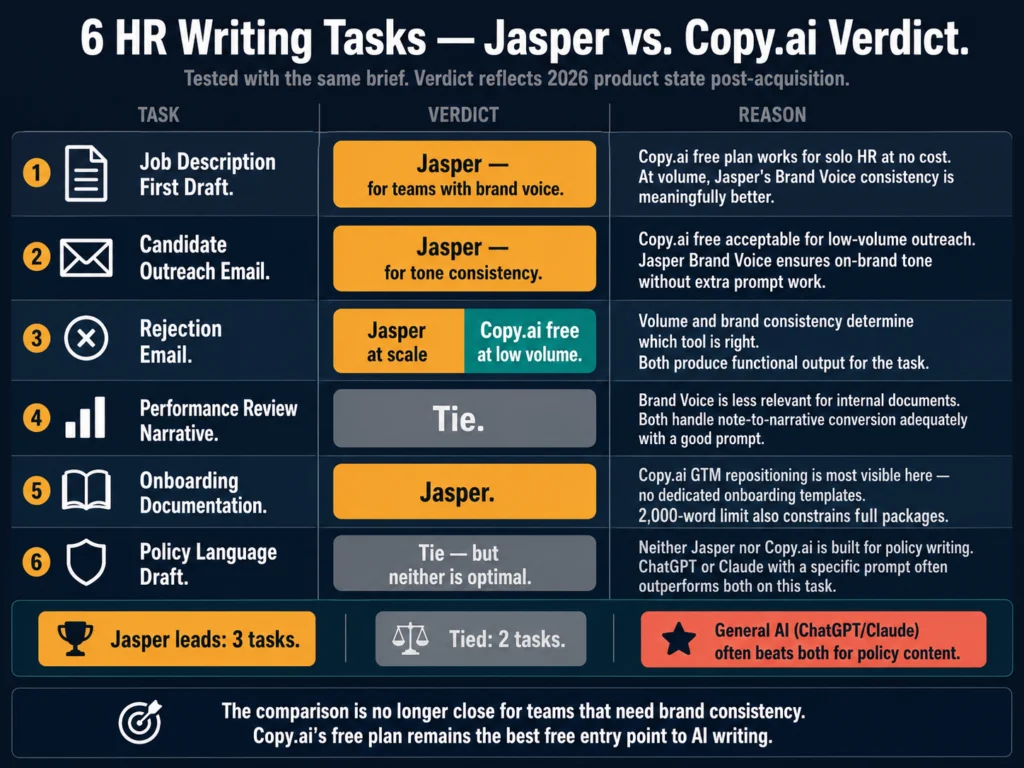
ToolStarting PriceFree PlanGenerates from ScratchBrand VoiceBias Flags
ChatGPT$20/mo (Plus)✓ GPT-5.3 (capped)✓Via custom GPTManual only
Jasper AI$39/mo (annual)7-day trial✓✓ NativeNo
TextioEnterprise (demo)No✓Limited✓ Data-backed
Copy.ai$49/mo✓ (2K words)✓BasicNo
Workable$189/mo (ATS)No✓NoNo
Grammarly$12/mo (annual)✓Editing onlyNoPartial

Verify current rates on vendor websites before purchasing.


How to Choose

Decision guide for choosing the right AI tool for writing job descriptions based on team size, budget, and hiring goals
Four scenarios, four different answers. The right tool depends on your hiring volume, budget, and what problem you are actually trying to solve.

You are a solo recruiter or small HR team with limited budget: Start with ChatGPT’s free tier and Grammarly’s free plan. Invest an hour building a reusable prompt template. This setup covers 80% of what any paid tool would do, at zero cost.

You have a team writing 15+ postings per month: Jasper makes sense if brand consistency is a real problem. Copy.ai makes sense if speed is the main constraint and brand voice is less critical.

Diversity hiring is a measured organizational goal: Textio is the only tool that directly addresses inclusive language using outcome data, not editorial opinion. The price is high, but it is doing something no other tool on this list does.

You are already using Workable: Use its built-in AI writer first. Save the evaluation of other tools for a later stage when you know what it cannot do.

For a head-to-head comparison of how ChatGPT and Claude handle nuanced HR writing tasks, read: ChatGPT vs. Claude for HR Writing — A Practical Comparison


Related Reading

  • #2: How to Write 10 Job Descriptions Per Day Using AI (Step-by-Step Workflow)
  • #3: AI Tools for Resume Screening — What Actually Works in 2026
  • #7: AI Bias in Hiring — What HR Teams Need to Know
  • #12: Can You Use AI-Generated Job Descriptions Legally? A Plain-English Guide
  • P1: The Complete Guide to AI Tools for HR Professionals

Frequently Asked Questions

Can AI write a complete job description from scratch without any human input?

Technically yes. Practically, you do not want it to. A job description written from just a job title will be generic enough that it could describe the role at any company. The AI does not know your team’s actual working style, what the previous person in this role struggled with, or what specific experience would make someone genuinely successful here. Useful AI drafts come from specific inputs. Give the tool a job title, seniority level, 5 to 8 real responsibilities, required qualifications, and at least one sentence about your culture or work environment. The more specific the brief, the less editing the draft needs.

Do AI-generated job descriptions attract fewer candidates?

The research does not support that claim. What affects application rates more than whether AI was used is the quality of the language in the post. Vague requirements, exclusionary phrasing, or an unrealistic list of must-haves suppress applications regardless of whether a human or an AI wrote them. A well-prompted and reviewed AI draft typically outperforms a rushed human draft. The issue is not the tool — it is the review step. A posting that goes live unedited, AI-written or not, will underperform.

What does EEOC guidance say about AI-generated job descriptions?

The EEOC’s position is that employers are responsible for the content of their job postings regardless of how that content was produced. If an AI-generated job description contains requirements that screen out protected groups without being genuinely necessary for the role, the employer bears the liability, not the tool vendor. The practical implication: review AI-generated requirements lists carefully. Ask whether each listed requirement is truly necessary for job performance, or whether it is a proxy for something else. For full guidance, see the EEOC Uniform Guidelines on Employee Selection Procedures.

How do I make AI job descriptions sound less generic?

Two moves make the biggest difference. First, put specific context into your prompt — not “manage a team” but “manage a team of 4 account managers across EMEA, with weekly 1:1s and quarterly performance reviews.” Second, add at least one sentence in the company description that is genuinely specific to your organization. Something a competitor could not copy. Generic AI output almost always traces back to generic input. The draft is only as specific as what you put in.

Which free AI tool produces the best job description drafts?

ChatGPT’s free tier produces the best output of the free options available, particularly when given a detailed prompt. Copy.ai’s free plan (2,000 words per month, no expiry) is more accessible for people who find prompt engineering unfamiliar — the form-based interface guides you through the inputs. Grammarly’s free plan adds useful editing and basic tone analysis after you have a draft. Most HR teams can build a complete drafting and editing workflow across all three without spending anything, at least initially.


Conclusion

The tools in this review have different strengths and almost no overlap in who they are genuinely built for.

ChatGPT and Copy.ai are starting points. Jasper is a team tool for consistent hiring at volume. Textio is an enterprise investment for organizations where inclusive language is a tracked outcome, not a checkbox. Workable is an ATS feature you may already have. Grammarly is the last step before publishing, not the first.

The most common mistake is treating AI as a replacement for having thought clearly about what a role requires. A tool can draft the language.

It cannot tell you whether the requirements list is too long, whether the title matches the market rate, or whether the responsibilities accurately reflect the first 90 days on the job. That part remains yours.

If you are starting from scratch, ChatGPT plus a well-built prompt template will get you further than any paid tool used with a lazy brief.

The Ailovyu Team

We research and test AI tools so you can make informed decisions before spending money on them. Every review, comparison, and tutorial on this site is based on actual use, not vendor marketing.
Learn more on our About page.

ailovyu.com

Affiliate links in this article earn a commission at no extra cost to you. This does not affect editorial recommendations.

Primary Sidebar

Copyright © 2026 · Magazine Pro on Genesis Framework · WordPress · Log in