
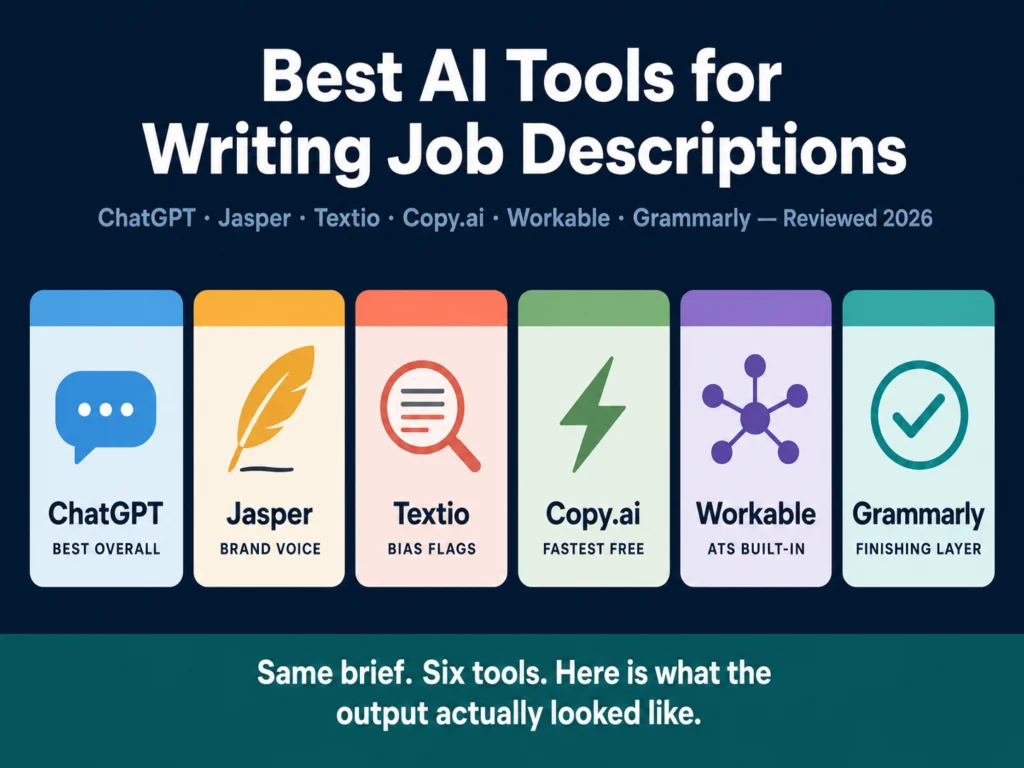
- ChatGPT is the most capable free option. A well-crafted prompt produces a usable draft in under 5 minutes.
- Jasper AI is worth it for teams writing 10+ postings per month who need consistent brand voice. Solo recruiters should skip it.
- Textio is the only tool built to reduce biased language using actual outcome data. Priced for enterprise budgets, though.
- Copy.ai has the most useful free plan in this category. Two minutes from job title to draft.
- Workable is relevant only if it is already your ATS. Its AI writer is competent and included in your subscription.
- Grammarly does not generate job descriptions from scratch. It refines what you already have. Include it as a finishing layer, not a primary tool.
- None of these tools replace a human review before posting.
Writing a job description should take 20 minutes. In practice it takes most recruiters 2 to 4 hours, and the result is often a copy-paste of the last version with a few lines swapped out. The posting goes live, attracts the wrong applicants, and the cycle repeats.
AI does not solve the underlying problem of not knowing what a role actually requires. But for the drafting work itself (structure, phrasing, formatting, tone), it removes most of the blank-page friction.
Among talent acquisition professionals already using generative AI in hiring, the average time saved is about 20% of their work week, roughly one full workday.
That figure comes from LinkedIn’s Future of Recruiting report and covers AI use across all recruiting tasks, not just writing. Even a fraction of that applied to job description drafting adds up fast.
AI use across HR tasks climbed to 43% as of early 2025, up from 26% in 2024, according to SHRM’s Talent Trends research. The organization describes this as a shift from pilots to real workflows.
The tools are no longer experimental. The question is which ones actually deliver for HR teams doing real hiring, not marketing teams with writing budgets.
The Ailovyu team submitted the same brief to five of the six tools on this list — a mid-level Customer Success Manager role at a 120-person B2B SaaS company, fully remote, requiring 3 years of experience with enterprise accounts. Here is what the output looked like, and what it tells you about each tool.
The 6 Best AI Tools for Writing Job Descriptions
1. ChatGPT — Best Overall for Most Teams
ChatGPT produced the most usable first draft of the five tools we tested. The output was clean, well-structured, and required less editing than any other tool. But only because we gave it a detailed prompt.
The brief included the job title, seniority level, 6 core responsibilities, 4 required qualifications, company size, culture notes, and a sentence about tone (“direct and practical, not startup-jargon-heavy”).
With that input, ChatGPT returned a 450-word draft with a role summary, bulleted responsibilities, requirements separated by “must-have” and “nice-to-have,” and a company blurb. The tone was accurate. The structure was ready to post with minor edits.
Without that level of detail, the output was noticeably generic. A prompt of just “write a job description for a Customer Success Manager, B2B SaaS, remote” produced a draft that could have come from any company, any industry, any decade.
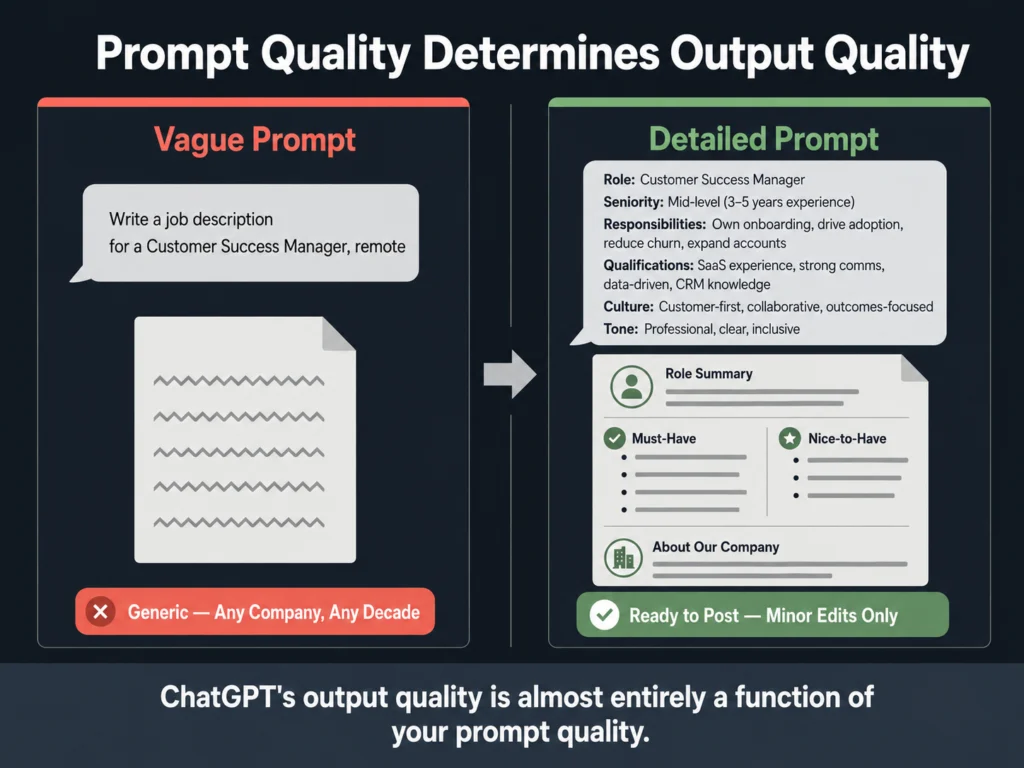
The practical lesson: ChatGPT’s output quality is almost entirely a function of your prompt quality. The tool itself is not the differentiator — your prompt template is. Build one good template and reuse it across all your postings.
Pricing: Free (GPT-5.3 Instant, capped at 10 messages per 5 hours — US free accounts now show ads). ChatGPT Plus at $20/month removes ads and gives access to GPT-5.5, which handles longer and more nuanced content noticeably better.
Best for: Any HR team that wants to start using AI without additional software spend. The entry point is zero dollars.
Honest limit: ChatGPT does not flag biased language unless you specifically ask. It also forgets your brand voice between sessions unless you use a custom GPT or system prompt.
2. Jasper AI — Powerful, but Not for Everyone
Let us address the obvious question first: at $39 to $49 per month for a single user, is Jasper worth it over just using ChatGPT Plus at $20?
For an individual recruiter writing a handful of postings per month, probably not. The output quality difference between Jasper and a well-prompted ChatGPT is real but not dramatic enough to justify twice the cost.
Where Jasper earns its price is the Brand Voice feature. You upload samples of your company’s existing content — careers page copy, past job posts, your About page — and Jasper learns the tone, vocabulary, and structure.
Every subsequent draft inherits that voice without you re-specifying it each time. For a team of 5 recruiters producing 30 postings a month across 4 departments, that consistency has real value.
Without it, your job descriptions for Engineering sound nothing like your postings for Sales, which sends a subtle but real signal to candidates about how organized your company is.
On our Customer Success Manager test, Jasper’s output was noticeably more on-brand than ChatGPT’s — after we spent about 90 minutes training the brand voice initially. That setup time is the hidden cost. It is worth it at scale. It is not worth it for occasional hiring.
Pricing: Creator plan $39/month (annual) or $49/month (monthly). Pro plan $59/month (annual) or $69/month (monthly). 7-day free trial available with no credit card required.
Best for: In-house HR teams with defined employer branding, hiring regularly across multiple departments.
Skip it if: You post fewer than 10 to 15 roles per month or you are a solo HR generalist without a defined brand voice to train.
→ Jasper offers a 7-day free trial with full feature access. No credit card needed.
3. Textio — The Only Tool Built Specifically for This Problem
Textio does something none of the other tools on this list do: it tells you, with outcome data behind it, which specific phrases in your job description are costing you applicants.
The mechanism matters here. Textio has analyzed hundreds of millions of job postings and their actual hiring outcomes — who applied, who was interviewed, who was hired.
From that data, it has identified language patterns that reliably suppress or expand the applicant pool. When you write “strong individual contributor” in a job post, Textio flags it because its data shows that phrase discourages women from applying at a statistically significant rate.
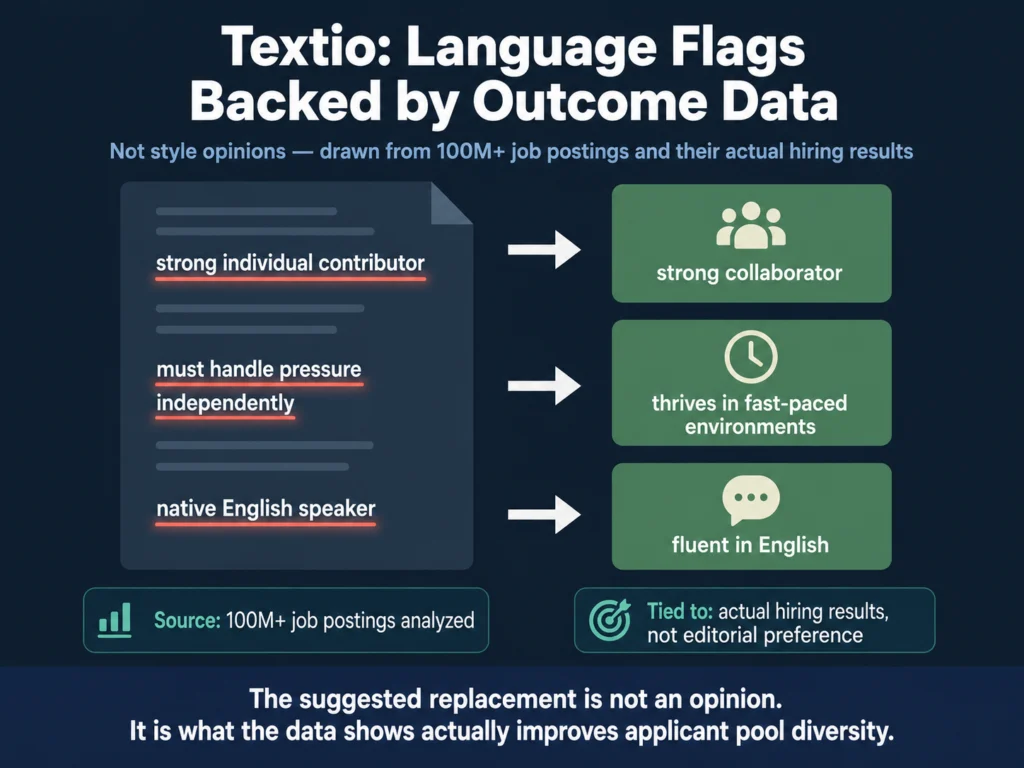
The suggested replacement is “strong collaborator.” That is not a style opinion. It is an outcome-based recommendation.
This is fundamentally different from what ChatGPT or Jasper do. They generate text. Textio audits it against real hiring behavior.
The tradeoff is price and scope. Textio does not publish rates publicly, which almost always means enterprise-level pricing. You will need to request a demo.
It is purpose-built for HR hiring content — you would not use it for marketing emails or blog posts.
Best for: Organizations with a measurable diversity hiring commitment, HR departments large enough to track hiring outcomes, and companies operating under the EU AI Act’s high-risk employment AI provisions — which took effect in August 2026 and cover AI used in recruitment and candidate evaluation.
Not the right fit: Small HR teams, low hiring volumes, or companies without defined DEI metrics to improve against.
For a closer look at why AI language matters in hiring — and what EEOC guidance says about job requirement language — read: Can You Use AI-Generated Job Descriptions Legally? A Plain-English Guide
Also relevant: AI Bias in Hiring — What HR Teams Need to Know
4. Copy.ai — Two Minutes to a Usable Draft
Copy.ai is the fastest tool on this list, and its free plan is genuinely useful — not artificially capped to force an upgrade.
The job description workflow is a simple form: job title, company name, 3 to 5 responsibilities, and any additional notes. Submit it and the tool returns a full draft in roughly 90 seconds.
On our Customer Success Manager test, the output was structurally solid and grammatically clean, but noticeably less specific than what ChatGPT produced with our detailed prompt. Copy.ai’s form does not encourage the same level of input depth, which shows in the output.
That said, for high-volume hiring teams under time pressure, “structurally solid and needs some editing” is often exactly what you need. The free plan gives you 2,000 words per month with no expiration date — enough to test the tool seriously before paying anything.
Pricing: Free (2,000 words/month, no expiry). Starter at $49/month. Advanced at $249/month for teams.
→ Copy.ai’s free plan has no expiry. Try it before paying.
Best for: Recruiters who want a fast, no-friction option for routine role postings. Good starting tool for small HR teams with no existing AI workflow.
Limit: Output specificity is lower than ChatGPT when using detailed prompts. The tool’s form format nudges you toward simpler inputs.
For a step-by-step workflow on turning a tool like Copy.ai into a repeatable system for bulk drafting, read: How to Write 10 Job Descriptions Per Day Using AI (Step-by-Step Workflow)
5. Workable — One Reason to Consider It
If you already use Workable as your ATS, turn on its AI writer before adding any other tool to your stack.
The AI writing assistant is included in your existing subscription, writes directly inside your posting workflow, and uses market data on job titles and compensation to inform its suggestions. It is not the best AI writing tool available.
But it is already paid for, it requires no additional logins, and it eliminates the copy-paste step between an external AI tool and your ATS. For teams where recruiter adoption of new tools is a persistent challenge, removing friction matters.
On our test, Workable’s output was comparable to Copy.ai — useful structure, needs specificity added, but ready to post faster than a manual draft.
One thing Workable does that standalone tools cannot: it pulls compensation benchmarks for the role directly into the drafting interface.
On our Customer Success Manager test, it flagged that the salary range we had in mind was below market median for fully remote roles in the US. That is a useful catch at the drafting stage, before the posting goes live.
Pricing: Workable plans start at $189/month. AI writing features are included across all paid tiers.
The honest assessment: Workable’s AI is not a reason to switch from your current ATS. It is a reason to use what you are already paying for.
Skip it entirely if: You are not a Workable customer. There is no standalone version and no reason to adopt Workable just for its AI writer.
6. Grammarly — Not a Generator, but Worth Having Anyway
Grammarly gets included on many AI job description tool lists, and it belongs on this one, with a clarification.
It does not write job descriptions. It improves them. If you use any other tool on this list to generate a draft, run it through Grammarly before posting.
It catches things those tools miss: a responsibilities section that reads as commanding rather than inviting, a requirements list where half the items are actually preferences, jargon that sounds natural internally but confuses external candidates.
The tone detector is the most useful feature for job descriptions specifically. It tells you whether your post reads as confident, friendly, or formal, and whether that matches what you intended.
A job description that reads as “harsh” according to Grammarly’s tone analysis will affect the quality and diversity of your applicant pool, even if you did not notice the tone problem yourself.
The free tier handles grammar, spelling, and basic clarity. Premium adds full tone analysis and advanced suggestions. The browser extension works inside most ATS platforms, Google Docs, and LinkedIn.
On our Customer Success Manager draft — after ChatGPT generated it — Grammarly flagged the responsibilities section as reading as “formal” and two bullet points as “direct” in a way that leaned toward commanding. One edit per flag, under two minutes total. The draft read noticeably better after.
Pricing: Free. Premium at $12/month (annual). Business at $15/member/month (annual).
→ Grammarly’s free plan is worth installing today. Premium adds the tone analysis that matters for job posts.
Best for: Every recruiter, as a second pass on any AI-generated draft before it goes live. Not useful as a standalone generation tool.
Quick Comparison
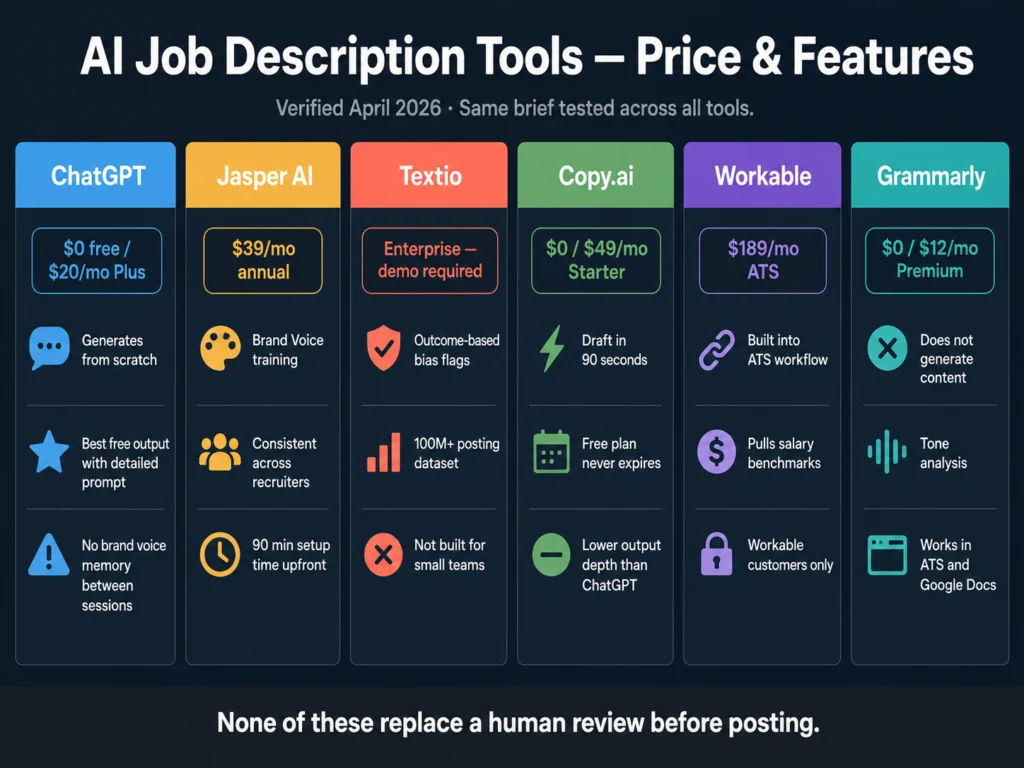
| Tool | Starting Price | Free Plan | Generates from Scratch | Brand Voice | Bias Flags |
|---|---|---|---|---|---|
| ChatGPT | $20/mo (Plus) | ✓ GPT-5.3 (capped) | ✓ | Via custom GPT | Manual only |
| Jasper AI | $39/mo (annual) | 7-day trial | ✓ | ✓ Native | No |
| Textio | Enterprise (demo) | No | ✓ | Limited | ✓ Data-backed |
| Copy.ai | $49/mo | ✓ (2K words) | ✓ | Basic | No |
| Workable | $189/mo (ATS) | No | ✓ | No | No |
| Grammarly | $12/mo (annual) | ✓ | Editing only | No | Partial |
Verify current rates on vendor websites before purchasing.
How to Choose
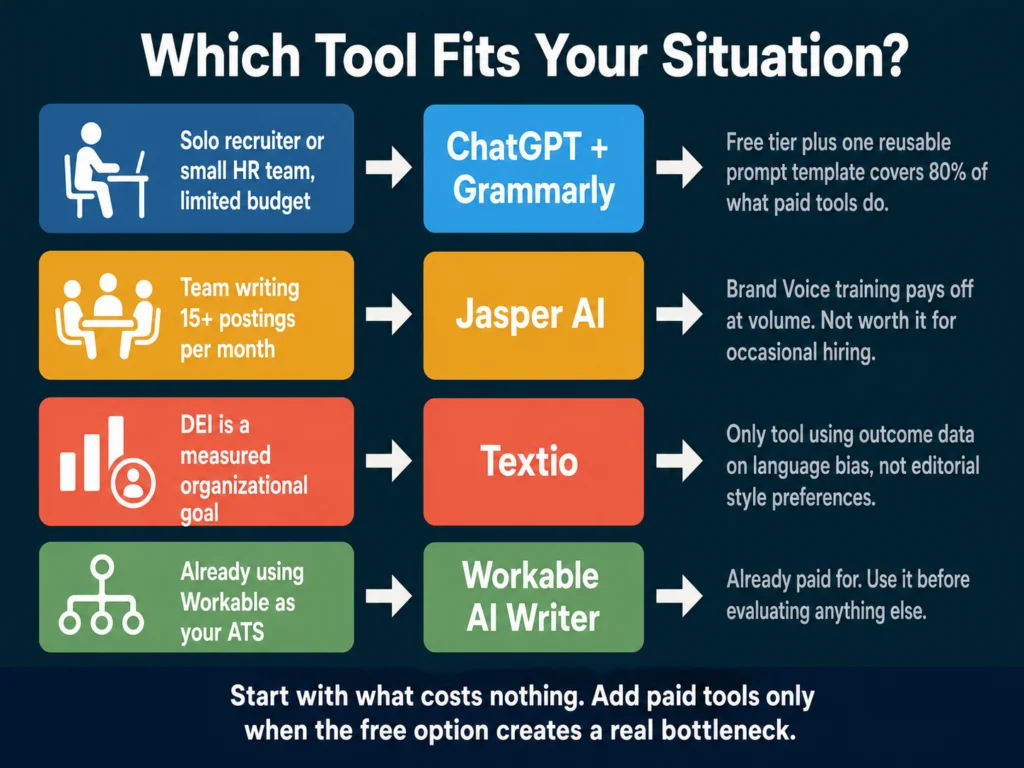
You are a solo recruiter or small HR team with limited budget: Start with ChatGPT’s free tier and Grammarly’s free plan. Invest an hour building a reusable prompt template. This setup covers 80% of what any paid tool would do, at zero cost.
You have a team writing 15+ postings per month: Jasper makes sense if brand consistency is a real problem. Copy.ai makes sense if speed is the main constraint and brand voice is less critical.
Diversity hiring is a measured organizational goal: Textio is the only tool that directly addresses inclusive language using outcome data, not editorial opinion. The price is high, but it is doing something no other tool on this list does.
You are already using Workable: Use its built-in AI writer first. Save the evaluation of other tools for a later stage when you know what it cannot do.
For a head-to-head comparison of how ChatGPT and Claude handle nuanced HR writing tasks, read: ChatGPT vs. Claude for HR Writing — A Practical Comparison
Related Reading
- How to Write 10 Job Descriptions Per Day Using AI (Step-by-Step Workflow)
- AI Tools for Resume Screening — What Actually Works
- AI Bias in Hiring — What HR Teams Need to Know
- Can You Use AI-Generated Job Descriptions Legally? A Plain-English Guide
- The Complete Guide to AI Tools for HR Professionals
Frequently Asked Questions
Technically yes. Practically, you do not want it to. A job description written from just a job title will be generic enough that it could describe the role at any company. The AI does not know your team’s actual working style, what the previous person in this role struggled with, or what specific experience would make someone genuinely successful here. Useful AI drafts come from specific inputs. Give the tool a job title, seniority level, 5 to 8 real responsibilities, required qualifications, and at least one sentence about your culture or work environment. The more specific the brief, the less editing the draft needs.
The research does not support that claim. What affects application rates more than whether AI was used is the quality of the language in the post. Vague requirements, exclusionary phrasing, or an unrealistic list of must-haves suppress applications regardless of whether a human or an AI wrote them. A well-prompted and reviewed AI draft typically outperforms a rushed human draft. The issue is not the tool — it is the review step. A posting that goes live unedited, AI-written or not, will underperform.
The EEOC’s position is that employers are responsible for the content of their job postings regardless of how that content was produced. If an AI-generated job description contains requirements that screen out protected groups without being genuinely necessary for the role, the employer bears the liability, not the tool vendor. The practical implication: review AI-generated requirements lists carefully. Ask whether each listed requirement is truly necessary for job performance, or whether it is a proxy for something else. For full guidance, see the EEOC Uniform Guidelines on Employee Selection Procedures.
Two moves make the biggest difference. First, put specific context into your prompt — not “manage a team” but “manage a team of 4 account managers across EMEA, with weekly 1:1s and quarterly performance reviews.” Second, add at least one sentence in the company description that is genuinely specific to your organization. Something a competitor could not copy. Generic AI output almost always traces back to generic input. The draft is only as specific as what you put in.
ChatGPT’s free tier produces the best output of the free options available, particularly when given a detailed prompt. Copy.ai’s free plan (2,000 words per month, no expiry) is more accessible for people who find prompt engineering unfamiliar — the form-based interface guides you through the inputs. Grammarly’s free plan adds useful editing and basic tone analysis after you have a draft. Most HR teams can build a complete drafting and editing workflow across all three without spending anything, at least initially.
Conclusion
The tools in this review have different strengths and almost no overlap in who they are genuinely built for.
ChatGPT and Copy.ai are starting points. Jasper is a team tool for consistent hiring at volume. Textio is an enterprise investment for organizations where inclusive language is a tracked outcome, not a checkbox. Workable is an ATS feature you may already have. Grammarly is the last step before publishing, not the first.
The most common mistake is treating AI as a replacement for having thought clearly about what a role requires. A tool can draft the language.
It cannot tell you whether the requirements list is too long, whether the title matches the market rate, or whether the responsibilities accurately reflect the first 90 days on the job. That part remains yours.
If you are starting from scratch, ChatGPT plus a well-built prompt template will get you further than any paid tool used with a lazy brief.
We research and test AI tools so you can make informed decisions before spending money on them. Every review, comparison, and tutorial on this site is based on actual use, not vendor marketing.
Learn more on our About page.
Affiliate links in this article earn a commission at no extra cost to you. This does not affect editorial recommendations.