
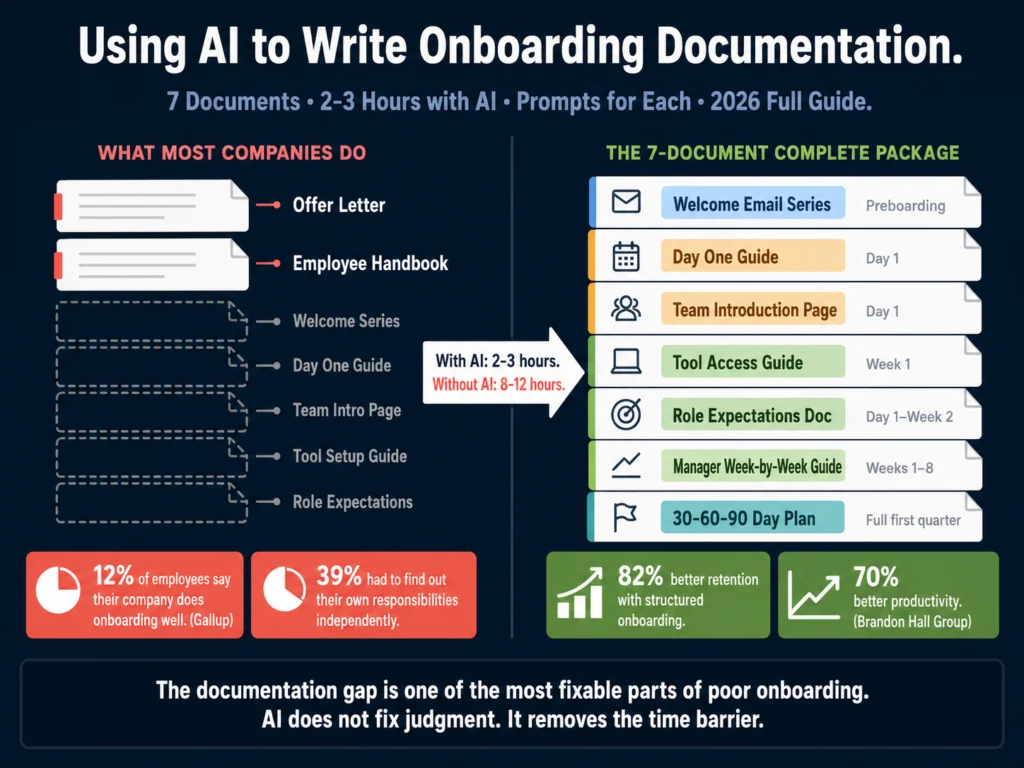
- Only 12% of employees say their company does onboarding well, according to Gallup. 39% say they had to figure out their own responsibilities independently. The documentation gap is one of the most fixable parts of that problem.
- A complete onboarding documentation package has seven document types, not one. Most companies produce two or three of them and call it onboarding.
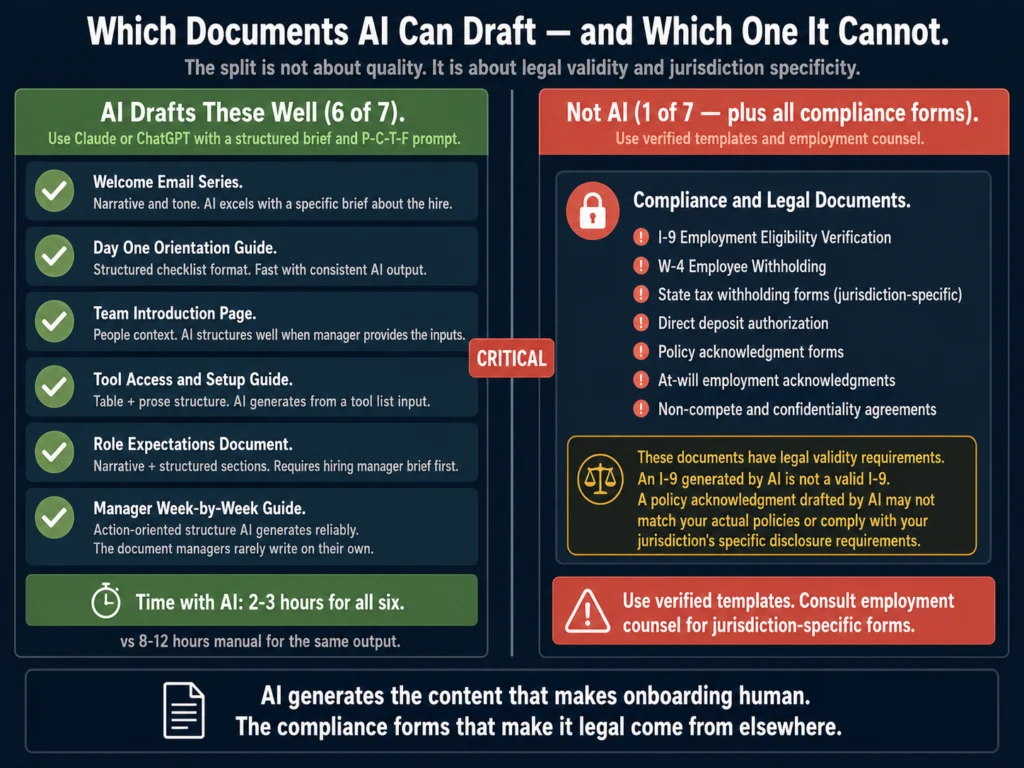
- AI handles six of the seven document types well. The seventh, compliance and legal forms, must come from verified templates and legal review, not AI generation.
- This guide covers each document type with a purpose statement, what AI does well, and a copy-paste prompt for drafting.
- Remote employees need documentation that works harder than in-person onboarding docs. Remote new hires are 50% more likely to say company culture was demonstrated poorly during onboarding, according to Enboarder 2025 research.
When onboarding fails, the cause is almost never a single bad experience. It is an accumulation of small documentation gaps that compound. The new hire did not receive a clear first-week schedule.
The tool access guide was out of date. No one sent a team introduction document. The manager’s expectations were communicated verbally and then forgotten.
39% of new hires say they had to find out some of their responsibilities independently, according to APQC research.
44.8% of organizations provide only general guidelines for a 30-60-90 day plan, leaving its actual execution to manager discretion, according to Enboarder’s 2025 HR Leader Survey.
These numbers describe organizations where the documentation exists in theory but not in a form any specific new hire actually receives.
AI does not fix poor onboarding judgment. It reduces the time it takes to produce the documentation that good onboarding requires. A complete onboarding documentation package can take an HR professional 8 to 12 hours to build from scratch.
With AI and the prompts in this guide, that drops to 2 to 3 hours. The output quality, when prompts are given the right inputs, is better than what most HR teams produce under time pressure.
- The Seven-Document Onboarding Package
- What AI Handles Well in Onboarding Documentation
- Document 1: Welcome Email Series
- Document 2: Day One Orientation Guide
- Document 3: Team Introduction Page
- Document 4: Tool Access and Setup Guide
- Document 5: Role Expectations Document
- Document 6: Manager’s Week-by-Week Onboarding Guide
- Remote vs. In-Person Onboarding Documentation
- Storing and Maintaining Onboarding Documentation
- Related Reading
- Frequently Asked Questions
- Conclusion
The Seven-Document Onboarding Package
Most companies produce an offer letter and an employee handbook and call it onboarding documentation.
A complete onboarding documentation package has seven distinct document types, each serving a different purpose and arriving at a different point in the new hire’s first 90 days.
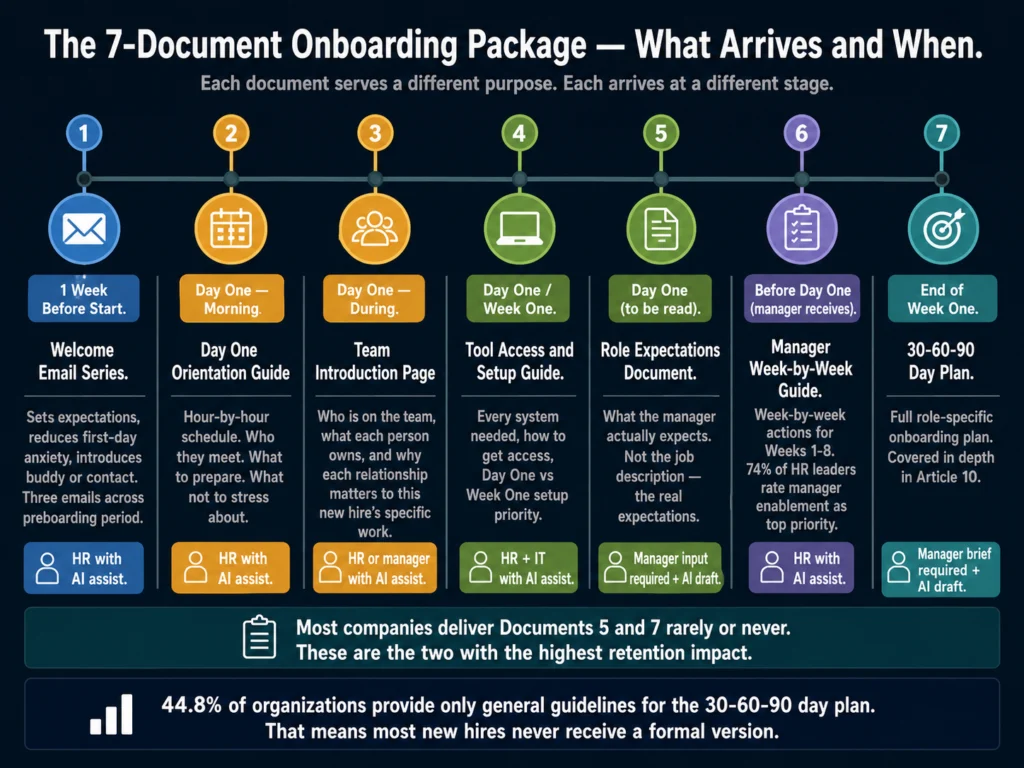
- Welcome email series (preboarding, before Day One)
- Day One orientation guide (what happens on the first day, hour by hour)
- Team introduction page (who the new hire is working with and why each person matters)
- Tool access and setup guide (every system the new hire needs, with setup instructions)
- Role expectations document (what the hiring manager expects, in specific terms)
- Manager’s week-by-week onboarding guide (what the manager should do at each milestone)
- 30-60-90 day plan (covered in depth in How to Write a 30-60-90 Day Onboarding Plan with AI)
Compliance and legal documents (I-9, W-4, direct deposit forms, policy acknowledgments) are not on this list because they should not be AI-generated.
Use verified templates and consult employment counsel on jurisdiction-specific requirements.
What AI Handles Well in Onboarding Documentation
Three categories of onboarding content are specifically well-suited for AI:
Narrative and explanatory content. Welcome messages, team introductions, role expectations, and culture explanations all benefit from well-phrased language.
A new hire reading a welcome email that sounds like a policy document will form an impression of the organization. AI with a good brief produces warmer, more specific language than most HR teams write under deadline.
Structural checklists and guides. Day One schedules, tool setup guides, and manager onboarding checklists have consistent structures. AI generates these quickly from a brief and they require less editing than narrative content.
Manager-facing enablement content. The week-by-week manager guide is consistently the document no one writes because it is hard to prioritize. AI generates a useful draft from three or four inputs. The manager does not have to start from a blank page.
Document 1: Welcome Email Series
The welcome email is the first document a new hire receives from HR after accepting the offer.
84% of new hires found pre- and post-Day One communications beneficial for building relationships at work, according to Enboarder’s 2025 research.
Most companies send one welcome email on the day before start. The stronger approach is a three-email series: one week before start, the day before, and end of Day One.
Prompt for three-email welcome series:
PERSONA: Act as an HR professional writing a welcome communication series.

CONTEXT: [COMPANY NAME] is a [COMPANY SIZE]-person [INDUSTRY] company.
The new hire's name is [NAME], joining as [JOB TITLE] in [DEPARTMENT].
Their manager is [MANAGER NAME]. Start date: [DATE].
One thing that makes this company or team distinctive: [SPECIFIC DETAIL].
Work arrangement: [REMOTE / HYBRID / ON-SITE].

TASK: Write three emails:

Email 1 (One week before start): Confirm excitement about the hire.
Tell them what to expect on Day One. Share one or two practical details
(what to bring, where to go, or how to log in). Introduce their buddy
or point of contact: [NAME, ROLE].

Email 2 (Day before start): Brief, warm check-in. Remind them of
Day One logistics. Offer to answer any last-minute questions.
Under 100 words.

Email 3 (End of Day One): From the manager. Acknowledge their first day.
Share one specific thing you noticed or are excited about. Preview
what Day Two looks like. Under 80 words.

FORMAT: Three separate emails, each with a subject line.
Tone: warm and direct. Not corporate. Not overly enthusiastic.
Sound like a person who is genuinely glad they are joining.Document 2: Day One Orientation Guide
The Day One guide answers the question every new hire has but rarely asks: “What exactly is going to happen to me today?”
A schedule reduces first-day anxiety more than any other single intervention. New hires who know what is happening and when are better able to focus on learning instead of wondering what comes next.
Prompt for Day One orientation guide:
PERSONA: Act as an HR professional creating a Day One orientation guide.

CONTEXT: New hire: [NAME], [JOB TITLE]. Start date: [DATE].
Work arrangement: [REMOTE / ON-SITE / HYBRID].
Manager: [NAME]. Buddy: [NAME].

TASK: Create a Day One orientation guide with:

SCHEDULE SECTION: Hour-by-hour schedule from arrival/login to end of day.
Include: welcome meeting, manager introduction, team introduction,
IT setup window, lunch (note if solo or with team), afternoon focus time,
and end-of-day check-in. [ADD ANY SPECIFIC EVENTS YOU HAVE PLANNED]

WHO YOU'LL MEET SECTION: List [3-5] people the new hire will meet on Day One.
For each person: name, role, and one sentence on why the relationship matters.

WHAT TO PREPARE SECTION: Three things the new hire should have ready
before their first meeting: [LIST IF KNOWN, OR ASK AI TO SUGGEST BASED ON ROLE]

WHAT NOT TO WORRY ABOUT SECTION: Two or three things new hires often
stress about that are not relevant on Day One.

FORMAT: Clearly labeled sections. Plain language. Short sentences.
This document is read by someone who is nervous. Make it easy to scan.Document 3: Team Introduction Page
The team introduction page accelerates relationship-building during the period when a new hire is meeting 10 to 15 people in quick succession and cannot remember who does what.
Most companies skip this document entirely. Those that produce it often create a generic org chart. An org chart tells you titles. A team introduction page tells you who each person is in the context of the new hire’s actual work.
Prompt for team introduction page:
PERSONA: Act as an HR professional creating a team context guide for a new hire.

CONTEXT: New hire: [NAME], [JOB TITLE].
Team name: [TEAM NAME]. Manager: [MANAGER NAME].

TASK: Create a team introduction page with a section for each team member.
For each person, include:
- Name and title
- One sentence on what they own or are responsible for
- One sentence on why this person matters to [NAME]'s work specifically
- One conversation starter or common interest if known

Team members: [LIST NAMES, TITLES, AND ANY CONTEXT YOU HAVE]

Also include:
- A "How this team works" section: 3-4 sentences on meeting cadence,
  communication norms, and how decisions are made
- A "Who to go to for what" list: 5-8 practical questions a new hire
  might have and who answers them

FORMAT: One section per team member. Short, scannable.
This is a reference document, not a formal bio page.Document 4: Tool Access and Setup Guide
Up to 39% of remote employees report that their organization did not properly configure technology when they started, according to Deel’s Employee Onboarding Statistics 2025 compiled by AIHR.
This is a documentation problem before it is an IT problem. If there is no written guide, setup depends on whoever happens to be available.
Prompt for tool access and setup guide:
PERSONA: Act as an HR professional creating a tool setup guide for a new hire.

CONTEXT: New hire: [NAME], [JOB TITLE]. Start date: [DATE].
Work arrangement: [REMOTE / HYBRID / ON-SITE].

TASK: Create a step-by-step tool access guide. For each tool, include:
- Tool name and purpose (one sentence)
- How access is granted (automatic on Day One / contact IT / self-signup)
- Where to go for setup help
- Estimated setup time

Tools to include: [LIST ALL TOOLS WITH NOTES ON EACH]
Common categories: email and calendar, project management, communication
(Slack/Teams), HRIS (for payroll and time-off), file storage,
role-specific tools.

Also include:
- A "Day One vs. Week One" distinction: which tools are needed
  on Day One and which can wait
- An IT contact section with name, email, and hours

FORMAT: Table format for the main tool list. Plain prose for the
Day One vs. Week One guidance. Under 600 words total.Document 5: Role Expectations Document
This is the document that has the most direct impact on 90-day retention and the one least likely to exist.
The top reason new hires leave in the first 90 days is misalignment between job expectations and reality, cited by 30.3% of HR leaders in Enboarder’s 2025 survey.
Unlike a job description, a role expectations document tells the new hire in plain language what their manager actually expects, what success looks like in the first 30 days, and what the unwritten norms of the team are.
It requires the hiring manager’s input. Use the same brief approach from Article 10’s manager brief template.
The AI drafts from the manager’s answers; the manager confirms before the document reaches the new hire.
Prompt for role expectations document:
PERSONA: Act as an HR business partner creating a role expectations document.

CONTEXT: New hire: [NAME], [JOB TITLE]. Manager: [MANAGER NAME].
Department: [DEPARTMENT]. Company stage: [SIZE AND STAGE].

Manager's inputs:
- What success looks like at Day 30: [MANAGER'S ANSWER]
- The most important relationship for this person to build in Month 1: [ANSWER]
- One thing that typically trips up new hires in this role: [ANSWER]
- The communication norm for this team: [e.g., async-first, lots of Slack,
  prefer written updates, daily standups]
- How much autonomy this person has in the first 30 days: [ANSWER]

TASK: Write a role expectations document covering:

SECTION 1: What your first 30 days are for
(3-4 sentences on learning, not delivering)

SECTION 2: What matters most in your role
(3 to 5 specific expectations, written in plain language)

SECTION 3: How this team works
(Communication norms, decision-making, meeting cadence)

SECTION 4: What success looks like at Day 30
(Specific, based on manager's input)

SECTION 5: Common first-month mistakes in this role
(1-2 things to avoid, based on manager's input)

FORMAT: Short sections, plain language. New hire reads this
on Day One. It should feel like the manager speaking directly,
not HR writing about the manager. Under 500 words.Document 6: Manager’s Week-by-Week Onboarding Guide
74% of HR leaders rate manager enablement tools as a top capability priority, according to Enboarder’s 2025 research.
Yet 28.8% of managers provide no formal guidance or training to new hires at all, according to the same research.
The gap is not always willingness. Many managers genuinely do not know what they are supposed to do at each stage.
A week-by-week guide removes ambiguity and gives managers a repeatable framework.
Prompt for manager’s week-by-week guide:
PERSONA: Act as an HR business partner writing a manager onboarding guide.

CONTEXT: New hire: [NAME], [JOB TITLE]. Manager: [MANAGER NAME].
Team size: [SIZE]. Work arrangement: [REMOTE / HYBRID / ON-SITE].

TASK: Write a week-by-week onboarding guide for the manager covering
Weeks 1 through 8. For each week, include:

- The primary goal for this week (one sentence)
- 2-3 specific actions the manager should take
- One thing to check in on or ask the new hire
- One common mistake managers make at this stage

Weeks to cover:
Week 1: Welcome, context, and connection
Week 2: Role clarity and first real work
Week 3-4: First feedback conversation
Week 5-6: Mid-point check-in (connect to goals)
Week 7-8: Assessing early performance, adjusting support level

FORMAT: One section per week. Practical action items, not abstract advice.
The manager should be able to read the relevant week in 2 minutes.
Total under 800 words.Remote vs. In-Person Onboarding Documentation
Remote documentation needs to work harder. When a new hire is in an office, ambient information flows naturally: they observe team dynamics, pick up culture signals, and ask questions in passing. Remote new hires receive only what is explicitly documented.
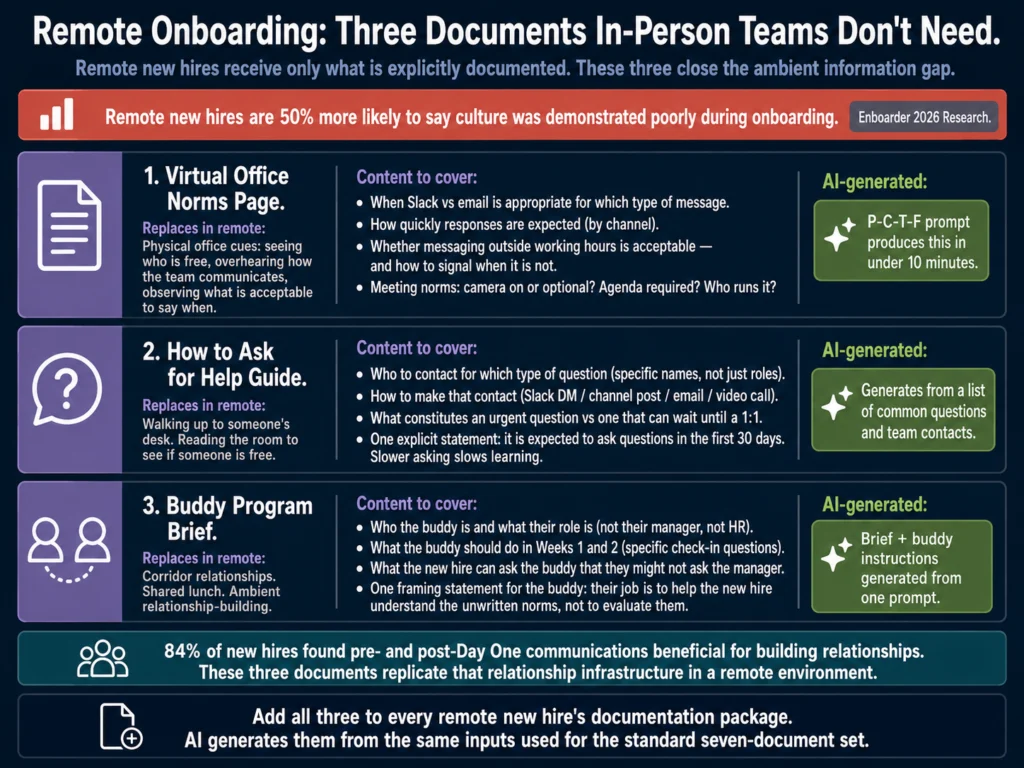
Remote new hires are nearly 50% more likely to say culture was demonstrated poorly or not at all during onboarding, compared to on-site peers, according to Enboarder’s 2026 research.
Three specific additions for remote documentation:
Virtual office norms page. Where on-site teams have physical cues, remote teams need explicit documentation of communication expectations.
When is Slack vs. email appropriate? How quickly are responses expected? Is it acceptable to message someone outside working hours? Document this.
How to ask for help guide. Remote new hires are slower to ask for help because they cannot see if someone is free. A one-page guide covering who to contact for which type of question and how to make that contact removes friction.
Buddy program brief. A buddy assigned before Day One and given a structured brief on what to do in the first two weeks creates a relationship that on-site proximity creates naturally.
84% of new hires found pre- and post-Day One communications beneficial for building work relationships.
Add these three documents to your remote onboarding package. AI generates all three quickly with the same P-C-T-F prompt structure used throughout this guide.
Storing and Maintaining Onboarding Documentation
Onboarding documentation has a short shelf life. Tools change. Team members change. Policies change. A guide that was accurate six months ago may be actively misleading today.
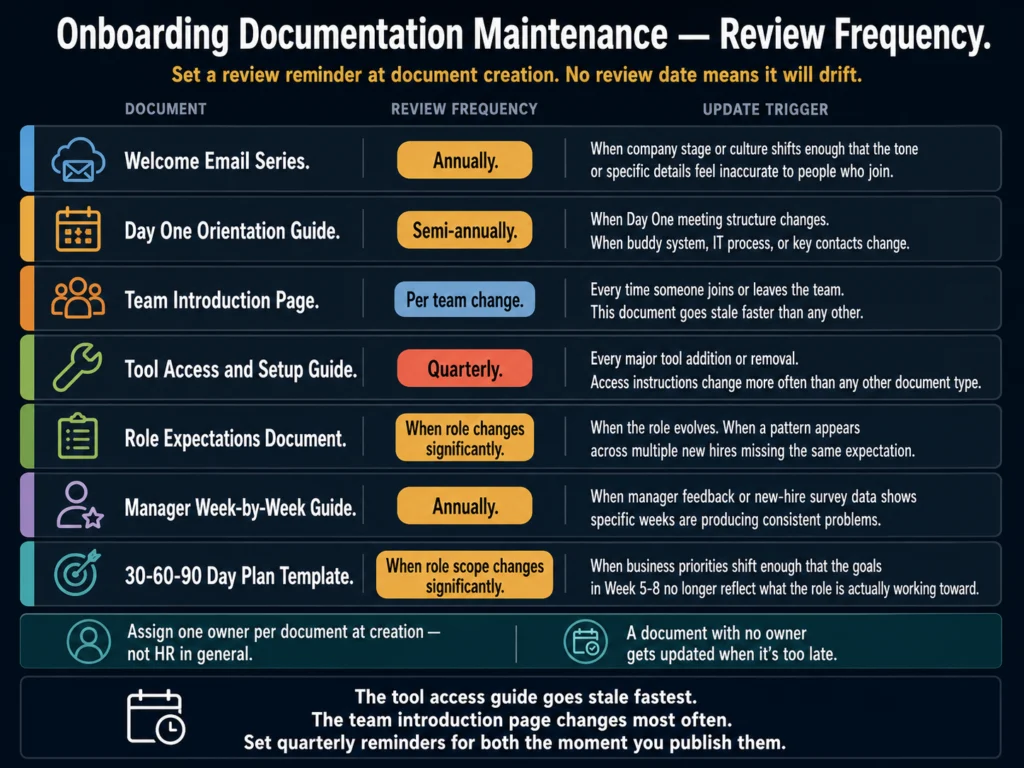
Assign an owner for each document. Set a review date when the document is created: quarterly for tool guides (tools change most often), semi-annually for team introductions and process overviews, annually for role expectations templates and the manager guide.
Store onboarding documents where new hires can find them without help.
A shared folder in Google Drive or a Notion page linked from the welcome email are both adequate. The document no one can find is the same as the document no one wrote.
Before any onboarding document reaches a new hire, run it through Grammarly’s tone detector.
Onboarding documents that read as formal or bureaucratic create an impression of the company that conflicts with most employer brands.
A tool setup guide that reads as warm and helpful will land better on Day One than one that reads as a policy document.
Grammarly Pro at $12/month is the right editing layer for any document a new hire reads in their first 90 days.
If your organization hires in cohorts, Copy.ai’s workflow automation lets you build onboarding document templates that generate role-specific versions from a data input.
One template produces seven documents, each personalized to the specific new hire’s role, manager, and team.
Copy.ai’s free plan (2,000 words/month) is enough to test one onboarding document template workflow.
Related Reading
- How to Write a 30-60-90 Day Onboarding Plan with AI
- Best AI Tools for Employee Handbook Writing
- Best AI Tools for Performance Review Writing
- How to Build an AI Prompt Library for HR Teams
- AI for HR Communications and Documentation: The Complete Guide
Frequently Asked Questions
The article covers the 30-60-90 day plan as a standalone document, with a full section on the hiring manager brief, prompt template, and customization by role type. This article covers the complete seven-document onboarding package. The 30-60-90 plan is one of the seven documents and is treated as a cross-reference here rather than covered in full. If you are building your onboarding documentation system, read this article first, then read Article 10 for the in-depth 30-60-90 plan workflow.
The role expectations document, followed closely by the manager’s week-by-week guide. The most common reason new hires leave in the first 90 days is expectation misalignment, and the role expectations document is specifically designed to prevent that. The manager guide matters because the manager’s behavior in the first eight weeks is the single largest predictor of whether the new hire stays or leaves. New hires are 3.4 times more likely to rate onboarding as successful when their manager is actively engaged, according to Gallup research.
Three things make adoption more likely. First, keep the guide short and action-oriented. A week-by-week guide that tells a manager exactly what to do in two minutes per week is more likely to be used than a 20-page onboarding philosophy document. Second, integrate it into the workflow they already use: send the Week One page on the Friday before the hire starts, not the full guide at once. Third, frame it as support rather than oversight. “Here are the specific things I need you to do in the first 8 weeks” lands differently than “Here is your onboarding guide.”
Some will recognize the structure. Most will not notice and will not care if the documents are accurate, specific, and clearly written for them. The signal of AI-generated content that new hires react negatively to is the same as in all other contexts: generic language that could apply to any company and any new hire. A Day One guide that mentions their actual manager’s name, the specific tools their team uses, and one honest statement about what the first week will be like reads as prepared rather than generated. Specificity is what matters, and the prompts in this guide require specific inputs for that reason.
Tool guides: every time a major tool changes or is added, and as a minimum every quarter. Team introduction pages: whenever someone joins or leaves the team. Role expectations templates: when the role changes significantly or when a pattern emerges across multiple new hires missing the same expectation. Manager guides: annually unless feedback shows they are not working. Welcome email templates: annually, or when the company’s stage or culture shifts enough to make them feel inaccurate. Set calendar reminders when you create each document. Documents with no review date will drift toward inaccuracy faster than you expect.
Conclusion
12% of employees say their company does onboarding well, according to Gallup. The gap between that number and what is achievable with structured documentation and 2 to 3 hours of AI-assisted drafting is a prioritization gap, not a technology problem.
The documents in this guide take 8 to 12 hours to build manually. With AI and the prompts above, that drops to 2 to 3 hours.
The inputs require about 30 minutes of hiring manager time per new hire. The output is a complete documentation package that covers every stage from preboarding through the end of Month Two.
Strong onboarding improves new hire retention by 82% and productivity by over 70%, according to Brandon Hall Group research. The ROI on 2 to 3 hours of documentation work is measurable within 90 days if you track turnover in the first quarter.
The documents exist now. You used AI to draft them. What determines the result is whether they reach each new hire in time, with specifics that apply to their actual role and team.
The seven-document framework and prompts in this guide reflect what the Ailovyu team has found works consistently across organizations at different onboarding scales — the structure is reusable, the inputs per new hire are what make it specific.
We research and test AI tools so you can make informed decisions before spending money on them. Every review, comparison, and tutorial on this site is based on actual use, not vendor marketing.
Learn more on our About page.
Statistics sourced from AIHR Employee Onboarding Statistics compilation (June 2026), Enboarder HR Leader Survey 2025, Enboarder 2026 Onboarding Trends, FirstHR Onboarding Statistics (February 2026), Gallup onboarding research, and Brandon Hall Group onboarding research. Affiliate links earn a commission at no extra cost to you.