
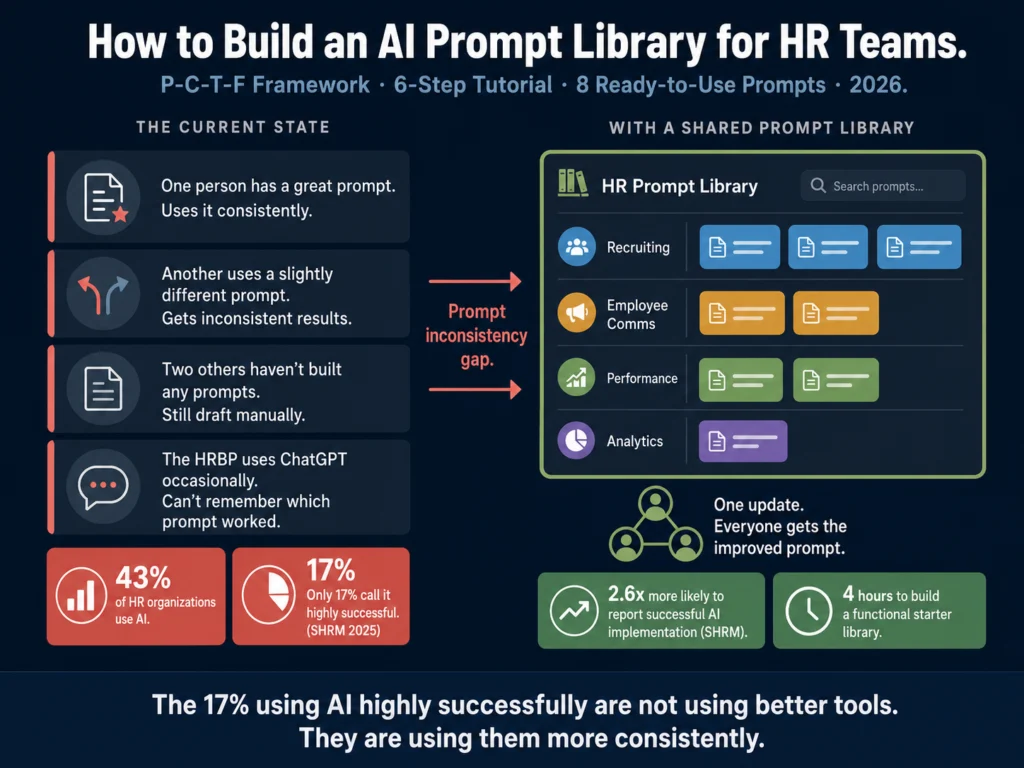
- 43% of HR organizations now use AI in HR tasks. Only 17% describe their implementation as “highly successful,” according to SHRM 2025 data. The gap is almost always a prompt quality and consistency problem.
- A prompt library is a shared, organized collection of tested prompts your team can access and reuse. It takes about 4 hours to build a functional starter library. The ROI shows up immediately.
- The P-C-T-F framework (Persona, Context, Task, Format) structures prompts in a way that produces consistent output across team members regardless of individual prompt-writing skill.
- This tutorial covers six steps: audit your tasks, learn P-C-T-F, build your first five prompts, choose a storage format, handle model updates, and govern the library across your team.
- At the end of this article, you get eight ready-to-use HR prompts you can add to your library today.
The typical HR team using AI looks like this: one person figured out a great prompt for job descriptions and uses it consistently.
Another person uses a slightly different prompt and gets inconsistent results. Two others have not gotten around to building any prompts and still draft manually.
The senior HRBP uses ChatGPT occasionally but cannot remember which prompt worked last time.
SHRM’s research found that HR teams following change management best practices when rolling out AI tools were 2.6 times more likely to report successful outcomes, and that establishing shared systems — including prompt libraries — was one of the recommended practices.
The research also found that only 17% of HR professionals describe their organization’s AI implementation as highly successful, despite 43% using AI in some capacity.
A prompt library is the difference between “our team uses AI” and “our team gets consistent, usable output from AI.” It is the infrastructure that makes individual AI skill transferable to the whole team.
This tutorial walks you through building one from scratch.
- Step 1: Audit Your Most Time-Consuming HR Writing Tasks
- Step 2: Learn the P-C-T-F Prompt Structure
- Step 3: Build Your First Five Prompts
- Step 4: Choose Where to Store Your Library
- Step 5: Handle Model Updates and Prompt Maintenance
- Step 6: Govern the Library Across Your Team
- The Starter Library: Eight Ready-to-Use HR Prompts
- Related Reading
- Frequently Asked Questions
- Conclusion
Step 1: Audit Your Most Time-Consuming HR Writing Tasks
Before you write a single prompt, spend 30 minutes with your team identifying which tasks consume the most drafting time. This determines your prompt priorities.
Ask each person on your HR team to list the five writing tasks they do most often and wish were faster. Common answers:
- Job description first drafts
- Rejection emails at scale
- Interview question sets per role
- Performance review narratives
- Candidate outreach messages
- Policy section drafts
- Onboarding documentation
- Self-assessment guidance for employees
- Exit interview summary reports
Rank by frequency and time cost. A task you do twice a year that takes 2 hours is less valuable to prompt than a task you do twice a week that takes 30 minutes.
Your first five prompts should target the five tasks that appear most often across your team’s lists. Do not try to build 30 prompts at launch.
well-tested prompts your team actually uses beats 30 untested prompts sitting in a folder no one opens.
Step 2: Learn the P-C-T-F Prompt Structure
Good prompts are not just longer prompts. They follow a structure that gives the AI the specific context it needs to produce consistent output.
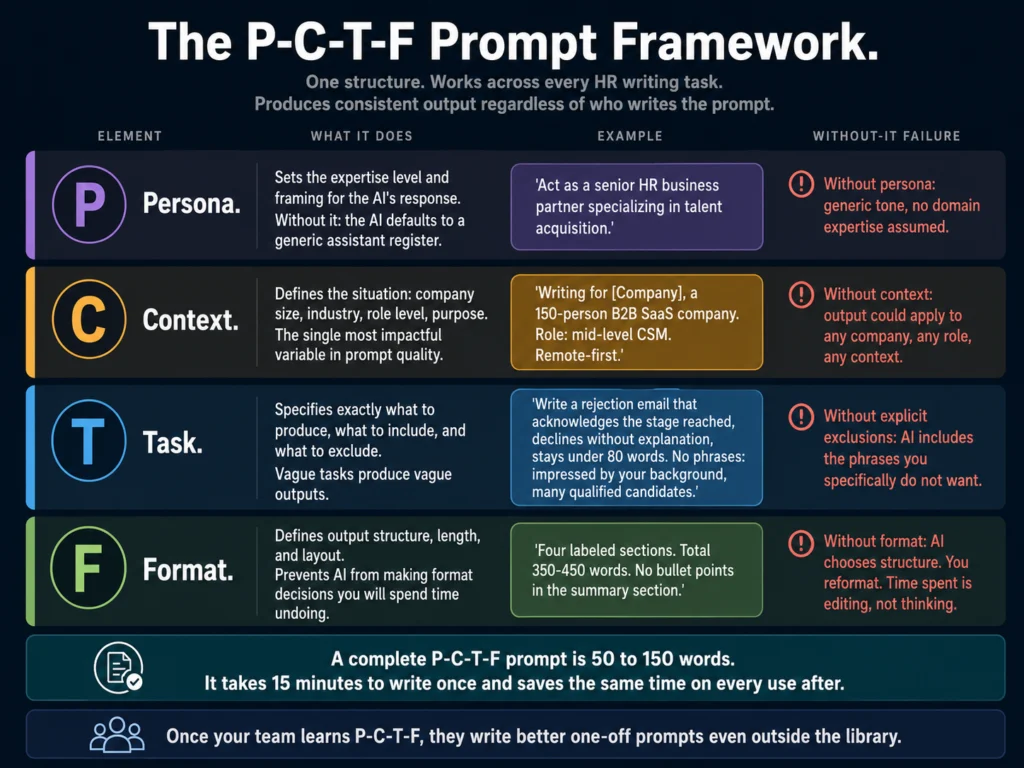
Here is what each element means in practice:
Persona: Who should the AI act as? A prompt that starts with “Act as a senior HR business partner with experience in talent acquisition” produces different output than one that starts with no persona. The persona sets the expertise level and framing.
Context: What is the situation? Include the company size, industry, role, candidate level, or document purpose. Context is where most prompts fail.
“Write a job description” has no context. “Write a job description for a mid-level Customer Success Manager at a 150-person B2B SaaS company, remote-first, reporting to the VP of Customer Success” has enough context to produce a usable first draft.
Task: What exactly should the AI produce? Be specific about what you want and what you do not want.
“Write a rejection email” is a task. “Write a post-interview rejection email that acknowledges the interview, declines the application without explanation, leaves the door open for future roles, and stays under 80 words” is a task that produces usable output.
Format: How should the output be structured? A job description has sections. A rejection email does not need bullet points.
Specifying format prevents the AI from making layout decisions you will spend time undoing.
A complete P-C-T-F prompt looks like this:
PERSONA: Act as a senior HR business partner specializing in talent acquisition.

CONTEXT: You are writing for [COMPANY NAME], a [COMPANY SIZE]-person
[INDUSTRY] company. The role is [JOB TITLE] at the [LEVEL] level.
[1-2 SENTENCES OF RELEVANT CONTEXT]

TASK: Write [SPECIFIC DELIVERABLE]. Include [REQUIREMENTS].
Do not include [EXCLUSIONS].

FORMAT: Structure the output as [DESCRIPTION OF FORMAT].
Keep the total length to [WORD/SENTENCE COUNT].This structure works across every HR writing task. Once your team learns it, they produce better individual prompts even outside the library.
Step 3: Build Your First Five Prompts
Take the top five tasks from your audit. Apply P-C-T-F to each one. Test each prompt three times with different role types before adding it to the library. If a prompt produces usable output 2 out of 3 times without heavy editing, it is ready.
Here is what testing looks like: run the prompt for a Customer Success Manager, then for a Software Engineer, then for a Sales Development Representative.
If the outputs are structurally consistent and require roughly the same editing time across all three, the prompt is good.
If one role produces unusable output, the context variables in your prompt are too specific to one function. Generalize them.
Record the editing time per output. Your baseline is current manual drafting time. A good prompt should cut that time by at least 50%.
Step 4: Choose Where to Store Your Library
The storage format determines whether people actually use the library. Choose based on your team size and how your team already works.
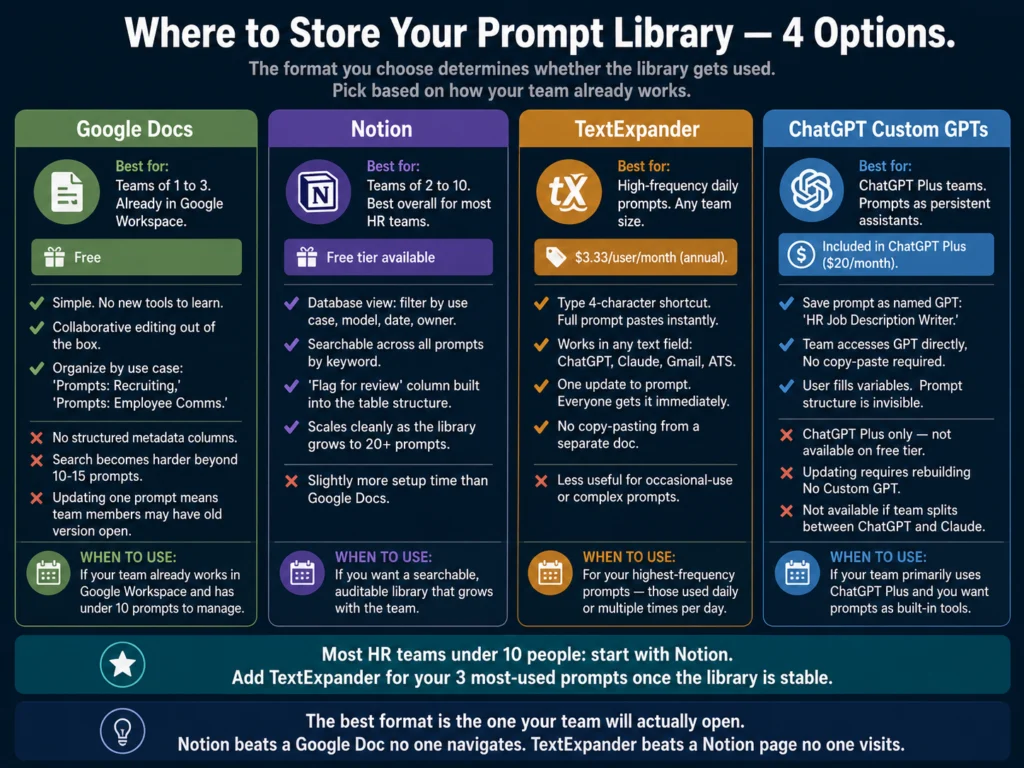
Google Docs (free): Simple and effective for teams of 1 to 3 people. Create one Google Doc per use case category. Name files consistently: “Prompts: Recruiting” and “Prompts: Employee Comms” are easier to navigate than “AI Stuff” and “ChatGPT prompts v3.”
Notion (free tier): Better than Google Docs for search and navigation. Build a database with columns for use case, AI tool, date last tested, and owner. This structure makes it easier to audit and update prompts when model changes affect output quality.
TextExpander: A snippet management tool that lets you assign keyboard shortcuts to prompts. Type a 4-character code and the full prompt pastes into whatever field you are in. Useful for high-frequency prompts used daily.
TextExpander’s real-time sync means when you update a prompt, everyone on the team gets the new version immediately without needing to check the library. Plans start at $3.33/user/month (annual billing).
Custom GPTs (ChatGPT Plus, $20/month): If your team primarily uses ChatGPT, Custom GPTs let you save system prompts as persistent AI assistants.
Create “HR Job Description Writer” with your P-C-T-F job description prompt pre-loaded. Team members open that GPT and fill in the variables. No copy-pasting from a doc. No risk of using an outdated prompt version.
For most HR teams under 10 people, Notion is the practical choice. The database structure makes it usable, searchable, and easy to audit. Google Docs works if your team already lives in Google Workspace and does not need the database functionality.
Step 5: Handle Model Updates and Prompt Maintenance
This step is the one most HR teams skip. Prompts degrade. A prompt that worked well with one model version can produce worse output after a model update.
Build a quarterly prompt review into your HR calendar. Each quarter, run your top five most-used prompts against three test cases. Compare the output to what you got three months ago. If quality has dropped, adjust the prompt and update the library.
Also build a feedback loop. When a team member notices a prompt producing lower-quality output than expected, they should have a channel to report it.
In Notion, this can be a “flag for review” column. In a shared Google Doc, a comment does the job. The goal is to catch prompt degradation before it produces work that goes to candidates or employees.
Step 6: Govern the Library Across Your Team
A prompt library no one maintains becomes a prompt graveyard. Assign one person as the library owner.
This does not need to be a senior role. It needs to be someone who uses the library regularly and has authority to update and remove prompts.
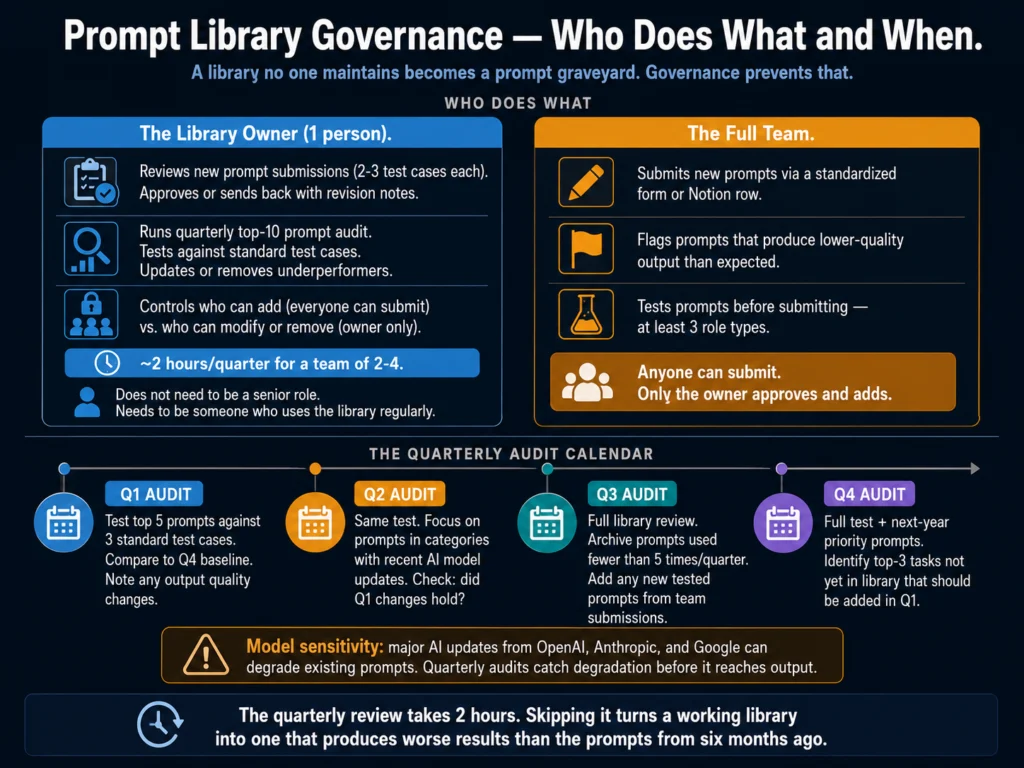
The library owner does three things:
Reviews and approves new prompts. When a team member builds a prompt that works well, they submit it for review. The owner tests it against 2 to 3 test cases and adds it to the library with metadata (use case, model, date added).
Runs the quarterly audit. Tests the top 10 prompts quarterly and updates or removes prompts that no longer perform.
Manages access. Decides who can add to the library (everyone) versus who can modify or remove from it (owner only, or owner plus managers). This prevents the library from accumulating untested variations.
For a team of 2 to 4 HR professionals, the library governance takes roughly 2 hours per quarter. For a larger team, it scales with the number of active prompts.
Copy.ai’s workflow automation features let you build prompt templates with variable fields that non-technical HR team members can use without editing the underlying prompt structure.
This is useful when you want the library to be accessible to everyone on the team, regardless of their comfort with prompt writing.
Copy.ai’s free plan (2,000 words/month) is enough to test one HR workflow template before committing to the paid plan.
The Starter Library: Eight Ready-to-Use HR Prompts
Copy these into your library today. Test each one against three role types before using them for real output.
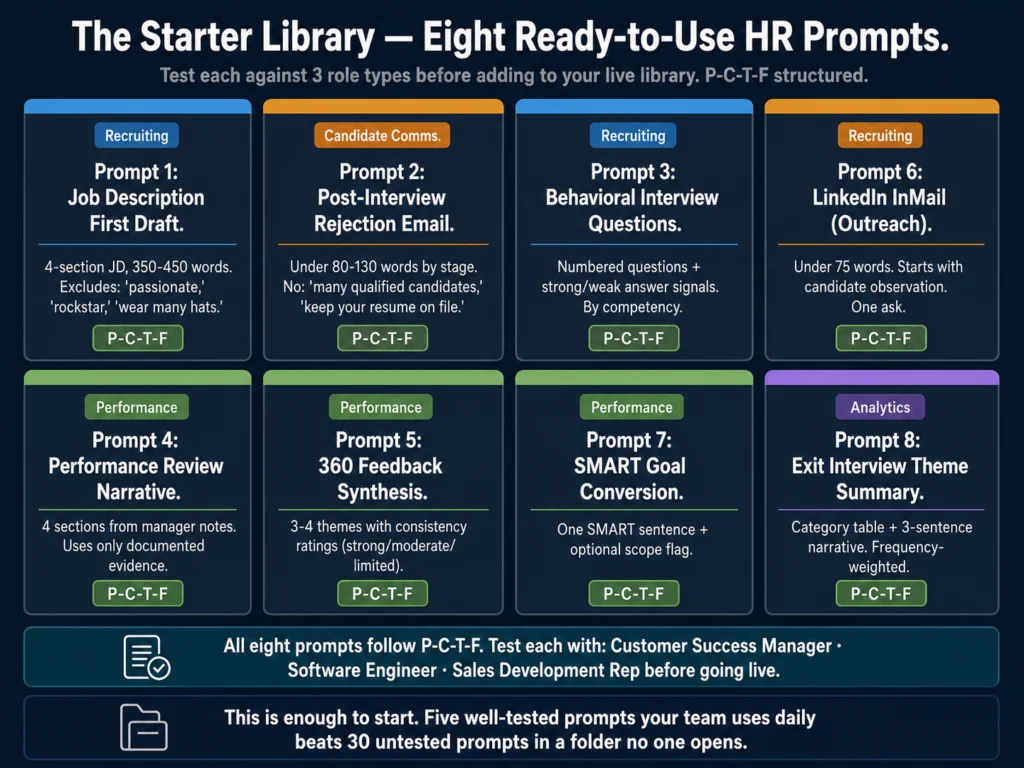
Prompt 1: Job Description First Draft
PERSONA: Act as a senior HR writer creating a job description.
CONTEXT: The role is [JOB TITLE] at the [LEVEL] level at [COMPANY NAME],
a [COMPANY SIZE]-person [INDUSTRY] company. Work arrangement: [REMOTE/HYBRID/ONSITE].
TASK: Write a job description with: a 2-sentence role summary, a "What You'll Do"
section with 6 bullet points, a "What We're Looking For" section separating
must-haves from nice-to-haves, and a 2-sentence company close.
Avoid filler phrases: "fast-paced," "passionate," "rockstar," "wear many hats."
FORMAT: Four labeled sections. Total 350-450 words.Prompt 2: Post-Interview Rejection Email
PERSONA: Act as an HR professional writing a candidate communication.
CONTEXT: [CANDIDATE FIRST NAME] completed [STAGE] for the [JOB TITLE] role.
One genuine positive observation: [OBSERVATION OR LEAVE BLANK].
TASK: Write a rejection email that acknowledges the stage reached, declines without
explanation, [includes/does not include] an invitation to apply for future roles.
No phrases: "impressed by your background," "many qualified candidates,"
"keep your resume on file."
FORMAT: Under [80/100/130] words depending on stage. Sign-off: [YOUR NAME].Prompt 3: Behavioral Interview Questions
PERSONA: Act as an HR professional designing a structured interview.
CONTEXT: The role is [JOB TITLE] at the [LEVEL] level. Required competencies: [LIST 3].
TASK: Generate [NUMBER] behavioral interview questions targeting those competencies.
For each question: state the competency it assesses, give 2 signals of a strong answer,
give 1 signal of a weak answer. Questions must begin with "Tell me about a time..."
or "Describe a situation where..."
FORMAT: Numbered list with sub-bullets for signals.Prompt 4: Performance Review Narrative (from notes)
PERSONA: Act as an HR business partner helping a manager write a performance review.
CONTEXT: Employee: [NAME]. Role: [TITLE]. Review period: [PERIOD].
TASK: Convert the notes below into a structured performance narrative. Use only
information from the notes. Do not add examples not present. Include:
summary (2-3 sentences), strengths (3-4 evidence-based observations), development
areas (2-3 specific areas), goals for next period (2-3 SMART goals).
Notes: [PASTE MANAGER NOTES]
FORMAT: Four labeled sections. Plain, direct language. No corporate filler.Prompt 5: 360 Feedback Synthesis
PERSONA: Act as an HR analyst synthesizing 360 feedback.
CONTEXT: Employee: [NAME]. Role: [TITLE]. [NUMBER] peer responses received.
TASK: Identify 3-4 themes from the feedback below. For each theme: state it in
one sentence, cite 2 examples from the feedback, note consistency rating
(strong = 5+ responses, moderate = 3-4, limited = 1-2).
Do not add themes not present in the responses. Do not soften negative themes.
Feedback: [PASTE RESPONSES]
FORMAT: Numbered themes with sub-bullets.Prompt 6: Candidate Outreach (LinkedIn InMail)
PERSONA: Act as a recruiter writing a LinkedIn InMail.
CONTEXT: Sender: [YOUR NAME], [TITLE] at [COMPANY]. Role: [JOB TITLE].
Specific observation about this candidate: [YOUR OBSERVATION].
TASK: Write an InMail under 75 words. Start with the observation, not a compliment.
Connect to why the role is relevant to them. One ask: "open to a 15-minute call?"
No phrases: "exciting opportunity," "impressed by your background," "I hope this
finds you well."
FORMAT: Plain text, no bullet points. Under 75 words.Prompt 7: SMART Goal Conversion
PERSONA: Act as an HR business partner specializing in performance management.
CONTEXT: Employee role: [TITLE]. Review period: [PERIOD]. Manager's draft goal: [GOAL].
TASK: Convert the draft into a SMART goal: specific, measurable, achievable,
relevant, and time-bound. Write it in one sentence a new employee could understand
without context. Flag if the original goal seems out of scope for this role.
FORMAT: One SMART goal sentence. Optional flag note below.Prompt 8: Exit Interview Theme Summary
PERSONA: Act as a people analytics specialist.
CONTEXT: [NUMBER] exit interview responses from [DEPARTMENT/TEAM] over [PERIOD].
TASK: Identify main themes and root causes. Group feedback into categories:
manager quality, compensation, career growth, workload, culture, flexibility, other.
For each category: summarize the pattern in 1-2 sentences, note frequency
(high = mentioned by 30%+, medium = 15-29%, low = under 15%).
Provide 2 recommendations for HR leadership.
Comments: [PASTE RESPONSES]
FORMAT: Category table first, then a 3-sentence narrative summary.Before adding any prompt to your library, run three test outputs through Grammarly Pro to check tone consistency.
If Grammarly consistently flags a prompt’s output as “formal” when you need “direct,” add a tone instruction to the Format section.
Grammarly Pro at $12/month is useful during prompt testing and before candidate-facing documents go out.
Related Reading
- How to Write 10 Job Descriptions in One Day Using AI
- Best AI Tools for Performance Review Writing
- How to Write Candidate Outreach Emails with AI
- How to Use AI for Performance Review Cycles
- AI Writing Tools for Recruiters: The Complete Guide
- AI for HR Communications and Documentation: The Complete Guide
Frequently Asked Questions
About 4 hours for a functional 5-prompt library. The audit takes 30 minutes. Learning P-C-T-F and applying it to your first prompt takes 45 minutes the first time and 15 minutes for each subsequent prompt. Testing three prompts against three role types each takes about 90 minutes. Setting up the storage format and adding metadata takes 30 minutes. Total: roughly 4 hours. Your return on that investment shows up within the first week if your team uses the library daily.
Some prompts will degrade and some will improve. This is expected and documented. The key practice is a quarterly review: test your top 5 to 10 prompts against standard test cases and compare output to what you got three months ago. If output quality dropped, adjust the prompt. The most common adjustment after a model update is removing over-specification from the Format section, because newer models are better at inferring structure. If your prompt explicitly specifies things the model now handles automatically, the over-specification sometimes produces redundant or awkward output.
Yes, but with a review step. Junior team members often find effective prompts for specific edge cases that senior team members have not encountered. A process where anyone can submit and one person reviews and approves keeps the library growing without accumulating untested variations. The review does not need to be extensive: test the submitted prompt against 3 cases and add it if it produces usable output consistently.
Start with 5. Grow to 15 to 20 over the first year as you identify new use cases and test them. Beyond 20 prompts, the library needs better categorization or it becomes hard to navigate. Use categories that match your team’s workflow: Recruiting, Employee Comms, Performance, Documentation, Analytics. Most HR teams find that 15 to 25 well-tested prompts covers 80% of their AI writing work. The remaining 20% consists of one-off tasks where you build a prompt in the session and do not add it to the library.
It depends on your team’s primary tool. If your team primarily uses ChatGPT, Custom GPTs (available on Plus, $20/month) let you save your most-used prompts as persistent AI assistants your team accesses directly. If your team splits between ChatGPT and Claude, store prompts in Notion with a “works best with” field for each prompt. Some prompts produce better output in Claude (narrative quality), others in ChatGPT (brainstorming breadth). Knowing which tool to use for which prompt is useful metadata to add to your library.
Conclusion
43% of HR teams use AI. 17% call it highly successful. The gap is not a tool problem. It is a systems problem.
Individuals build prompts. Those prompts stay in personal notes. Someone on the team produces good output. No one else knows how. The next cycle, everyone starts from scratch.
A shared prompt library is the fix. It takes 4 hours to build a functional starter version. It takes a quarterly review to maintain it. It costs nothing if you use Notion or Google Docs.
The eight prompts in this article are enough to start. Test them this week. Add the ones that work to a Notion doc. Build the review process into your next quarterly planning session.
The 17% of HR teams calling their AI implementation highly successful are not using better AI. They are using it more consistently.
The P-C-T-F framework and starter library in this article are what the Ailovyu team uses as the foundation for every HR prompt we build and test. The structure stays constant; the variables change per task.

We research and test AI tools so you can make informed decisions before spending money on them. Every review, comparison, and tutorial on this site is based on actual use, not vendor marketing.
Learn more on our About page.
Statistics sourced from SHRM “From Adoption to Empowerment: Shaping the AI-Driven Workforce of Tomorrow” report (17% highly successful, 2.6x change management finding) and SHRM 2025 Talent Trends Research (43% AI adoption). Additional sources: ValueX2 AI Prompts for HR (February 2026) and TextExpander Prompt Management Guide (May 2026). Affiliate links in this article earn a commission at no extra cost to you.