
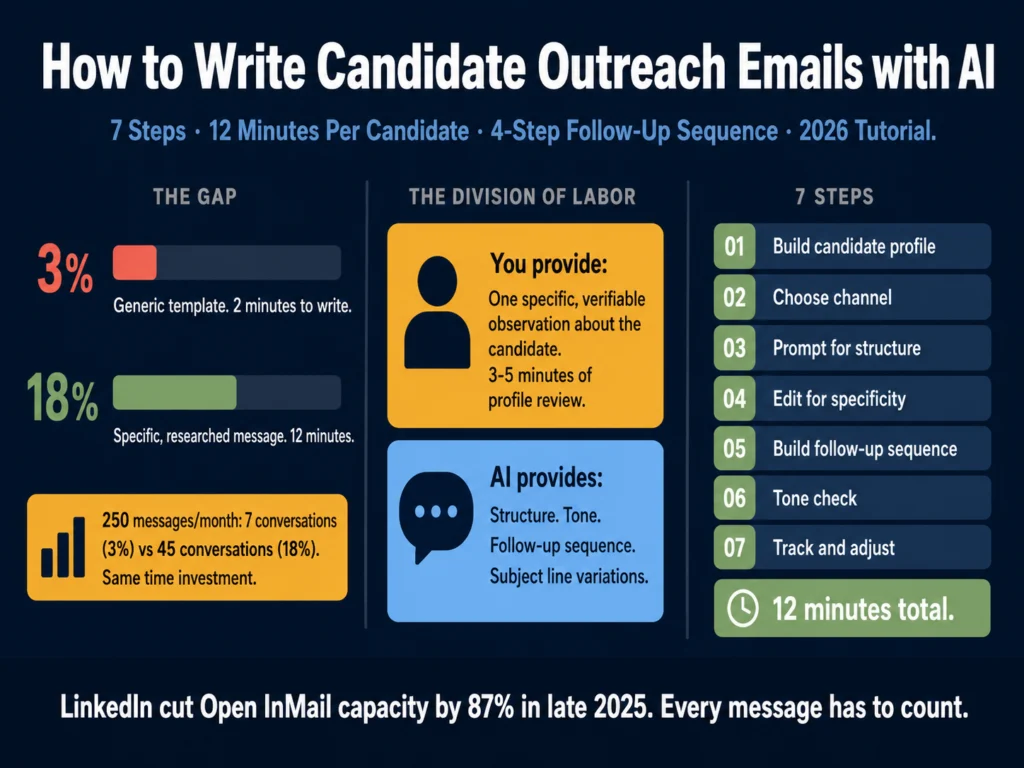
- LinkedIn cut its open InMail cap by 87% in late 2025. You get fewer shots. Each one has to count.
- Recruiters using 4-step AI outreach sequences get 2x more replies and a 68% higher interest rate than single-touch outreach, according to Gem’s 2026 analysis of 6.2 million email sequences.
- 82% of candidate responses come from follow-up messages, not the initial outreach. Most recruiters stop at one touch and leave that 82% on the table.
- AI handles structure, sequence design, and follow-up drafts well. The one input it cannot generate is a specific, verifiable observation about the candidate. That comes from you.
- This tutorial covers seven steps: candidate profiling, writing the observation, choosing the right channel, building the prompt, editing the draft, sequencing follow-ups, and tracking what works.
In late 2025, LinkedIn capped Open InMail sends to under 100 per month per account, down from roughly 800.
That’s an 87% drop in capacity through the Open InMail channel specifically (the free-to-send messages you can reach any Open Profile with).
Credit InMail, which costs credits from your Recruiter subscription, was not affected by this change. The platform made a deliberate trade: volume for quality.
If you were sending generic templates, the cap reduction hit you hard. If you were sending specific, well-researched messages, you lost fewer shots than you thought because most of those 800 were going unread anyway.
This tutorial is about building a workflow that makes each outreach message worth sending. AI speeds up the drafting and sequencing.
The research and observation behind each message still comes from you.
- Step 1: Build Your Candidate Profile Before Touching Any AI Tool
- Step 2: Choose Your Channel and Match the Format
- Step 3: Use the Prompt to Generate Structure, Not the Observation
- Step 4: Edit the Draft for Specificity
- Step 5: Build the Follow-Up Sequence
- Step 6: Run the Final Message Through a Tone Check
- Step 7: Track What Works and Adjust
- What This Workflow Looks Like in Practice
- Related Reading
- Frequently Asked Questions
- Conclusion
Step 1: Build Your Candidate Profile Before Touching Any AI Tool
The single most common mistake in recruiter outreach is opening ChatGPT or Claude before reviewing the candidate’s profile.
Every AI message you write is only as specific as the input you provide. If you open a prompt with “write an outreach email for a senior data engineer,” you get a template.
If you open a prompt with “write an outreach message for a senior data engineer who built the data infrastructure at two Series B companies and transitioned from a machine learning research background,” you get a starting point worth editing.
Before you write anything, spend 3 to 5 minutes on the candidate’s profile. You are looking for one specific, verifiable observation.
Not “your background is impressive” (every recruiter says this). Something like:
- “You built Mercado’s analytics pipeline from scratch and reduced query time by 60%”
- “You moved from research into applied ML at two different companies, both at an early stage”
- “You led a team through a re-platforming project while maintaining a public-facing product”
Write that observation in one sentence before you open your AI tool. It becomes the anchor of every message in your sequence.
Step 2: Choose Your Channel and Match the Format
Three channels matter in 2026: LinkedIn InMail, email, and LinkedIn connection requests. Each has different constraints.
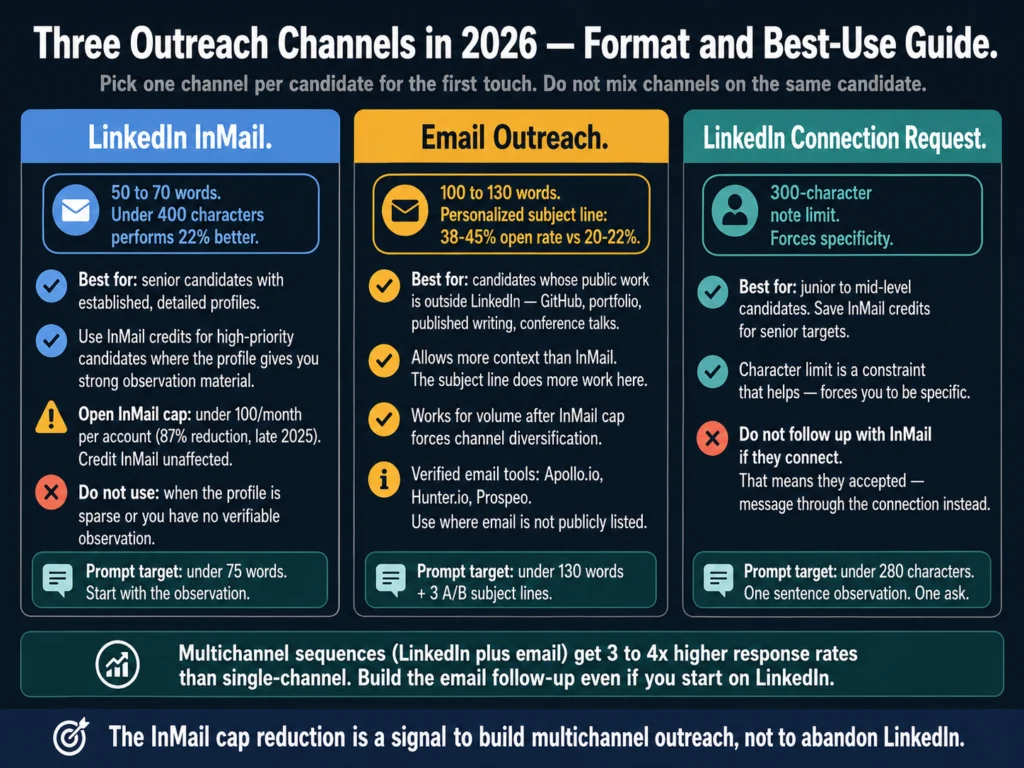
LinkedIn InMail is best for senior candidates with established profiles. The sweet spot is 50 to 70 words. Messages under 400 characters perform 22% better, according to LinkedIn Talent Blog benchmarks.
InMail works when the candidate’s profile gives you enough context for a specific observation.
Email allows more length but needs a stronger subject line. Personalized subject lines generate 38 to 45% open rates versus 20 to 22% for generic ones.
Email is better for candidates whose LinkedIn is sparse but whose public portfolio, GitHub, or published work gives you material to reference.
LinkedIn connection requests have a 300-character note limit. Use these for junior or mid-level candidates where InMail credit is better saved. The character limit forces specificity in a way that helps you.
Pick one channel per candidate for the first touch. Do not start with a connection request and then send an InMail if they connect.
Pick the channel that fits their profile and commit.
Step 3: Use the Prompt to Generate Structure, Not the Observation
This is where the two-part division of labor matters. You provide the observation. AI provides the structure, tone, and follow-up language.
Prompt for LinkedIn InMail (50 to 75 words):
Write a LinkedIn InMail from [YOUR NAME], [YOUR TITLE] at [COMPANY].

Candidate name: [NAME]
Role: [JOB TITLE]
My specific observation about their background: [YOUR ONE-SENTENCE OBSERVATION]

Requirements:
- Under 75 words total
- Start with the observation, not a compliment or "I came across your profile"
- Connect the observation to why this specific role is relevant to them
- One ask only: "open to a 15-minute call this week?"
- Tone: direct and peer-level
- No phrases: "exciting opportunity," "impressed by your background,"
  "I hope this message finds you well," "passionate about"
- Do not use the word "leverage"Prompt for email outreach (100 to 130 words):
Write a candidate outreach email from [YOUR NAME] at [COMPANY].

Candidate name: [NAME]
Role: [JOB TITLE]
Specific observation from their background: [YOUR OBSERVATION]
Why that experience is directly relevant to this role: [ONE SENTENCE]
One specific thing about this company or role: [NOT "fast-growing startup"]

Requirements:
- Subject line: specific to the candidate, under 50 characters
- Body: under 130 words
- Structure: observation, why it matters for this role,
  one specific company detail, one ask
- Tone: warm but direct
- Generate 3 alternative subject lines for A/B testing
- Sign off with your name and LinkedIn URLRun the output through a quick read before copying it. If you can send the same message to 20 other candidates with minimal changes, it is not specific enough.
Step 4: Edit the Draft for Specificity
AI drafts often preserve the observation you gave them but dilute it in the surrounding sentences.
The most common problem: the observation appears in sentence one, then sentences two and three revert to generic language about the role or company.
Read the output sentence by sentence. Mark any sentence that could apply to any candidate. Rewrite or delete it.
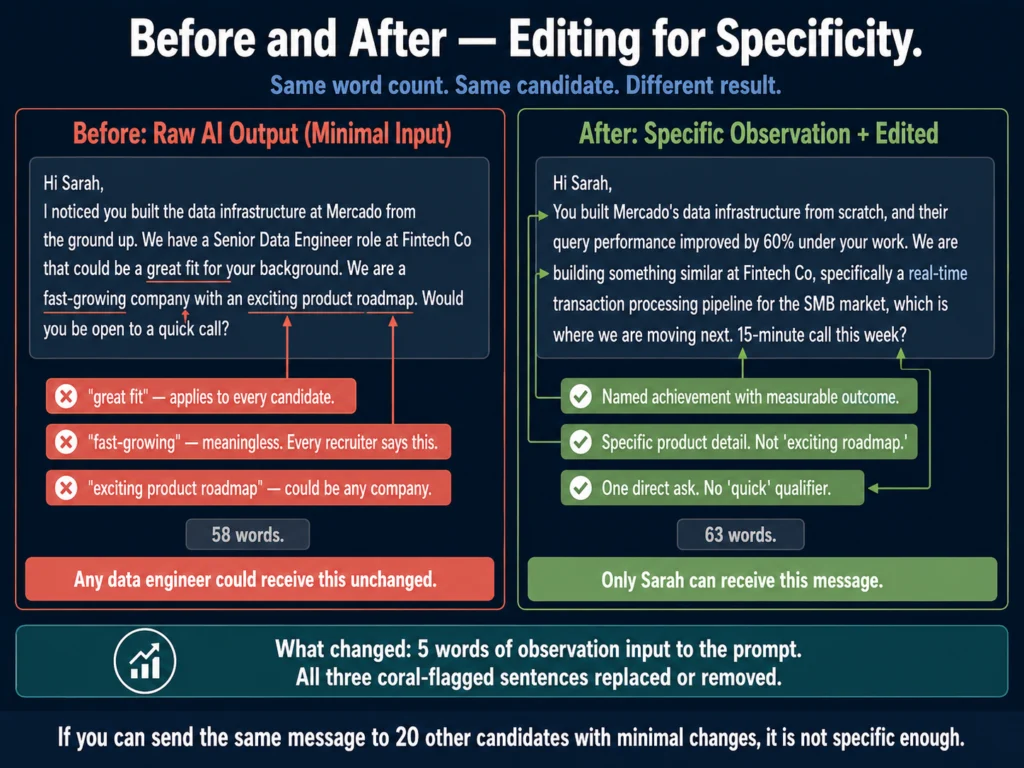
Before editing (typical raw output):
Hi Sarah, I noticed you built the data infrastructure at Mercado from the ground up. We have a Senior Data Engineer role at Fintech Co that could be a great fit for your background. We are a fast-growing company with an exciting product roadmap. Would you be open to a quick call?
After editing:
Hi Sarah, You built Mercado’s data infrastructure from scratch, and their query performance improved by 60% under your work. We are building something similar at Fintech Co, specifically a real-time transaction processing pipeline for the SMB market, which is where we are moving next. 15-minute call this week?
The second version is 63 words. The first is 58 words. Length is not the difference. Specificity is.
Step 5: Build the Follow-Up Sequence
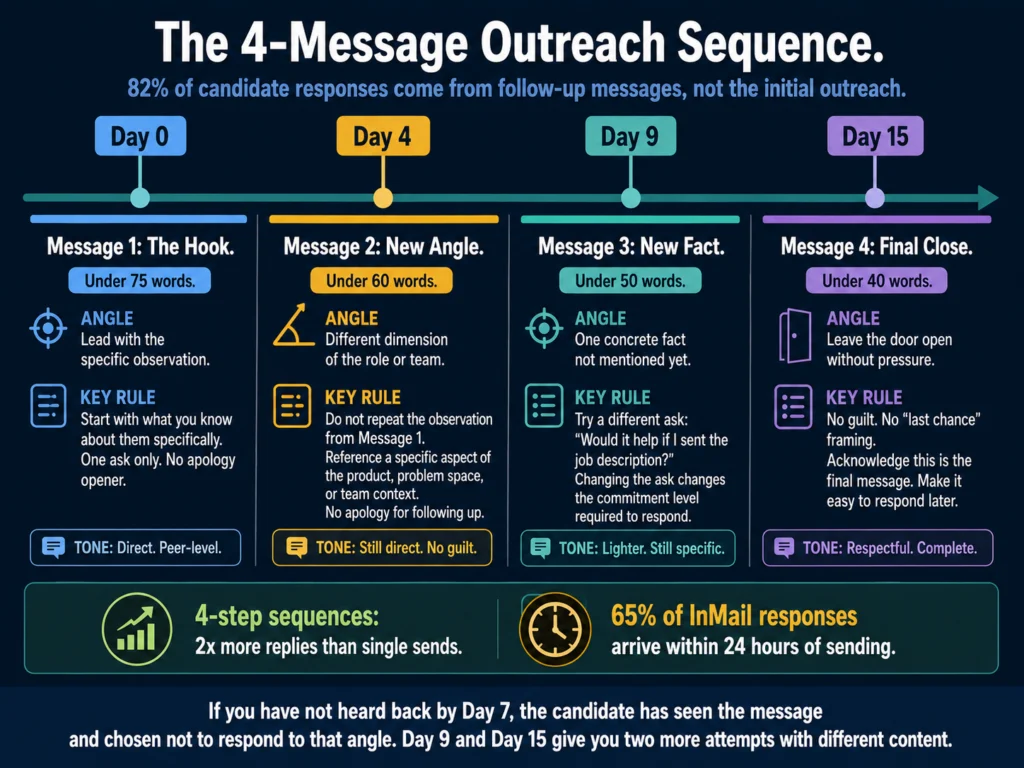
82% of total candidate responses come from follow-up messages rather than the initial outreach, according to Gem’s 2026 analysis of 6.2 million recruiting sequences. Four-step sequences get 2x more replies than single sends.
Use this prompt to generate the full sequence in one session:
Write a 4-message outreach sequence for a [JOB TITLE] recruiting campaign.

Target candidate type: [DESCRIBE IN 1-2 SENTENCES]
Company: [COMPANY NAME]
One specific thing about the role or team: [SPECIFIC DETAIL]
My observation for the first message: [YOUR OBSERVATION]

Message 1 (Day 0): Under 75 words. Lead with the observation.
One ask.

Message 2 (Day 4): Under 60 words. Different angle from Message 1.
Reference a specific aspect of the team, product, or problem space.
No apology for following up.

Message 3 (Day 9): Under 50 words. Share one concrete fact you have
not mentioned yet. Try a different ask: "Would it help if I sent
the job description?"

Message 4 (Day 15): Under 40 words. Final message. No guilt.
Leave the door open without pressure.

Tone across all four: direct, peer-level. Not sales-like.The spacing (Day 0, Day 4, Day 9, Day 15) is intentional. 65% of InMail responses arrive within 24 hours and 90% within one week of sending.
If you have not heard back by Day 7, the candidate has seen the message and chosen not to respond to that angle. Day 9 and Day 15 give you two more attempts with different content.
Step 6: Run the Final Message Through a Tone Check
Outreach that reads as sales-like or overly formal gets lower response rates than outreach that reads as peer-to-peer.
Grammarly’s tone detector catches the specific phrases that shift the register in the wrong direction before you send.
Grammarly Pro’s tone detection flags the register mismatches that make outreach read as templated. At $12/month, it pays for itself in one improved sequence.
Three phrases that consistently trigger lower response rates and that Grammarly will flag:
- “I hope this message finds you well” (formal signal, delete it)
- “I wanted to reach out” (passive, start with the observation instead)
- “Please feel free to” (bureaucratic, replace with a direct ask)
Step 7: Track What Works and Adjust
Most recruiters send sequences and never look at which messages generated responses. This makes improvement impossible.
Track three numbers per campaign:
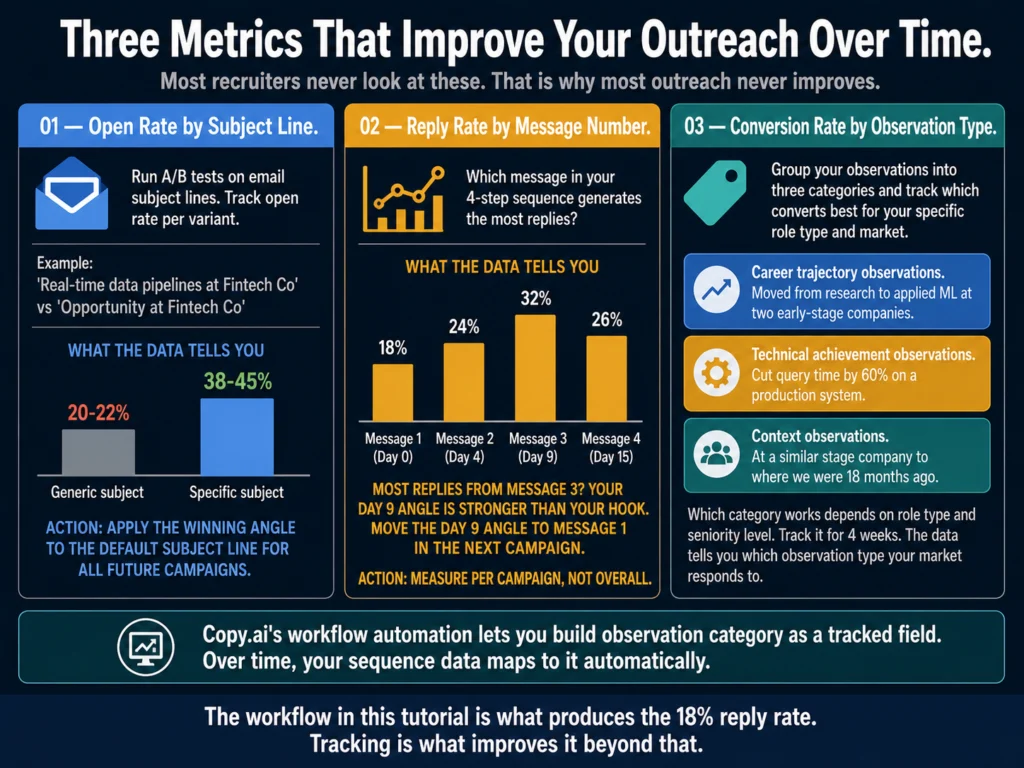
Open rate by subject line.
If you are running A/B subject line tests on email, this tells you which framing got the candidate to open.
A subject line that names the specific technical domain (“Real-time data pipelines at Fintech Co”) consistently outperforms generic ones (“Opportunity at Fintech Co”).
Reply rate by message number.
If most replies come from Message 3 rather than Message 1, that tells you either your initial hook is not compelling enough or your Day 9 angle is significantly better.
Apply the Day 9 angle to Message 1 in your next campaign.
Conversion rate by observation type.
Group your observations into categories: career trajectory observations (“moved from research to applied ML twice”), technical achievement observations (“cut query time by 60%”), and context observations (“you are at a similar stage company to where we were 18 months ago”).
Track which category produces the most responses in your specific market. The answer varies by role type and seniority.
Copy.ai’s workflow automation features let you build this tracking loop directly into your outreach template structure.
You build the observation category as a field, and over time your sequence data maps to it.
Copy.ai’s workflow tools are useful for building repeatable outreach systems. The free plan (2,000 words/month) is enough to test one sequence workflow before paying.
What This Workflow Looks Like in Practice
Here is the full workflow for a single outreach message, timed:
| Step | Task | Time |
|---|---|---|
| 1 | Review candidate profile, write one observation | 4 minutes |
| 2 | Choose channel, check format requirements | 1 minute |
| 3 | Run prompt, generate draft | 2 minutes |
| 4 | Edit for specificity, check every sentence | 3 minutes |
| 5 | Run tone check in Grammarly | 1 minute |
| 6 | Copy to outreach platform or send directly | 1 minute |
| Total | 12 minutes |
At 12 minutes per candidate and 25 working days per month, a recruiter spending 2 hours daily on outreach can contact roughly 250 candidates per month with specific, researched messages. That is a realistic daily load, not a theoretical ceiling.
The economics: at an 18% reply rate (low-end personalized benchmark), 250 messages produces 45 candidate conversations per month.
At a 3% generic template rate, 250 messages produces 7. The difference is 38 conversations, from the same time investment.
Related Reading
- ChatGPT vs. Claude for HR Writing: Tested Comparison
- How to Write Rejection Emails with AI (Without Sounding Robotic)
- Best AI Tools for Candidate Outreach Emails
- How to Build an AI Prompt Library for HR Teams
- AI Writing Tools for Recruiters: The Complete Guide
- AI for HR Communications and Documentation: The Complete Guide
Frequently Asked Questions
Best AI Tools for Candidate Outreach Emails covers which tools to use and what each one does well. This tutorial covers the step-by-step workflow for actually executing an outreach campaign with those tools. If you want to know whether to use Claude or Copy.ai, read Article 14 first. If you want to know how to structure your daily outreach process, this article covers that.
Yes, with adjustments. The observation-first approach applies regardless of what platform sends your messages. Most built-in CRM outreach tools have dynamic field systems that let you add a custom field for your observation. Put your one-sentence observation in that field and build your template around it. The platform handles scheduling and tracking. You handle the observation quality. That division of labor works with Greenhouse, Lever, Manatal, or any sequence tool.
Start with LinkedIn’s Skills section on their profile. Look for the most specific skills listed, not the generic ones. “dbt” or “Apache Kafka” tells you more than “data engineering.” Search for what those specific tools are used for and write your observation around the combination: “You work with dbt for transformation and Kafka for streaming, which is exactly the stack we are building on.” You do not need to be a technical expert. You need to demonstrate that you read the profile.
Four touches over 15 days is the standard that current data supports. After 15 days with no response, the probability of conversion drops sharply. Some recruiters extend to a fifth message at Day 30 if the role is hard to fill and the candidate is a strong match. Beyond that, move on. Reaching out again months later when you have a different role is legitimate if you acknowledge the previous outreach directly: “I sent you a message in March about a data role. We have a different position that might be a better fit.” That transparency typically gets a better response than pretending the prior outreach did not happen.
For most sourcing workflows in 2026, yes. LinkedIn’s cap reduction in late 2025 effectively forces you to reserve InMail for high-priority targets where the candidate’s LinkedIn profile gives you strong material to reference. Email outreach now handles the volume, and verified email tools (Apollo.io, Hunter.io, Prospeo) help you reach candidates whose email addresses are not publicly listed.
Multichannel sequences combining LinkedIn and email consistently outperform single-channel outreach by a wide margin. The most cited benchmark, from Omnisend’s 2025 omnichannel research, puts the improvement at 287% for three-plus channel campaigns versus single-channel. That figure comes from ecommerce data, but multiple B2B sales benchmarks show 3-4x higher response rates for combined LinkedIn-plus-email sequences versus email alone. The InMail cap reduction is a signal to build multichannel outreach, not to abandon LinkedIn.
Conclusion
The workflow in this tutorial takes 12 minutes per candidate. The output is a researched, specific message with a 4-step follow-up sequence. The alternative is a 2-minute template that gets a 3% reply rate.
The math is straightforward. The execution is the hard part because finding the observation requires looking at each profile individually.
AI cannot automate that step without sacrificing the specificity that drives response rates.
Use AI to build the structure faster. Do the observation work yourself. Track what your data shows about which observations, angles, and follow-up timing produce responses in your specific market.
Adjust your templates based on that data, not on what any guide says should work. The workflow in this tutorial is what the Ailovyu team runs across different role types and markets.
The seven steps hold. Calibrate the angles and timing to your data.

We research and test AI tools so you can make informed decisions before spending money on them. Every review, comparison, and tutorial on this site is based on actual use, not vendor marketing.
Learn more on our About page.
Statistics sourced from Gem 2026 Email Outreach Benchmarks Report (6.2 million email sequences analyzed), HeroHunt AI Outreach Sequences Guide (April 2026), LinkedIn Future of Recruiting 2025, RecruiterFlow Candidate Outreach Guide (2026), Omnisend 2025 Omnichannel Research (287% multichannel figure), and GLOZO LinkedIn InMail Cost Analysis (May 2026, 87% Open InMail cap figure). Affiliate links earn a commission at no extra cost to you.