
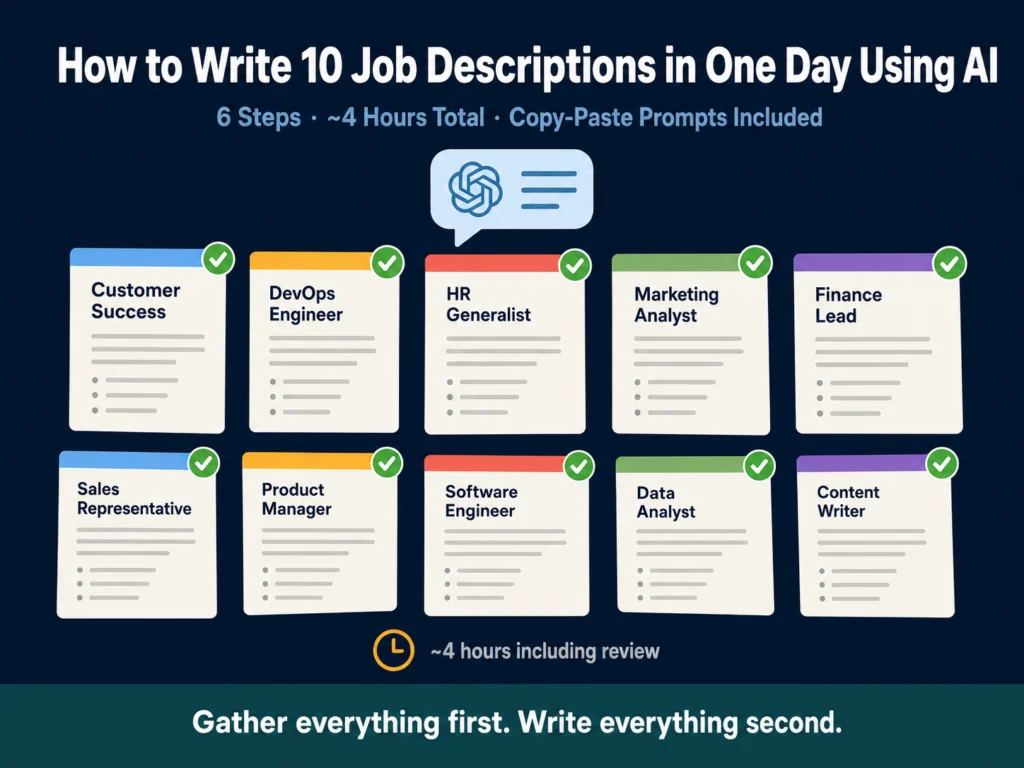
- Writing 10 job descriptions in a single day is realistic with AI — but only if you work in batches, not one at a time.
- The bottleneck is not the writing. It is the brief. Getting complete, accurate information about each role before you open ChatGPT cuts your editing time in half.
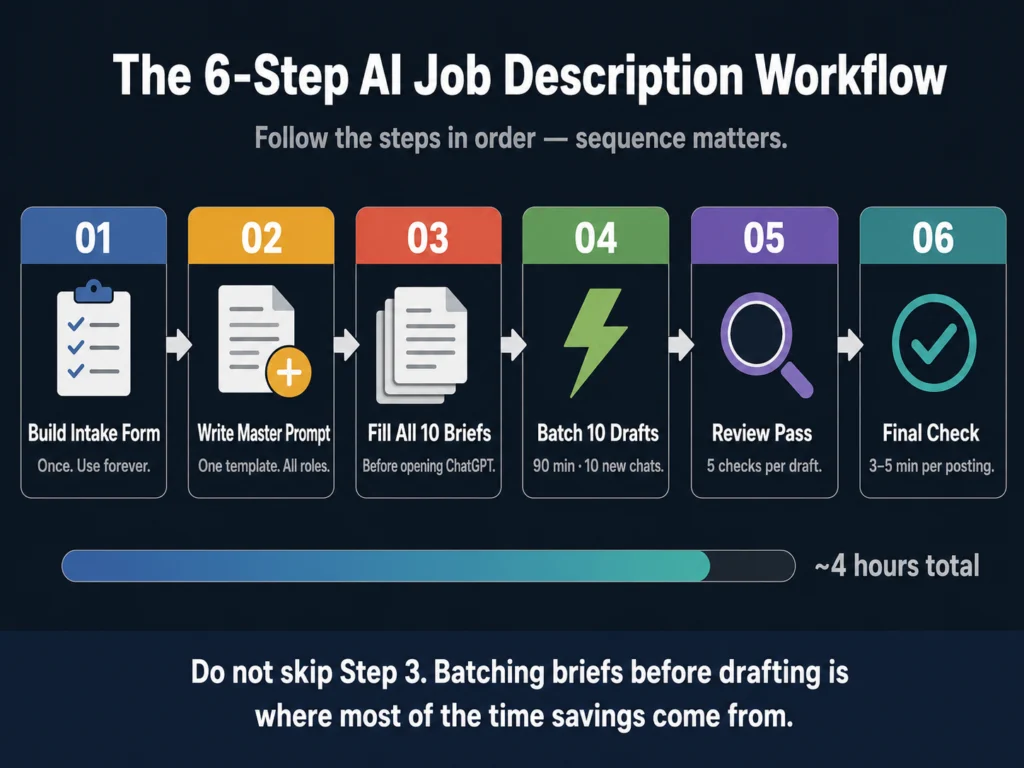
- This workflow has six steps: build an intake form, write a master prompt, fill the briefs, batch the drafts, run a review pass, and final-check before posting.
- Total working time: roughly 3 to 4 hours for 10 job descriptions, including editing.
- The prompts in this article are copy-paste ready. Adjust the bracketed variables and they work across roles.
Most recruiters would not attempt to write 10 job descriptions in a single day. The mental overhead of switching between roles, formats, and tones makes the task feel bigger than it is.
Start a description for a Senior Accountant, get halfway through, remember you still have a DevOps Engineer and two Customer Success roles open, and the whole thing starts to feel unmanageable.
AI does not solve the mental overhead on its own. What it solves is the drafting time, but only if you restructure how you approach the work.
The workflow below is built around one core principle: gather everything first, write everything second. Switching back and forth between gathering role information and writing descriptions is where most of the time disappears.
According to a HiringThing survey of recruiters and hiring managers, 57% of respondents say it takes over an hour to write a quality job description — with 26% reporting more than two hours per posting.
Applied to 10 roles, that is anywhere from 10 to 20 hours of work. The workflow below brings that down to 3 to 4 hours, including review.
That math only works if you follow the steps in order.
- Before You Start: What This Workflow Requires
- Step 1: Build Your Role Intake Form (Do This Once, Use It Forever)
- Step 2: Write Your Master Prompt Template (Do This Once)
- Step 3: Fill All 10 Briefs Before Opening ChatGPT
- Step 4: Batch All 10 Drafts in One Session
- Step 5: Run a Structured Review Pass
- Step 6: Final Check Before Posting
- Time Breakdown for 10 Job Descriptions
- The Most Common Mistakes in This Workflow
- Related Reading
- Frequently Asked Questions
- Conclusion
Before You Start: What This Workflow Requires
You will need access to ChatGPT. The free tier now runs on GPT-5.5 Instant, which handles most standard job description briefs well, but caps out at 10 messages every 5 hours.
ChatGPT Plus at $20/month removes that cap and adds GPT-5.5 Thinking, the reasoning-capable tier that handles longer and more complex briefs noticeably better.
Grammarly is useful for the review pass. The rest is organizational, not technical.
You also need to accept one constraint upfront: this workflow is not suitable for highly specialized or executive-level roles without significant customization.
A staff-level Customer Success Manager description can be drafted and reviewed in 20 minutes with this method.
A VP of Engineering role at a late-stage startup, where the requirements are genuinely complex and the wrong posting costs months of sourcing time, deserves more than a batch workflow. Know which category your open roles fall into before you start.
For roles that do fit the batch approach, here is the full workflow.
Step 1: Build Your Role Intake Form (Do This Once, Use It Forever)
The single most important thing you can do before drafting any job description — with or without AI — is to stop starting from memory.
Most job descriptions are vague because the person writing them did not have specific information. They knew the title, guessed at the responsibilities, and copied the requirements from a previous posting. AI amplifies this problem: a vague brief produces a vague draft, faster.
The fix is a standardized intake form you send to hiring managers before you write anything. It takes about 20 minutes to build once, and it makes every description you write — for the rest of your career — faster and more accurate.
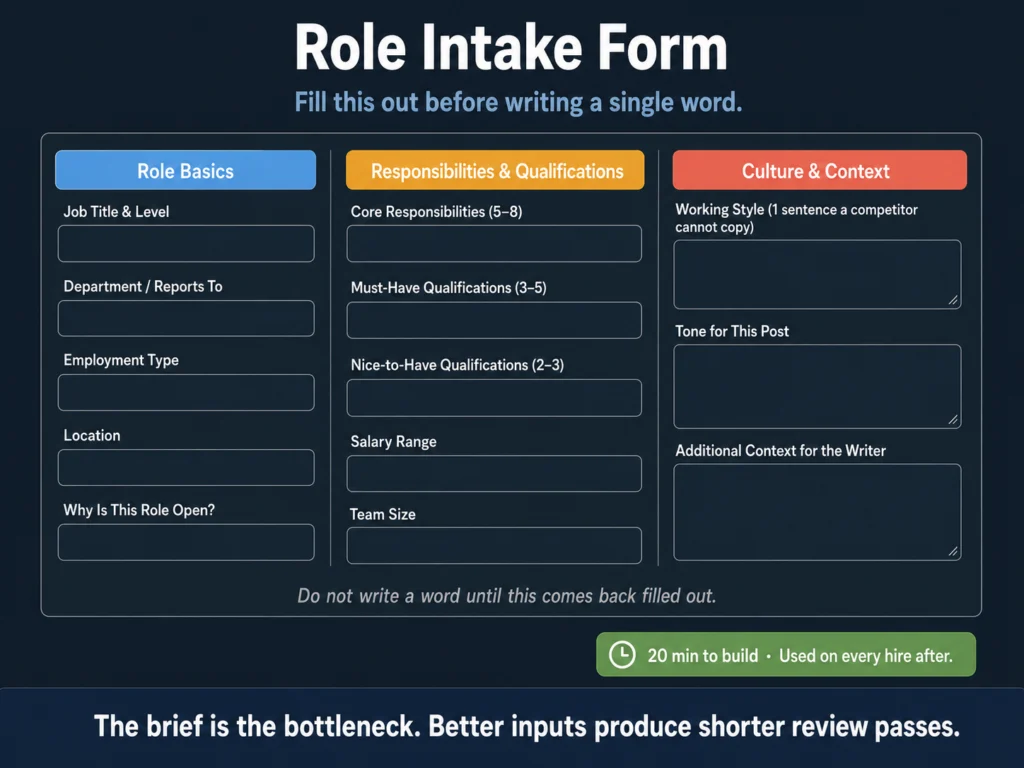
Your intake form should capture:
- Job title and level (junior, mid, senior, lead, manager)
- Department and direct reporting line
- Employment type (full-time, part-time, contract) and location (remote, hybrid, on-site)
- 5 to 8 core responsibilities — written as what the person actually does, not what the role “supports”
- 3 to 5 must-have qualifications — non-negotiable requirements only
- 2 to 3 nice-to-have qualifications — genuinely optional
- Salary range, if you are including it in the posting
- One sentence about your team’s working style or culture that a generic company cannot copy
- One sentence about why this role is open — growth, backfill, or new function (this often surfaces context that changes how you position the role)
Send this form to every hiring manager as the trigger for starting a job description. Do not write a word until it comes back filled out.
A recruiter who chases incomplete briefs wastes more time than a recruiter who waits two days for a complete one.
Step 2: Write Your Master Prompt Template (Do This Once)
This is the prompt structure that will power every job description you write. You customize it per role. You do not rewrite it from scratch.
Copy the template below into a Google Doc, Notion page, or wherever you keep your HR resources:
You are an experienced HR writer creating job descriptions for [COMPANY NAME],
a [COMPANY SIZE]-person [INDUSTRY] company based in [LOCATION / REMOTE STATUS].

Write a job description for the role of [JOB TITLE] at the [LEVEL] level.

The description should:
- Be between 350 and 500 words total
- Open with a 2-sentence summary of the role's purpose and impact
- Include a "What You'll Do" section with [NUMBER] bullet points
- Include a "What We're Looking For" section with must-haves clearly
  separated from nice-to-haves
- Close with 2 to 3 sentences about the company and team
- Use a [TONE: direct and practical / conversational / formal] tone
- Avoid the following phrases: [LIST ANY BANNED PHRASES]

Role details:
- Core responsibilities: [PASTE FROM INTAKE FORM]
- Must-have qualifications: [PASTE FROM INTAKE FORM]
- Nice-to-have qualifications: [PASTE FROM INTAKE FORM]
- Why this role is open: [GROWTH / BACKFILL / NEW FUNCTION]
- Team context: [ONE SENTENCE FROM INTAKE FORM]
- Salary range: [RANGE OR "not included in this posting"]

Do not use filler phrases like "fast-paced environment," "wear many hats,"
"passionate about," or "rockstar." Write as if the reader is a capable
professional, not someone who needs to be sold on taking a job.This template does several things that a generic “write me a job description” prompt does not. It sets word count boundaries, because best-performing job descriptions run between 300 and 700 words, according to Ongig research.
Specifying structure means you get formatted output, not a blob of text that needs reworking. And banning filler phrases by name keeps the output from sounding like it could have come from any company.
GPT-5.5 Instant — the current default for all users — handles this prompt well for most standard roles.
For dense briefs covering senior or highly technical positions, GPT-5.5 Thinking (available on ChatGPT Plus at $20/month) produces more precise output and reasons through complex requirements without flattening the detail.
Step 3: Fill All 10 Briefs Before Opening ChatGPT
This step feels counterintuitive. Most people want to start drafting the moment they have one brief ready. Do not.
The reason to batch all your briefs first is context switching. Every time you move from “gathering information” to “writing” and back to “gathering information,” your brain resets its working context.
That transition costs around 23 minutes of recovery time, according to research by Gloria Mark at UC Irvine, time you spend re-reading what you wrote and mentally re-entering the task.
If you collect all 10 intake forms before drafting the first description, you stay in the same mode — reviewing and organizing — for a concentrated block of time. Then you shift into drafting mode and stay there.
Practically: set a deadline for hiring managers to return their intake forms. Chase once if they miss it. If the brief is incomplete, do not start the description. An incomplete brief produces a draft you will rewrite twice.
Once all 10 briefs are back, spend 20 to 30 minutes reading through them and flagging anything that needs clarification before you draft.
A responsibilities section that says “manage projects” is not enough. “Manage 3 to 5 concurrent product launches across EMEA” is.
Step 4: Batch All 10 Drafts in One Session
Open ChatGPT. Set a timer for 90 minutes. Work through all 10 roles without stopping to heavily edit as you go.
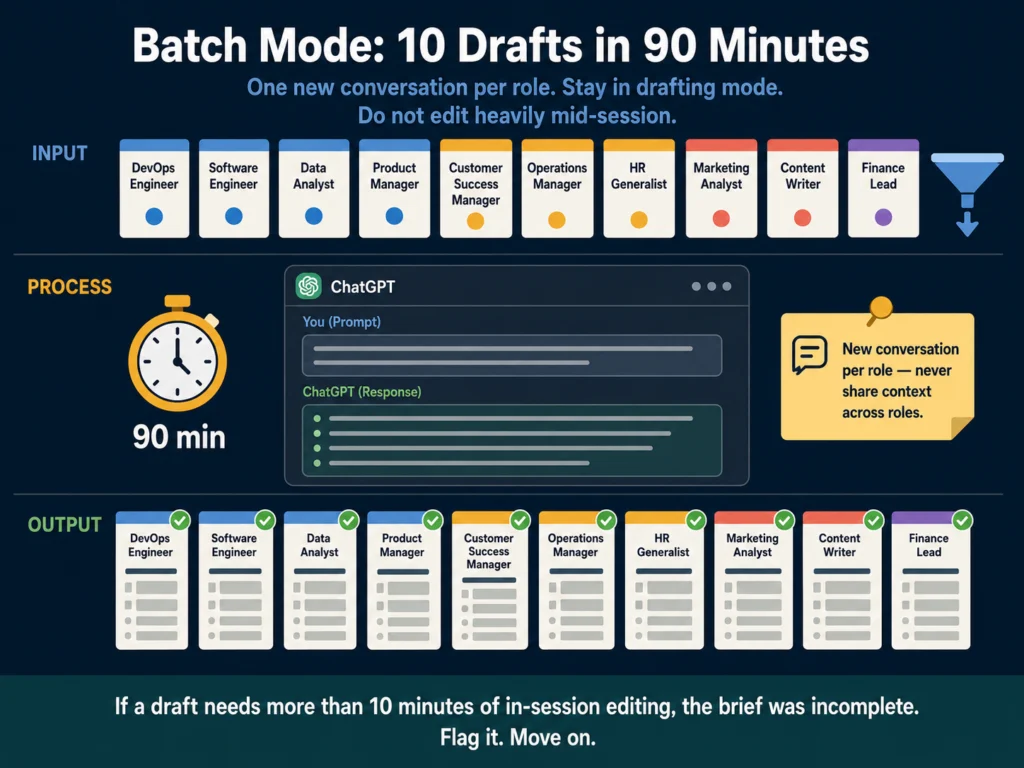
The sequence for each role:
- Paste your master prompt template into a new ChatGPT conversation
- Fill in all the bracketed variables with data from that role’s intake form
- Submit and read the output
- If the structure is correct but specific sentences are off, use one follow-up prompt to fix them (examples below)
- Copy the draft into your working document and move to the next role
Useful follow-up prompts for in-session fixes:
If the opening is too generic:
The opening paragraph is too vague. Rewrite it in 2 sentences that describe
specifically what this person will own and why the role matters to the team.If the requirements list is too long:
The requirements section has [NUMBER] bullet points.
Cut it to [TARGET NUMBER]. Keep only the genuine must-haves.If the tone is off:
Rewrite this in a more [direct / conversational / formal] tone.
Remove any phrasing that sounds like a marketing email.If a specific section is weak:
The "What We're Looking For" section is too generic.
Rewrite it using the specific qualifications I provided,
not general competency language.Do not spend more than 10 minutes per role in this drafting phase. If a draft requires extensive in-session editing, the brief was incomplete. Flag it and move on. You can return to it after the others are done.
By the end of 90 minutes, you should have 10 rough drafts in a working document.
If you are managing a team of recruiters who all need access to the same master prompt and company voice settings, Jasper’s Brand Voice feature is worth evaluating.
It ensures that descriptions written by different people still sound like the same company — something a shared Google Doc prompt cannot fully replicate.
→ Jasper offers a 7-day free trial with full feature access.
Step 5: Run a Structured Review Pass
The drafts from Step 4 are not ready to post. They are well-structured starting points that need a human to verify accuracy and add the one or two details that make a posting sound specific to your company.
Work through each draft with these five checks:
Accuracy check: Does every responsibility and qualification match what the hiring manager actually submitted? AI occasionally smooths or generalizes specific details into broader language. Restore the specifics when this happens.
Requirements audit: Requirements lists frequently accumulate nice-to-haves that most hiring managers would overlook in an otherwise strong candidate. Go through each must-have and ask: would we actually pass on someone who ticks every other box but lacks this? Cut anything where the honest answer is no.
Tone check: Read the description aloud. If any sentence sounds like it was written by a committee, rewrite it. The goal is for the post to sound like a real person at your company — not a job description generator.
Closing line: Does the final company description say something specific to your organization? “We are a team that values collaboration” is not specific. “We are a 40-person team where senior engineers review code the same day it’s submitted” is.
Word count check: Is the description between 300 and 700 words? According to Ongig’s research on job description length, postings in that range consistently outperform shorter and longer ones on application rates.
Under 300 words signals a role that is not well-defined. Over 700 words signals a requirements list that has not been edited. Both hurt conversion. If your draft is outside that range, cut the requirements section first. That is almost always where the excess lives.
Grammarly’s tone detector is useful for this step — particularly if you are reviewing a batch of descriptions quickly and want a second signal on whether a posting reads as intended.
The free plan handles basic clarity. Premium adds the tone analysis.
→ Grammarly’s free plan is worth installing before your next review pass.
Step 6: Final Check Before Posting
Before each description goes live, spend 3 to 5 minutes on this checklist:
- Job title: Is it the title a candidate would actually search for? Internal titles sometimes differ from market-standard ones.
- Salary range: If you are including it, is it current? Salary data shifts. A range from a previous hiring cycle may now be below market.
- Requirements: Could any item on the must-have list inadvertently screen out candidates from underrepresented groups? Overly long experience requirements and credentials not required for the job are the most common sources of bias. For a detailed breakdown of this topic, read: #7: AI Bias in Hiring — What HR Teams Need to Know
- Links and formatting: Will the description paste cleanly into your ATS? Bold, italic, and bullet formatting does not always transfer correctly.
- Legal review: Does any line in the description make a promise or imply a condition of employment that your company cannot fulfill? A phrase like “unlimited growth opportunities” can create legal exposure. For more on this, read: #12: Can You Use AI-Generated Job Descriptions Legally? A Plain-English Guide
Time Breakdown for 10 Job Descriptions
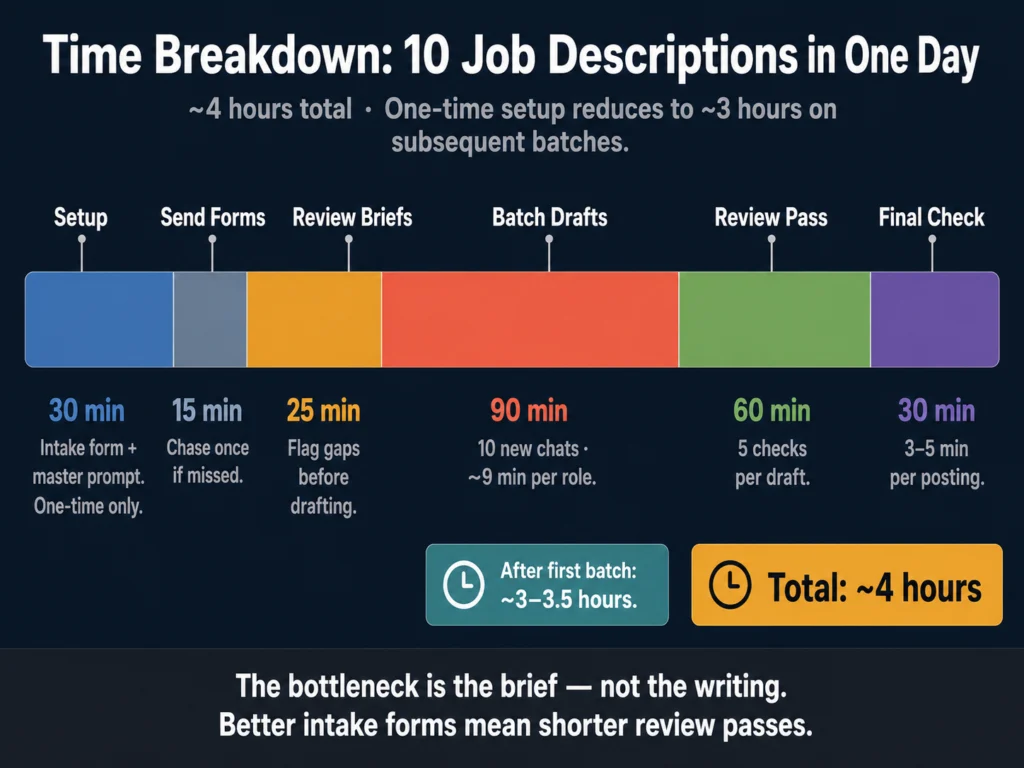
| Phase | Task | Time |
|---|---|---|
| Setup (one-time) | Build intake form and master prompt | 30 min |
| Prep | Send and chase intake forms | 15 min |
| Prep | Review all 10 briefs, flag gaps | 25 min |
| Drafting | Batch all 10 drafts in ChatGPT | 90 min |
| Review | Accuracy, requirements, tone checks | 60 min |
| Final | Pre-posting checklist per role | 30 min |
| Total | ~4 hours |
The 30-minute setup (intake form and master prompt) is a one-time investment. After the first batch, your working time per 10 descriptions drops to roughly 3 to 3.5 hours.
The Most Common Mistakes in This Workflow
Starting with a weak brief. The output is only as specific as the input. If you skip the intake form and draft from memory, you will spend more time editing than you saved by using AI.
Editing heavily in the drafting phase. The batch approach only works if you stay in drafting mode during Step 4. Heavy editing mid-session breaks the rhythm and defeats the time advantage.
Posting without a review pass. AI drafts are starting points, not finished products. The requirements audit in Step 5 is particularly important — AI frequently mirrors whatever qualification language you give it without questioning whether the list is realistic or necessary.
Using the same conversation for multiple roles. Open a new ChatGPT conversation for each role. Context from a previous role can bleed into subsequent drafts in the same session, producing outputs that conflate responsibilities across positions.
Related Reading
- Best AI Tools for Writing Job Descriptions
- ChatGPT vs. Claude for HR Writing — A Practical Comparison
- AI Bias in Hiring — What HR Teams Need to Know
- Can You Use AI-Generated Job Descriptions Legally? A Plain-English Guide
- How to Build an AI Prompt Library for HR Teams
- AI Writing Tools for Recruiters — The Complete Guide
Frequently Asked Questions
The free tier — now running on GPT-5.5 Instant — handles straightforward roles with shorter briefs without issue, but caps out at 10 messages every 5 hours. For senior roles, highly detailed briefs, or complex follow-up edits within a single conversation, GPT-5.5 Thinking (available on ChatGPT Plus at $20/month) produces more precise output. If you are running a full 10-role batch that includes senior or technical positions, the Plus subscription is worth it — you get higher message limits and the reasoning tier for the roles that need it.
Do not start the description. Send one follow-up message asking for the specific missing information. The two most common gaps are vague responsibility descriptions (“manage projects,” “support the team”) and missing context about why the role is open. A backfill is positioned differently from a growth hire — the framing affects the entire posting. Writing from an incomplete brief produces a draft you will revise more than once.
Yes. The master prompt template works with Claude, Gemini, and other large language model tools. Claude tends to produce slightly more precise language on senior or technical roles; ChatGPT’s formatting is cleaner out of the box. The core workflow — batch briefs, batch drafts, structured review — applies regardless of which tool you use. For a direct comparison of how ChatGPT and Claude handle HR writing tasks, read: ChatGPT vs. Claude for HR Writing — A Practical Comparison
Adjust the tone variable in your master prompt for each department. Engineering descriptions typically run more direct and technical; Marketing roles often benefit from a slightly warmer tone; Finance postings tend toward formal. You do not need separate templates for each department — a single variable swap in Step 2 handles it. If your organization has very distinct brand voice requirements across departments, Jasper’s Brand Voice feature is worth the investment. It encodes the voice difference once and applies it automatically.
Yes, especially if you use similar briefs across similar roles. ChatGPT draws from the same underlying patterns, so a batch of Customer Success Manager descriptions written with minimal variation in the brief will produce drafts with noticeable similarities. The solution is specificity at the brief level: even for similar roles, surface the details that make each position distinct — the team size, the stage of the product, the specific customer segment. Different inputs produce different outputs.
Conclusion
Writing 10 job descriptions in a day is not about writing fast. It is about organizing the work so that the writing itself, which AI handles quickly, is not interrupted by information-gathering, context-switching, or mid-draft editing.
The Ailovyu team built this workflow for exactly that problem: recruiters who have the roles open but lose hours to process, not to writing.
The intake form is where most of the value in this workflow lives. Better inputs produce better drafts, shorter review passes, and fewer rounds of back-and-forth with hiring managers.
The AI is just the drafting engine. You are still the editor, the accuracy check, and the person who knows whether a job description actually reflects the role.
Build the intake form today. Write the master prompt. Use it on the next batch of open roles. The workflow becomes faster the second and third time as your prompt template improves based on what the review pass keeps catching.

We research and test AI tools so you can make informed decisions before spending money on them. Every review, comparison, and tutorial on this site is based on actual use, not vendor marketing.
Learn more on our About page.
Affiliate links in this article earn a commission at no extra cost to you. Pricing and tool features verified May 2026 from vendor websites. ChatGPT model information sourced from OpenAI’s official release notes.