
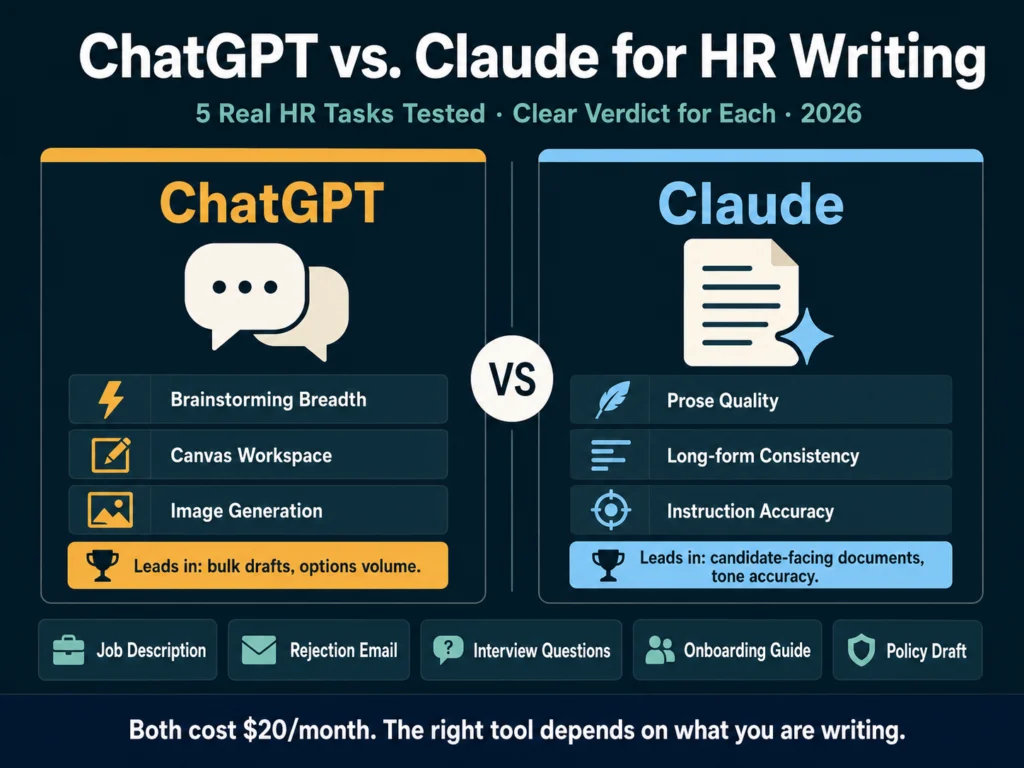
- For HR writing where quality and tone matter (rejection emails, offer letters, nuanced job descriptions), Claude produces noticeably better output. Multiple independent writing comparisons consistently describe Claude’s prose as more natural, more varied, and requiring less editing.
- For brainstorming, bulk drafting, and structured template-based content at speed, ChatGPT holds an edge — particularly through GPT-5.5 Thinking on Plus and the Canvas workspace. It generates more options faster and Canvas is the best iterative editing environment currently available.
- Both cost $20/month on paid plans. Both have free tiers. The free tier gap has narrowed: GPT-5.5 Instant is a capable free model, and Claude Sonnet handles most HR writing tasks well without upgrading.
- Claude’s 200K context window at the standard paid tier matters for HR teams working with long documents — entire employee handbooks, collections of policy drafts, or multi-role onboarding documentation in a single session.
- Practical split: Use Claude for documents a candidate or employee will actually read. Use ChatGPT when you need more raw options to choose from, or when you are working through Canvas.
Most “ChatGPT vs. Claude” comparisons treat both tools as general writing assistants and test them on generic content. This one is different.
The Ailovyu team tested both tools on five specific HR writing tasks that represent the actual work recruiters and HR professionals do daily.
The results are not uniform — each tool leads in different scenarios — and the difference is meaningful enough that using the wrong tool for the wrong task adds editing time rather than saving it.
A note on what we are comparing: ChatGPT in 2026 runs on GPT-5.5 Instant for free users, with GPT-5.5 Thinking available to Plus subscribers ($20/month) — the reasoning-capable tier that handles longer and more complex writing tasks noticeably better.
Claude runs on Claude Sonnet 4.6 for most users, with Opus 4.7 available on the Pro plan. Both paid plans are $20/month.
The free tier comparison matters here too — GPT-5.5 Instant rolled out in May 2026, replacing GPT-5.3 Instant as the free default, and is substantially more capable than what many people remember from a year ago.
What the Data Says Before We Get to the Tests
The consensus among professional writers and editors comparing both tools in 2026 is consistent: Claude produces more natural, nuanced prose.
ChatGPT tends toward a formulaic style — competent but recognizable. Claude’s writing has more rhythm, better paragraph transitions, and a wider vocabulary range.
For template-heavy writing at scale, the gap narrows significantly. For long-form work, ChatGPT’s prose can feel slightly formulaic, particularly in how sections are introduced and closed.
Brainstorming is where GPT-5.5 has a clear edge — when you want a wide range of ideas, angles, headlines, or directions to explore, it generates more of them, and they span a broader range.
For marketing copy, long-form articles, and voice-specific work, Claude is the consensus pick among professional writers.
Applied to HR writing, those generalizations translate into specific task-level differences worth knowing before you commit to a workflow.
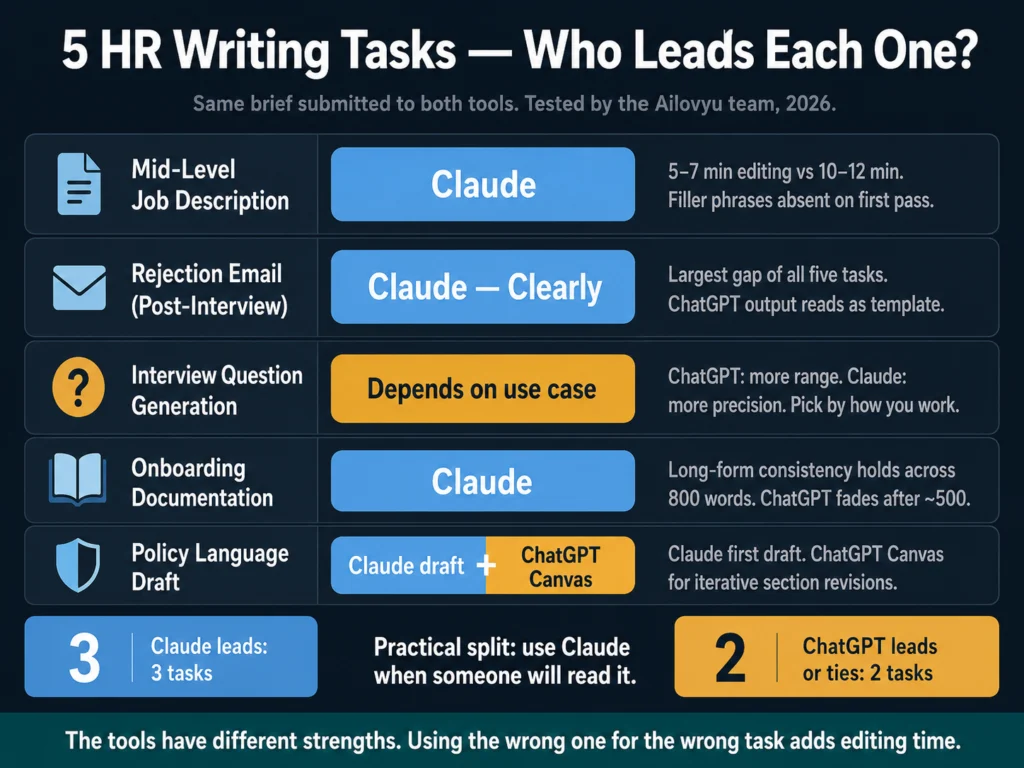
The Tests: Five HR Writing Tasks
Task 1: Mid-Level Job Description
The brief: Customer Success Manager, 3 years experience required, B2B SaaS company, remote, 120-person team, direct and practical tone.
ChatGPT output: Clean structure, well-organized sections, requirements list formatted correctly out of the box. The opening paragraph reads like a description of a role rather than an invitation to apply.
Phrasing like “join our dynamic team” and “passionate about customer success” appear despite the prompt specifying to avoid filler language, not consistently but often enough to require cleanup. Editing time: roughly 10 to 12 minutes.
Claude output: The opening paragraph frames the role from the candidate’s perspective — what they will own and why it matters — rather than describing the company’s need.
Filler phrases are absent without requiring enforcement in the prompt. The requirements are precise and separated cleanly. The tone matches the brief more accurately on the first pass. Editing time: roughly 5 to 7 minutes.
Verdict for this task: Claude. The difference in editing time compounds across a batch of 10 to 15 descriptions per week. For a deeper workflow on batching job descriptions, read: How to Write 10 Job Descriptions in One Day Using AI
Task 2: Candidate Rejection Email (Post-Interview)
The brief: Candidate interviewed twice, strong background but not the right fit for this specific role, keep the door open for future opportunities, tone should feel like it came from a person not a template.
This task is where the prose quality difference matters most. Rejection emails are read carefully by candidates.
An email that sounds like it was generated by a system, even a polite and well-structured one, lands differently than one that sounds like it came from a human who spent a few minutes thinking about the right words.
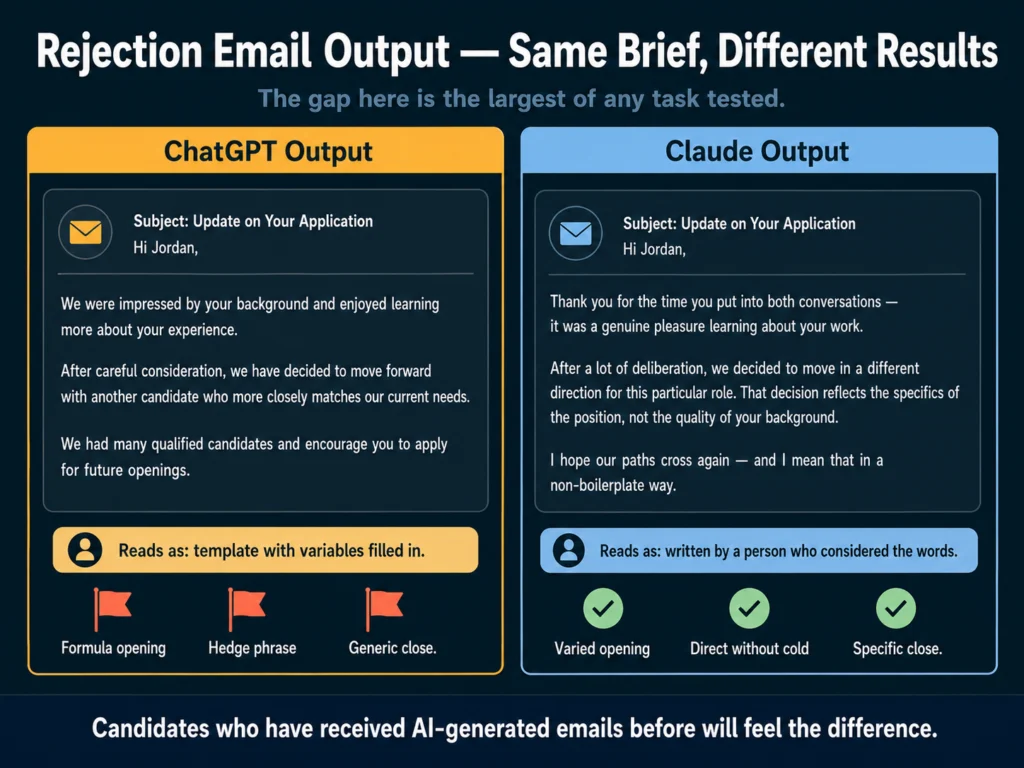
ChatGPT output: Structurally correct, appropriately brief, covers the required points. The phrasing is recognizable as AI output to anyone who reads a lot of it: “We were impressed by your background,” “we had many qualified candidates,” “we encourage you to apply for future roles.”
Functional, but a candidate who has received AI-generated emails before will feel it.
Claude output: The phrasing varies more noticeably. The opening does not start with a compliment formula.
The acknowledgment of the decision is direct without being cold. The close is specific rather than generic. It reads as a considered response rather than a template with variables filled in.
Verdict for this task: Claude, clearly. The gap here is the largest of any task we tested. For a tutorial on writing candidate communications with AI, read: How to Write Candidate Outreach Emails with AI — A Practical Tutorial
Task 3: Interview Question Generation
The brief: Generate 15 behavioral and situational interview questions for a Senior Product Manager role, covering product strategy, stakeholder management, and handling ambiguity.
ChatGPT output: 15 questions, varied across the three categories, good distribution of behavioral (“Tell me about a time…”) and situational (“How would you handle…”) formats. Several questions are genuinely strong and specific to PM work. Two or three are generic enough to apply to almost any senior role.
Claude output: 15 questions, also varied. Claude’s questions lean toward higher specificity — tighter framing, clearer connection to PM-specific challenges. Fewer generic entries.
However, the overall range is narrower. When asked to generate 15 questions, Claude gives you 15 carefully considered ones. ChatGPT gives you 15 that span more territory, some stronger than others.
Verdict for this task: Depends on how you work. If you will pick the best 8 from the list, ChatGPT’s broader range gives you more to work with.
If you want a focused set that is mostly ready to use, Claude’s quality-over-breadth approach saves selection time. For brainstorming sessions where volume matters, ChatGPT is the better starting point.
Task 4: Onboarding Documentation (Multi-Section)
The brief: Write a first-week onboarding guide for a new Sales Development Representative — covering team structure, tools setup, first-week goals, and who to meet in the first 5 days. Approximately 800 words.
This task tests long-form consistency and instruction retention: whether the tool maintains tone, follows structural requirements, and stays on task across a longer output.
ChatGPT output: Competent and well-organized. The structure follows the brief. Tone is slightly more formal than specified.
Around the 500-word mark, the guidance becomes more generic — the specificity of the opening sections does not carry through to the end. The 800-word target is met but the last 300 words require more editing than the first 500.
Claude output: Consistent tone and specificity from opening to close. The “who to meet” section, which is the most likely to become a generic list, stays specific in framing even where the actual names are left as placeholders. Instruction retention across the full document length is noticeably stronger.
Verdict for this task: Claude. For any HR document where consistency over several hundred words matters, Claude’s long-form stability is a practical advantage.
This advantage scales further at the paid tier — Claude Sonnet 4.6 includes a 200K context window, meaning you can process an entire onboarding guide, employee handbook, or collection of policy documents in a single conversation without loss of coherence.
For more on AI-generated onboarding content, read: How to Write a 30-60-90 Day Onboarding Plan Using AI
Task 5: Policy Language Draft (Flexible Work Policy)
The brief: Draft a flexible work policy covering remote work eligibility, core hours expectations, equipment, and manager discretion. Formal but not bureaucratic. Approximately 500 words.
ChatGPT output: Well-structured, covers all four areas, uses clear section headers. The language is precise where it needs to be (eligibility criteria, equipment responsibility) but slightly over-formal in places: “pursuant to this policy” instead of “under this policy.”
Canvas, ChatGPT’s integrated editing workspace, is genuinely useful here: you can highlight specific clauses and ask for rewrites without re-submitting the full document.
Claude output: Formal without being stiff. The manager discretion section — the most legally sensitive part of a flexible work policy — is worded more carefully, with language that acknowledges authority without eliminating it. The output is closer to what an experienced HR writer would draft.
Verdict for this task: Claude for first draft quality, ChatGPT’s Canvas for iterative revision once a draft exists. If you are a heavy Canvas user, consider using Claude to generate the initial policy and ChatGPT’s Canvas to work through specific section revisions. The tools are not mutually exclusive.
Feature Comparison: What Matters for HR Teams
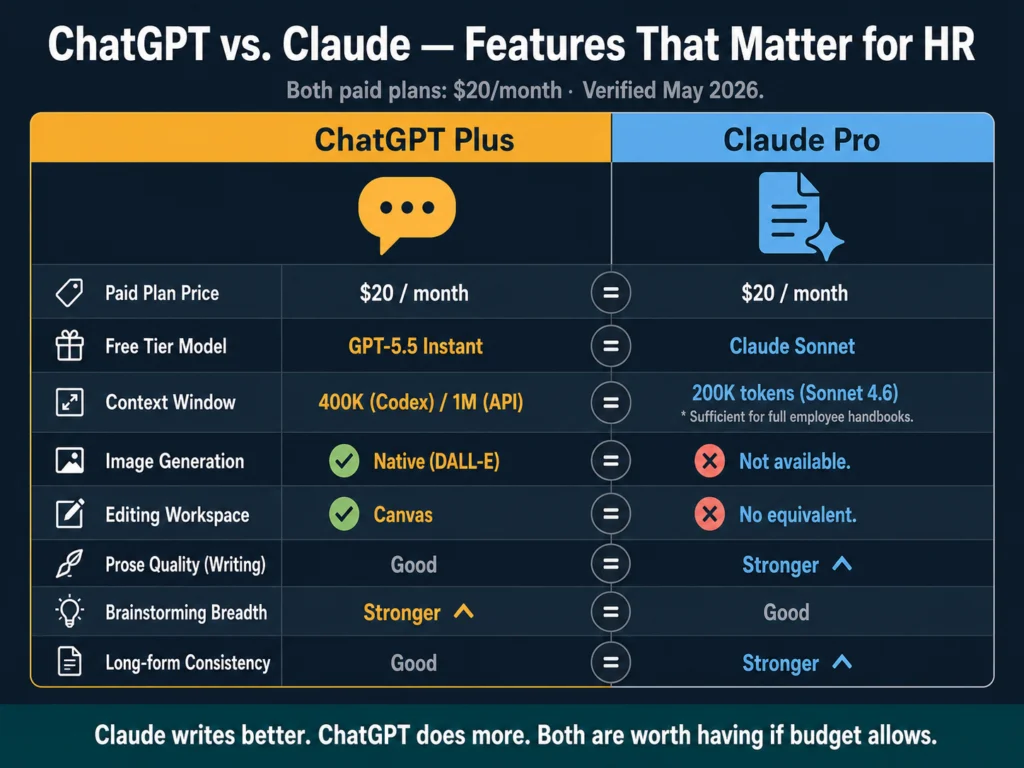
| Feature | ChatGPT (Plus) | Claude (Pro) |
|---|---|---|
| Paid plan price | $20/month | $20/month |
| Free tier model | GPT-5.5 Instant | Claude Sonnet |
| Context window | 400K (Codex) / 1M (API)* | 200K tokens (Sonnet 4.6) |
| Image generation | ✓ Native (DALL-E) | No |
| Editing workspace | ✓ Canvas | No equivalent |
| Web browsing | ✓ | ✓ |
| Prose quality (writing) | Good | Stronger |
| Brainstorming breadth | Stronger | Good |
| Instruction precision | Good | Stronger |
| Long-form consistency | Good | Stronger |
*Context window for ChatGPT refers to GPT-5.5 in Codex (400K) and API (1M). Effective limit in the standard ChatGPT conversation UI may differ — verify at openai.com before making decisions based on this figure.
Pricing
Both tools cost $20/month on paid plans. Neither has a dedicated affiliate program, so this is a recommendation without commission involved.
The free tier difference is smaller than it used to be. GPT-5.5 Instant is the current default ChatGPT model for free users — it rolled out in May 2026, replacing GPT-5.3 Instant as the free default.
The jump in capability from what most people remember as the free ChatGPT experience is significant. Claude’s free tier uses Sonnet models, which handle most HR writing tasks without requiring an upgrade.
For an HR professional writing job descriptions, rejection emails, and onboarding content regularly, the paid tier ($20/month) is worth it for both tools.
The capability gap between free and paid tiers — on both platforms — is real and noticeable for complex or lengthy documents.
Who Should Use Which
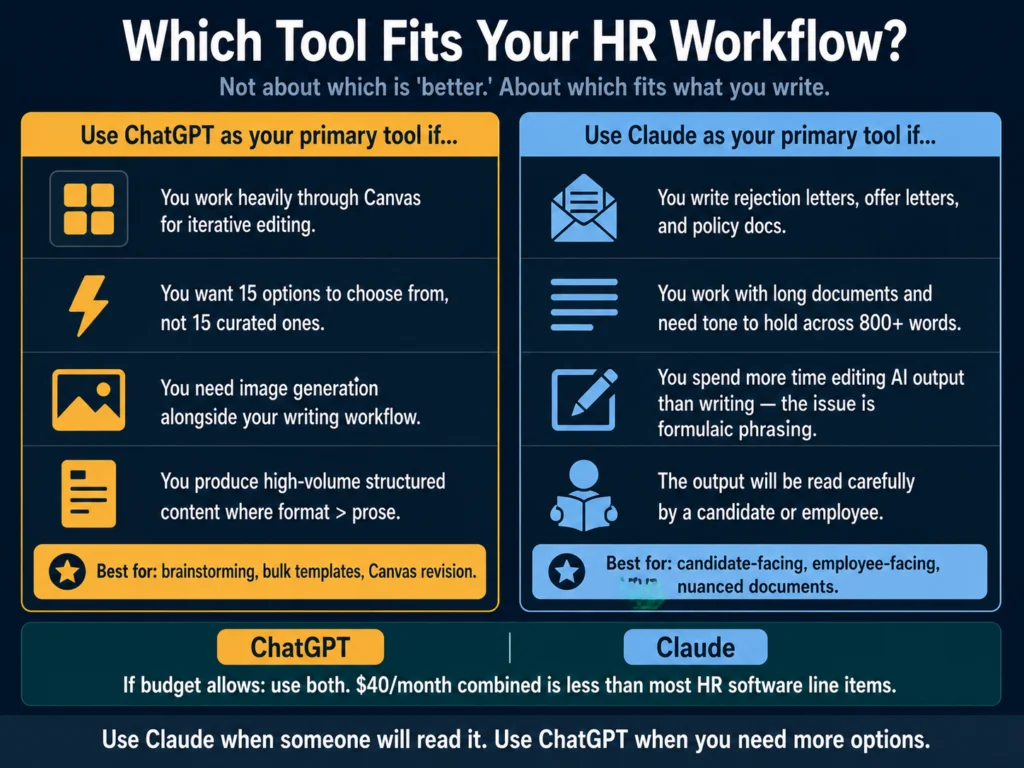
Use Claude as your primary tool if: You write content that candidates or employees will read and that needs to sound like it came from a person — rejection letters, offer letters, nuanced job descriptions, policy documents.
You work with long documents where consistency across 500 to 1,000 words matters. You find yourself spending more time editing AI output than writing, and the issue is formulaic phrasing rather than structure.
Use ChatGPT as your primary tool if: You work primarily through Canvas and find the iterative editing workflow productive. You value brainstorming breadth — you want 15 interview questions to select from, not 15 carefully curated ones.
You need image generation alongside your writing workflow. You produce high volumes of standardized content where structure matters more than prose quality.
If you have the budget for both: Split tasks by tool strength. Claude handles candidate-facing and employee-facing documents; ChatGPT handles internal brainstorming, bulk template generation, and anything that runs through Canvas.
There is no rule requiring you to pick one, and the $40/month combined is still lower than most HR software line items.
For reviews of the individual tools mentioned in this comparison, read:
- Best AI Tools for Writing Job Descriptions
- Jasper AI Review for HR Professionals
- Free vs. Paid AI Tools for HR — What You Actually Get
- Jasper vs. Copy.ai for HR Writing
Related Reading
- How to Write 10 Job Descriptions in One Day Using AI
- How to Write Rejection Emails with AI — Without Sounding Robotic
- How to Write a 30-60-90 Day Onboarding Plan Using AI
- AI Writing Tools for Recruiters — The Complete Guide
Frequently Asked Questions
For most HR writing where a human will read the output carefully — rejection emails, offer letters, nuanced job descriptions — Claude produces better output with less editing. For brainstorming, bulk template work, or iterative editing through ChatGPT’s Canvas workspace, ChatGPT holds the advantage. The honest answer is that the tools have different strengths, and the best choice depends on what you are writing, not which tool is generally rated higher.
No. Both free tiers are functional for HR writing in 2026. ChatGPT’s free tier runs on GPT-5.5 Instant, which is a capable model for job descriptions and shorter documents. Claude’s free tier uses Sonnet models, which handle most HR writing tasks without requiring an upgrade. The paid tiers ($20/month for both) are worth it if you regularly work with long documents, need higher usage limits, or want access to the most capable models — GPT-5.5 Thinking for ChatGPT, Opus 4.7 for Claude.
Yes, and for some HR teams this makes sense. A practical split: use Claude to generate a first draft of documents where tone and naturalness matter (rejection emails, offer letters, policy language), then use ChatGPT’s Canvas for iterative revision on specific sections. The two tools are not competing subscriptions — they are tools with different strengths that can be combined. Many professional writers in 2026 use both rather than committing to one exclusively.
Claude Sonnet 4.6 has a 200K token context window. GPT-5.5, which ChatGPT Plus now runs on, has a significantly larger context window — 400K in Codex and 1M in the API, though the effective limit in the standard ChatGPT conversation interface may differ. For most individual HR documents — a job description, a single policy, a rejection email — neither tool’s context limit is a practical constraint. For large multi-document sessions, both tools now handle more than most HR workflows require. The context window is no longer a meaningful differentiator between the two at the Plus tier.
Both tools have memory features in their consumer interfaces, but they work differently. ChatGPT’s Memory stores explicit facts the user adds or that the system captures from conversations — available on paid plans. Claude’s memory system generates summaries from past conversations automatically and surfaces them in future sessions; users can also add, edit, or delete specific memory entries directly. In practice, both systems are useful for storing preferences like tone, company name, and writing style — but neither replaces a proper prompt template for role-specific context. For HR teams, the most reliable approach is still to keep company voice notes, brand guidelines, and role-specific briefs in an external document and paste the relevant sections into each session. Memory features are a convenience layer, not a workflow replacement.
Conclusion
The conclusion most comparisons avoid giving: Claude writes better, and ChatGPT does more.
For HR professionals specifically, “writes better” matters more than it does for developers or data analysts.
The documents HR teams produce (job descriptions, rejection letters, offer letters, onboarding guides) are often the first and last impression a candidate or employee has of an organization.
AI output that sounds like AI output damages that impression. Output that sounds like it was written by a thoughtful person does not.
Use Claude when the document will be read. Use ChatGPT when you need to generate options. If budget allows, use both — the $40/month combined is still lower than most HR software line items.
We research and test AI tools so you can make informed decisions before spending money on them. Every review, comparison, and tutorial on this site is based on actual use, not vendor marketing.
Learn more on our About page.
ChatGPT model information sourced from OpenAI release notes. Claude model information sourced from Anthropic’s official documentation.