
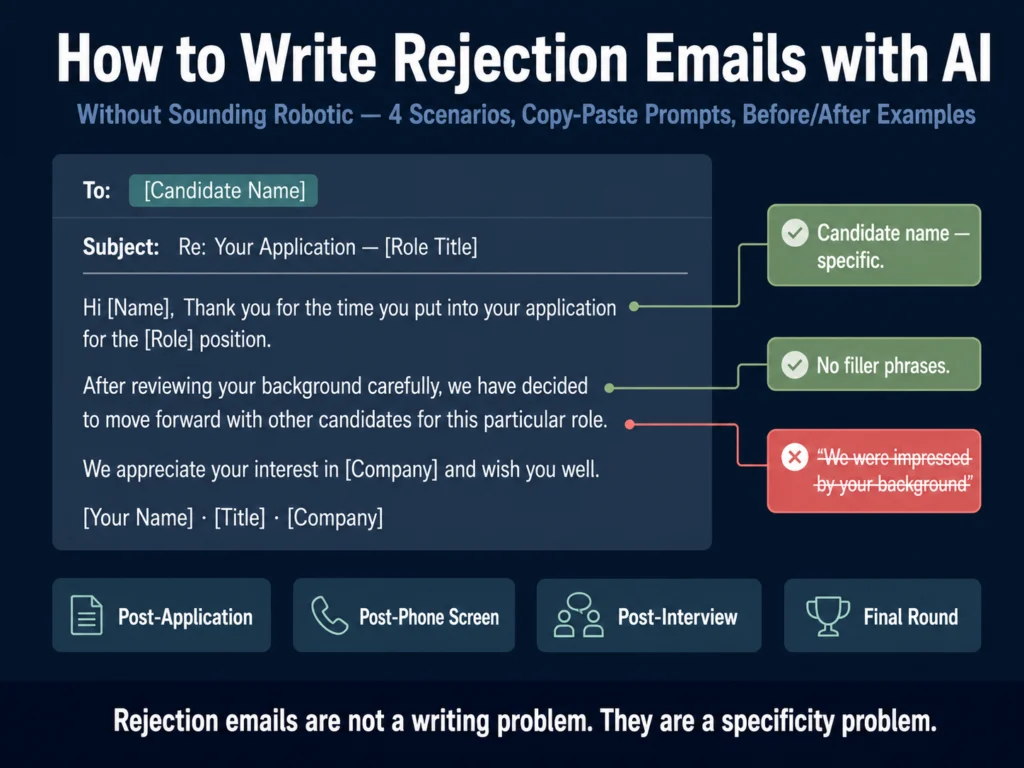
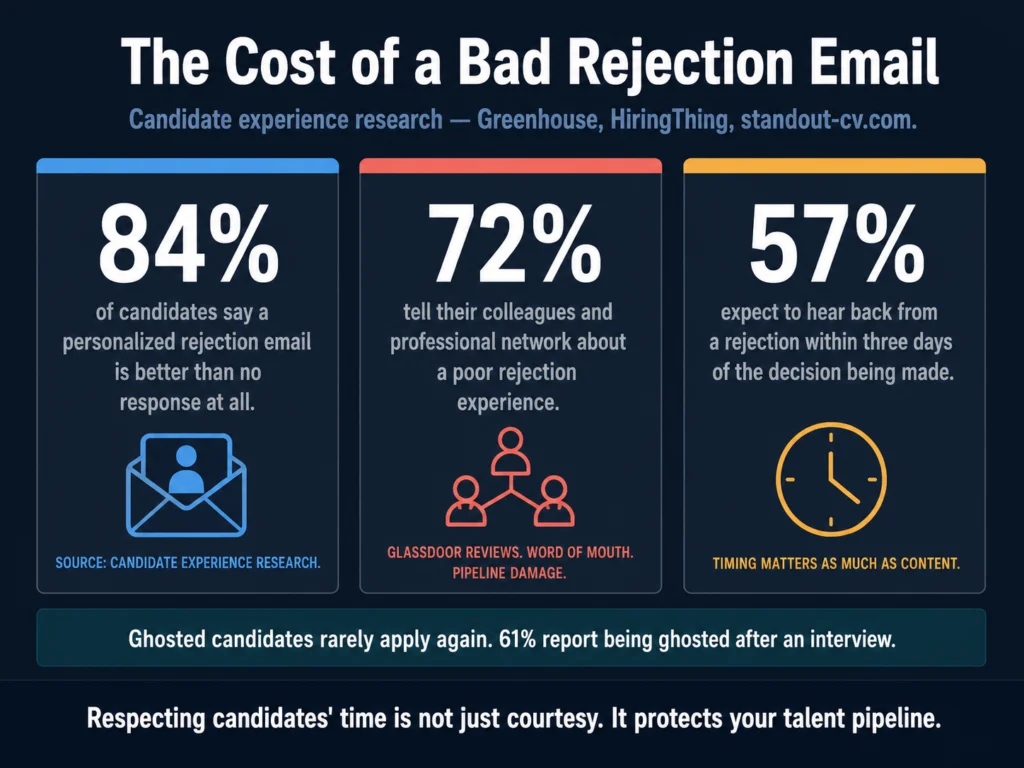
- 61% of job seekers report being ghosted after an interview, according to Greenhouse’s 2024 State of Job Hunting report. A rejection email, even a brief one, is not just courtesy. It protects your employer brand.
- Most AI rejection emails feel robotic for one reason: they contain nothing specific to the candidate. The fix is not better writing — it is better input.
- This article covers four rejection scenarios with copy-paste prompts: post-application, post-phone screen, post-interview, and the hardest one, the final-round rejection.
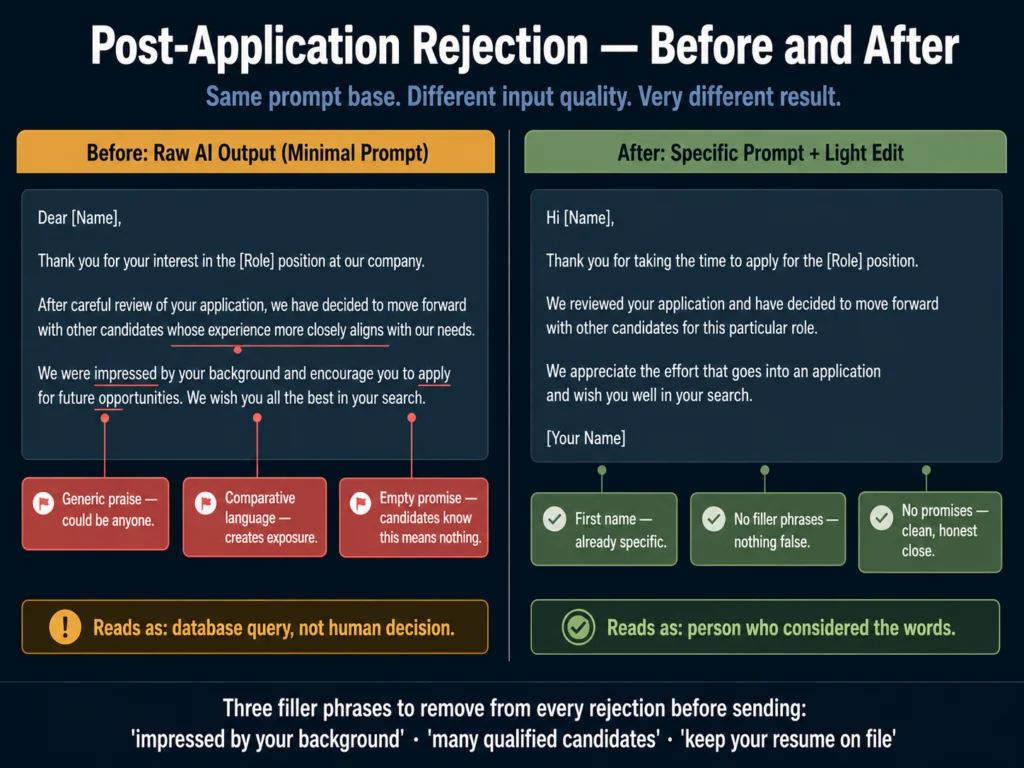
- Three phrases to remove from every rejection email before sending: “we were impressed by your background,” “we had many qualified candidates,” and “we will keep your resume on file.”
- Use Claude or ChatGPT for drafting. Run a Grammarly tone check before sending. Do not send raw AI output — it will read as raw AI output.
Rejection emails are not a writing problem. They are a specificity problem.
The emails that feel like a form letter — and candidates can tell immediately — contain nothing that could not apply to anyone who applied to anything.
“We were impressed by your background.” “We had many qualified candidates.” “We encourage you to apply for future roles.”
These phrases are not wrong. They are just empty. They tell the candidate that no one thought about them specifically, and that the email they received was a database query, not a communication from a person.
AI makes this problem faster. A raw ChatGPT or Claude draft of a rejection email, generated with a minimal prompt, reproduces the exact same patterns.
It is polite, it is grammatically correct, and it sounds like every other rejection email the candidate has received in the last three months.
The fix is not avoiding AI. It is using it differently. A rejection email written with a detailed, candidate-specific input produces output that reads as considered rather than automated, even if it was generated in 45 seconds.
Here is why this matters before we get to the prompts.
The Business Case for Better Rejections
84% of candidates say a personalized rejection email is better than no response, and 44% say they have a better opinion of a company when they receive a personal rejection note. These are not feelings — they translate into measurable outcomes.
Candidates who are rejected respectfully remain in your talent pipeline. The person who was second choice for a Product Manager role this quarter may be the right hire in six months.
Candidates who are ghosted or receive obviously automated rejections rarely apply again, and 72% tell their colleagues and professional network about the experience.
57% of candidates expect to hear back within three days of being rejected. The timing matters as much as the content. An empathetic rejection that arrives three weeks later still signals that the candidate’s time was not valued.
Recruiters using AI for candidate communication report meaningful time savings on routine writing tasks, time that shifts to higher-value work like sourcing and candidate relationships.
The question is whether the output quality justifies the approach — and with the right prompt structure, it does.
What Makes a Rejection Email Sound Robotic
Before the prompts, understand the patterns that make rejection emails obviously automated. They fall into four categories.
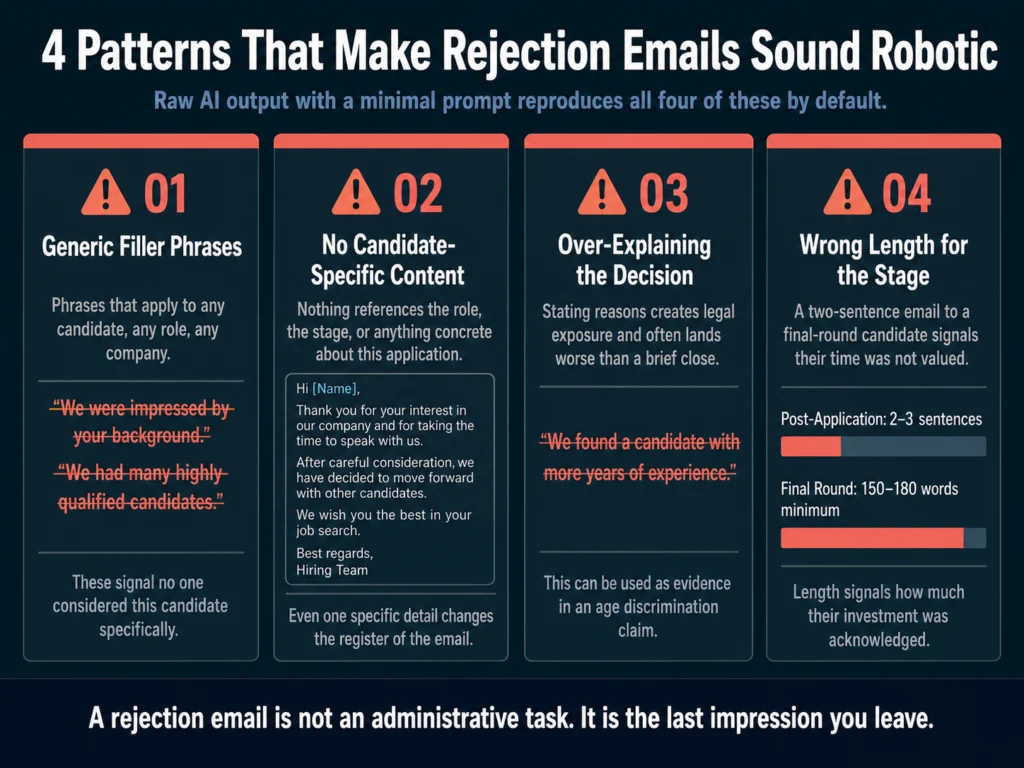
Generic filler phrases. Any phrase that could apply to any candidate, any role, any company should be removed. The most common offenders:
- “We were impressed by your background”
- “We had many highly qualified candidates”
- “This was a difficult decision”
- “We will keep your resume on file for future opportunities”
- “We wish you all the best in your search”
These phrases are not honest signals of consideration. They are clichés that signal the opposite — that no one considered the candidate specifically.
No candidate-specific content. A rejection email that does not reference the specific role, the stage the candidate reached, or anything concrete about their application reads as automated regardless of how it was generated.
Even one specific detail (the role title, the interview date, a skill they mentioned) changes the register of the email.
Explaining why. Counterintuitively, over-explaining the reason for rejection creates legal exposure and often feels worse to the candidate than a brief, warm close.
The right answer is not “we found a candidate with more years of experience.” That can be used as evidence in an age discrimination claim.
The right answer is a graceful, honest close that does not invite a dispute.
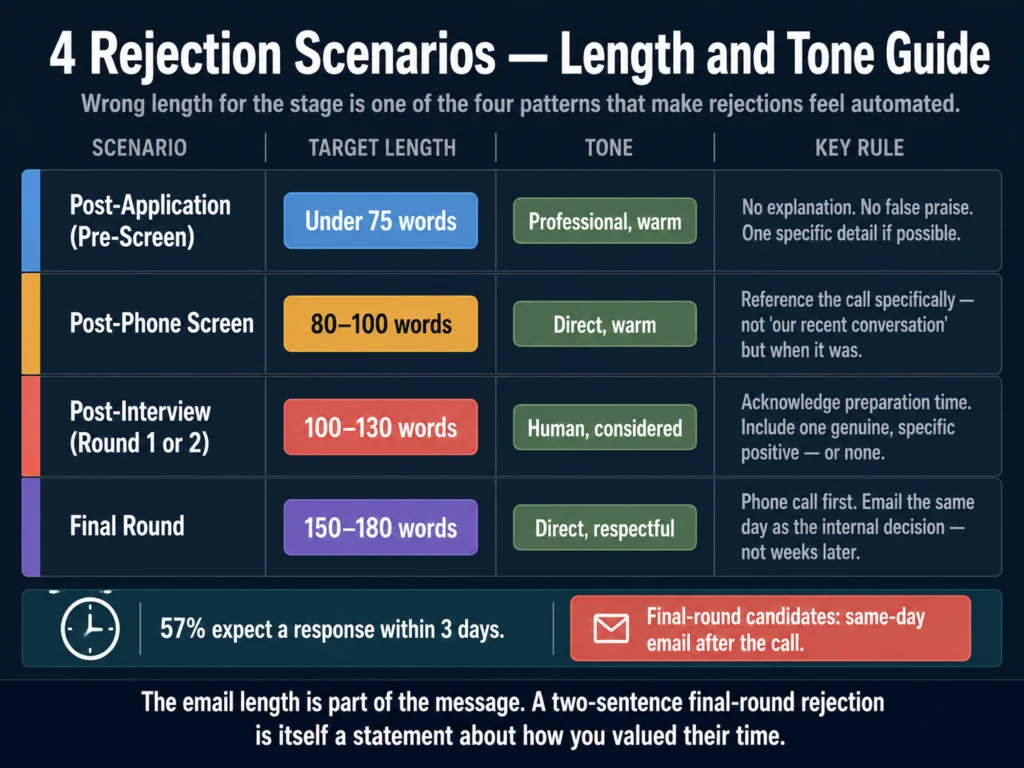
Wrong length for the stage. A post-application rejection should be two to three sentences. A post-final-interview rejection earns at least one paragraph.
Sending a two-sentence rejection to a candidate who completed three rounds of interviews signals that the time they invested was not acknowledged.
Before You Prompt: What to Gather
The quality of an AI-generated rejection email is almost entirely determined by the quality of the information you provide. Before opening ChatGPT or Claude, collect:
- The candidate’s first name
- The exact role title they applied for
- The stage they reached (application, phone screen, first interview, final round)
- One genuine, specific positive observation (if applicable and truthful)
- Whether you want to leave the door open or close it
- Your name as the sender
That is all you need. None of it requires detailed feedback about the candidate’s performance. The goal is specificity, not comprehensive evaluation.
The Prompts: Four Rejection Scenarios
Scenario 1: Post-Application Rejection (Pre-Screen)
This is the highest-volume rejection. A candidate applied, and the role or the application does not meet the minimum criteria. Keep this brief.
Do not over-apologize. Do not promise what you cannot deliver.
Prompt:
Write a rejection email for a candidate who applied for [ROLE TITLE] at our company.
They did not make it through the initial application review.

Requirements:
- First name only: [NAME]
- Keep it under 75 words total
- Do not use any of these phrases: "impressed by your background," "highly qualified
  candidates," "keep your resume on file," "wish you all the best"
- Tone: professional but warm — it should sound like a person wrote it
- Do not explain why they were not selected
- Include a genuine acknowledgment that they took time to apply
- Sign off with [YOUR NAME], [YOUR TITLE]
- Do not invite them to reapply unless we want them toBefore (typical raw AI output):
Dear [Name], Thank you for your interest in the [Role] position at our company. After careful review of your application, we have decided to move forward with other candidates whose experience more closely aligns with our current needs. We were impressed by your background and encourage you to apply for future opportunities that match your skills. We wish you all the best in your job search.
After (with specific prompt and editing):
Hi [Name], Thank you for taking the time to apply for the [Role] position. We reviewed your application and have decided to move forward with other candidates for this particular role. We appreciate the effort that goes into an application and wish you well in your search. [Your Name]
The after version is shorter, contains no false praise, and does not make promises about future opportunities.
It is still warm. It took the candidate’s time seriously without inventing enthusiasm that was not there.
Scenario 2: Post-Phone Screen Rejection
The candidate spoke with a recruiter. They invested real time. The email should acknowledge that briefly without over-elaborating.
Prompt:
Write a rejection email for a candidate following a recruiter phone screen.

Details:
- Candidate first name: [NAME]
- Role: [ROLE TITLE]
- Approximate date of the call: [DATE or "last week"]
- One truthful positive observation from the conversation (optional): [OBSERVATION
  OR leave blank]
- We [do / do not] want to keep the door open for future roles

Requirements:
- 80 to 100 words
- Reference the phone conversation without being vague ("our call last week"
  not "our recent conversation")
- Warm but direct tone — no filler phrases
- No explanation of the specific reason for the decision
- Sign off with [YOUR NAME]Scenario 3: Post-Interview Rejection (First or Second Round)
This is the most common scenario where tone matters most. The candidate prepared, showed up, and invested meaningful time.
The email should be longer than the previous two — at least one short paragraph — and should acknowledge the conversation specifically.
Prompt:
Write a rejection email for a candidate following [FIRST / SECOND] round interviews
for the role of [ROLE TITLE].

Details:
- Candidate first name: [NAME]
- Date of interview: [DATE]
- One specific, genuine observation from the interview (something they said or
  demonstrated that was genuinely strong): [OBSERVATION]
- We [do / do not] want to leave the door open for future roles

Requirements:
- 100 to 130 words
- Reference the interview specifically — not "our conversation" but the role
  and context
- Acknowledge the preparation and time they invested
- Do not explain why they were not selected — no comparative statements, no
  skills gap analysis
- Include the specific positive observation naturally (do not make it sound like
  a consolation prize)
- Warm, human tone — it should not read as a template
- Sign off with [YOUR NAME], [YOUR TITLE]What to do when you do not have a genuine positive observation: Do not invent one. Leave that variable blank in the prompt and instruct the model not to include false praise.
A truthful, warm email without specific praise is better than one with fabricated enthusiasm.
Scenario 4: Final-Round Rejection (The Hardest One)
A candidate who reached the final round invested weeks of their time, prepared extensively, and may have turned down other conversations to stay engaged with your process.
This email is not an administrative task. It deserves direct, human communication — and in most cases, a phone call first.
Prompt:
Write a rejection email for a candidate who reached the final round of interviews
for [ROLE TITLE] and was not selected.

Details:
- Candidate first name: [NAME]
- They completed [NUMBER] rounds of interviews over approximately [TIMEFRAME]
- One specific, genuine positive from the process: [OBSERVATION]
- The decision was close (if true): [YES / NO]
- We genuinely want to stay in contact for future roles: [YES / NO]

Requirements:
- 150 to 180 words
- This candidate invested significant time — the email should acknowledge that
  directly and specifically
- Do not explain why they were not selected — no "we found someone with more X"
  statements
- If the decision was genuinely close, say so — but only if it is true
- If we want to stay in contact, say so specifically: not "feel free to apply
  to future roles" but "I will personally reach out if something opens up
  that fits your background"
- Tone: direct, warm, respectful — this person deserved the role and did not
  get it through no failure of their own
- Do not end with "good luck" — it is dismissive for this level of investmentFor final-round candidates, consider sending this email the same day as the internal decision — not two weeks later. The timing is part of the respect.
Before You Send: The Tone Check
Before any rejection email goes out, read it aloud. If any sentence sounds like it was written by someone who did not know the candidate existed, rewrite it.
Grammarly’s tone detector is useful here — it gives a signal on whether the email reads as warm, formal, or confident, and flags sentences that are likely to land differently than intended.
→ Grammarly’s free plan handles basic clarity. Premium adds the tone analysis that matters for candidate communications.
Legal Considerations: What Not to Say
Rejection emails are not just a branding exercise. They can become evidence in discrimination complaints, and the language matters.
Do not explain the reason in comparative terms. “We found a candidate with more experience” creates age discrimination exposure. “We found a candidate who was a stronger fit for this specific role” is marginally better but still unnecessary.
You are not required to explain your decision. A warm, professional close without explanation is legally safer and often kinder.
Do not reference anything the candidate shared that touches protected characteristics. If a candidate mentioned a health condition, a family situation, a religious practice, or their age in passing during the interview, that information should not appear in any written communication — including the rejection email.
Empty forward-looking promises. “We will reach out when the right role opens up” is a commitment. If you do not intend to follow through, do not write it. “We will keep your resume on file” is effectively meaningless and candidates know it.
For a fuller look at the legal landscape around AI-generated HR communications, read: Can You Use AI-Generated Job Descriptions Legally? A Plain-English Guide
The Silver Medalist Case
A silver medalist is a candidate you genuinely wanted, came close to hiring, and may want to hire in the future. This candidate deserves a different email — and a different follow-up strategy.
For silver medalists, the rejection email is not the end of the relationship. It is the beginning of a pipeline. The email should close with a specific commitment, not a generic invitation.
Not “feel free to apply again” but “I want to stay in touch — would it be all right if I reach out directly when something aligned with your background opens up?”
Then follow through. Put a reminder in your calendar. The cost of a silver medalist rejection that turns into a hire six months later is close to zero compared to a full search.
Related Reading
- ChatGPT vs. Claude for HR Writing — A Practical Comparison
- Best AI Tools for Writing Interview Questions
- AI Bias in Hiring — What HR Teams Need to Know
- Can You Use AI-Generated Job Descriptions Legally?
- Best AI Tools for Writing Candidate Outreach Emails
- AI Writing Tools for Recruiters — The Complete Guide
Frequently Asked Questions
Send one. The volume argument — that high-application roles make individual rejections impossible — is real, but it is also a solvable workflow problem. An automated rejection triggered by a status change in your ATS takes zero additional time and removes the candidate from an indefinite waiting state. The email itself does not need to be personalized at the application stage. Two sentences, a human name in the sign-off, and a timely send are enough. What is not acceptable is silence — 61% of job seekers report being ghosted after an interview according to Greenhouse’s 2024 State of Job Hunting report, and the reputational cost of that pattern compounds across Glassdoor reviews and professional word-of-mouth over time.
Not specific at all, as a general rule. Specificity in rejection emails creates two problems. First, it invites a dispute — a candidate who is told they did not have enough experience in X may counter that they did, and you are now in a conversation you do not need to have. Second, specific feedback in writing can be used as evidence in discrimination claims if the stated reason touches on a protected characteristic. If a candidate asks directly for feedback in a follow-up message, that is a separate conversation you can handle by phone if you choose to. The rejection email itself should close the decision clearly without explaining it.
Yes. Do not write that a decision was close if it was not. Candidates often compare notes with others who applied to the same company, and a recruiter who tells every finalist it was a close call loses credibility quickly. More importantly, candidates are receiving a difficult piece of news and deserve honesty. A warm, professional rejection that does not claim closeness is better than false consolation. Reserve “the decision was genuinely close” for cases where it is true.
Do not commit either way. Avoid language that explicitly closes the door (“we will not be considering your application for future roles”) and avoid language that makes a commitment you may not keep (“we will be in touch for future opportunities”). A neutral close — “Thank you for your time and interest in [Company]. We wish you well in your search” — leaves the situation genuinely open without promising anything specific. If you do want the candidate for future roles, say so directly and mean it.
AI can draft the email, but the internal candidate scenario requires a phone call first. An internal candidate who did not get the role they applied for needs to hear from their manager or HR directly — not by email. The email serves as a follow-up record of the conversation, not a substitute for it. The prompt structure is similar to the final-round template, but the tone should acknowledge the ongoing employment relationship. Do not use language that creates distance (“we were not able to move forward with your application”) — they still work there. A conversation, then a brief written follow-up, is the appropriate sequence for internal rejections.
Conclusion
Rejection emails written with AI are not inherently worse than ones written by hand. The problem is not the tool. It is the habit of generating them with minimal input and sending the raw output without editing.
A rejection email that references something specific about the candidate, arrives within a reasonable timeframe, and is signed by a real person with a real name does most of the work that candidate experience requires.
The prompts in this article are ones the Ailovyu team has refined through repeated use across different role types and hiring volumes. The inputs matter more than the tool. The editing pass — reading it aloud, removing the filler phrases, checking the tone — takes three minutes.
That three minutes is the difference between a candidate who remembers your company positively and one who leaves a Glassdoor review that costs you the next candidate.
We research and test AI tools so you can make informed decisions before spending money on them. Every review, comparison, and tutorial on this site is based on actual use, not vendor marketing.
Learn more on our About page.
Statistics on candidate experience sourced from Greenhouse 2024 State of Job Hunting Report, wifitalents.com (2026 compilation), HiringThing Job Application Statistics (April 2026), and standout-cv.com. Affiliate links in this article earn a commission at no extra cost to you. Pricing verified May 2026.