
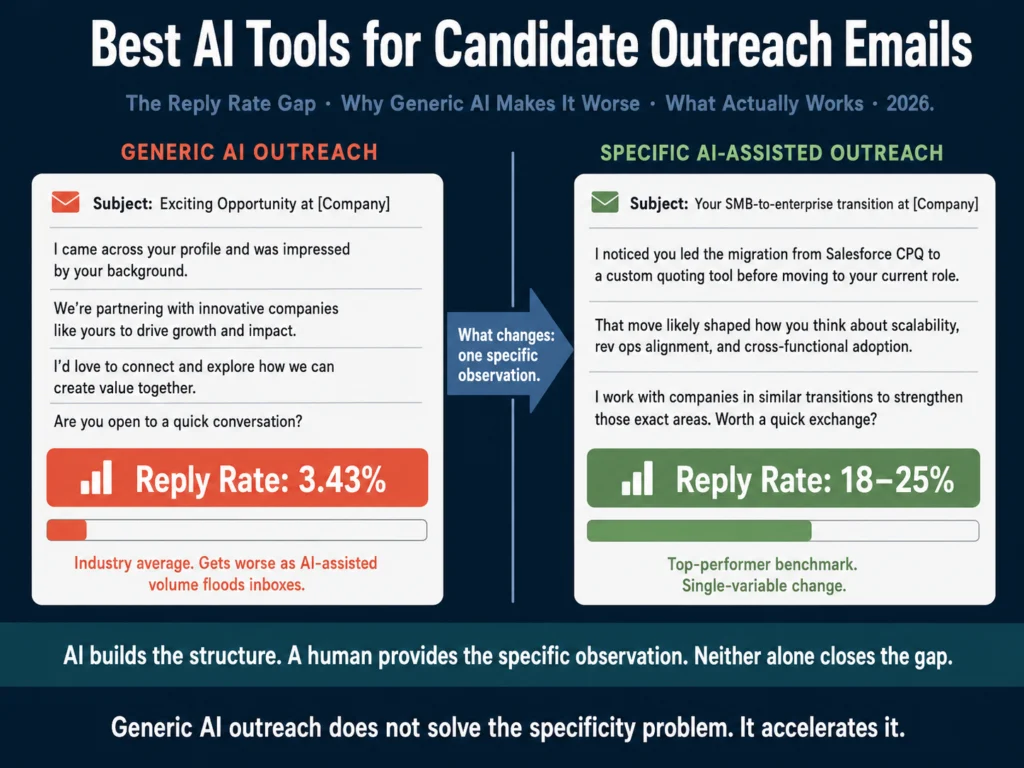
- The average cold outreach reply rate in recruiting is 3.43%. Personalized, specific outreach from top recruiters hits 18–25% on LinkedIn InMail. That 5-7x gap is almost entirely explained by specificity.
- Generic AI outreach does not close that gap. It makes it worse. Candidates can identify AI-generated templates instantly, and inbox AI-detection has improved significantly.
- AI is useful for structure, sequence design, variation generation, and follow-up drafts. The one thing that drives response rates — a genuinely specific observation about the candidate — has to come from a human who reviewed their profile.
- Best tools for writing outreach drafts: Claude and ChatGPT with candidate-specific prompts. Copy.ai for generating multiple variation drafts quickly.
- Best tool for editing tone before sending: Grammarly Pro — outreach that reads as warm and direct outperforms outreach that reads as formal or sales-like.
- Best approach for volume with quality: Build a prompt template that requires one candidate-specific input before it generates a message. That single constraint forces specificity and produces measurably better output.
Most recruiter outreach fails before the candidate reads the first sentence.
The subject line pattern — “Exciting opportunity at [Company]” — is recognizable as automated in under a second.
The opening line confirms it: “I came across your profile and was impressed by your background.” No specific background mentioned. No specific opportunity described. Delete.
That gap has widened in 2026 as AI-assisted outreach has flooded inboxes and trained candidates to delete templated messages faster.
The problem AI-generated outreach creates is not new. It is an acceleration of a problem that existed before AI. Volume without specificity has always produced low response rates.
AI allows recruiters to send more volume with less effort. Without the right prompt structure, that means more ignored messages, faster.
The tools and approaches below are specifically designed to produce outreach that clears the specificity bar: messages a candidate reads because something in the first sentence tells them this was not sent to everyone.
- Why Most AI Outreach Underperforms
- What AI Actually Handles Well in Outreach
- The Two Outreach Contexts: LinkedIn InMail vs. Email
- Tool Recommendations
- Building a Follow-Up Sequence with AI
- Personalization at Scale: The One-Variable Method
- What AI Cannot Fix in Outreach
- Related Reading
- Frequently Asked Questions
- Conclusion
Why Most AI Outreach Underperforms
Before the tools, understand the mechanism. Response rates in candidate outreach are primarily driven by one variable: does the candidate believe this message was written for them?
The signals candidates use to make that judgment are:
- Whether the subject line references something specific to their profile
- Whether the opening line mentions something verifiable about their background
- Whether the role described connects to what they actually do, not just their job title
- Whether the message is short enough to suggest the sender read their profile rather than ran a bulk search
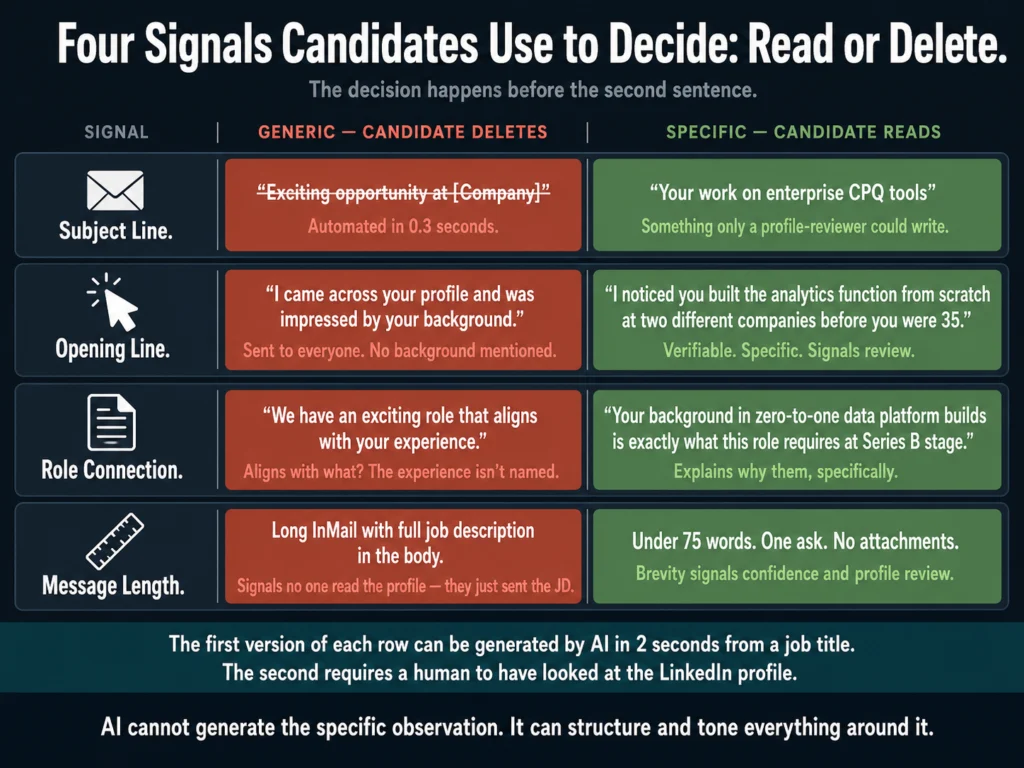
AI tools generate outreach that passes visual inspection but fails the specificity test.
A message that says “I noticed your work in enterprise software sales” when the candidate has 12 years of enterprise software sales experience feels generic.
A message that says “I noticed you led the SMB-to-enterprise transition at Salesforce before moving to Stripe — that specific background is why I’m reaching out” feels specific.
The first version can be generated by AI in two seconds from a job title. The second requires a human to have looked at the LinkedIn profile.
This is the constraint AI cannot remove from outreach writing: specificity requires input that comes from human review.
What AI can do is produce better-structured, better-toned messages around that input, and produce them faster and in greater variation than manual drafting allows.
What AI Actually Handles Well in Outreach
Message Structure and Flow
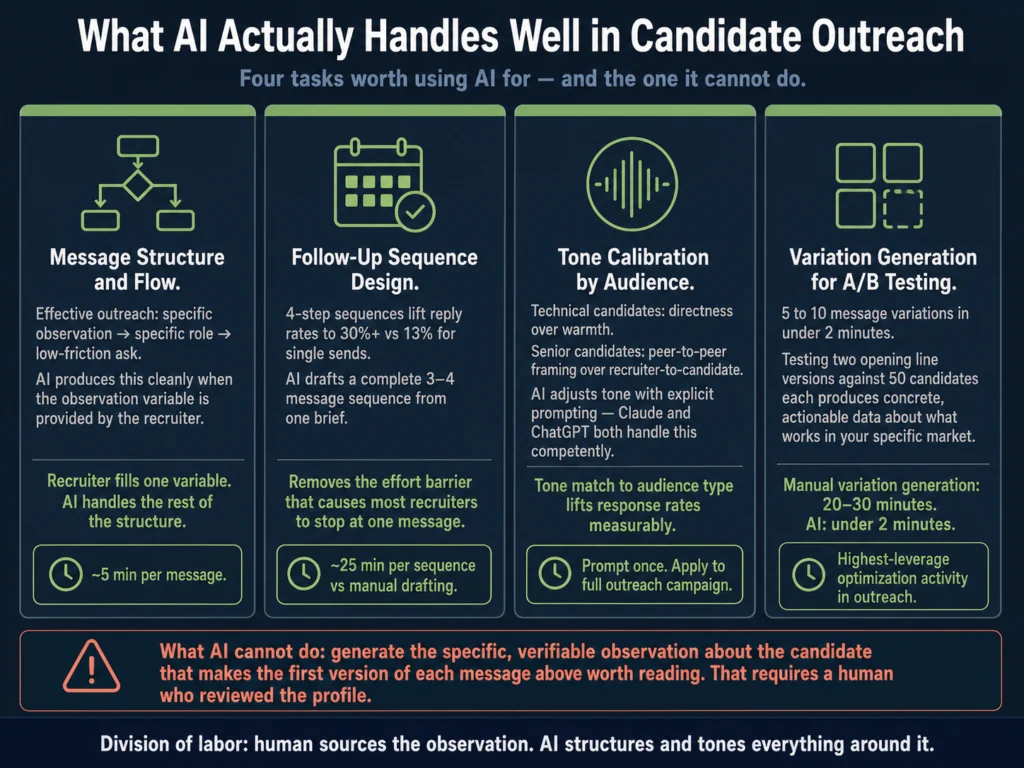
Effective outreach follows a consistent structure: specific observation → specific role → low-friction ask.
AI models produce this structure cleanly when given the right prompt.
The observation variable is filled by the recruiter; the role description and ask are AI-generated. This is the right division of labor.
Follow-Up Sequence Design
Four-step outreach sequences lift reply rates to 30%+ versus 13% for single sends, yet most recruiters send one message and stop.
AI can draft a complete 3 to 4 message sequence from a single brief — initial contact, first follow-up, second follow-up with an alternate angle, and a final close.
This removes the effort barrier that causes most recruiters to stop at one message.
Tone Calibration
Outreach that reads as warm and direct consistently outperforms outreach that reads as formal or sales-like. AI can be prompted to match a specific tone register.
For technical candidates, directness outperforms warmth. For senior candidates, peer-to-peer framing outperforms recruiter-to-candidate framing. Claude and ChatGPT handle these tone variations competently with explicit prompting.
Variation Generation
Testing message variations is one of the highest-leverage activities in outreach optimization.
A recruiter who runs two versions of an opening line against 50 candidates each and measures reply rates learns something concrete about what works in their specific market.
AI generates 5 to 10 variations of any message element in under two minutes — work that would take 20 to 30 minutes manually.
The Two Outreach Contexts: LinkedIn InMail vs. Email
These are different formats requiring different approaches. AI tools handle both, but the constraints differ.
LinkedIn InMail
InMail has a character limit and a different audience expectation. Candidates on LinkedIn expect professional-but-human communication.
Messages under 400 characters perform 22% better than longer InMails, according to LinkedIn Talent Blog 2025 benchmarks. The 50 to 70 word sweet spot is not negotiable.
AI models left to their own produce InMails that are too long. Add a word count constraint to every InMail prompt: “Write this in under 75 words.” Add a character reference if sending directly through LinkedIn.
LinkedIn InMail Prompt:
Write a LinkedIn InMail from [YOUR NAME], [YOUR TITLE] at [COMPANY].

Candidate name: [NAME]
Role: [JOB TITLE] at [COMPANY NAME]
One specific observation from their LinkedIn profile: [OBSERVATION —
e.g., "led the migration from Salesforce CPQ to a custom quoting tool
at their last company"]

Requirements:
- Under 75 words total
- Open with the specific observation, not a compliment
- Connect the observation to why this role is relevant to them
- One clear, low-friction ask: "open to a 15-minute call?"
- No phrases: "I came across your profile," "exciting opportunity,"
  "impressed by your background"
- Tone: direct and peer-level — not recruiter-to-candidate
- Do not use the word "leverage"Email Outreach
Email allows more length but still rewards conciseness.
The 3.43% average cold email reply rate in recruiting is not a fixed ceiling — top-quartile recruiters hit 5.5%+ and the elite tier clears 10%, primarily through tighter personalization and better follow-up discipline.
Subject lines matter more for email than InMail. Personalized subject lines generate 38 to 45% open rates versus 20 to 22% for generic ones.
AI generates subject line variations well — run 5 options and A/B test with your first 30 sends before committing to one for the full list.
Email Outreach Prompt:
Write a candidate outreach email for [YOUR NAME], [YOUR TITLE] at [COMPANY].

Candidate name: [NAME]
Role being recruited for: [JOB TITLE]
One specific observation from their background: [OBSERVATION — e.g.,
"you built the analytics function from scratch at two different companies"]
Why that experience matters for this role: [ONE SENTENCE REASON]
What makes this role or company notable: [ONE SPECIFIC DETAIL — not
generic like "fast-growing startup"]

Requirements:
- Subject line: specific to the candidate, under 50 characters, no
  "exciting opportunity"
- Body: under 120 words
- Structure: specific observation → why it matters for this role →
  one specific thing about the company → low-friction ask
- Tone: warm but direct — the candidate should feel this was written
  for them, not sent to a list
- Do not include: salary ranges, benefits, or detailed job requirements
  — those come after they respond
- Sign off with your name and LinkedIn profile URL

Also generate 3 alternative subject lines for A/B testing.Tool Recommendations
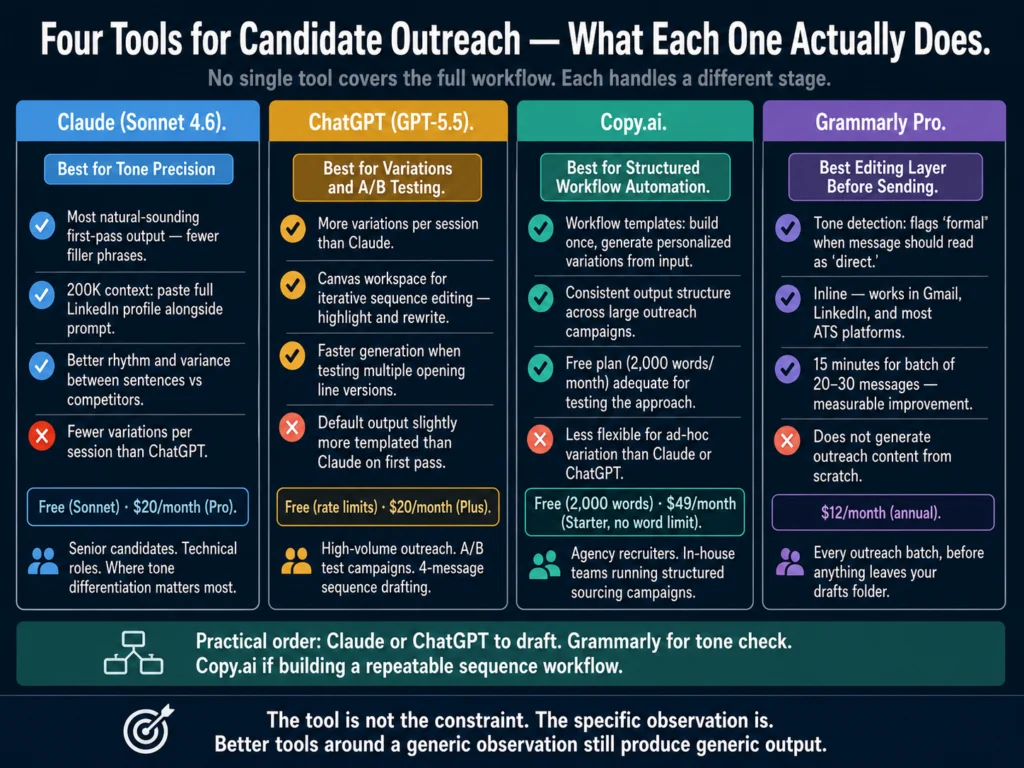
Claude (Sonnet 4.6) — Best for Tone Precision in Outreach
Claude produces outreach copy that reads more naturally than ChatGPT on the first pass — fewer filler phrases, better rhythm, higher variance between sentences.
For outreach specifically, where tone differentiation from generic templates is the primary goal, Claude’s default output style is an advantage.
The 200K context window allows pasting a candidate’s full LinkedIn profile alongside the prompt rather than summarizing it.
This produces better candidate-specific output when there is enough profile content to work from.
Best for: Senior candidate outreach, technical roles, outreach where tone precision matters more than speed.
Pricing: Free (Sonnet via Claude.ai) or $20/month (Pro).
ChatGPT (GPT-5.5 Instant) — Best for Variation Generation and Speed
ChatGPT generates more variations per session than Claude and handles the volume side of outreach optimization better.
For a recruiter running A/B tests across message elements, ChatGPT’s breadth is more useful than Claude’s depth.
Canvas, ChatGPT’s editing workspace, is useful for iterating on a draft sequence — you can highlight specific sentences and request rewrites without regenerating the full sequence.
Best for: High-volume outreach, A/B test variation generation, multi-message sequence drafting.
Pricing: Free (GPT-5.5 Instant, usage limits apply) or $20/month (Plus — removes usage limits and adds GPT-5.5 Thinking for longer sequences and more variation generation per session).
Copy.ai — Best for Template Libraries and Sequence Automation
Copy.ai’s workflow automation features allow building an outreach sequence template once and generating personalized variations from a data input.
For agencies or in-house teams running structured outreach campaigns, the workflow approach produces more consistent output than ad-hoc prompting.
Copy.ai’s free plan (2,000 words/month) is adequate for testing the approach. The $49/month Starter plan removes the word limit and adds the workflow features that make sequence automation practical.
→ Copy.ai’s free plan is enough to test one outreach sequence before committing to the workflow features.
Grammarly Pro — Best Editing Layer Before Sending
Outreach that reads as sales-like, overly formal, or robotic is the primary driver of non-response beyond missing personalization.
Grammarly’s tone detector flags when a message reads as “formal” when it should read as “direct” or “confident.”
The practical workflow: generate the draft in Claude or ChatGPT, paste into Grammarly, check tone, fix any flagged issues, then send. For batches of 20 to 30 outreach messages, this adds 15 minutes and measurably improves the output.
→ Grammarly Pro’s tone detection is particularly valuable for outreach — it tells you before you send whether a message reads as warm or accidentally formal.
Building a Follow-Up Sequence with AI
Single-send outreach converts at roughly 13% when it does convert. Four-step sequences with varied angles lift that to 30%+.
The follow-up messages most recruiters do not send are the messages that would have gotten the reply.
Use this prompt to generate a complete sequence from a single brief:
Write a 4-message outreach sequence for a [JOB TITLE] recruiting campaign.

Candidate profile type: [DESCRIBE THE TARGET CANDIDATE — e.g., "senior
software engineer, 8-12 years, currently at a Series B-C fintech"]
Company: [COMPANY NAME]
One thing that makes this role or company notable: [SPECIFIC DETAIL]

Message 1 (Initial contact): Under 75 words. Lead with a specific
observation about their profile type. Reference the role. One ask.

Message 2 (Follow-up, day 4): Under 60 words. Different angle from
Message 1. Try a specific aspect of the role or team. No apology
for following up.

Message 3 (Follow-up, day 9): Under 50 words. Share one concrete fact
about the company or role that Message 1 and 2 did not include. Different ask —
maybe "would it help if I sent the job description?"

Message 4 (Final, day 15): Under 40 words. Acknowledge this is the last
message. Leave the door open. No guilt or pressure.

Tone across all four: direct, peer-level, warm but not sales-like.
The candidate should feel the recruiter is worth talking to, not that
they are being worked.Personalization at Scale: The One-Variable Method
The most effective approach to AI-assisted outreach at volume is the one-variable method: require one candidate-specific input in every prompt before generating the message.
This single constraint produces messages that read as personalized without requiring the recruiter to write from scratch.
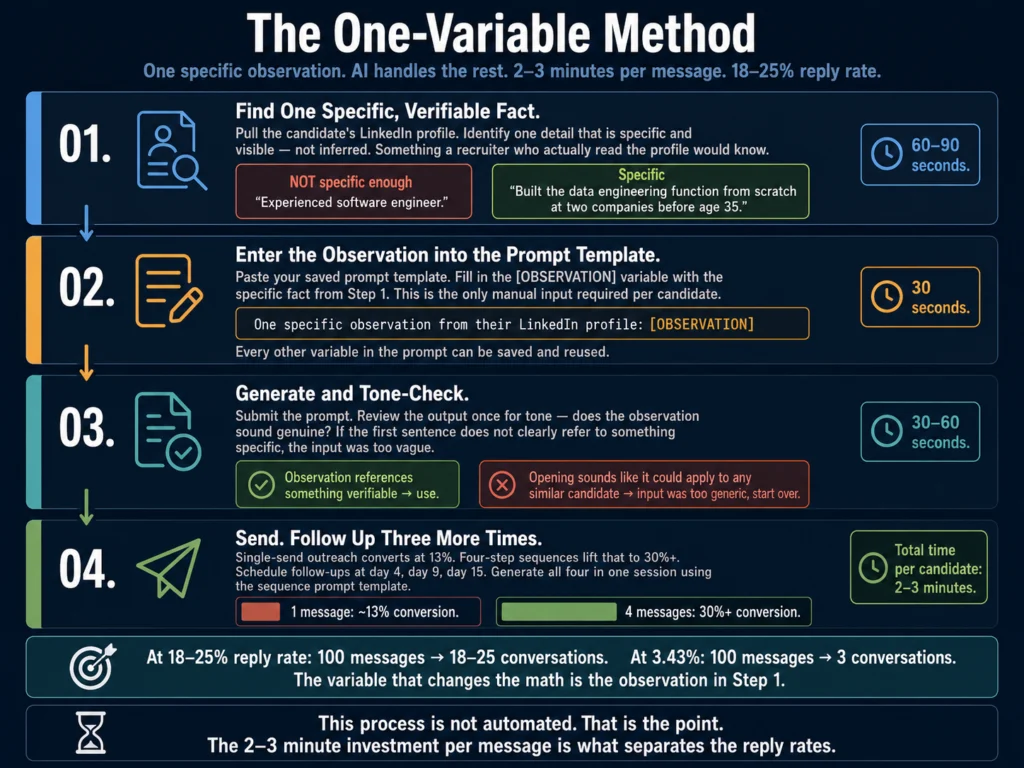
The variable should be specific and verifiable — something visible in the candidate’s LinkedIn profile or resume.
“Led a team of 8 engineers at a healthcare tech company” is specific. “Experienced software engineer” is not a variable.
The practical process:
- Pull the candidate’s profile and identify one specific, verifiable fact
- Enter that fact into the [OBSERVATION] variable in your prompt template
- Generate the message
- Read it once before sending — if the observation does not sound genuine, it is because the input was not specific enough
This process takes 2 to 3 minutes per candidate. It is not automated. That is the point.
A 2 to 3 minute investment per message produces an 18 to 25% reply rate. A 10-second template send produces under 5%.
What AI Cannot Fix in Outreach
Wrong candidate, right message.
AI improves message quality but cannot fix targeting errors.
A well-written InMail to a candidate who is actively employed, not interested in changing, and three levels too senior for the role will still produce no response.
The best AI-assisted outreach in the world does not compensate for a weak candidate sourcing process.
Deliverability.
Email outreach from domains with poor sending reputation or missing authentication (DKIM, SPF, DMARC) goes to spam regardless of message quality.
AI does not address deliverability. If your response rates are consistently below 2%, check your domain reputation before optimizing your message.
Candidate market conditions.
In 2026, certain technical roles are in low supply and high demand.
No message quality improvement compensates for a compensation band that is 20% below market or a role that requires relocation in a remote-first market.
AI helps you communicate a compelling opportunity. It cannot make an uncompetitive opportunity compelling.
Related Reading
- How to Write Rejection Emails with AI (Without Sounding Robotic)
- Best AI Tools for Writing Offer Letters
- How to Write Candidate Outreach Emails with AI — A Step-by-Step Tutorial
- ChatGPT vs. Claude for HR Writing — A Practical Comparison
- Grammarly vs. Jasper for HR Writing — Which Should You Use?
- AI for HR Communications and Documentation — The Complete Guide
Frequently Asked Questions
Increasingly, yes — if you use raw AI output without a specific candidate observation. In 2026, candidates who receive significant recruiter outreach have developed pattern recognition for AI-generated messages. The tell is not AI grammar or vocabulary — it is the absence of anything specific to them. A message that opens with “I came across your profile and was impressed by your background” could have been sent to anyone. A message that opens with “I noticed you built the data engineering function from scratch at two different companies” signals review. The observation is what differentiates AI-assisted outreach that performs from AI-assisted outreach that gets deleted.
With the one-variable method described in this article — one specific observation per candidate, AI-generated structure around it — a recruiter can personalize 30 to 40 LinkedIn InMails or emails per day without meaningful quality degradation. The constraint is sourcing and profile review time, not message writing time. Finding 30 to 40 genuinely strong candidates and reviewing their profiles takes significantly longer than writing the messages. If you are hitting that volume daily, the bottleneck is likely sourcing precision, not message generation.
Based on LinkedIn benchmarks, 65% of InMail responses arrive within 24 hours of sending. For sequences, spacing of 4 to 5 days between messages performs better than daily follow-ups (which read as pressure) or weekly follow-ups (which allow too much time for interest to fade). A four-message sequence over 15 days — initial, day 4, day 9, day 15 — matches the response timing data and covers the realistic window during which a candidate is likely to respond. After day 15 with no response, the probability of conversion drops sharply.
Yes. LinkedIn InMail has a 1,900-character limit (300 for the subject line) and is read in a professional networking context — candidates expect brevity and professional relevance. Email allows more length but has lower open rates without strong subject lines. The prompt constraints should reflect this: InMail prompts should specify a 75-word maximum; email prompts should specify a subject line requirement and can allow 100 to 150 words. Both formats benefit from the same specificity principle, but InMail’s character limit enforces brevity automatically, while email requires explicit instruction to stay concise.
Several sourcing platforms claim to do this — Gem, SeekOut, and HireEZ all offer AI-personalized outreach automation that pulls candidate data directly from their profile to generate messages. The quality of these automated personalizations varies significantly. In testing, the outputs read more natural than generic templates but less natural than human-reviewed observations fed into a writing AI. If you are running outreach at a scale where per-candidate review is not feasible, automated personalization platforms are better than generic templates. If you can review profiles, the one-variable method described in this article produces better results than fully automated personalization at any volume up to 40 messages per day.
Conclusion
The data on candidate outreach in 2026 is unambiguous: specificity drives response rates, and volume without specificity produces noise.
The gap between the 3.43% average reply rate and the 18 to 25% top-performer rate is not a tool gap. It is a specificity gap.
The one-variable method and prompt templates in this article are what the Ailovyu team has found produces consistently better results than any other AI outreach approach — across different role types, seniority levels, and sourcing markets.
AI tools close part of that gap by producing better-structured, better-toned messages faster. They do not close the part that matters most: the observation that tells the candidate this message was written for them.
The right workflow is not complicated. Find one specific thing about the candidate. Put it in the prompt. Let AI handle the structure and tone. Read it once before sending. Follow up three more times.
That workflow, applied consistently, produces reply rates that compound across a sourcing funnel. At 18 to 25% reply rates, 100 outreach messages produces 18 to 25 conversations. At 3.43%, it produces 3.
The tools do not change the math. The specificity does.

We research and test AI tools so you can make informed decisions before spending money on them. Every review, comparison, and tutorial on this site is based on actual use, not vendor marketing.
Learn more on our About page.
Statistics sourced from LinkedIn Talent Blog (2025), Gem’s 2026 Email Outreach Benchmarks, Prospeo recruiter email analysis, and RecruiterFlow candidate outreach guide (2026). Affiliate links in this article earn a commission at no extra cost to you. Tool pricing verified May 2026 from vendor websites.