
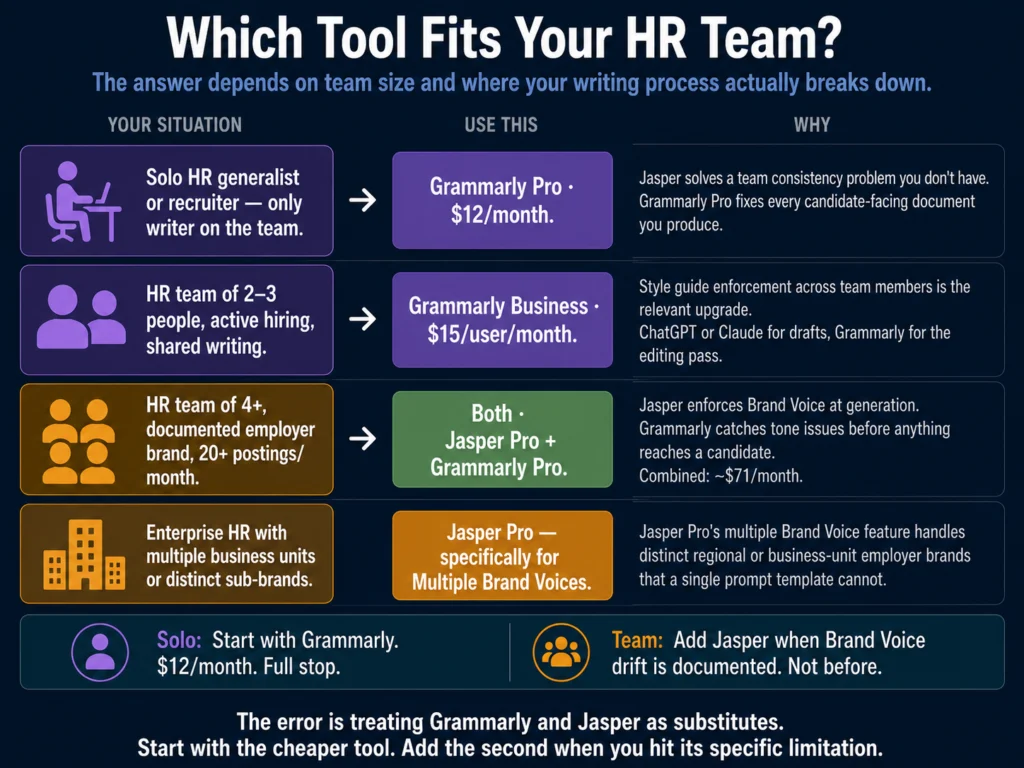
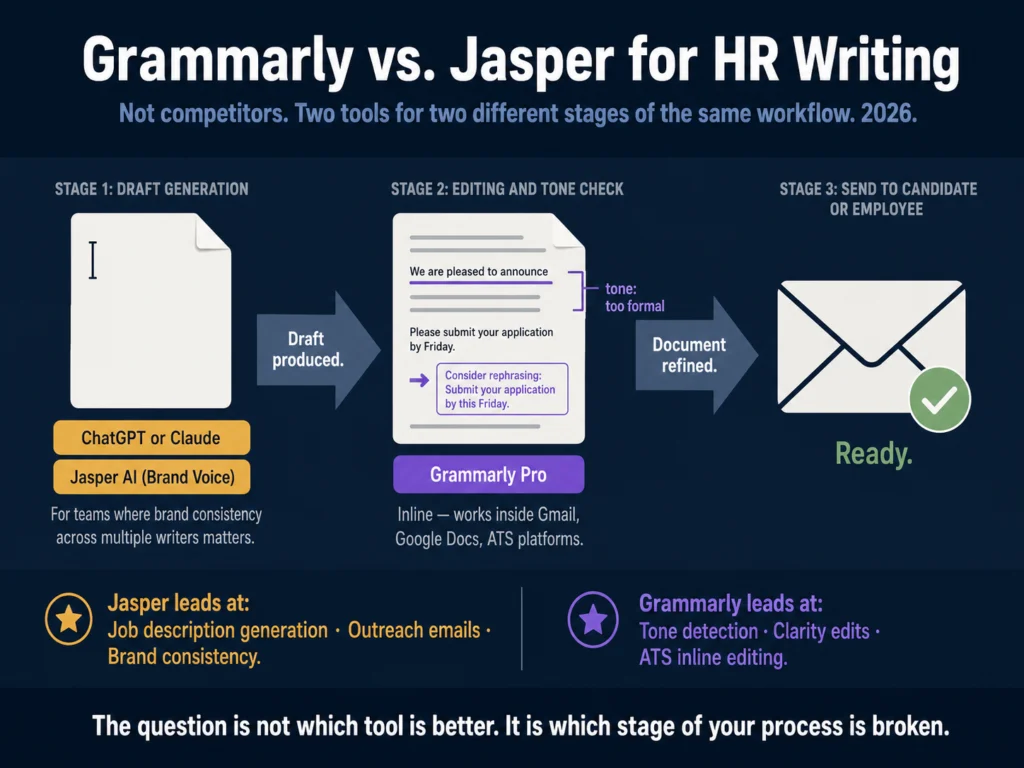
- Grammarly and Jasper are not substitutes for each other. They solve different problems at different stages of the writing process.
- Grammarly is an editing and refinement tool. It improves text you have already written or generated. It works inline in Gmail, Google Docs, LinkedIn, and most ATS platforms. It does not generate content from scratch.
- Jasper is a content generation platform. It drafts new content from a brief and applies Brand Voice settings to keep the output consistent across multiple writers. It does not edit inline.
- For most HR professionals, Grammarly Pro at $12/month is the right choice. The inline editing, tone detection, and workflow fit are better for day-to-day HR writing tasks than Jasper’s generation-first model.
- Jasper at $59/month (Pro, annual) is worth evaluating only if your team has multiple writers producing job descriptions and candidate communications that currently sound inconsistent — and you have a documented employer brand to train it on.
- Both tools together at $71/month is a reasonable stack for a mid-sized HR team with active hiring volume. For solo HR professionals, Grammarly alone is the answer.
The Grammarly vs. Jasper question gets asked because both tools involve AI and writing. That is where the overlap ends.
One improves text you already have. The other produces text you do not have yet.
The decision between them is less about which is better and more about where your writing process actually breaks down.
If the problem is that job descriptions, rejection emails, and candidate outreach feel inconsistent in tone — some formal, some casual, some enthusiastic, some flat — depending on who wrote them and when, Jasper addresses that at the generation stage.
If the problem is that your writing is clear enough but occasionally lands in the wrong register, sounds more bureaucratic than intended, or goes out with grammar and phrasing issues that make HR communications feel less professional than they should, Grammarly addresses that at the editing stage.
The question is not which tool is better. It is which problem you have.
What Each Tool Actually Does
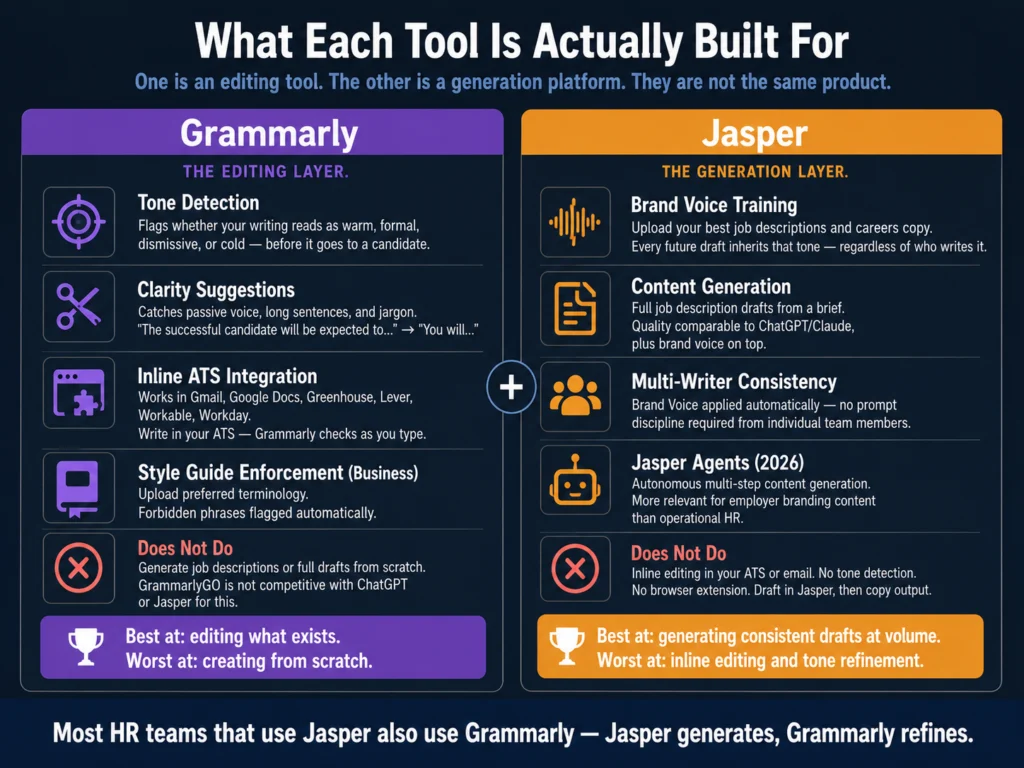
Grammarly: The Editing Layer
Grammarly started as a grammar correction tool in 2009. It has expanded significantly since then, but its core value proposition remains: take text you have already written and make it cleaner, clearer, and more appropriate in tone.
In 2026, Grammarly’s HR-relevant features include:
Tone detection. Grammarly Pro analyzes your writing and tells you whether it reads as confident, warm, formal, direct, or any combination.
For job descriptions, rejection letters, and offer letters, this is the feature that matters most. A rejection email that accidentally reads as dismissive creates a different impression than one that reads as warm and direct.
Clarity and conciseness suggestions. HR documents are often written under time pressure. Grammarly flags passive constructions, unnecessarily long sentences, and jargon that obscures meaning.
A job description that says “the successful candidate will be expected to demonstrate proficiency in stakeholder engagement” is cleaner as “you will manage relationships with key stakeholders across product and sales.”
Style guide enforcement (Business plan). At the Business tier ($15/user/month), Grammarly lets teams upload a style guide — preferred terminology, forbidden phrases, formatting preferences.
For HR teams that have invested in employer brand language, this enforces it without requiring each writer to remember the guidelines manually.
Platform integration. This is Grammarly’s most practical differentiator for HR. The browser extension works across Gmail, Google Docs, LinkedIn, Greenhouse, Lever, Workable, Workday, and virtually every text field in a browser. You write in your ATS and Grammarly checks inline — no copy-pasting, no switching tools.
What Grammarly does not do: generate content from scratch with any sophistication. GrammarlyGO, its generative feature, handles short-form content adequately but is not competitive with ChatGPT, Claude, or Jasper for full job description drafts or multi-paragraph candidate communications.
Grammarly’s strength is refinement, not generation.
Jasper: The Generation Layer
Jasper is a content generation platform built originally for marketing teams. Its relevance to HR is specific: the Brand Voice feature, which trains the tool on your existing content and applies that voice to everything it generates — regardless of which team member is writing.
In 2026, Jasper runs on underlying models from OpenAI and Anthropic rather than a proprietary model — which means the raw output quality is comparable to what you would get from ChatGPT or Claude directly.
The value Jasper adds is not model superiority but the Brand Voice layer and workflow built on top of those models.
Jasper’s HR-relevant features:
Brand Voice training. The core differentiator. Upload samples of your best existing job descriptions, careers page copy, and candidate communications.
Jasper learns the tone, vocabulary, and structure of your employer brand. Every subsequent draft inherits that voice without any additional instruction from the writer.
50+ content templates. Jasper includes a job description template. It does not include HR-specific templates for rejection emails, offer letters, or onboarding documentation — those are written through Jasper Chat or direct prompting, not template-driven workflows.
Jasper Agents (new in 2026). Autonomous writing assistants that can research and generate multi-step content without manual prompting at each stage.
More relevant for employer branding content (careers blog posts, company culture articles) than for operational HR writing.
No inline editing. Jasper does not have a browser extension that works inside your ATS. You draft in Jasper and copy the output into your ATS or email.
For high-volume workflows this adds friction. Many HR teams that use Jasper use it alongside Grammarly — Jasper for generation, Grammarly for the editing pass before sending.
Head-to-Head: Five HR Writing Tasks
Task 1: Job Description First Draft
Grammarly: Cannot generate a job description from scratch in any useful way. GrammarlyGO produces very short, generic output for this task that requires substantial editing.
Jasper: This is where Jasper earns its cost. With Brand Voice trained on your existing postings, Jasper generates a full job description draft that matches your employer brand on the first pass. For teams writing 15+ postings per month, the reduction in editing time is real.
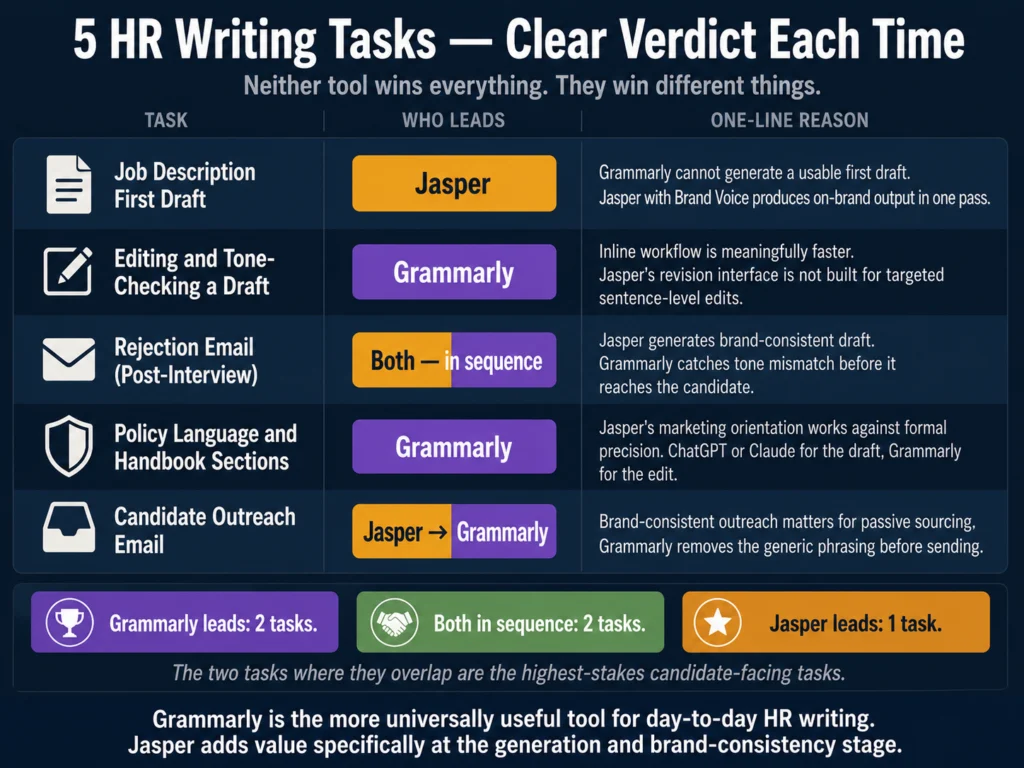
Verdict: Jasper. Not close. For generating initial job description drafts, Grammarly is not the right tool.
Task 2: Editing and Tone-Checking a Draft
Grammarly: This is exactly what Grammarly is built for. Run any draft — whether written by hand, generated by ChatGPT, or produced by Jasper — through Grammarly Pro and it flags tone mismatches, clarity issues, passive voice, and phrasing that will read as overly formal or casual.
Jasper: Can revise a draft through Jasper Chat, but the interface is not designed for inline editing. You describe the change you want and Jasper regenerates the relevant section.
For targeted edits (tighten this paragraph, change the tone of this sentence), Grammarly’s inline approach is faster and more precise.
Verdict: Grammarly. The inline workflow is meaningfully faster for editing tasks.
Task 3: Rejection Email (Post-Interview)
Grammarly: Can refine a rejection email you have written or generated elsewhere. The tone detection feature is specifically useful here — it tells you whether the email reads as appropriately warm or inadvertently cold before it goes out.
Jasper: With Brand Voice training, Jasper generates a rejection email that matches your company’s communication style.
Useful for ensuring that a rejection email written by a junior recruiter sounds the same as one written by the HR director.
Verdict: Both are useful, in sequence. Jasper for generation if brand consistency matters; Grammarly for the editing pass before sending.
For a solo HR professional without a team brand consistency problem, write the email in ChatGPT or Claude, then run it through Grammarly.
For a full workflow on rejection email writing with AI, read: How to Write Rejection Emails with AI (Without Sounding Robotic)
Task 4: Policy Language and Employee Handbook Sections
Grammarly: Good fit for polishing policy language. The clarity suggestions catch convoluted legal-influenced phrasing that makes policy documents harder to read than they need to be.
Business plan style guide enforcement is specifically useful for ensuring consistent terminology across a handbook written by multiple contributors.
Jasper: Handles policy drafts but its marketing orientation shows here. Policy writing requires formal precision that Jasper’s tone tends to work against.
The output is usable but requires more editing than job descriptions — Jasper’s templates are built for persuasive content, and policy language is not persuasive.
Verdict: Grammarly for editing and consistency enforcement. ChatGPT or Claude for generation, then Grammarly for the editing pass. Jasper is not the right tool for policy writing.
Task 5: Candidate Outreach Email (Passive Sourcing)
Grammarly: Refines tone and phrasing. Especially useful for catching language that sounds too salesy or generic — a common problem with AI-generated outreach.
Jasper: Generates outreach emails in your brand voice, which matters more for outreach than for rejection emails.
A passive candidate receiving an InMail is making a quick judgment about whether the company sounds like a place worth responding to. Consistent, on-brand outreach language makes that judgment more favorable.
Verdict: Jasper for generation if brand voice is the priority. Grammarly for the editing pass on any outreach before it sends.
Feature Comparison Table
| Feature | Grammarly Pro ($12/mo) | Grammarly Business ($15/user/mo) | Jasper Creator ($39/mo) | Jasper Pro ($59/mo) |
|---|---|---|---|---|
| Content generation | Limited (GrammarlyGO) | Limited | ✓ Full | ✓ Full |
| Brand voice | No | Style guide only | 1 voice | Multiple voices |
| Inline browser editing | ✓ | ✓ | No | No |
| ATS integration | Browser extension | Browser extension | No | No |
| Tone detection | ✓ | ✓ | No | No |
| Grammar/clarity | ✓ Full | ✓ Full | Basic | Basic |
| Plagiarism check | ✓ | ✓ | No | No |
| Team style guide | No | ✓ | No | ✓ |
| Free tier | ✓ | No | No | No |
| Trial | No | No | 7-day | 7-day |
| G2 rating (2026) | 4.7/5 (13,186 reviews) | — | 4.7/5 (1,268 reviews) | — |
Pricing verified May 2026. Jasper Pro at $59/month annual ($69/month monthly). G2 ratings verified at time of writing — verify before publishing as ratings update continuously.
Pricing in Plain Terms
Grammarly costs $12/month (Pro, annual billing). The annual vs. monthly price difference is significant — monthly billing runs $30/month, which is 150% more expensive.
If you are going to use Grammarly for professional HR writing, annual billing is the only financially sensible option.
The Business plan at $15/user/month adds team features: a shared style guide, admin dashboard, and usage analytics.
For a three-person HR team, Business costs $45/month versus $36/month for three individual Pro subscriptions. The style guide feature is the meaningful addition — for teams writing jointly, it is worth the difference.
Jasper costs $39/month for Creator or $59/month for Pro (annual billing). The Creator plan includes one Brand Voice — sufficient for most HR teams with a single employer brand. The Pro plan’s multiple Brand Voices matter for organizations managing distinct sub-brands or significantly different regional employer brands.
→ Grammarly Pro at $12/month (annual) is the highest-value single upgrade for HR writers who produce candidate-facing content regularly.
→ Jasper’s 7-day free trial gives you full access to Brand Voice training — enough time to test it on your actual job descriptions before committing.
Who Should Use Which
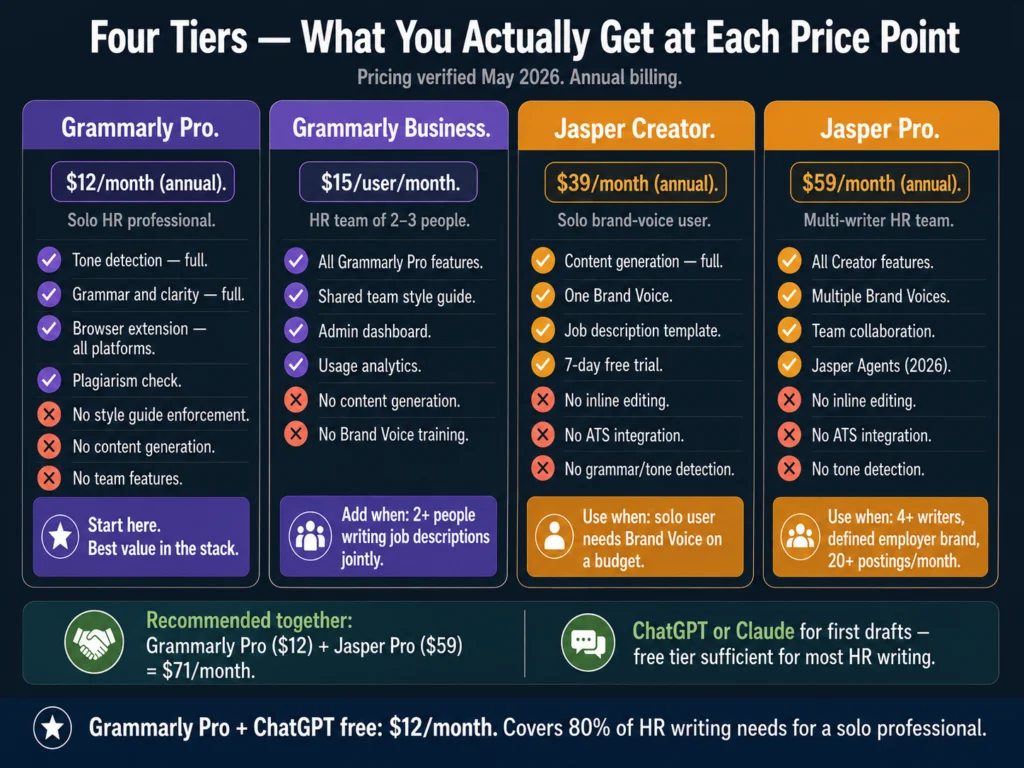
Solo HR generalist or recruiter: Grammarly Pro. Full stop. At $12/month it handles the editing and tone checking that improves the quality of every candidate-facing document you produce.
Jasper’s value is in team-level Brand Voice enforcement, which you do not need if you are the only writer.
HR team of 2-3 people, active hiring: Grammarly Business ($15/user/month). The shared style guide is the relevant upgrade from Pro — it keeps your posting language consistent across team members without Jasper’s generation overhead.
If you are already using ChatGPT or Claude for drafting, Grammarly handles the editing layer cleanly.
HR team of 4+, defined employer brand, 20+ postings per month: Both tools. Jasper Pro for generation with Brand Voice enforcement; Grammarly for the editing pass before any document goes out.
The combined cost is approximately $71/month (Grammarly Pro for one editor + Jasper Pro).
At a team level with Business and Pro plans, the stack runs higher but the case for both tools is clear: Jasper ensures all drafts start from the right brand foundation; Grammarly ensures they finish with the right tone and clarity before sending.
Organization with multiple business units or distinct sub-brands: Jasper Pro’s multiple Brand Voices is the relevant feature here.
If your company has three distinct employer brands and needs job descriptions to reflect each one distinctly, Jasper Pro handles this more systematically than any combination of prompt templates.
The Case for Using Both
For HR teams, the logical split is:
- ChatGPT or Claude for first drafts (neither has a meaningful affiliate relationship, but both free tiers are capable)
- Jasper for Brand Voice enforcement if multiple writers need to stay on-brand
- Grammarly for the editing and tone-check pass before any document goes to a candidate or employee
The tools are not redundant. Each addresses a different failure mode: inconsistent brand voice (Jasper), imprecise tone in individual documents (Grammarly), and blank-page drafting friction (ChatGPT/Claude).
Related Reading
- Best AI Tools for Writing Job Descriptions
- ChatGPT vs. Claude for HR Writing — A Practical Comparison
- Jasper AI Review for HR Professionals — Is It Worth It?
- Free vs. Paid AI Tools for Small HR Teams
- Jasper vs. Copy.ai for HR Writing — Which Is More Practical?
- The Complete Guide to AI Tools for HR Professionals
Frequently Asked Questions
No. Grammarly does not generate job descriptions in any useful way. GrammarlyGO, its generative feature, produces very short output for this task that requires extensive editing to be usable. If your primary need is drafting job descriptions, Grammarly is not the right tool — use ChatGPT, Claude, or Jasper for the draft, then Grammarly for the editing pass. The two tools address different stages of the writing process rather than competing for the same function.
No. Jasper’s output undergoes basic grammar checking, but it does not have dedicated tone detection, clarity analysis, or the inline editing features that Grammarly provides. Most HR teams that use Jasper run their drafts through Grammarly before sending — Jasper for generation, Grammarly for the editing pass. The two tools address different stages of the writing process rather than competing for the same function. If you are evaluating one as a replacement for the other, you are solving the wrong problem.
Grammarly rebranded its individual paid tier from “Premium” to “Pro. The features and pricing remained unchanged at the time of the rebrand. For HR users, the practical implication is that references to “Grammarly Premium” in older articles and internal documentation refer to the same product now called Grammarly Pro. The $12/month annual price point is the same.
Jasper addresses this problem more directly. When multiple people write job descriptions without a shared enforcement mechanism, the outputs will reflect individual writing styles rather than a consistent employer brand. Jasper’s Brand Voice training encodes that consistency into the tool — every writer using Jasper draws from the same brand profile regardless of their individual writing habits. Grammarly Business’s style guide helps but requires each writer to read and apply a set of rules, which they will apply inconsistently under time pressure. Jasper applies the rules automatically at the generation stage.
Start with Grammarly Pro at $12/month (annual billing). Pair it with ChatGPT’s free tier (GPT-5.5 Instant) for drafting. This combination — free generation, paid editing — covers the majority of HR writing tasks at the lowest cost. The free tier of ChatGPT is capable enough for job descriptions, rejection emails, and interview question generation with a well-structured prompt. Grammarly Pro adds the tone and clarity checking layer that prevents those drafts from going out with inadvertent register problems. Jasper becomes relevant only when you have a documented brand voice problem, which solo HR professionals typically do not have.
Conclusion
The Grammarly vs. Jasper question has a cleaner answer for HR professionals than it does for marketing teams, where both tools have a stronger claim to being primary.
For HR: Grammarly is the more universally useful tool. It works everywhere, it solves a problem every HR writer has (writing that does not land the way it was intended), and at $12/month it is the most cost-effective paid upgrade in an HR AI stack.
Jasper is more powerful in the specific scenario it is designed for — a team of writers who need to produce consistent brand-aligned content at volume. For that scenario, it is genuinely the best tool available at its price point.
The error to avoid is treating these as substitutes when they are complements. Grammarly makes existing writing better. Jasper generates new writing in a consistent voice.
Most HR teams eventually need both. Most HR professionals starting from scratch should begin with Grammarly.
That recommendation comes from what the Ailovyu team has observed across HR teams at different sizes and hiring volumes — the tools that earn their cost are almost always the ones that solve a specific, documented problem rather than a general desire to write better.
We research and test AI tools so you can make informed decisions before spending money on them. Every review, comparison, and tutorial on this site is based on actual use, not vendor marketing.
Learn more on our About page.
Pricing verified May 2026 from vendor websites. G2 ratings sourced from g2.com. Affiliate links in this article earn a commission at no extra cost to you — Grammarly and Jasper both have active affiliate programs. This does not affect editorial recommendations.