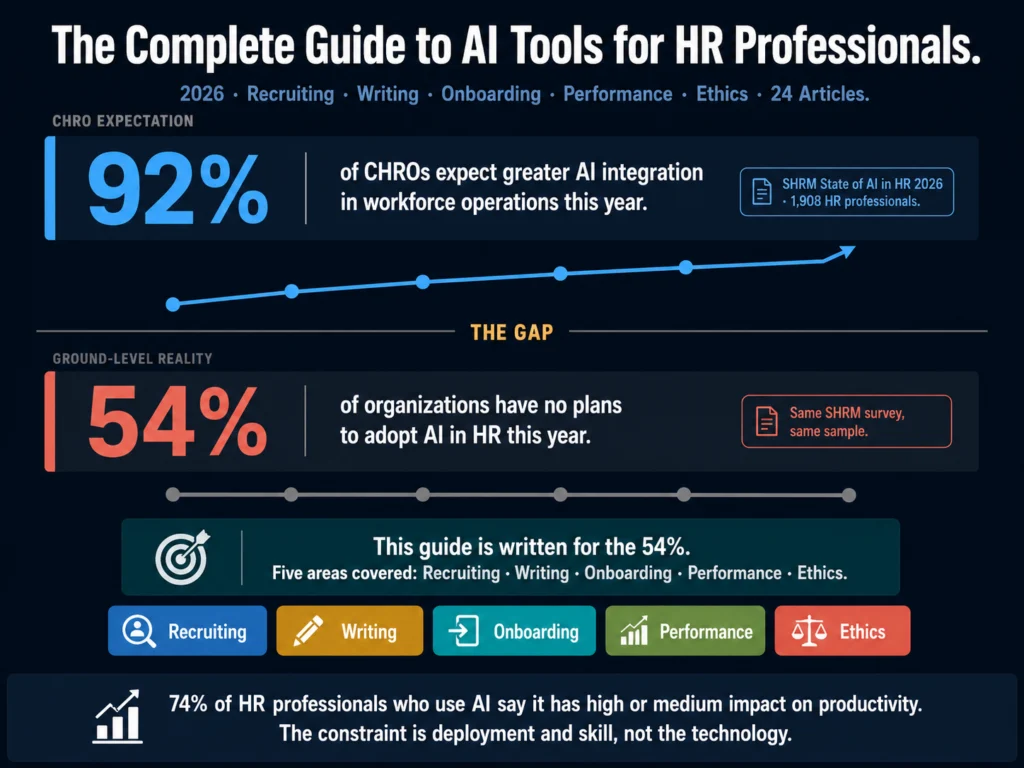
- Less than half of all organizations currently use AI in HR, and 54% have no plans to adopt it this year, according to SHRM’s 2026 State of AI in HR report surveying 1,908 HR professionals. The gap between awareness and implementation is larger than most HR teams realize.
- AI is most commonly used in recruiting (27%), HR technology (21%), learning and development (17%), and employee experience (14%). It is used least in compliance and DEI.
- 74% of HR professionals who do use AI say it has a high or medium impact on their productivity. The constraint is deployment and skill, not the technology itself.
- This guide covers every major AI use case in HR: recruiting, writing and communications, onboarding, performance management, and compliance. Each section links to a dedicated deep-dive article for teams ready to go further.
- The honest summary: AI saves time on drafting, screening, synthesis, and repetitive documentation. It does not replace human judgment on any decision that matters. That division of labor is the correct model, not a limitation.
The conversation about AI in HR has moved past “should we use it” and into “where does it actually work.”
That shift is visible in SHRM’s 2026 State of AI in HR report, drawn from 1,908 HR professionals: 92% of CHROs anticipate greater AI integration in workforce operations this year, and 87% expect increased AI adoption within HR processes specifically, up from 83% in 2025.
The adoption numbers at the individual HR professional level tell a different story. Less than half of all organizations currently use AI in HR, and 54% have no plans to adopt it this year. Of those who do use AI, 26% use it weekly, 20% daily, and 9% several times a day.
The gap between CHRO expectations and actual organizational adoption is where most HR teams are operating in 2026. Leadership believes AI will transform HR.
Most individual HR professionals are still figuring out where and how to start. This guide is written for that second group.
- What AI Actually Changes in HR Work
- Part 1: Recruiting and Talent Acquisition
- Part 2: HR Writing and Communications
- Part 3: Onboarding and HR Documentation
- Part 4: Performance Management
- Part 5: Ethics, Compliance, and Legal Considerations
- Part 6: HR Communications and Documentation
- Building Your AI Stack: Three Budget Scenarios
- What AI Cannot Do in HR
- The Three Most Common AI Mistakes HR Teams Make
- Exploring the Full Cluster
- Frequently Asked Questions
- Conclusion
What AI Actually Changes in HR Work
The most common applications of generative AI in HR include drafting job postings, developing onboarding materials, creating policy explanations, and producing personalized communications, according to Staffbase’s 2026 HR trends analysis. These are primarily writing tasks.
That framing matters. AI in HR is primarily about writing speed and documentation quality, not decision-making or prediction.
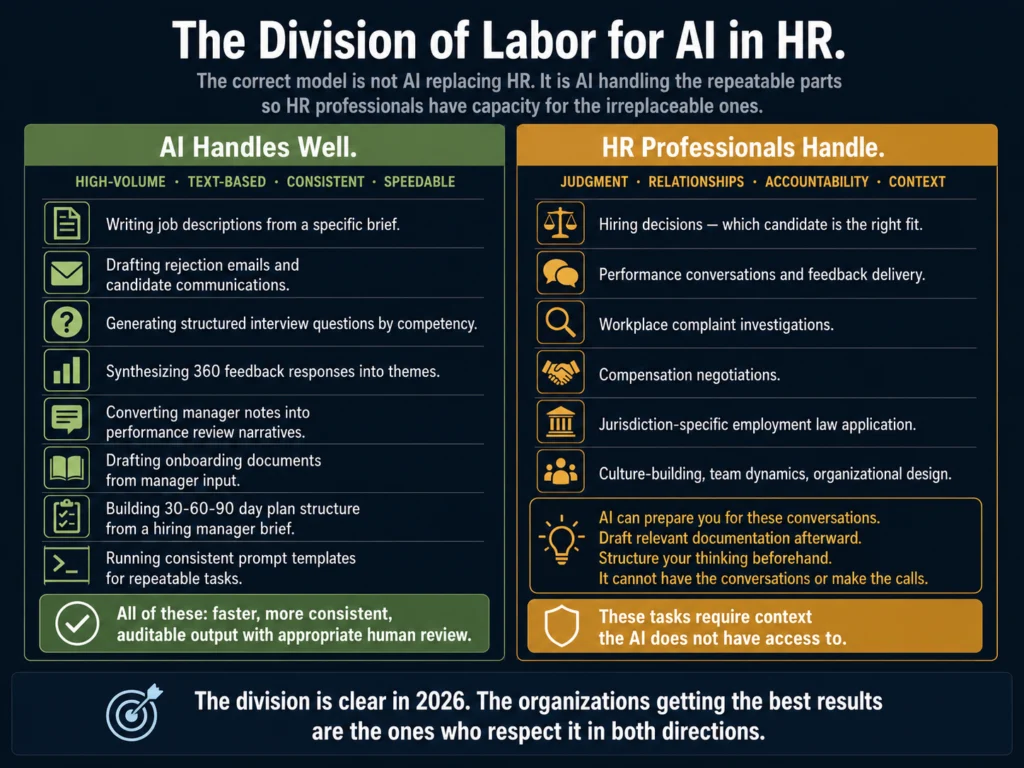
The time that HR teams spend drafting job descriptions, rejection emails, onboarding documents, performance review narratives, and policy content is significant, repetitive, and highly suitable for AI assistance. The time they spend exercising judgment about people, culture, and organizational dynamics is not.
74% of HR professionals who use AI say it has a high or medium impact on their work productivity, according to SHRM’s 2026 data. The impact concentrates on drafting speed, documentation throughput, and the ability to synthesize large amounts of feedback or data quickly.
What the data also shows: high-performing HR teams don’t try to automate everything. They concentrate AI use where it delivers the cleanest returns, typically high-volume, early-funnel activities like screening, matching, and scheduling, according to Software Advice’s survey of 928 HR professionals in 2026.
The framework this guide uses for every use case: what does AI handle well, what does it handle badly, and where is the human-AI boundary that produces the best outcomes?
Part 1: Recruiting and Talent Acquisition
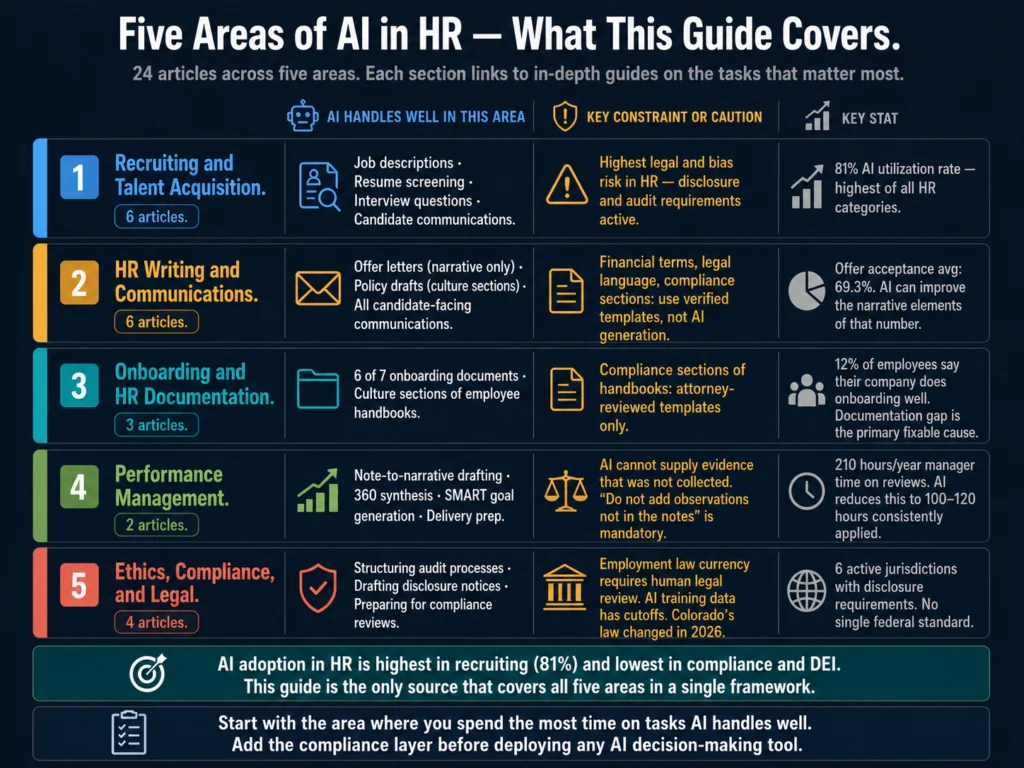
Recruiting is where AI adoption in HR is highest. Recruiting leads AI adoption across all HR software categories, with an 81% utilization rate among organizations using AI in HR, according to Software Advice’s 2026 data.
Writing Job Descriptions
Writing a job description from scratch takes most recruiters 2 to 4 hours. With a well-built prompt template and AI assistance, that drops to 15 to 30 minutes.
The output quality, when the prompt is given specific inputs, is consistently better than what most recruiters produce under time pressure.
The common mistake: using AI with minimal input and expecting a specific result. A prompt that says “write a job description for a marketing manager” produces a template.
A prompt that includes the seniority level, reporting structure, 6 to 8 specific responsibilities, must-have vs. nice-to-have qualifications, and one sentence about company tone produces a usable first draft. The difference is the input, not the AI tool.
Detailed guides to job description AI tools and workflows:
- Best AI Tools for Writing Job Descriptions — the full tool comparison
- How to Write 10 Job Descriptions in One Day Using AI — the batch workflow with copy-paste prompts
Resume Screening
The average job posting now receives roughly 250 applications, with popular or well-known employer brands regularly seeing 400 or more, according to HiringThing’s 2026 job application statistics.
At that volume, some AI assistance in screening is a practical necessity for most recruiting teams. The tools that work best in 2026 move beyond keyword matching toward contextual matching, identifying candidates who describe relevant experience in different terms.
The legal and bias risks in AI resume screening are real and require active management. Several state laws now impose disclosure and audit requirements on AI screening tools.
Employers remain fully liable for discriminatory screening outcomes even when a third-party tool produced them.
- AI Tools for Resume Screening: What Actually Works — honest assessments of tools that hold up in practice
- AI Bias in Hiring: What HR Teams Need to Know — the legal and ethical landscape
Interview Questions
AI generates behavioral, situational, and technical interview questions efficiently from a role brief. The output is typically better structured and more comprehensively calibrated across competencies than what most managers produce under time pressure.
The remaining human task: building a scoring rubric alongside each question, which AI also assists with when specifically prompted.
- Best AI Tools for Writing Interview Questions — framework and tools
- ChatGPT vs. Claude for HR Writing: Tested Comparison — which model to use for which task
Candidate Communications
The two candidate communications that most HR teams AI-assist most effectively: rejection emails and outreach to passive candidates.
Rejection emails are high-volume and tone-sensitive. Outreach emails require specificity that AI can structure around human-provided observations.
- How to Write Rejection Emails with AI (Without Sounding Robotic) — prompts for four rejection scenarios
- Best AI Tools for Writing Candidate Outreach Emails — tools for outreach
- How to Write Candidate Outreach Emails with AI (Tutorial) — the step-by-step workflow
ATS and Recruiting Platforms with AI Features
- Manatal vs. Workable: AI Recruiting Features Compared — the two most relevant platforms for SMB and mid-market teams
Part 2: HR Writing and Communications
Beyond recruiting, HR produces a consistent stream of written documents that AI handles well: offer letters, policy drafts, employee handbook sections, and various internal communications.
Offer Letters
The offer acceptance rate averages 69.3%, with strong teams hitting 85 to 90%. The written offer letter is one of the few conversion levers recruiters control directly. AI handles the narrative sections well. The financial and legal terms must come from verified templates, not AI generation.
- Best AI Tools for Writing Offer Letters — what AI handles vs. what it must not handle alone
AI Writing Tool Comparisons
Not every AI tool is appropriate for every HR writing task. The comparison guides below address the most common decision points HR teams face:
- ChatGPT vs. Claude for HR Writing: Tested Comparison — the most thorough head-to-head test for HR-specific writing tasks
- Jasper AI Review for HR Professionals — the deep-dive single-tool review
- Free vs. Paid AI Tools for Small HR Teams — the budget guide with three specific scenarios and monthly costs
- Grammarly vs. Jasper for HR Writing: Which Should You Use? — two different tools solving two different problems
- Jasper vs. Copy.ai for HR Writing: Which Is More Practical? — updated for Copy.ai’s October 2025 acquisition by Fullcast
Prompt Libraries and Workflow Systems
Most HR teams using AI effectively in 2026 have moved beyond ad-hoc prompting toward centralized prompt libraries.
SHRM’s 2026 research found that HR teams following structured AI implementation approaches were 2.6 times more likely to report successful outcomes than those treating AI as an individual tool.
- How to Build an AI Prompt Library for HR Teams — the setup guide with eight ready-to-use starter prompts
Part 3: Onboarding and HR Documentation
The Onboarding Documentation Problem
Only 12% of employees say their company does onboarding well. The documentation gap is a primary cause: most organizations do not produce the full set of onboarding documents that effective onboarding requires, because producing them manually takes 8 to 12 hours per new hire. With AI, that drops to 2 to 3 hours.
The complete onboarding documentation package has seven document types: welcome email series, Day One orientation guide, team introduction page, tool access guide, role expectations document, manager’s week-by-week guide, and a 30-60-90 day plan.
- How to Write a 30-60-90 Day Onboarding Plan with AI — the in-depth guide for the most impactful single onboarding document
- Using AI to Write Onboarding Documentation (Full Guide) — the complete seven-document package with prompts for each
Employee Handbooks
Employee handbooks contain two fundamentally different types of content that require different AI approaches: compliance sections (which should come from attorney-reviewed templates, not AI generation) and culture sections (which AI handles well).
Using the wrong tool for the wrong section is the most common handbook writing error.
- Best AI Tools for Employee Handbook Writing — the two-track approach with tool recommendations for each
Part 4: Performance Management
Performance Review Writing
Managers spend an average of 210 hours per year on performance review activities, according to 2026 benchmarking data. AI reduces the drafting time significantly, but only when managers bring specific, dated observations to the prompting process.
A manager who has not kept notes throughout the year cannot use AI to manufacture evidence that was not collected.
The most important constraint in AI-assisted review writing: “do not add observations not present in the notes” is a mandatory instruction in every synthesis prompt. Without it, AI produces confident-sounding text with no evidentiary basis.
- Best AI Tools for Performance Review Writing — tool comparisons with a ready-to-use master prompt
- How to Use AI for Performance Review Cycles (Full Tutorial) — AI applied across all nine stages of the cycle, not just the writing step
Part 5: Ethics, Compliance, and Legal Considerations
This is the part of AI in HR that most implementation guides treat as a footnote. It is not a footnote. The legal landscape in 2026 has moved fast enough that compliance plans built in 2024 may reflect requirements that have since changed.
AI Bias in Hiring
AI tools favor white-associated names 85% of the time in comparable resume evaluations, according to a May 2026 analysis.
Employers remain fully liable for discriminatory outcomes produced by AI tools they purchased from third-party vendors.
The Mobley v. Workday class action, which reached nationwide class certification in 2025 covering potentially millions of applicants, is the clearest signal that courts are treating AI hiring tools as a serious civil rights concern.
- AI Bias in Hiring: What HR Teams Need to Know — the full legal and research landscape
Legal Compliance for AI Job Descriptions
The language in AI-generated job descriptions carries the same legal weight as manually written ones.
Unnecessary credential requirements, gender-coded language, and disability-exclusionary requirements create disparate impact regardless of whether a human or AI wrote them. The employer is responsible for the content.
- Can You Use AI-Generated Job Descriptions Legally? — what the law requires, including the 2026 state regulatory landscape
Bias Auditing
The practical complement to understanding bias risks is knowing how to find them before a job description goes live. A six-step audit process using free tools (Gender Decoder, Ongig’s Text Analyzer) catches the most common bias patterns AI introduces from training data.
- How to Audit AI Job Posts for Bias Before Publishing — the step-by-step audit with a printable checklist
Disclosure Requirements
Six jurisdictions now have active or imminent AI hiring disclosure requirements: Illinois, California, Colorado, New York City, Connecticut, and Maryland.
Colorado’s original AI Act (SB 24-205) was repealed and replaced by a narrower law (SB 26-189) effective January 1, 2027, a change many compliance guides have not yet caught.
- How to Disclose AI Use in Your Hiring Process to Candidates — the jurisdiction-by-jurisdiction guide with sample disclosure language
Part 6: HR Communications and Documentation
The P4 pillar covers tools for HR communications beyond recruiting: outreach emails, performance communications, onboarding documentation, and operational HR writing.
- Best AI Tools for Writing Offer Letters
- Best AI Tools for Writing Candidate Outreach Emails
- Best AI Tools for Performance Review Writing
- Best AI Tools for Employee Handbook Writing
- How to Write Candidate Outreach Emails with AI (Tutorial)
- How to Use AI for Performance Review Cycles (Tutorial)
- How to Build an AI Prompt Library for HR Teams
- Using AI to Write Onboarding Documentation (Full Guide)
Building Your AI Stack: Three Budget Scenarios
The tool landscape for AI in HR in 2026 ranges from $0 to hundreds of dollars per month. The right starting point depends on your team size and hiring volume.
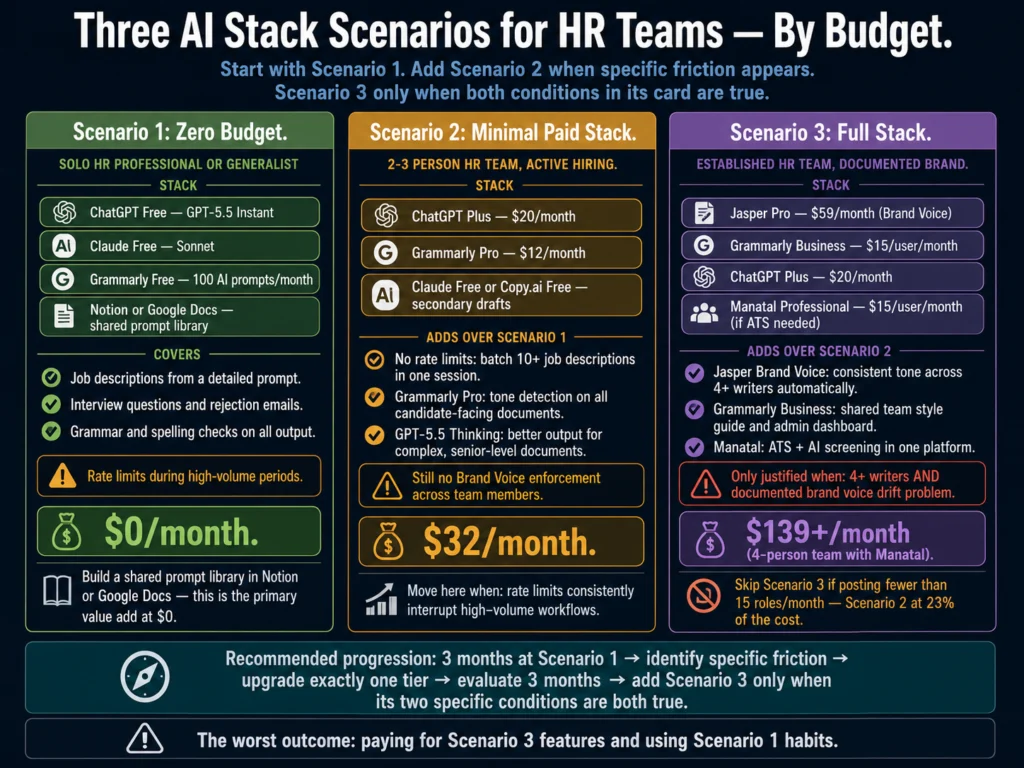
Scenario 1: Zero budget (solo HR professional or generalist) ChatGPT free (GPT-5.5 Instant) and Grammarly free cover 80% of HR writing tasks at no cost.
The constraint is rate limits during high-volume periods and the absence of Brand Voice automation. Build a shared prompt library in a free Notion or Google Doc and share it with your team.
Scenario 2: Minimal paid stack ($32/month) for a 2 to 3 person HR team ChatGPT Plus ($20/month) removes rate limits and provides GPT-5.5 Thinking for complex briefs, the reasoning tier that handles longer, more nuanced HR documents better than the free tier.
Grammarly Pro ($12/month) adds tone detection across all candidate-facing documents. This combination handles most HR writing needs with quality that is close to premium tools.
Scenario 3: Full stack ($139+/month) for an established HR team Jasper Pro ($59/month) for Brand Voice enforcement across multiple writers. Grammarly Business ($15/user/month) for team style guides and admin oversight.
ChatGPT Plus ($20/month) for tasks where Jasper is not the right fit. Manatal Professional ($15/user/month) if you need ATS + AI screening in one platform.
For the detailed breakdown with specific upgrade triggers:
What AI Cannot Do in HR
Three categories where AI performs poorly and should not replace human judgment:
Making hiring decisions. AI can score and rank. It can synthesize feedback. It cannot evaluate whether a candidate’s judgment, cultural contribution, or leadership potential makes them the right hire for your team at this stage. That evaluation requires context the AI does not have access to.
Navigating relationship dynamics. Performance conversations, exit interviews, team conflicts, and compensation negotiations involve emotional complexity and organizational history that AI cannot read. AI can help you prepare for these conversations. It cannot have them.
Staying current on employment law. AI models have training data cutoffs. Colorado’s AI Act changed materially in 2026 in a way that outdated guidance still does not reflect.
Legal requirements in your specific jurisdiction require human legal review of current primary sources, not AI-generated summaries of potentially outdated training data.
The Three Most Common AI Mistakes HR Teams Make
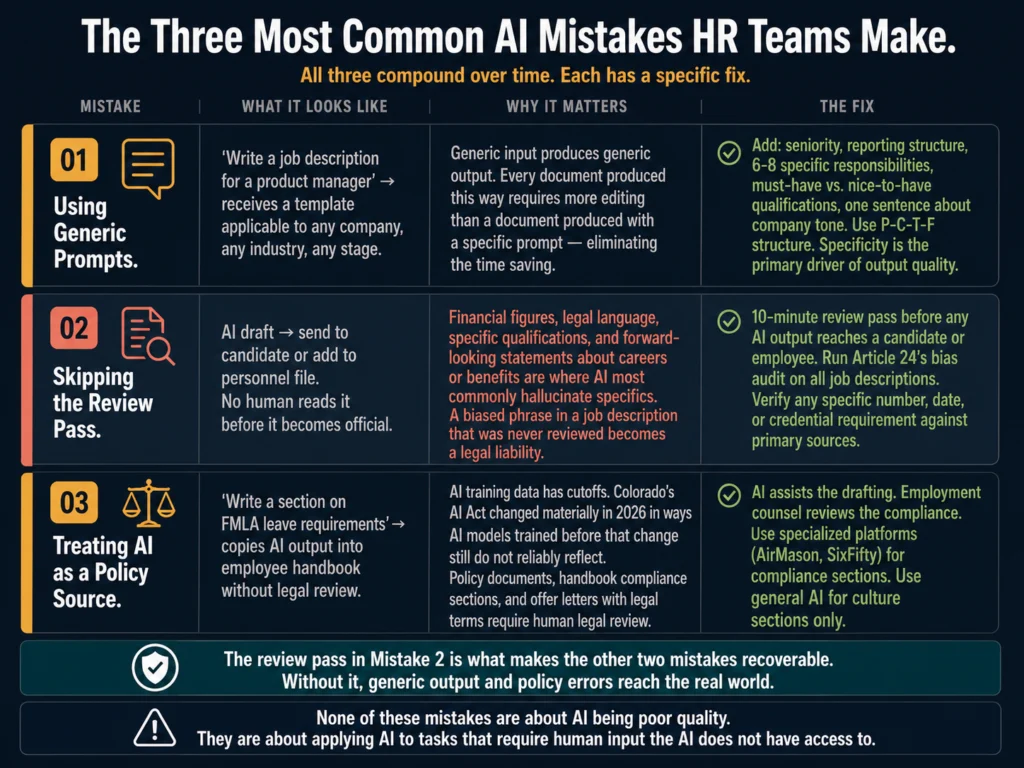
Using generic prompts. “Write a job description for a product manager” produces a generic job description.
“Write a job description for a mid-level Product Manager at a 200-person B2B SaaS company, reporting to the VP of Product, responsible for owning the self-service onboarding funnel, with 3 to 5 years of relevant experience required” produces a usable first draft. Specificity in the input is the primary driver of output quality.
Skipping the review pass. AI drafts require human review before any candidate or employee reads them. Financial figures, legal language, specific qualifications, and forward-looking statements about careers or benefits are particularly likely to contain errors or hallucinated specifics.
A 10-minute review pass before posting prevents the errors that most undermine AI’s credibility in HR contexts.
Treating AI as a replacement for policy. AI produces fast drafts of policy documents. It does not know your state’s current leave law requirements, your organization’s specific at-will employment nuances, or the EEOC’s current guidance on a specific category of hiring decision.
Policy documents, handbook compliance sections, and offer letters with legal terms require human legal review. AI assists the drafting. It does not replace the expertise.
Exploring the Full Cluster
This guide links to all 24 articles and three other pillar articles in the Ailovyu HR AI cluster. Here is the complete index:
Use Case Reviews
- Best AI Tools for Writing Job Descriptions
- AI Tools for Resume Screening: What Actually Works
- Best AI Tools for Writing Interview Questions
- Jasper AI Review for HR Professionals
- Free vs. Paid AI Tools for Small HR Teams
- Best AI Tools for Writing Offer Letters
- Best AI Tools for Writing Candidate Outreach Emails
- Best AI Tools for Performance Review Writing
- Best AI Tools for Employee Handbook Writing
Tutorials and How-To Guides
- How to Write 10 Job Descriptions in One Day Using AI
- How to Write Rejection Emails with AI (Without Sounding Robotic)
- How to Write a 30-60-90 Day Onboarding Plan with AI
- How to Write Candidate Outreach Emails with AI (Tutorial)
- How to Use AI for Performance Review Cycles (Tutorial)
- How to Build an AI Prompt Library for HR Teams
- Using AI to Write Onboarding Documentation (Full Guide)
Comparison Articles
- ChatGPT vs. Claude for HR Writing: Tested Comparison
- Grammarly vs. Jasper for HR Writing: Which Should You Use?
- Jasper vs. Copy.ai for HR Writing: Which Is More Practical?
- Manatal vs. Workable: AI Recruiting Features Compared
Ethics and Compliance
- AI Bias in Hiring: What HR Teams Need to Know
- Can You Use AI-Generated Job Descriptions Legally?
- How to Disclose AI Use in Your Hiring Process to Candidates
- How to Audit AI Job Posts for Bias Before Publishing
Other Pillar Guides
- INTERNAL -> P2: AI Writing Tools for Recruiters: The Complete Guide
- INTERNAL -> P3: AI Ethics and Compliance in Hiring: The Complete Guide
- INTERNAL -> P4: AI for HR Communications and Documentation: The Complete Guide
Frequently Asked Questions
Start with ChatGPT’s free tier (GPT-5.5 Instant) and Grammarly’s free plan. Both are genuinely capable at no cost. Build a prompt template for your most frequently written document type, test it on three to five real examples, refine it, and save it in a shared location your team can access. The barrier to meaningful time savings is building a consistent prompt that reflects your organization’s specific needs, not the tool. That takes 90 minutes to build and saves 30 minutes per document from that point forward.
Final hiring decisions. Termination conversations. Performance feedback delivery. Investigations of workplace complaints. Compensation negotiations. These are tasks where the organizational context, the relationship dynamics, and the human judgment involved are not replicable with current AI tools. AI can help you prepare for each of these, draft relevant documentation afterward, and structure your thinking beforehand. It cannot be the person having the conversation or making the call.
Worried enough to take concrete steps, but not paralyzed. The documented bias in AI hiring tools is real: tools favor white-associated names 85% of the time, show age and gender bias patterns, and reproduce historical hiring disparities from their training data. The practical response is to put governance structures in place: audit your AI-generated job descriptions before posting (Article 24 covers the six-step process), run the four-fifths rule on your screening tool outcomes, maintain a human review step before any candidate-facing AI decision, and understand the disclosure requirements in your operating jurisdictions (Article 23). These are concrete, achievable steps. They do not require abandoning AI. They require governing it.
74% of HR professionals who use AI say it has a high or medium impact on their productivity, according to SHRM’s 2026 data. The specific time savings vary by task and volume. Job description drafting: 1.5 to 3 hours saved per description. Rejection email batches: 60 to 90 minutes per 20 emails. 360 feedback synthesis: 35 minutes saved per employee review. Performance review narrative drafting: 30 to 60 minutes saved per report. A recruiting team handling 10 open roles per month and using AI across all of these tasks realistically saves 6 to 10 hours per week. Those are meaningful numbers that compound across a year.
62% of organizations expect to grow their workforce in 2026, and AI is primarily replacing tasks rather than people, according to Software Advice’s analysis of 928 HR professionals already using AI. The roles most at risk are highly repetitive, low-judgment administrative roles. Strategic HR roles, those involving relationship management, organizational design, conflict resolution, and culture-building, are less at risk and in some cases are becoming more valuable as AI handles the administrative load. Workers with advanced AI skills earn 56% more than peers in the same roles without those skills, according to PwC’s analysis. The practical advice for HR professionals: learn to use AI tools for the tasks it handles well, and protect your time for the tasks it cannot handle. Both are career-protective moves.
Conclusion
The division of labor for AI in HR in 2026 is clearer than it was two years ago. AI handles drafting, structuring, synthesizing, and pattern-matching across large volumes of text. HR professionals handle judgment, relationships, strategy, and accountability.
The 54% of organizations that have not adopted AI in HR are not necessarily behind.
They are behind if they are spending 3 hours per job description and 210 hours per year on performance review administration while their competitors are spending 30 minutes and 100 hours respectively, and redirecting the saved time toward higher-value work.
They are not behind if they are simply delaying the adoption of tools that are not yet mature enough for their specific use case.
The use cases that are demonstrably mature in 2026: job description drafting, candidate communication writing, interview question generation, 360 feedback synthesis, and performance review narrative drafting.
These are high-volume, repetitive writing tasks where AI consistently reduces time and maintains quality with a review pass.
The use cases that require caution in 2026: AI-powered resume screening (legal risk, bias risk, disclosure requirements), autonomous candidate communication (tone risk, employer brand risk), and any AI use in compensation or termination decisions (legal risk, relationship risk).
Start with the mature use cases. Build your prompt library. Train your team. Then evaluate the riskier territory when your governance structures are in place.
The 24 articles linked throughout this guide give you the tools, prompts, and honest assessments to get started on any of those use cases today.
Every article in this cluster (including this one) reflects the Ailovyu team’s approach to AI in HR: verified data, honest assessments of what works and what does not, and no affiliate influence on editorial conclusions.
We research and test AI tools so you can make informed decisions before spending money on them. Every review, comparison, and tutorial on this site is based on actual use, not vendor marketing.
Learn more on our About page.
Statistics from SHRM State of AI in HR 2026 report (1,908 HR professionals surveyed, December 2025); Software Advice HR and People Trends 2026 (928 HR professionals); Staffbase AI Trends in HR 2026; Gloat AI Workforce Trends 2026 Q2 Update (PwC data); BestJobSearchApps AI Bias Analysis (May 2026); HiringThing Job Application Statistics 2026. No affiliate links in this pillar article. Tool-specific affiliate relationships are disclosed in the individual reviews linked above.