
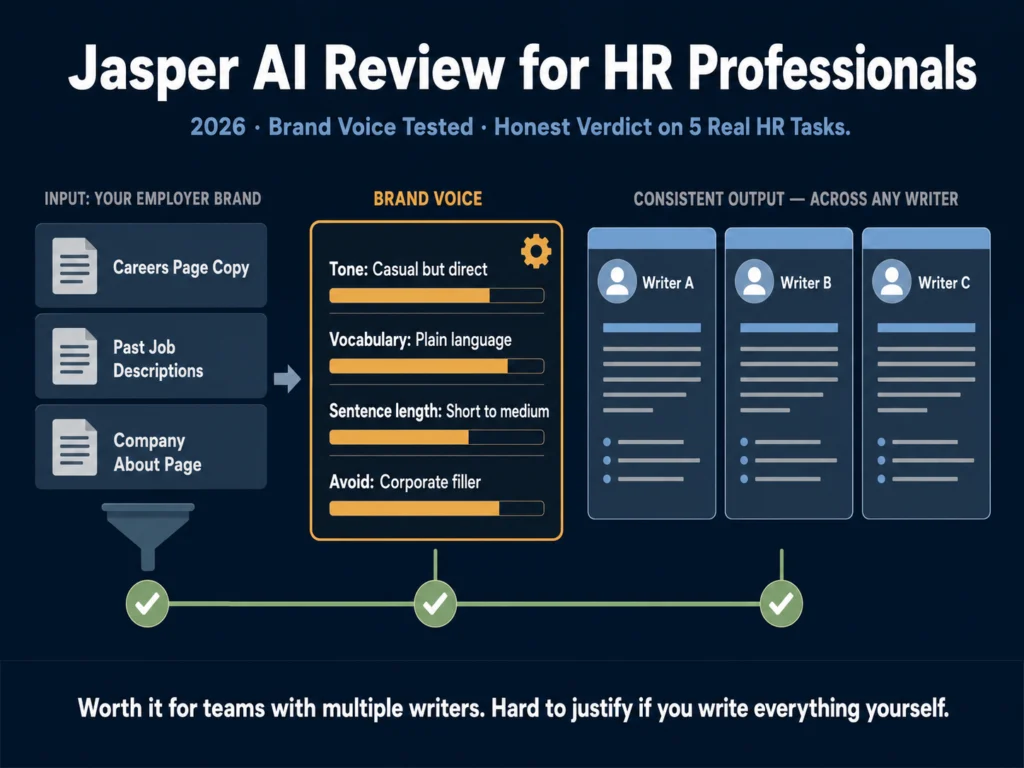
- Jasper AI is a marketing-focused AI writing platform that HR professionals have adopted for job descriptions, candidate communications, and employer branding content.
- Its Brand Voice feature is genuinely the best available for ensuring consistent tone across a team — but it requires upfront setup time and ongoing management.
- For a solo HR generalist or recruiter writing fewer than 10 postings per month: Jasper is not worth the premium. ChatGPT Plus at $20/month with a good prompt template produces comparable results at half the cost.
- For an in-house HR team writing postings regularly across departments, managing employer brand consistency across multiple writers, and producing candidate-facing communications at scale: Jasper earns its price.
- Pricing in 2026: Creator at $39/month (annual), Pro at $59/month (annual). 7-day free trial available. No permanent free plan.
Jasper AI was not built for HR professionals. It was built for marketing teams.
That matters for this review, because the question “is Jasper worth it for HR?” requires understanding what Jasper is optimized for, where that optimization translates to HR work, and where it does not.
The honest answer is that Jasper is excellent at one specific thing that HR teams also need: producing large volumes of written content that sounds like it came from the same organization, regardless of who wrote it.
If that is a real problem for your team, Jasper solves it better than any other tool at this price point.
If brand voice consistency across your job postings is not a documented problem — because you have one person writing everything, or because you post infrequently — Jasper’s premium over general AI tools is harder to justify.
This review covers what Jasper does well for HR, where it falls short, and the specific team profiles that should and should not consider subscribing.
Quick Verdict
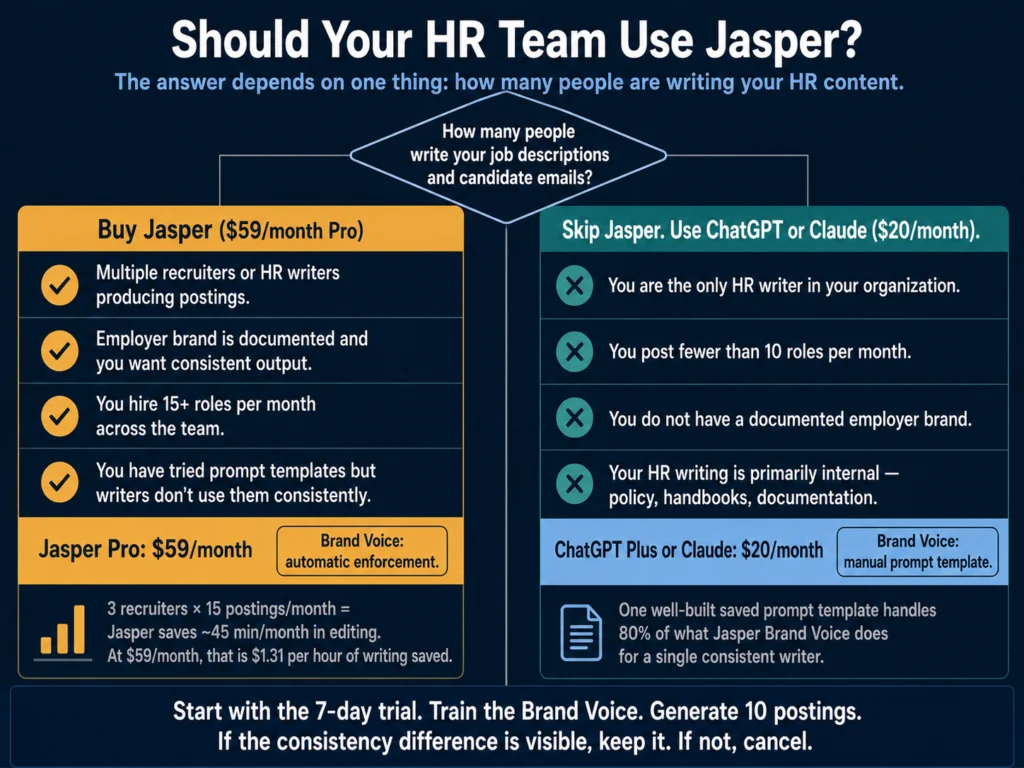
Buy Jasper if: You manage an HR team with multiple people writing job descriptions and candidate communications, your employer brand is defined and documented, and you hire consistently enough to generate ongoing writing volume.
The Pro plan ($59/month annual) handles multi-user brand voice and is where the HR value is.
Skip Jasper if: You are a solo HR professional, you post fewer than 10 roles per month, your organization does not have a documented employer brand, or you are primarily writing internal-facing documents.
ChatGPT Plus ($20/month) or Claude ($20/month) covers your needs at less than half the cost.
What Jasper Is (And Is Not)
Jasper positions itself as an AI content platform for marketing teams. Its templates, workflows, and feature set are designed around marketing use cases: blog posts, email campaigns, ad copy, product descriptions, social content.
In 2026, Jasper introduced Jasper Agents — autonomous writing assistants that can research topics, optimize for SEO, and generate campaigns without step-by-step prompting.
HR professionals use Jasper because writing job descriptions, candidate outreach emails, offer letters, and employer branding content involves the same core challenge as marketing: producing large volumes of written content that consistently reflects an organization’s voice and values.
The underlying task — “write this in our brand’s tone” — is something Jasper is specifically designed for.
What Jasper is not: an HR-specific tool. There are no dedicated templates for onboarding documentation, employee handbook language, performance review writing, or policy drafting.
If those are your primary HR writing needs, Jasper’s marketing-first template library will feel like using a hammer to drive a screw. The tool works, but it is not optimized for the task.
The Brand Voice Feature: What It Actually Does
Brand Voice is Jasper’s central differentiator and the only feature that substantially justifies its premium over ChatGPT for HR use.
The way it works: you upload samples of your existing content, careers page copy, past job descriptions, your company’s About page, leadership blog posts.
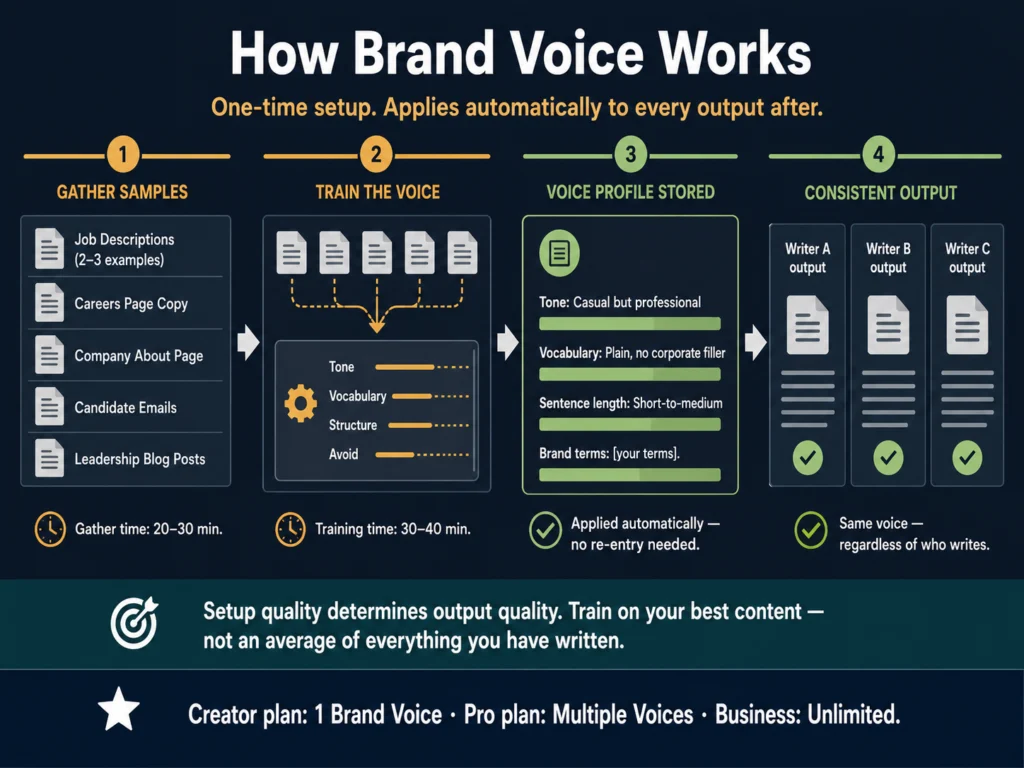
Jasper analyzes the writing style, tone, vocabulary patterns, and sentence structure, then stores that profile as a Brand Voice. Every subsequent piece of content you generate in Jasper draws from that profile.
For HR teams, this means that a job description written by your talent acquisition team in San Francisco and a job description written by your HR generalist in London are both calibrated to the same organizational voice, without requiring either writer to carefully replicate the style manually. The consistency is encoded in the tool, not in the individual.
Setup time is the hidden cost. Training a high-quality Brand Voice requires good sample content. If your existing job descriptions are inconsistent or poorly written, training Jasper on them encodes that inconsistency.
The setup is a one-time investment of 60 to 90 minutes for initial training, plus periodic refinement as your employer brand evolves. Factor that into the decision.
Creator plan vs. Pro plan for Brand Voice: The Creator plan includes one Brand Voice. The Pro plan includes multiple.
For most HR teams with a single employer brand, Creator is sufficient. Teams managing multiple business units, subsidiaries, or geographic brands with distinct voices should evaluate Pro.
Tested: Five HR Writing Tasks
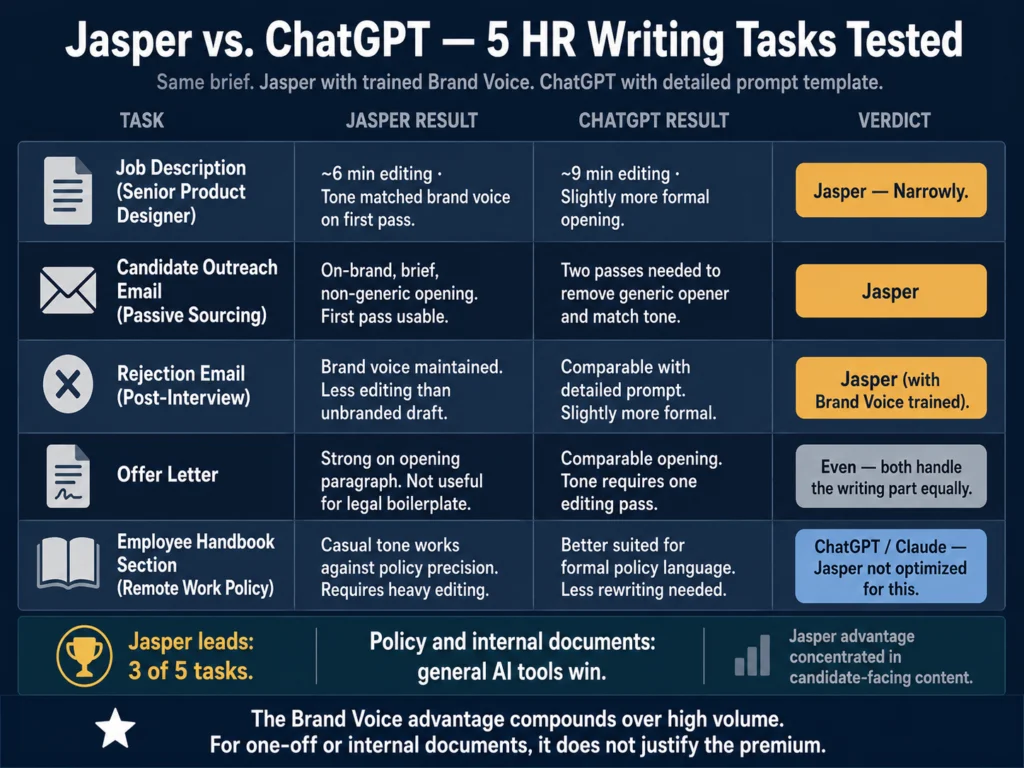
The Ailovyu team submitted the same briefs to Jasper and to ChatGPT Plus (GPT-5.5 Thinking) with a standard prompt.
The role: Senior Product Designer, 7 years experience, B2B SaaS company with a casual but professional culture, remote-first, 200-person organization.
Task 1: Job Description
Jasper output: After a one-time Brand Voice setup using the company’s About page and two previous job postings, Jasper produced a description that matched the sample content’s tone closely — casual sentence structure, direct language, no filler phrases.
The “Why work here” section felt authentic rather than generic. Editing time: approximately 6 minutes.
ChatGPT (detailed prompt) output: Similar structure, similar quality. The opening was slightly more formal than the brand voice samples. Editing time: approximately 9 minutes.
Verdict: Jasper, but narrowly. With a well-set Brand Voice, Jasper consistently hits the right tone on the first pass.
With a detailed ChatGPT prompt, you get close but spend more time in the editing pass. Over a batch of 15 descriptions, that adds up.
Task 2: Candidate Outreach Email (Passive Sourcing)
A LinkedIn InMail to a Senior Designer who is not actively looking. The tone needs to be direct and human, not obviously templated.
Jasper output: On-brand and appropriately brief. The opening line did not start with “Hi [Name], I came across your profile and was impressed.”
It led with a specific observation about the role’s work rather than generic flattery. The Brand Voice training kept it from defaulting to marketing copy language.
ChatGPT output: Required two passes to remove the generic opening and match the casual tone. The second version was comparable to Jasper’s first.
Verdict: Jasper. For high-volume candidate outreach where every extra editing step adds friction, the brand voice consistency matters more than for one-off documents.
Task 3: Rejection Email (Post-Interview)
This task is covered in depth in How to Write Rejection Emails with AI (Without Sounding Robotic), but the summary for Jasper specifically: Jasper’s Brand Voice training helped here.
The rejection email matched the warm but direct tone of the employer brand rather than defaulting to a corporate-formal register. The output required less editing than an unbranded ChatGPT draft.
Task 4: Offer Letter
Offer letters are primarily legal documents with a human close. The legal language is standardized — the part where writing quality matters is the opening paragraph that frames the offer positively.
Jasper: Good at the opening. The Brand Voice training kept the tone consistent with the company’s other candidate communications — warmer and more direct than a typical legal-adjacent draft.
Not useful for the legal boilerplate sections, which should come from your legal team’s template regardless of what AI tool generates them. Do not use Jasper (or any AI) as the source for the legal terms of an offer letter.
ChatGPT (GPT-5.5 Thinking) output: Comparable opening quality. Without Brand Voice, the tone defaulted slightly more formal than the company’s established style, requiring one editing pass to match the register of other candidate communications.
Verdict: Jasper handles the one part of offer letters that benefits from brand voice. The rest is not a writing problem — it is a legal review problem.
Task 5: Employee Handbook Section (Remote Work Policy)
This task is where Jasper’s marketing orientation becomes a limitation. The templates do not include HR policy formats.
The Brand Voice feature still applies, but the output for policy language requires more editing than job descriptions or outreach emails — the formal precision that policy writing requires works against the casual, conversational output Jasper is optimized for.
Verdict: ChatGPT or Claude for policy and handbook writing. Jasper’s output for these formats is usable but no better than a well-prompted general AI model, and the premium is not justified for this use case.
What Jasper Does Not Do for HR Teams
No HR-specific templates. The 50+ templates are marketing-oriented. You will use Jasper as a chatbot or brand voice generator for HR content, not as a template-driven workflow.
No ATS integration. Jasper does not connect to Workable, Greenhouse, Lever, or other recruiting platforms. You write in Jasper and copy-paste to your ATS.
The browser extension helps with this: it lets you use Jasper directly within Google Docs, where you may already be drafting. Still, it is not a native integration.
No resume screening or candidate evaluation features. Jasper is a writing tool. It does not read, score, or analyze resumes. For screening tools, see AI Tools for Resume Screening — What Actually Works.
No bias detection. Unlike Textio, Jasper does not flag potentially biased language in job descriptions. You would need to run Jasper’s output through a separate tool or manual checklist if bias reduction is a priority.
For more on that, read AI Bias in Hiring — What HR Teams Need to Know.
Pricing in 2026
| Plan | Annual Price | Monthly Price | Brand Voices | Best For |
|---|---|---|---|---|
| Creator | $39/month | $49/month | 1 | Solo recruiter, small HR team |
| Pro | $59/month | $69/month | Multiple | HR teams, multiple departments |
| Business | Custom | Custom | Unlimited | Enterprise, agency |
All plans include a 7-day free trial. No permanent free tier exists. Annual billing saves approximately 20% versus monthly.
→ Jasper’s 7-day free trial gives you full access to Brand Voice training and all writing features — no credit card required to start.
How Jasper Compares to Alternatives for HR
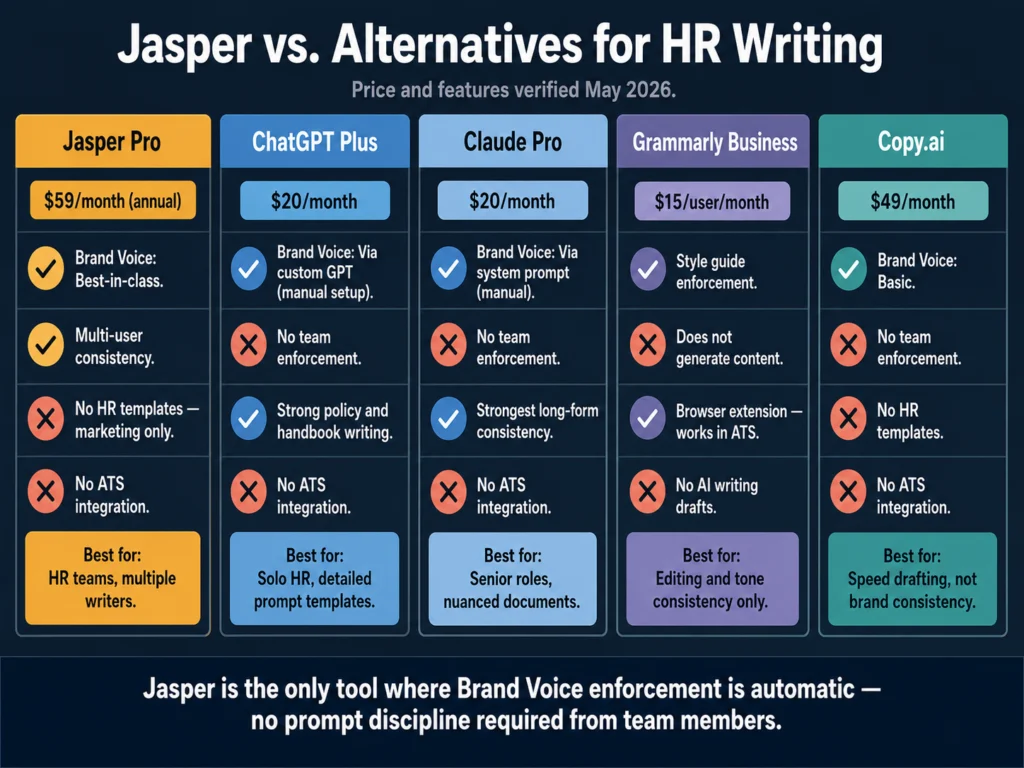
| Tool | Monthly Cost | Brand Voice | HR Templates | ATS Integration |
|---|---|---|---|---|
| Jasper Pro | $59 (annual) | ✓ Best-in-class | Marketing-only | Browser extension |
| ChatGPT Plus (GPT-5.5) | $20 | Via custom GPT | None | None |
| Claude Pro | $20 | Via system prompt | None | None |
| Grammarly Business | $15/user | Style guide | None | Browser extension |
| Copy.ai | $49 | Basic | None | None |
The comparison that matters most for HR: Jasper Pro vs. ChatGPT Plus plus a well-built prompt template.
Jasper Pro costs $59/month. ChatGPT Plus costs $20/month. The $39/month difference buys you:
- Native Brand Voice training that applies automatically, without re-entering your tone instructions in each session
- Consistent output across multiple team members without requiring everyone to maintain the same prompt template
- A more marketing-polished interface with collaboration features
If you are the only person writing HR content and you are disciplined about using a saved prompt template in ChatGPT, the $39/month difference is hard to justify.
If you have three recruiters writing job descriptions and you cannot control what prompt each one uses, Jasper’s Brand Voice enforcement is worth that premium.
Related Reading
- Best AI Tools for Writing Job Descriptions
- ChatGPT vs. Claude for HR Writing — A Practical Comparison
- Free vs. Paid AI Tools for Small HR Teams
- Grammarly vs. Jasper for HR Writing — Which Should You Use?
- Jasper vs. Copy.ai for HR Writing
- The Complete Guide to AI Tools for HR Professionals
Frequently Asked Questions
Probably not. The core value of Jasper for HR is Brand Voice consistency across a team of writers. A solo writer using a saved ChatGPT or Claude prompt template achieves similar tone consistency at $20/month rather than $39 to $59/month. Where Jasper earns its premium is when multiple people are producing content and you cannot enforce prompt discipline across all of them. For a one-person operation, start with ChatGPT Plus and build a strong prompt template first. Upgrade to Jasper if and when inconsistency across writers becomes a documented problem.
Not natively. Jasper’s browser extension lets you use it within Google Docs, Gmail, and some other web interfaces, but it does not integrate directly with ATS platforms like Workable, Greenhouse, or Lever. The standard workflow is: draft in Jasper, copy the output, paste into your ATS. Some teams draft in Google Docs with the Jasper browser extension active, then import from Docs to their ATS. It adds a step, but it is manageable for most teams.
No. Jasper does not analyze language for bias patterns or flag exclusionary phrasing. It is a content generation tool, not a bias detection tool. If bias reduction is a priority — and it should be, given the legal landscape in 2026 — you need a separate tool for that analysis. Textio is purpose-built for this use case. Running Jasper’s output through a manual checklist is a lower-cost alternative. For a detailed breakdown of AI bias in hiring and what HR teams need to do about it, read: AI Bias in Hiring — What HR Teams Need to Know
Expect 60 to 90 minutes for the initial setup. You will need to gather a representative sample of your existing content — ideally 5 to 10 pieces that reflect your actual employer voice, including job descriptions, careers page copy, and candidate communications. The quality of the Brand Voice output depends on the quality of the sample content. If your existing writing is inconsistent, train on your best examples, not an average of everything. After setup, Brand Voice applies automatically to every new piece of content you generate without additional input from your team.
Jasper Agents, introduced in 2026, are autonomous writing assistants that can research topics, optimize content for SEO, and generate multi-step content workflows without manual prompting at each stage. For HR, the most relevant application is employer branding content — blog posts about company culture, LinkedIn articles, careers site copy — where Jasper can research competitive positioning and generate drafts with minimal input. For core HR operational writing (job descriptions, rejection emails, offer letters), the standard Jasper writing interface is more appropriate than the agentic workflow. Agents are more useful for marketing-adjacent HR content than for daily recruiting communications.
Conclusion
Jasper AI is a premium tool that solves a specific problem well: consistent brand voice at scale across multiple writers.
For HR teams where that consistency is a real operational challenge (multiple recruiters writing job descriptions that need to sound like they came from the same organization), Jasper earns its $59/month Pro plan cost.
That assessment is based on what the Ailovyu team tested across five real HR writing tasks using a trained Brand Voice, not on Jasper’s own marketing claims.
For everyone else, the premium is hard to justify. The combination of ChatGPT Plus or Claude at $20/month with a well-built prompt template produces comparable output quality for HR writing tasks.
The difference is not the AI’s capability. It is the enforcement mechanism: Jasper encodes your brand voice into the tool so every writer uses it correctly by default. Without Jasper, that enforcement requires prompt discipline from every member of your team.
Start with the 7-day trial. Train the Brand Voice on your best existing content. Generate 10 job descriptions and compare them to what you produce with your current workflow.
If the consistency improvement is visible and the editing time reduction is meaningful, the subscription pays for itself quickly. If the difference is marginal, cancel before the trial ends.
We research and test AI tools so you can make informed decisions before spending money on them. Every review, comparison, and tutorial on this site is based on actual use, not vendor marketing.
Learn more on our About page.
Jasper pricing verified May 2026 from jasper.ai. All testing was conducted using the Jasper Pro plan with Brand Voice trained on publicly available employer branding content. This article contains an affiliate link — if you subscribe through our link, we earn a recurring commission at no extra cost to you. This does not affect our editorial assessment.