• Skip to main content
  • Skip to primary sidebar
  • Homepage
  • About Ailovyu
  • Privacy Policy
  • Disclaimer
  • Affiliate Disclosure
  • Contact
Ailovyu.com

Ailovyu.com

Home » AI for HR and Recruiters » Page 3

AI for HR and Recruiters

AI Bias in Hiring: What HR Teams Need to Know (2026)

Updated: July 12, 2026

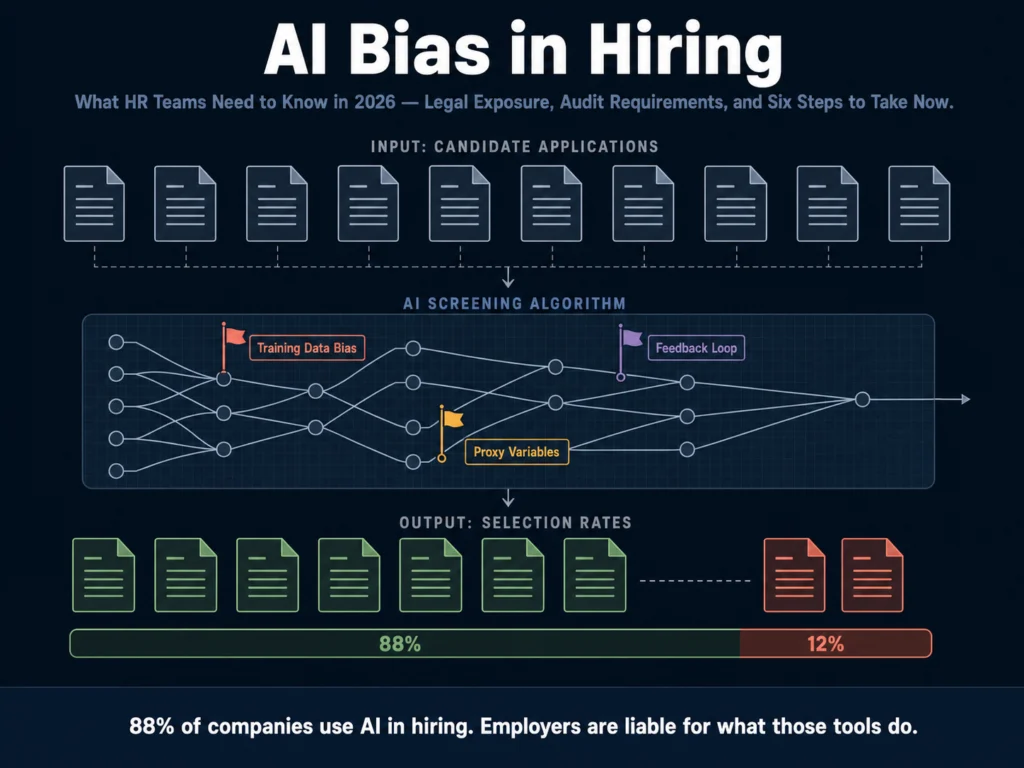
Abstract visualization of AI hiring algorithm bias patterns — systemic discrimination in automated candidate screening

TL;DR
  • AI hiring tools are not neutral. Research shows they systematically favor white-associated names 85% of the time and show measurable bias against women, older workers, and candidates with disabilities.
  • Mobley v. Workday is the case every HR team needs to understand. In 2026, it became a nationwide class action covering potentially millions of applicants over 40. A March 2026 court ruling rejected Workday’s central defense. The case is ongoing.
  • Employers are legally responsible for discriminatory outcomes produced by third-party AI tools — even when they did not build the algorithm. “We just used the vendor’s software” is not a legal defense.
  • The regulatory picture in 2026 is fragmented but tightening: California, Colorado, and New York City have active requirements in effect or taking effect this year.
  • Six things HR teams should do now: request a bias audit from every AI hiring vendor, apply the four-fifths rule to your screening data, document everything, keep humans in the loop on final decisions, update candidate notices, and review your vendor contracts.

In 2023, the EEOC settled its first AI hiring discrimination lawsuit. The defendant, iTutorGroup, had programmed its recruitment software to automatically reject women over 55 and men over 60.

The settlement was $365,000. The fix was a policy overhaul. It was the first case. It was not the last.

By 2026, AI-powered tools are involved in hiring decisions at approximately 88% of companies, according to World Economic Forum data.

That penetration means the bias embedded in those tools is not an edge case — it is systemic. Courts are beginning to treat it as such.

This article explains how AI bias happens in hiring, what the legal landscape looks like in 2026, and what HR teams need to do now. Not eventually.

Table of Contents
  • How AI Bias Happens: Three Mechanisms
    • Mechanism 1: Biased Training Data
    • Mechanism 2: Proxy Variables
    • Mechanism 3: Feedback Loops
  • What the Data Shows
  • The Legal Landscape in 2026
    • Mobley v. Workday: The Case That Changed Everything
    • What This Means for Employers
    • State Regulations Active
  • The Four-Fifths Rule: The Standard You Need to Know
  • Six Steps HR Teams Need to Take Now
    • Step 1: Request an Independent Bias Audit from Every Vendor
    • Step 2: Run the Four-Fifths Calculation on Your Own Screening Data
    • Step 3: Document Everything
    • Step 4: Keep Humans Between AI Output and Candidate-Facing Decisions
    • Step 5: Update Candidate Notices
    • Step 6: Review Your Vendor Contracts
  • The Complication: Changing Federal Priorities
  • Related Reading
  • Frequently Asked Questions
  • Conclusion

How AI Bias Happens: Three Mechanisms

Understanding bias in AI hiring requires understanding where it comes from.

It is not a glitch. It is a predictable output of how these systems are built.
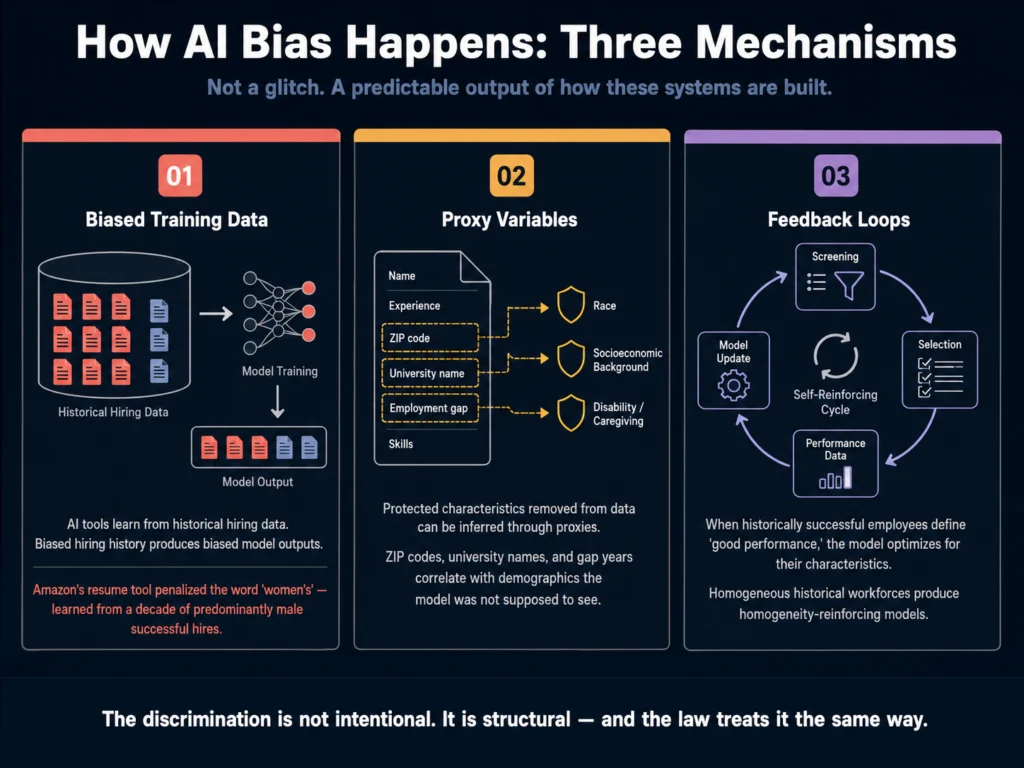
Three mechanisms of AI hiring bias — biased training data, proxy variables, and feedback loops explained
AI hiring bias is not a glitch. It is a predictable output of how these systems are built. Understanding the mechanism is the first step to governing it.

Mechanism 1: Biased Training Data

AI hiring tools learn from historical hiring data. If your organization, or the organizations whose data the tool was trained on, hired mostly white men for engineering roles over the past decade, the model learns to associate those characteristics with engineering success.

It is not making a moral judgment. It is pattern-matching. The pattern it is matching happens to reproduce historical discrimination.

A large-scale randomised experiment published through VoxDev in May 2025 (An, Huang, Lin & Tai, 2025) found that leading AI models systematically favored female applicants while disadvantaging Black male applicants with identical qualifications — not through any explicit design choice, but because the tools reproduced existing disparities in their training data.

The discrimination was not intentional. It was structural.

Mechanism 2: Proxy Variables

Even when demographic information is explicitly removed from the data the AI evaluates, the model can infer protected characteristics through proxy variables. ZIP codes correlate with race. University names correlate with socioeconomic background.

Resume formatting conventions correlate with national origin and age. Gap years correlate with disability or caregiving.

The Amazon resume screening tool — a well-documented case from 2018 that the company ultimately abandoned — penalized resumes that included the word “women’s,” as in “women’s chess club” or “women’s college.”

The system had no explicit instruction to discriminate against women. It had trained on a decade of resumes from successful Amazon employees, most of whom were men, and learned to deprioritize signals associated with female applicants.

Mechanism 3: Feedback Loops

When AI screening tools advance candidates who perform well in the role, and that performance data is fed back into the model, the model optimizes for the characteristics of historically successful employees.

If the historical workforce was demographically homogeneous, by design or circumstance, the feedback loop reinforces that homogeneity.

The system gets better at finding people who look like the people who already work there, which is definitionally not what diversity hiring is trying to do.


What the Data Shows

The documented evidence of AI hiring bias is no longer theoretical.

A 2026 audit of algorithmic hiring systems found that resume screening algorithms were 35% less likely to advance applications from candidates with names perceived as African American, and video interview analysis tools showed a 28% bias against candidates over age 50.

Research aggregated across multiple studies shows AI tools favor white-associated names 85% of the time. Male names are preferred over female names by rates of 52 to 85%, depending on the tool and role type.

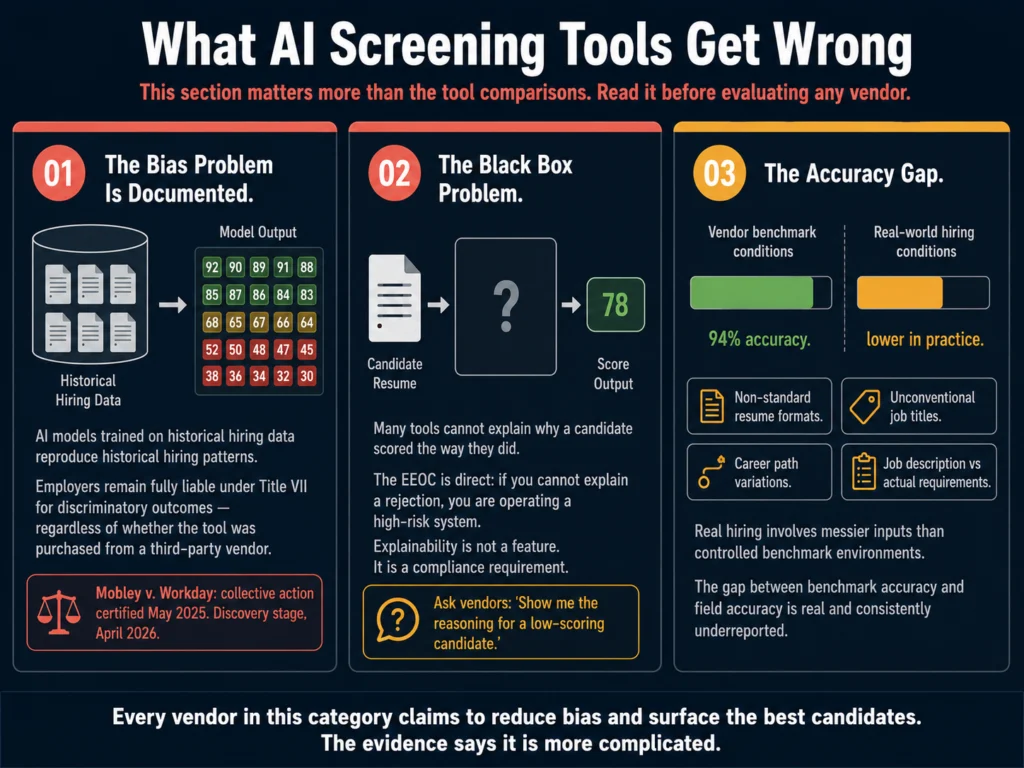
The documentation gap is significant. Most organizations deploying AI hiring tools cannot produce independent audit results on request, have not run the four-fifths calculation on their screening data, and lack the four-year records California now requires for automated decision systems.

The problem is not ignorance of the tools — it is ignorance of what those tools are actually doing to the applicant pool.

If you are accepting your vendor’s bias-reduction marketing without requesting independent audit data, you are operating on faith rather than evidence.


The Legal Landscape in 2026

Mobley v. Workday: The Case That Changed Everything

Derek Mobley is a Black man over 40 with anxiety and depression. Beginning in 2017, he applied to more than 100 jobs at companies that use Workday’s AI-powered screening tools.

He was rejected every time — often within minutes of submitting his application, sometimes in the middle of the night. He sued in 2023.
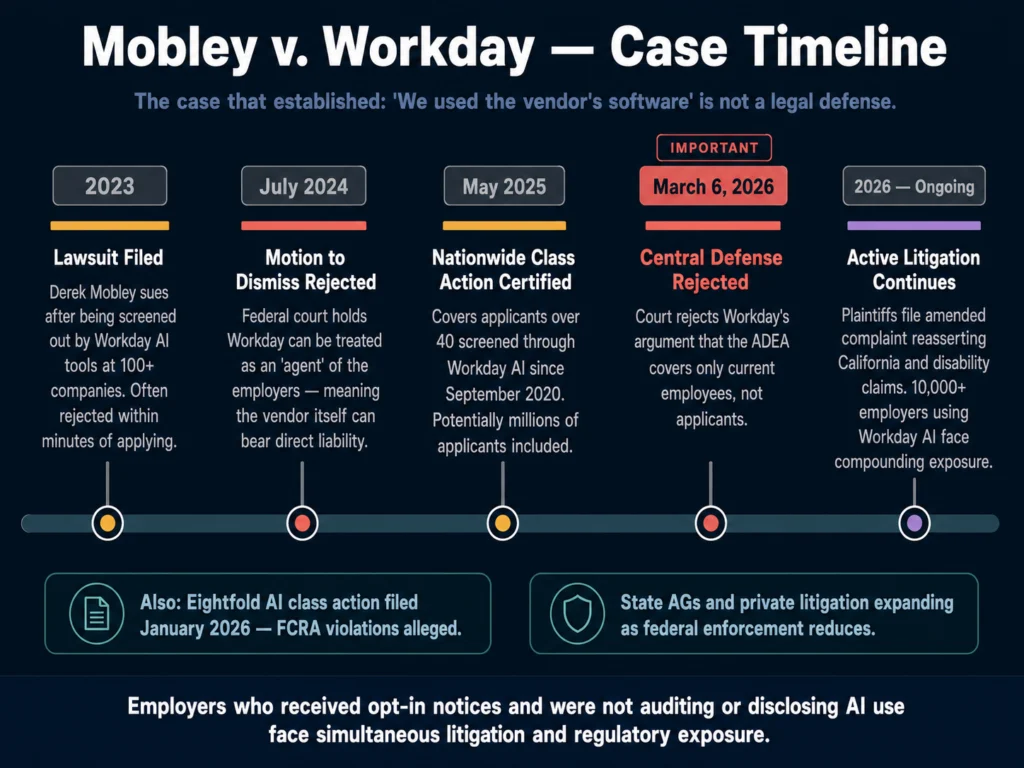
Mobley v. Workday AI hiring discrimination lawsuit timeline — key rulings from 2023 to 2026 including nationwide class action certification
This case is setting the legal framework for employer liability over third-party AI hiring tools. A March 2026 ruling rejected Workday’s central defense. The case continues.

What has happened since:

July 2024: A California federal court rejected Workday’s motion to dismiss. The court held that Workday could be treated as an “agent” of the employers who used its tools — meaning the vendor itself could bear direct liability for discriminatory outcomes.

May 2025: Judge Rita Lin granted preliminary collective certification. The case became a nationwide class action covering applicants over 40 who were screened through Workday’s AI tools since September 2020. Potentially millions of applicants were included.

March 6, 2026: The court rejected Workday’s central remaining defense — that the Age Discrimination in Employment Act does not cover job applicants, only current employees. That argument failed.

March to April 2026: Plaintiffs filed an amended complaint reasserting California state and disability claims. The case continues in active litigation.

The case now presents compounding exposure not only for Workday but increasingly for the more than 10,000 employers that use Workday’s AI-powered hiring tools.

If those employers receive opt-in notices — and discover they were not disclosing, auditing, or governing their AI tools — they may face simultaneous exposure in litigation and regulatory enforcement.

In January 2026, a separate class action was filed against Eightfold AI, alleging the company operated as a consumer reporting agency — collecting and scoring applicant data from unverified third-party sources without consent, in violation of the Fair Credit Reporting Act.

Workday establishes that vendors can be liable for discrimination. Eightfold frames vendors as entities subject to transparency mandates. These two cases are developing the legal framework from two directions.

What This Means for Employers

The core legal principle to understand: employers remain fully liable under Title VII if their AI hiring tools produce a disparate impact on protected groups, regardless of whether the tool was purchased from a third-party vendor.

The EEOC has been explicit that “we just used the vendor’s software” is not a defense.

This has not changed under the Trump administration’s April 2025 executive order, which instructed federal agencies to reduce pursuit of disparate impact theories of liability.

That order affects government-led enforcement. It does not affect private litigation like Mobley, which proceeds on existing statutory grounds. State EEO agencies are actively taking up cases the federal government steps back from.

State Regulations Active

California (effective October 2025): New regulations from the Civil Rights Council explicitly bring AI-driven automated decision systems under existing anti-discrimination law.

Employers must maintain records of automated decision data for four years. AI tools that screen out applicants based on protected characteristics are prohibited.

Colorado (effective June 30, 2026, enforcement status uncertain): The AI Act (SB 24-205) requires employers and developers of high-risk AI hiring tools to use “reasonable care” to prevent algorithmic discrimination.

Mandatory risk assessments and transparency notices to candidates are required. Penalties can reach $25,000 per violation.

As of April 2026, a federal court has paused enforcement during ongoing litigation, and the Colorado legislature is actively considering SB 26-189, a bill that would substantially rewrite the law’s framework before it takes effect.

Employers in Colorado should monitor developments closely — the law’s final form is not yet settled.

New York City (in effect since July 2023): Local Law 144 requires annual independent bias audits for automated employment decision tools and public reporting of results. Candidates must be notified when such tools are used.

EU AI Act: Emotion recognition in workplace contexts has been prohibited since February 2025.

Any AI vendor still marketing facial expression analysis for hiring in European markets is operating in legally precarious territory.


The Four-Fifths Rule: The Standard You Need to Know
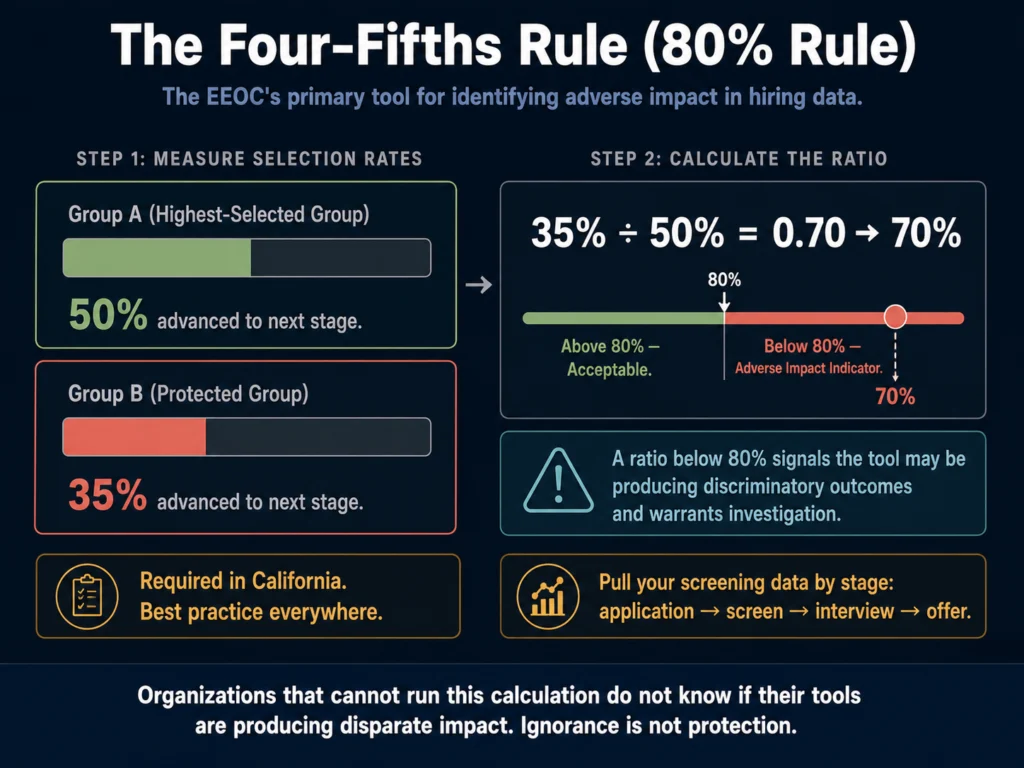
Four-fifths rule adverse impact calculation for AI hiring tools — 80 percent threshold example showing disparate screening rates
If your AI screening tool advances 50% of one group but only 35% of another, that 70% ratio falls below the 80% threshold. That is an EEOC adverse impact indicator — and warrants immediate investigation.

The four-fifths rule (also called the 80% rule) is the EEOC’s primary tool for identifying adverse impact.

The rule: if the selection rate for a protected group is less than 80% of the selection rate of the highest-selected group, that is an indicator of adverse impact.

In practice: if your AI screening tool advances 50% of white male applicants to the next stage, but only 35% of Black female applicants, that is 70% — below the 80% threshold.

That disparity is a signal that the tool may be producing discriminatory outcomes and warrants investigation.

This calculation requires data you may not currently be collecting. That is itself a problem.

Organizations that cannot run the four-fifths calculation on their screening tools do not know whether those tools are producing disparate impact. Ignorance is not protection. It is exposure.

For a detailed guide on running a bias audit specific to job description content, read: How to Audit AI Job Posts for Bias Before Publishing


Six Steps HR Teams Need to Take Now
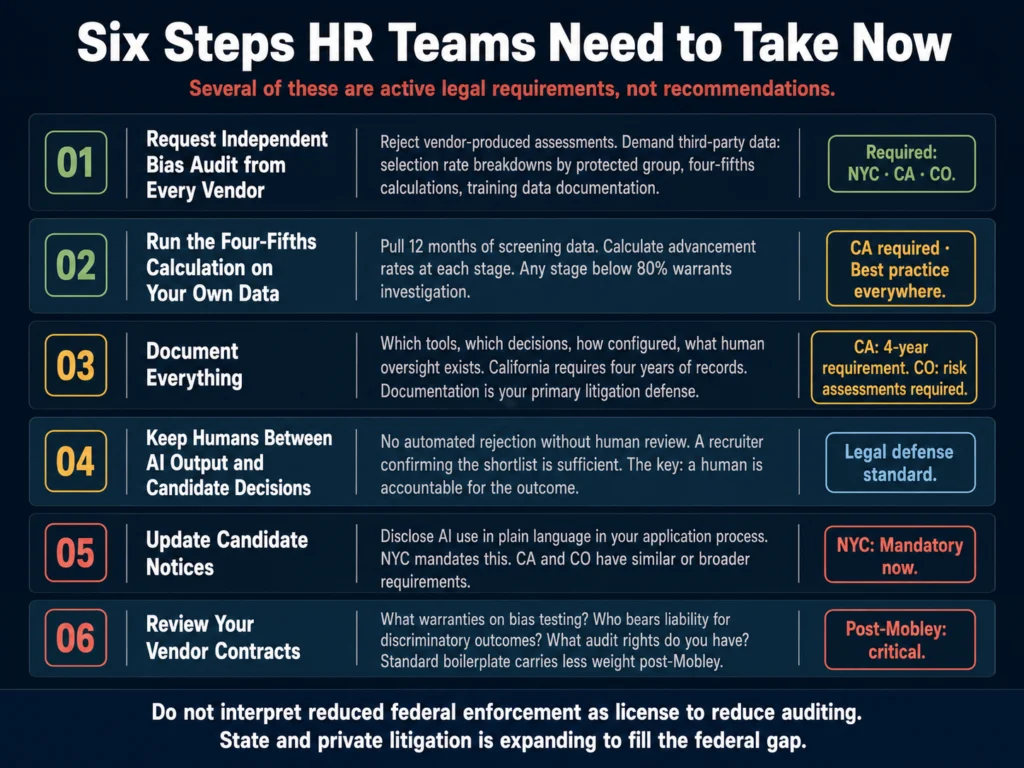
Six steps for HR teams to address AI hiring bias — vendor audits, four-fifths calculation, documentation, human review, candidate notices, and contract review
These steps are not eventual best practices. Several are active compliance requirements in California, Colorado, and New York City. The documentation requirements in Step 3 can be the difference between a defensible process and a losing litigation position.

Step 1: Request an Independent Bias Audit from Every Vendor

Do not accept vendor-produced bias assessments as evidence of fairness. Request independent third-party audit results.

The audit should include: selection rate breakdowns by protected group, four-fifths calculations, documentation of what the model was trained on, and how frequently it is retested. If a vendor cannot or will not provide this documentation, that is itself a signal.

Step 2: Run the Four-Fifths Calculation on Your Own Screening Data

Pull your screening data for the last 12 months. Calculate selection rates by race, age, sex, and disability status at each stage — application to phone screen, phone screen to interview, interview to offer.

Any stage where a protected group’s advancement rate falls below 80% of the highest-advancing group warrants investigation. This is now a compliance requirement in California and a best practice everywhere.

Step 3: Document Everything

California requires four years of records on automated decision data. Colorado requires documentation of risk assessments.

Even where not legally required, documentation is your primary protection in litigation.

Document: which tools you use, what decisions they inform, how they were configured, what your human oversight process is, and the results of any bias audits.

Step 4: Keep Humans Between AI Output and Candidate-Facing Decisions

No automated rejection should go to a candidate without human review.

Automated rejections without human review are the fastest path to discrimination claims and the most difficult to defend.

A recruiter confirming that the AI’s shortlist is reasonable is sufficient for most stages. The key is that a human is accountable for the outcome.

Step 5: Update Candidate Notices

New York City requires explicit notice to candidates when automated employment decision tools are used.

California and Colorado have similar or broader requirements. Even where not mandated, disclosure is increasingly expected by candidates and may affect whether they view your process as fair.

Update your application process to include a plain-language statement about AI use in your screening.

Step 6: Review Your Vendor Contracts

Mobley established that employers can be held liable for their vendor’s algorithm. Your vendor contracts should address this directly.

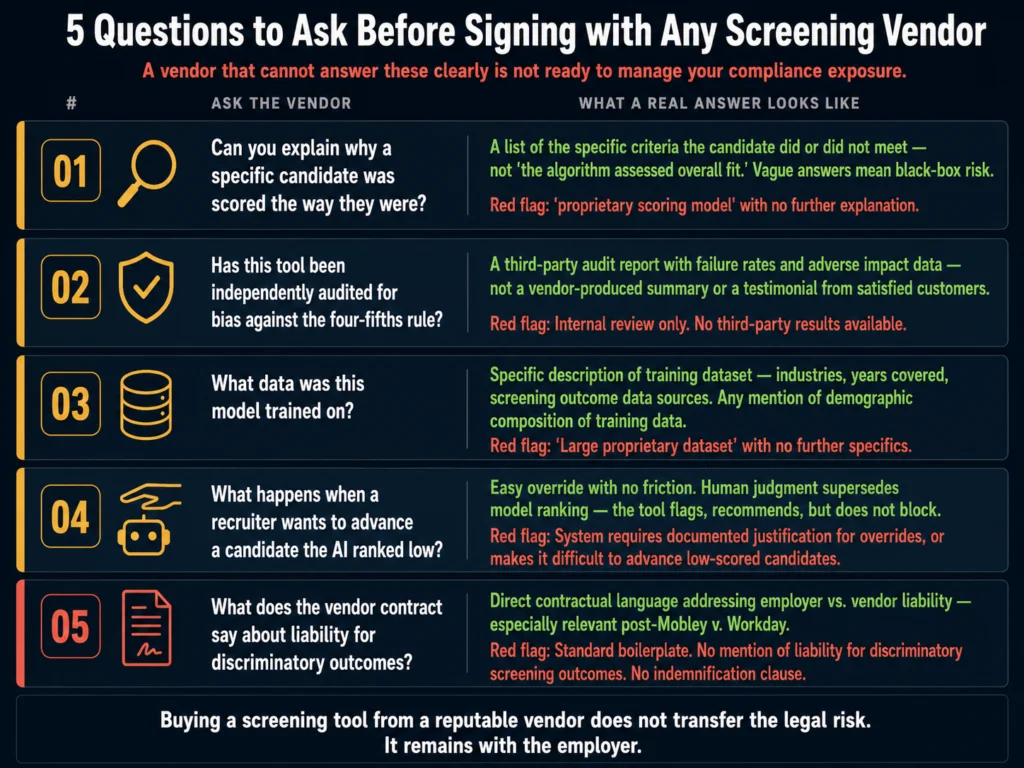
At minimum: What warranties does the vendor provide about bias testing and non-discrimination? What does the contract say about liability for discriminatory outcomes? What audit rights do you have over the tool’s configuration and training data?

Standard boilerplate that the client “retains control” carries less weight if the system effectively prevents candidates from reaching a human reviewer.


The Complication: Changing Federal Priorities

The Trump administration’s April 2025 executive order instructing agencies to reduce pursuit of disparate impact theory creates genuine uncertainty at the federal level.

The EEOC’s May 2023 technical guidance on AI and employment discrimination — which was widely cited — has been removed from the agency’s website.

This does not mean the legal risk has diminished. It means the source of that risk has shifted. State attorneys general, private class action lawyers, and state EEO agencies are actively pursuing cases the federal government is stepping back from.

Mobley v. Workday proceeds as a private class action on statutory grounds that the executive order does not affect.

The practical implication for HR teams: do not interpret reduced federal enforcement activity as license to reduce bias auditing.

State-level exposure is expanding to fill the federal gap, and private litigation has always operated independently of EEOC enforcement priorities.


Related Reading

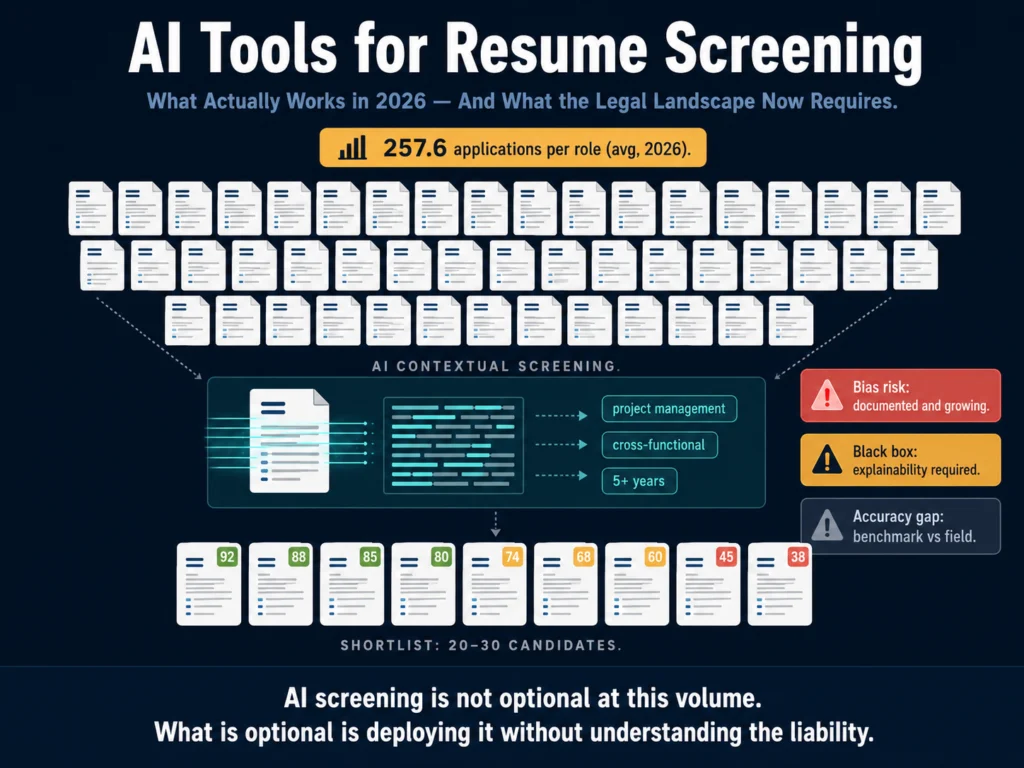
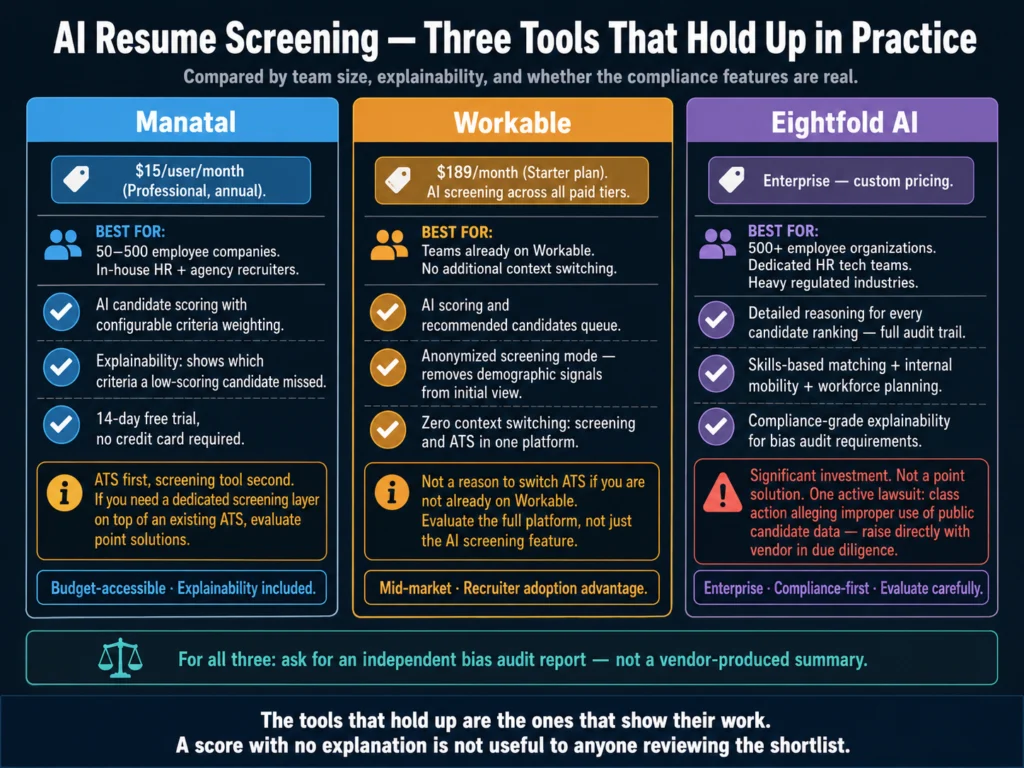
  • AI Tools for Resume Screening — What Actually Works
  • Can You Use AI-Generated Job Descriptions Legally? A Plain-English Guide
  • How to Disclose AI Use in Your Hiring Process to Candidates
  • How to Audit AI Job Posts for Bias Before Publishing
  • AI Ethics and Compliance in Hiring — The Complete Guide

Frequently Asked Questions

Are all AI hiring tools biased, or is this a problem with specific types?

Every AI hiring tool trained on historical hiring data carries some risk of reproducing existing biases. The degree of risk varies by tool design, training data quality, the organization’s historical hiring patterns, and how the tool is configured. Tools with independent third-party bias audits, explainable scoring, and active monitoring for disparate impact perform better than black-box tools that cannot show their reasoning. No tool eliminates bias entirely. The meaningful distinction is between tools that make bias visible and auditable versus those that hide it behind algorithmic outputs no one can examine.

If my vendor’s contract says they are responsible for their algorithm’s outputs, am I protected?

Not reliably. The Mobley v. Workday ruling established that employers can be treated as liable parties even when a third-party vendor produced the algorithm. Standard vendor contracts often include disclaimers that the client retains control over hiring decisions. Courts have been skeptical of this argument when the algorithm’s outputs effectively determine who advances and who does not, without meaningful human review. Contractual indemnification clauses may provide some financial protection if a vendor agrees to cover defense costs — but they do not eliminate the legal exposure or the reputational damage of a discrimination lawsuit naming your organization.

How do I know if my current ATS has AI bias built in?

Most ATS platforms now include AI features — candidate scoring, resume ranking, recommended shortlists — often enabled by default. Start by asking your vendor these questions: What AI features are active in my account? What were those features trained on? Has the system been independently audited for disparate impact? What is the methodology for those audits? If the vendor cannot answer these questions clearly, escalate. The features may have been activated without deliberate setup decisions, and you may not know what criteria the algorithm is applying.

Does reducing the use of AI in hiring reduce legal risk?

Reducing AI use reduces algorithmic bias risk but does not eliminate hiring bias risk overall. Human-only hiring decisions are also subject to discrimination law and often produce worse outcomes for candidates from underrepresented groups — unconscious bias in resume review and interviews is well-documented. The better framing is not “AI versus human” but “explainable decisions with documented reasoning and bias monitoring versus opaque decisions with no audit trail.” A well-governed AI screening process with active bias monitoring may produce more defensible outcomes than an unstructured human-only process.

What should I do if I discover that my AI screening tool has been producing disparate impact?

Stop using the tool for final candidate decisions immediately. Do not destroy data — preserve all records related to how the tool was used, its outputs, and the candidates it processed. Consult employment counsel before taking further action. Conduct an internal investigation to understand the scope of the disparate impact — which roles, which time periods, which protected groups were affected. Consider whether candidates who were screened out may warrant re-evaluation. Document every step of your response. The way an organization handles a discovered bias problem affects its defensibility in any subsequent litigation significantly more than the bias problem itself.


Conclusion

The core of this issue is straightforward: AI systems that learn from biased data reproduce biased outcomes.

The tools do not intend to discriminate. They are extraordinarily good at finding patterns in historical data, and historical hiring has never been neutral.

The legal environment in 2026 does not allow employers to outsource accountability to their vendors.

Mobley v. Workday is the clearest signal that courts are prepared to hold employers responsible for algorithmic outcomes they did not design but chose to deploy without adequate governance.

The state-level regulatory picture tightens that exposure further, regardless of what happens at the federal level.

The response is not to stop using AI in hiring. The tools offer real efficiency advantages that are difficult to forgo at scale.

The response is to govern them as the high-stakes decision-making systems they are. Audit them. Document them.

Put humans between their outputs and your candidates. And make sure you can explain every decision, because eventually someone may ask you to.

The legal and regulatory picture in this article reflects what the Ailovyu team has tracked across case developments, court filings, and state-level regulation through May 2026 — and it is still moving.
The Ailovyu Team

We research and test AI tools so you can make informed decisions before spending money on them. Every review, comparison, and tutorial on this site is based on actual use, not vendor marketing.
Learn more on our About page.

ailovyu.com

Legal information in this article is sourced from court filings, law firm publications (Akin Gump, Fisher Phillips, Seyfarth Shaw, Maynard Nexsen), and published regulatory guidance. This article is for informational purposes and does not constitute legal advice. If your organization is facing a specific compliance question or litigation matter, consult qualified employment counsel. No affiliate relationships are disclosed in this article.
How to Write Rejection Emails with AI (Without Sounding Robotic)

Updated: July 12, 2026

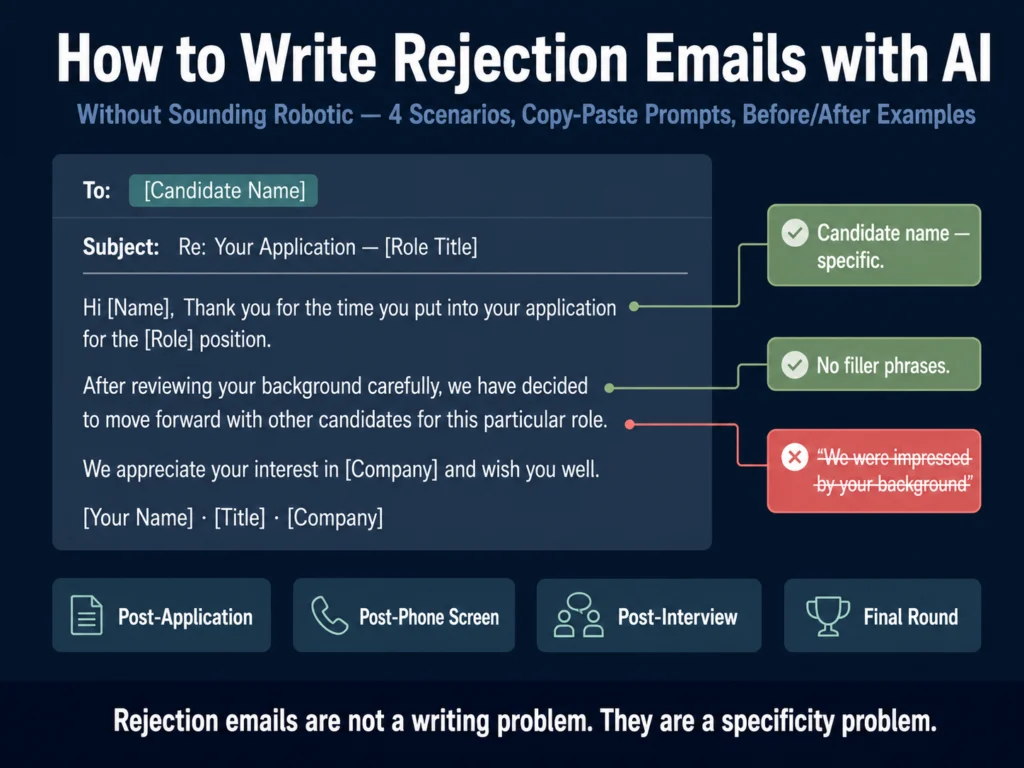
How to write candidate rejection emails with AI without sounding robotic — prompts and templates for four rejection scenarios

TL;DR
  • 61% of job seekers report being ghosted after an interview, according to Greenhouse’s 2024 State of Job Hunting report. A rejection email, even a brief one, is not just courtesy. It protects your employer brand.
  • Most AI rejection emails feel robotic for one reason: they contain nothing specific to the candidate. The fix is not better writing — it is better input.
  • This article covers four rejection scenarios with copy-paste prompts: post-application, post-phone screen, post-interview, and the hardest one, the final-round rejection.
  • Three phrases to remove from every rejection email before sending: “we were impressed by your background,” “we had many qualified candidates,” and “we will keep your resume on file.”
  • Use Claude or ChatGPT for drafting. Run a Grammarly tone check before sending. Do not send raw AI output — it will read as raw AI output.

Rejection emails are not a writing problem. They are a specificity problem.

The emails that feel like a form letter — and candidates can tell immediately — contain nothing that could not apply to anyone who applied to anything.

“We were impressed by your background.” “We had many qualified candidates.” “We encourage you to apply for future roles.”

These phrases are not wrong. They are just empty. They tell the candidate that no one thought about them specifically, and that the email they received was a database query, not a communication from a person.

AI makes this problem faster. A raw ChatGPT or Claude draft of a rejection email, generated with a minimal prompt, reproduces the exact same patterns.

It is polite, it is grammatically correct, and it sounds like every other rejection email the candidate has received in the last three months.

The fix is not avoiding AI. It is using it differently. A rejection email written with a detailed, candidate-specific input produces output that reads as considered rather than automated, even if it was generated in 45 seconds.

Here is why this matters before we get to the prompts.

Table of Contents
  • The Business Case for Better Rejections
  • What Makes a Rejection Email Sound Robotic
  • Before You Prompt: What to Gather
  • The Prompts: Four Rejection Scenarios
    • Scenario 1: Post-Application Rejection (Pre-Screen)
    • Scenario 2: Post-Phone Screen Rejection
    • Scenario 3: Post-Interview Rejection (First or Second Round)
    • Scenario 4: Final-Round Rejection (The Hardest One)
  • Before You Send: The Tone Check
  • Legal Considerations: What Not to Say
  • The Silver Medalist Case
  • Related Reading
  • Frequently Asked Questions
  • Conclusion

The Business Case for Better Rejections

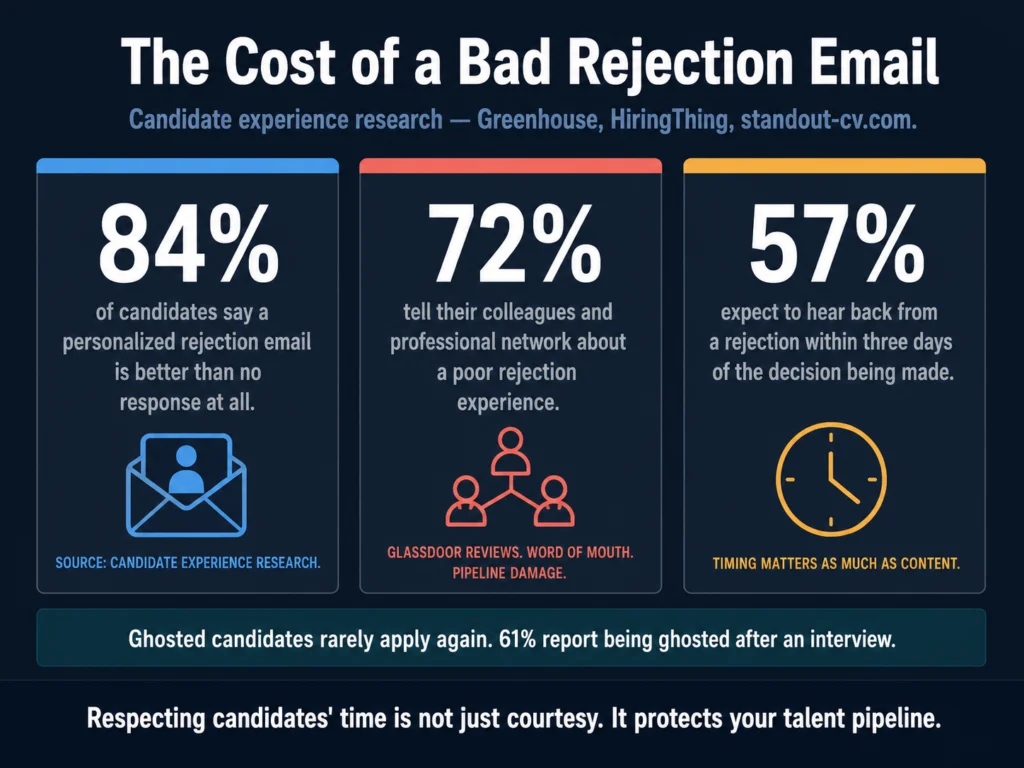
84% of candidates say a personalized rejection email is better than no response, and 44% say they have a better opinion of a company when they receive a personal rejection note. These are not feelings — they translate into measurable outcomes.

Candidate rejection email statistics — 84% prefer personalized rejection, 72% share bad experiences, 57% expect response within 3 days
These figures come from Greenhouse, HiringThing, and standout-cv.com research on candidate experience. Ghosted candidates do not stay silent — 72% tell their professional network about it.

Candidates who are rejected respectfully remain in your talent pipeline. The person who was second choice for a Product Manager role this quarter may be the right hire in six months.

Candidates who are ghosted or receive obviously automated rejections rarely apply again, and 72% tell their colleagues and professional network about the experience.

57% of candidates expect to hear back within three days of being rejected. The timing matters as much as the content. An empathetic rejection that arrives three weeks later still signals that the candidate’s time was not valued.

Recruiters using AI for candidate communication report meaningful time savings on routine writing tasks, time that shifts to higher-value work like sourcing and candidate relationships.

The question is whether the output quality justifies the approach — and with the right prompt structure, it does.


What Makes a Rejection Email Sound Robotic

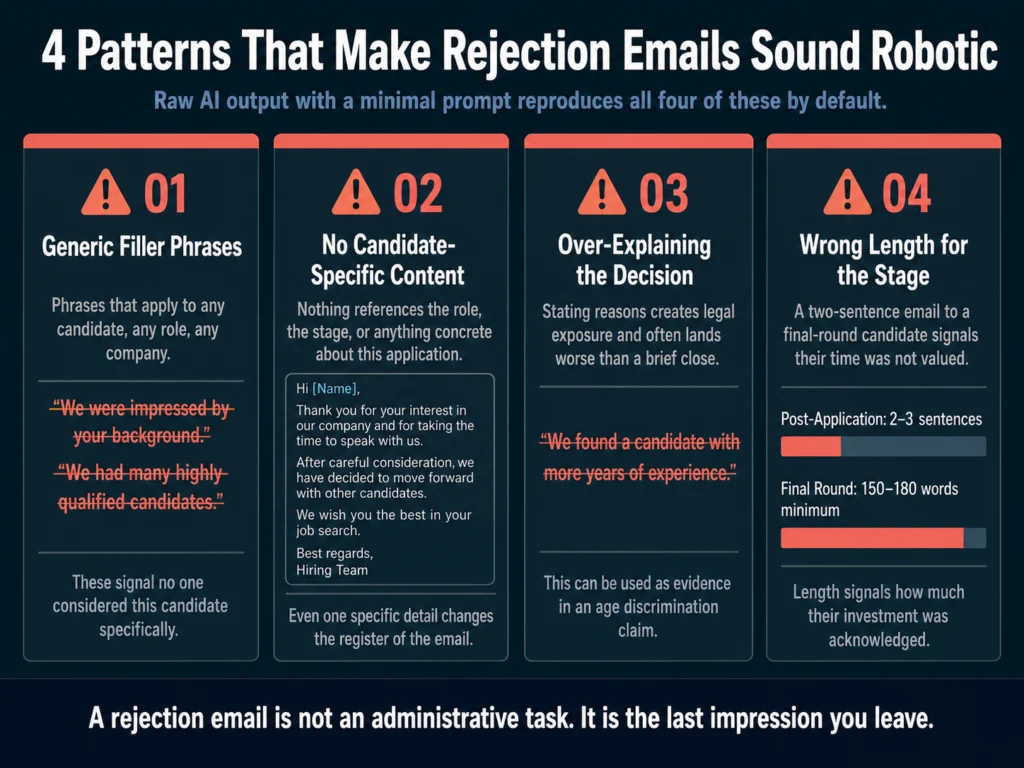
Before the prompts, understand the patterns that make rejection emails obviously automated. They fall into four categories.

Four patterns that make AI-generated rejection emails sound robotic — generic filler phrases, no candidate specifics, over-explaining, and wrong length for the stage
Raw AI output with a minimal prompt reproduces all four of these patterns by default. The fix is the brief you give the tool — not a different tool.

Generic filler phrases. Any phrase that could apply to any candidate, any role, any company should be removed. The most common offenders:

  • “We were impressed by your background”
  • “We had many highly qualified candidates”
  • “This was a difficult decision”
  • “We will keep your resume on file for future opportunities”
  • “We wish you all the best in your search”

These phrases are not honest signals of consideration. They are clichés that signal the opposite — that no one considered the candidate specifically.

No candidate-specific content. A rejection email that does not reference the specific role, the stage the candidate reached, or anything concrete about their application reads as automated regardless of how it was generated.

Even one specific detail (the role title, the interview date, a skill they mentioned) changes the register of the email.

Explaining why. Counterintuitively, over-explaining the reason for rejection creates legal exposure and often feels worse to the candidate than a brief, warm close.

The right answer is not “we found a candidate with more years of experience.” That can be used as evidence in an age discrimination claim.

The right answer is a graceful, honest close that does not invite a dispute.

Wrong length for the stage. A post-application rejection should be two to three sentences. A post-final-interview rejection earns at least one paragraph.

Sending a two-sentence rejection to a candidate who completed three rounds of interviews signals that the time they invested was not acknowledged.


Before You Prompt: What to Gather

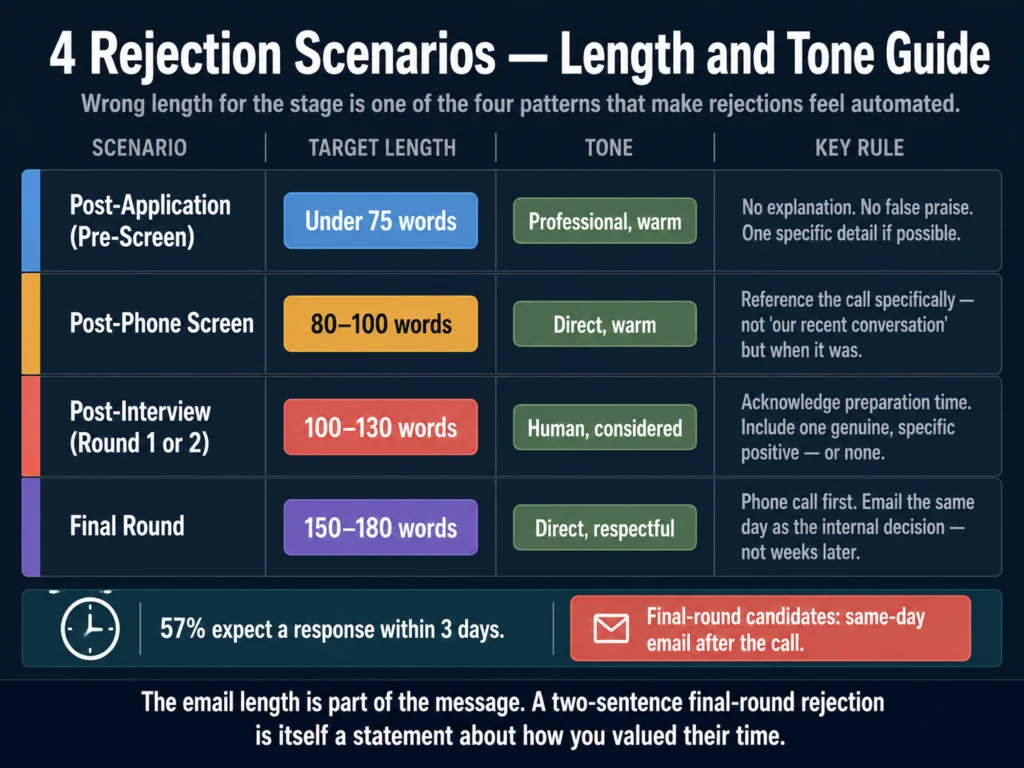
Four candidate rejection email scenarios with recommended word count and tone guidance — post-application, phone screen, interview, and final round
The right length signals how much the candidate’s time was valued. A final-round rejection that arrives in two sentences tells the candidate exactly how the company thought about their investment.

The quality of an AI-generated rejection email is almost entirely determined by the quality of the information you provide. Before opening ChatGPT or Claude, collect:

  • The candidate’s first name
  • The exact role title they applied for
  • The stage they reached (application, phone screen, first interview, final round)
  • One genuine, specific positive observation (if applicable and truthful)
  • Whether you want to leave the door open or close it
  • Your name as the sender

That is all you need. None of it requires detailed feedback about the candidate’s performance. The goal is specificity, not comprehensive evaluation.


The Prompts: Four Rejection Scenarios


Scenario 1: Post-Application Rejection (Pre-Screen)

This is the highest-volume rejection. A candidate applied, and the role or the application does not meet the minimum criteria. Keep this brief.

Do not over-apologize. Do not promise what you cannot deliver.

Prompt:

Write a rejection email for a candidate who applied for [ROLE TITLE] at our company.
They did not make it through the initial application review.

Requirements:
- First name only: [NAME]
- Keep it under 75 words total
- Do not use any of these phrases: "impressed by your background," "highly qualified 
  candidates," "keep your resume on file," "wish you all the best"
- Tone: professional but warm — it should sound like a person wrote it
- Do not explain why they were not selected
- Include a genuine acknowledgment that they took time to apply
- Sign off with [YOUR NAME], [YOUR TITLE]
- Do not invite them to reapply unless we want them to

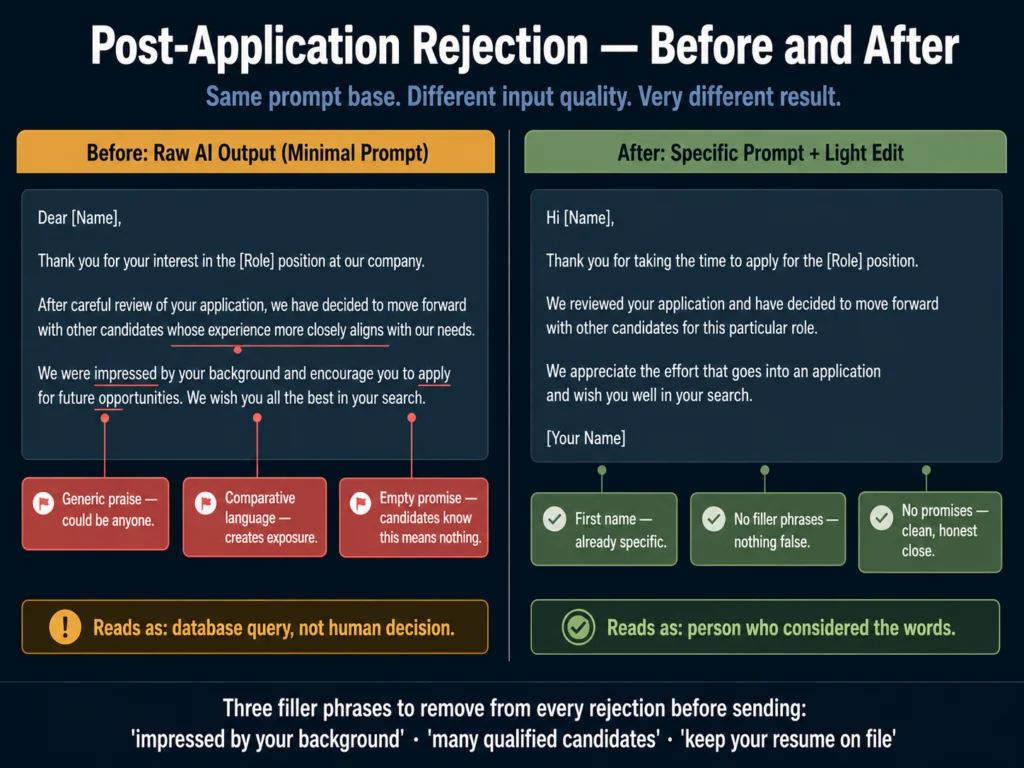
Before (typical raw AI output):

Dear [Name], Thank you for your interest in the [Role] position at our company. After careful review of your application, we have decided to move forward with other candidates whose experience more closely aligns with our current needs. We were impressed by your background and encourage you to apply for future opportunities that match your skills. We wish you all the best in your job search.

After (with specific prompt and editing):

Hi [Name], Thank you for taking the time to apply for the [Role] position. We reviewed your application and have decided to move forward with other candidates for this particular role. We appreciate the effort that goes into an application and wish you well in your search. [Your Name]

The after version is shorter, contains no false praise, and does not make promises about future opportunities.

It is still warm. It took the candidate’s time seriously without inventing enthusiasm that was not there.

Before and after comparison of AI-generated candidate rejection email — generic filler phrases removed, tone improved, no false promises
Same situation. Both under 80 words. Only one of them sounds like a person decided to write it.

Scenario 2: Post-Phone Screen Rejection

The candidate spoke with a recruiter. They invested real time. The email should acknowledge that briefly without over-elaborating.

Prompt:

Write a rejection email for a candidate following a recruiter phone screen.

Details:
- Candidate first name: [NAME]
- Role: [ROLE TITLE]
- Approximate date of the call: [DATE or "last week"]
- One truthful positive observation from the conversation (optional): [OBSERVATION 
  OR leave blank]
- We [do / do not] want to keep the door open for future roles

Requirements:
- 80 to 100 words
- Reference the phone conversation without being vague ("our call last week" 
  not "our recent conversation")
- Warm but direct tone — no filler phrases
- No explanation of the specific reason for the decision
- Sign off with [YOUR NAME]

Scenario 3: Post-Interview Rejection (First or Second Round)

This is the most common scenario where tone matters most. The candidate prepared, showed up, and invested meaningful time.

The email should be longer than the previous two — at least one short paragraph — and should acknowledge the conversation specifically.

Prompt:

Write a rejection email for a candidate following [FIRST / SECOND] round interviews 
for the role of [ROLE TITLE].

Details:
- Candidate first name: [NAME]
- Date of interview: [DATE]
- One specific, genuine observation from the interview (something they said or 
  demonstrated that was genuinely strong): [OBSERVATION]
- We [do / do not] want to leave the door open for future roles

Requirements:
- 100 to 130 words
- Reference the interview specifically — not "our conversation" but the role 
  and context
- Acknowledge the preparation and time they invested
- Do not explain why they were not selected — no comparative statements, no
  skills gap analysis
- Include the specific positive observation naturally (do not make it sound like 
  a consolation prize)
- Warm, human tone — it should not read as a template
- Sign off with [YOUR NAME], [YOUR TITLE]

What to do when you do not have a genuine positive observation: Do not invent one. Leave that variable blank in the prompt and instruct the model not to include false praise.

A truthful, warm email without specific praise is better than one with fabricated enthusiasm.


Scenario 4: Final-Round Rejection (The Hardest One)

A candidate who reached the final round invested weeks of their time, prepared extensively, and may have turned down other conversations to stay engaged with your process.

This email is not an administrative task. It deserves direct, human communication — and in most cases, a phone call first.

Prompt:

Write a rejection email for a candidate who reached the final round of interviews 
for [ROLE TITLE] and was not selected.

Details:
- Candidate first name: [NAME]
- They completed [NUMBER] rounds of interviews over approximately [TIMEFRAME]
- One specific, genuine positive from the process: [OBSERVATION]
- The decision was close (if true): [YES / NO]
- We genuinely want to stay in contact for future roles: [YES / NO]

Requirements:
- 150 to 180 words
- This candidate invested significant time — the email should acknowledge that 
  directly and specifically
- Do not explain why they were not selected — no "we found someone with more X" 
  statements
- If the decision was genuinely close, say so — but only if it is true
- If we want to stay in contact, say so specifically: not "feel free to apply 
  to future roles" but "I will personally reach out if something opens up 
  that fits your background"
- Tone: direct, warm, respectful — this person deserved the role and did not 
  get it through no failure of their own
- Do not end with "good luck" — it is dismissive for this level of investment

For final-round candidates, consider sending this email the same day as the internal decision — not two weeks later. The timing is part of the respect.

Before You Send: The Tone Check

Before any rejection email goes out, read it aloud. If any sentence sounds like it was written by someone who did not know the candidate existed, rewrite it.

Grammarly’s tone detector is useful here — it gives a signal on whether the email reads as warm, formal, or confident, and flags sentences that are likely to land differently than intended.

→ Grammarly’s free plan handles basic clarity. Premium adds the tone analysis that matters for candidate communications.


Legal Considerations: What Not to Say

Rejection emails are not just a branding exercise. They can become evidence in discrimination complaints, and the language matters.

Do not explain the reason in comparative terms. “We found a candidate with more experience” creates age discrimination exposure. “We found a candidate who was a stronger fit for this specific role” is marginally better but still unnecessary.

You are not required to explain your decision. A warm, professional close without explanation is legally safer and often kinder.

Do not reference anything the candidate shared that touches protected characteristics. If a candidate mentioned a health condition, a family situation, a religious practice, or their age in passing during the interview, that information should not appear in any written communication — including the rejection email.

Empty forward-looking promises. “We will reach out when the right role opens up” is a commitment. If you do not intend to follow through, do not write it. “We will keep your resume on file” is effectively meaningless and candidates know it.

For a fuller look at the legal landscape around AI-generated HR communications, read: Can You Use AI-Generated Job Descriptions Legally? A Plain-English Guide


The Silver Medalist Case

A silver medalist is a candidate you genuinely wanted, came close to hiring, and may want to hire in the future. This candidate deserves a different email — and a different follow-up strategy.

For silver medalists, the rejection email is not the end of the relationship. It is the beginning of a pipeline. The email should close with a specific commitment, not a generic invitation.

Not “feel free to apply again” but “I want to stay in touch — would it be all right if I reach out directly when something aligned with your background opens up?”

Then follow through. Put a reminder in your calendar. The cost of a silver medalist rejection that turns into a hire six months later is close to zero compared to a full search.


Related Reading

  • ChatGPT vs. Claude for HR Writing — A Practical Comparison
  • Best AI Tools for Writing Interview Questions
  • AI Bias in Hiring — What HR Teams Need to Know
  • Can You Use AI-Generated Job Descriptions Legally?
  • Best AI Tools for Writing Candidate Outreach Emails
  • AI Writing Tools for Recruiters — The Complete Guide

Frequently Asked Questions

Should I always send a rejection email, or is it acceptable to skip it for applications that did not reach the phone screen?

Send one. The volume argument — that high-application roles make individual rejections impossible — is real, but it is also a solvable workflow problem. An automated rejection triggered by a status change in your ATS takes zero additional time and removes the candidate from an indefinite waiting state. The email itself does not need to be personalized at the application stage. Two sentences, a human name in the sign-off, and a timely send are enough. What is not acceptable is silence — 61% of job seekers report being ghosted after an interview according to Greenhouse’s 2024 State of Job Hunting report, and the reputational cost of that pattern compounds across Glassdoor reviews and professional word-of-mouth over time.

How specific should I be about why a candidate was not selected?

Not specific at all, as a general rule. Specificity in rejection emails creates two problems. First, it invites a dispute — a candidate who is told they did not have enough experience in X may counter that they did, and you are now in a conversation you do not need to have. Second, specific feedback in writing can be used as evidence in discrimination claims if the stated reason touches on a protected characteristic. If a candidate asks directly for feedback in a follow-up message, that is a separate conversation you can handle by phone if you choose to. The rejection email itself should close the decision clearly without explaining it.

Is it wrong to tell a candidate the decision was close if it was not?

Yes. Do not write that a decision was close if it was not. Candidates often compare notes with others who applied to the same company, and a recruiter who tells every finalist it was a close call loses credibility quickly. More importantly, candidates are receiving a difficult piece of news and deserve honesty. A warm, professional rejection that does not claim closeness is better than false consolation. Reserve “the decision was genuinely close” for cases where it is true.

How do I handle rejection emails when I am not sure if we want the candidate for future roles?

Do not commit either way. Avoid language that explicitly closes the door (“we will not be considering your application for future roles”) and avoid language that makes a commitment you may not keep (“we will be in touch for future opportunities”). A neutral close — “Thank you for your time and interest in [Company]. We wish you well in your search” — leaves the situation genuinely open without promising anything specific. If you do want the candidate for future roles, say so directly and mean it.

Can AI write rejection emails for internal candidates, and is there anything different I need to account for?

AI can draft the email, but the internal candidate scenario requires a phone call first. An internal candidate who did not get the role they applied for needs to hear from their manager or HR directly — not by email. The email serves as a follow-up record of the conversation, not a substitute for it. The prompt structure is similar to the final-round template, but the tone should acknowledge the ongoing employment relationship. Do not use language that creates distance (“we were not able to move forward with your application”) — they still work there. A conversation, then a brief written follow-up, is the appropriate sequence for internal rejections.


Conclusion

Rejection emails written with AI are not inherently worse than ones written by hand. The problem is not the tool. It is the habit of generating them with minimal input and sending the raw output without editing.

A rejection email that references something specific about the candidate, arrives within a reasonable timeframe, and is signed by a real person with a real name does most of the work that candidate experience requires.

The prompts in this article are ones the Ailovyu team has refined through repeated use across different role types and hiring volumes. The inputs matter more than the tool. The editing pass — reading it aloud, removing the filler phrases, checking the tone — takes three minutes.

That three minutes is the difference between a candidate who remembers your company positively and one who leaves a Glassdoor review that costs you the next candidate.

The Ailovyu Team

We research and test AI tools so you can make informed decisions before spending money on them. Every review, comparison, and tutorial on this site is based on actual use, not vendor marketing.
Learn more on our About page.

ailovyu.com

Statistics on candidate experience sourced from Greenhouse 2024 State of Job Hunting Report, wifitalents.com (2026 compilation), HiringThing Job Application Statistics (April 2026), and standout-cv.com. Affiliate links in this article earn a commission at no extra cost to you. Pricing verified May 2026.

Best AI Tools for Writing Interview Questions (2026)

Updated: July 12, 2026

Best AI tools for writing structured interview questions in 2026 — behavioral, situational, technical, and culture question types with AI generation

TL;DR
  • For most HR teams, ChatGPT (GPT-5.5 Instant) and Claude (Sonnet 4.6) generate better role-specific interview questions than dedicated tools, as long as you give them a detailed brief and specify the question type.
  • Dedicated interview tools like Workable, Greenhouse, and Clovers earn their keep when you need structured question libraries integrated into your ATS, real-time prompting during live interviews, or scoring rubrics tied to question responses.
  • HireVue is worth knowing about for enterprise teams running video interview programs — its AI-enhanced structured question sets and scoring have become standard at JPMorgan, Goldman Sachs, IBM, Microsoft, Amazon, and Bain.
  • The biggest problem with AI-generated interview questions is not quality — it is that teams use them without building a scoring rubric alongside them. A question without a rubric is not a structured interview. It is small talk with a framework.
  • Research consistently shows structured interviews are roughly twice as predictive of job performance as unstructured ones, and the advantage compounds when scoring rubrics are used alongside standardized questions.

Bad interview questions produce bad signal. A recruiter who asks “where do you see yourself in five years” for a mid-level product manager role learns nothing useful.

The candidate recites a rehearsed answer, the interviewer nods, and both leave the conversation with a vague impression that may or may not reflect reality.

The purpose of an interview question is to surface evidence of a specific competency. Behavioral questions look for evidence in past behavior.

Situational questions look for evidence in decision-making frameworks. Technical questions verify claimed skills. Culture questions surface values alignment — though this category is the most prone to bias and requires the most careful design.

AI is genuinely useful for interview question writing because the underlying task is pattern-matching against a role brief and a competency framework.

Given clear inputs about the role, seniority, required skills, and question type, a good AI model generates better first-draft questions than most recruiters produce manually — not because AI understands the role better, but because it has been trained on enough examples of well-structured questions to generate strong templates efficiently.

What AI does not do is build the scoring rubric that makes a question useful. That part is yours.

Table of Contents
  • Before the Tools: The Question Types That Matter
  • Track 1: General AI Tools (ChatGPT and Claude)
    • Why General AI Tools Often Beat Dedicated Ones Here
    • Prompt Templates for Each Question Type
    • ChatGPT vs. Claude for Interview Questions
  • Track 2: Dedicated HR Tools for Interview Questions
    • Workable — Best ATS-Native Question Library
    • Greenhouse — Best for Structured Interview Kits
    • Clovers — Best for Real-Time Interview Support
    • HireVue — Best for Enterprise Video Interview Programs
  • Quick Comparison
  • The Step Most Teams Skip: Building a Scoring Rubric
  • Related Reading
  • Frequently Asked Questions
  • Conclusion

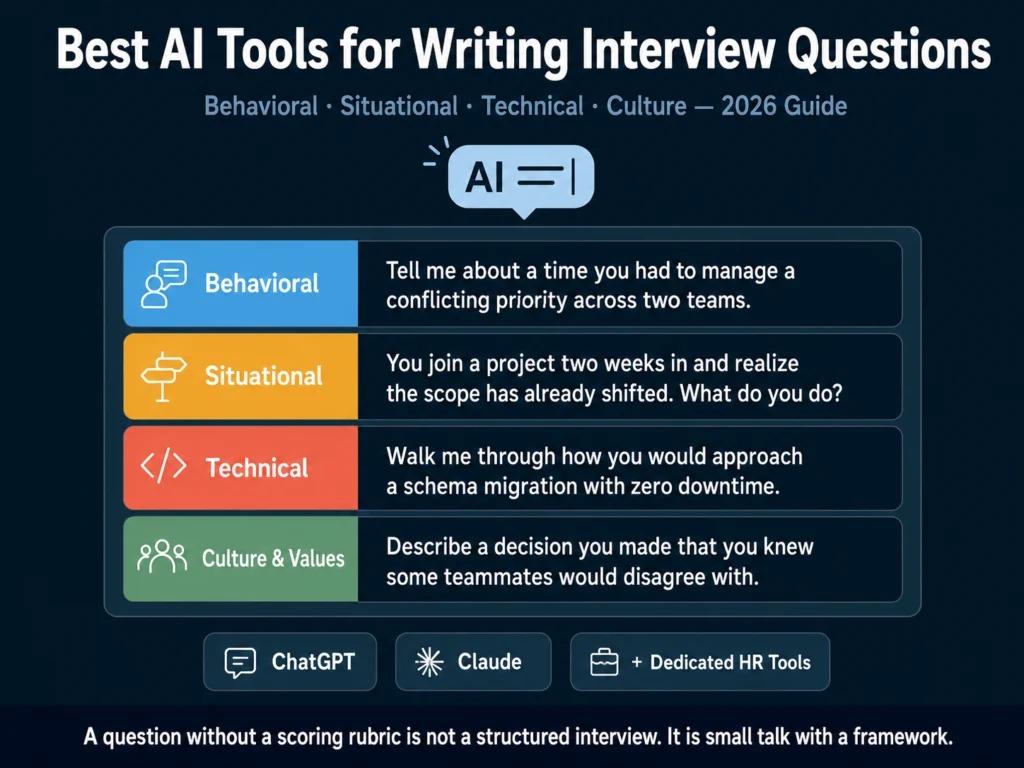
Before the Tools: The Question Types That Matter

Understanding what type of question you need before selecting a tool makes the output substantially better.

There are four types most HR teams use, and each serves a different purpose.

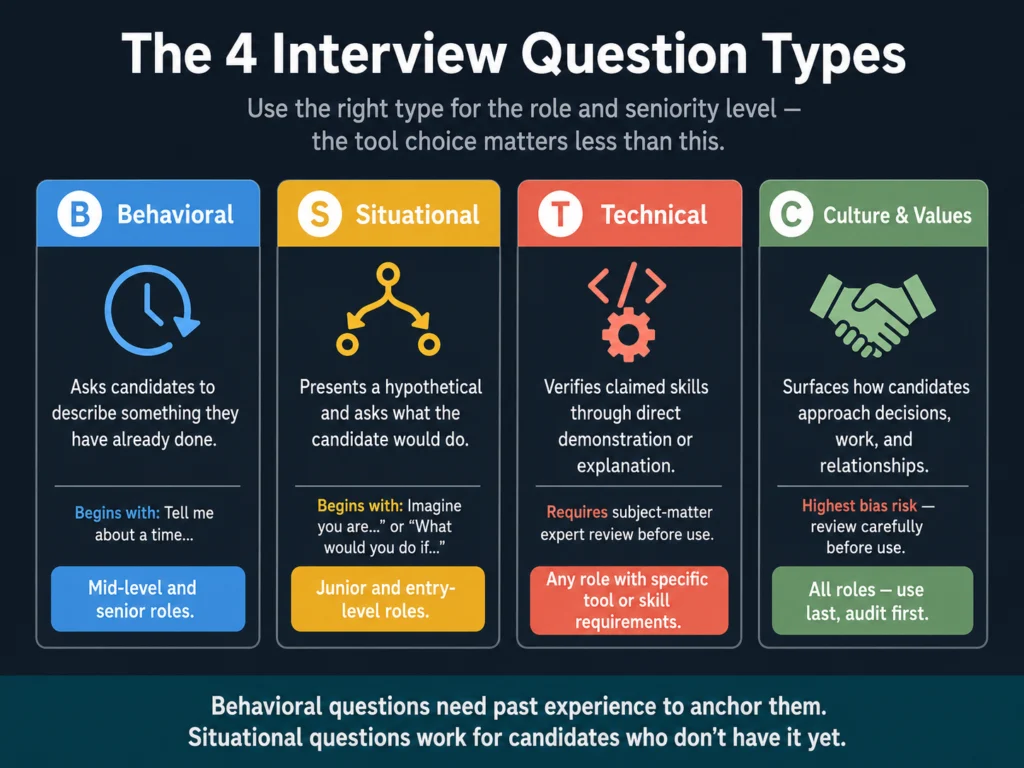
Four interview question types for HR teams — behavioral, situational, technical, and culture questions with best-use cases and seniority guidance
Using the right question type for the right role and seniority level produces better signal than any tool upgrade. Behavioral questions need experience to anchor them. Situational questions work for candidates who don’t have it yet.

Behavioral questions ask candidates to describe something they have already done.

They follow the STAR structure (Situation, Task, Action, Result) and work best for assessing competencies like leadership, conflict resolution, and communication.

Best used for: mid-level and senior roles where past performance is the strongest predictor.

Situational questions present a hypothetical scenario and ask what the candidate would do.

They are better than behavioral questions for assessing judgment in candidates who are newer to a role and may not have extensive relevant experience.

Best used for: junior and entry-level hiring.

Technical questions verify claimed skills through direct demonstration or explanation.

For technical roles, these are non-negotiable. They are also the category where AI-generated questions require the most review — a general AI model may generate questions at the wrong difficulty level or reference outdated practices.

Culture and values questions surface how candidates approach work, decision-making, and relationships.

This is the category most susceptible to bias. Questions that feel like culture assessment but are actually demographic signal (“where are you from,” “what do you like to do on weekends”) create legal exposure and should be avoided entirely.

For a detailed breakdown of where AI-generated interview content creates legal risk, read: Can You Use AI-Generated Job Descriptions Legally? A Plain-English Guide


Track 1: General AI Tools (ChatGPT and Claude)

For most HR teams, particularly those without a dedicated interview intelligence platform, the two most capable tools for interview question generation are ChatGPT and Claude.

Both are available on free tiers and produce strong output when given a structured prompt.

Why General AI Tools Often Beat Dedicated Ones Here

Dedicated ATS tools with built-in question libraries give you pre-written questions organized by role type.

That is useful for speed but limiting for specificity. The question library in most ATS platforms was written for generic versions of common roles.

A Customer Success Manager at a 15-person startup requires different questions than a Customer Success Manager at a 2,000-person enterprise — and the library does not know the difference.

ChatGPT and Claude know the difference if you tell them. A well-structured prompt produces role-specific, seniority-calibrated questions that reflect the actual requirements of the position rather than a generic template.

Prompt Templates for Each Question Type

Copy these templates. Fill in the bracketed variables. Submit to ChatGPT or Claude.

For behavioral questions:

You are an experienced HR professional designing a structured interview for the
role of [JOB TITLE] at the [LEVEL] level in a [INDUSTRY] company.

Generate [NUMBER] behavioral interview questions focused on these competencies:
[LIST 3-4 COMPETENCIES, e.g., stakeholder management, prioritization under
ambiguity, cross-functional collaboration].

Each question should:
- Begin with "Tell me about a time..." or "Describe a situation where..."
- Target a specific competency clearly
- Be calibrated for someone with [X] years of experience
- Avoid hypotheticals — all questions must reference past experience

Also provide, for each question:
- The competency it is designed to assess
- Two or three signals that indicate a strong response
- One signal that indicates a weak response

For situational questions:

You are designing interview questions for a [JOB TITLE] role — specifically for
candidates who may be stepping into this type of role for the first time.

Generate [NUMBER] situational interview questions that test judgment and
decision-making in realistic scenarios relevant to this role.

Each question should:
- Present a specific, plausible scenario the candidate would face
- Ask what they would do, not what they have done
- Be complex enough that there is no obvious single correct answer

For each question, provide:
- The underlying competency being tested
- What a thoughtful response would address
- A common weak response pattern to watch for

For technical questions:

Generate [NUMBER] technical interview questions for a [JOB TITLE] at the
[LEVEL] level.

The candidate should have demonstrated experience with: [LIST KEY TECHNICAL SKILLS].

Questions should range from [BASIC/INTERMEDIATE/ADVANCED].

For each question, include:
- The question itself
- What a correct or strong answer looks like
- What a weak or incomplete answer looks like
- Estimated time a strong candidate needs to answer it

ChatGPT vs. Claude for Interview Questions

As covered in ChatGPT vs. Claude for HR Writing — A Practical Comparison, ChatGPT generates more options for brainstorming, while Claude produces fewer, more carefully worded outputs. For interview questions specifically:

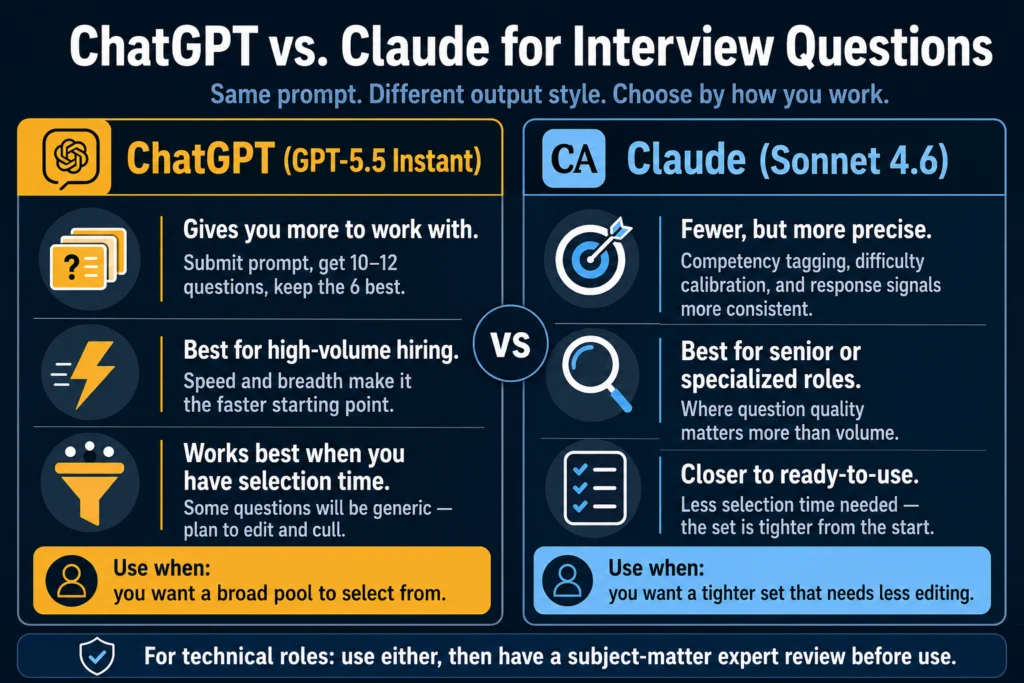
Use ChatGPT (GPT-5.5 Instant) when you want a broad pool of questions to select from. Submit the behavioral prompt, get 10 to 12 questions, keep the 6 best.

ChatGPT vs Claude comparison for AI-generated interview questions — breadth vs precision for HR use cases
ChatGPT gives you more questions to select from. Claude gives you fewer that need less editing. Which approach fits your workflow depends on the role seniority and how much selection time you have.

Claude (Sonnet 4.6) is worth choosing when you want a tighter set that is closer to ready-to-use.

Its higher instruction precision means the competency tagging, response signals, and difficulty calibration are more consistent across a batch.

For high-volume roles where you need questions quickly, ChatGPT’s speed and breadth make it the faster starting point.

For senior or specialized roles where question quality matters more, Claude’s tighter output requires less selection and editing.


Track 2: Dedicated HR Tools for Interview Questions

Workable — Best ATS-Native Question Library

Workable includes a built-in interview question library with questions organized by role, competency, and question type.

For teams already on Workable, it is the fastest way to pull a structured question set into a new role: no external tool, no prompt engineering, no copy-pasting.

The library covers hundreds of roles and includes questions across behavioral, situational, and technical formats. You can customize the set per role and add your own questions to the library over time.

The limitation is the same as any pre-written library: the questions are generic by design. A Senior Data Engineer at a fintech company and a Senior Data Engineer at a healthcare startup need materially different questions.

Workable’s library gives you a solid starting scaffold; you still need to edit for specificity.

Pricing: Included in all Workable paid plans, starting at $189/month.

→ Workable’s 15-day free trial includes the full question library and ATS features.


Greenhouse — Best for Structured Interview Kits

Greenhouse takes a more systematic approach to interview question management than most ATS platforms.

Its Structured Hiring feature builds complete interview kits, not just question lists: questions, assigned interviewers, scoring rubrics, and expected response indicators for each question.

The kit-based approach enforces consistency across hiring teams.

When a company has five recruiters running engineering interviews, Greenhouse ensures each one asks the same questions, scores responses against the same criteria, and submits structured feedback before seeing what their colleagues wrote.

That structure is what actually produces the consistency advantage that research on structured interviewing consistently documents — Harvard Business Review describes unstructured interviews as “essentially worthless in forecasting job performance” compared to structured, rubric-based formats.

AI-assisted question suggestions in Greenhouse surface relevant questions from its database based on the role type you specify.

The filtering is better than a generic search, though the questions themselves are pre-written rather than dynamically generated.

Pricing: Custom enterprise pricing. Greenhouse does not publish rates. Mid-market and enterprise focus — not cost-effective for small teams.

Best for: Mid-to-large organizations where multiple people are interviewing for the same role and consistency across evaluators is a documented problem.


Clovers — Best for Real-Time Interview Support

Clovers takes a different approach from every other tool in this category.

It does not help you write interview questions in advance and supports human interviewers during live interviews in real time.

During an interview, Clovers surfaces follow-up question suggestions based on what the candidate just said, alerts interviewers when they stray into potentially biased territory, and enforces structured note-taking in the moment.

After the interview, it generates summary reports and flags patterns in the evaluation.

This is interviewer-enablement, not question generation. The distinction matters.

Clovers is useful when you have a good question set and the problem is that interviewers deviate from it, forget to probe weak answers, or introduce inconsistent evaluation standards across candidates.

Pricing: Custom pricing — contact Clovers for team rates.

Best for: Organizations with experienced recruiters who have good question discipline but need guardrails for evaluator consistency and post-interview documentation.


HireVue — Best for Enterprise Video Interview Programs

HireVue is the most established platform for large organizations running structured video interview programs.

Its AI-enhanced question sets and scoring rubrics are designed for on-demand video formats — candidates record answers to pre-set questions asynchronously, without a live interviewer present.

HireVue’s question libraries are role-specific and designed with structured evaluation in mind. The platform is used by JPMorgan, Goldman Sachs, IBM, Microsoft, Amazon, and Bain for initial screening at scale.

One thing to know about HireVue’s AI before evaluating it: the platform removed facial expression analysis from its assessments in 2021, following pressure from the ACLU and scrutiny under the Illinois AI Video Interview Act.

Its AI scoring has since focused exclusively on verbal content and language patterns — no facial expressions, appearance, or demographic characteristics factor into candidate scores.

For HR teams operating in the EU, this distinction matters: emotion recognition in workplace contexts has been prohibited under the EU AI Act since February 2025, and HireVue’s current approach is compliant with that prohibition.

Pricing: Enterprise custom pricing. Not designed for small or mid-sized teams.

Best for: Large enterprises running structured video screening programs at significant scale. Not a general-purpose interview question tool.


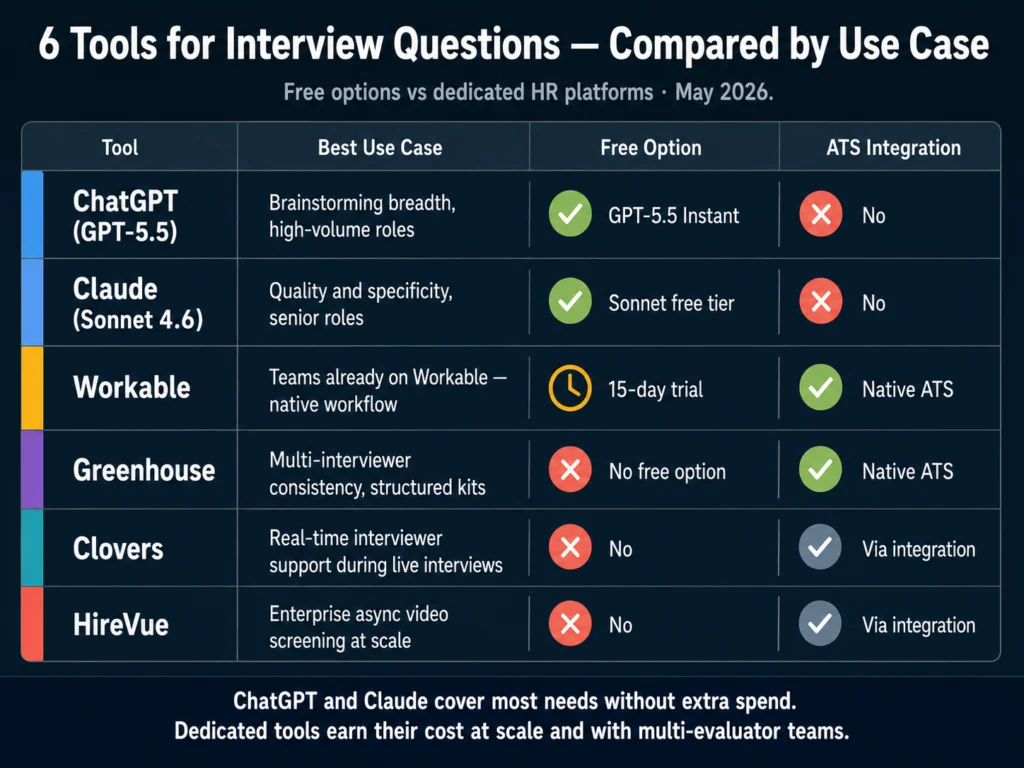
Quick Comparison

Comparison of 6 AI interview question tools in 2026 — ChatGPT, Claude, Workable, Greenhouse, Clovers, and HireVue by use case and pricing
ChatGPT and Claude work for most teams without extra software spend. The dedicated tools earn their cost when you need ATS integration, real-time interview support, or structured scoring enforcement across evaluators.
ToolQuestion TypeBest ForFree OptionIntegrated with ATS
ChatGPT (GPT-5.5)All typesBreadth, brainstorming✓ (GPT-5.5 Instant)No
Claude (Sonnet 4.6)All typesQuality, specificity✓ (Sonnet)No
WorkablePre-built libraryTeams already on Workable15-day trial✓ (native ATS)
GreenhouseStructured kitsMulti-interviewer consistencyNo✓ (native ATS)
CloversReal-time promptsLive interview supportNoVia integration
HireVueVideo interview setsEnterprise async screeningNoVia integration

The Step Most Teams Skip: Building a Scoring Rubric

A question without a scoring rubric is not structured interviewing. It is a conversation with a topic.

The research on structured interviews showing higher assessment consistency is specifically about the combination of standardized questions and standardized scoring — not questions alone.

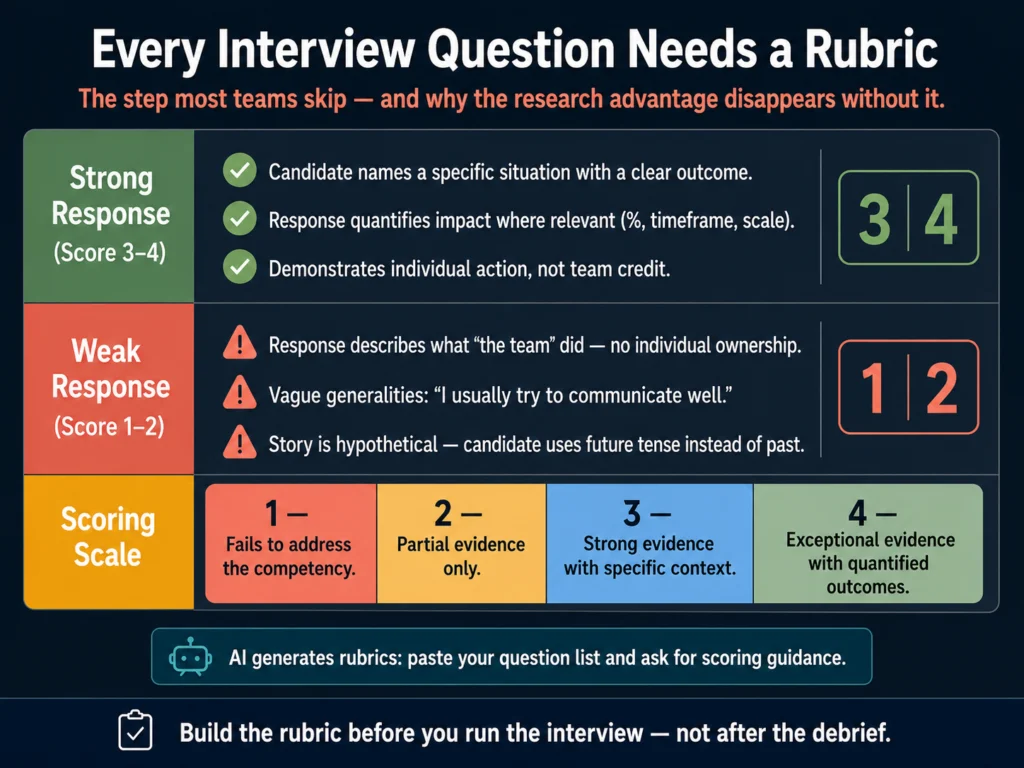
Interview question scoring rubric framework — strong response signals, weak response patterns, and 1-to-4 scoring scale for structured hiring
Structured interviewing research shows higher predictive validity specifically because of the combination of standardized questions and standardized scoring — not questions alone. A question without a rubric is a conversation with a topic.

Every interview question you write, whether generated by AI or written manually, should have a scoring rubric attached before any candidate uses it.

The rubric does not need to be complex. At minimum, for each question, document:

What a strong response includes: Specific elements you expect a qualified candidate to address. Not a model answer, but the components that indicate relevant experience or sound judgment.

What a weak response looks like: Common patterns that suggest the candidate does not have the competency — vague generalities, stories that are actually about team achievements framed as individual contributions, inability to quantify outcomes.

Numerical scoring guide: A simple 1 to 4 scale is sufficient. 1 = response fails to address the competency; 2 = partial evidence; 3 = strong evidence; 4 = exceptional evidence with specific, quantified outcomes.

ChatGPT and Claude generate rubrics. Both prompt templates in Track 1 above request response signals alongside the questions.

If you submitted the behavioral prompt and received questions without scoring guidance, run the question list through the following prompt:

For each question below, write a scoring rubric with:
- Two or three elements a strong (score 3-4) response will include
- One or two patterns that indicate a weak (score 1-2) response

Questions: [PASTE YOUR QUESTION LIST]

Related Reading

  • Best AI Tools for Writing Job Descriptions
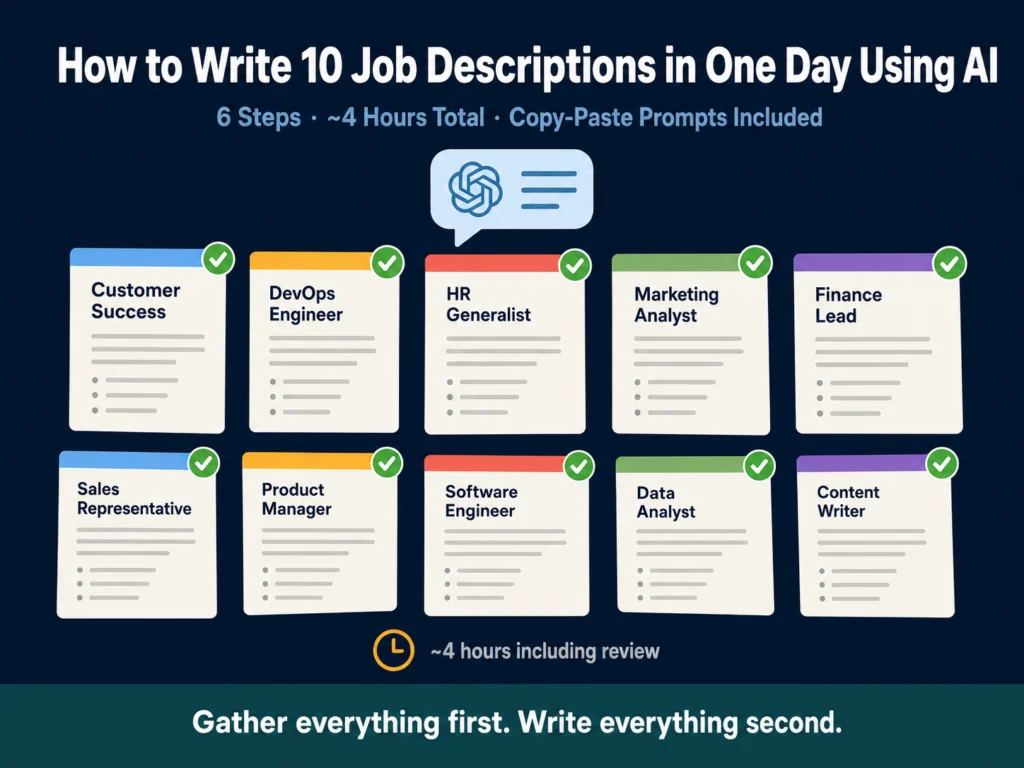
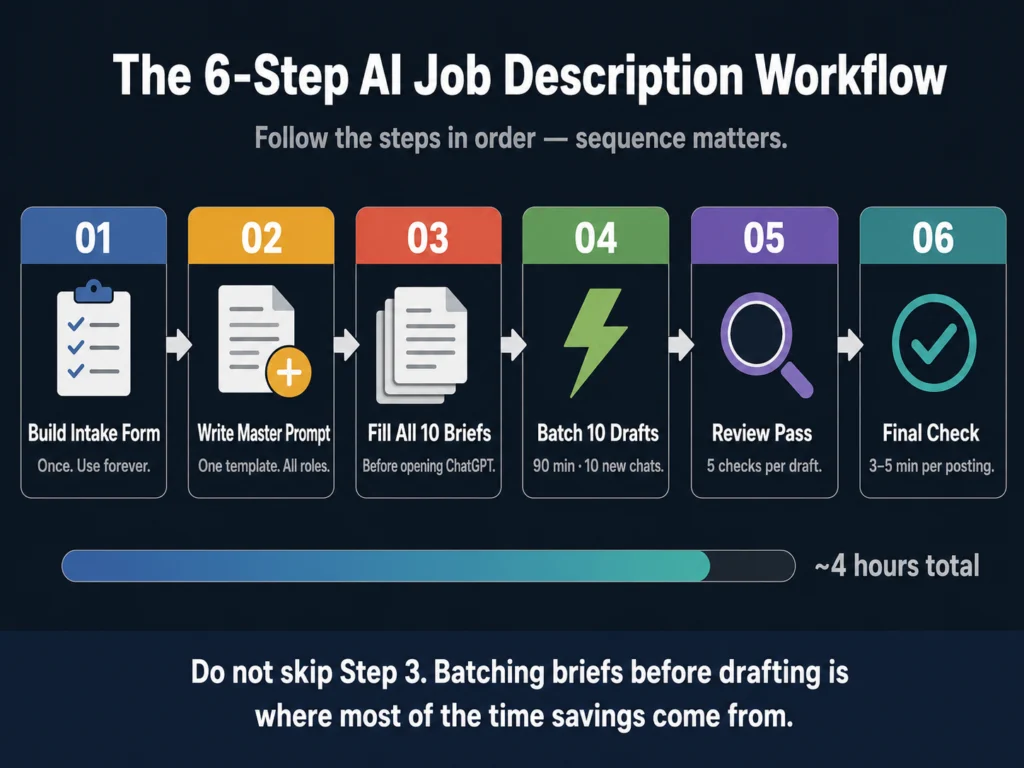
  • How to Write 10 Job Descriptions in One Day Using AI
  • ChatGPT vs. Claude for HR Writing — A Practical Comparison
  • How to Write Rejection Emails with AI — Without Sounding Robotic
  • AI Bias in Hiring — What HR Teams Need to Know
  • The Complete Guide to AI Tools for HR Professionals

Frequently Asked Questions

Can AI generate interview questions for technical roles, or does it need human input for those?

AI generates useful technical questions but requires more review for this category than for behavioral or situational types. A general AI model may produce technical questions at the wrong difficulty level, reference frameworks that have evolved since its training, or miss domain-specific evaluation criteria that a technical hiring manager would include. The practical approach: use ChatGPT or Claude to generate a first draft of technical questions, then have the relevant technical lead review and refine them before use. The AI handles the structure and framing; the subject matter expert validates the content. For roles where technical question accuracy matters most — staff engineers, senior data scientists, specialized security roles — do not skip the technical review.

How many interview questions should I prepare per interview stage?

A common mistake is over-preparing. Recruiters who prepare 20 questions for a 45-minute interview end up rushing through surface-level answers on all of them. A better model: prepare 5 to 7 questions per interviewer per stage, with 2 or 3 designated follow-up probes per question. This allows time for candidates to give complete STAR-format answers (typically 2 to 4 minutes each) while leaving room for follow-up. For a multi-stage process, coordinate questions across interviewers so that different stages cover different competencies rather than covering the same ground repeatedly.

Do I need to tell candidates I used AI to write the interview questions?

In most jurisdictions, there is no disclosure requirement specifically for using AI to generate interview questions. Disclosure requirements in New York City, California, and Colorado focus on automated decision-making tools that evaluate candidates — resume screening systems, video interview scoring software — not on tools used to write the questions themselves. That said, transparency is generally better for candidate trust. Only 26% of applicants trust AI to evaluate them fairly, according to a Q1 2025 Gartner survey of 2,918 job candidates — which suggests visible human oversight matters to the people you are trying to hire.

What should I do if an AI-generated question inadvertently touches on a protected characteristic?

Remove it before using it. A question like “Describe how you managed a young team” or “Tell me about a time you had to adapt to a different cultural working style” may seem benign but can function as proxies for age or national origin. The test is simple: could the question or its expected answer reveal information about a candidate’s age, race, national origin, religion, sex, disability status, or other protected class? If yes, rewrite or remove it. This is one category where having a subject matter expert or legal reviewer look at a new question set before use is worth the time. For more on AI bias in hiring, read: AI Bias in Hiring — What HR Teams Need to Know

Is it better to have the same interviewer ask all questions, or distribute questions across multiple interviewers?

Distributing questions across interviewers — with each person covering a distinct competency area — typically produces better signal than having one person cover everything. The risk of a single interviewer is halo effect: a strong impression early in the conversation colors how they evaluate all subsequent answers. Distributing by competency reduces this risk and ensures candidates are evaluated by the person best positioned to assess that competency. Engineering questions go to engineers. Business judgment questions go to the hiring manager. Culture questions go to a team member who can speak to the actual day-to-day. Greenhouse’s structured interview kits are specifically designed to manage this multi-interviewer distribution.


Conclusion

The biggest lever in interview question quality is not the tool. It is the brief you give the tool and the rubric you build alongside the output.

An AI model with a detailed role brief, specified question type, and requested competency mapping produces materially better questions than the same model given “write some interview questions for a marketing manager.”

For most HR teams, ChatGPT or Claude with the prompt templates above covers the majority of interview question needs without additional software spend.

The dedicated tools (Workable, Greenhouse, Clovers, HireVue) earn their cost when you need questions integrated into ATS workflows, real-time interview support, or structured scoring enforcement across multiple evaluators.

Whatever tool generates the questions: build the scoring rubric before you use them. A question without evaluation criteria is not an assessment. It is a conversation.

The frameworks and prompt templates in this article reflect what the Ailovyu team has found works consistently across different role types and hiring volumes — starting with the brief, not the tool.

The Ailovyu Team

We research and test AI tools so you can make informed decisions before spending money on them. Every review, comparison, and tutorial on this site is based on actual use, not vendor marketing.
Learn more on our About page.

ailovyu.com

Statistics sourced from Gartner Q1 2025 survey (candidate trust in AI) and Harvard Business Review (structured interview predictive validity). HireVue facial analysis removal sourced from SHRM, January 2021. This article contains one affiliate relationship.

ChatGPT vs Claude for HR Writing: Tested Comparison (2026)

Updated: July 12, 2026

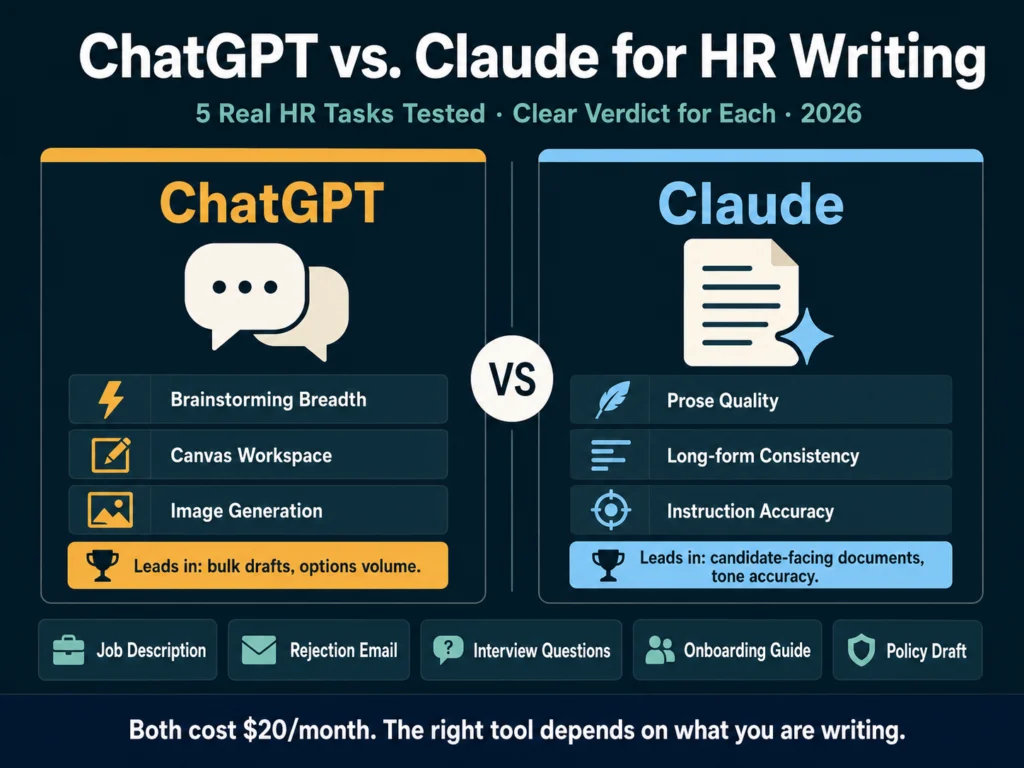
ChatGPT vs Claude for HR writing comparison 2026 — tested on job descriptions, rejection emails, interview questions, onboarding, and policy drafts

TL;DR
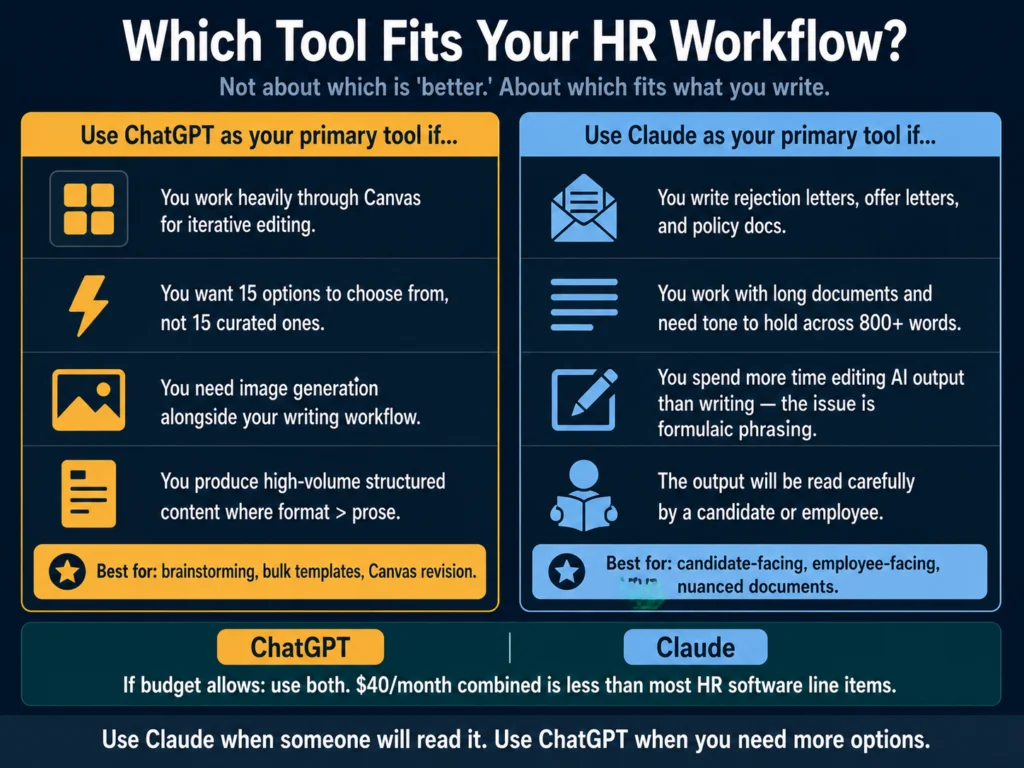
  • For HR writing where quality and tone matter (rejection emails, offer letters, nuanced job descriptions), Claude produces noticeably better output. Multiple independent writing comparisons consistently describe Claude’s prose as more natural, more varied, and requiring less editing.
  • For brainstorming, bulk drafting, and structured template-based content at speed, ChatGPT holds an edge — particularly through GPT-5.5 Thinking on Plus and the Canvas workspace. It generates more options faster and Canvas is the best iterative editing environment currently available.
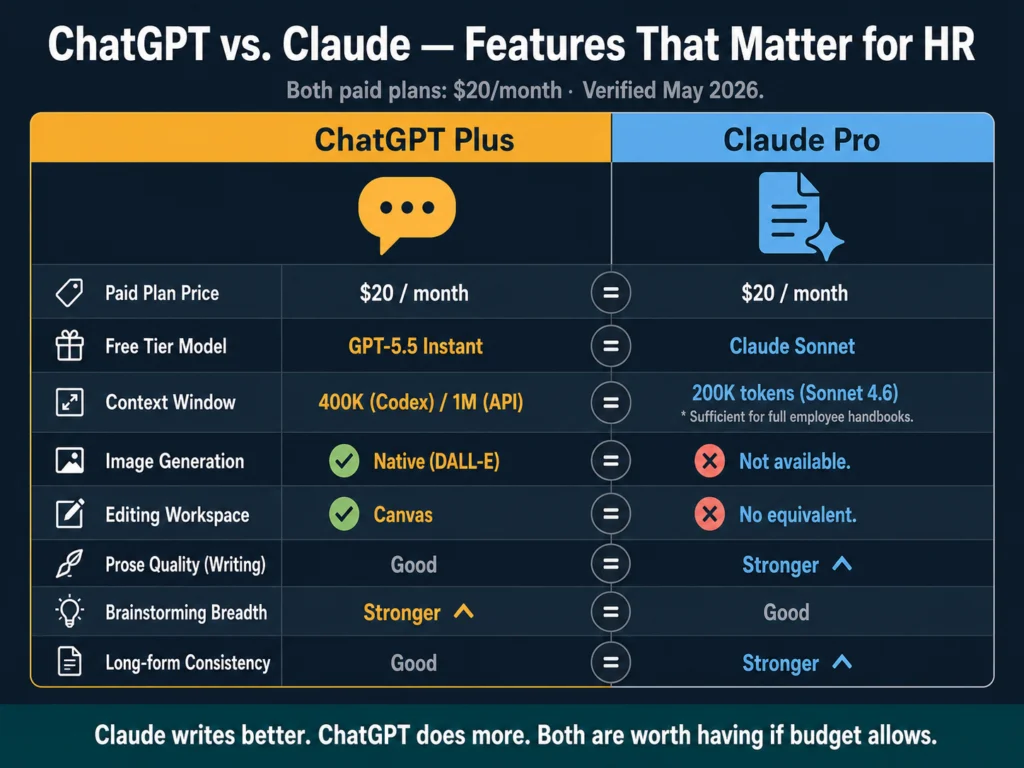
  • Both cost $20/month on paid plans. Both have free tiers. The free tier gap has narrowed: GPT-5.5 Instant is a capable free model, and Claude Sonnet handles most HR writing tasks well without upgrading.
  • Claude’s 200K context window at the standard paid tier matters for HR teams working with long documents — entire employee handbooks, collections of policy drafts, or multi-role onboarding documentation in a single session.
  • Practical split: Use Claude for documents a candidate or employee will actually read. Use ChatGPT when you need more raw options to choose from, or when you are working through Canvas.

Most “ChatGPT vs. Claude” comparisons treat both tools as general writing assistants and test them on generic content. This one is different.

The Ailovyu team tested both tools on five specific HR writing tasks that represent the actual work recruiters and HR professionals do daily.

The results are not uniform — each tool leads in different scenarios — and the difference is meaningful enough that using the wrong tool for the wrong task adds editing time rather than saving it.

A note on what we are comparing: ChatGPT in 2026 runs on GPT-5.5 Instant for free users, with GPT-5.5 Thinking available to Plus subscribers ($20/month) — the reasoning-capable tier that handles longer and more complex writing tasks noticeably better.

Claude runs on Claude Sonnet 4.6 for most users, with Opus 4.7 available on the Pro plan. Both paid plans are $20/month.

The free tier comparison matters here too — GPT-5.5 Instant rolled out in May 2026, replacing GPT-5.3 Instant as the free default, and is substantially more capable than what many people remember from a year ago.

Table of Contents
  • What the Data Says Before We Get to the Tests
  • The Tests: Five HR Writing Tasks
    • Task 1: Mid-Level Job Description
    • Task 2: Candidate Rejection Email (Post-Interview)
    • Task 3: Interview Question Generation
    • Task 4: Onboarding Documentation (Multi-Section)
    • Task 5: Policy Language Draft (Flexible Work Policy)
  • Feature Comparison: What Matters for HR Teams
  • Pricing
  • Who Should Use Which
  • Related Reading
  • Frequently Asked Questions
  • Conclusion

What the Data Says Before We Get to the Tests

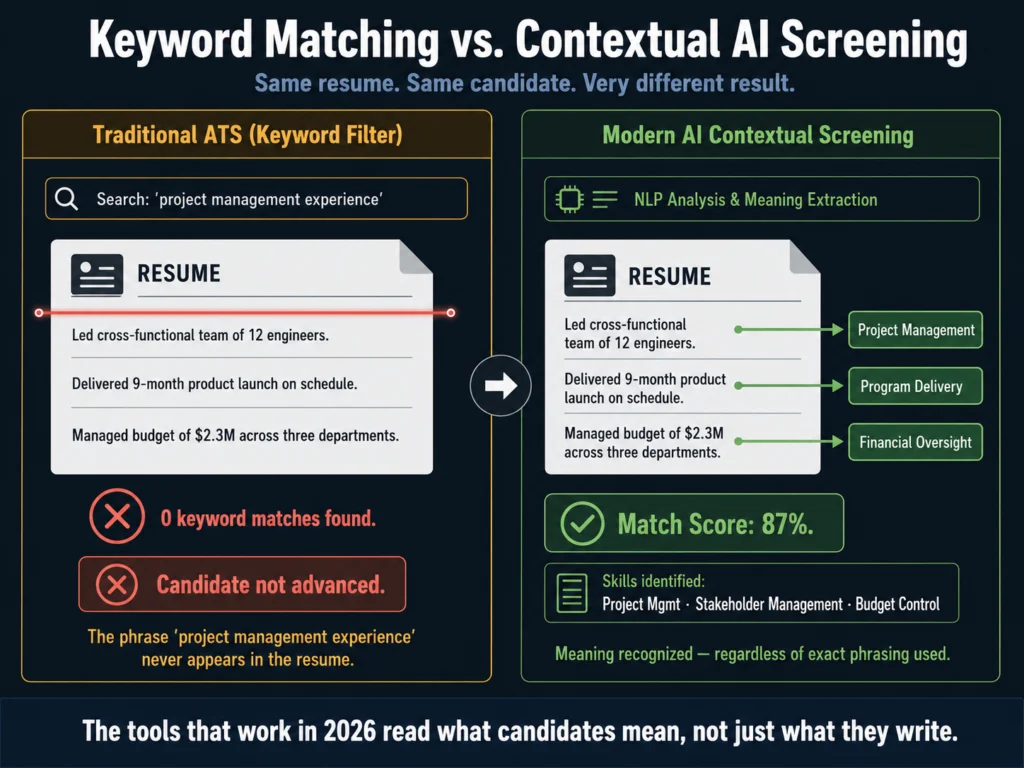
The consensus among professional writers and editors comparing both tools in 2026 is consistent: Claude produces more natural, nuanced prose.

ChatGPT tends toward a formulaic style — competent but recognizable. Claude’s writing has more rhythm, better paragraph transitions, and a wider vocabulary range.

For template-heavy writing at scale, the gap narrows significantly. For long-form work, ChatGPT’s prose can feel slightly formulaic, particularly in how sections are introduced and closed.

Brainstorming is where GPT-5.5 has a clear edge — when you want a wide range of ideas, angles, headlines, or directions to explore, it generates more of them, and they span a broader range.

For marketing copy, long-form articles, and voice-specific work, Claude is the consensus pick among professional writers.

Applied to HR writing, those generalizations translate into specific task-level differences worth knowing before you commit to a workflow.

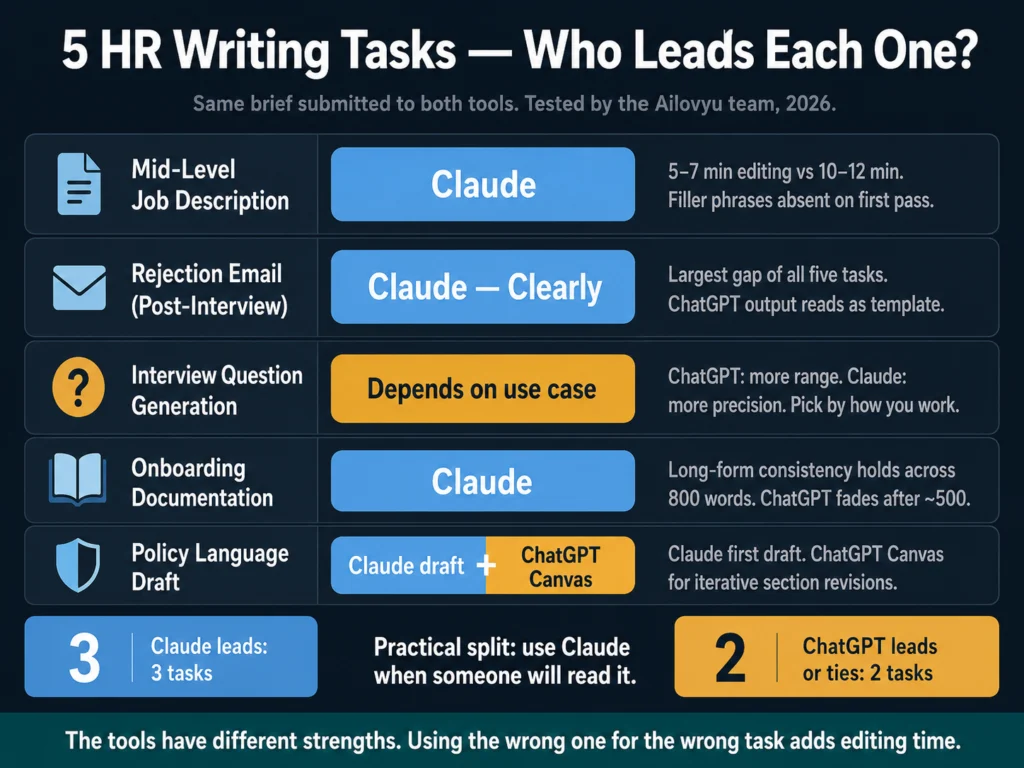
Scoreboard comparing ChatGPT vs Claude across five HR writing tasks — job descriptions, rejection emails, interview questions, onboarding, and policy drafts
Claude leads on prose quality and tone accuracy. ChatGPT leads on brainstorming volume and iterative editing through Canvas. Neither tool wins everything.

The Tests: Five HR Writing Tasks


Task 1: Mid-Level Job Description

The brief: Customer Success Manager, 3 years experience required, B2B SaaS company, remote, 120-person team, direct and practical tone.

ChatGPT output: Clean structure, well-organized sections, requirements list formatted correctly out of the box. The opening paragraph reads like a description of a role rather than an invitation to apply.

Phrasing like “join our dynamic team” and “passionate about customer success” appear despite the prompt specifying to avoid filler language, not consistently but often enough to require cleanup. Editing time: roughly 10 to 12 minutes.

Claude output: The opening paragraph frames the role from the candidate’s perspective — what they will own and why it matters — rather than describing the company’s need.

Filler phrases are absent without requiring enforcement in the prompt. The requirements are precise and separated cleanly. The tone matches the brief more accurately on the first pass. Editing time: roughly 5 to 7 minutes.

Verdict for this task: Claude. The difference in editing time compounds across a batch of 10 to 15 descriptions per week. For a deeper workflow on batching job descriptions, read: How to Write 10 Job Descriptions in One Day Using AI


Task 2: Candidate Rejection Email (Post-Interview)

The brief: Candidate interviewed twice, strong background but not the right fit for this specific role, keep the door open for future opportunities, tone should feel like it came from a person not a template.

This task is where the prose quality difference matters most. Rejection emails are read carefully by candidates.

An email that sounds like it was generated by a system, even a polite and well-structured one, lands differently than one that sounds like it came from a human who spent a few minutes thinking about the right words.

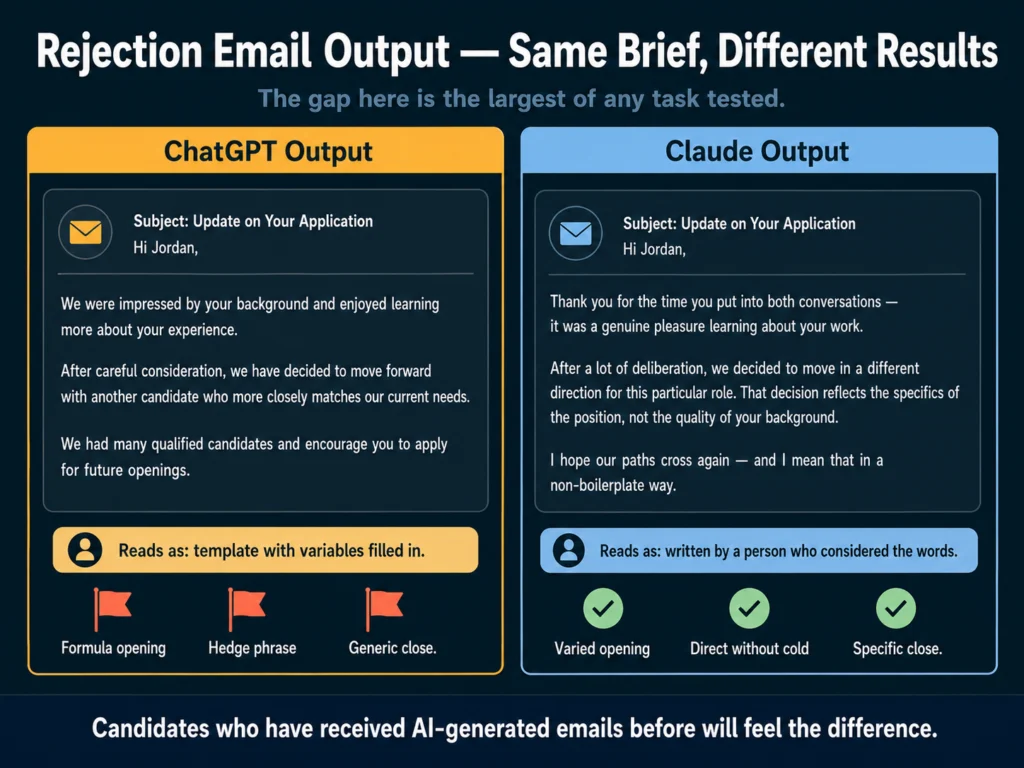
ChatGPT output: Structurally correct, appropriately brief, covers the required points. The phrasing is recognizable as AI output to anyone who reads a lot of it: “We were impressed by your background,” “we had many qualified candidates,” “we encourage you to apply for future roles.”

Functional, but a candidate who has received AI-generated emails before will feel it.

Claude output: The phrasing varies more noticeably. The opening does not start with a compliment formula.

The acknowledgment of the decision is direct without being cold. The close is specific rather than generic. It reads as a considered response rather than a template with variables filled in.

Verdict for this task: Claude, clearly. The gap here is the largest of any task we tested. For a tutorial on writing candidate communications with AI, read: How to Write Candidate Outreach Emails with AI — A Practical Tutorial

Side-by-side comparison of ChatGPT vs Claude rejection email output quality — formulaic AI tone versus natural human-sounding writing
Same brief. Both tools produced structurally correct emails. Only one of them sounds like it came from a person who thought about what to say.

Task 3: Interview Question Generation

The brief: Generate 15 behavioral and situational interview questions for a Senior Product Manager role, covering product strategy, stakeholder management, and handling ambiguity.

ChatGPT output: 15 questions, varied across the three categories, good distribution of behavioral (“Tell me about a time…”) and situational (“How would you handle…”) formats. Several questions are genuinely strong and specific to PM work. Two or three are generic enough to apply to almost any senior role.

Claude output: 15 questions, also varied. Claude’s questions lean toward higher specificity — tighter framing, clearer connection to PM-specific challenges. Fewer generic entries.

However, the overall range is narrower. When asked to generate 15 questions, Claude gives you 15 carefully considered ones. ChatGPT gives you 15 that span more territory, some stronger than others.

Verdict for this task: Depends on how you work. If you will pick the best 8 from the list, ChatGPT’s broader range gives you more to work with.

If you want a focused set that is mostly ready to use, Claude’s quality-over-breadth approach saves selection time. For brainstorming sessions where volume matters, ChatGPT is the better starting point.


Task 4: Onboarding Documentation (Multi-Section)

The brief: Write a first-week onboarding guide for a new Sales Development Representative — covering team structure, tools setup, first-week goals, and who to meet in the first 5 days. Approximately 800 words.

This task tests long-form consistency and instruction retention: whether the tool maintains tone, follows structural requirements, and stays on task across a longer output.

ChatGPT output: Competent and well-organized. The structure follows the brief. Tone is slightly more formal than specified.

Around the 500-word mark, the guidance becomes more generic — the specificity of the opening sections does not carry through to the end. The 800-word target is met but the last 300 words require more editing than the first 500.

Claude output: Consistent tone and specificity from opening to close. The “who to meet” section, which is the most likely to become a generic list, stays specific in framing even where the actual names are left as placeholders. Instruction retention across the full document length is noticeably stronger.

Verdict for this task: Claude. For any HR document where consistency over several hundred words matters, Claude’s long-form stability is a practical advantage.

This advantage scales further at the paid tier — Claude Sonnet 4.6 includes a 200K context window, meaning you can process an entire onboarding guide, employee handbook, or collection of policy documents in a single conversation without loss of coherence.

For more on AI-generated onboarding content, read: How to Write a 30-60-90 Day Onboarding Plan Using AI


Task 5: Policy Language Draft (Flexible Work Policy)

The brief: Draft a flexible work policy covering remote work eligibility, core hours expectations, equipment, and manager discretion. Formal but not bureaucratic. Approximately 500 words.

ChatGPT output: Well-structured, covers all four areas, uses clear section headers. The language is precise where it needs to be (eligibility criteria, equipment responsibility) but slightly over-formal in places: “pursuant to this policy” instead of “under this policy.”

Canvas, ChatGPT’s integrated editing workspace, is genuinely useful here: you can highlight specific clauses and ask for rewrites without re-submitting the full document.

Claude output: Formal without being stiff. The manager discretion section — the most legally sensitive part of a flexible work policy — is worded more carefully, with language that acknowledges authority without eliminating it. The output is closer to what an experienced HR writer would draft.

Verdict for this task: Claude for first draft quality, ChatGPT’s Canvas for iterative revision once a draft exists. If you are a heavy Canvas user, consider using Claude to generate the initial policy and ChatGPT’s Canvas to work through specific section revisions. The tools are not mutually exclusive.


Feature Comparison: What Matters for HR Teams

Feature comparison table of ChatGPT Plus vs Claude Pro for HR writing — pricing, context window, editing workspace, and prose quality
Both paid plans are $20/month. The differences that matter for HR are prose quality, long-form consistency, and whether you use Canvas regularly.
FeatureChatGPT (Plus)Claude (Pro)
Paid plan price$20/month$20/month
Free tier modelGPT-5.5 InstantClaude Sonnet
Context window400K (Codex) / 1M (API)*200K tokens (Sonnet 4.6)
Image generation✓ Native (DALL-E)No
Editing workspace✓ CanvasNo equivalent
Web browsing✓✓
Prose quality (writing)GoodStronger
Brainstorming breadthStrongerGood
Instruction precisionGoodStronger
Long-form consistencyGoodStronger

*Context window for ChatGPT refers to GPT-5.5 in Codex (400K) and API (1M). Effective limit in the standard ChatGPT conversation UI may differ — verify at openai.com before making decisions based on this figure.


Pricing

Both tools cost $20/month on paid plans. Neither has a dedicated affiliate program, so this is a recommendation without commission involved.

The free tier difference is smaller than it used to be. GPT-5.5 Instant is the current default ChatGPT model for free users — it rolled out in May 2026, replacing GPT-5.3 Instant as the free default.

The jump in capability from what most people remember as the free ChatGPT experience is significant. Claude’s free tier uses Sonnet models, which handle most HR writing tasks without requiring an upgrade.

For an HR professional writing job descriptions, rejection emails, and onboarding content regularly, the paid tier ($20/month) is worth it for both tools.

The capability gap between free and paid tiers — on both platforms — is real and noticeable for complex or lengthy documents.


Who Should Use Which

Decision guide showing which HR writing tasks are better suited for ChatGPT versus Claude based on use case and workflow type
The answer depends on what you write most, not which tool scores higher on a generic benchmark. Here is how to split them by task type.

Use Claude as your primary tool if: You write content that candidates or employees will read and that needs to sound like it came from a person — rejection letters, offer letters, nuanced job descriptions, policy documents.

You work with long documents where consistency across 500 to 1,000 words matters. You find yourself spending more time editing AI output than writing, and the issue is formulaic phrasing rather than structure.

Use ChatGPT as your primary tool if: You work primarily through Canvas and find the iterative editing workflow productive. You value brainstorming breadth — you want 15 interview questions to select from, not 15 carefully curated ones.

You need image generation alongside your writing workflow. You produce high volumes of standardized content where structure matters more than prose quality.

If you have the budget for both: Split tasks by tool strength. Claude handles candidate-facing and employee-facing documents; ChatGPT handles internal brainstorming, bulk template generation, and anything that runs through Canvas.

There is no rule requiring you to pick one, and the $40/month combined is still lower than most HR software line items.


For reviews of the individual tools mentioned in this comparison, read:

  • Best AI Tools for Writing Job Descriptions
  • Jasper AI Review for HR Professionals
  • Free vs. Paid AI Tools for HR — What You Actually Get
  • Jasper vs. Copy.ai for HR Writing

Related Reading

  • How to Write 10 Job Descriptions in One Day Using AI
  • How to Write Rejection Emails with AI — Without Sounding Robotic
  • How to Write a 30-60-90 Day Onboarding Plan Using AI
  • AI Writing Tools for Recruiters — The Complete Guide

Frequently Asked Questions

Which is better for HR writing, ChatGPT or Claude?

For most HR writing where a human will read the output carefully — rejection emails, offer letters, nuanced job descriptions — Claude produces better output with less editing. For brainstorming, bulk template work, or iterative editing through ChatGPT’s Canvas workspace, ChatGPT holds the advantage. The honest answer is that the tools have different strengths, and the best choice depends on what you are writing, not which tool is generally rated higher.

Do I need to pay for either tool to use it for HR writing?

No. Both free tiers are functional for HR writing in 2026. ChatGPT’s free tier runs on GPT-5.5 Instant, which is a capable model for job descriptions and shorter documents. Claude’s free tier uses Sonnet models, which handle most HR writing tasks without requiring an upgrade. The paid tiers ($20/month for both) are worth it if you regularly work with long documents, need higher usage limits, or want access to the most capable models — GPT-5.5 Thinking for ChatGPT, Opus 4.7 for Claude.

Can I use Claude and ChatGPT together in the same workflow?

Yes, and for some HR teams this makes sense. A practical split: use Claude to generate a first draft of documents where tone and naturalness matter (rejection emails, offer letters, policy language), then use ChatGPT’s Canvas for iterative revision on specific sections. The two tools are not competing subscriptions — they are tools with different strengths that can be combined. Many professional writers in 2026 use both rather than committing to one exclusively.

How does the context window difference affect HR use cases?

Claude Sonnet 4.6 has a 200K token context window. GPT-5.5, which ChatGPT Plus now runs on, has a significantly larger context window — 400K in Codex and 1M in the API, though the effective limit in the standard ChatGPT conversation interface may differ. For most individual HR documents — a job description, a single policy, a rejection email — neither tool’s context limit is a practical constraint. For large multi-document sessions, both tools now handle more than most HR workflows require. The context window is no longer a meaningful differentiator between the two at the Plus tier.

Does either tool retain information between sessions?

Both tools have memory features in their consumer interfaces, but they work differently. ChatGPT’s Memory stores explicit facts the user adds or that the system captures from conversations — available on paid plans. Claude’s memory system generates summaries from past conversations automatically and surfaces them in future sessions; users can also add, edit, or delete specific memory entries directly. In practice, both systems are useful for storing preferences like tone, company name, and writing style — but neither replaces a proper prompt template for role-specific context. For HR teams, the most reliable approach is still to keep company voice notes, brand guidelines, and role-specific briefs in an external document and paste the relevant sections into each session. Memory features are a convenience layer, not a workflow replacement.


Conclusion

The conclusion most comparisons avoid giving: Claude writes better, and ChatGPT does more.

For HR professionals specifically, “writes better” matters more than it does for developers or data analysts.

The documents HR teams produce (job descriptions, rejection letters, offer letters, onboarding guides) are often the first and last impression a candidate or employee has of an organization.

AI output that sounds like AI output damages that impression. Output that sounds like it was written by a thoughtful person does not.

Use Claude when the document will be read. Use ChatGPT when you need to generate options. If budget allows, use both — the $40/month combined is still lower than most HR software line items.

The Ailovyu Team

We research and test AI tools so you can make informed decisions before spending money on them. Every review, comparison, and tutorial on this site is based on actual use, not vendor marketing.
Learn more on our About page.

ailovyu.com

ChatGPT model information sourced from OpenAI release notes. Claude model information sourced from Anthropic’s official documentation.

AI Tools for Resume Screening: What Actually Works (2026)

Updated: July 12, 2026

AI tools for resume screening 2026 — automated candidate scoring, NLP matching, and legal compliance for HR teams

TL;DR
  • The average job posting now receives 257.6 applications, up from 207.2 in 2024. Manual screening at that volume is not a workflow problem — it is a math problem.
  • Modern AI screening tools do not just match keywords. The better ones read contextual signals: someone who “led a cross-functional team through a 9-month product launch” gets scored as a project manager even if those exact words do not appear.
  • The tools that work best for high-volume teams: Manatal (budget), Workable (mid-market, built into ATS), and Eightfold AI (enterprise with explainability features).
  • AI screening has a serious bias problem that is no longer theoretical — Mobley v. Workday reached collective action status in May 2025 with allegations that AI screening unlawfully filtered candidates by age, race, and disability. As of April 2026, the case is in discovery.
  • The legal exposure is real. Employers remain liable under Title VII for discriminatory outcomes even when the tool was purchased from a third-party vendor.
  • A human review step is not optional. Automated rejections without human oversight are the fastest path to an EEOC complaint.

The resume screening problem is not about speed. It is about volume.

According to Employ Inc.’s 2026 benchmarking data, the average job posting now attracts 257.6 applications — up from 207.2 in 2024. That is a 24% increase in one year.

For a recruiter managing 10 to 15 open roles simultaneously, that translates to thousands of resumes requiring some form of evaluation before a single interview is scheduled.

No recruiter reads 257 resumes carefully for every open role. What actually happens is a quick scan: 6 to 10 seconds per resume, pattern-matching for familiar signals, and a shortlist built on whatever the eye catches first.

Research consistently shows this process is faster than manual review but not more accurate — and it introduces the same cognitive biases a recruiter brings to everything else they do.

AI screening tools promise to replace that flawed quick scan with something more consistent and scalable. The reality is more complicated. Some tools deliver. Others replace one set of problems with another.

And the legal landscape around AI-assisted hiring has shifted significantly enough in 2026 that no HR team should adopt a screening tool without understanding the liability framework first.

This article covers what AI resume screening actually does, which tools are worth considering, what they get wrong, and what you need to know before deploying any of them.

Table of Contents
  • How AI Resume Screening Actually Works
  • What the Tools Get Wrong
  • The Legal Landscape in 2026
  • Tools Worth Considering
    • Manatal — Best Value for Mid-Sized Teams
    • Workable — Best for Teams Already in the Ecosystem
    • Eightfold AI — Best for Enterprise Explainability
    • Jobscan — Different Use Case, Worth Knowing About
  • How to Evaluate Any Screening Tool Before You Buy
  • Related Reading
  • Frequently Asked Questions
  • Conclusion

How AI Resume Screening Actually Works

Traditional applicant tracking systems filter resumes by keyword. If the job description says “5 years of Salesforce experience” and a resume contains “Salesforce” fewer than some threshold, the candidate is filtered out.

Simple, fast, and wrong more often than most hiring managers realize.

Comparison of traditional ATS keyword matching versus AI contextual NLP resume screening — same candidate, different result
A traditional ATS that cannot find the phrase “project management experience” rejects the candidate. An AI screening tool reads that the candidate “led a cross-functional team of 12 engineers through a 9-month product launch” — and scores it correctly.

Modern AI screening tools work differently. They use natural language processing to read resumes contextually — identifying skills, experience, and career trajectory from meaning rather than just keyword presence.

A recruiter who searches for “project management experience” in a traditional ATS gets candidates whose resumes contain that phrase.

An AI screening tool recognizes that “led a cross-functional team of 12 engineers through a 9-month product launch” is project management experience, even without the label.

The best tools go further than matching. They score candidates against a role’s actual requirements, generate structured summaries that give recruiters something to review instead of the raw document, and flag anomalies: employment gaps, credential inconsistencies, or qualifications that do not match claimed experience levels.

What none of them do reliably: evaluate judgment, cultural fit, communication style, or anything that requires a conversation.

AI screening is useful for getting a pile of 257 resumes down to a shortlist of 20 to 30 qualified candidates. The rest of the evaluation is still yours.


What the Tools Get Wrong

This section matters more than the tool comparisons. Every vendor in this category claims their tool reduces bias and surfaces the best candidates. The evidence says it is more complicated.

Three documented problems with AI resume screening tools — bias and disparate impact, black box explainability, and accuracy gap in real conditions
Vendor demos use curated datasets. Real-world hiring is messier. These three problems appear across the category — including in tools with strong marketing around bias reduction.

The bias problem is documented and growing. Employers remain fully liable under Title VII if their AI tools produce a disparate impact on protected groups, regardless of whether the tool was purchased from a vendor.

In practice, this means you cannot point at the software company when something goes wrong.

The case that reshaped how HR teams should think about this is Mobley v. Workday. In May 2025, a federal court in California granted preliminary certification of a collective action under the Age Discrimination in Employment Act — allowing plaintiffs to advance claims that Workday’s AI screening software unlawfully filtered out applicants based on age, race, and disability.

The court also accepted the argument that Workday can be considered an “agent” of its employer-clients, meaning the vendor itself faces liability alongside the companies that use its tools.

As of April 2026, the case is in the discovery stage. No ruling on the merits has been issued.

The implications are significant. If a federal court ultimately confirms that vendors bear liability as agents, it opens a new front of exposure for both software companies and their customers.

For HR teams, the practical takeaway is this: buying a screening tool from a reputable vendor does not transfer the legal risk. It remains with the employer.

The black box problem. Many AI screening tools cannot explain why a candidate was ranked the way they were.

When AI systems operate as black boxes, making it impossible for HR teams to explain why a candidate was rejected, this creates a dangerous accountability vacuum: when discrimination occurs, no one can identify the source, and candidates have no basis to challenge decisions.

The EEOC has been direct about this. If you cannot explain why a candidate was rejected, you are operating a high-risk system.

Explainability — the ability to show why a candidate scored a certain way — is not a nice-to-have feature in a screening tool. It is a compliance requirement.

Accuracy is high in controlled conditions, lower in practice. AI screening achieves high accuracy rates in vendor-controlled testing environments.

Real-world hiring involves messier inputs: inconsistently formatted resumes, non-standard job titles, career paths that do not follow conventional progression, and roles where the hiring manager’s actual requirements differ from what made it into the job description.

The gap between benchmark accuracy and field accuracy is real.

For a deeper look at bias in AI hiring tools and what HR teams need to audit, read: AI Bias in Hiring — What HR Teams Need to Know


The Legal Landscape in 2026

Before reviewing specific tools, understand the regulatory environment they operate in.

The EEOC’s Strategic Enforcement Plan (2023–2027) identifies AI and automated hiring tools as a priority enforcement area — a designation driven in part by a surge in discrimination complaints tied to algorithmic screening systems across multiple industries.

At the federal level, using third-party AI tools does not insulate employers from liability. The EEOC has been explicit: if the tool produces discriminatory outcomes, the employer answers for it.

At the state level, the picture is fragmented but tightening. California’s new regulations from the Civil Rights Council extend anti-discrimination laws to AI tools, requiring that employers maintain records of automated decision data for four years and prohibiting the use of AI that screens out applicants based on protected characteristics.

Colorado’s landmark AI Act (SB 24-205), which requires rigorous impact assessments for high-risk AI systems, has an effective date of June 30, 2026, but as of April 2026, a federal court has paused enforcement during ongoing litigation, and the Colorado legislature is actively considering SB 26-189, a bill that would substantially rewrite the law’s framework before it takes effect. Employers in Colorado should monitor developments closely; the law’s final form is not yet settled.

New York City’s Local Law 144 requires employers using automated employment decision tools to conduct annual bias audits and notify candidates when such tools are used. It has been in effect since July 2023 and continues to shape how enterprise tools are designed.

The EEOC and plaintiffs’ attorneys recommend that employers conduct annual bias audits using the four-fifths rule, ensure application processes include clear disclosures about AI use as required by New York City, Colorado, and California, and keep a human in the loop.

Automated rejections without any human review are the fastest way to trigger discrimination claims.

For a plain-English breakdown of what this means for HR teams, read: Can You Use AI-Generated Job Descriptions Legally? A Plain-English Guide


Tools Worth Considering

With those caveats clear, here are the tools that hold up in practice across different team sizes and budgets.

AI resume screening tool comparison 2026 — Manatal, Workable, and Eightfold AI compared by pricing, team size, and compliance features
These three tools hold up in practice. The right one depends on your org size, whether you are already inside one of these ATS ecosystems, and how much explainability your compliance program requires.

Manatal — Best Value for Mid-Sized Teams

Manatal is an ATS with AI screening capabilities built in, and it sits at a price point that makes it accessible to teams that cannot afford enterprise talent intelligence platforms.

The AI candidate scoring system ranks applicants against a job’s requirements and generates a match score alongside a structured summary of each candidate’s qualifications.

The scoring criteria are configurable — you can weight specific skills or experience levels based on your actual hiring priorities rather than a generic template.

What distinguishes Manatal from cheaper options is the explainability of its scores. When a candidate receives a low score, the system shows which criteria they did not meet.

This is the minimum level of transparency you should accept in any screening tool, for both compliance and practical reasons. A score with no explanation is not useful to anyone reviewing the shortlist.

Pricing: $15/user/month (Professional plan, billed annually). Enterprise plan at $35/user/month adds unlimited jobs and workflow automations. 14-day free trial available, no credit card required.

Best for: In-house HR teams at companies with 50 to 500 employees handling regular hiring volume. Agency recruiters managing multiple clients.

Honest limit: Manatal is an ATS first and a screening tool second. If your primary need is a dedicated screening layer on top of an existing ATS, a point solution might serve you better.

→ Manatal’s 14-day free trial includes full AI screening features.


Workable — Best for Teams Already in the Ecosystem

Workable’s AI screening sits inside its recruiting platform, which means zero context switching between your screening tool and your ATS. For teams where recruiter adoption of new software is a persistent challenge, that friction reduction is worth something.

The AI features include candidate scoring, a recommended candidates queue based on your job requirements, and anonymized screening mode — where demographic signals are removed from the initial candidate view to reduce evaluator bias before a human makes a judgment.

The anonymized screening feature is worth noting separately. It does not solve the AI bias problem at the model level, but it addresses one layer of the human bias problem: the recruiter who sees a name before evaluating a resume.

For organizations actively working on hiring equity, this is a meaningful feature even if it is not a complete solution.

Pricing: Starter plan at $189/month. AI screening features are included across all paid tiers.

Best for: Teams already on Workable. For teams not yet on Workable, the AI screening features alone are not a reason to switch from your current ATS — evaluate the full platform.


Eightfold AI — Best for Enterprise Explainability

Eightfold is a talent intelligence platform built for large organizations. It goes further than resume screening into skills-based matching, internal mobility, and workforce planning — which makes it more powerful and more expensive than anything else on this list.

For the resume screening use case specifically, what sets Eightfold apart is the explainability of its candidate matching. The system generates detailed reasoning for each candidate ranking, showing which skills, experiences, and signals drove the score.

For enterprise teams operating under regulatory scrutiny or preparing for bias audits, that audit trail is not a feature — it is a compliance requirement.

Pricing: Enterprise custom pricing. Expect significant investment — this is a platform for large HR teams at substantial organizations, not a point solution.

Best for: Enterprise organizations with 500+ employees, dedicated HR technology teams, and formal compliance programs. Companies operating in heavily regulated industries where explainable AI decisions are legally required.

Skip it if: You are a mid-sized organization with straightforward screening needs. The complexity and cost do not match the use case.

One thing to know: Eightfold is not without its own legal exposure. A class action filed in California state court alleges that Eightfold’s AI tools unfairly rely on publicly available online data about candidates to make hiring predictions — a challenge to the same explainability standards the platform markets as a differentiator.

The case is ongoing and no ruling has been issued. For enterprise teams evaluating Eightfold specifically for compliance purposes, this is worth raising directly with the vendor during due diligence.


Jobscan — Different Use Case, Worth Knowing About

Jobscan is primarily designed to help job seekers optimize resumes for ATS systems.

HR teams sometimes use it in reverse: running their job description through the tool to understand how their posting will be parsed by the ATS, and whether their requirements will screen in or out the candidates they actually want.

This is a niche use case but a legitimate one. If your ATS is rejecting candidates you would have interviewed — a common complaint from hiring managers — Jobscan can help you diagnose whether the job description or the ATS configuration is the problem.

Pricing: Free basic scan. Plans start at $49.95/month for full feature access.


How to Evaluate Any Screening Tool Before You Buy

The sales process for AI screening tools is designed to impress.

Demos use curated datasets, benchmark results are from controlled environments, and bias audit claims are often marketing copy rather than independent verification.

Five due diligence questions for evaluating AI resume screening tools — explainability, bias audits, training data, human override, and vendor contract liability
Vendor demos use curated datasets. Independent bias audit results are different from vendor-produced summaries. These five questions separate tools with real compliance infrastructure from those using audit language as marketing copy.

Before signing anything, ask these questions:

Can the vendor explain why a candidate was scored the way they were?

If the answer is “the algorithm assessed overall fit,” that is not an explanation. Push for specifics. A tool that cannot explain its decisions is a compliance liability.

Has the tool undergone an independent bias audit?

Not a vendor-conducted internal review — an independent third-party audit against the EEOC’s four-fifths rule for adverse impact. Ask to see the results, including failure rates, not just the summary.

What data was the model trained on?

AI screening models trained on historical hiring data at companies with documented demographic skews will reproduce those skews. Understanding the training data is the foundation of understanding bias risk.

What happens when you override the AI?

A tool that makes it difficult to advance a candidate the AI ranked low, or that requires justification for human overrides, has inverted the appropriate relationship between human judgment and machine ranking.

What does the vendor contract say about liability?

Following Mobley v. Workday, the question of whether vendors bear liability alongside employers is actively litigated. Your contract should address this directly.


Related Reading

  • Best AI Tools for Writing Job Descriptions
  • AI Bias in Hiring — What HR Teams Need to Know
  • Free vs. Paid AI Tools for HR — What You Actually Get
  • Can You Use AI-Generated Job Descriptions Legally? A Plain-English Guide
  • Manatal vs. Workable — AI Recruiting Features Compared
  • The Complete Guide to AI Tools for HR Professionals

Frequently Asked Questions

Does AI resume screening actually save time, and by how much?

The time savings are real but depend heavily on volume. At low hiring volume — under 20 applications per role — AI screening adds overhead without meaningful benefit. The tools earn their keep at high volume. When the average time-to-fill sits at 63.5 days, even modest improvements in screening speed translate directly to faster hires. For teams handling hundreds of applications per role, the reduction in time spent on initial review is significant, though the saved time shifts to configuring, calibrating, and auditing the tool itself, which is often underestimated.

Can AI screening tools be used for all roles, or are some better handled manually?

High-volume roles with standardized requirements — customer service, sales development, operations — are the strongest fit for AI screening. The role is well-defined, the qualification signals are clear, and the volume justifies the setup cost. Senior, executive, or highly specialized roles are a weaker fit. The requirements are nuanced, the candidate pool is smaller, and the cost of a false negative — screening out a strong candidate the AI misread — is much higher. Most HR teams end up running AI screening on high-volume roles and handling senior searches manually or through specialized search firms.

How do I know if an AI screening tool is introducing bias into my hiring process?

The most common signal is a pattern in who gets advanced versus who gets screened out that does not align with the stated requirements. If you notice that candidates from certain institutions, career paths, or demographic backgrounds are consistently scored lower, the model may be reproducing historical hiring patterns from its training data rather than evaluating current qualifications. Conduct a structured audit: compare the demographic distribution of the applicant pool to the screened-in shortlist. Any significant gap warrants investigation. Tools with built-in reporting on candidate progression by demographic group make this audit significantly easier.

What does “human in the loop” mean in practice for AI resume screening?

It means a human reviews and approves AI decisions before any candidate-facing action is taken. At minimum: no automated rejection emails are sent based solely on an AI score. A recruiter reviews the AI’s shortlist and the low-scored candidates it deprioritized before the shortlist is finalized. For regulated industries or positions covered by local AI hiring disclosure laws, the bar is higher — candidates must be notified that AI was used, and there must be a mechanism for human override. Automated rejections without any human review are the fastest way to trigger discrimination claims.

Are there free AI resume screening tools worth using?

The free tiers of most dedicated screening tools are too limited for production use — they either cap the number of resumes you can process or restrict the matching features to basic keyword logic. The one legitimate free option for small teams: using ChatGPT or Claude to review a batch of resumes against a defined criteria rubric. This is not automated at scale, but for a team hiring fewer than five people per month, a structured prompt that asks the AI to score each resume against your specific requirements works reasonably well. The advantage is full transparency — you can see the reasoning for every assessment. The disadvantage is that it does not integrate with your ATS and does not scale past low volume.

Conclusion

AI resume screening is not optional at 257 applications per role. The math does not work any other way.

What is optional — and what HR teams consistently get wrong, based on what the Ailovyu team has tracked across compliance developments and vendor claims in this space — is treating it as a pass-through decision rather than one that requires audit, calibration, and human review.

The tools that hold up are the ones that show their work. If a vendor cannot tell you why a candidate ranked where they did, you are running an audit-proof black box that your legal team would not be comfortable with if they knew it existed.

Start with Manatal if budget is a constraint and you need ATS and screening in one tool. Use Workable’s built-in features if you are already on that platform.

Consider Eightfold when the organization’s size and compliance requirements justify the investment — and ask the vendor directly about their own litigation exposure before signing.

In all cases: keep a human between the AI’s output and any candidate-facing outcome. The legal landscape in 2026 makes that non-negotiable.

The Ailovyu Team

We research and test AI tools so you can make informed decisions before spending money on them. Every review, comparison, and tutorial on this site is based on actual use, not vendor marketing.
Learn more on our About page.

ailovyu.com

Statistics sourced from Employ Inc. 2026 Recruiting Benchmarking Report and SHRM 2025 Talent Trends. Legal information sourced from DISA, Foley & Lardner, and angelareddock-wright.com. This article is for informational purposes and does not constitute legal advice. Affiliate links earn a commission at no extra cost to you.

How to Write 10 Job Descriptions in One Day Using AI (2026)

Updated: July 12, 2026

AI workflow for writing 10 job descriptions in one day using ChatGPT — step-by-step process overview

TL;DR
  • Writing 10 job descriptions in a single day is realistic with AI — but only if you work in batches, not one at a time.
  • The bottleneck is not the writing. It is the brief. Getting complete, accurate information about each role before you open ChatGPT cuts your editing time in half.
  • This workflow has six steps: build an intake form, write a master prompt, fill the briefs, batch the drafts, run a review pass, and final-check before posting.
  • Total working time: roughly 3 to 4 hours for 10 job descriptions, including editing.
  • The prompts in this article are copy-paste ready. Adjust the bracketed variables and they work across roles.

Most recruiters would not attempt to write 10 job descriptions in a single day. The mental overhead of switching between roles, formats, and tones makes the task feel bigger than it is.

Start a description for a Senior Accountant, get halfway through, remember you still have a DevOps Engineer and two Customer Success roles open, and the whole thing starts to feel unmanageable.

AI does not solve the mental overhead on its own. What it solves is the drafting time, but only if you restructure how you approach the work.

The workflow below is built around one core principle: gather everything first, write everything second. Switching back and forth between gathering role information and writing descriptions is where most of the time disappears.

According to a HiringThing survey of recruiters and hiring managers, 57% of respondents say it takes over an hour to write a quality job description — with 26% reporting more than two hours per posting.

Applied to 10 roles, that is anywhere from 10 to 20 hours of work. The workflow below brings that down to 3 to 4 hours, including review.

That math only works if you follow the steps in order.

Table of Contents
  • Before You Start: What This Workflow Requires
  • Step 1: Build Your Role Intake Form (Do This Once, Use It Forever)
  • Step 2: Write Your Master Prompt Template (Do This Once)
  • Step 3: Fill All 10 Briefs Before Opening ChatGPT
  • Step 4: Batch All 10 Drafts in One Session
  • Step 5: Run a Structured Review Pass
  • Step 6: Final Check Before Posting
  • Time Breakdown for 10 Job Descriptions
  • The Most Common Mistakes in This Workflow
  • Related Reading
  • Frequently Asked Questions
  • Conclusion

Before You Start: What This Workflow Requires

You will need access to ChatGPT. The free tier now runs on GPT-5.5 Instant, which handles most standard job description briefs well, but caps out at 10 messages every 5 hours.

ChatGPT Plus at $20/month removes that cap and adds GPT-5.5 Thinking, the reasoning-capable tier that handles longer and more complex briefs noticeably better.

Six-step workflow diagram for writing job descriptions with AI — from intake form to final posting check
All six steps in order. The workflow only works if you follow the sequence, especially the rule about gathering all briefs before drafting anything.

Grammarly is useful for the review pass. The rest is organizational, not technical.

You also need to accept one constraint upfront: this workflow is not suitable for highly specialized or executive-level roles without significant customization.

A staff-level Customer Success Manager description can be drafted and reviewed in 20 minutes with this method.

A VP of Engineering role at a late-stage startup, where the requirements are genuinely complex and the wrong posting costs months of sourcing time, deserves more than a batch workflow. Know which category your open roles fall into before you start.

For roles that do fit the batch approach, here is the full workflow.


Step 1: Build Your Role Intake Form (Do This Once, Use It Forever)

The single most important thing you can do before drafting any job description — with or without AI — is to stop starting from memory.

Most job descriptions are vague because the person writing them did not have specific information. They knew the title, guessed at the responsibilities, and copied the requirements from a previous posting. AI amplifies this problem: a vague brief produces a vague draft, faster.

The fix is a standardized intake form you send to hiring managers before you write anything. It takes about 20 minutes to build once, and it makes every description you write — for the rest of your career — faster and more accurate.

Recruiter intake form template for AI job description writing — fields covering responsibilities, qualifications, and role context
Send this form to every hiring manager before you write a word. Do not start a description until it comes back filled out. An incomplete brief costs more time than waiting two days for a complete one.

Your intake form should capture:

  • Job title and level (junior, mid, senior, lead, manager)
  • Department and direct reporting line
  • Employment type (full-time, part-time, contract) and location (remote, hybrid, on-site)
  • 5 to 8 core responsibilities — written as what the person actually does, not what the role “supports”
  • 3 to 5 must-have qualifications — non-negotiable requirements only
  • 2 to 3 nice-to-have qualifications — genuinely optional
  • Salary range, if you are including it in the posting
  • One sentence about your team’s working style or culture that a generic company cannot copy
  • One sentence about why this role is open — growth, backfill, or new function (this often surfaces context that changes how you position the role)

Send this form to every hiring manager as the trigger for starting a job description. Do not write a word until it comes back filled out.

A recruiter who chases incomplete briefs wastes more time than a recruiter who waits two days for a complete one.


Step 2: Write Your Master Prompt Template (Do This Once)

This is the prompt structure that will power every job description you write. You customize it per role. You do not rewrite it from scratch.

Copy the template below into a Google Doc, Notion page, or wherever you keep your HR resources:

You are an experienced HR writer creating job descriptions for [COMPANY NAME], 
a [COMPANY SIZE]-person [INDUSTRY] company based in [LOCATION / REMOTE STATUS].

Write a job description for the role of [JOB TITLE] at the [LEVEL] level.

The description should:
- Be between 350 and 500 words total
- Open with a 2-sentence summary of the role's purpose and impact
- Include a "What You'll Do" section with [NUMBER] bullet points
- Include a "What We're Looking For" section with must-haves clearly 
  separated from nice-to-haves
- Close with 2 to 3 sentences about the company and team
- Use a [TONE: direct and practical / conversational / formal] tone
- Avoid the following phrases: [LIST ANY BANNED PHRASES]

Role details:
- Core responsibilities: [PASTE FROM INTAKE FORM]
- Must-have qualifications: [PASTE FROM INTAKE FORM]
- Nice-to-have qualifications: [PASTE FROM INTAKE FORM]
- Why this role is open: [GROWTH / BACKFILL / NEW FUNCTION]
- Team context: [ONE SENTENCE FROM INTAKE FORM]
- Salary range: [RANGE OR "not included in this posting"]

Do not use filler phrases like "fast-paced environment," "wear many hats," 
"passionate about," or "rockstar." Write as if the reader is a capable 
professional, not someone who needs to be sold on taking a job.

This template does several things that a generic “write me a job description” prompt does not. It sets word count boundaries, because best-performing job descriptions run between 300 and 700 words, according to Ongig research.

Specifying structure means you get formatted output, not a blob of text that needs reworking. And banning filler phrases by name keeps the output from sounding like it could have come from any company.

GPT-5.5 Instant — the current default for all users — handles this prompt well for most standard roles.

For dense briefs covering senior or highly technical positions, GPT-5.5 Thinking (available on ChatGPT Plus at $20/month) produces more precise output and reasons through complex requirements without flattening the detail.


Step 3: Fill All 10 Briefs Before Opening ChatGPT

This step feels counterintuitive. Most people want to start drafting the moment they have one brief ready. Do not.

The reason to batch all your briefs first is context switching. Every time you move from “gathering information” to “writing” and back to “gathering information,” your brain resets its working context.

That transition costs around 23 minutes of recovery time, according to research by Gloria Mark at UC Irvine, time you spend re-reading what you wrote and mentally re-entering the task.

If you collect all 10 intake forms before drafting the first description, you stay in the same mode — reviewing and organizing — for a concentrated block of time. Then you shift into drafting mode and stay there.

Practically: set a deadline for hiring managers to return their intake forms. Chase once if they miss it. If the brief is incomplete, do not start the description. An incomplete brief produces a draft you will rewrite twice.

Once all 10 briefs are back, spend 20 to 30 minutes reading through them and flagging anything that needs clarification before you draft.

A responsibilities section that says “manage projects” is not enough. “Manage 3 to 5 concurrent product launches across EMEA” is.


Step 4: Batch All 10 Drafts in One Session

Open ChatGPT. Set a timer for 90 minutes. Work through all 10 roles without stopping to heavily edit as you go.

Batch drafting workflow showing 10 job description roles processed in one 90-minute ChatGPT session
Open one new ChatGPT conversation per role. Never draft two roles in the same chat. Context from one role bleeds into the next if you do.

The sequence for each role:

  1. Paste your master prompt template into a new ChatGPT conversation
  2. Fill in all the bracketed variables with data from that role’s intake form
  3. Submit and read the output
  4. If the structure is correct but specific sentences are off, use one follow-up prompt to fix them (examples below)
  5. Copy the draft into your working document and move to the next role

Useful follow-up prompts for in-session fixes:

If the opening is too generic:

The opening paragraph is too vague. Rewrite it in 2 sentences that describe 
specifically what this person will own and why the role matters to the team.

If the requirements list is too long:

The requirements section has [NUMBER] bullet points. 
Cut it to [TARGET NUMBER]. Keep only the genuine must-haves.

If the tone is off:

Rewrite this in a more [direct / conversational / formal] tone. 
Remove any phrasing that sounds like a marketing email.

If a specific section is weak:

The "What We're Looking For" section is too generic. 
Rewrite it using the specific qualifications I provided, 
not general competency language.

Do not spend more than 10 minutes per role in this drafting phase. If a draft requires extensive in-session editing, the brief was incomplete. Flag it and move on. You can return to it after the others are done.

By the end of 90 minutes, you should have 10 rough drafts in a working document.

If you are managing a team of recruiters who all need access to the same master prompt and company voice settings, Jasper’s Brand Voice feature is worth evaluating.

It ensures that descriptions written by different people still sound like the same company — something a shared Google Doc prompt cannot fully replicate.

→ Jasper offers a 7-day free trial with full feature access.


Step 5: Run a Structured Review Pass

The drafts from Step 4 are not ready to post. They are well-structured starting points that need a human to verify accuracy and add the one or two details that make a posting sound specific to your company.

Work through each draft with these five checks:

Accuracy check: Does every responsibility and qualification match what the hiring manager actually submitted? AI occasionally smooths or generalizes specific details into broader language. Restore the specifics when this happens.

Requirements audit: Requirements lists frequently accumulate nice-to-haves that most hiring managers would overlook in an otherwise strong candidate. Go through each must-have and ask: would we actually pass on someone who ticks every other box but lacks this? Cut anything where the honest answer is no.

Tone check: Read the description aloud. If any sentence sounds like it was written by a committee, rewrite it. The goal is for the post to sound like a real person at your company — not a job description generator.

Closing line: Does the final company description say something specific to your organization? “We are a team that values collaboration” is not specific. “We are a 40-person team where senior engineers review code the same day it’s submitted” is.

Word count check: Is the description between 300 and 700 words? According to Ongig’s research on job description length, postings in that range consistently outperform shorter and longer ones on application rates.

Under 300 words signals a role that is not well-defined. Over 700 words signals a requirements list that has not been edited. Both hurt conversion. If your draft is outside that range, cut the requirements section first. That is almost always where the excess lives.

Grammarly’s tone detector is useful for this step — particularly if you are reviewing a batch of descriptions quickly and want a second signal on whether a posting reads as intended.

The free plan handles basic clarity. Premium adds the tone analysis.

→ Grammarly’s free plan is worth installing before your next review pass.


Step 6: Final Check Before Posting

Before each description goes live, spend 3 to 5 minutes on this checklist:

  • Job title: Is it the title a candidate would actually search for? Internal titles sometimes differ from market-standard ones.
  • Salary range: If you are including it, is it current? Salary data shifts. A range from a previous hiring cycle may now be below market.
  • Requirements: Could any item on the must-have list inadvertently screen out candidates from underrepresented groups? Overly long experience requirements and credentials not required for the job are the most common sources of bias. For a detailed breakdown of this topic, read: #7: AI Bias in Hiring — What HR Teams Need to Know
  • Links and formatting: Will the description paste cleanly into your ATS? Bold, italic, and bullet formatting does not always transfer correctly.
  • Legal review: Does any line in the description make a promise or imply a condition of employment that your company cannot fulfill? A phrase like “unlimited growth opportunities” can create legal exposure. For more on this, read: #12: Can You Use AI-Generated Job Descriptions Legally? A Plain-English Guide

Time Breakdown for 10 Job Descriptions

Time breakdown chart showing the 4-hour AI workflow for writing 10 job descriptions — from setup to final posting check
About 4 hours for a full batch of 10. The 30-minute setup (intake form and master prompt) is a one-time cost. Every batch after the first runs closer to 3 to 3.5 hours.
PhaseTaskTime
Setup (one-time)Build intake form and master prompt30 min
PrepSend and chase intake forms15 min
PrepReview all 10 briefs, flag gaps25 min
DraftingBatch all 10 drafts in ChatGPT90 min
ReviewAccuracy, requirements, tone checks60 min
FinalPre-posting checklist per role30 min
Total~4 hours

The 30-minute setup (intake form and master prompt) is a one-time investment. After the first batch, your working time per 10 descriptions drops to roughly 3 to 3.5 hours.


The Most Common Mistakes in This Workflow

Starting with a weak brief. The output is only as specific as the input. If you skip the intake form and draft from memory, you will spend more time editing than you saved by using AI.

Editing heavily in the drafting phase. The batch approach only works if you stay in drafting mode during Step 4. Heavy editing mid-session breaks the rhythm and defeats the time advantage.

Posting without a review pass. AI drafts are starting points, not finished products. The requirements audit in Step 5 is particularly important — AI frequently mirrors whatever qualification language you give it without questioning whether the list is realistic or necessary.

Using the same conversation for multiple roles. Open a new ChatGPT conversation for each role. Context from a previous role can bleed into subsequent drafts in the same session, producing outputs that conflate responsibilities across positions.


Related Reading

  • Best AI Tools for Writing Job Descriptions
  • ChatGPT vs. Claude for HR Writing — A Practical Comparison
  • AI Bias in Hiring — What HR Teams Need to Know
  • Can You Use AI-Generated Job Descriptions Legally? A Plain-English Guide
  • How to Build an AI Prompt Library for HR Teams
  • AI Writing Tools for Recruiters — The Complete Guide

Frequently Asked Questions

Do I need ChatGPT Plus to use this workflow, or will the free tier work?

The free tier — now running on GPT-5.5 Instant — handles straightforward roles with shorter briefs without issue, but caps out at 10 messages every 5 hours. For senior roles, highly detailed briefs, or complex follow-up edits within a single conversation, GPT-5.5 Thinking (available on ChatGPT Plus at $20/month) produces more precise output. If you are running a full 10-role batch that includes senior or technical positions, the Plus subscription is worth it — you get higher message limits and the reasoning tier for the roles that need it.

What if a hiring manager submits an incomplete intake form?

Do not start the description. Send one follow-up message asking for the specific missing information. The two most common gaps are vague responsibility descriptions (“manage projects,” “support the team”) and missing context about why the role is open. A backfill is positioned differently from a growth hire — the framing affects the entire posting. Writing from an incomplete brief produces a draft you will revise more than once.

Can I use this workflow with tools other than ChatGPT?

Yes. The master prompt template works with Claude, Gemini, and other large language model tools. Claude tends to produce slightly more precise language on senior or technical roles; ChatGPT’s formatting is cleaner out of the box. The core workflow — batch briefs, batch drafts, structured review — applies regardless of which tool you use. For a direct comparison of how ChatGPT and Claude handle HR writing tasks, read: ChatGPT vs. Claude for HR Writing — A Practical Comparison

How should I handle roles in different departments that need a different tone?

Adjust the tone variable in your master prompt for each department. Engineering descriptions typically run more direct and technical; Marketing roles often benefit from a slightly warmer tone; Finance postings tend toward formal. You do not need separate templates for each department — a single variable swap in Step 2 handles it. If your organization has very distinct brand voice requirements across departments, Jasper’s Brand Voice feature is worth the investment. It encodes the voice difference once and applies it automatically.

Is there a risk of the same phrasing appearing across multiple job descriptions?

Yes, especially if you use similar briefs across similar roles. ChatGPT draws from the same underlying patterns, so a batch of Customer Success Manager descriptions written with minimal variation in the brief will produce drafts with noticeable similarities. The solution is specificity at the brief level: even for similar roles, surface the details that make each position distinct — the team size, the stage of the product, the specific customer segment. Different inputs produce different outputs.


Conclusion

Writing 10 job descriptions in a day is not about writing fast. It is about organizing the work so that the writing itself, which AI handles quickly, is not interrupted by information-gathering, context-switching, or mid-draft editing.

The Ailovyu team built this workflow for exactly that problem: recruiters who have the roles open but lose hours to process, not to writing.

The intake form is where most of the value in this workflow lives. Better inputs produce better drafts, shorter review passes, and fewer rounds of back-and-forth with hiring managers.

The AI is just the drafting engine. You are still the editor, the accuracy check, and the person who knows whether a job description actually reflects the role.

Build the intake form today. Write the master prompt. Use it on the next batch of open roles. The workflow becomes faster the second and third time as your prompt template improves based on what the review pass keeps catching.

The Ailovyu Team

We research and test AI tools so you can make informed decisions before spending money on them. Every review, comparison, and tutorial on this site is based on actual use, not vendor marketing.
Learn more on our About page.

ailovyu.com

Affiliate links in this article earn a commission at no extra cost to you. Pricing and tool features verified May 2026 from vendor websites. ChatGPT model information sourced from OpenAI’s official release notes.

Best AI Tools for Writing Job Descriptions (2026) – Reviewed

Updated: July 12, 2026

Best AI tools for writing job descriptions in 2026 — ChatGPT, Jasper, Textio, Copy.ai, Workable, Grammarly compared

TL;DR
  • ChatGPT is the most capable free option. A well-crafted prompt produces a usable draft in under 5 minutes.
  • Jasper AI is worth it for teams writing 10+ postings per month who need consistent brand voice. Solo recruiters should skip it.
  • Textio is the only tool built to reduce biased language using actual outcome data. Priced for enterprise budgets, though.
  • Copy.ai has the most useful free plan in this category. Two minutes from job title to draft.
  • Workable is relevant only if it is already your ATS. Its AI writer is competent and included in your subscription.
  • Grammarly does not generate job descriptions from scratch. It refines what you already have. Include it as a finishing layer, not a primary tool.
  • None of these tools replace a human review before posting.

Writing a job description should take 20 minutes. In practice it takes most recruiters 2 to 4 hours, and the result is often a copy-paste of the last version with a few lines swapped out. The posting goes live, attracts the wrong applicants, and the cycle repeats.

AI does not solve the underlying problem of not knowing what a role actually requires. But for the drafting work itself (structure, phrasing, formatting, tone), it removes most of the blank-page friction.

Among talent acquisition professionals already using generative AI in hiring, the average time saved is about 20% of their work week, roughly one full workday.

That figure comes from LinkedIn’s Future of Recruiting report and covers AI use across all recruiting tasks, not just writing. Even a fraction of that applied to job description drafting adds up fast.

AI use across HR tasks climbed to 43% as of early 2025, up from 26% in 2024, according to SHRM’s Talent Trends research. The organization describes this as a shift from pilots to real workflows.

The tools are no longer experimental. The question is which ones actually deliver for HR teams doing real hiring, not marketing teams with writing budgets.

The Ailovyu team submitted the same brief to five of the six tools on this list — a mid-level Customer Success Manager role at a 120-person B2B SaaS company, fully remote, requiring 3 years of experience with enterprise accounts. Here is what the output looked like, and what it tells you about each tool.

Table of Contents
  • The 6 Best AI Tools for Writing Job Descriptions
    • 1. ChatGPT — Best Overall for Most Teams
    • 2. Jasper AI — Powerful, but Not for Everyone
    • 3. Textio — The Only Tool Built Specifically for This Problem
    • 4. Copy.ai — Two Minutes to a Usable Draft
    • 5. Workable — One Reason to Consider It
    • 6. Grammarly — Not a Generator, but Worth Having Anyway
  • Quick Comparison
  • How to Choose
  • Related Reading
  • Frequently Asked Questions
  • Conclusion

The 6 Best AI Tools for Writing Job Descriptions


1. ChatGPT — Best Overall for Most Teams

ChatGPT produced the most usable first draft of the five tools we tested. The output was clean, well-structured, and required less editing than any other tool. But only because we gave it a detailed prompt.

The brief included the job title, seniority level, 6 core responsibilities, 4 required qualifications, company size, culture notes, and a sentence about tone (“direct and practical, not startup-jargon-heavy”).

With that input, ChatGPT returned a 450-word draft with a role summary, bulleted responsibilities, requirements separated by “must-have” and “nice-to-have,” and a company blurb. The tone was accurate. The structure was ready to post with minor edits.

Without that level of detail, the output was noticeably generic. A prompt of just “write a job description for a Customer Success Manager, B2B SaaS, remote” produced a draft that could have come from any company, any industry, any decade.

Comparison showing how a vague vs detailed ChatGPT prompt produces different job description quality
The tool is not the differentiator. Your prompt template is. A 6-line brief returns a ready-to-post draft. A one-liner returns something any company could have written.

The practical lesson: ChatGPT’s output quality is almost entirely a function of your prompt quality. The tool itself is not the differentiator — your prompt template is. Build one good template and reuse it across all your postings.

Pricing: Free (GPT-5.3 Instant, capped at 10 messages per 5 hours — US free accounts now show ads). ChatGPT Plus at $20/month removes ads and gives access to GPT-5.5, which handles longer and more nuanced content noticeably better.

Best for: Any HR team that wants to start using AI without additional software spend. The entry point is zero dollars.

Honest limit: ChatGPT does not flag biased language unless you specifically ask. It also forgets your brand voice between sessions unless you use a custom GPT or system prompt.


2. Jasper AI — Powerful, but Not for Everyone

Let us address the obvious question first: at $39 to $49 per month for a single user, is Jasper worth it over just using ChatGPT Plus at $20?

For an individual recruiter writing a handful of postings per month, probably not. The output quality difference between Jasper and a well-prompted ChatGPT is real but not dramatic enough to justify twice the cost.

Where Jasper earns its price is the Brand Voice feature. You upload samples of your company’s existing content — careers page copy, past job posts, your About page — and Jasper learns the tone, vocabulary, and structure.

Every subsequent draft inherits that voice without you re-specifying it each time. For a team of 5 recruiters producing 30 postings a month across 4 departments, that consistency has real value.

Without it, your job descriptions for Engineering sound nothing like your postings for Sales, which sends a subtle but real signal to candidates about how organized your company is.

On our Customer Success Manager test, Jasper’s output was noticeably more on-brand than ChatGPT’s — after we spent about 90 minutes training the brand voice initially. That setup time is the hidden cost. It is worth it at scale. It is not worth it for occasional hiring.

Pricing: Creator plan $39/month (annual) or $49/month (monthly). Pro plan $59/month (annual) or $69/month (monthly). 7-day free trial available with no credit card required.

Best for: In-house HR teams with defined employer branding, hiring regularly across multiple departments.

Skip it if: You post fewer than 10 to 15 roles per month or you are a solo HR generalist without a defined brand voice to train.

→ Jasper offers a 7-day free trial with full feature access. No credit card needed.


3. Textio — The Only Tool Built Specifically for This Problem

Textio does something none of the other tools on this list do: it tells you, with outcome data behind it, which specific phrases in your job description are costing you applicants.

The mechanism matters here. Textio has analyzed hundreds of millions of job postings and their actual hiring outcomes — who applied, who was interviewed, who was hired.

From that data, it has identified language patterns that reliably suppress or expand the applicant pool. When you write “strong individual contributor” in a job post, Textio flags it because its data shows that phrase discourages women from applying at a statistically significant rate.

Illustration of Textio flagging biased job description language with outcome-based replacement suggestions
Textio doesn’t guess. It flags phrases that have measurably reduced applicant diversity across hundreds of millions of real job postings — then suggests a replacement backed by outcome data.

The suggested replacement is “strong collaborator.” That is not a style opinion. It is an outcome-based recommendation.

This is fundamentally different from what ChatGPT or Jasper do. They generate text. Textio audits it against real hiring behavior.

The tradeoff is price and scope. Textio does not publish rates publicly, which almost always means enterprise-level pricing. You will need to request a demo.

It is purpose-built for HR hiring content — you would not use it for marketing emails or blog posts.

Best for: Organizations with a measurable diversity hiring commitment, HR departments large enough to track hiring outcomes, and companies operating under the EU AI Act’s high-risk employment AI provisions — which took effect in August 2026 and cover AI used in recruitment and candidate evaluation.

Not the right fit: Small HR teams, low hiring volumes, or companies without defined DEI metrics to improve against.

For a closer look at why AI language matters in hiring — and what EEOC guidance says about job requirement language — read: Can You Use AI-Generated Job Descriptions Legally? A Plain-English Guide

Also relevant: AI Bias in Hiring — What HR Teams Need to Know


4. Copy.ai — Two Minutes to a Usable Draft

Copy.ai is the fastest tool on this list, and its free plan is genuinely useful — not artificially capped to force an upgrade.

The job description workflow is a simple form: job title, company name, 3 to 5 responsibilities, and any additional notes. Submit it and the tool returns a full draft in roughly 90 seconds.

On our Customer Success Manager test, the output was structurally solid and grammatically clean, but noticeably less specific than what ChatGPT produced with our detailed prompt. Copy.ai’s form does not encourage the same level of input depth, which shows in the output.

That said, for high-volume hiring teams under time pressure, “structurally solid and needs some editing” is often exactly what you need. The free plan gives you 2,000 words per month with no expiration date — enough to test the tool seriously before paying anything.

Pricing: Free (2,000 words/month, no expiry). Starter at $49/month. Advanced at $249/month for teams.

→ Copy.ai’s free plan has no expiry. Try it before paying.

Best for: Recruiters who want a fast, no-friction option for routine role postings. Good starting tool for small HR teams with no existing AI workflow.

Limit: Output specificity is lower than ChatGPT when using detailed prompts. The tool’s form format nudges you toward simpler inputs.

For a step-by-step workflow on turning a tool like Copy.ai into a repeatable system for bulk drafting, read: How to Write 10 Job Descriptions Per Day Using AI (Step-by-Step Workflow)


5. Workable — One Reason to Consider It

If you already use Workable as your ATS, turn on its AI writer before adding any other tool to your stack.

The AI writing assistant is included in your existing subscription, writes directly inside your posting workflow, and uses market data on job titles and compensation to inform its suggestions. It is not the best AI writing tool available.

But it is already paid for, it requires no additional logins, and it eliminates the copy-paste step between an external AI tool and your ATS. For teams where recruiter adoption of new tools is a persistent challenge, removing friction matters.

On our test, Workable’s output was comparable to Copy.ai — useful structure, needs specificity added, but ready to post faster than a manual draft.

One thing Workable does that standalone tools cannot: it pulls compensation benchmarks for the role directly into the drafting interface.

On our Customer Success Manager test, it flagged that the salary range we had in mind was below market median for fully remote roles in the US. That is a useful catch at the drafting stage, before the posting goes live.

Pricing: Workable plans start at $189/month. AI writing features are included across all paid tiers.

The honest assessment: Workable’s AI is not a reason to switch from your current ATS. It is a reason to use what you are already paying for.

Skip it entirely if: You are not a Workable customer. There is no standalone version and no reason to adopt Workable just for its AI writer.


6. Grammarly — Not a Generator, but Worth Having Anyway

Grammarly gets included on many AI job description tool lists, and it belongs on this one, with a clarification.

It does not write job descriptions. It improves them. If you use any other tool on this list to generate a draft, run it through Grammarly before posting.

It catches things those tools miss: a responsibilities section that reads as commanding rather than inviting, a requirements list where half the items are actually preferences, jargon that sounds natural internally but confuses external candidates.

The tone detector is the most useful feature for job descriptions specifically. It tells you whether your post reads as confident, friendly, or formal, and whether that matches what you intended.

A job description that reads as “harsh” according to Grammarly’s tone analysis will affect the quality and diversity of your applicant pool, even if you did not notice the tone problem yourself.

The free tier handles grammar, spelling, and basic clarity. Premium adds full tone analysis and advanced suggestions. The browser extension works inside most ATS platforms, Google Docs, and LinkedIn.

On our Customer Success Manager draft — after ChatGPT generated it — Grammarly flagged the responsibilities section as reading as “formal” and two bullet points as “direct” in a way that leaned toward commanding. One edit per flag, under two minutes total. The draft read noticeably better after.

Pricing: Free. Premium at $12/month (annual). Business at $15/member/month (annual).

→ Grammarly’s free plan is worth installing today. Premium adds the tone analysis that matters for job posts.

Best for: Every recruiter, as a second pass on any AI-generated draft before it goes live. Not useful as a standalone generation tool.


Quick Comparison

Side-by-side feature and pricing comparison of 6 AI job description writing tools in 2026
Pricing and core capabilities across all six tools, verified April 2026. Verify current rates on vendor websites before purchasing.
ToolStarting PriceFree PlanGenerates from ScratchBrand VoiceBias Flags
ChatGPT$20/mo (Plus)✓ GPT-5.3 (capped)✓Via custom GPTManual only
Jasper AI$39/mo (annual)7-day trial✓✓ NativeNo
TextioEnterprise (demo)No✓Limited✓ Data-backed
Copy.ai$49/mo✓ (2K words)✓BasicNo
Workable$189/mo (ATS)No✓NoNo
Grammarly$12/mo (annual)✓Editing onlyNoPartial

Verify current rates on vendor websites before purchasing.


How to Choose

Decision guide for choosing the right AI tool for writing job descriptions based on team size, budget, and hiring goals
Four scenarios, four different answers. The right tool depends on your hiring volume, budget, and what problem you are actually trying to solve.

You are a solo recruiter or small HR team with limited budget: Start with ChatGPT’s free tier and Grammarly’s free plan. Invest an hour building a reusable prompt template. This setup covers 80% of what any paid tool would do, at zero cost.

You have a team writing 15+ postings per month: Jasper makes sense if brand consistency is a real problem. Copy.ai makes sense if speed is the main constraint and brand voice is less critical.

Diversity hiring is a measured organizational goal: Textio is the only tool that directly addresses inclusive language using outcome data, not editorial opinion. The price is high, but it is doing something no other tool on this list does.

You are already using Workable: Use its built-in AI writer first. Save the evaluation of other tools for a later stage when you know what it cannot do.

For a head-to-head comparison of how ChatGPT and Claude handle nuanced HR writing tasks, read: ChatGPT vs. Claude for HR Writing — A Practical Comparison


Related Reading

  • How to Write 10 Job Descriptions Per Day Using AI (Step-by-Step Workflow)
  • AI Tools for Resume Screening — What Actually Works
  • AI Bias in Hiring — What HR Teams Need to Know
  • Can You Use AI-Generated Job Descriptions Legally? A Plain-English Guide
  • The Complete Guide to AI Tools for HR Professionals

Frequently Asked Questions

Can AI write a complete job description from scratch without any human input?

Technically yes. Practically, you do not want it to. A job description written from just a job title will be generic enough that it could describe the role at any company. The AI does not know your team’s actual working style, what the previous person in this role struggled with, or what specific experience would make someone genuinely successful here. Useful AI drafts come from specific inputs. Give the tool a job title, seniority level, 5 to 8 real responsibilities, required qualifications, and at least one sentence about your culture or work environment. The more specific the brief, the less editing the draft needs.

Do AI-generated job descriptions attract fewer candidates?

The research does not support that claim. What affects application rates more than whether AI was used is the quality of the language in the post. Vague requirements, exclusionary phrasing, or an unrealistic list of must-haves suppress applications regardless of whether a human or an AI wrote them. A well-prompted and reviewed AI draft typically outperforms a rushed human draft. The issue is not the tool — it is the review step. A posting that goes live unedited, AI-written or not, will underperform.

What does EEOC guidance say about AI-generated job descriptions?

The EEOC’s position is that employers are responsible for the content of their job postings regardless of how that content was produced. If an AI-generated job description contains requirements that screen out protected groups without being genuinely necessary for the role, the employer bears the liability, not the tool vendor. The practical implication: review AI-generated requirements lists carefully. Ask whether each listed requirement is truly necessary for job performance, or whether it is a proxy for something else. For full guidance, see the EEOC Uniform Guidelines on Employee Selection Procedures.

How do I make AI job descriptions sound less generic?

Two moves make the biggest difference. First, put specific context into your prompt — not “manage a team” but “manage a team of 4 account managers across EMEA, with weekly 1:1s and quarterly performance reviews.” Second, add at least one sentence in the company description that is genuinely specific to your organization. Something a competitor could not copy. Generic AI output almost always traces back to generic input. The draft is only as specific as what you put in.

Which free AI tool produces the best job description drafts?

ChatGPT’s free tier produces the best output of the free options available, particularly when given a detailed prompt. Copy.ai’s free plan (2,000 words per month, no expiry) is more accessible for people who find prompt engineering unfamiliar — the form-based interface guides you through the inputs. Grammarly’s free plan adds useful editing and basic tone analysis after you have a draft. Most HR teams can build a complete drafting and editing workflow across all three without spending anything, at least initially.


Conclusion

The tools in this review have different strengths and almost no overlap in who they are genuinely built for.

ChatGPT and Copy.ai are starting points. Jasper is a team tool for consistent hiring at volume. Textio is an enterprise investment for organizations where inclusive language is a tracked outcome, not a checkbox. Workable is an ATS feature you may already have. Grammarly is the last step before publishing, not the first.

The most common mistake is treating AI as a replacement for having thought clearly about what a role requires. A tool can draft the language.

It cannot tell you whether the requirements list is too long, whether the title matches the market rate, or whether the responsibilities accurately reflect the first 90 days on the job. That part remains yours.

If you are starting from scratch, ChatGPT plus a well-built prompt template will get you further than any paid tool used with a lazy brief.

The Ailovyu Team

We research and test AI tools so you can make informed decisions before spending money on them. Every review, comparison, and tutorial on this site is based on actual use, not vendor marketing.
Learn more on our About page.

ailovyu.com

Affiliate links in this article earn a commission at no extra cost to you. This does not affect editorial recommendations.

« Previous Page

Primary Sidebar

More To See

Best AI tools for writing listing descriptions 2026 — ChatGPT, Claude, Jasper, Write.Homes, and ListingAI tested and compared for real estate agents

Best AI Tools for Writing Listing Descriptions (2026)

AI for HR communications and documentation complete guide 2026 — offer letters, rejection emails, onboarding docs, performance reviews, handbooks, and prompt library

AI for HR Communications and Documentation: The Complete Guide (2026)

AI ethics and compliance in hiring complete guide 2026 — federal statutes, state patchwork, vendor liability, Mobley v Workday, and building a defensible AI hiring program

AI Ethics and Compliance in Hiring: The Complete Guide (2026)

AI writing tools for recruiters complete guide 2026 — job descriptions, candidate outreach, rejection emails, interview questions, and offer letters

AI Writing Tools for Recruiters: The Complete Guide (2026)

Copyright © 2026 · Ailovyu.com