• Skip to main content
  • Skip to primary sidebar
  • Homepage
  • About Ailovyu
  • Privacy Policy
  • Disclaimer
  • Affiliate Disclosure
  • Contact
Ailovyu.com

Ailovyu.com

Home » AI for HR and Recruiters » Page 2

AI for HR and Recruiters

How to Use AI for Performance Review Cycles in 2026: A Step-by-Step Guide

Updated: July 12, 2026

How to use AI for performance review cycles in 2026 — nine-step guide from goal setting to 360 feedback synthesis, calibration, and delivery

TL;DR
  • Most HR teams use AI only for the narrative writing step of performance reviews. That misses eight other stages in the cycle where AI saves time.
  • AI adds the most value at goal setting, 360 feedback synthesis, and self-assessment structuring. These are where managers spend the most undocumented time.
  • Through 2026, Gartner predicts 20% of organizations will use AI to flatten management structures, eliminating more than half of current middle management positions. Performance cycles increasingly need to measure AI-human collaboration, not just individual output.
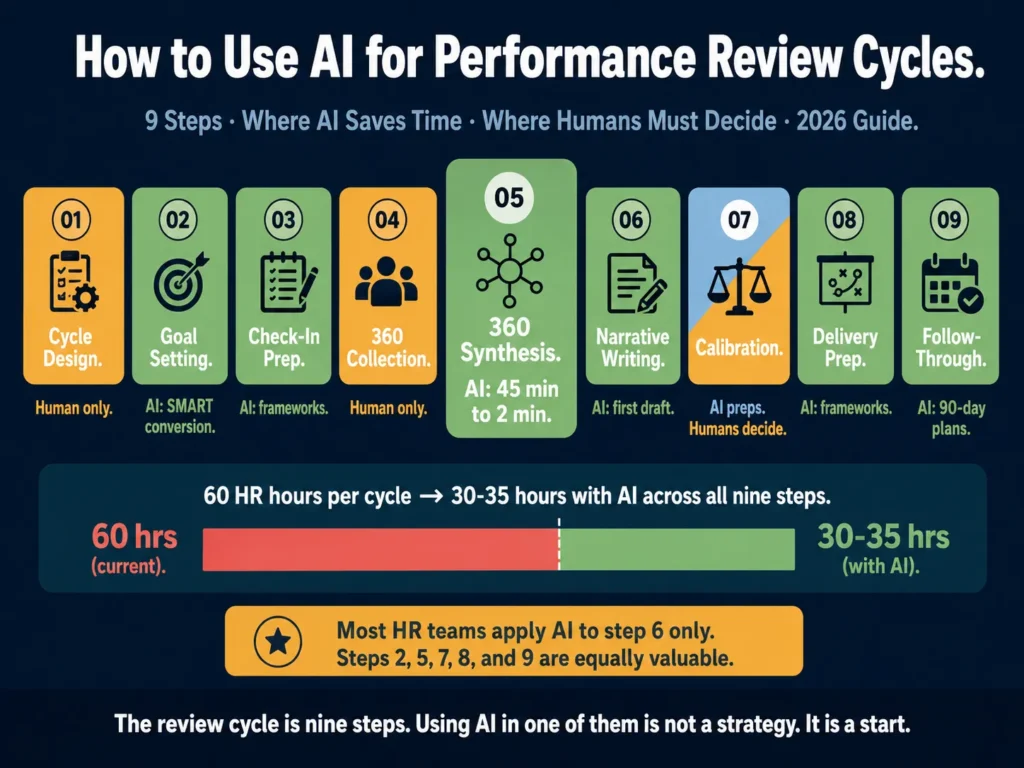
  • The tutorial covers nine steps: cycle design, goal setting, mid-cycle check-ins, 360 collection, 360 synthesis, narrative writing, rating calibration, delivery prep, and follow-through.
  • Two legal compliance areas require attention in 2026: the EU AI Act’s provisions on AI in employment decisions, and NYC Local Law 144 for organizations in New York City.

Most articles on AI and performance reviews focus on one thing: writing the narrative.

HR teams spend 30 minutes generating a paragraph about an employee’s contributions when they could spend 5 minutes.

That matters. But the narrative is one step in a 9-step cycle that runs for 60 to 90 days per year.

A complete performance review cycle covers goal setting, continuous feedback, mid-year check-ins, 360 collection, synthesis, narrative writing, calibration, delivery, and follow-through.

Each step creates administrative load. AI reduces that load at multiple points, not just one.

This guide walks through each step, explains what AI does well there, and gives you the prompt or workflow to use.

The writing step gets covered here in summary and links to Article 15 for the full treatment.

Table of Contents
  • Step 1: Design Your Review Cycle Before Adding AI
  • Step 2: AI-Assisted Goal Setting at Cycle Start
  • Step 3: Mid-Cycle Check-In Prompts
  • Step 4: Collecting 360 Feedback
  • Step 5: AI-Assisted 360 Feedback Synthesis
  • Step 6: Manager Narrative Writing
  • Step 7: Rating Calibration
  • Step 8: Delivery Preparation
  • Step 9: Post-Review Follow-Through
  • Two Legal Areas to Check in 2026
  • Related Reading
  • Frequently Asked Questions
  • Conclusion

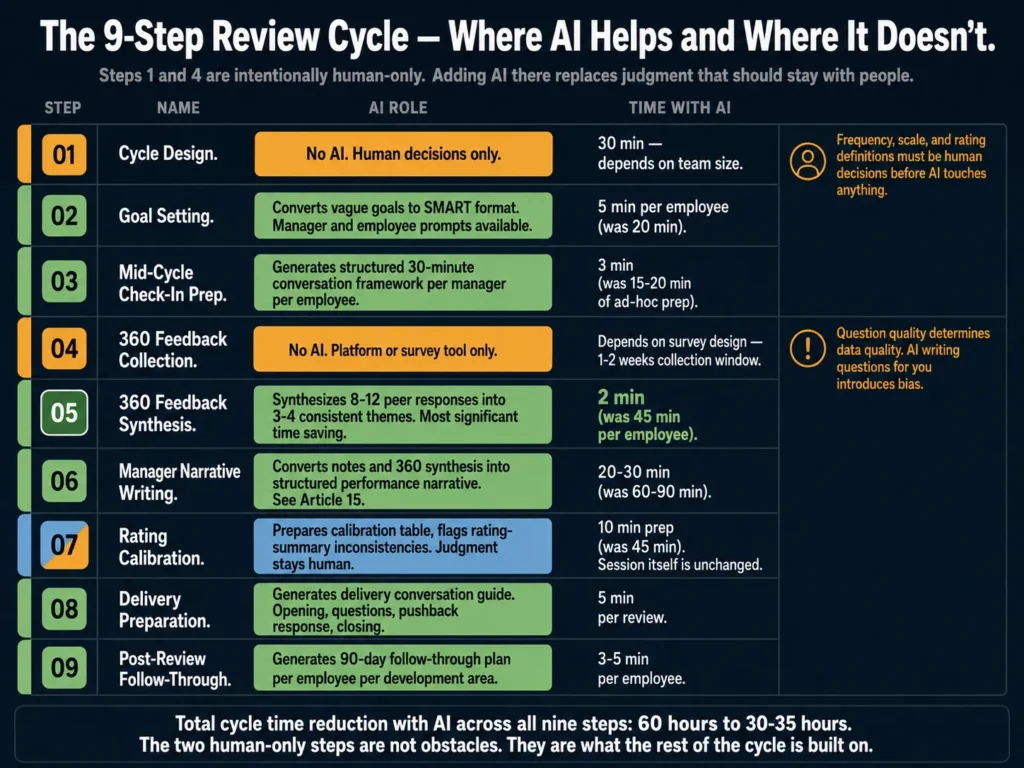
Nine-step performance review cycle showing which steps benefit from AI assistance and which require human judgment only — goal setting, 360 synthesis, calibration, and delivery
Step 1 and Step 4 have no AI in them by design. Adding AI to cycle design or 360 collection replaces judgment calls that must stay human. Knowing which steps benefit from AI and which don’t is the skill this tutorial builds.

Step 1: Design Your Review Cycle Before Adding AI

This step has no AI in it. You make decisions here that determine how useful AI will be later.

Decide on three things before you open any tool:

Review frequency. Annual reviews produce the worst data because managers evaluate on what they remember, not what happened.

Quarterly check-ins with a formal annual review produce better data and reduce recency bias.

If you are currently running annual-only reviews, adding one mid-year check-in improves the quality of the annual evaluation significantly.

Self-assessment structure. Open-ended self-assessments (“describe your performance this year”) produce text that is hard to calibrate across employees.

Structured self-assessments with 4 to 6 specific questions produce responses that managers and HR can compare. Define those questions before the cycle opens.

Rating scale. A 5-point scale with clear definitions for each level produces more useful data than a 3-point scale.

Define what a “3” means in concrete behavioral terms before anyone is asked to rate anyone.

If managers cannot explain the difference between a 3 and a 4 without guidance, your scale is too vague.

Document these decisions and share them with all managers before the cycle opens.

AI cannot compensate for an unclear process. It accelerates whatever process you have, good or bad.


Step 2: AI-Assisted Goal Setting at Cycle Start

Goal setting is where most cycles fail before they start. Managers write vague goals. Employees write vague goals.

At the end of the year, no one can objectively evaluate them.

AI converts vague goals into SMART ones, quickly.

Prompt for converting a manager’s vague goal into a SMART goal:

Convert this vague performance goal into a SMART goal for an employee.

Employee role: [TITLE AND LEVEL]
Manager's original goal: [PASTE GOAL AS WRITTEN]
Review period: [START DATE] to [END DATE]
One piece of context about the team's current priorities: [CONTEXT]

Write the SMART goal in plain language. Include:
- Specific: what exactly will the employee do or produce?
- Measurable: what number, percentage, or observable outcome shows completion?
- Achievable: is this realistic for this role and period?
  Flag if the original goal seems out of scope.
- Relevant: connect it to one team or company priority.
- Time-bound: by what date or milestone?

Write one sentence that a manager could read in 30 seconds
and a new employee would understand without context.

Prompt for helping an employee write their own goals:

Help me write 3 SMART performance goals for my review period.

My role: [TITLE AND LEVEL]
Department: [DEPARTMENT]
My three priority areas this cycle: [LIST]
One ongoing project I will work on: [PROJECT]
One skill I want to develop: [SKILL]

For each priority area, write one SMART goal in plain language.
Keep each goal under 50 words.
Do not use corporate jargon.

You can batch this. If you are HR setting up a review cycle for 40 managers, share the goal prompt as a template.

Ask managers to run their direct reports’ draft goals through the prompt and submit the SMART version. Review time per manager drops from 20 minutes to 5.


Step 3: Mid-Cycle Check-In Prompts

Quarterly or mid-year check-ins are the step most managers skip because they do not know what to say.

AI gives them a structured conversation framework, not another written report to file and forget.

Prompt for mid-cycle check-in prep:

Generate a 30-minute mid-cycle check-in framework for a manager
meeting with a direct report.

Employee name: [NAME]
Role: [TITLE]
Goals set at cycle start: [PASTE 3-4 GOALS]
One thing that has changed since cycle start (new project,
team change, priority shift): [CONTEXT]

Produce:
- 4 questions the manager should ask, in order
- One question the employee should ask the manager
- A note-taking template with space for each question
- A "next steps" field with 3 blank lines

Tone: direct and practical. This is a working conversation,
not a formal evaluation.

Run this once. Save the output as a template. Distribute it to all managers before each mid-cycle period.

The consistency this creates across your organization is worth more than any individual conversation improvement.


Step 4: Collecting 360 Feedback

Before AI touches 360 feedback, you need to collect it correctly. Three things determine whether 360 data is useful:

Response quality depends on question quality. “Rate this person’s communication skills on a scale of 1 to 5” gives you a number with no context.

“Describe a specific situation where this person’s communication affected the outcome of a project” gives you something a manager can use.

Anonymity affects honesty. If respondents believe their specific feedback can be traced back to them, they inflate ratings. Use a platform that aggregates responses before managers see them.

Sample size affects reliability. Three peer responses produce unreliable data. Seven to ten responses produce patterns you can act on.

The strongest performance review platforms in 2026 connect AI to structured feedback collection workflows rather than treating review writing as a standalone task.

Platforms like Lattice, Leapsome, and Culture Amp collect structured 360 feedback and feed it directly into AI synthesis, reducing manual data handling.

If you are not on one of those platforms, you can run 360 collection through a Google Form or a similar survey tool and handle the synthesis in Step 5 manually.


Step 5: AI-Assisted 360 Feedback Synthesis

This is where AI saves the most time in the review cycle, and the use case is straightforward. You have 8 peer feedback responses averaging 150 words each.
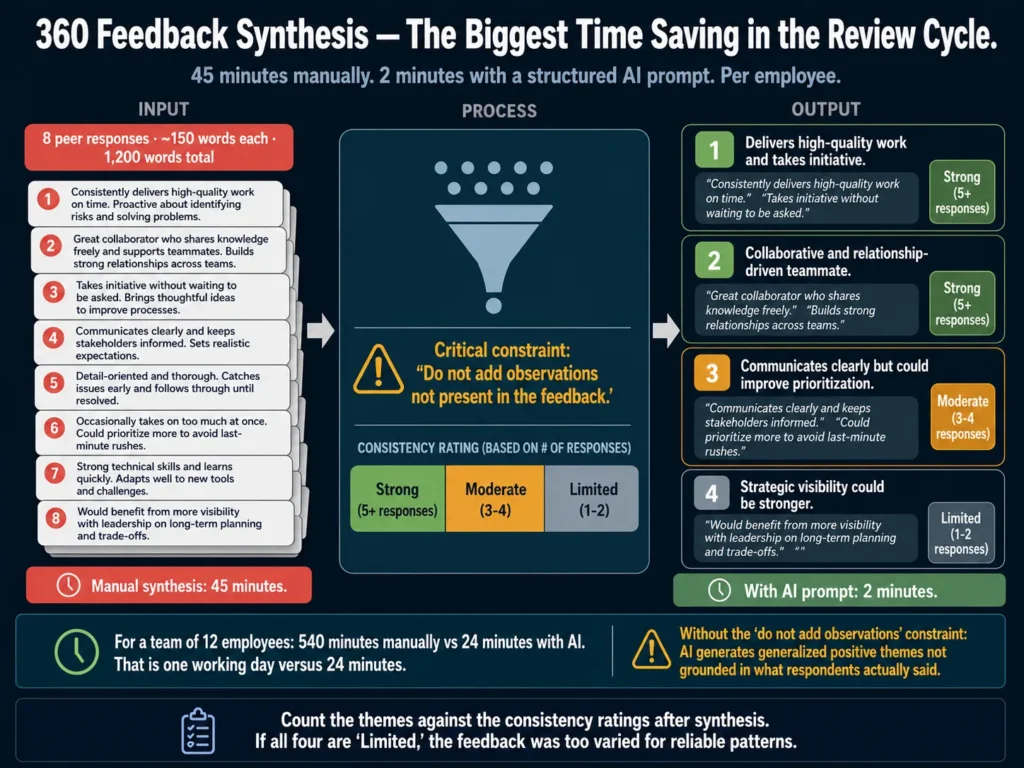
AI 360 feedback synthesis workflow — converting 8 peer responses into 3-4 themes with consistency ratings, reducing 45 minutes to 2 minutes per employee
Eight peer responses averaging 150 words each. The manager needs four themes, with consistency ratings, in 15 minutes. That is not achievable manually for a team of 12. AI synthesis with a well-structured prompt completes it in 2 minutes per employee — but only if you add the constraint that prevents it from generating observations that weren’t in the feedback.

A manager needs to synthesize them into 3 to 4 themes within 15 minutes. That is not realistic manually. AI does it in 2 minutes.

Prompt for synthesizing 360 feedback:

You are an HR analyst synthesizing 360 feedback for a performance review.

Employee name: [NAME]
Role: [TITLE]
Review period: [PERIOD]

Below are peer and manager feedback responses. Synthesize them into
3 to 4 clear themes.

For each theme:
- State the theme in one sentence
- Quote 2 specific examples from the feedback (use exact phrases,
  keep them short)
- Rate the consistency of this theme across responses:
  strong (5+ responses mention it), moderate (3-4), or
  limited (1-2 responses)

Important: do not add observations not present in the feedback.
Do not soften negative themes. Report what the data shows.

Feedback responses:
[PASTE ALL RESPONSES HERE]

The instruction “do not add observations not present in the feedback” is critical. Without it, Claude and ChatGPT generate generalized positive themes that are not grounded in what respondents actually said. Add this constraint to every 360 synthesis prompt.

One practical check: after AI generates the synthesis, count how many themes it identified. If it produced 4 themes and you gave it 8 responses averaging 150 words each, at least 2 of those themes should have “strong” consistency ratings.

If all four are “limited,” the feedback may have been too varied for reliable synthesis, or the employee had a genuinely mixed peer perception that deserves reflection in the review.


Step 6: Manager Narrative Writing

This step is covered in full in Best AI Tools for Performance Review Writing. The short version:

Use the master prompt from Article 15. Give the AI specific, dated observations from the manager’s notes. Add the 360 synthesis from Step 5.

Run the output through a specificity check: every strength and development area should cite evidence from the actual notes or feedback, not general claims.

The most common failure here: managers provide general inputs and accept general outputs.

“Strong communicator” without a single named example is not useful to the employee and is legally weak in a dispute. Article 15 covers how to prevent this.


Step 7: Rating Calibration

Calibration is where AI reaches its clearest limit. The purpose of calibration is to ensure that a “3” from one manager means the same thing as a “3” from another manager.
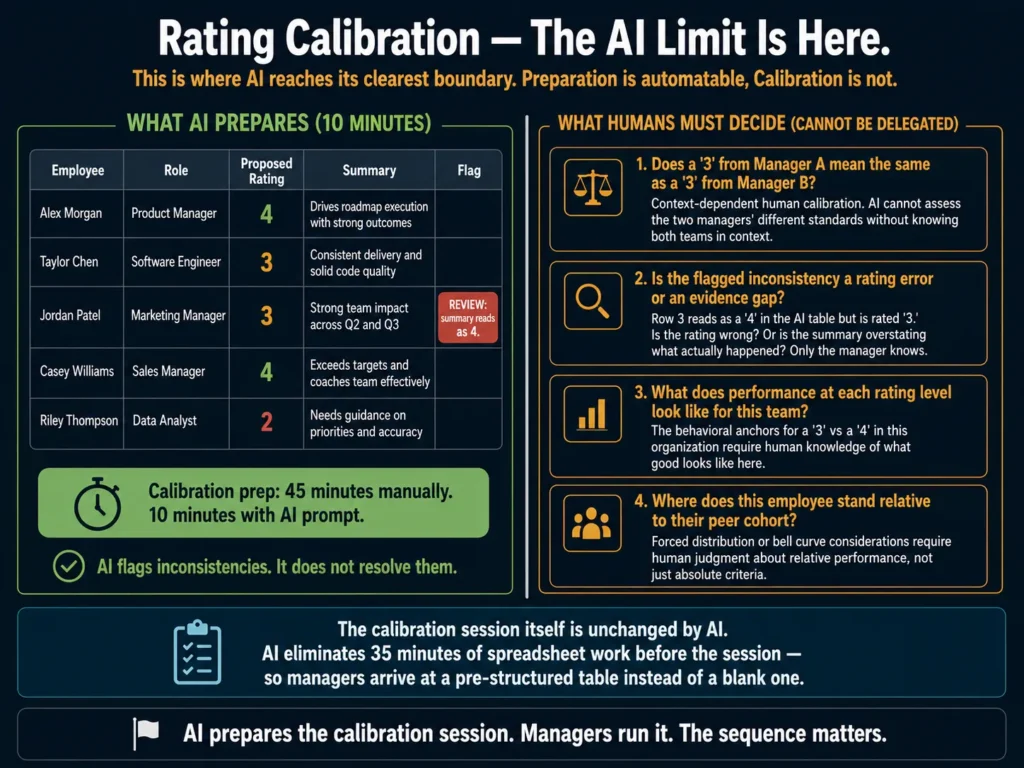
Performance review calibration split — AI prepares calibration table and flags rating inconsistencies while human managers make the final calibration decisions
The purpose of calibration is to ensure a “3” from one manager means the same as a “3” from another. That requires human judgment about people in context. AI can prepare the table and flag inconsistencies. It cannot make the calibration decisions.

That requires human judgment about people in context. AI cannot do it.

What AI can do is prepare the calibration session.

Prompt for calibration session prep:

Prepare a calibration summary for a team of [NUMBER] employees
being reviewed by [NUMBER] managers.

Below are the employee names, their roles, their proposed ratings,
and a one-line summary of their performance from their review.

Format the output as a table with:
- Employee name
- Role
- Proposed rating
- One-sentence performance summary
- Flag column (mark "review" if the rating seems inconsistent
  with the summary provided)

Employee data:
[PASTE DATA]

Note any cases where the one-sentence summary sounds like a
"4" but the proposed rating is a "3", or vice versa.
Do not change any ratings. Only flag inconsistencies for
discussion.

This prep work used to take an HR leader 45 minutes before each calibration session.

With AI, it takes 10 minutes. The session itself requires human judgment. The preparation does not.


Step 8: Delivery Preparation

Most managers treat the written review as the finish line and spend no time preparing for the actual delivery conversation.

They improvise. That produces inconsistent experiences across the organization, and employees feel it.

AI generates a structured delivery framework in minutes.

Prompt for review delivery prep:

Create a 20-minute review delivery conversation guide for a manager.

Employee name: [NAME]
Overall rating: [RATING]
Key strength from the review: [ONE SENTENCE]
Key development area from the review: [ONE SENTENCE]
One specific goal for the next cycle: [GOAL]
Anticipated employee reaction (if known): [POSITIVE / NEUTRAL /
LIKELY TO PUSH BACK / UNKNOWN]

Produce:
- Opening statement (2-3 sentences, not "let me start by saying...")
- Three questions to ask the employee during the conversation
- One response if the employee disagrees with the rating
- Closing statement that connects the review to the next cycle
- Things to avoid saying (3 specific phrases that create problems)

Run the delivery framework through Grammarly before the conversation. Not for grammar. For tone.

A delivery opening that reads as “formal” will land differently in a room than one that reads as “confident” or “warm.” Catching that before the conversation matters.

Grammarly Pro’s tone detection applies to spoken scripts, not just written documents. At $12/month, it is a practical tool for review delivery preparation.


Step 9: Post-Review Follow-Through

The review cycle does not end at delivery. It ends when the actions from the review are reflected in how the employee is managed over the next 90 days.

AI cannot do the follow-through for you. It can structure it.

Prompt for generating a post-review action plan:

Create a 90-day follow-through plan for a manager after a
performance review.

Employee name: [NAME]
Role: [TITLE]
One key development area identified in the review: [AREA]
One goal set for the next cycle: [GOAL]
Rating received: [RATING]

Produce:
- Weeks 1-4: What the manager should observe and document
- Weeks 5-8: One mid-point check-in question and what a
  positive or concerning response looks like
- Weeks 9-12: How to assess whether the development area
  is improving

Keep this practical. No abstract frameworks.
Format as a 3-section checklist the manager can actually use.

If you are generating follow-through plans for a team of 10 to 15 employees after a review cycle, Copy.ai’s workflow automation lets you build this as a template with variable fields.

One manager brief generates one plan. You run 15 in a session.

Copy.ai’s workflow tools are useful for batch-generating follow-through plans. The free plan (2,000 words/month) covers a small team test before committing.


Two Legal Areas to Check in 2026

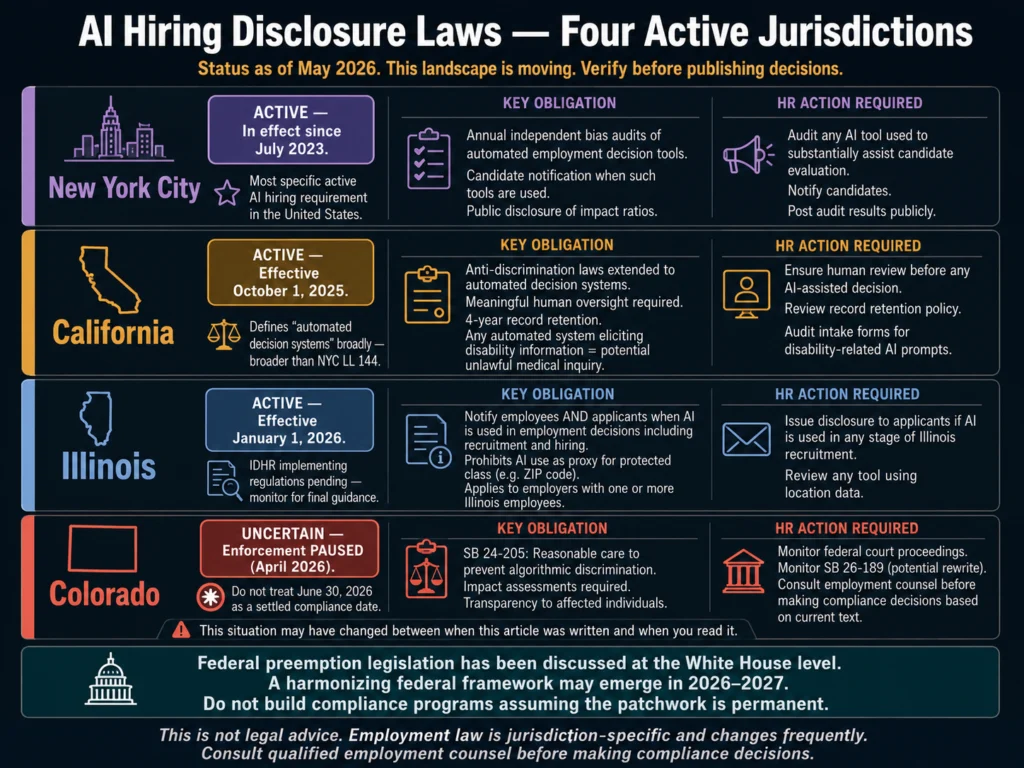
EU AI Act compliance. If your organization has employees in the EU, the EU AI Act applies in two separate phases for employment contexts.

Since February 2025, certain AI practices have been prohibited outright: biometric categorization of employees and emotion recognition in workplace settings.

AI systems used to evaluate or make decisions about employees are classified as high-risk under Annex III. The compliance deadline for these high-risk employment AI systems was originally 2 August 2026.

The EU’s political agreement of 7 May 2026 on the AI Act Omnibus proposes extending that deadline to 2 December 2027, but formal adoption has not yet occurred.

Treat 2 August 2026 as the operative deadline until the Omnibus is formally published in the Official Journal.

If your performance management platform uses AI to generate or recommend ratings, verify compliance with your legal team before August 2026.

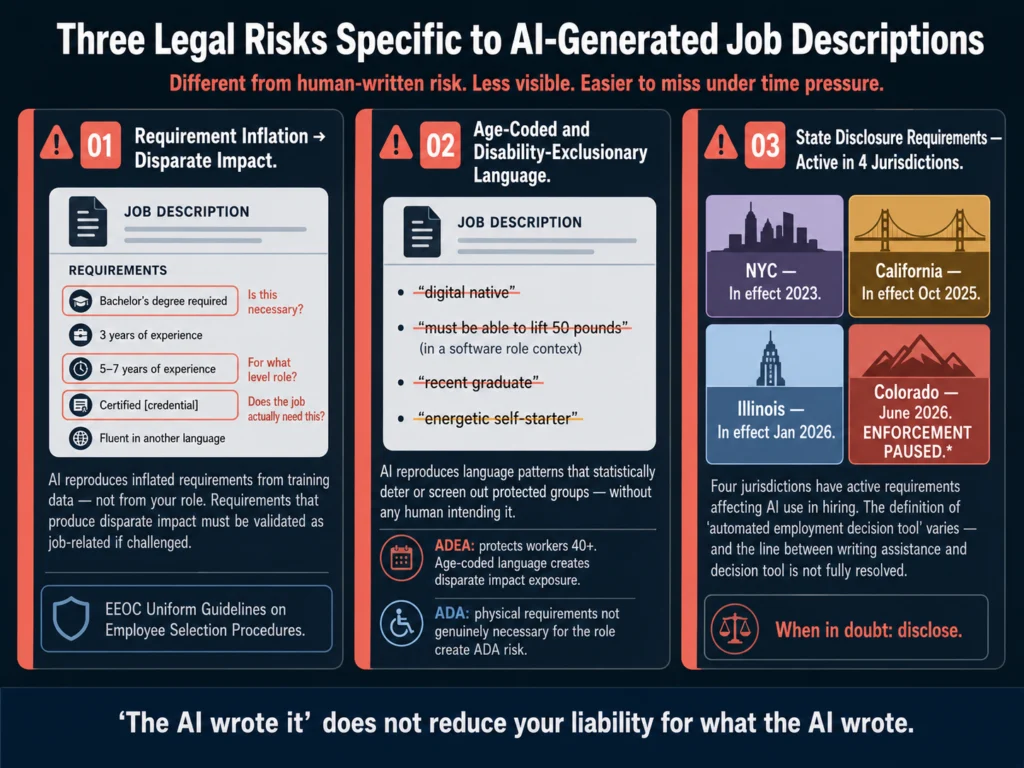
NYC Local Law 144. If you have employees or conduct hiring in New York City, the bias audit and candidate disclosure requirements extend to automated employment decision tools.

Performance management tools that use AI to generate ratings or assessments may fall under this law’s scope.

Confirm with your legal team which specific features in your platform qualify as automated employment decision tools under the NYC definition.

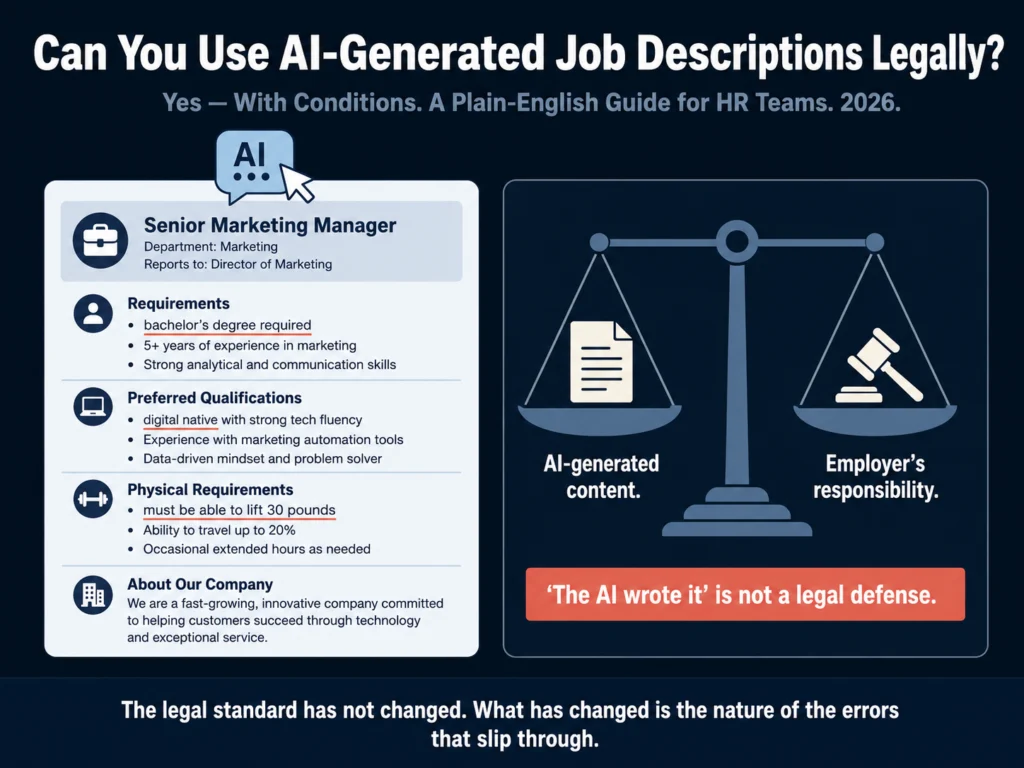
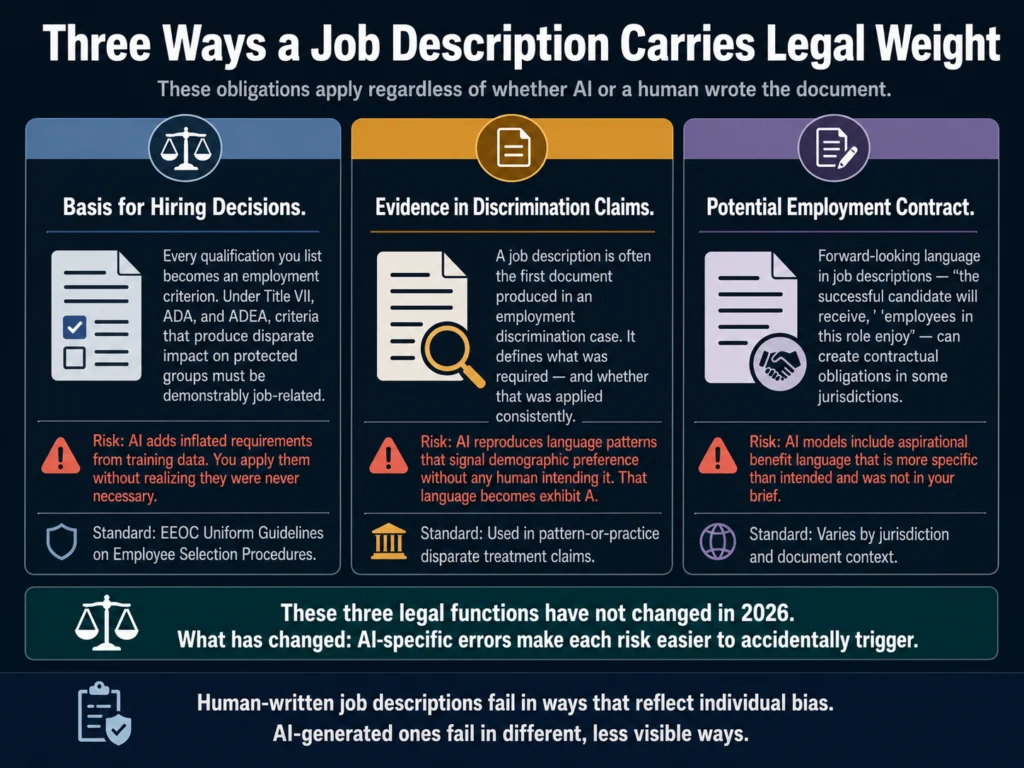
For more on AI legal compliance in employment, read Can You Use AI-Generated Job Descriptions Legally? and AI Bias in Hiring: What HR Teams Need to Know.


Related Reading

  • Best AI Tools for Performance Review Writing
  • AI Bias in Hiring: What HR Teams Need to Know
  • How to Write a 30-60-90 Day Onboarding Plan with AI
  • How to Build an AI Prompt Library for HR Teams
  • AI for HR Communications and Documentation: The Complete Guide

Frequently Asked Questions

How is this different from Article 15 on AI tools for performance review writing?

Article 15 covers writing tools for the narrative drafting step specifically. This article covers all nine steps in a complete review cycle. If you want to know which AI tool to use for drafting a performance narrative, read Article 15. If you want to understand how to use AI across the full cycle from goal setting to follow-through, this is the article.

Can AI run a performance review cycle autonomously without manager involvement?

No, and you should not want it to. The steps where AI saves time are administrative: structuring goals, synthesizing feedback, preparing calibration tables, drafting narrative language. The steps that require human judgment are different: evaluating whether an employee actually met a goal, deciding what a rating means in context of the team, and delivering feedback in a way that motivates rather than demoralizes. AI can flag risk, but managers and HR still need to decide what fair feedback actually means. Organizations that try to use AI to replace manager judgment in reviews end up with legally exposed processes and employee relations problems.

What performance management platforms have the best AI features for full cycle support?

Lattice, Leapsome, and 15Five are the strongest mid-market options for full-cycle AI-assisted performance management. Leapsome’s AI connects directly to goal data, 1:1 notes, and prior reviews to generate contextualized narratives. Lattice’s AI copilot handles review drafts and has recently added calibration support. 15Five focuses on continuous performance management rather than annual review cycles. For enterprise organizations, Workday and SAP SuccessFactors have added AI features, though these are more useful for analytics than for narrative drafting. For tool comparisons within those categories, read Best AI Tools for Performance Review Writing.

How do you handle an employee who knows AI wrote their performance review?

Proactively. If a manager used AI to draft a review narrative, the manager should own the content. The review should reflect the manager’s actual assessment, supported by specific evidence from the year. If an employee questions whether a review was AI-generated, the right response is not to deny it. Confirm that AI assisted with drafting and that every observation in the review is based on documented evidence the manager can cite. A manager who cannot cite specific evidence for any claim in the review has a problem regardless of whether AI was involved. The practice to avoid: approving AI-generated reviews without reading them carefully or substituting evidence for general claims.

Should self-assessments be AI-written by the employee?

Some will. This is already happening. The practical response is to design self-assessment questions that are specific enough to make generic AI responses obvious. “Describe your three most impactful contributions this year” produces AI-friendly responses. “Describe one specific project where you made a decision your manager did not expect, what happened, and what you would do differently” produces responses that are harder to generalize. When self-assessments are used in calibration or evaluation, managers should treat suspiciously fluent or generic responses as requiring a follow-up conversation, not as evidence of high performance.


Conclusion
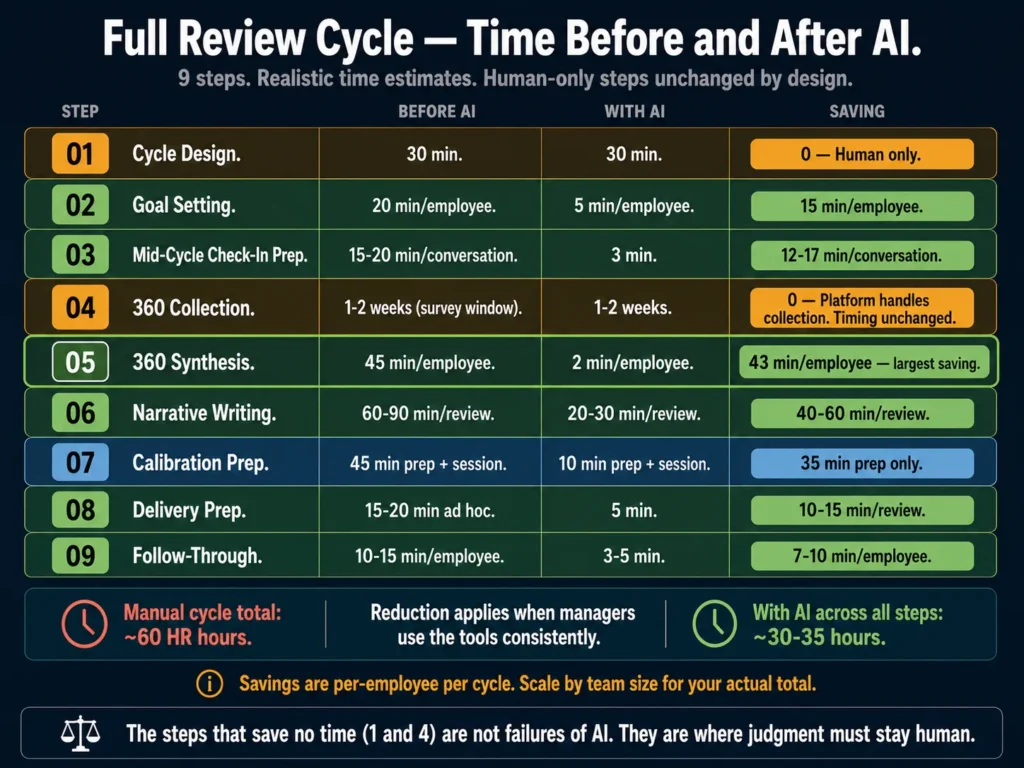
Performance review cycle time savings summary — nine steps showing before and after AI time estimates from goal setting to post-review follow-through
Sixty hours of HR time per review cycle down to thirty to thirty-five hours. The savings compound when managers use the tools consistently. The two steps that stay the same (calibration session, delivery itself) are the steps that require judgment. That is intentional.

A performance review cycle is nine steps. Most HR teams apply AI to one of them.

The savings are real at each stage. Goal setting runs faster when AI converts vague drafts into structured targets. 360 synthesis drops from 45 minutes to 10 minutes.

Calibration prep that used to take an hour takes less than 15 minutes. Delivery prep, post-review planning, and mid-cycle frameworks each have a prompt that works and takes fewer than 5 minutes to run.

None of this replaces the manager’s role. Judgment, calibration, and delivery still require a person. AI reduces the administrative load so managers can focus on the parts only they can handle.

If your review cycle takes 60 hours of HR time per cycle, applying AI across all nine steps can realistically cut that to 30 to 35 hours. That is not a guaranteed number.

It depends on your team size, your current process maturity, and how consistently managers use the tools you give them.

But the reduction is achievable, and it is available with tools most HR teams already have access to.

The nine-step framework and prompts in this article reflect what the Ailovyu team has tested and refined across performance review cycles at organizations of different sizes.
The Ailovyu Team

We research and test AI tools so you can make informed decisions before spending money on them. Every review, comparison, and tutorial on this site is based on actual use, not vendor marketing.
Learn more on our About page.

ailovyu.com

Statistics sourced from Peoplebox.ai Performance Review Cycle Guide (April 2026), Gartner Newsroom “Gartner Unveils Top Predictions for IT Organizations and Users in 2025 and Beyond” (October 22, 2024), and Engagedly AI in Performance Reviews 2026 analysis. EU AI Act timeline sourced from artificialintelligenceact.eu, Holland & Knight (April 2026), and Gibson Dunn (May 2026). Affiliate links in this article earn a commission at no extra cost to you. This article is for informational purposes and does not constitute legal advice.
How to Write Candidate Outreach Emails with AI (2026 Tutorial)

Updated: July 12, 2026

How to write candidate outreach emails with AI in 2026 — 7-step tutorial with prompt templates, before and after examples, and 4-step follow-up sequence

TL;DR
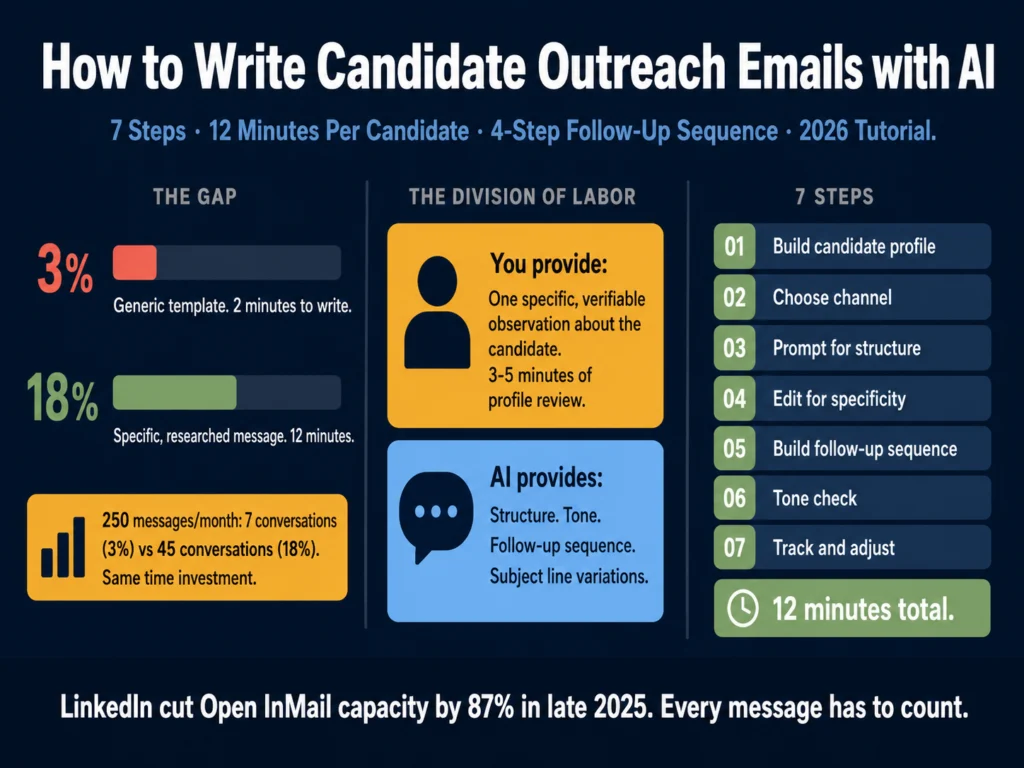
  • LinkedIn cut its open InMail cap by 87% in late 2025. You get fewer shots. Each one has to count.
  • Recruiters using 4-step AI outreach sequences get 2x more replies and a 68% higher interest rate than single-touch outreach, according to Gem’s 2026 analysis of 6.2 million email sequences.
  • 82% of candidate responses come from follow-up messages, not the initial outreach. Most recruiters stop at one touch and leave that 82% on the table.
  • AI handles structure, sequence design, and follow-up drafts well. The one input it cannot generate is a specific, verifiable observation about the candidate. That comes from you.
  • This tutorial covers seven steps: candidate profiling, writing the observation, choosing the right channel, building the prompt, editing the draft, sequencing follow-ups, and tracking what works.

In late 2025, LinkedIn capped Open InMail sends to under 100 per month per account, down from roughly 800.

That’s an 87% drop in capacity through the Open InMail channel specifically (the free-to-send messages you can reach any Open Profile with).

Credit InMail, which costs credits from your Recruiter subscription, was not affected by this change. The platform made a deliberate trade: volume for quality.

If you were sending generic templates, the cap reduction hit you hard. If you were sending specific, well-researched messages, you lost fewer shots than you thought because most of those 800 were going unread anyway.

This tutorial is about building a workflow that makes each outreach message worth sending. AI speeds up the drafting and sequencing.

The research and observation behind each message still comes from you.

Table of Contents
  • Step 1: Build Your Candidate Profile Before Touching Any AI Tool
  • Step 2: Choose Your Channel and Match the Format
  • Step 3: Use the Prompt to Generate Structure, Not the Observation
  • Step 4: Edit the Draft for Specificity
  • Step 5: Build the Follow-Up Sequence
  • Step 6: Run the Final Message Through a Tone Check
  • Step 7: Track What Works and Adjust
  • What This Workflow Looks Like in Practice
  • Related Reading
  • Frequently Asked Questions
  • Conclusion

Step 1: Build Your Candidate Profile Before Touching Any AI Tool

The single most common mistake in recruiter outreach is opening ChatGPT or Claude before reviewing the candidate’s profile.

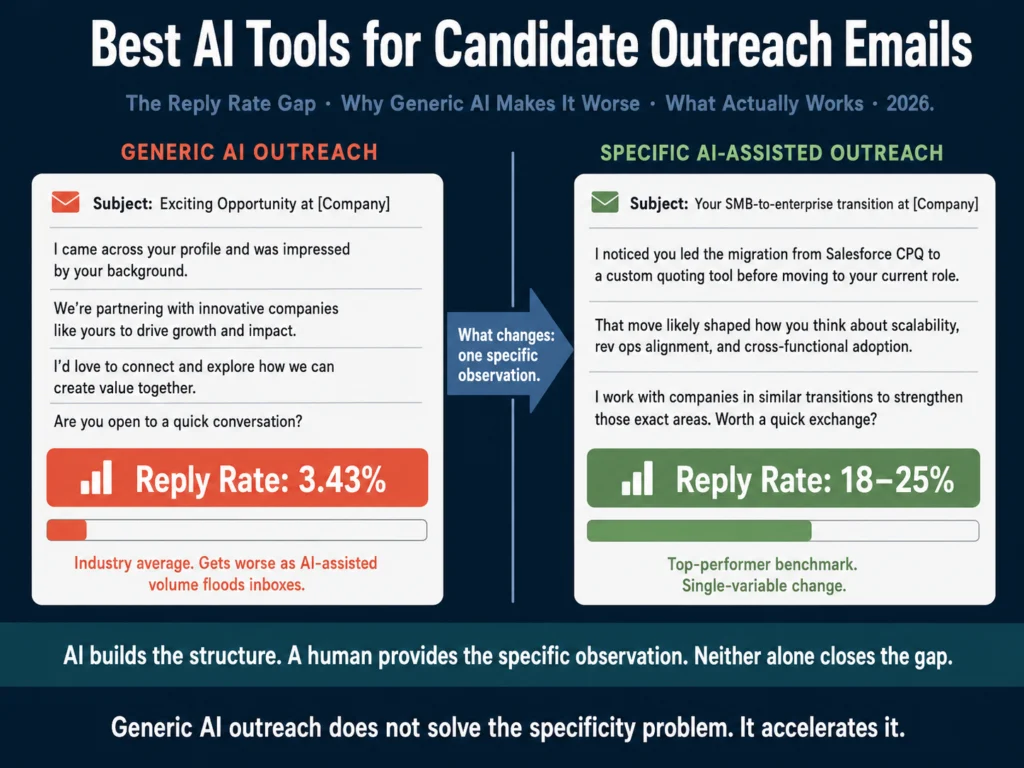
Every AI message you write is only as specific as the input you provide. If you open a prompt with “write an outreach email for a senior data engineer,” you get a template.

If you open a prompt with “write an outreach message for a senior data engineer who built the data infrastructure at two Series B companies and transitioned from a machine learning research background,” you get a starting point worth editing.

Before you write anything, spend 3 to 5 minutes on the candidate’s profile. You are looking for one specific, verifiable observation.

Not “your background is impressive” (every recruiter says this). Something like:

  • “You built Mercado’s analytics pipeline from scratch and reduced query time by 60%”
  • “You moved from research into applied ML at two different companies, both at an early stage”
  • “You led a team through a re-platforming project while maintaining a public-facing product”

Write that observation in one sentence before you open your AI tool. It becomes the anchor of every message in your sequence.


Step 2: Choose Your Channel and Match the Format

Three channels matter in 2026: LinkedIn InMail, email, and LinkedIn connection requests. Each has different constraints.

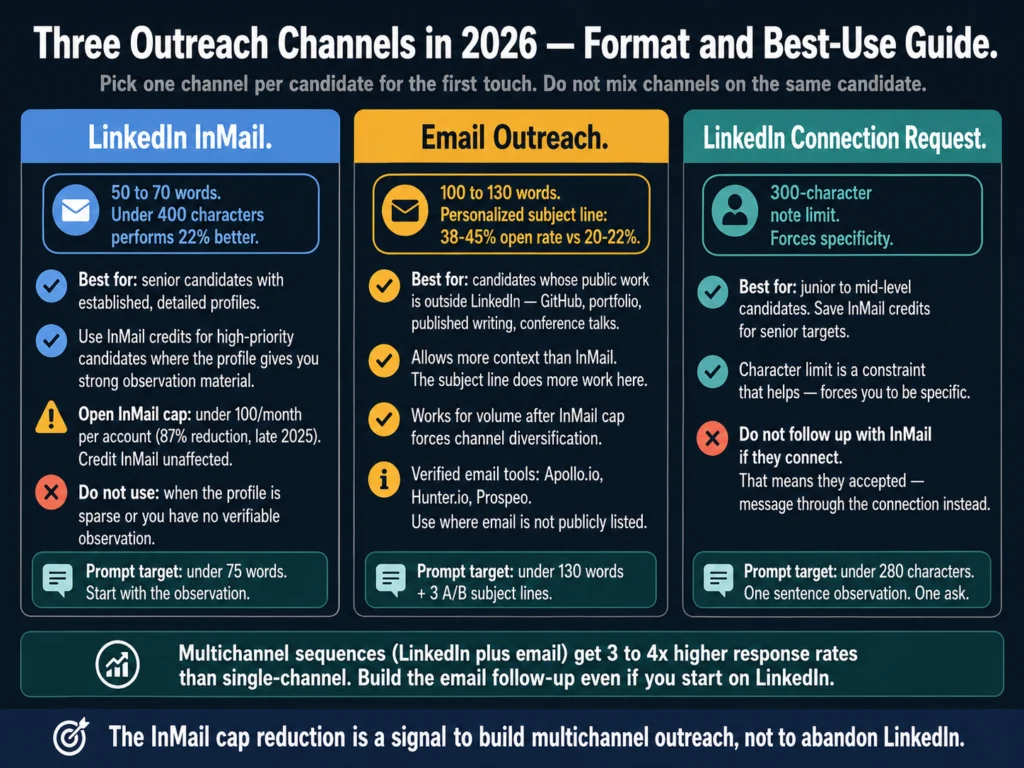
Three candidate outreach channels in 2026 — LinkedIn InMail word limits, email subject line guidance, and connection request character rules for recruiters
Pick one channel per candidate for the first touch. The InMail cap reduction means InMail should be reserved for candidates whose LinkedIn profile gives you strong specific material to reference. Email handles the volume.

LinkedIn InMail is best for senior candidates with established profiles. The sweet spot is 50 to 70 words. Messages under 400 characters perform 22% better, according to LinkedIn Talent Blog benchmarks.

InMail works when the candidate’s profile gives you enough context for a specific observation.

Email allows more length but needs a stronger subject line. Personalized subject lines generate 38 to 45% open rates versus 20 to 22% for generic ones.

Email is better for candidates whose LinkedIn is sparse but whose public portfolio, GitHub, or published work gives you material to reference.

LinkedIn connection requests have a 300-character note limit. Use these for junior or mid-level candidates where InMail credit is better saved. The character limit forces specificity in a way that helps you.

Pick one channel per candidate for the first touch. Do not start with a connection request and then send an InMail if they connect.

Pick the channel that fits their profile and commit.


Step 3: Use the Prompt to Generate Structure, Not the Observation

This is where the two-part division of labor matters. You provide the observation. AI provides the structure, tone, and follow-up language.

Prompt for LinkedIn InMail (50 to 75 words):

Write a LinkedIn InMail from [YOUR NAME], [YOUR TITLE] at [COMPANY].

Candidate name: [NAME]
Role: [JOB TITLE]
My specific observation about their background: [YOUR ONE-SENTENCE OBSERVATION]

Requirements:
- Under 75 words total
- Start with the observation, not a compliment or "I came across your profile"
- Connect the observation to why this specific role is relevant to them
- One ask only: "open to a 15-minute call this week?"
- Tone: direct and peer-level
- No phrases: "exciting opportunity," "impressed by your background,"
  "I hope this message finds you well," "passionate about"
- Do not use the word "leverage"

Prompt for email outreach (100 to 130 words):

Write a candidate outreach email from [YOUR NAME] at [COMPANY].

Candidate name: [NAME]
Role: [JOB TITLE]
Specific observation from their background: [YOUR OBSERVATION]
Why that experience is directly relevant to this role: [ONE SENTENCE]
One specific thing about this company or role: [NOT "fast-growing startup"]

Requirements:
- Subject line: specific to the candidate, under 50 characters
- Body: under 130 words
- Structure: observation, why it matters for this role,
  one specific company detail, one ask
- Tone: warm but direct
- Generate 3 alternative subject lines for A/B testing
- Sign off with your name and LinkedIn URL

Run the output through a quick read before copying it. If you can send the same message to 20 other candidates with minimal changes, it is not specific enough.


Step 4: Edit the Draft for Specificity

AI drafts often preserve the observation you gave them but dilute it in the surrounding sentences.

The most common problem: the observation appears in sentence one, then sentences two and three revert to generic language about the role or company.

Read the output sentence by sentence. Mark any sentence that could apply to any candidate. Rewrite or delete it.

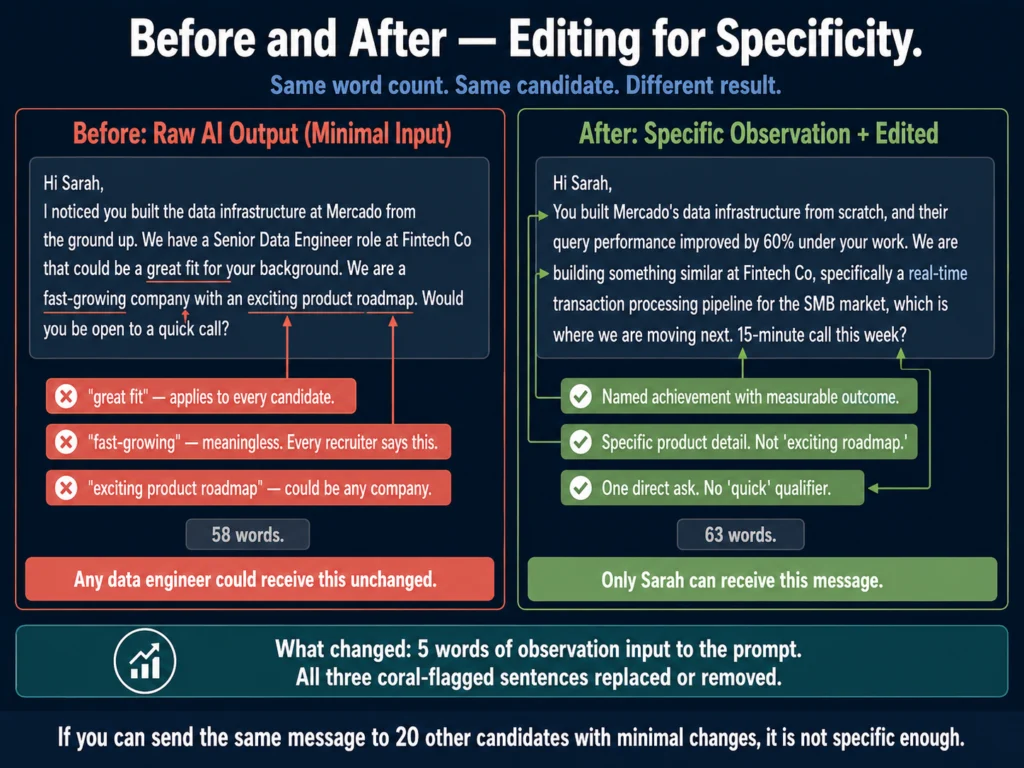
Before and after editing a candidate outreach email for specificity — generic AI output versus a specific observation-led message with real example
Both versions are under 75 words. Length is not the difference. Every sentence in the “before” version applies to any data engineer. Every sentence in the “after” version applies only to Sarah.

Before editing (typical raw output):

Hi Sarah, I noticed you built the data infrastructure at Mercado from the ground up. We have a Senior Data Engineer role at Fintech Co that could be a great fit for your background. We are a fast-growing company with an exciting product roadmap. Would you be open to a quick call?

After editing:

Hi Sarah, You built Mercado’s data infrastructure from scratch, and their query performance improved by 60% under your work. We are building something similar at Fintech Co, specifically a real-time transaction processing pipeline for the SMB market, which is where we are moving next. 15-minute call this week?

The second version is 63 words. The first is 58 words. Length is not the difference. Specificity is.


Step 5: Build the Follow-Up Sequence

Four-step candidate outreach follow-up sequence timeline — Day 0 initial message, Day 4 different angle, Day 9 new fact, Day 15 final low-pressure close
82% of candidate responses come from follow-up messages, not the first touch. Four-step sequences get 2x more replies than single sends. The spacing (Day 0, 4, 9, 15) is based on Gem’s analysis of 6.2 million recruiting sequences.

82% of total candidate responses come from follow-up messages rather than the initial outreach, according to Gem’s 2026 analysis of 6.2 million recruiting sequences. Four-step sequences get 2x more replies than single sends.

Use this prompt to generate the full sequence in one session:

Write a 4-message outreach sequence for a [JOB TITLE] recruiting campaign.

Target candidate type: [DESCRIBE IN 1-2 SENTENCES]
Company: [COMPANY NAME]
One specific thing about the role or team: [SPECIFIC DETAIL]
My observation for the first message: [YOUR OBSERVATION]

Message 1 (Day 0): Under 75 words. Lead with the observation.
One ask.

Message 2 (Day 4): Under 60 words. Different angle from Message 1.
Reference a specific aspect of the team, product, or problem space.
No apology for following up.

Message 3 (Day 9): Under 50 words. Share one concrete fact you have
not mentioned yet. Try a different ask: "Would it help if I sent
the job description?"

Message 4 (Day 15): Under 40 words. Final message. No guilt.
Leave the door open without pressure.

Tone across all four: direct, peer-level. Not sales-like.

The spacing (Day 0, Day 4, Day 9, Day 15) is intentional. 65% of InMail responses arrive within 24 hours and 90% within one week of sending.

If you have not heard back by Day 7, the candidate has seen the message and chosen not to respond to that angle. Day 9 and Day 15 give you two more attempts with different content.


Step 6: Run the Final Message Through a Tone Check

Outreach that reads as sales-like or overly formal gets lower response rates than outreach that reads as peer-to-peer.

Grammarly’s tone detector catches the specific phrases that shift the register in the wrong direction before you send.

Grammarly Pro’s tone detection flags the register mismatches that make outreach read as templated. At $12/month, it pays for itself in one improved sequence.

Three phrases that consistently trigger lower response rates and that Grammarly will flag:

  • “I hope this message finds you well” (formal signal, delete it)
  • “I wanted to reach out” (passive, start with the observation instead)
  • “Please feel free to” (bureaucratic, replace with a direct ask)

Step 7: Track What Works and Adjust

Most recruiters send sequences and never look at which messages generated responses. This makes improvement impossible.

Track three numbers per campaign:

Three outreach tracking metrics for recruiters — open rate by subject line, reply rate by message number, and conversion rate by observation type for AI outreach optimization
Tracking is what separates a 12-minute workflow that keeps getting better from one that stays flat. Most recruiters never look at which specific messages got replies. That makes improvement impossible.

Open rate by subject line.

If you are running A/B subject line tests on email, this tells you which framing got the candidate to open.

A subject line that names the specific technical domain (“Real-time data pipelines at Fintech Co”) consistently outperforms generic ones (“Opportunity at Fintech Co”).

Reply rate by message number.

If most replies come from Message 3 rather than Message 1, that tells you either your initial hook is not compelling enough or your Day 9 angle is significantly better.

Apply the Day 9 angle to Message 1 in your next campaign.

Conversion rate by observation type.

Group your observations into categories: career trajectory observations (“moved from research to applied ML twice”), technical achievement observations (“cut query time by 60%”), and context observations (“you are at a similar stage company to where we were 18 months ago”).

Track which category produces the most responses in your specific market. The answer varies by role type and seniority.

Copy.ai’s workflow automation features let you build this tracking loop directly into your outreach template structure.

You build the observation category as a field, and over time your sequence data maps to it.

Copy.ai’s workflow tools are useful for building repeatable outreach systems. The free plan (2,000 words/month) is enough to test one sequence workflow before paying.


What This Workflow Looks Like in Practice

Here is the full workflow for a single outreach message, timed:

StepTaskTime
1Review candidate profile, write one observation4 minutes
2Choose channel, check format requirements1 minute
3Run prompt, generate draft2 minutes
4Edit for specificity, check every sentence3 minutes
5Run tone check in Grammarly1 minute
6Copy to outreach platform or send directly1 minute
Total12 minutes

At 12 minutes per candidate and 25 working days per month, a recruiter spending 2 hours daily on outreach can contact roughly 250 candidates per month with specific, researched messages. That is a realistic daily load, not a theoretical ceiling.

The economics: at an 18% reply rate (low-end personalized benchmark), 250 messages produces 45 candidate conversations per month.

At a 3% generic template rate, 250 messages produces 7. The difference is 38 conversations, from the same time investment.


Related Reading

  • ChatGPT vs. Claude for HR Writing: Tested Comparison
  • How to Write Rejection Emails with AI (Without Sounding Robotic)
  • Best AI Tools for Candidate Outreach Emails
  • How to Build an AI Prompt Library for HR Teams
  • AI Writing Tools for Recruiters: The Complete Guide
  • AI for HR Communications and Documentation: The Complete Guide

Frequently Asked Questions

How is this tutorial different from Article Best AI Tools for Candidate Outreach Emails?

Best AI Tools for Candidate Outreach Emails covers which tools to use and what each one does well. This tutorial covers the step-by-step workflow for actually executing an outreach campaign with those tools. If you want to know whether to use Claude or Copy.ai, read Article 14 first. If you want to know how to structure your daily outreach process, this article covers that.

My company uses a CRM or ATS with built-in outreach sequences. Should I still use this workflow?

Yes, with adjustments. The observation-first approach applies regardless of what platform sends your messages. Most built-in CRM outreach tools have dynamic field systems that let you add a custom field for your observation. Put your one-sentence observation in that field and build your template around it. The platform handles scheduling and tracking. You handle the observation quality. That division of labor works with Greenhouse, Lever, Manatal, or any sequence tool.

How do I write outreach for candidates in industries I know less about?

Start with LinkedIn’s Skills section on their profile. Look for the most specific skills listed, not the generic ones. “dbt” or “Apache Kafka” tells you more than “data engineering.” Search for what those specific tools are used for and write your observation around the combination: “You work with dbt for transformation and Kafka for streaming, which is exactly the stack we are building on.” You do not need to be a technical expert. You need to demonstrate that you read the profile.

What is the right number of follow-ups before stopping?

Four touches over 15 days is the standard that current data supports. After 15 days with no response, the probability of conversion drops sharply. Some recruiters extend to a fifth message at Day 30 if the role is hard to fill and the candidate is a strong match. Beyond that, move on. Reaching out again months later when you have a different role is legitimate if you acknowledge the previous outreach directly: “I sent you a message in March about a data role. We have a different position that might be a better fit.” That transparency typically gets a better response than pretending the prior outreach did not happen.

LinkedIn’s InMail cap is much lower now. Should I shift to email outreach instead?

For most sourcing workflows in 2026, yes. LinkedIn’s cap reduction in late 2025 effectively forces you to reserve InMail for high-priority targets where the candidate’s LinkedIn profile gives you strong material to reference. Email outreach now handles the volume, and verified email tools (Apollo.io, Hunter.io, Prospeo) help you reach candidates whose email addresses are not publicly listed.

Multichannel sequences combining LinkedIn and email consistently outperform single-channel outreach by a wide margin. The most cited benchmark, from Omnisend’s 2025 omnichannel research, puts the improvement at 287% for three-plus channel campaigns versus single-channel. That figure comes from ecommerce data, but multiple B2B sales benchmarks show 3-4x higher response rates for combined LinkedIn-plus-email sequences versus email alone. The InMail cap reduction is a signal to build multichannel outreach, not to abandon LinkedIn.


Conclusion

The workflow in this tutorial takes 12 minutes per candidate. The output is a researched, specific message with a 4-step follow-up sequence. The alternative is a 2-minute template that gets a 3% reply rate.

The math is straightforward. The execution is the hard part because finding the observation requires looking at each profile individually.

AI cannot automate that step without sacrificing the specificity that drives response rates.

Use AI to build the structure faster. Do the observation work yourself. Track what your data shows about which observations, angles, and follow-up timing produce responses in your specific market.

Adjust your templates based on that data, not on what any guide says should work. The workflow in this tutorial is what the Ailovyu team runs across different role types and markets.

The seven steps hold. Calibrate the angles and timing to your data.

The Ailovyu Team

We research and test AI tools so you can make informed decisions before spending money on them. Every review, comparison, and tutorial on this site is based on actual use, not vendor marketing.
Learn more on our About page.

ailovyu.com

Statistics sourced from Gem 2026 Email Outreach Benchmarks Report (6.2 million email sequences analyzed), HeroHunt AI Outreach Sequences Guide (April 2026), LinkedIn Future of Recruiting 2025, RecruiterFlow Candidate Outreach Guide (2026), Omnisend 2025 Omnichannel Research (287% multichannel figure), and GLOZO LinkedIn InMail Cost Analysis (May 2026, 87% Open InMail cap figure). Affiliate links earn a commission at no extra cost to you.

Best AI Tools for Employee Handbook Writing (2026)

Updated: July 12, 2026

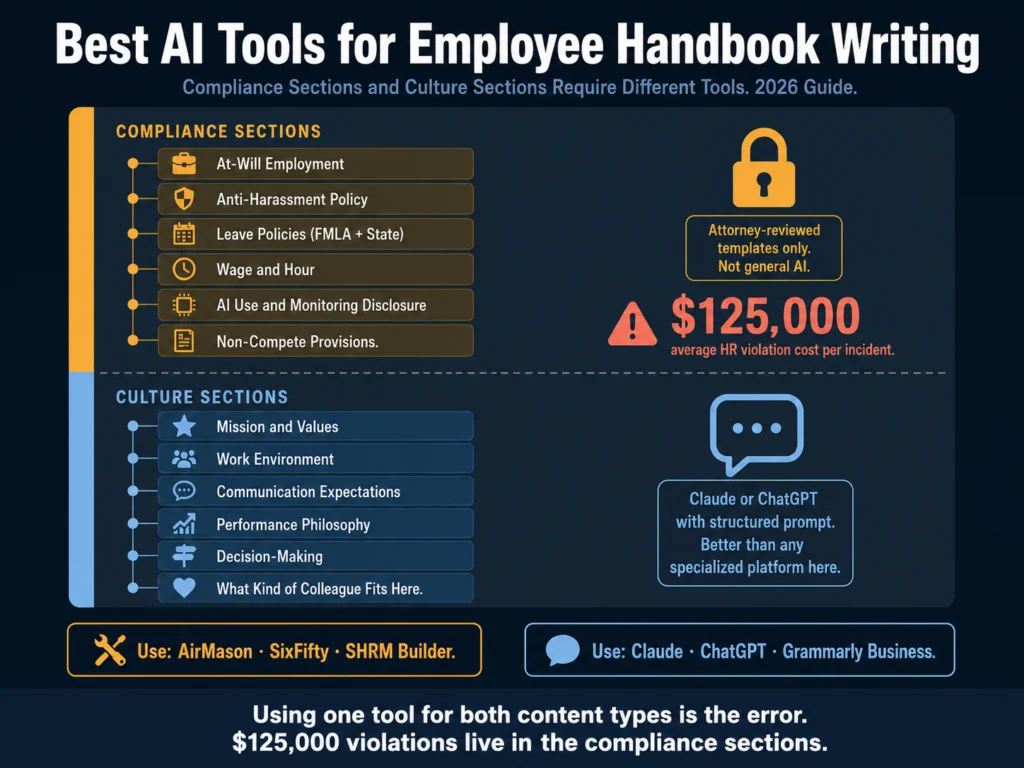
Best AI tools for employee handbook writing 2026 — compliance sections require specialized platforms, culture sections use Claude or ChatGPT

TL;DR
  • HR violations cost small businesses an average of $125,000 per incident. An outdated or legally non-compliant handbook is direct exposure.
  • Employee handbooks have two fundamentally different types of content: compliance sections (required legal language, state-specific policies) and culture sections (values, work environment, expectations). The right AI tool for one is wrong for the other.
  • For compliance sections: Use specialized handbook platforms — AirMason, SixFifty, or the SHRM Handbook Builder — not general AI. These platforms use attorney-reviewed templates updated continuously for state and federal law changes. General AI cannot do this reliably.
  • For culture sections: Claude or ChatGPT with a structured prompt produce better first drafts than any specialized handbook platform.
  • For consistency and tone across the full document: Grammarly Business is the right editing layer — its style guide enforcement catches terminology inconsistencies across a long document more reliably than manual review.
  • Between 2023 and 2026, new laws on AI use in the workplace, SECURE 2.0, remote work monitoring, and DEI language changes made pre-2025 handbooks legally outdated. If your handbook has not been reviewed since 2024, it needs to be.

An employee handbook that no one reads is a compliance problem waiting to become a legal one.

HR violations cost small businesses an average of $125,000 per incident, and one of the most common sources of that exposure is an outdated handbook — policies that do not reflect current law, missing required disclosures, or at-will language that was weakened by well-intentioned additions.

64% of HR managers report lacking the time and resources to keep up with HR compliance challenges. The employee handbook is the document that is most likely to fall behind because it requires both legal expertise and writing time — neither of which is abundantly available in most HR functions.

AI addresses the writing time problem. It does not address the legal expertise problem.

The central argument of this article is that those two dimensions of employee handbook writing require different tools, and conflating them (using a general-purpose AI tool for compliance sections because it is fast) creates exactly the kind of risk handbooks are supposed to prevent.

Table of Contents
  • The Core Distinction: Compliance Sections vs. Culture Sections
    • Compliance Sections
    • Culture Sections
  • Tools for Compliance Sections
    • AirMason — Best for Automated Compliance Monitoring
    • SixFifty — Best for State-Specific Policy Accuracy
    • SHRM Employee Handbook Builder — Best for SHRM Members on a Budget
  • Tools for Culture Sections
    • Claude (Sonnet 4.6) — Best for Authentic Culture Writing
    • ChatGPT (GPT-5.5 Instant) — Best for Speed and Section Variation
  • Prompt Template for Culture Sections
  • Editing the Full Handbook: Grammarly Business
  • What Changed in 2026: The Update Checklist
  • What Legal Must Review Before Finalizing
  • Related Reading
  • Frequently Asked Questions
  • Conclusion

The Core Distinction: Compliance Sections vs. Culture Sections

Every employee handbook contains two fundamentally different types of content.

Treating them the same way is the error most HR teams make when they try to use general AI for handbook writing.

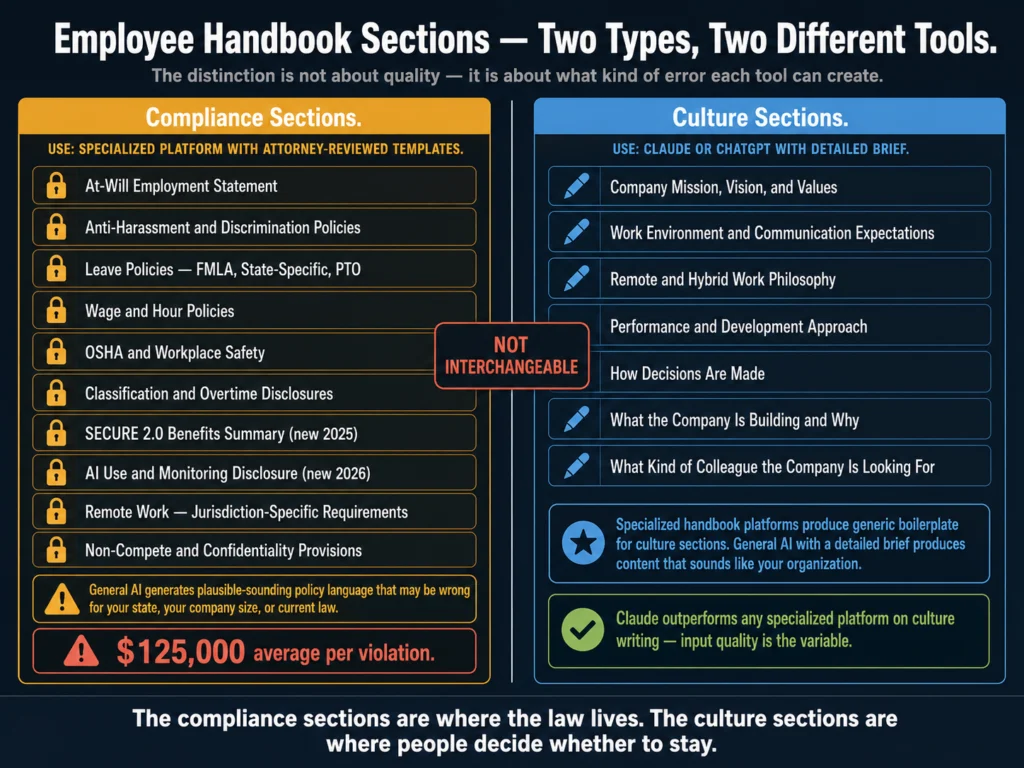
Employee handbook compliance vs culture section guide — showing which sections require specialized legal platforms versus general AI tools like Claude and ChatGPT
The rule is simple but consequential: compliance sections need attorney-reviewed, jurisdiction-specific templates. Culture sections need good input and a capable general AI. Neither tool does the other’s job well.

Compliance Sections

These are the sections where the language is legally required, jurisdiction-specific, and must be accurate:

  • At-will employment statement
  • Anti-harassment and discrimination policies
  • Leave policies (FMLA, state-specific leave, PTO)
  • Wage and hour policies
  • OSHA and workplace safety requirements
  • Classification and overtime disclosures
  • Benefits summary (SECURE 2.0 requirements from 2025)
  • AI use and monitoring disclosure (new in several states for 2026)
  • Remote work policies with jurisdiction-specific requirements
  • Non-compete and confidentiality provisions

The language in these sections carries legal weight. Outdated policies (particularly anti-harassment procedures that list contacts who are no longer with the company, or leave policies that do not reflect current state law) create direct compliance risk.

General AI models generate plausible-sounding policy language that may be wrong for your state, wrong for your company size, or wrong for current law.

They do not know Colorado passed an AI Act effective June 30, 2026. They do not know that California’s leave requirements differ from Illinois’s.

Do not use general AI to write compliance sections. Use a platform with attorney-reviewed, jurisdiction-specific templates. The tools for this are covered below.

Culture Sections

These are the sections where tone and authentic expression matter more than legal precision:

  • Company mission, vision, and values
  • Work environment and communication expectations
  • Remote and hybrid work philosophy
  • Performance and development approach
  • How decisions are made
  • What the company is building and why
  • What kind of colleague the company is looking for

For these sections, a specialized handbook compliance platform is the wrong tool — its attorney-reviewed templates produce generic, formal language that fails to capture what makes your organization specific.

General AI with a good prompt produces better culture content than any specialized platform.


Tools for Compliance Sections

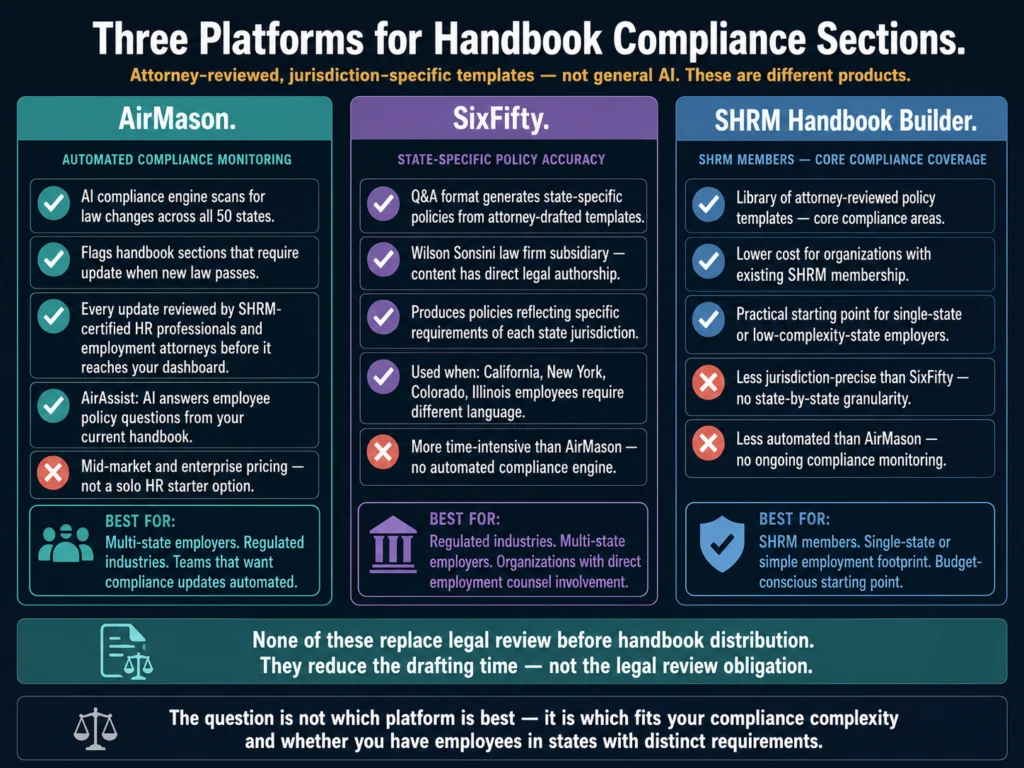
Three employee handbook compliance platforms compared — AirMason for automated monitoring, SixFifty for state-specific accuracy, and SHRM Handbook Builder for members
These three platforms use attorney-reviewed, jurisdiction-specific templates. The difference between them is how automated the compliance monitoring is and how jurisdiction-granular the output becomes. AirMason automates ongoing updates. SixFifty produces the most state-specific output. SHRM is accessible for existing members.

AirMason — Best for Automated Compliance Monitoring

AirMason is the most feature-complete employee handbook platform for compliance-focused organizations.

Its AI compliance engine scans for law changes across all 50 states and flags when your handbook requires an update.

When a new law passes — such as California’s SB 294 (the Workplace Know Your Rights Act, effective January 2026) — AirMason’s relevance filtering matches the change to your specific company configuration before surfacing it.

Critically, every update is reviewed by AirMason’s in-house team of SHRM-certified HR professionals and employment attorneys before it reaches your dashboard. This is the distinction from general AI: the content is attorney-verified, not AI-generated.

AirMason also includes AirAssist — an AI assistant that answers employee questions based on your current policies.

This addresses one of the most practical handbook problems: employees who would ask HR rather than searching the handbook. AirAssist deflects routine policy questions without requiring HR staff time.

Pricing: Contact AirMason for current pricing. Mid-market and enterprise focused.

Best for: Organizations in heavily regulated industries, multi-state employers, or any company that wants automated compliance updates rather than manual annual reviews.

SixFifty — Best for State-Specific Policy Accuracy

SixFifty is a subsidiary of the law firm Wilson Sonsini. Its handbook builder uses a question-and-answer format to generate state-specific policies from attorney-drafted templates.

For organizations with employees across multiple states — where California, New York, Colorado, and Illinois each have distinct requirements — SixFifty produces policies that reflect the specific requirements of each jurisdiction.

The Q&A format is more time-intensive than AirMason’s compliance engine, but it produces higher specificity for organizations in regulated industries where policy precision matters more than speed.

Pricing: Custom — request a demo from SixFifty.

Best for: U.S.-based companies in regulated industries (healthcare, finance, government contracting), multi-state employers, and organizations where employment counsel is directly involved in handbook development.

SHRM Employee Handbook Builder — Best for SHRM Members on a Budget

The SHRM Handbook Builder provides a library of attorney-reviewed policy templates that SHRM members can customize and combine into a handbook.

It is less automated than AirMason and less jurisdiction-precise than SixFifty, but it is accessible at a lower cost for organizations that already maintain SHRM membership.

The template library covers core compliance areas without state-by-state granularity.

For organizations with employees in a single state or in states without particularly complex employment law, SHRM’s builder is a practical starting point.

Pricing: Included with SHRM membership tiers. Verify current access levels on SHRM’s website.

Best for: SHRM members who need a compliant starting framework without the cost of a dedicated handbook platform.


Tools for Culture Sections

Claude (Sonnet 4.6) — Best for Authentic Culture Writing

Culture sections — values statements, communication expectations, work environment descriptions — fail when they sound like HR boilerplate.

A values statement that says “we are committed to excellence, integrity, and collaboration” says nothing that distinguishes your organization from any other.

A culture section that reflects the actual working conditions, decision-making style, and expectations of your specific team is the one employees actually read.

Claude produces more distinctive, specific cultural language than any other tool when given a detailed brief.

The key is input quality: a prompt that includes your actual mission context, how decisions are made, what the team is working toward, and what kind of person thrives at your organization produces culture content that sounds like it was written by someone who works there.

In testing culture section writing for a 120-person SaaS company, Claude produced a work environment description that the founding team said “sounds like us” — direct language, no corporate softening, specific about the ambiguity that characterizes the current stage.

The same prompt in a specialized handbook platform produced a generic paragraph indistinguishable from any other mid-stage startup’s handbook.

Best for: Mission and values sections, communication expectations, work environment descriptions, performance philosophy.

Pricing: Free (Sonnet via Claude.ai) or $20/month (Pro).

ChatGPT (GPT-5.5 Instant) — Best for Speed and Section Variation

ChatGPT generates culture section drafts faster and produces more variations per session.

When you need to show two or three versions of a values statement to the leadership team before selecting one, ChatGPT’s breadth is more useful than Claude’s quality-over-quantity approach.

Canvas makes the iterative editing workflow for handbook sections more efficient than Claude’s interface — you can highlight a specific paragraph and request a rewrite without regenerating the full section.

Best for: High-variation drafting, leadership team review sessions, iterative editing through Canvas.

Pricing: Free (GPT-5.5 Instant) or $20/month (Plus — removes usage limits and adds GPT-5.5 Thinking, useful for iterating through multiple handbook section drafts in a single session).


Prompt Template for Culture Sections

This prompt generates culture sections that reflect your specific organization rather than generic HR language.

You are writing the [SECTION NAME] section of an employee handbook for 
[COMPANY NAME], a [COMPANY SIZE]-person [INDUSTRY] company based in 
[LOCATION/REMOTE STATUS].

Company context:
- What the company is building and why: [MISSION IN 1–2 SENTENCES]
- Stage of the company: [EARLY-STAGE / GROWTH / ESTABLISHED]
- How decisions are made: [CENTRALIZED / DISTRIBUTED / CONSENSUS-BASED / etc.]
- What kind of person thrives here: [2–3 HONEST CHARACTERISTICS]
- What makes working here genuinely different from competitors: 
  [ONE SPECIFIC, HONEST ANSWER — not "we move fast" or "great culture"]
- What does not work here, or what kinds of people should not apply:
  [HONEST ANSWER]

Write [SECTION NAME] in [WORD COUNT] words.

Requirements:
- Sound like your company actually wrote it — not a generic handbook template
- Use plain language — no corporate jargon, no abstract values statements 
  that could apply to any company
- Be honest about what the company is at this stage — do not oversell
- Do not make promises about compensation, growth, or stability that 
  the company has not committed to
- Avoid the following phrases: "passionate," "rockstar," "fast-paced 
  environment," "wear many hats," "family," "excellence," "integrity"
  unless they describe something specific

Editing the Full Handbook: Grammarly Business

A handbook written across multiple tools (compliance sections from AirMason or SixFifty, culture sections from Claude, employee-contributed sections from HR team members) will be tonally inconsistent unless edited as a unified document.

The contrast between attorney-drafted policy language and warm values statements is appropriate. Inconsistency within those categories — three different terms for the same policy, shifting formality within a single section — is not.

Grammarly Business’s style guide enforcement is the right editing layer for a handbook. You define preferred terminology, forbidden phrases, and tone requirements.

Grammarly applies them across the entire document, flagging inconsistencies that a human editor reading sequentially would miss.

→ Grammarly Business at $15/user/month adds style guide enforcement that catches terminology inconsistencies across a full handbook document.


What Changed in 2026: The Update Checklist

Between 2023 and 2026, new laws made pre-2025 handbooks legally outdated almost overnight, according to SixFifty’s handbook update analysis.

Five areas that every handbook should address for 2026:

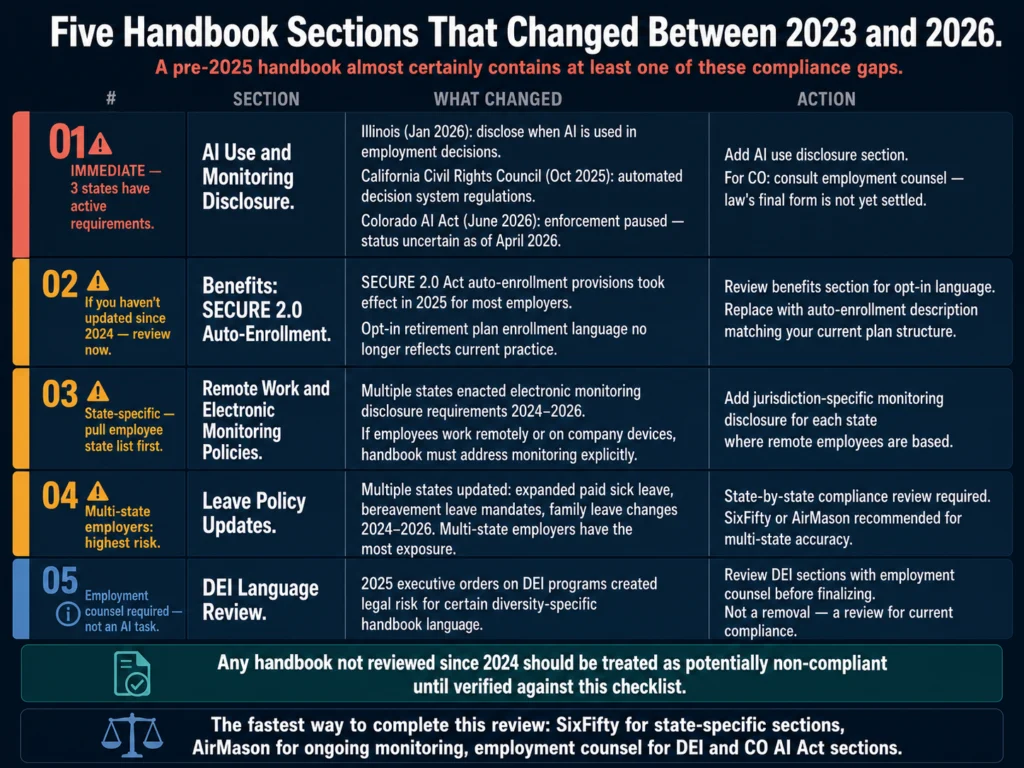
2026 employee handbook update checklist — five areas requiring review including AI disclosure, SECURE 2.0, remote work monitoring, leave policies, and DEI language changes
Between 2023 and 2026, new laws on AI use, SECURE 2.0, electronic monitoring, leave policy, and DEI language made pre-2025 handbooks legally outdated. A handbook that has not been reviewed since 2024 almost certainly contains at least one of these gaps.

1. AI Use and Monitoring Disclosure Illinois (effective January 1, 2026) requires disclosure when AI is used in employment decisions.

California’s Civil Rights Council regulations (effective October 1, 2025) address automated decision systems broadly. Colorado’s AI Act (SB 24-205, effective June 30, 2026, enforcement status uncertain) introduces impact assessment requirements for employers using high-risk AI systems.

As of April 2026, a federal court has paused enforcement during ongoing litigation, and the Colorado legislature is considering SB 26-189 which may substantially rewrite the law.

If your organization has employees in Colorado and uses AI in employment decisions, monitor developments and consult employment counsel before finalizing handbook language on this section — the law’s final form is not yet settled.

For all three states, if your handbook does not address how the company uses AI in hiring, performance management, or employee monitoring, it needs to be reviewed.

2. SECURE 2.0 Auto-Enrollment The SECURE 2.0 Act’s auto-enrollment provisions took effect in 2025 for most employers.

If your benefits section still describes opt-in retirement plan enrollment, it may not reflect current practice or legal requirements.

3. Remote Work and Electronic Monitoring Policies Multiple states have enacted electronic monitoring disclosure requirements.

If your company monitors employee activity on company devices or networks — or if employees work remotely — your handbook should address this explicitly with jurisdiction-specific language.

4. Leave Policy Updates Multiple states updated leave requirements between 2024 and 2026: expanded paid sick leave, bereavement leave mandates, and changes to family leave.

A state-by-state compliance review is necessary for organizations with multi-state employees.

5. DEI Language Review The Trump administration’s 2025 executive orders on DEI programs created legal risk for certain types of diversity-specific language in employee handbooks.

Organizations should review their DEI sections with employment counsel to ensure they reflect current compliance requirements without creating new legal exposure.


What Legal Must Review Before Finalizing

Regardless of which tools you used to draft the handbook, legal review is non-negotiable before the document is distributed to employees.

The sections that carry the most legal risk and require the closest review: at-will employment language (especially how it interacts with progressive discipline language elsewhere in the handbook), leave policies for each state in which you have employees, non-compete and confidentiality provisions, and any AI use or monitoring disclosure added for 2026 compliance.

Handbooks should also be reviewed for internal consistency — particularly between the discipline and termination sections and the performance review language.

Handbook language that implies a specific process for termination creates an obligation to follow that process.

A termination that does not follow the handbook’s stated procedure is a legal risk even if the at-will employment clause is preserved.


Related Reading

  • How to Write a 30-60-90 Day Onboarding Plan with AI
  • Can You Use AI-Generated Job Descriptions Legally?
  • Best AI Tools for Performance Review Writing
  • Using AI to Write Onboarding Documentation — A Full Guide
  • AI for HR Communications and Documentation — The Complete Guide

Frequently Asked Questions

Can I use ChatGPT or Claude to write an entire employee handbook?

For the culture and narrative sections, yes — and the output is often better than what specialized platforms produce for those sections. For the compliance sections (leave policies, anti-harassment procedures, classification language, required disclosures), no. General AI models generate policy language that sounds authoritative but may be wrong for your state, your company size, or current law. The risk is not immediately visible: the language looks like a real policy. It becomes visible when an employee files a complaint and the policy does not comply with current state law. Use attorney-reviewed templates for compliance sections and general AI for culture sections.

How often does an employee handbook need to be updated?

At minimum, annually. In practice, compliance-driven updates should be triggered by law changes — which means the right answer is to track employment law changes continuously and update affected sections as they occur, rather than conducting one large annual review. Specialized platforms like AirMason automate this monitoring. For organizations without a dedicated handbook platform, the HR compliance calendar for 2026 includes January as the month to review and update the handbook, before the start of the employment year. Any significant law change in your operating states should trigger an immediate handbook review of the relevant sections.

Does an employee handbook create an employment contract?

It can, inadvertently. Courts in multiple states have ruled that handbook language implying specific procedures for termination, guaranteed employment periods, or binding promises about benefits creates implied contractual obligations. This is why at-will employment language must be explicit, why forward-looking promises about compensation or career growth should be avoided, and why progressive discipline language should be carefully reviewed to ensure it does not imply that dismissal can only occur after a specific sequence of steps. An employment attorney reviewing the handbook before distribution is the best protection against creating unintended contractual obligations.

What is the right length for an employee handbook?

Long enough to cover required disclosures and core policies; short enough that employees will actually read it. For most organizations, 30 to 50 pages covers the necessary ground without becoming a document that functions as an obstacle rather than a resource. The most common length error is bloat from policies that belong in operational documentation — specific procedures, step-by-step workflows, role-specific requirements — rather than in the handbook itself. The handbook should set principles and legal requirements. Detailed procedures go elsewhere.

Can one handbook cover employees in multiple states?

With careful structuring, yes. The most common approach is a core handbook covering company-wide policies and culture, with state-specific addenda covering jurisdiction-specific requirements for each state where you have employees. This structure is more maintainable than trying to accommodate every state’s variations within a single document — state addenda can be updated when specific laws change without requiring a review of the entire handbook. SixFifty and AirMason both support this structure. General AI tools do not produce state-specific addenda reliably — this is precisely the use case where attorney-reviewed jurisdiction-specific templates are essential.


Conclusion

The employee handbook is the only HR document that serves simultaneously as a legal compliance instrument, an employment contract modifier, a cultural onboarding tool, and an employee reference document.

No other document HR produces carries that range of functions — or that range of risk when it fails.

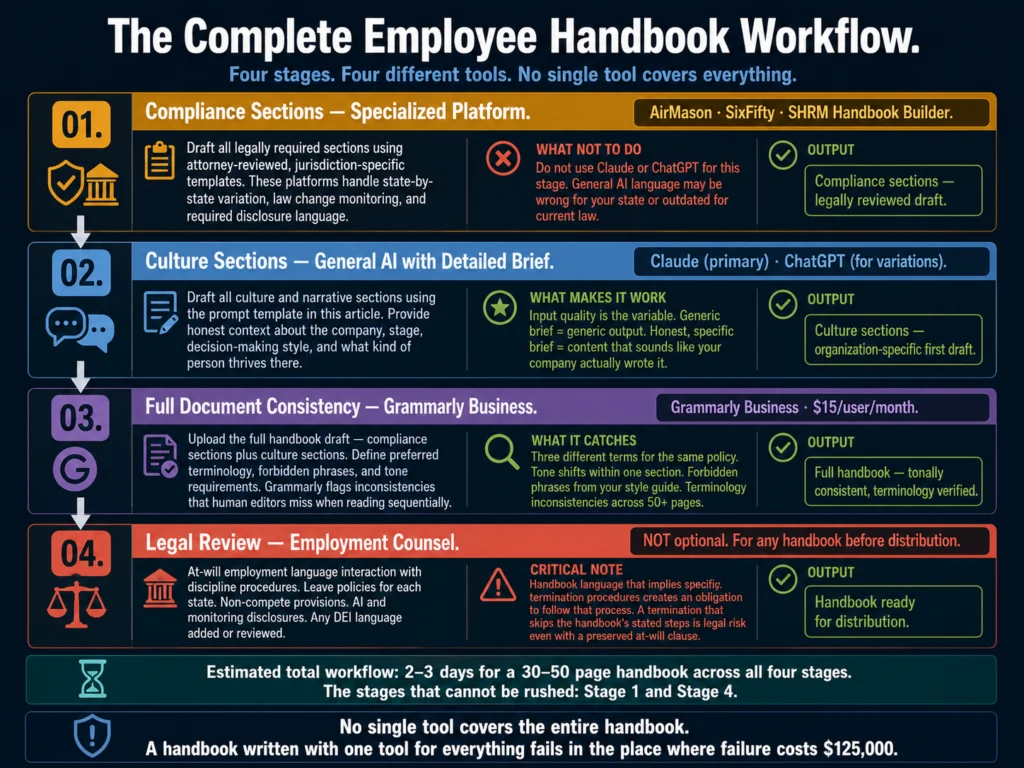
Complete employee handbook writing workflow 2026 — compliance platforms for legal sections, Claude or ChatGPT for culture sections, Grammarly Business for consistency, and legal review before distribution
No single tool covers the entire handbook. A handbook that tries to use one tool for everything will fail in the place where failure is most expensive — the compliance sections.

AI tools make the handbook writing process faster and, in the right sections, produce better cultural content than most HR teams generate under time pressure.

But the compliance sections (the sections where $125,000-per-incident violations live) require attorney-reviewed templates, not AI generation.

The right workflow is not complicated: specialized platform for compliance sections, Claude or ChatGPT for culture sections, Grammarly Business for consistency across the full document, and employment counsel for legal review before distribution.

No single tool covers all of it. A handbook that tries to use one tool for everything will fail in the place where failure is most expensive.

The compliance vs. culture framework in this article is what the Ailovyu team has found consistently holds up across organizations at different sizes and stages.

The boundary between those two types of content is where most handbook errors originate.

The Ailovyu Team

We research and test AI tools so you can make informed decisions before spending money on them. Every review, comparison, and tutorial on this site is based on actual use, not vendor marketing.
Learn more on our About page.

ailovyu.com

Statistics sourced from AirMason 2026 California Labor Law Compliance analysis, GoCo HR compliance resources, SixFifty employee handbook update checklist (2026), and Mitratech Mineral 2026 handbook update guide. This article is for informational purposes and does not constitute legal advice. Affiliate links in this article earn a commission at no extra cost to you.
Best AI Tools for Performance Review Writing (2026)

Updated: July 12, 2026

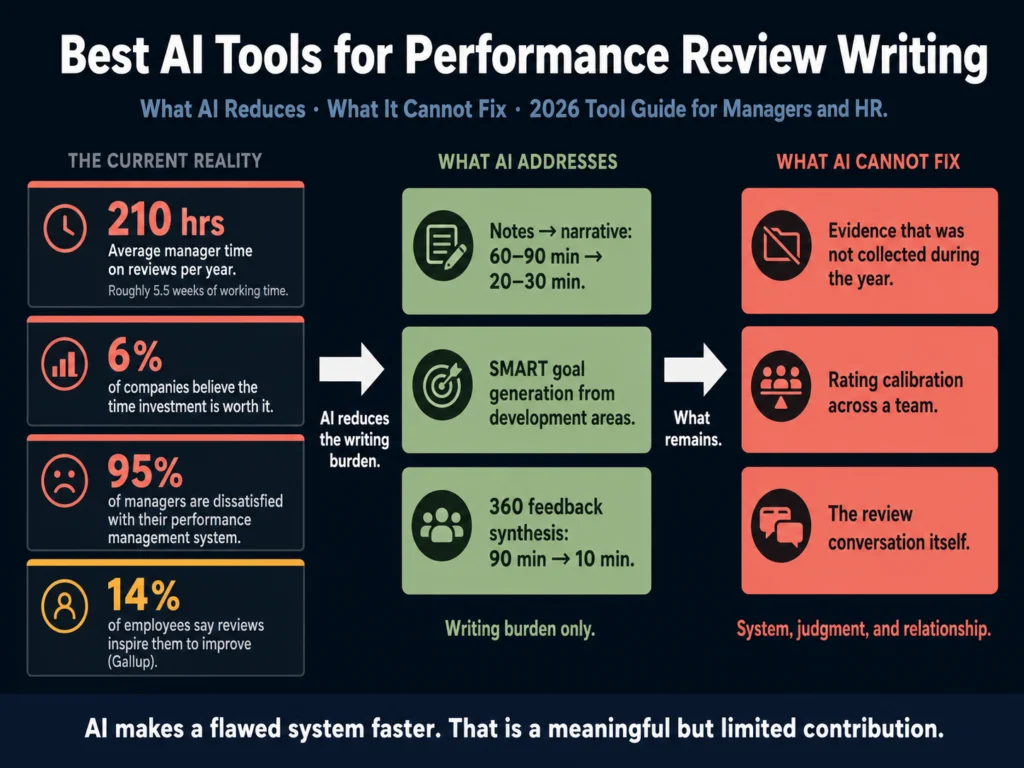
Best AI tools for performance review writing 2026 — 210-hour manager burden, tool comparison, and what AI cannot fix in the review process

TL;DR
  • Managers spend an average of 210 hours per year on performance review activities. AI meaningfully reduces the drafting time, but cannot fix the underlying system, the bias, or the conversation.
  • 95% of managers are dissatisfied with their performance management systems. AI makes a flawed system faster, not better. The tools in this article address the writing burden, not the structural problem.
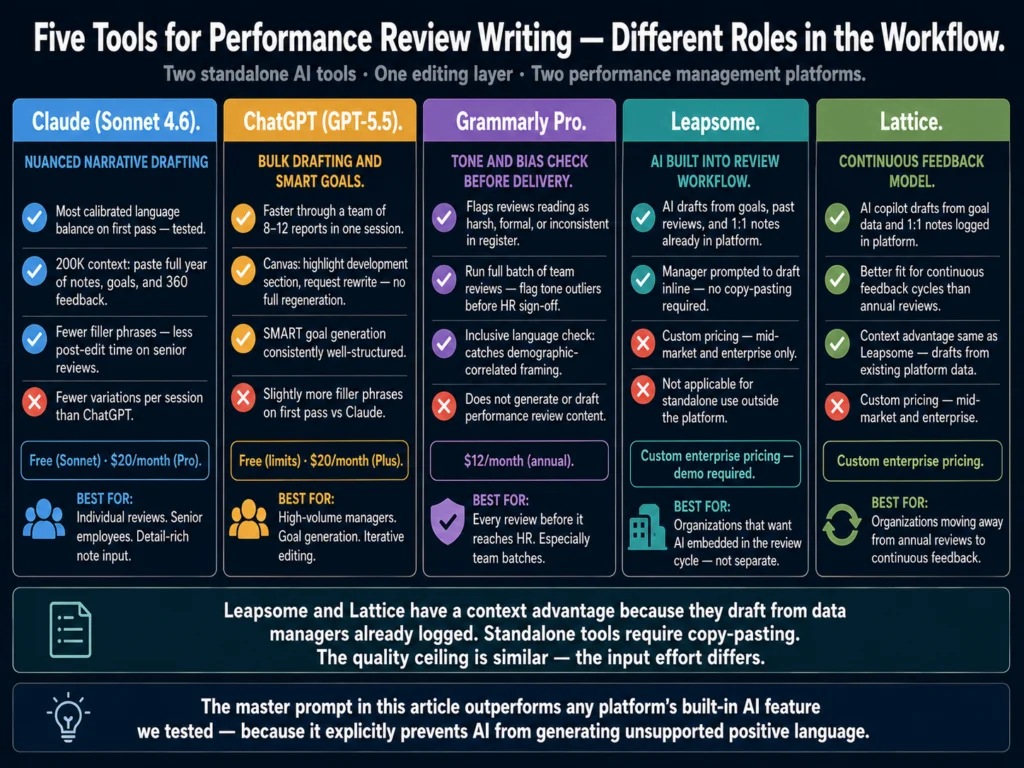
  • Best for narrative drafting from notes: Claude (Sonnet 4.6) produces more nuanced, balanced review language than ChatGPT on the first pass. Both work with a structured prompt.
  • Best for tone and bias-checking a draft: Grammarly Pro flags language that reads as vague, harsh, or inconsistent before the review reaches the employee.
  • Best for full performance management with AI writing features: Leapsome and Lattice both include AI writing assistance within their review cycles. Worth evaluating if you are also re-platforming your performance management process.
  • The most common AI mistake in performance reviews: generating positive-sounding language that contains no evidence. A review that says “consistently demonstrates strong leadership” without a single example is legally weak and developmentally useless.

The math on performance reviews is grim.

Managers spend an average of 210 hours per year on performance review activities, according to 2026 benchmarking data, roughly five and a half weeks of working time per year, every year, on a process that only 6% of companies believe is worth the time investment.

95% of managers express dissatisfaction with their performance management systems, according to PerformYard’s 2025 State of Performance Management Report.

Only 14% of employees say reviews inspire them to improve, according to Gallup. 90% of HR leaders admit that performance reviews fail to accurately reflect employee contributions, a finding sourced to Corporate Executive Bord research.

These numbers describe a process that consumes enormous management bandwidth while producing almost no one who thinks it works.

AI does not fix this problem. It makes the writing portion of it faster.

That is a meaningful but limited contribution — the difference between spending 210 hours and spending 140 hours on a process that still produces documentation neither managers nor employees find valuable.

The tools in this article are worth using. But they are worth using with a clear-eyed view of what they can and cannot address.

Table of Contents
  • What Makes Performance Review Writing Different
  • What AI Handles Well in Performance Review Writing
    • Converting Notes to Narratives
    • Ensuring Balance
    • Generating Development Goals
    • Summarizing 360 Feedback
    • Language Calibration Across a Team
  • What AI Cannot Do in Performance Reviews
  • The Master Prompt for Performance Review Narrative Drafting
  • Tool Recommendations
    • Claude (Sonnet 4.6) — Best for Nuanced Narrative Drafting
    • ChatGPT (GPT-5.5 Instant) — Best for Bulk Drafting and Goal Generation
    • Grammarly Pro — Best for Tone and Bias Checking Before Delivery
    • Leapsome — Best Full-Platform Option with AI Writing Assistance
    • Lattice — Best for Organizations Moving Toward Continuous Feedback
  • A Note on Copy.ai for Performance Reviews
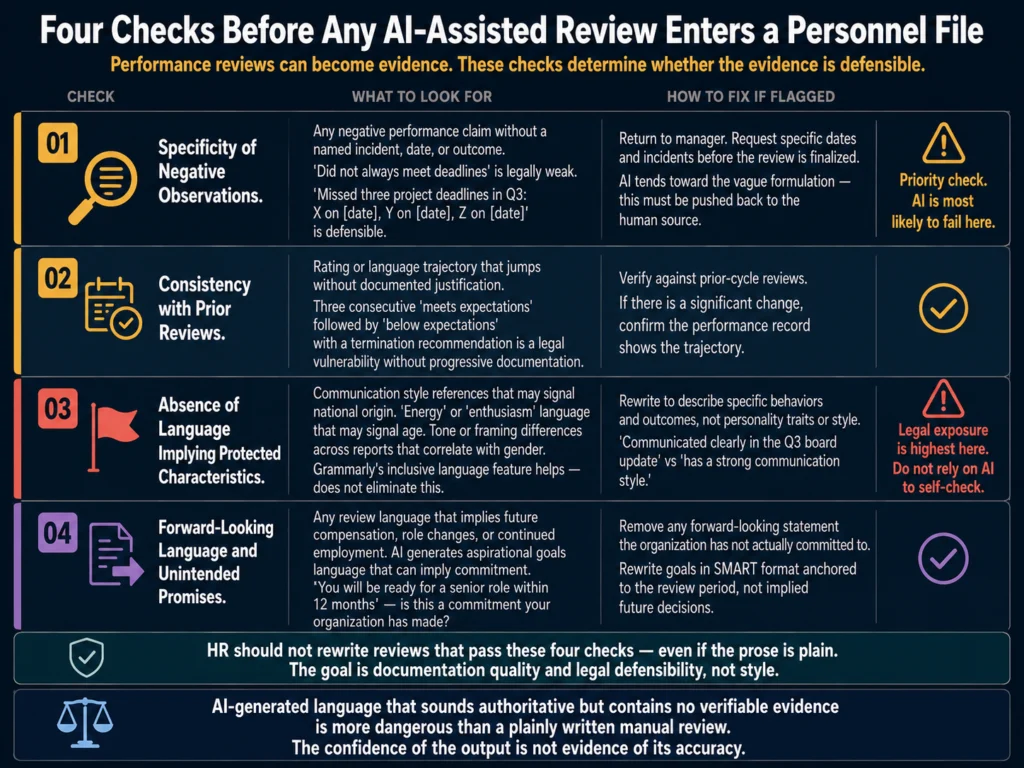
  • Legal Consideration: What HR Should Check Before Finalizing
  • Related Reading
  • Frequently Asked Questions
  • Conclusion

What Makes Performance Review Writing Different

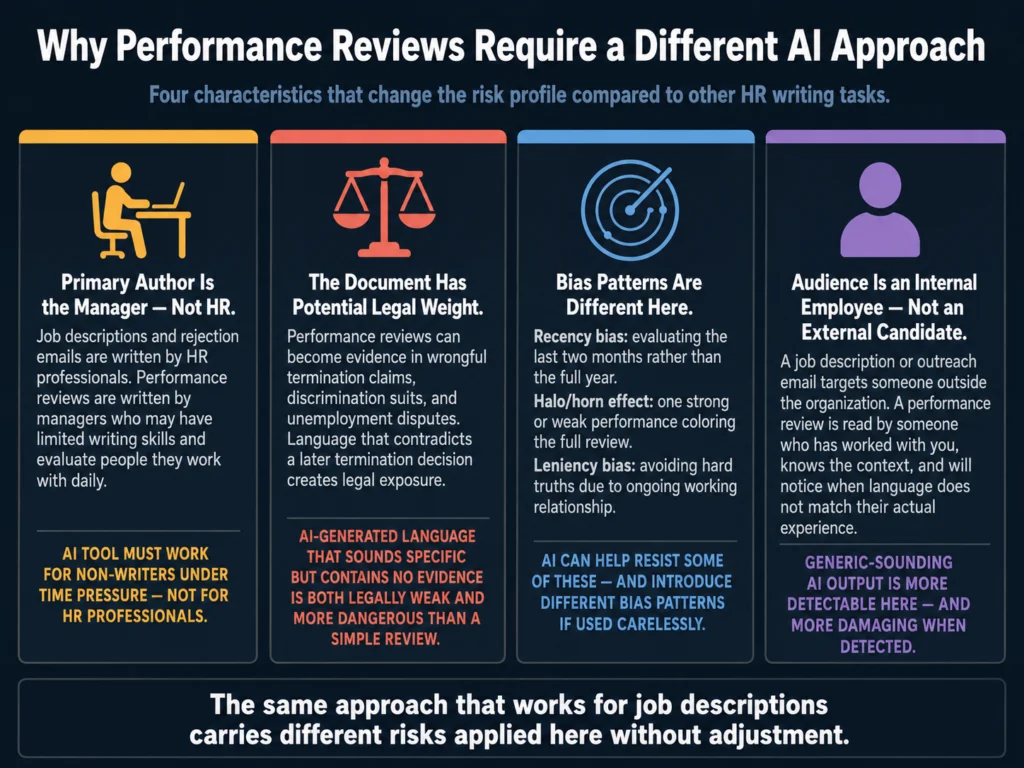
Performance review writing differs from every other HR writing task in this cluster in four specific ways that affect how AI tools should be applied.

Four ways performance review writing differs from other HR writing tasks — primary author is the manager, legal weight, distinct bias patterns, and internal employee audience
These four characteristics mean that the same AI approach that works for job descriptions and rejection emails produces different risks when applied to performance reviews without adjustment.

The primary author is the manager, not HR.

Unlike job descriptions or rejection emails, performance reviews are written by the people being evaluated and the managers evaluating them.

AI tools for performance review writing must work for managers who may not have strong writing skills and who are evaluating people they work with every day — not for HR professionals writing on behalf of the organization.

The document has potential legal weight.

Performance reviews can become evidence in wrongful termination claims, discrimination suits, and unemployment disputes.

Language that appears to contradict a later termination decision, or that fails to document performance issues that were used to justify a dismissal, creates legal exposure.

AI-generated performance reviews that are approved without legal-language review carry this risk.

The bias patterns are distinct.

Performance review writing is susceptible to biases that do not apply to other HR documents: recency bias (evaluating the last two months rather than the full year), halo and horn effects (one strong or weak performance coloring the entire evaluation), and leniency bias (avoiding hard truths because the manager has an ongoing working relationship with the person).

AI can help structure reviews to resist some of these biases — and can introduce new ones if used carelessly.

The audience is an internal employee, not an external candidate.

This changes the tone, the legal obligations, and the development purpose.

A performance review that is motivating and specific to the employee’s actual contributions is a different document from a review that reads as generic and defensive.


What AI Handles Well in Performance Review Writing

Converting Notes to Narratives

The most practical AI use case for performance reviews is note-to-narrative conversion.

A manager who keeps running notes on a direct report throughout the year — accomplishments, feedback conversations, project outcomes, missed targets — has the evidence they need for a strong review.

What they often lack is the time and writing skill to turn those notes into coherent, specific, balanced narrative text.

AI handles this conversion well. A prompt that includes a chronological list of 10 to 15 specific observations from the year, plus the employee’s role and level, produces a first-draft narrative that is significantly better than what most managers write from memory under year-end time pressure.

Ensuring Balance

Many managers write reviews that are either uniformly positive (avoiding difficult truths) or uniformly negative (failing to acknowledge genuine contributions).

A well-structured AI prompt that explicitly requests both strengths and development areas produces more balanced output than most managers generate under time pressure.

The balance is structural — the prompt forces inclusion of both — not evaluative. The AI does not assess whether the observations are accurate.

Generating Development Goals

The SMART goal framework (Specific, Measurable, Achievable, Relevant, Time-bound) is well within AI’s capability to apply.

Given an employee’s development area and role context, ChatGPT and Claude generate SMART goals that are better structured than most managers produce manually.

The goals still require manager review for accuracy and relevance — but the structural quality is consistently better.

Summarizing 360 Feedback

In organizations that collect peer feedback, synthesizing 6 to 12 written peer responses into a coherent theme summary is a task that can take a manager 60 to 90 minutes manually.

AI can reduce this to 10 minutes. The input is the raw peer feedback; the output is a structured thematic summary identifying 3 to 4 consistent observations.

Quality depends heavily on the quality of the peer feedback — AI cannot create insight from responses that lack specificity.

Language Calibration Across a Team

A manager evaluating 8 direct reports should use consistent language intensity across the team.

“Exceptional” for one person and “solid” for another conveys a calibration difference that affects how employees perceive their relative standing.

AI can be prompted to review a batch of narratives and flag inconsistencies in language intensity across reports.


What AI Cannot Do in Performance Reviews

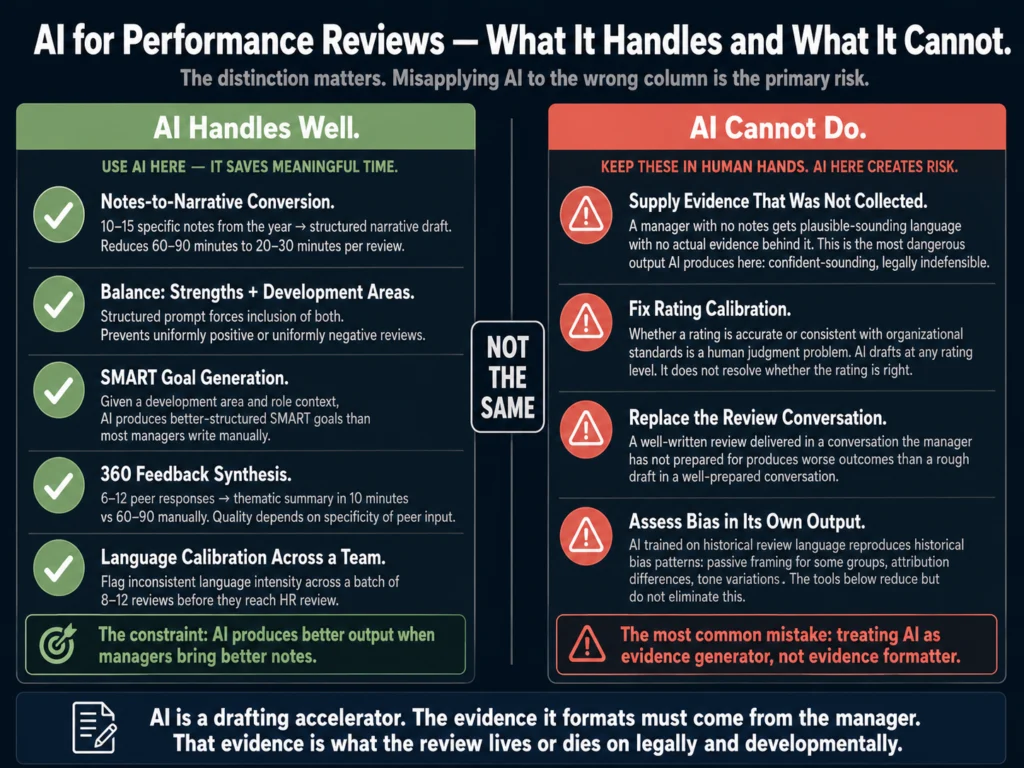
The most dangerous AI output in performance reviews is confident-sounding language that contains no actual evidence. A review that says “consistently demonstrated strong leadership” without a single named example is legally indefensible and developmentally useless.

AI cannot supply evidence that was not collected.

A manager who did not take notes throughout the year cannot use AI to generate specific examples of an employee’s performance.

AI will produce plausible-sounding language — “consistently demonstrated strong problem-solving skills” — that contains no actual evidence.

This is the most dangerous output AI produces in the performance review context: confident-sounding, legally indefensible language that an employee can reasonably challenge.

AI cannot fix rating calibration.

The gap between what a manager rates an employee and what HR or a review committee determines is appropriate calibration is a human judgment problem.

AI can help draft language at any rating level but does not resolve the underlying question of whether a rating is accurate or consistent with organizational standards.

AI cannot replace the review conversation.

The written review is a record of a conversation that should have already happened — or at minimum, a preview of the conversation that will happen when the manager delivers it.

A well-written AI-assisted review delivered in a conversation the manager has not prepared for produces a worse outcome than a rough draft delivered in a well-prepared conversation.

AI cannot assess for bias in its own outputs.

AI models trained on historical performance review language reproduce the bias patterns embedded in that language — more passive framing for women’s contributions, attribution differences across demographic groups, tone differences that correlate with protected characteristics.

The tools below help with some of this, but none of them eliminate it.

As Confirm’s 2026 analysis of performance review trends notes, the companies threading this needle are using AI to reduce administrative friction — summarizing feedback, drafting write-ups, identifying evidence gaps — while keeping judgment calls firmly with managers and HR.

That balance is worth internalizing before deploying any AI tool in a review cycle.


The Master Prompt for Performance Review Narrative Drafting

This prompt converts manager notes into a structured performance review narrative.

Managers fill in the bracketed variables; AI produces the draft.

You are helping a manager write a performance review narrative for a 
direct report. Use only the information provided — do not add examples, 
accomplishments, or observations that are not in the notes below.

Employee name: [NAME]
Role and level: [TITLE, LEVEL]
Review period: [e.g., January–December 2026]
Manager name: [YOUR NAME]

Performance notes from the review period (list specific observations, 
accomplishments, feedback conversations, and outcomes):
[PASTE NOTES HERE — as many specific details as possible]

Write a structured performance narrative with four sections:

SECTION 1 — OVERALL PERFORMANCE SUMMARY (2–3 sentences)
Summarize the employee's overall contribution during the review period. 
Reflect the weight of the evidence in tone — do not inflate positively 
or negatively beyond what the notes support.

SECTION 2 — STRENGTHS (3–5 observations)
Write in specific, evidence-based language. Each strength should 
reference at least one observation from the notes. Avoid vague phrases 
like "strong communicator" or "team player" without a specific example.

SECTION 3 — DEVELOPMENT AREAS (2–3 areas)
Write constructively and specifically. Reference the evidence from 
the notes. Frame as what the employee should develop, not what they 
did wrong.

SECTION 4 — GOALS FOR NEXT REVIEW PERIOD (2–3 goals)
Write in SMART format: specific, measurable, achievable, relevant, 
time-bound. Goals should connect directly to the development areas 
in Section 3.

Tone: direct and professional. Avoid corporate filler phrases. 
Do not use passive voice to obscure accountability ("errors were 
made" instead of "made errors in X"). Do not use language that 
implies protected characteristics.

This prompt produces better first drafts than any performance management platform’s built-in AI writing features we tested, specifically because the constraint “use only the information provided” prevents AI from generating unsupported positive language.


Tool Recommendations

Five AI tools for performance review writing 2026 — Claude, ChatGPT, Grammarly, Leapsome, and Lattice compared by use case, pricing, and team fit
Two standalone AI tools, one editing tool, and two performance management platforms. The platforms have a context advantage — they draft from data already logged in the system. The standalone tools have a flexibility and cost advantage.

Claude (Sonnet 4.6) — Best for Nuanced Narrative Drafting

In testing performance review narrative drafts across both Claude and ChatGPT, Claude produces more calibrated language on the first pass — better balance between recognition and development feedback, fewer filler phrases, tighter sentence structure.

For managers evaluating senior employees where language nuance matters significantly, Claude’s output requires less editing.

The 200K context window allows pasting a full year of meeting notes, 360 feedback responses, and goal documentation into a single session.

Claude maintains coherence across a longer context than ChatGPT, which matters when the input is dense.

Best for: Individual narrative drafts, senior employee reviews, cases where a manager has detailed notes but limited writing time.

Pricing: Free (Sonnet via Claude.ai) or $20/month (Pro, Opus 4.7 access).

ChatGPT (GPT-5.5 Instant) — Best for Bulk Drafting and Goal Generation

ChatGPT handles performance review drafting competently and is faster for managers running through a team of 8 to 12 reports in a single session.

It generates SMART goals consistently and produces good structural output when given clear inputs.

The Canvas workspace is useful for performance reviews specifically: you can generate a draft, highlight a development area section, and ask for a rewrite without regenerating the whole document.

Best for: High-volume managers reviewing large teams, SMART goal generation, iterative editing through Canvas.

Pricing: Free (GPT-5.5 Instant) or $20/month (Plus — removes usage limits and adds GPT-5.5 Thinking, which handles longer note inputs and maintains coherence across large review batches better than the free tier).

Grammarly Pro — Best for Tone and Bias Checking Before Delivery

Performance review language should be direct, evidence-based, and consistent.

Grammarly’s tone detector flags when a review reads as harsh, overly formal, or inconsistent in register — signals that often indicate a manager wrote a section under frustration rather than reflection.

The more specific use case: run a manager’s full set of 8 to 12 reviews through Grammarly as a batch before HR review.

Flag any review where the tone reads as significantly more negative or more formal than the others.

That inconsistency is worth a conversation before the review reaches the employee.

→ Grammarly Pro’s tone detection is particularly valuable for catching language inconsistencies across a team’s performance reviews before HR sign-off.

Leapsome — Best Full-Platform Option with AI Writing Assistance

Leapsome is a people management platform covering performance reviews, goal-setting, engagement surveys, and learning.

Its AI writing assistant is built into the review workflow — managers are prompted to draft review narratives inline, with AI suggestions surfaced in context.

The integration advantage over standalone AI tools is significant: Leapsome’s AI can reference the employee’s logged goals, past reviews, and 1:1 notes from within the same platform.

This produces more relevant drafts than a generic AI model working from copy-pasted notes.

Pricing: Custom pricing — Leapsome does not publish rates. Mid-market and enterprise focused. Request a demo.

Best for: Organizations that want AI writing assistance embedded in their performance management workflow rather than managing a separate AI tool.

Lattice — Best for Organizations Moving Toward Continuous Feedback

Lattice’s AI copilot (introduced in late 2025) assists managers with drafting review narratives from goal data and 1:1 notes logged within the platform.

Like Leapsome, the context advantage is meaningful — the AI drafts from data the manager has already logged rather than from copy-pasted inputs.

Lattice’s strength is in continuous feedback workflows rather than annual review cycles.

For organizations shifting away from annual reviews — 82% of employees reported their company gave annual reviews in 2016, a number that dropped to just 54% by 2019, according to ClearCompany data — Lattice’s continuous feedback model is a better structural fit.

Pricing: Custom pricing. Mid-market and enterprise.

Best for: Organizations replacing annual review cycles with continuous feedback models.


A Note on Copy.ai for Performance Reviews

Copy.ai’s template library does not include dedicated performance review templates, but its workflow automation features allow building a performance review template once and generating drafts from structured manager inputs.

For HR teams administering review cycles across a large organization where manager writing quality is highly variable, a standardized Copy.ai workflow can reduce the variance in review quality across a team.

→ Copy.ai’s free plan (2,000 words/month) is enough to test one performance review template workflow before committing to the paid tier.


Legal Consideration: What HR Should Check Before Finalizing

Performance reviews sometimes become evidence in employment disputes.

Before any AI-assisted review enters the employee’s permanent file, HR should verify four things.

Four legal compliance checks for AI-assisted performance reviews before HR finalization — evidence specificity, prior review consistency, bias language, and forward-looking promises
Performance reviews become evidence in employment disputes. AI-assisted reviews that pass into personnel files without these four checks carry the same legal exposure as carelessly written manual reviews — with the added risk that AI-generated language sounds more authoritative than its evidence base supports.

Specificity of negative observations.

A review that documents a performance issue vaguely (“did not always meet deadlines”) is weaker legal documentation than one that names the incidents: “missed three project deadlines in Q3: X on [date], Y on [date], Z on [date].”

AI tends toward the vague formulation. Push managers to provide specific dates and incidents in their notes before the AI drafts.

Consistency with prior reviews.

An employee who received “meets expectations” ratings for three consecutive years and then receives a “below expectations” rating with a termination recommendation three months later faces a more credible legal argument than one whose performance decline was documented progressively.

AI-assisted reviews that introduce a sudden change in language without accompanying evidence are legally weak.

Absence of language implying protected characteristics.

Review language that correlates with demographic characteristics — references to communication style that may signal national origin, language about “energy” or “enthusiasm” that may signal age, framing differences between male and female reports — should be caught in review.

Grammarly’s inclusive language features help but do not eliminate this risk.

Forward-looking language.

Review language that promises future compensation, role changes, or continued employment creates obligations.

AI sometimes generates aspirational forward-looking language in the goals section that was not in the manager’s notes.

Remove any forward-looking statement that your organization cannot or has not committed to.


Related Reading

  • AI Bias in Hiring — What HR Teams Need to Know
  • How to Write a 30-60-90 Day Onboarding Plan with AI
  • How to Use AI for Performance Review Cycles — A Tutorial
  • How to Build an AI Prompt Library for HR Teams
  • AI for HR Communications and Documentation — The Complete Guide

Frequently Asked Questions

Can AI write a complete performance review without manager input?

Technically, yes. Practically, the output is useless and legally risky. An AI-generated performance review that contains no specific evidence of actual performance — because the manager provided no notes — produces confident-sounding text that describes a generic employee rather than the person being reviewed. This kind of review is both developmentally meaningless for the employee and legally indefensible in a dispute. If an AI model produces a review that the manager cannot verify against specific observations from the year, that review should not be finalized. AI for performance reviews is a drafting accelerator, not a replacement for the evidence the manager was supposed to collect throughout the year.

Does using AI to write performance reviews violate any employment laws?

No existing employment law prohibits using AI to assist with drafting performance review language. The legal obligations that apply to performance reviews — consistency, documentation specificity, freedom from discriminatory language — apply equally to AI-assisted and manually written reviews. The risk is not the tool; it is the output. AI-generated language that is vague, inconsistent with prior reviews, or contains demographic-correlated framing creates the same legal exposure as manually written reviews with the same characteristics. HR should review AI-assisted performance reviews with the same scrutiny applied to any review before it enters a personnel file.

How should HR handle performance reviews where a manager has not taken notes throughout the year?

This is the most common scenario and the one where AI assistance produces the worst outcomes. A manager with no notes will prompt AI with vague inputs and receive vague outputs — language that sounds like a performance review but contains nothing specific. HR’s response should be to require that managers provide at least 5 to 8 specific, dated observations before submitting a review for drafting assistance. This requirement should be built into the review process itself, not retrofitted at the drafting stage. The best time to fix the evidence problem is through continuous documentation throughout the year — not in the 48 hours before reviews are due.

Can AI help reduce recency bias in performance reviews?

Partially. Recency bias — evaluating the last two months rather than the full year — is a function of what evidence the manager brings to the drafting process. If the manager’s notes are concentrated in Q4, the AI draft will reflect Q4. If the prompt explicitly requests quarterly observations (“provide 2–3 specific observations from each quarter”), the AI will structure the output to reflect the full year — but only if the manager has observations from each quarter to provide. The most effective recency bias mitigation is requiring managers to log observations at the end of each month or quarter, not hoping AI can reconstruct a full year from the last-minute notes they provide.

What is the right role for HR when managers use AI to write performance reviews?

HR should function as the quality and consistency gate, not the drafting resource. When managers submit AI-assisted reviews, HR’s review should check for four things: specificity of evidence (are there named examples or just general statements?), consistency with the employee’s prior reviews (does the rating trajectory make sense?), language that could imply protected characteristics (demographic-correlated framing), and forward-looking promises the organization has not committed to. HR should not rewrite reviews that pass these checks — even if the writing style is plain or imperfect. The goal is documentation quality and legal defensibility, not prose quality.


Conclusion

The 210-hour-per-year manager time burden on performance reviews is not primarily a writing problem.

It is a system design problem, a documentation discipline problem, and an evidence collection problem.

AI tools address the writing portion — and they address it well, when managers bring adequate notes to the drafting process.

Used correctly, the workflow is straightforward: managers keep running notes throughout the year, paste those notes into the master prompt at review time, review the AI draft against the evidence, edit for accuracy and tone, run through Grammarly for a final tone check, and submit for HR review.

Total drafting time per review: 20 to 30 minutes rather than 60 to 90.

Used incorrectly (as a substitute for evidence collection, not an accelerator of it), AI produces reviews that are legally weak, developmentally useless, and likely to generate employee grievances when the confident language does not survive scrutiny.

The 95% manager dissatisfaction rate and the 6% organizational satisfaction rate with performance reviews reflect a process whose problems run deeper than the time it takes to write.

AI saves time on the writing. Everything else is still yours to fix.

The workflow and prompt in this article reflect what the Ailovyu team has found reduces drafting time without creating the false confidence that comes from AI-generated language that sounds specific but contains nothing verifiable.

The Ailovyu Team

We research and test AI tools so you can make informed decisions before spending money on them. Every review, comparison, and tutorial on this site is based on actual use, not vendor marketing.
Learn more on our About page.

ailovyu.com

Statistics sourced from BragBook Performance Review Statistics 2026, PerformYard 2025 State of Performance Management Report (via Speakwise 2026 analysis), Gallup “More Harm Than Good: The Truth About Performance Reviews,” Corporate Executive Board (CEB) performance management research, Confirm.com Performance Review Trends 2025–2026, ClearCompany performance management statistics, and People Managing People performance management statistics compilation. Affiliate links in this article earn a commission at no extra cost to you. Tool pricing verified May 2026 from vendor websites. This article is for informational purposes and does not constitute legal advice.
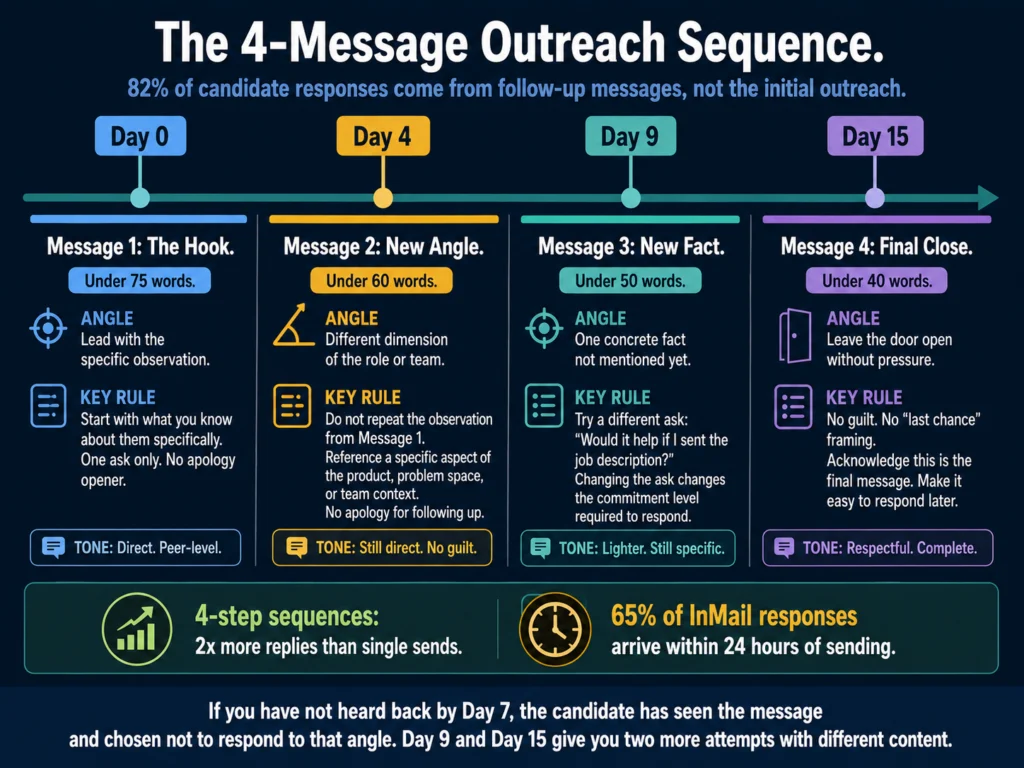
Best AI Tools for Candidate Outreach Emails (2026) – Tested

Updated: July 12, 2026

Best AI tools for candidate outreach emails 2026 — reply rate comparison between generic and personalized recruiter outreach with tool recommendations

TL;DR
  • The average cold outreach reply rate in recruiting is 3.43%. Personalized, specific outreach from top recruiters hits 18–25% on LinkedIn InMail. That 5-7x gap is almost entirely explained by specificity.
  • Generic AI outreach does not close that gap. It makes it worse. Candidates can identify AI-generated templates instantly, and inbox AI-detection has improved significantly.
  • AI is useful for structure, sequence design, variation generation, and follow-up drafts. The one thing that drives response rates — a genuinely specific observation about the candidate — has to come from a human who reviewed their profile.
  • Best tools for writing outreach drafts: Claude and ChatGPT with candidate-specific prompts. Copy.ai for generating multiple variation drafts quickly.
  • Best tool for editing tone before sending: Grammarly Pro — outreach that reads as warm and direct outperforms outreach that reads as formal or sales-like.
  • Best approach for volume with quality: Build a prompt template that requires one candidate-specific input before it generates a message. That single constraint forces specificity and produces measurably better output.

Most recruiter outreach fails before the candidate reads the first sentence.

The subject line pattern — “Exciting opportunity at [Company]” — is recognizable as automated in under a second.

The opening line confirms it: “I came across your profile and was impressed by your background.” No specific background mentioned. No specific opportunity described. Delete.

LinkedIn Talent Blog data shows that generic templates reliably land under 5% reply rates, while personalized InMails from recruiting firms hit 18–25%, with top performers reaching 30–40%.

That gap has widened in 2026 as AI-assisted outreach has flooded inboxes and trained candidates to delete templated messages faster.

The problem AI-generated outreach creates is not new. It is an acceleration of a problem that existed before AI. Volume without specificity has always produced low response rates.

AI allows recruiters to send more volume with less effort. Without the right prompt structure, that means more ignored messages, faster.

The tools and approaches below are specifically designed to produce outreach that clears the specificity bar: messages a candidate reads because something in the first sentence tells them this was not sent to everyone.

Table of Contents
  • Why Most AI Outreach Underperforms
  • What AI Actually Handles Well in Outreach
    • Message Structure and Flow
    • Follow-Up Sequence Design
    • Tone Calibration
    • Variation Generation
  • The Two Outreach Contexts: LinkedIn InMail vs. Email
    • LinkedIn InMail
    • Email Outreach
  • Tool Recommendations
    • Claude (Sonnet 4.6) — Best for Tone Precision in Outreach
    • ChatGPT (GPT-5.5 Instant) — Best for Variation Generation and Speed
    • Copy.ai — Best for Template Libraries and Sequence Automation
    • Grammarly Pro — Best Editing Layer Before Sending
  • Building a Follow-Up Sequence with AI
  • Personalization at Scale: The One-Variable Method
  • What AI Cannot Fix in Outreach
  • Related Reading
  • Frequently Asked Questions
  • Conclusion

Why Most AI Outreach Underperforms

Before the tools, understand the mechanism. Response rates in candidate outreach are primarily driven by one variable: does the candidate believe this message was written for them?

The signals candidates use to make that judgment are:

  • Whether the subject line references something specific to their profile
  • Whether the opening line mentions something verifiable about their background
  • Whether the role described connects to what they actually do, not just their job title
  • Whether the message is short enough to suggest the sender read their profile rather than ran a bulk search
Comparison of generic versus specific recruiter outreach signals — what candidates use to decide whether a message was written for them or sent to a list
Candidates who receive significant recruiter outreach have developed fast pattern recognition. The decision to read or delete happens before the second sentence. These are the four signals they use — and which side of the line your AI output falls on.

AI tools generate outreach that passes visual inspection but fails the specificity test.

A message that says “I noticed your work in enterprise software sales” when the candidate has 12 years of enterprise software sales experience feels generic.

A message that says “I noticed you led the SMB-to-enterprise transition at Salesforce before moving to Stripe — that specific background is why I’m reaching out” feels specific.

The first version can be generated by AI in two seconds from a job title. The second requires a human to have looked at the LinkedIn profile.

This is the constraint AI cannot remove from outreach writing: specificity requires input that comes from human review.

What AI can do is produce better-structured, better-toned messages around that input, and produce them faster and in greater variation than manual drafting allows.


What AI Actually Handles Well in Outreach

Four AI-assisted tasks in candidate outreach — message structure, follow-up sequence design, tone calibration by audience, and variation generation for A/B testing
These are the tasks where AI saves meaningful recruiter time without reducing message quality. The fifth task — generating the specific candidate observation — is not on this list, because AI cannot do it from a job title alone.

Message Structure and Flow

Effective outreach follows a consistent structure: specific observation → specific role → low-friction ask.

AI models produce this structure cleanly when given the right prompt.

The observation variable is filled by the recruiter; the role description and ask are AI-generated. This is the right division of labor.

Follow-Up Sequence Design

Four-step outreach sequences lift reply rates to 30%+ versus 13% for single sends, yet most recruiters send one message and stop.

AI can draft a complete 3 to 4 message sequence from a single brief — initial contact, first follow-up, second follow-up with an alternate angle, and a final close.

This removes the effort barrier that causes most recruiters to stop at one message.

Tone Calibration

Outreach that reads as warm and direct consistently outperforms outreach that reads as formal or sales-like. AI can be prompted to match a specific tone register.

For technical candidates, directness outperforms warmth. For senior candidates, peer-to-peer framing outperforms recruiter-to-candidate framing. Claude and ChatGPT handle these tone variations competently with explicit prompting.

Variation Generation

Testing message variations is one of the highest-leverage activities in outreach optimization.

A recruiter who runs two versions of an opening line against 50 candidates each and measures reply rates learns something concrete about what works in their specific market.

AI generates 5 to 10 variations of any message element in under two minutes — work that would take 20 to 30 minutes manually.


The Two Outreach Contexts: LinkedIn InMail vs. Email

These are different formats requiring different approaches. AI tools handle both, but the constraints differ.

LinkedIn InMail

InMail has a character limit and a different audience expectation. Candidates on LinkedIn expect professional-but-human communication.

Messages under 400 characters perform 22% better than longer InMails, according to LinkedIn Talent Blog 2025 benchmarks. The 50 to 70 word sweet spot is not negotiable.

AI models left to their own produce InMails that are too long. Add a word count constraint to every InMail prompt: “Write this in under 75 words.” Add a character reference if sending directly through LinkedIn.

LinkedIn InMail Prompt:

Write a LinkedIn InMail from [YOUR NAME], [YOUR TITLE] at [COMPANY].

Candidate name: [NAME]
Role: [JOB TITLE] at [COMPANY NAME]
One specific observation from their LinkedIn profile: [OBSERVATION — 
e.g., "led the migration from Salesforce CPQ to a custom quoting tool 
at their last company"]

Requirements:
- Under 75 words total
- Open with the specific observation, not a compliment
- Connect the observation to why this role is relevant to them
- One clear, low-friction ask: "open to a 15-minute call?"
- No phrases: "I came across your profile," "exciting opportunity," 
  "impressed by your background"
- Tone: direct and peer-level — not recruiter-to-candidate
- Do not use the word "leverage"

Email Outreach

Email allows more length but still rewards conciseness.

The 3.43% average cold email reply rate in recruiting is not a fixed ceiling — top-quartile recruiters hit 5.5%+ and the elite tier clears 10%, primarily through tighter personalization and better follow-up discipline.

Subject lines matter more for email than InMail. Personalized subject lines generate 38 to 45% open rates versus 20 to 22% for generic ones.

AI generates subject line variations well — run 5 options and A/B test with your first 30 sends before committing to one for the full list.

Email Outreach Prompt:

Write a candidate outreach email for [YOUR NAME], [YOUR TITLE] at [COMPANY].

Candidate name: [NAME]
Role being recruited for: [JOB TITLE]
One specific observation from their background: [OBSERVATION — e.g., 
"you built the analytics function from scratch at two different companies"]
Why that experience matters for this role: [ONE SENTENCE REASON]
What makes this role or company notable: [ONE SPECIFIC DETAIL — not 
generic like "fast-growing startup"]

Requirements:
- Subject line: specific to the candidate, under 50 characters, no 
  "exciting opportunity"
- Body: under 120 words
- Structure: specific observation → why it matters for this role → 
  one specific thing about the company → low-friction ask
- Tone: warm but direct — the candidate should feel this was written 
  for them, not sent to a list
- Do not include: salary ranges, benefits, or detailed job requirements 
  — those come after they respond
- Sign off with your name and LinkedIn profile URL

Also generate 3 alternative subject lines for A/B testing.

Tool Recommendations

Four AI tools for candidate outreach emails 2026 — Claude for tone precision, ChatGPT for variations, Copy.ai for sequence automation, and Grammarly for pre-send editing
These four tools cover different parts of the outreach workflow. None of them generate the specific candidate observation. Each handles a different stage of what happens after you have that observation.

Claude (Sonnet 4.6) — Best for Tone Precision in Outreach

Claude produces outreach copy that reads more naturally than ChatGPT on the first pass — fewer filler phrases, better rhythm, higher variance between sentences.

For outreach specifically, where tone differentiation from generic templates is the primary goal, Claude’s default output style is an advantage.

The 200K context window allows pasting a candidate’s full LinkedIn profile alongside the prompt rather than summarizing it.

This produces better candidate-specific output when there is enough profile content to work from.

Best for: Senior candidate outreach, technical roles, outreach where tone precision matters more than speed.

Pricing: Free (Sonnet via Claude.ai) or $20/month (Pro).

ChatGPT (GPT-5.5 Instant) — Best for Variation Generation and Speed

ChatGPT generates more variations per session than Claude and handles the volume side of outreach optimization better.

For a recruiter running A/B tests across message elements, ChatGPT’s breadth is more useful than Claude’s depth.

Canvas, ChatGPT’s editing workspace, is useful for iterating on a draft sequence — you can highlight specific sentences and request rewrites without regenerating the full sequence.

Best for: High-volume outreach, A/B test variation generation, multi-message sequence drafting.

Pricing: Free (GPT-5.5 Instant, usage limits apply) or $20/month (Plus — removes usage limits and adds GPT-5.5 Thinking for longer sequences and more variation generation per session).

Copy.ai — Best for Template Libraries and Sequence Automation

Copy.ai’s workflow automation features allow building an outreach sequence template once and generating personalized variations from a data input.

For agencies or in-house teams running structured outreach campaigns, the workflow approach produces more consistent output than ad-hoc prompting.

Copy.ai’s free plan (2,000 words/month) is adequate for testing the approach. The $49/month Starter plan removes the word limit and adds the workflow features that make sequence automation practical.

→ Copy.ai’s free plan is enough to test one outreach sequence before committing to the workflow features.

Grammarly Pro — Best Editing Layer Before Sending

Outreach that reads as sales-like, overly formal, or robotic is the primary driver of non-response beyond missing personalization.

Grammarly’s tone detector flags when a message reads as “formal” when it should read as “direct” or “confident.”

The practical workflow: generate the draft in Claude or ChatGPT, paste into Grammarly, check tone, fix any flagged issues, then send. For batches of 20 to 30 outreach messages, this adds 15 minutes and measurably improves the output.

→ Grammarly Pro’s tone detection is particularly valuable for outreach — it tells you before you send whether a message reads as warm or accidentally formal.


Building a Follow-Up Sequence with AI

Single-send outreach converts at roughly 13% when it does convert. Four-step sequences with varied angles lift that to 30%+.

The follow-up messages most recruiters do not send are the messages that would have gotten the reply.

Use this prompt to generate a complete sequence from a single brief:

Write a 4-message outreach sequence for a [JOB TITLE] recruiting campaign.

Candidate profile type: [DESCRIBE THE TARGET CANDIDATE — e.g., "senior 
software engineer, 8-12 years, currently at a Series B-C fintech"]
Company: [COMPANY NAME]
One thing that makes this role or company notable: [SPECIFIC DETAIL]

Message 1 (Initial contact): Under 75 words. Lead with a specific 
observation about their profile type. Reference the role. One ask.

Message 2 (Follow-up, day 4): Under 60 words. Different angle from 
Message 1. Try a specific aspect of the role or team. No apology 
for following up.

Message 3 (Follow-up, day 9): Under 50 words. Share one concrete fact 
about the company or role that Message 1 and 2 did not include. Different ask — 
maybe "would it help if I sent the job description?"

Message 4 (Final, day 15): Under 40 words. Acknowledge this is the last 
message. Leave the door open. No guilt or pressure.

Tone across all four: direct, peer-level, warm but not sales-like. 
The candidate should feel the recruiter is worth talking to, not that 
they are being worked.

Personalization at Scale: The One-Variable Method

The most effective approach to AI-assisted outreach at volume is the one-variable method: require one candidate-specific input in every prompt before generating the message.

This single constraint produces messages that read as personalized without requiring the recruiter to write from scratch.

The one-variable method for AI-assisted candidate outreach — four-step process for personalized recruiter messages at scale with 18-25% reply rate
One specific, verifiable observation per candidate. AI handles everything around it. This process takes 2 to 3 minutes per message. At 18 to 25% reply rates, 100 messages produces 18 to 25 conversations. At 3.43%, it produces 3.

The variable should be specific and verifiable — something visible in the candidate’s LinkedIn profile or resume.

“Led a team of 8 engineers at a healthcare tech company” is specific. “Experienced software engineer” is not a variable.

The practical process:

  1. Pull the candidate’s profile and identify one specific, verifiable fact
  2. Enter that fact into the [OBSERVATION] variable in your prompt template
  3. Generate the message
  4. Read it once before sending — if the observation does not sound genuine, it is because the input was not specific enough

This process takes 2 to 3 minutes per candidate. It is not automated. That is the point.

A 2 to 3 minute investment per message produces an 18 to 25% reply rate. A 10-second template send produces under 5%.


What AI Cannot Fix in Outreach

Wrong candidate, right message.

AI improves message quality but cannot fix targeting errors.

A well-written InMail to a candidate who is actively employed, not interested in changing, and three levels too senior for the role will still produce no response.

The best AI-assisted outreach in the world does not compensate for a weak candidate sourcing process.

Deliverability.

Email outreach from domains with poor sending reputation or missing authentication (DKIM, SPF, DMARC) goes to spam regardless of message quality.

AI does not address deliverability. If your response rates are consistently below 2%, check your domain reputation before optimizing your message.

Candidate market conditions.

In 2026, certain technical roles are in low supply and high demand.

No message quality improvement compensates for a compensation band that is 20% below market or a role that requires relocation in a remote-first market.

AI helps you communicate a compelling opportunity. It cannot make an uncompetitive opportunity compelling.


Related Reading

  • How to Write Rejection Emails with AI (Without Sounding Robotic)
  • Best AI Tools for Writing Offer Letters
  • How to Write Candidate Outreach Emails with AI — A Step-by-Step Tutorial
  • ChatGPT vs. Claude for HR Writing — A Practical Comparison
  • Grammarly vs. Jasper for HR Writing — Which Should You Use?
  • AI for HR Communications and Documentation — The Complete Guide

Frequently Asked Questions

Will candidates know if I used AI to write my outreach message?

Increasingly, yes — if you use raw AI output without a specific candidate observation. In 2026, candidates who receive significant recruiter outreach have developed pattern recognition for AI-generated messages. The tell is not AI grammar or vocabulary — it is the absence of anything specific to them. A message that opens with “I came across your profile and was impressed by your background” could have been sent to anyone. A message that opens with “I noticed you built the data engineering function from scratch at two different companies” signals review. The observation is what differentiates AI-assisted outreach that performs from AI-assisted outreach that gets deleted.

How many outreach messages can I personalize per day realistically?

With the one-variable method described in this article — one specific observation per candidate, AI-generated structure around it — a recruiter can personalize 30 to 40 LinkedIn InMails or emails per day without meaningful quality degradation. The constraint is sourcing and profile review time, not message writing time. Finding 30 to 40 genuinely strong candidates and reviewing their profiles takes significantly longer than writing the messages. If you are hitting that volume daily, the bottleneck is likely sourcing precision, not message generation.

What is the best follow-up cadence for candidate outreach?

Based on LinkedIn benchmarks, 65% of InMail responses arrive within 24 hours of sending. For sequences, spacing of 4 to 5 days between messages performs better than daily follow-ups (which read as pressure) or weekly follow-ups (which allow too much time for interest to fade). A four-message sequence over 15 days — initial, day 4, day 9, day 15 — matches the response timing data and covers the realistic window during which a candidate is likely to respond. After day 15 with no response, the probability of conversion drops sharply.

Should I use AI differently for LinkedIn InMail versus email outreach?

Yes. LinkedIn InMail has a 1,900-character limit (300 for the subject line) and is read in a professional networking context — candidates expect brevity and professional relevance. Email allows more length but has lower open rates without strong subject lines. The prompt constraints should reflect this: InMail prompts should specify a 75-word maximum; email prompts should specify a subject line requirement and can allow 100 to 150 words. Both formats benefit from the same specificity principle, but InMail’s character limit enforces brevity automatically, while email requires explicit instruction to stay concise.

Is there an AI tool that can automate personalized outreach without requiring per-candidate input?

Several sourcing platforms claim to do this — Gem, SeekOut, and HireEZ all offer AI-personalized outreach automation that pulls candidate data directly from their profile to generate messages. The quality of these automated personalizations varies significantly. In testing, the outputs read more natural than generic templates but less natural than human-reviewed observations fed into a writing AI. If you are running outreach at a scale where per-candidate review is not feasible, automated personalization platforms are better than generic templates. If you can review profiles, the one-variable method described in this article produces better results than fully automated personalization at any volume up to 40 messages per day.


Conclusion

The data on candidate outreach in 2026 is unambiguous: specificity drives response rates, and volume without specificity produces noise.

The gap between the 3.43% average reply rate and the 18 to 25% top-performer rate is not a tool gap. It is a specificity gap.

The one-variable method and prompt templates in this article are what the Ailovyu team has found produces consistently better results than any other AI outreach approach — across different role types, seniority levels, and sourcing markets.

AI tools close part of that gap by producing better-structured, better-toned messages faster. They do not close the part that matters most: the observation that tells the candidate this message was written for them.

The right workflow is not complicated. Find one specific thing about the candidate. Put it in the prompt. Let AI handle the structure and tone. Read it once before sending. Follow up three more times.

That workflow, applied consistently, produces reply rates that compound across a sourcing funnel. At 18 to 25% reply rates, 100 outreach messages produces 18 to 25 conversations. At 3.43%, it produces 3.

The tools do not change the math. The specificity does.

The Ailovyu Team

We research and test AI tools so you can make informed decisions before spending money on them. Every review, comparison, and tutorial on this site is based on actual use, not vendor marketing.
Learn more on our About page.

ailovyu.com

Statistics sourced from LinkedIn Talent Blog (2025), Gem’s 2026 Email Outreach Benchmarks, Prospeo recruiter email analysis, and RecruiterFlow candidate outreach guide (2026). Affiliate links in this article earn a commission at no extra cost to you. Tool pricing verified May 2026 from vendor websites.

Can You Use AI-Generated Job Descriptions Legally? (2026)

Updated: July 12, 2026

Legal compliance guide for AI-generated job descriptions 2026 — EEOC obligations, state disclosure laws, and five pre-posting checks for HR teams

TL;DR
  • Yes, using AI to write job descriptions is legal. There is no law prohibiting it.
  • The content of those job descriptions is still your legal responsibility. “The AI wrote it” is not a defense.
  • The three specific legal risks in AI-generated job descriptions: over-inflated requirements that create disparate impact, age-coded or disability-exclusionary language the AI reproduces from biased training data, and new state disclosure requirements you may not know apply to you.
  • Illinois (January 2026), California (October 2025), Colorado (June 2026, enforcement uncertain), and New York City (since 2023) all have active laws that affect how AI can be used in employment contexts — with disclosure obligations that extend beyond just screening tools in some jurisdictions.
  • Five things to check before posting any AI-generated job description: requirement necessity, language bias signals, credential inflation, disability screening language, and any explicit forward-looking promises the AI may have included.
  • This article is informational. It is not legal advice. If your organization is navigating a specific compliance matter, consult qualified employment counsel.

The question HR teams most often ask about AI-generated job descriptions is whether they are allowed to use them.

The short answer is yes. No federal law and no state law in the United States currently prohibits using AI to draft a job description.

The more useful question is different: what legal obligations does a job description carry, and does the fact that AI wrote it change your liability for what it says?

The answer to that question is clearly no. The content of a job description — every requirement, every qualification, every promise — is the employer’s legal responsibility regardless of how it was produced.

The EEOC has been explicit on this point: employers using software, algorithms, or AI as part of a hiring process face the same anti-discrimination obligations as employers using purely human-driven processes.

What changes when AI writes a job description is not the legal standard. What changes is the nature of the errors that slip through.

Human-written job descriptions tend to fail in ways that reflect individual bias — the hiring manager who lists requirements they prefer in a candidate rather than requirements the job actually demands.

AI-generated job descriptions fail in different, less visible ways: they reproduce language patterns from training data that correlate with discrimination without any human intending it, and they include hallucinated or inflated requirements that can create disparate impact at scale.

This guide covers what the law actually requires of job description content, where AI-specific risks emerge, which states have active obligations HR teams need to understand, and the practical compliance steps for any HR team using AI to draft hiring documents.

Table of Contents
  • What the Law Requires of Job Description Content
  • The Three Legal Risks Specific to AI-Generated Job Descriptions
    • Risk 1: Requirement Inflation and Disparate Impact
    • Risk 2: Age-Coded and Disability-Exclusionary Language
    • Risk 3: State Disclosure Requirements
  • Five Checks Before Posting Any AI-Generated Job Description
  • The Disclosure Question: Do You Have to Tell Candidates?
  • What Reduced Federal Enforcement Means for HR Teams
  • Related Reading
  • Frequently Asked Questions
  • Conclusion

What the Law Requires of Job Description Content

Job descriptions carry legal weight in three distinct ways.

Three legal functions of a job description — basis for hiring decisions, evidence in discrimination claims, and potential employment contract obligations
A job description is not an administrative document. It is the basis for hiring decisions, the first exhibit in a discrimination case, and in some circumstances a contract. The fact that AI generated it changes none of that.

As the basis for hire decisions. If your job description lists qualifications and you hire or reject candidates based on those qualifications, you are making employment decisions on the basis of those criteria.

Under Title VII of the Civil Rights Act, the ADA, and the ADEA, employment criteria that produce a disparate impact on protected groups must be demonstrably related to actual job performance.

As evidence in discrimination claims. A job description is often the first document produced in an employment discrimination case.

If a rejected candidate challenges a hiring decision, the job description defines what qualifications were required and whether those requirements were applied consistently.

Language in a job description that signals preference for a demographic group — even unintentionally — can become evidence of discriminatory intent.

As a potential employment contract. In some jurisdictions and circumstances, language in a job description that makes forward-looking promises (“the successful candidate will receive a salary of,” “employees in this role are eligible for”) can create contractual obligations.

AI models generating job descriptions sometimes include aspirational or descriptive language in benefit sections that is more specific than intended.

The underlying legal framework has not changed in 2026.

What has changed is the regulatory environment’s recognition that AI tools are now involved in the production of hiring documents at scale — and the growing body of state law addressing that involvement.


The Three Legal Risks Specific to AI-Generated Job Descriptions

Three legal risks of AI-generated job descriptions — requirement inflation and disparate impact, age-coded language, and state disclosure obligations
These risks are different from the risks in human-written job descriptions. Human writers bias toward candidates they have in mind. AI models bias toward patterns in training data — which reflects years of real-world hiring with documented demographic disparities.

Risk 1: Requirement Inflation and Disparate Impact

AI models trained on large corpora of job descriptions learn to reproduce what “a job description” looks like.

What that training data reflects, overwhelmingly, is years of posted positions with over-inflated requirements — degree requirements for roles that do not need them, years-of-experience thresholds that exceed what the work actually demands, credential lists that have accumulated through iteration rather than deliberate design.

When an AI generates a new job description, it reproduces those patterns. The practical result is job descriptions that look credible but contain requirements that are not genuinely job-related.

Under the EEOC’s Uniform Guidelines on Employee Selection Procedures, selection criteria that produce disparate impact on protected groups must be validated as job-related if challenged.

A requirement that was added by an AI because it appeared in similar postings — not because the job actually demands it — is difficult to defend.

The specific patterns to watch for in AI-generated requirements:

Degree requirements where none is necessary. AI models frequently default to “bachelor’s degree required” or “advanced degree preferred” because these appear in the majority of similar postings in their training data.

For roles that do not genuinely require a degree, this language creates a disparate impact on candidates from certain racial and socioeconomic backgrounds. It also now creates risk under some state skills-based hiring initiatives.

Years-of-experience inflation. An entry-level analyst role should not require five to seven years of experience.

AI models sometimes generate inflated experience requirements because they mirror mid-level postings for similar titles in their training data.

Years-of-experience requirements above what the role genuinely demands can function as age discrimination by excluding younger workers from roles that do not require that much experience — or, at the higher end of a career, serving as a pretext for screening out older candidates.

Credential stacking. AI sometimes adds professional certifications, licenses, or technical credentials that appear frequently in similar postings but are not necessary for the specific role being hired.

Each unnecessary credential narrows the candidate pool in ways that may not be uniformly distributed across protected groups.

Risk 2: Age-Coded and Disability-Exclusionary Language

AI models reproduce language patterns that signal demographic preferences even when those signals are not explicit.

Two categories require specific attention.

Age-coded language refers to phrases that statistically correlate with either favoring younger candidates or disadvantaging older ones.

Research on job description language patterns has identified terms like “digital native,” “recent graduate,” “fresh perspective,” “energetic,” and “tech-savvy” as disproportionately deterring older applicants.

The inverse problem also exists: phrases like “seasoned professional” or “wealth of experience” may function as coded preferences for older workers that could be used to exclude younger ones.

The Age Discrimination in Employment Act (ADEA) protects workers 40 and older.

Language that signals age preference does not need to be explicit to create legal exposure — a pattern of age-coded job descriptions combined with a documented outcome of hiring disproportionately fewer candidates over 40 is the kind of evidence that supports a disparate impact claim.

Disability-exclusionary language is more nuanced. The ADA prohibits excluding candidates with disabilities from consideration unless the disability is directly relevant to a genuine occupational requirement.

An AI-generated job description that lists “must be able to lift 50 pounds” for a software engineering role, or “requires excellent vision” for a data analyst position, creates ADA compliance risk if those requirements are not genuinely necessary for the job.

The EEOC’s technical guidance on AI and the ADA notes specifically that AI tools can screen out individuals because of disability-related traits — and employers are responsible for that outcome even when the screening occurred through an algorithm rather than a human decision.

That principle applies to the language in a job description as well as to screening tool outputs.

Risk 3: State Disclosure Requirements

The most significant regulatory shift affecting AI use in job descriptions in 2026 is the emergence of state disclosure requirements.

These vary significantly by jurisdiction and are evolving quickly.

AI hiring disclosure requirements by state 2026 — New York City, California, Illinois, and Colorado active laws with status and key obligations for HR teams
This is the fastest-changing part of the legal landscape. The Colorado situation alone — effective date on the books, enforcement paused, legislature considering a rewrite — illustrates why the word “verify” appears more than any other in this section.

Illinois (effective January 1, 2026).

House Bill 3773 amended the Illinois Human Rights Act to require employers to notify both employees and applicants when AI is used in employment-related decisions — including recruitment, hiring, promotion, discipline, and any use that could affect the terms or conditions of employment.

The law applies to employers with one or more employees in Illinois. It also prohibits using AI in ways that discriminate based on protected characteristics, including using zip codes as a proxy for protected classes.

The Illinois Department of Human Rights is finalizing implementing regulations; employers should monitor IDHR guidance and review compliance with employment counsel.

California (effective October 1, 2025).

The California Civil Rights Council’s regulations extend the state’s anti-discrimination laws explicitly to automated decision systems.

The regulations require meaningful human oversight of any automated system used in employment, require employers to maintain records for four years, and prohibit automated systems that discriminate based on protected traits.

The regulations also clarify that any automated system that elicits information about disability may constitute an unlawful medical inquiry — relevant to how some AI tools prompt for candidate information.

Colorado (effective June 30, 2026, enforcement status uncertain).

Senate Bill 24-205, the Colorado AI Act, requires employers using high-risk AI systems to use “reasonable care” to prevent algorithmic discrimination, conduct impact assessments, and provide transparency to affected individuals.

As of April 2026, a federal court has paused enforcement during ongoing litigation — meaning the law’s effective date remains on the books but compliance obligations are currently frozen.

The Colorado legislature is also considering SB 26-189, which would substantially rewrite the statute’s framework before it takes effect.

Employers in Colorado should not treat June 30, 2026 as a settled compliance deadline.

Monitor developments and consult employment counsel before making compliance decisions based on this law’s current text.

New York City (in effect since July 2023).

Local Law 144 remains the most specific active AI hiring requirement in the United States.

It requires annual independent bias audits of automated employment decision tools and public disclosure of impact ratios.

It requires that candidates be notified when such tools are used. Unlike some other state laws, NYC LL 144 has been actively enforced.

As of spring 2026, employment lawyers tracking this space describe the landscape as a “patchwork” of state and local requirements with no federal law providing a harmonizing framework, though federal preemption legislation has been discussed at the White House level and may emerge in 2026 or 2027.

Organizations operating across multiple states face the most complex compliance picture.

Disclosure is a separate question from content compliance.

For most HR teams, the immediate compliance priority is the content of the job description: the requirements, the language, the accuracy.

Disclosure requirements vary by jurisdiction and apply most clearly to automated decision-making tools rather than to AI writing assistants.

However, in Illinois and potentially under California’s broader definitions, the line between “drafting assistance” and “employment decision tool” is not fully resolved. When in doubt, disclose.


Five Checks Before Posting Any AI-Generated Job Description

These are not a legal audit. They are the minimum editorial review that every AI-generated job description should go through before it is posted.

Five pre-posting compliance checks for AI-generated job descriptions — requirement necessity audit, age signal scan, ADA language review, hallucination check, and promise language review
These are not a legal audit. They are the minimum editorial review that every AI-generated job description should go through. The necessity audit on requirements is the single most legally significant check — and the most likely to be skipped under time pressure.

1. Necessity audit on every requirement.

For each item in the requirements section, ask: if a candidate could do this job excellently without meeting this requirement, should it be on the list?

Move any such item to “preferred” or remove it entirely. Pay particular attention to degree requirements, years-of-experience thresholds, and professional credentials.

2. Age signal scan.

Read the description looking specifically for terms that signal a preference for younger or older candidates. Remove or replace any that appear.

“Digital native” becomes “proficient with digital tools.” “Recent graduate” becomes “early-career candidate.” “Seasoned professional” should not appear unless the role genuinely requires extensive experience — and if it does, the years-of-experience requirement should be specific.

3. Disability and physical requirement review.

Every physical or sensory requirement in a job description should pass one test: is this genuinely necessary for the role?

“Must be able to commute to our New York office” for an on-site role is legitimate.

“Must possess excellent verbal communication skills” for a written content creation role may screen out candidates with speech disabilities without serving the role’s actual requirements.

If you would not require it of a candidate with a disability who could perform the job’s essential functions in another way, it should not be stated as a requirement.

4. Hallucination check.

AI models occasionally generate specific details (salary ranges, benefit terms, certification requirements) that are not accurate for your organization.

Review the description for any specific claims the AI made that were not in your brief. Pay particular attention to benefit descriptions, promotion language, and any forward-looking statements about career growth.

These are the sections most likely to contain hallucinated content that your legal team would not want in a posted document.

5. Promise language review.

Job descriptions that say “the successful candidate will receive” or “employees in this role enjoy” may create obligations.

Review any sentence that makes a forward-looking promise about compensation, benefits, or working conditions.

These statements should reflect your actual current policy, not AI-generated aspirational language.


The Disclosure Question: Do You Have to Tell Candidates?

Currently, there is no federal law requiring employers to disclose that AI was used to write a job description.

The disclosure requirements that do exist — in New York City, California, Illinois, and Colorado — apply most clearly to automated tools that make employment decisions, which is a different legal category from tools that help humans draft documents.

That said, this distinction is not fully resolved in all jurisdictions. Illinois’s language is broad. California’s regulations define automated decision systems expansively.

If your organization operates in those states and uses AI tools as part of the hiring process, a conservative approach is to include a brief disclosure in your application materials noting that AI tools are used in hiring-related processes and that all hiring decisions are made by human employees.

Whether or not disclosure is legally required, it may be strategically sensible.

Research consistently shows that candidates who understand how a process works and feel it was applied fairly are more likely to accept offers and remain engaged through onboarding — regardless of whether AI was involved.

For more on the disclosure requirement specifically, read: How to Disclose AI Use in Your Hiring Process to Candidates


What Reduced Federal Enforcement Means for HR Teams

The Trump administration’s April 2025 executive order directing federal agencies to reduce pursuit of disparate impact enforcement created some confusion about whether EEOC AI enforcement had effectively ended. The practical answer for HR teams is: not materially.

Employment lawyers at Akerman note that while EEOC’s 2023 AI technical guidance was removed from the agency’s website, employers are still required to comply with underlying federal laws — Title VII, the ADA, the ADEA — that the executive order did not repeal.

Private plaintiffs can still bring disparate impact claims. State attorneys general are actively pursuing cases.

The Mobley v. Workday class action, discussed in depth in AI Bias in Hiring — What HR Teams Need to Know, proceeds on statutory grounds unaffected by the executive order.

The source of legal risk has shifted from federal enforcement to private litigation and state-level enforcement. For HR teams, this means the risk has not decreased. It has changed shape.


Related Reading

  • Best AI Tools for Writing Job Descriptions
  • How to Write 10 Job Descriptions in One Day Using AI
  • AI Tools for Resume Screening — What Actually Works
  • AI Bias in Hiring — What HR Teams Need to Know
  • How to Disclose AI Use in Your Hiring Process to Candidates
  • How to Audit AI Job Posts for Bias Before Publishing
  • AI Ethics and Compliance in Hiring — The Complete Guide

Frequently Asked Questions

Is there any law that specifically prohibits using AI to write job descriptions?

No. As of May 2026, no federal law and no state law in the United States explicitly prohibits using AI to draft job description content. The laws that apply to AI in hiring — including the new state regulations in California, Illinois, and Colorado — focus primarily on automated decision-making tools that evaluate or rank candidates. A tool used to draft a job posting that a human then reviews and approves is generally treated differently from a tool that makes candidate advancement decisions autonomously. However, if the AI tool also functions as part of a selection process or generates language that influences candidate screening, the legal analysis becomes more complex and jurisdiction-specific.

If an AI tool writes something discriminatory in a job description, does the tool vendor share liability?

The Mobley v. Workday litigation, currently ongoing as of May 2026, is directly testing the question of vendor liability in AI hiring tools. A 2024 court ruling held that Workday could be treated as an “agent” of the employers who used its platform — potentially exposing both the vendor and the employer to liability. That ruling addressed screening tools, not drafting tools, but the principle may extend. More practically: for general-purpose AI writing tools (ChatGPT, Claude, Jasper), vendor liability for discriminatory content in AI-generated job descriptions has not been tested in litigation. Employment lawyers uniformly advise that employers should not assume the tool vendor will share any liability for discriminatory outcomes — the safest assumption is that liability rests with the employer.

How do degree requirements in AI-generated job descriptions create legal risk?

Degree requirements that are not genuinely necessary for job performance can create disparate impact claims under Title VII. Research has consistently shown that blanket degree requirements disproportionately exclude Black, Hispanic, and first-generation applicants from roles where the degree is not actually necessary. When AI generates a degree requirement because it appeared in similar job postings — rather than because your specific role actually requires a degree — you have inherited a potentially discriminatory criterion from biased training data. If that criterion is challenged, you must demonstrate that the degree requirement is genuinely job-related and consistent with business necessity. Removing unnecessary degree requirements is both legally defensible and expands your candidate pool.

Do I need to tell applicants in New York City that AI was used to write the job description?

New York City Local Law 144’s disclosure requirement applies specifically to “automated employment decision tools” — tools that use machine learning, statistical modeling, or AI to substantially assist or replace discretionary decision-making in screening or evaluating candidates. A general-purpose AI writing tool used to draft a job description, where a human makes all subsequent hiring decisions, is not clearly covered by that definition. However, if your organization also uses AI-powered screening tools, video interview scoring, or other automated decision tools as part of the same process, the broader disclosure requirement likely applies to the overall process. The safer position for any organization using AI tools in hiring in New York City is to include a disclosure and consult employment counsel about the specific tools in use.

What is the single most important legal check to run on an AI-generated job description?

The requirements audit — specifically, whether every listed qualification is genuinely necessary for the job. This is the check that produces the most significant legal risk reduction and the one most likely to be skipped under time pressure. For each requirement, apply this test: if an excellent candidate met every other requirement on the list but not this one, would you genuinely reject them? If no, the requirement should be removed or moved to “preferred.” This exercise catches credential inflation, unnecessary degree requirements, and experience thresholds that the AI reproduced from training data rather than derived from the actual role. It is also the check that most directly addresses EEOC concerns about AI-driven hiring criteria producing disparate impact.


Conclusion

Using AI to write job descriptions is legal. Using it carelessly is not.

The distinction matters because AI-generated job descriptions carry the same legal freight as human-written ones — and because the errors AI introduces are different in kind from the errors humans make.

Human writers bias toward the candidates they have in mind. AI models bias toward the patterns in their training data, which reflect years of real-world hiring with documented demographic disparities.

The compliance steps for AI-generated job descriptions are not technically complex.

Audit every requirement for genuine necessity. Remove age-coded language. Check physical and sensory requirements against what the role actually demands.

Review forward-looking language for unintended promises. Understand which disclosure requirements apply to your jurisdiction.

What is complex is the legal landscape itself, which is evolving faster than any single article can track.

The state-level patchwork of AI employment regulations in 2026 is expected to change significantly by 2027, potentially including federal preemption legislation.

Organizations that build compliance practices now — document review processes, requirements auditing, disclosure policies — are better positioned to adapt to whatever federal framework eventually emerges.

The legal and regulatory picture in this article reflects what the Ailovyu team has tracked across court filings, state regulatory actions, and law firm guidance through May 2026.

It is still moving — and the Colorado situation alone illustrates how quickly the picture can shift between when an article is written and when it is read.

The Ailovyu Team

We research and test AI tools so you can make informed decisions before spending money on them. Every review, comparison, and tutorial on this site is based on actual use, not vendor marketing.
Learn more on our About page.

ailovyu.com

Legal information in this article is sourced from EEOC technical guidance documents, published law firm analyses (Akerman LLP, Harris Beach Murtha, DarrowEverett LLP), and state regulatory texts. This article is for informational purposes only and does not constitute legal advice. Employment law is jurisdiction-specific and changes frequently. Consult qualified employment counsel before making compliance decisions. No affiliate relationships are disclosed in this article.
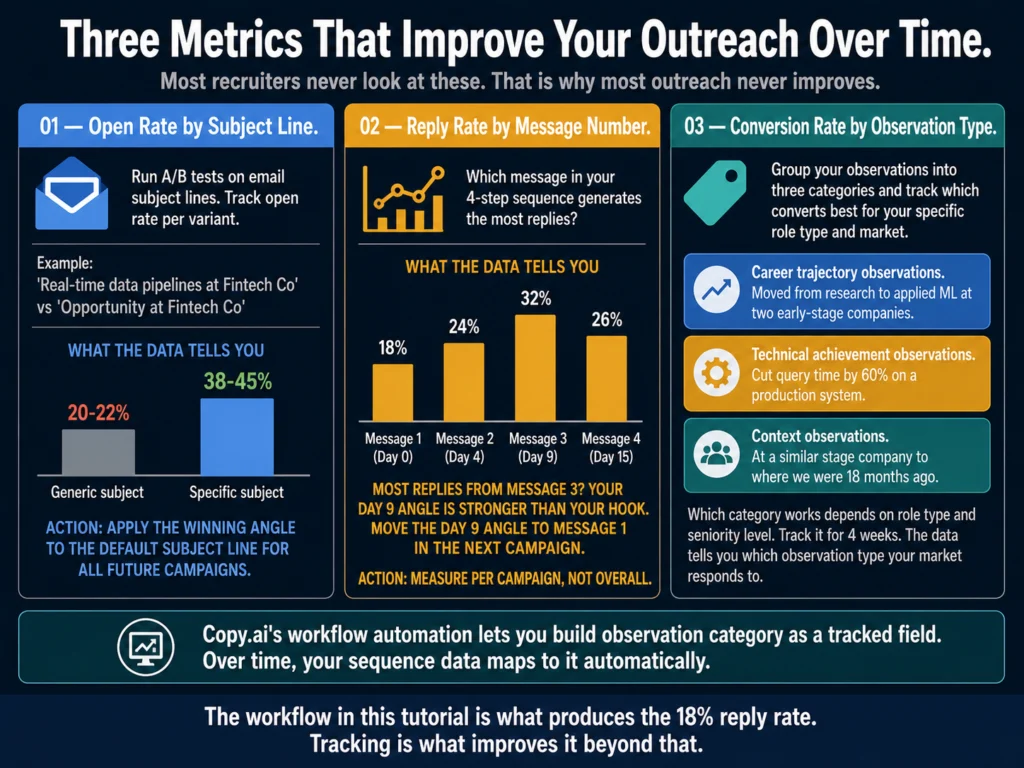
Grammarly vs. Jasper for HR Writing (2026): Which to Use?

Updated: July 12, 2026

Grammarly vs Jasper for HR writing 2026 — editing tool vs content generation tool comparison for job descriptions and candidate communications

TL;DR
  • Grammarly and Jasper are not substitutes for each other. They solve different problems at different stages of the writing process.
  • Grammarly is an editing and refinement tool. It improves text you have already written or generated. It works inline in Gmail, Google Docs, LinkedIn, and most ATS platforms. It does not generate content from scratch.
  • Jasper is a content generation platform. It drafts new content from a brief and applies Brand Voice settings to keep the output consistent across multiple writers. It does not edit inline.
  • For most HR professionals, Grammarly Pro at $12/month is the right choice. The inline editing, tone detection, and workflow fit are better for day-to-day HR writing tasks than Jasper’s generation-first model.
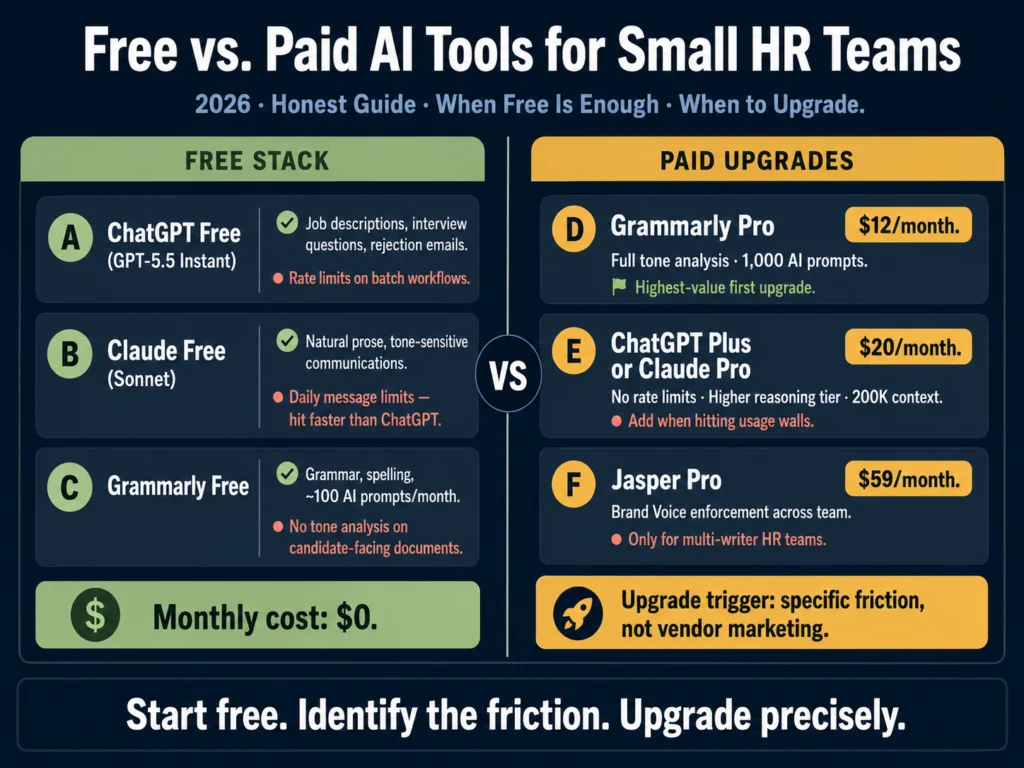
  • Jasper at $59/month (Pro, annual) is worth evaluating only if your team has multiple writers producing job descriptions and candidate communications that currently sound inconsistent — and you have a documented employer brand to train it on.
  • Both tools together at $71/month is a reasonable stack for a mid-sized HR team with active hiring volume. For solo HR professionals, Grammarly alone is the answer.

The Grammarly vs. Jasper question gets asked because both tools involve AI and writing. That is where the overlap ends.

One improves text you already have. The other produces text you do not have yet.

The decision between them is less about which is better and more about where your writing process actually breaks down.

If the problem is that job descriptions, rejection emails, and candidate outreach feel inconsistent in tone — some formal, some casual, some enthusiastic, some flat — depending on who wrote them and when, Jasper addresses that at the generation stage.

If the problem is that your writing is clear enough but occasionally lands in the wrong register, sounds more bureaucratic than intended, or goes out with grammar and phrasing issues that make HR communications feel less professional than they should, Grammarly addresses that at the editing stage.

The question is not which tool is better. It is which problem you have.

Table of Contents
  • What Each Tool Actually Does
    • Grammarly: The Editing Layer
    • Jasper: The Generation Layer
  • Head-to-Head: Five HR Writing Tasks
    • Task 1: Job Description First Draft
    • Task 2: Editing and Tone-Checking a Draft
    • Task 3: Rejection Email (Post-Interview)
    • Task 4: Policy Language and Employee Handbook Sections
    • Task 5: Candidate Outreach Email (Passive Sourcing)
  • Feature Comparison Table
  • Pricing in Plain Terms
  • Who Should Use Which
  • The Case for Using Both
  • Related Reading
  • Frequently Asked Questions
  • Conclusion

What Each Tool Actually Does

Grammarly vs Jasper feature breakdown for HR teams — editing and tone detection versus content generation and brand voice training
Grammarly is an editing tool. It works on text that already exists. Jasper is a generation platform. It creates text from a brief. Neither does what the other does well — which is why the comparison is less useful than understanding which problem you have.

Grammarly: The Editing Layer

Grammarly started as a grammar correction tool in 2009. It has expanded significantly since then, but its core value proposition remains: take text you have already written and make it cleaner, clearer, and more appropriate in tone.

In 2026, Grammarly’s HR-relevant features include:

Tone detection. Grammarly Pro analyzes your writing and tells you whether it reads as confident, warm, formal, direct, or any combination.

For job descriptions, rejection letters, and offer letters, this is the feature that matters most. A rejection email that accidentally reads as dismissive creates a different impression than one that reads as warm and direct.

Clarity and conciseness suggestions. HR documents are often written under time pressure. Grammarly flags passive constructions, unnecessarily long sentences, and jargon that obscures meaning.

A job description that says “the successful candidate will be expected to demonstrate proficiency in stakeholder engagement” is cleaner as “you will manage relationships with key stakeholders across product and sales.”

Style guide enforcement (Business plan). At the Business tier ($15/user/month), Grammarly lets teams upload a style guide — preferred terminology, forbidden phrases, formatting preferences.

For HR teams that have invested in employer brand language, this enforces it without requiring each writer to remember the guidelines manually.

Platform integration. This is Grammarly’s most practical differentiator for HR. The browser extension works across Gmail, Google Docs, LinkedIn, Greenhouse, Lever, Workable, Workday, and virtually every text field in a browser. You write in your ATS and Grammarly checks inline — no copy-pasting, no switching tools.

What Grammarly does not do: generate content from scratch with any sophistication. GrammarlyGO, its generative feature, handles short-form content adequately but is not competitive with ChatGPT, Claude, or Jasper for full job description drafts or multi-paragraph candidate communications.

Grammarly’s strength is refinement, not generation.

Jasper: The Generation Layer

Jasper is a content generation platform built originally for marketing teams. Its relevance to HR is specific: the Brand Voice feature, which trains the tool on your existing content and applies that voice to everything it generates — regardless of which team member is writing.

In 2026, Jasper runs on underlying models from OpenAI and Anthropic rather than a proprietary model — which means the raw output quality is comparable to what you would get from ChatGPT or Claude directly.

The value Jasper adds is not model superiority but the Brand Voice layer and workflow built on top of those models.

Jasper’s HR-relevant features:

Brand Voice training. The core differentiator. Upload samples of your best existing job descriptions, careers page copy, and candidate communications.

Jasper learns the tone, vocabulary, and structure of your employer brand. Every subsequent draft inherits that voice without any additional instruction from the writer.

50+ content templates. Jasper includes a job description template. It does not include HR-specific templates for rejection emails, offer letters, or onboarding documentation — those are written through Jasper Chat or direct prompting, not template-driven workflows.

Jasper Agents (new in 2026). Autonomous writing assistants that can research and generate multi-step content without manual prompting at each stage.

More relevant for employer branding content (careers blog posts, company culture articles) than for operational HR writing.

No inline editing. Jasper does not have a browser extension that works inside your ATS. You draft in Jasper and copy the output into your ATS or email.

For high-volume workflows this adds friction. Many HR teams that use Jasper use it alongside Grammarly — Jasper for generation, Grammarly for the editing pass before sending.


Head-to-Head: Five HR Writing Tasks

Grammarly vs Jasper tested on 5 HR writing tasks — job descriptions, editing drafts, rejection emails, policy language, and candidate outreach verdicts
The pattern across all five tasks is consistent: Jasper generates, Grammarly refines. The two tasks where they overlap (rejection email and outreach) are the ones where using them in sequence is better than using either alone.

Task 1: Job Description First Draft

Grammarly: Cannot generate a job description from scratch in any useful way. GrammarlyGO produces very short, generic output for this task that requires substantial editing.

Jasper: This is where Jasper earns its cost. With Brand Voice trained on your existing postings, Jasper generates a full job description draft that matches your employer brand on the first pass. For teams writing 15+ postings per month, the reduction in editing time is real.

Verdict: Jasper. Not close. For generating initial job description drafts, Grammarly is not the right tool.


Task 2: Editing and Tone-Checking a Draft

Grammarly: This is exactly what Grammarly is built for. Run any draft — whether written by hand, generated by ChatGPT, or produced by Jasper — through Grammarly Pro and it flags tone mismatches, clarity issues, passive voice, and phrasing that will read as overly formal or casual.

Jasper: Can revise a draft through Jasper Chat, but the interface is not designed for inline editing. You describe the change you want and Jasper regenerates the relevant section.

For targeted edits (tighten this paragraph, change the tone of this sentence), Grammarly’s inline approach is faster and more precise.

Verdict: Grammarly. The inline workflow is meaningfully faster for editing tasks.


Task 3: Rejection Email (Post-Interview)

Grammarly: Can refine a rejection email you have written or generated elsewhere. The tone detection feature is specifically useful here — it tells you whether the email reads as appropriately warm or inadvertently cold before it goes out.

Jasper: With Brand Voice training, Jasper generates a rejection email that matches your company’s communication style.

Useful for ensuring that a rejection email written by a junior recruiter sounds the same as one written by the HR director.

Verdict: Both are useful, in sequence. Jasper for generation if brand consistency matters; Grammarly for the editing pass before sending.
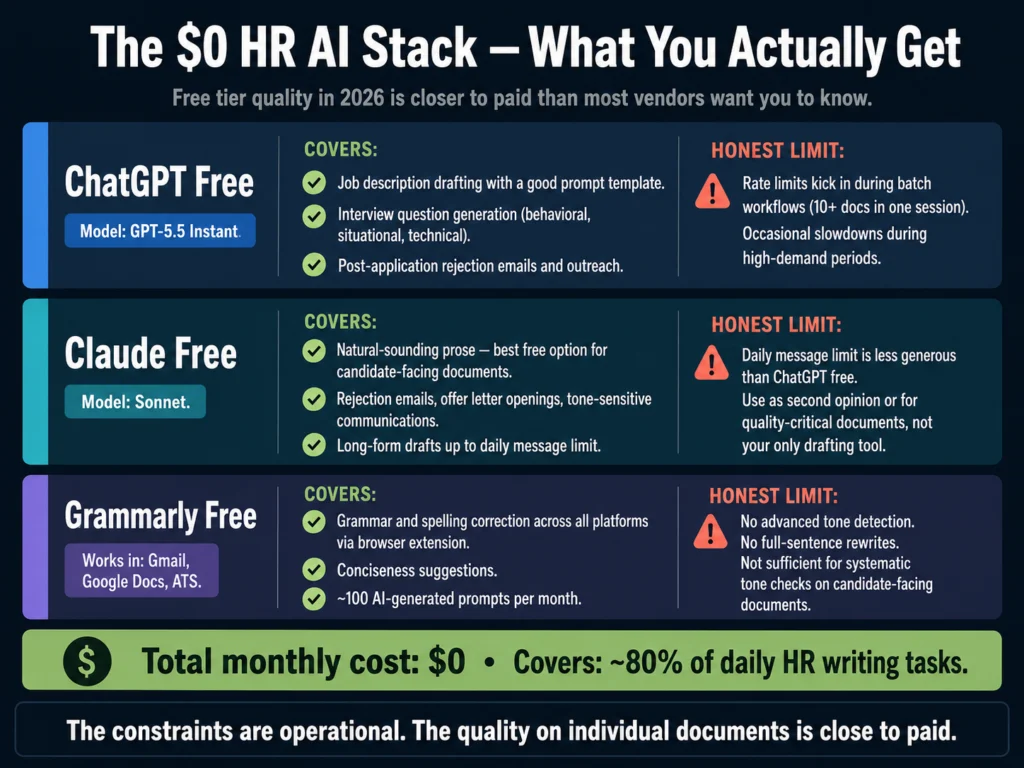
For a solo HR professional without a team brand consistency problem, write the email in ChatGPT or Claude, then run it through Grammarly.

For a full workflow on rejection email writing with AI, read: How to Write Rejection Emails with AI (Without Sounding Robotic)


Task 4: Policy Language and Employee Handbook Sections

Grammarly: Good fit for polishing policy language. The clarity suggestions catch convoluted legal-influenced phrasing that makes policy documents harder to read than they need to be.
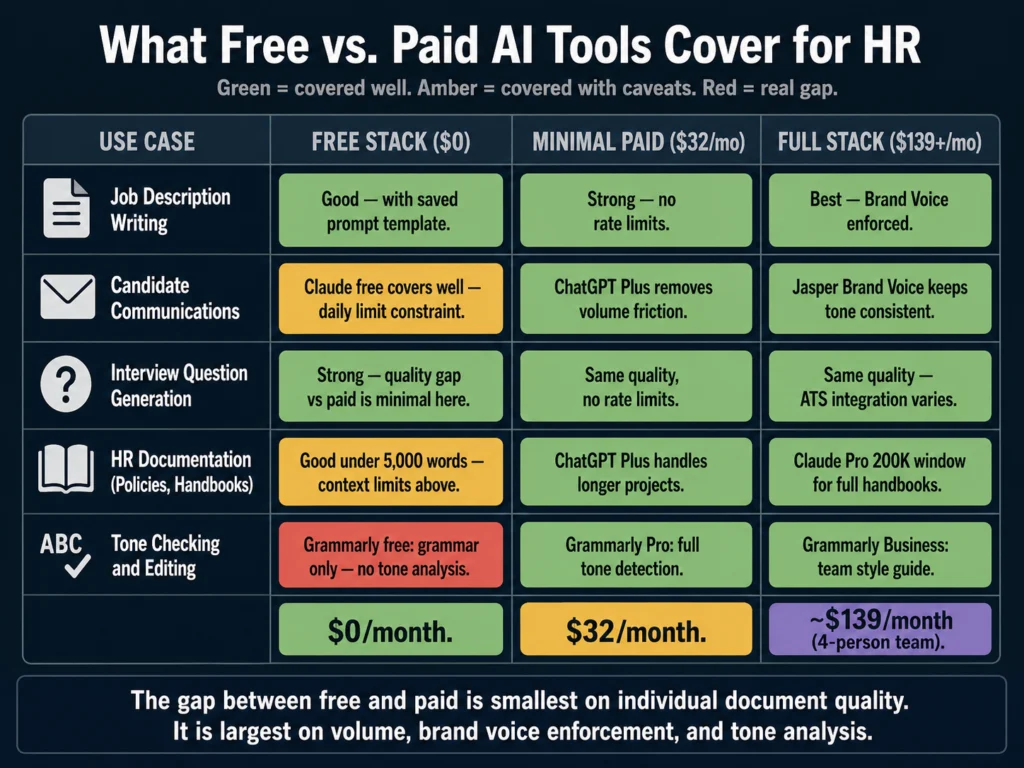
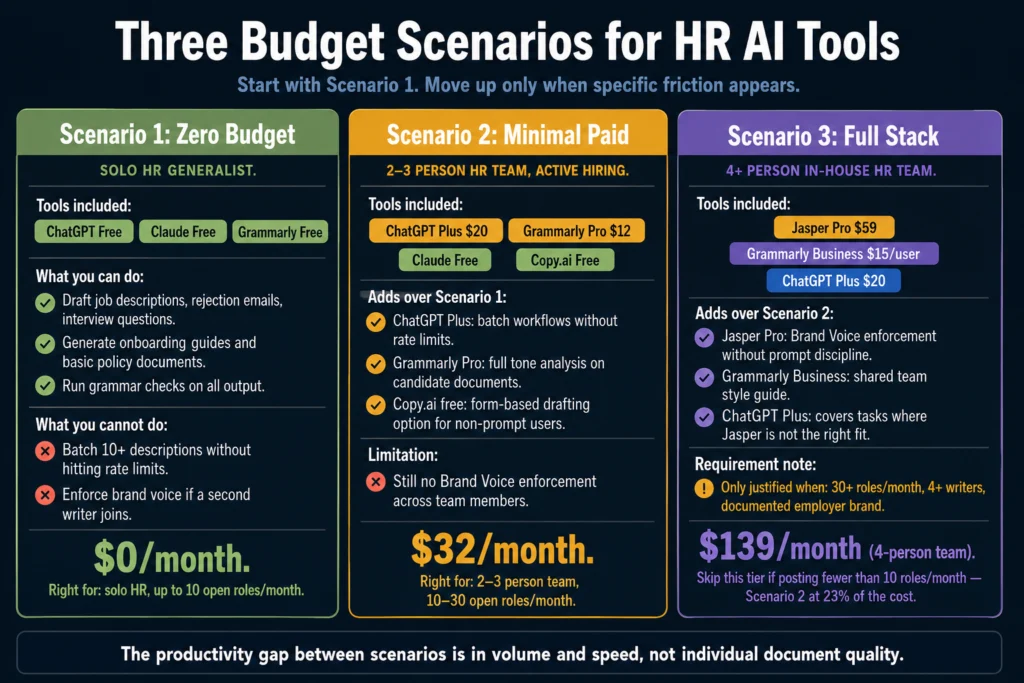
Business plan style guide enforcement is specifically useful for ensuring consistent terminology across a handbook written by multiple contributors.

Jasper: Handles policy drafts but its marketing orientation shows here. Policy writing requires formal precision that Jasper’s tone tends to work against.

The output is usable but requires more editing than job descriptions — Jasper’s templates are built for persuasive content, and policy language is not persuasive.

Verdict: Grammarly for editing and consistency enforcement. ChatGPT or Claude for generation, then Grammarly for the editing pass. Jasper is not the right tool for policy writing.


Task 5: Candidate Outreach Email (Passive Sourcing)

Grammarly: Refines tone and phrasing. Especially useful for catching language that sounds too salesy or generic — a common problem with AI-generated outreach.

Jasper: Generates outreach emails in your brand voice, which matters more for outreach than for rejection emails.

A passive candidate receiving an InMail is making a quick judgment about whether the company sounds like a place worth responding to. Consistent, on-brand outreach language makes that judgment more favorable.

Verdict: Jasper for generation if brand voice is the priority. Grammarly for the editing pass on any outreach before it sends.


Feature Comparison Table

Four-tier pricing comparison of Grammarly Pro, Grammarly Business, Jasper Creator, and Jasper Pro for HR writing teams — features and monthly costs
The two most relevant tiers for most HR teams are Grammarly Pro ($12/month) and Jasper Pro ($59/month). The gap between them is not about quality — it is about whether you need generation, editing, or both.
FeatureGrammarly Pro ($12/mo)Grammarly Business ($15/user/mo)Jasper Creator ($39/mo)Jasper Pro ($59/mo)
Content generationLimited (GrammarlyGO)Limited✓ Full✓ Full
Brand voiceNoStyle guide only1 voiceMultiple voices
Inline browser editing✓✓NoNo
ATS integrationBrowser extensionBrowser extensionNoNo
Tone detection✓✓NoNo
Grammar/clarity✓ Full✓ FullBasicBasic
Plagiarism check✓✓NoNo
Team style guideNo✓No✓
Free tier✓NoNoNo
TrialNoNo7-day7-day
G2 rating (2026)4.7/5 (13,186 reviews)—4.7/5 (1,268 reviews)—

Pricing verified May 2026. Jasper Pro at $59/month annual ($69/month monthly). G2 ratings verified at time of writing — verify before publishing as ratings update continuously.


Pricing in Plain Terms

Grammarly costs $12/month (Pro, annual billing). The annual vs. monthly price difference is significant — monthly billing runs $30/month, which is 150% more expensive.

If you are going to use Grammarly for professional HR writing, annual billing is the only financially sensible option.

The Business plan at $15/user/month adds team features: a shared style guide, admin dashboard, and usage analytics.

For a three-person HR team, Business costs $45/month versus $36/month for three individual Pro subscriptions. The style guide feature is the meaningful addition — for teams writing jointly, it is worth the difference.

Jasper costs $39/month for Creator or $59/month for Pro (annual billing). The Creator plan includes one Brand Voice — sufficient for most HR teams with a single employer brand. The Pro plan’s multiple Brand Voices matter for organizations managing distinct sub-brands or significantly different regional employer brands.

→ Grammarly Pro at $12/month (annual) is the highest-value single upgrade for HR writers who produce candidate-facing content regularly.

→ Jasper’s 7-day free trial gives you full access to Brand Voice training — enough time to test it on your actual job descriptions before committing.


Who Should Use Which

Solo HR generalist or recruiter: Grammarly Pro. Full stop. At $12/month it handles the editing and tone checking that improves the quality of every candidate-facing document you produce.

Jasper’s value is in team-level Brand Voice enforcement, which you do not need if you are the only writer.

HR team of 2-3 people, active hiring: Grammarly Business ($15/user/month). The shared style guide is the relevant upgrade from Pro — it keeps your posting language consistent across team members without Jasper’s generation overhead.

If you are already using ChatGPT or Claude for drafting, Grammarly handles the editing layer cleanly.

HR team of 4+, defined employer brand, 20+ postings per month: Both tools. Jasper Pro for generation with Brand Voice enforcement; Grammarly for the editing pass before any document goes out.

The combined cost is approximately $71/month (Grammarly Pro for one editor + Jasper Pro).

At a team level with Business and Pro plans, the stack runs higher but the case for both tools is clear: Jasper ensures all drafts start from the right brand foundation; Grammarly ensures they finish with the right tone and clarity before sending.

Organization with multiple business units or distinct sub-brands: Jasper Pro’s multiple Brand Voices is the relevant feature here.

If your company has three distinct employer brands and needs job descriptions to reflect each one distinctly, Jasper Pro handles this more systematically than any combination of prompt templates.


The Case for Using Both

A 2026 analysis of AI writing tools for professionals notes that most working writers pay for two tools: one for drafting, one for editing. That covers 80% of the work.

For HR teams, the logical split is:

  1. ChatGPT or Claude for first drafts (neither has a meaningful affiliate relationship, but both free tiers are capable)
  2. Jasper for Brand Voice enforcement if multiple writers need to stay on-brand
  3. Grammarly for the editing and tone-check pass before any document goes to a candidate or employee

The tools are not redundant. Each addresses a different failure mode: inconsistent brand voice (Jasper), imprecise tone in individual documents (Grammarly), and blank-page drafting friction (ChatGPT/Claude).


Related Reading

  • Best AI Tools for Writing Job Descriptions
  • ChatGPT vs. Claude for HR Writing — A Practical Comparison
  • Jasper AI Review for HR Professionals — Is It Worth It?
  • Free vs. Paid AI Tools for Small HR Teams
  • Jasper vs. Copy.ai for HR Writing — Which Is More Practical?
  • The Complete Guide to AI Tools for HR Professionals

Frequently Asked Questions

Can Grammarly replace Jasper for job description writing?

No. Grammarly does not generate job descriptions in any useful way. GrammarlyGO, its generative feature, produces very short output for this task that requires extensive editing to be usable. If your primary need is drafting job descriptions, Grammarly is not the right tool — use ChatGPT, Claude, or Jasper for the draft, then Grammarly for the editing pass. The two tools address different stages of the writing process rather than competing for the same function.

Does Jasper include grammar and clarity checking like Grammarly?

No. Jasper’s output undergoes basic grammar checking, but it does not have dedicated tone detection, clarity analysis, or the inline editing features that Grammarly provides. Most HR teams that use Jasper run their drafts through Grammarly before sending — Jasper for generation, Grammarly for the editing pass. The two tools address different stages of the writing process rather than competing for the same function. If you are evaluating one as a replacement for the other, you are solving the wrong problem.

Grammarly recently rebranded Premium to Pro — does anything change for HR users?

Grammarly rebranded its individual paid tier from “Premium” to “Pro. The features and pricing remained unchanged at the time of the rebrand. For HR users, the practical implication is that references to “Grammarly Premium” in older articles and internal documentation refer to the same product now called Grammarly Pro. The $12/month annual price point is the same.

Which tool is better for a remote HR team where multiple people write job descriptions independently?

Jasper addresses this problem more directly. When multiple people write job descriptions without a shared enforcement mechanism, the outputs will reflect individual writing styles rather than a consistent employer brand. Jasper’s Brand Voice training encodes that consistency into the tool — every writer using Jasper draws from the same brand profile regardless of their individual writing habits. Grammarly Business’s style guide helps but requires each writer to read and apply a set of rules, which they will apply inconsistently under time pressure. Jasper applies the rules automatically at the generation stage.

What is the most cost-effective path for a solo HR professional who wants better AI writing tools?

Start with Grammarly Pro at $12/month (annual billing). Pair it with ChatGPT’s free tier (GPT-5.5 Instant) for drafting. This combination — free generation, paid editing — covers the majority of HR writing tasks at the lowest cost. The free tier of ChatGPT is capable enough for job descriptions, rejection emails, and interview question generation with a well-structured prompt. Grammarly Pro adds the tone and clarity checking layer that prevents those drafts from going out with inadvertent register problems. Jasper becomes relevant only when you have a documented brand voice problem, which solo HR professionals typically do not have.


Conclusion

The Grammarly vs. Jasper question has a cleaner answer for HR professionals than it does for marketing teams, where both tools have a stronger claim to being primary.

For HR: Grammarly is the more universally useful tool. It works everywhere, it solves a problem every HR writer has (writing that does not land the way it was intended), and at $12/month it is the most cost-effective paid upgrade in an HR AI stack.

Jasper is more powerful in the specific scenario it is designed for — a team of writers who need to produce consistent brand-aligned content at volume. For that scenario, it is genuinely the best tool available at its price point.

The error to avoid is treating these as substitutes when they are complements. Grammarly makes existing writing better. Jasper generates new writing in a consistent voice.

Most HR teams eventually need both. Most HR professionals starting from scratch should begin with Grammarly.

That recommendation comes from what the Ailovyu team has observed across HR teams at different sizes and hiring volumes — the tools that earn their cost are almost always the ones that solve a specific, documented problem rather than a general desire to write better.

The Ailovyu Team

We research and test AI tools so you can make informed decisions before spending money on them. Every review, comparison, and tutorial on this site is based on actual use, not vendor marketing.
Learn more on our About page.

ailovyu.com

Pricing verified May 2026 from vendor websites. G2 ratings sourced from g2.com. Affiliate links in this article earn a commission at no extra cost to you — Grammarly and Jasper both have active affiliate programs. This does not affect editorial recommendations.

How to Write a 30-60-90 Day Onboarding Plan with AI (2026)

Updated: July 12, 2026

How to write a 30-60-90 day onboarding plan with AI in 2026 — three-phase structure with milestones for new hire HR workflow

TL;DR
  • Only 12% of employees strongly agree their organization does a great job of onboarding, according to Gallup. The data on what happens next is straightforward: 1 in 3 new hires leaves within the first 90 days when onboarding is poor, according to Jobvite research.
  • A 30-60-90 day plan is the single most effective onboarding document HR can provide — and most companies use a generic version that does not reflect the actual role.
  • AI writes the structure. The hiring manager provides the context. Neither alone produces a useful plan.
  • This article includes a master prompt template, customization prompts for three role types (individual contributor, technical, managerial), and a hiring manager brief template for extracting the information AI needs.
  • Total time to produce a role-specific 30-60-90 day plan with this workflow: 45 to 60 minutes, including the manager conversation.

Most onboarding fails quietly. HR is busy filling the next role before the last hire has finished their first week, and onboarding planning falls to the bottom of the list because nothing bad happens immediately when you skip it.

The consequences show up 60 days later, when a new hire who never got real clarity about what success looked like starts looking for another job.

Gallup research consistently finds that only 12% of employees strongly agree their organization does a great job of onboarding. That means 88% of workers rate their onboarding experience as inadequate.

Companies with strong onboarding programs improve new hire retention by 82% and productivity by over 70%, according to Brandon Hall Group research. The gap between what organizations know about onboarding and what they actually implement is substantial.

The 30-60-90 day plan is one of the most effective tools for closing that gap. It gives new hires role clarity — what they are expected to learn, demonstrate, and achieve at each stage.

It gives managers a shared accountability framework. And it gives HR a structured document they can hand off at the start of day one instead of hoping information filters through informally.

The problem is time. A good 30-60-90 day plan is role-specific. Generic templates — the same document with the same milestones applied to every new hire regardless of function — are better than nothing, but not by much.

AI makes role-specific plans achievable in under an hour.

Table of Contents
  • What Goes Into a 30-60-90 Day Plan
  • Why Most Onboarding Plans Fail
  • Before the Prompts: The Hiring Manager Brief
  • The Master Prompt Template
  • Customization Prompts for Three Role Types
  • The Section Most Plans Miss: Pre-Day-One Preparation
  • The Editing Pass: Before You Share the Plan
  • Storing and Sharing the Plan
  • Related Reading
  • Frequently Asked Questions
  • Conclusion

What Goes Into a 30-60-90 Day Plan

Before the prompts, understand the structure you are building. A 30-60-90 day plan covers three distinct phases, each with a different primary objective.

30-60-90 day onboarding plan structure — four components per phase including learning goals, relationships, performance expectations, and success indicators
Each phase has four components. The success indicators are what most generic templates skip — they define what “done well” looks like at each stage, which is what new hires actually need to calibrate their own performance without waiting for manager feedback.

Days 1 to 30: Learn The first 30 days are about orientation — understanding the company, the team, the role, and the tools. The new hire is not expected to produce significant independent work yet.

Milestones in this phase center on completing training, meeting key stakeholders, and developing enough context to ask informed questions.

Days 31 to 60: Apply The second phase shifts from learning to doing — under guidance. The new hire takes on their first real projects, begins making independent decisions in lower-stakes areas, and starts building relationships beyond their immediate team.

Milestones in this phase involve delivering initial work, receiving and incorporating feedback, and identifying gaps in their knowledge or skills.

Days 61 to 90: Contribute The third phase is about demonstrating competence and operating with increasing independence.

By day 90, a new hire should be handling their core responsibilities without daily supervision, contributing meaningfully to team goals, and building toward full productivity.

Milestones in this phase are more outcome-oriented: specific deliverables, measurable contributions, or demonstrated skill benchmarks.

Each phase should include four components: learning goals, relationship-building targets, performance expectations, and success indicators.

The success indicators are the part most generic templates miss — they define what “done well” looks like at each stage, which is what new hires actually need to calibrate their own performance.


Why Most Onboarding Plans Fail

Enboarder’s 2025 research found that 60% of companies do not set clear goals or milestones for new hires. 28.8% of managers provide zero guidance or training to their new hires.

Only 36% of HR leaders describe the handoff between recruiting and onboarding as seamless.

Onboarding failure statistics 2025 — 12% excellent rating, 60% no milestones set, 1 in 3 new hires leaves within 90 days of poor onboarding
The problem is not that HR does not care. It is that onboarding planning competes for time with active recruiting and produces no visible output until a new hire has already started.

The structural problem: most 30-60-90 day plans are written by HR and reflect what HR thinks the role involves, not what the hiring manager expects the new hire to demonstrate.

A Customer Success Manager plan written by HR generically looks similar to a Sales Account Executive plan written by HR generically. The function, the tools, the relationships, and the success criteria are entirely different — but the template does not reflect that.

A secondary problem: 60% of companies focus onboarding on process rather than people. Completing paperwork and compliance training is measurable.

Whether a new hire has built a meaningful relationship with the colleague whose work is most relevant to theirs is not.

Plans that only track the process component miss the relational dimension that Enboarder’s research identifies as the second most common reason new hires leave early.

AI addresses the first problem — role-specificity — directly. It cannot address the second without the right inputs.


Before the Prompts: The Hiring Manager Brief

The most important step in building an AI-assisted onboarding plan is not the AI. It is the 20-minute conversation with the hiring manager that gives you the information AI needs to make the plan useful.

Use this prompt to extract the right information. Send it as a Google Form or a short email before you open any AI tool.

Hiring manager brief template for 30-60-90 day onboarding plans — 8 questions to complete before writing an AI-assisted onboarding plan
Questions 4, 5, and 7 are the most valuable. Question 7 in particular — what do most new hires get wrong in the first 90 days — surfaces the implicit expectations that never make it into a formal plan but determine whether someone is perceived as successful.

Hiring Manager Brief Template:

Before we finalize [NAME]'s onboarding plan, I need 15 minutes 
of your input. Please answer the following:

1. What should [NAME] know by the end of week one that they 
   would not know from reading the job description?

2. Who are the three most important people for [NAME] to build 
   a working relationship with in the first 30 days? 
   (Name and role, plus a one-line reason why each matters)

3. What is the one thing [NAME] should deliver or demonstrate 
   by day 30 to make you feel the hire was the right decision?

4. What does success look like at day 60?

5. What does success look like at day 90?

6. What tools, systems, or processes will take [NAME] the 
   longest to get up to speed on?

7. What do most new hires in this role get wrong in the 
   first 90 days?

8. Is there anything about the team dynamics, current 
   projects, or company context that [NAME] should 
   understand before starting?

This brief takes the manager 10 to 15 minutes to complete. The answers to questions 4, 5, and 7 are the most valuable.

Question 7 in particular — what do most new hires in this role get wrong — surfaces the implicit expectations that never make it into a formal plan but determine whether someone is perceived as successful in the role.

Do not start the AI prompt until this brief comes back.


The Master Prompt Template

With the hiring manager brief in hand, open ChatGPT (GPT-5.5 Instant is adequate for this task; GPT-5.5 Thinking via Plus handles longer, more complex role briefs more precisely — particularly for senior or managerial roles where the brief contains dense context) or Claude.

You are an experienced HR professional building a 30-60-90 day 
onboarding plan for a new hire.

Role: [JOB TITLE]
Level: [JUNIOR / MID / SENIOR / MANAGER]
Department: [DEPARTMENT]
Reports to: [MANAGER TITLE]
Company size: [COMPANY SIZE]
Work arrangement: [REMOTE / HYBRID / ON-SITE]

The plan should be structured in three phases:
- Days 1-30: Learning and orientation
- Days 31-60: Application and contribution under guidance
- Days 61-90: Independent contribution and performance demonstration

For each phase, include:
1. Learning goals (3-5 specific items to know or understand)
2. Relationships to build (specific roles or types of people, 
   with one sentence on why each matters)
3. Performance expectations (what they should be doing, 
   not just learning)
4. Success indicators (how the manager and new hire will know 
   the phase went well — make these specific and measurable 
   where possible)

Context from the hiring manager:
- Key knowledge for week one: [PASTE FROM BRIEF]
- Three most important relationships: [PASTE FROM BRIEF]
- Day 30 success indicator: [PASTE FROM BRIEF]
- Day 60 success indicator: [PASTE FROM BRIEF]
- Day 90 success indicator: [PASTE FROM BRIEF]
- Tools that take the longest to learn: [PASTE FROM BRIEF]
- What new hires most often get wrong: [PASTE FROM BRIEF]
- Additional team/company context: [PASTE FROM BRIEF]

Format the plan as a structured document with clear section 
headers. Use plain language — this document will be given 
directly to the new hire on day one. Avoid corporate jargon 
and vague phrases like "build strong relationships" without 
specifying with whom and why.

This prompt produces a draft that is substantially more useful than any generic template because it incorporates the hiring manager’s actual expectations rather than HR’s assumptions about what the role requires.


Customization Prompts for Three Role Types

The master prompt handles most situations. These follow-up prompts address common gaps for specific role categories.

30-60-90 day onboarding plan customization guide for three role types — individual contributors, technical roles, and managers with specific section additions
The master prompt handles most roles. These three customizations address the gaps that appear consistently for individual contributors, technical roles, and managers — the sections that generic templates always miss for each type.

For individual contributor roles (sales, customer success, account management):

Add a section to the Day 31-60 phase called "First Client 
or Account Interactions." Include:
- What level of account or client complexity [NAME] should 
  handle independently by day 60
- Who should shadow or support them for their first [3-5] 
  client interactions
- What a successful first solo client interaction looks like
- One thing to avoid in early client interactions that would 
  create a poor first impression for the company

For technical roles (engineering, data, product):

Add a "Technical Ramp-Up" section to the Day 1-30 phase. Include:
- The three codebase areas, data systems, or product domains 
  to prioritize understanding first (and why)
- The definition of "read-only" access vs. "contributing" access 
  and when each is appropriate
- Who owns code review for [NAME]'s first pull requests or 
  deliverables, and what the expected review turnaround is
- What a first meaningful technical contribution looks like 
  by day 45 (not just completing setup tasks)

For managerial roles (team leads, people managers, directors):

Add a "Team and Stakeholder Assessment" section to the Day 1-30 
phase. Include:
- A recommended schedule for 1:1s with each direct report in 
  the first two weeks (frequency and duration)
- Three things to listen for in those early 1:1s that would 
  signal team health issues to address early
- The organizational stakeholders outside the immediate team 
  whose trust and alignment matters most by day 60
- What "earning the right to change things" looks like in this 
  context — how much context should [NAME] build before 
  proposing structural or process changes

The Section Most Plans Miss: Pre-Day-One Preparation

A 30-60-90 day plan that starts on day one misses an opportunity. The best onboarding experiences begin before the new hire walks in the door.

Add this section at the beginning of every plan you produce:

Add a "Before Day One" section to the beginning of the plan. Include:
- What [NAME] should read or watch before starting 
  (company handbook, product demo, key team presentation)
- Who will reach out to them before day one to confirm 
  logistics and answer questions (name and role)
- Any accounts or tools they should set up in advance 
  (if company policy allows pre-start access)
- One action [NAME] can take before day one to feel 
  prepared — something that will reduce first-day anxiety 
  without requiring company access

Research from FirstHR found that 70% of new hires know within the first month whether a job is a good fit — and 29% decide in the first week. Pre-day-one communication is the first signal a new hire receives about how their experience will be managed.

A single email from their hiring manager before they start — with their first-week schedule, the name of the person meeting them at the door, and one piece of genuine context about what the first day looks like — reduces early anxiety and sets a concrete expectation.


The Editing Pass: Before You Share the Plan

The onboarding plan is a document a new hire reads on their most anxious workday. Before sharing it, run it through the same editing discipline you would apply to any candidate-facing document.

Read it aloud. Any sentence that sounds like it was written by someone who does not know the new hire should be rewritten.

Phrases like “leverage your expertise to drive cross-functional value” are worse than useless — they signal that no one wrote this specifically for the person holding it.

Check for specificity. Every learning goal should reference a specific system, process, person, or outcome. “Learn how the team operates” is not a learning goal. “Shadow three customer calls with [Name] to understand how escalation requests are handled” is.

Check the success indicators. Each one should answer: how will the new hire know if they have met this milestone without asking their manager? If the indicator requires interpretation, make it more concrete.

Grammarly’s tone detector is useful at this stage — specifically for confirming that the document reads as warm and welcoming rather than evaluative or bureaucratic.

A 30-60-90 day plan that reads like a performance review framework before the hire has started sets an anxious tone from day one.

→ Grammarly Pro’s tone detection is the editing layer worth adding before any new-hire-facing document goes out.


Storing and Sharing the Plan

The format matters as much as the content. A 30-60-90 day plan buried in a PDF attached to a welcome email is less likely to be referenced than one shared in a Google Doc the new hire can access and annotate.

Recommended approach: store the plan in a Google Doc or Notion page shared with the new hire, their manager, and HR. This allows:

  • The manager to add notes or updates as the role evolves
  • The new hire to track their own progress and add context
  • HR to review at the 30-day check-in without requesting a new document

If your organization uses an HRIS or onboarding platform (BambooHR, Workday, Leapsome), check whether it supports structured goal-setting within the onboarding workflow.

Many platforms have a built-in 30-60-90 day section that integrates the plan directly into performance check-in cadences.


Related Reading

  • How to Write 10 Job Descriptions in One Day Using AI
  • ChatGPT vs. Claude for HR Writing — A Practical Comparison
  • Best AI Tools for Writing Interview Questions
  • Using AI to Write Onboarding Documentation — A Full Guide
  • How to Build an AI Prompt Library for HR Teams
  • AI Writing Tools for Recruiters — The Complete Guide
  • AI for HR Communications and Documentation — The Complete Guide

Frequently Asked Questions

How long does it take to write a role-specific 30-60-90 day plan using AI?

With this workflow: 45 to 60 minutes total. The hiring manager brief takes 10 to 15 minutes to complete on the manager’s end. Reviewing the brief and building the prompt takes 10 minutes. The AI generates the initial draft in under two minutes. The editing and customization pass takes 15 to 20 minutes. If you have a template from a previous role in the same function, the editing pass is faster because you can compare against an existing calibrated example. First-time users typically take 75 to 90 minutes. After two or three iterations, the process is reliably under an hour.

Can I use the same 30-60-90 day plan template for multiple new hires in the same role?

Partially. The role-level structure — the general learning goals, tool ramp-up sequence, and stakeholder relationships for a Customer Success Manager, for example — can be reused across multiple hires into the same function. The success indicators for days 30, 60, and 90 should be reviewed and updated per hire based on the current team’s priorities and any context the manager provides about what this particular person needs to develop. The plan for a new CSM joining a team mid-quarter during a product launch is different from the same role hired at the start of a relatively stable period. Treat role-level structure as a reusable starting point, not a finished document.

Should the new hire see the 30-60-90 day plan before their start date?

Yes. Sharing the plan before day one serves two purposes. It reduces first-day anxiety by giving the new hire a concrete sense of what the first three months look like. And it signals that the organization planned for their arrival rather than scrambling once they showed up. Some organizations prefer to walk through the plan in the first one-on-one with the manager rather than sending it cold. Both approaches work — the important variable is that the conversation happens in the first week, not after the 30-day mark.

What if the hiring manager does not complete the brief in time?

Do not produce the plan without it. A 30-60-90 day plan written without manager input is a generic template with a new hire’s name on it, which is only marginally better than no plan at all. If the manager cannot complete an 8-question brief before a hire’s start date, that is itself a signal about the onboarding experience the new hire is about to have. Escalate the completion of the brief to the manager’s manager if needed. The brief conversation is also useful preparation for the manager — it forces them to articulate what success looks like before the hire starts, rather than evaluating performance vaguely at the end of 90 days.

How should the 30-60-90 day plan connect to the formal performance review process?

The day-90 success indicators in the plan should directly inform the 90-day performance conversation. If the plan specifies that by day 90 the new hire should be handling a specific volume of accounts independently, the 90-day check-in evaluates against that specific benchmark — not a generic “how are things going” conversation. This connection requires that HR and the manager agree on the success indicators before the hire starts, not after. It also means the plan is only useful if the 90-day check-in actually happens. Build the check-in into the calendar on day one. Scheduling it retroactively at day 85 produces a less useful conversation than one the new hire has been preparing for since week one.


Conclusion

The 30-60-90 day plan is not a form that HR fills out. It is a contract between the organization and a new hire about what the first three months will look like, what support the hire can expect, and how success will be defined.

Generic templates fulfill the first function — they give the hire a document. They rarely fulfill the second and third.

AI makes role-specific plans achievable at scale. The workflow is not complicated: a 20-minute hiring manager brief, a structured prompt, role-specific customization, and a 15-minute editing pass.

The output is a document a new hire can actually use to calibrate their own performance rather than waiting to receive feedback at the end of a quarter.

The Gallup statistic that only 12% of employees rate their onboarding as genuinely excellent is not a talent acquisition problem.

It is a documentation and planning problem. The tools to solve it are available and inexpensive.

The constraint is whether HR has a workflow that makes consistent, role-specific onboarding planning tractable.

The workflow in this article is one the Ailovyu team has refined specifically for HR professionals who need to produce role-specific plans without adding hours to an already full recruiting workload.


Onboarding statistics sourced from Gallup Workplace Research, Brandon Hall Group, Enboarder 2025 Report, FirstHR 2026 compilation, and Jobvite (1 in 3 new hires within 90 days stat). Affiliate links in this article earn a commission at no extra cost to you.

The Ailovyu Team

We research and test AI tools so you can make informed decisions before spending money on them. Every review, comparison, and tutorial on this site is based on actual use, not vendor marketing.
Learn more on our About page.

ailovyu.com

Free vs. Paid AI Tools for HR Teams (2026): Honest Guide

Updated: July 12, 2026

Free vs paid AI tools for HR teams 2026 — ChatGPT, Claude, Grammarly, Copy.ai, and Jasper compared by cost and use case

TL;DR
  • A small HR team can run a functional AI-assisted writing workflow entirely on free tools. The quality is not meaningfully worse than paid options for most tasks.
  • The free stack that covers 80% of needs: ChatGPT free (GPT-5.5 Instant) + Claude free (Sonnet) + Grammarly free. Total cost: $0.
  • The minimum paid upgrade: Grammarly Pro at $12/month (annual) adds full tone analysis and 1,000 AI prompts. This is the highest-value single upgrade for HR writers.
  • When to add ChatGPT Plus or Claude Pro ($20/month): When you regularly work with long documents, need consistently higher output quality on senior or complex roles, or hit usage limits on the free tier.
  • When to add Jasper ($39–$59/month): Only when multiple writers need Brand Voice enforcement and your employer brand is documented. Not justified for solo HR professionals or low-volume teams.
  • Copy.ai’s free plan (2,000 words/month, no expiry) is the best free option for template-driven job description drafting if you want structure without prompt engineering.

Small HR teams rarely have a software budget that scales with their workload.

A two-person HR function at a 150-person company is expected to produce the same quality of job descriptions, candidate communications, and onboarding materials as a team five times its size.

AI tools help close that gap — but the question of which tools actually justify their monthly cost versus which free alternatives cover the same ground is worth answering directly.

The short answer: free AI tools in 2026 are genuinely capable. The gap between free and paid has narrowed significantly.

You can build an effective HR writing workflow without spending anything in your first six months.

The paid upgrades that justify their cost are specific and limited — and most small HR teams do not need all of them.

This guide breaks down the free and paid options by use case, gives you honest assessments of where free plans hit their limits, and ends with three budget scenarios for teams at different stages.

Table of Contents
  • The Free Stack: What You Actually Get
    • ChatGPT Free (GPT-5.5 Instant)
    • Claude Free (Sonnet Models)
    • Grammarly Free
  • Use Case Breakdown: Free vs. Paid
    • Job Description Writing
    • Candidate Communications (Rejection Emails, Outreach)
    • Interview Question Generation
    • HR Documentation (Policies, Handbooks, Onboarding)
    • Tone Checking and Editing
  • Honest Pricing Table: What You Get at Each Level
  • Three Budget Scenarios
    • Scenario 1: Zero Budget (Solo HR Generalist)
    • Scenario 2: Minimal Paid Stack (2–3 Person HR Team, Active Hiring)
    • Scenario 3: Full Stack (In-House HR Team, 4+ People, Defined Employer Brand)
  • Related Reading
  • Frequently Asked Questions
  • Conclusion

The Free Stack: What You Actually Get

Three free tools form the foundation of a zero-cost HR AI workflow.

Free AI writing tools for HR teams — ChatGPT free, Claude free, and Grammarly free with capabilities and honest usage limits
Three free tools. One consistent workflow. The quality on individual documents is close to paid alternatives — the constraints are operational, not capability-based.

ChatGPT Free (GPT-5.5 Instant)

The free ChatGPT tier now runs on GPT-5.5 Instant, which became the default model on May 5, 2026, replacing GPT-5.3 Instant.

GPT-4o was deprecated in February 2026, with GPT-5.3 Instant serving as the interim default before GPT-5.5 Instant took over.

This is a substantial improvement over what the free tier offered a year ago. GPT-5.5 Instant handles job description drafting, interview question generation, rejection email writing, and basic policy drafts competently, with a well-constructed prompt.

Honest limit: The free tier has usage limits that kick in during high-demand periods, occasionally producing slower responses or rate limiting when you are trying to run a batch workflow.

For most HR writers handling fewer than 20 documents per week, this is not a practical problem.

For batch workflows (10+ job descriptions in a single session), ChatGPT Plus ($20/month) removes those friction points.

Claude Free (Sonnet Models)

Claude’s free tier uses Sonnet models, which handle most HR writing tasks without noticeable quality compromise.

As covered in ChatGPT vs. Claude for HR Writing — A Practical Comparison, Claude produces more natural-sounding prose and is marginally better at maintaining tone consistency across longer documents.

The free tier has daily usage limits that are less generous than ChatGPT’s.

Honest limit: Claude’s free tier hits its daily message limit faster than ChatGPT’s, which makes it less suited as your only drafting tool.

Use it as a second opinion or for the specific tasks where its writing quality advantage matters most — rejection emails, offer letters, tone-sensitive candidate communications.

Grammarly Free

Grammarly Free catches roughly 60 to 70% of the issues that Premium catches.

For HR writing, that means basic grammar and spelling correction, conciseness suggestions, and a limited number of AI-generated prompts (approximately 100 per month).

The browser extension works across Gmail, Google Docs, LinkedIn, and most ATS platforms — meaning it runs in the background of wherever you already write.

Honest limit: No advanced tone detection, no full-sentence rewrites, and no plagiarism check on the free tier. For internal memos and emails, the free tier is sufficient.

For documents that a candidate will read (rejection letters, offer letters, job descriptions), the Premium tone analysis catches mismatch between intended and actual tone that the free tier misses.


Use Case Breakdown: Free vs. Paid

Coverage matrix comparing free vs paid AI tools for five HR writing use cases — job descriptions, candidate communications, interview questions, documentation, and tone editing
Free tools cover most tasks adequately. The gaps appear at volume, brand voice enforcement, and tone analysis on candidate-facing documents — not at the level of individual document quality.

Job Description Writing

Free coverage: ChatGPT free with a saved prompt template handles this well for straightforward roles.

Copy.ai’s free plan (2,000 words/month, no expiry) provides a form-based interface that is faster for users who find prompt engineering unfamiliar.

The form structure guides you through the inputs without requiring expertise.

Where free falls short: Brand voice consistency across a team of writers. Free tools require every writer to use the same prompt template manually.

They will not. If you have three recruiters writing job descriptions independently, the outputs will sound different without an enforcement mechanism.

This is where Jasper’s Brand Voice feature earns its cost, but only for multi-writer teams.

Recommended free approach: ChatGPT free + a master prompt template saved in a shared Google Doc. For the prompt structure, see How to Write 10 Job Descriptions in One Day Using AI.

Upgrade trigger: Three or more writers producing job descriptions, documented employer brand that is not being consistently applied.


Candidate Communications (Rejection Emails, Outreach)

Free coverage: Claude free produces the most natural-sounding candidate communications of any free tool.

A good prompt with specific candidate details (role, stage, one genuine observation) produces rejection emails that do not read as obviously automated.

For a full workflow on this, see How to Write Rejection Emails with AI (Without Sounding Robotic).

Where free falls short: Volume. If you are sending 40 rejection emails per week, Claude’s free tier daily message limit becomes a bottleneck.

ChatGPT Plus ($20/month) removes usage constraints and handles this volume without friction.

Recommended free approach: Claude free for sensitive communications (final-round rejections, offer letters). ChatGPT free for high-volume post-application rejections.

Upgrade trigger: Sending more than 30 candidate emails per week and hitting daily message limits.


Interview Question Generation

Free coverage: Both ChatGPT free and Claude free generate strong role-specific behavioral and situational interview questions with a well-structured prompt.

The quality difference between free and paid here is minimal. For the prompts, see Best AI Tools for Writing Interview Questions.

Where free falls short: Real-time interview support. Tools like Clovers, which provide in-the-moment question suggestions during live interviews, are paid products with no free tier.

For teams where interviewer consistency is a documented problem, those tools address something free general-purpose AI cannot.

Upgrade trigger: You need real-time interview support or ATS-integrated question libraries, not just standalone question generation.


HR Documentation (Policies, Handbooks, Onboarding)

Free coverage: ChatGPT free handles longer policy documents well with GPT-5.5 Instant. For a flexible work policy or an onboarding guide under 1,000 words, the free tier produces a solid first draft.

The main limitation is context window. For very long documents (full employee handbook, multi-section policy manual), ChatGPT free may not hold coherence across the full length.

Where free falls short: Extended context on long documents. Claude Pro ($20/month) includes a 200K token context window, which allows processing an entire employee handbook in a single session without losing coherence in later sections.

ChatGPT Plus runs on GPT-5.5 Thinking, which offers a significantly larger context window than the deprecated GPT-4o — making the context window gap between the two tools less pronounced than it was a year ago.

For most HR documents under 50,000 words, both tools now handle the full document in a single session.

The Claude Pro advantage on context is most relevant for very large projects: multi-section policy manuals, full employee handbooks combined with annexes, or extended onboarding documentation sets.

Upgrade trigger: You regularly work with HR documents exceeding 5,000 words in a single session.


Tone Checking and Editing

Free coverage: Grammarly free handles basic grammar and spelling. For internal documents, it is sufficient.

Where free falls short: Tone analysis for candidate-facing documents. Grammarly Premium (now called Grammarly Pro) adds full tone detection: whether your job description reads as confident, warm, or inadvertently harsh.

For HR teams where candidate-facing document quality directly affects employer brand, this is the single highest-value paid upgrade in the stack.

Upgrade trigger: You regularly produce candidate-facing documents and want a systematic tone check before publishing. At $12/month (annual billing), this is the lowest-cost meaningful upgrade in the HR AI stack.

→ Grammarly Pro is $12/month on annual billing — the most cost-effective paid upgrade for HR writers.


Honest Pricing Table: What You Get at Each Level

ToolFree TierPaid TierMonthly Cost (Annual)HR Value
ChatGPTGPT-5.5 Instant, usage limitsGPT-5.5 Thinking, higher limits$20High
ClaudeSonnet, daily message limitsOpus 4.7, 200K context$20High
GrammarlyBasic grammar, 100 AI promptsFull tone, 1,000 prompts$12High for candidate docs
Copy.ai2,000 words/month, templatesUnlimited words, workflows$49Medium for template users
Jasper7-day trial onlyBrand Voice, 50+ templates$39–$59High for multi-writer teams

Three Budget Scenarios

Three budget scenarios for HR AI writing tools — zero cost free stack, $32 per month minimal paid, and $139 per month full team stack
Most small HR teams belong in Scenario 1 or 2. Scenario 3 is only justified when brand voice consistency across multiple writers is a documented operational problem.

Scenario 1: Zero Budget (Solo HR Generalist)

Stack: ChatGPT free + Claude free + Grammarly free

What you can do:

  • Draft job descriptions for any role with a saved prompt template
  • Write rejection emails and candidate outreach
  • Generate interview question sets with scoring rubrics
  • Draft onboarding guides and basic policy documents
  • Run basic grammar and tone checks on all output

What you cannot do efficiently:

  • Batch 10+ job descriptions in a single session without hitting rate limits
  • Work with very long documents (full handbook) without potential context truncation
  • Enforce brand voice consistency if another writer joins the team

Monthly cost: $0

Realistic assessment: This stack handles the day-to-day writing needs of a solo HR professional managing up to 10 open roles per month.

The constraints are operational (rate limits, context length) rather than quality-based. Output quality on individual documents is close to paid alternatives.


Scenario 2: Minimal Paid Stack (2–3 Person HR Team, Active Hiring)

Stack: ChatGPT Plus ($20/month) + Grammarly Pro ($12/month) + Claude free + Copy.ai free

What this adds over Scenario 1:

  • ChatGPT Plus removes rate limits and gives GPT-5.5 Thinking access, which matters for batch workflows, senior role descriptions, and complex briefs that benefit from the reasoning tier
  • Grammarly Pro adds full tone analysis on all candidate-facing documents — the upgrade that most directly affects employer brand quality
  • Copy.ai free covers team members who prefer form-based drafting

Monthly cost: $32/month

Realistic assessment: This is the right stack for a two or three-person HR team handling 10 to 30 open roles per month.

The $32/month spend is justified by the reduction in editing time on batch job description workflows (ChatGPT Plus) and the tone consistency improvement on rejection letters and offer letters (Grammarly Pro).


Scenario 3: Full Stack (In-House HR Team, 4+ People, Defined Employer Brand)

Stack: Jasper Pro ($59/month) + Grammarly Business ($15/user/month) + ChatGPT Plus ($20/month)

What this adds over Scenario 2:

  • Jasper Pro enforces Brand Voice across all writers without requiring prompt discipline from each team member
  • Grammarly Business adds a shared team style guide and admin dashboard — useful for enforcing consistent terminology and preferred phrasing across the HR team
  • ChatGPT Plus covers tasks where Jasper is not the right fit (long documents, research-heavy drafts)

Monthly cost (4-person team): ~$139/month

Realistic assessment: Justifiable when brand voice consistency across multiple writers is a documented problem and the team produces enough volume to make the overhead worthwhile.

For a four-person HR team posting 30+ roles per month, the reduction in editing time and revision cycles pays for the tooling.

For the same team posting fewer than 10 roles per month, Scenario 2 covers the need at 23% of the cost.

→ Copy.ai’s free plan (2,000 words/month, no expiry) is the lowest-friction way to test template-based job description drafting before committing to anything.

AI tool upgrade decision guide for HR teams — specific triggers for Grammarly Pro, ChatGPT Plus, Claude Pro, and Jasper based on operational friction
Upgrade in response to a specific friction point, not because a vendor’s marketing says you should. These are the four triggers that actually justify moving from free to paid.

Related Reading

  • Best AI Tools for Writing Job Descriptions
  • How to Write 10 Job Descriptions in One Day Using AI
  • ChatGPT vs. Claude for HR Writing — A Practical Comparison
  • Jasper AI Review for HR Professionals — Is It Worth It?
  • Grammarly vs. Jasper for HR Writing — Which Should You Use?
  • The Complete Guide to AI Tools for HR Professionals

Frequently Asked Questions

Can a small HR team genuinely function with only free AI tools, or will quality suffer?

For most HR writing tasks, the quality difference between free and paid AI tools in 2026 is smaller than most vendors would like you to believe. ChatGPT free (GPT-5.5 Instant) and Claude free handle job descriptions, rejection emails, and interview question generation at a level that is adequate for professional use with proper prompting and editing. The constraints of free tools are operational (usage limits, context length, lack of brand voice enforcement), not quality-based. A small HR team can produce professional-quality output on free tools if they invest time in building good prompt templates and maintaining a consistent editing workflow.

What is the single most cost-effective paid upgrade for an HR writer?

Grammarly Pro at $12/month (annual billing). The upgrade from Grammarly free to Pro adds full tone detection, unlimited AI prompts (versus 100/month on free), and full-sentence rewrites. For HR professionals who produce candidate-facing documents — job descriptions, rejection letters, offer letters — the tone analysis catches mismatches between intended and actual register that the free tier misses. At $12/month, this is the lowest-cost upgrade that produces a visible quality improvement on the documents that directly affect employer brand.

Is Copy.ai’s free plan genuinely usable, or is it too limited?

If you consistently stay under 2,000 words per month, the free plan is fine. For an HR professional writing two to four job descriptions per month, the 2,000-word limit is close to sufficient. For higher volume, the limit becomes restrictive quickly — a single detailed job description runs 400 to 600 words, which means the free tier covers roughly four descriptions before hitting the cap. The free plan also has no expiry, which makes it a genuine test environment rather than a time-limited trial. Use it to evaluate whether the template-based interface suits your workflow before committing to the $49/month paid plan.

Does using free AI tools put a small HR team at a competitive disadvantage versus larger teams with bigger budgets?

Not significantly, for most tasks. Large HR teams with premium tool stacks have advantages in brand voice consistency and ATS integration — areas where paid tooling genuinely adds value. For the core writing tasks (job descriptions, candidate communications, interview question sets), a small HR team using free tools with good prompt discipline produces output that is comparable to larger teams using Jasper or similar platforms. The productivity gap is in volume and speed, not quality. A two-person HR team cannot produce 50 job descriptions per week without hitting free tier rate limits — but a two-person HR team should not be trying to do that regardless.

How long should I try free tools before deciding whether to upgrade?

A minimum of 60 days of actual use before evaluating any paid upgrade. This gives you time to build prompt templates, establish a consistent workflow, and identify the specific friction points that free tools create. Most HR professionals who switch to paid tools do so because of a specific operational pain point — rate limits during a high-volume hiring period, context truncation on a long handbook project, brand voice drift when a second writer joins the team. Upgrade in response to a specific friction point, not because a vendor’s marketing says you should.


Conclusion

The case for starting with free AI tools and upgrading only when specific friction points emerge is strong.

The free stack — ChatGPT free, Claude free, Grammarly free — covers the vast majority of HR writing tasks with quality that is close to paid alternatives on individual documents.

That finding holds up in practice: based on what the Ailovyu team has tested and observed across small HR teams, the friction points that actually justify paid upgrades are specific and predictable: rate limits during batch workflows, tone analysis on candidate-facing documents, and brand voice enforcement across multiple writers.

The two upgrades that earn their cost for most small HR teams, in order of priority: Grammarly Pro at $12/month for tone analysis on candidate-facing documents, and ChatGPT Plus at $20/month for removing rate limit friction during batch workflows.

Everything else — Jasper, Copy.ai Pro, Claude Pro — becomes relevant only when specific use cases create specific operational problems that free tools demonstrably cannot solve.

Start free. Identify the friction. Upgrade precisely.

The Ailovyu Team

We research and test AI tools so you can make informed decisions before spending money on them. Every review, comparison, and tutorial on this site is based on actual use, not vendor marketing.
Learn more on our About page.

ailovyu.com

Tool pricing verified May 2026 from vendor websites. Grammarly is now called Grammarly Pro at the individual paid tier — some references still use the older “Premium” name. Affiliate links in this article earn a commission at no extra cost to you.

Jasper AI Review for HR Professionals (2026): Worth It?

Updated: July 12, 2026

Jasper AI review for HR professionals 2026 — brand voice consistency, job descriptions, and whether the pricing is justified for recruiting teams

TL;DR
  • Jasper AI is a marketing-focused AI writing platform that HR professionals have adopted for job descriptions, candidate communications, and employer branding content.
  • Its Brand Voice feature is genuinely the best available for ensuring consistent tone across a team — but it requires upfront setup time and ongoing management.
  • For a solo HR generalist or recruiter writing fewer than 10 postings per month: Jasper is not worth the premium. ChatGPT Plus at $20/month with a good prompt template produces comparable results at half the cost.
  • For an in-house HR team writing postings regularly across departments, managing employer brand consistency across multiple writers, and producing candidate-facing communications at scale: Jasper earns its price.
  • Pricing in 2026: Creator at $39/month (annual), Pro at $59/month (annual). 7-day free trial available. No permanent free plan.

Jasper AI was not built for HR professionals. It was built for marketing teams.

That matters for this review, because the question “is Jasper worth it for HR?” requires understanding what Jasper is optimized for, where that optimization translates to HR work, and where it does not.

The honest answer is that Jasper is excellent at one specific thing that HR teams also need: producing large volumes of written content that sounds like it came from the same organization, regardless of who wrote it.

If that is a real problem for your team, Jasper solves it better than any other tool at this price point.

If brand voice consistency across your job postings is not a documented problem — because you have one person writing everything, or because you post infrequently — Jasper’s premium over general AI tools is harder to justify.

This review covers what Jasper does well for HR, where it falls short, and the specific team profiles that should and should not consider subscribing.

Table of Contents
  • Quick Verdict
  • What Jasper Is (And Is Not)
  • The Brand Voice Feature: What It Actually Does
  • Tested: Five HR Writing Tasks
    • Task 1: Job Description
    • Task 2: Candidate Outreach Email (Passive Sourcing)
    • Task 3: Rejection Email (Post-Interview)
    • Task 4: Offer Letter
    • Task 5: Employee Handbook Section (Remote Work Policy)
  • What Jasper Does Not Do for HR Teams
  • Pricing in 2026
  • How Jasper Compares to Alternatives for HR
  • Related Reading
  • Frequently Asked Questions
  • Conclusion

Quick Verdict

Buy Jasper if: You manage an HR team with multiple people writing job descriptions and candidate communications, your employer brand is defined and documented, and you hire consistently enough to generate ongoing writing volume.

The Pro plan ($59/month annual) handles multi-user brand voice and is where the HR value is.

Skip Jasper if: You are a solo HR professional, you post fewer than 10 roles per month, your organization does not have a documented employer brand, or you are primarily writing internal-facing documents.

ChatGPT Plus ($20/month) or Claude ($20/month) covers your needs at less than half the cost.

Jasper AI decision guide for HR teams — who should buy Jasper versus who should use ChatGPT or Claude instead
The core question is not whether Jasper is a good tool. It is whether the specific problem Jasper solves — brand voice consistency across multiple writers — is a problem your team actually has.

What Jasper Is (And Is Not)

Jasper positions itself as an AI content platform for marketing teams. Its templates, workflows, and feature set are designed around marketing use cases: blog posts, email campaigns, ad copy, product descriptions, social content.

In 2026, Jasper introduced Jasper Agents — autonomous writing assistants that can research topics, optimize for SEO, and generate campaigns without step-by-step prompting.

HR professionals use Jasper because writing job descriptions, candidate outreach emails, offer letters, and employer branding content involves the same core challenge as marketing: producing large volumes of written content that consistently reflects an organization’s voice and values.

The underlying task — “write this in our brand’s tone” — is something Jasper is specifically designed for.

What Jasper is not: an HR-specific tool. There are no dedicated templates for onboarding documentation, employee handbook language, performance review writing, or policy drafting.

If those are your primary HR writing needs, Jasper’s marketing-first template library will feel like using a hammer to drive a screw. The tool works, but it is not optimized for the task.


The Brand Voice Feature: What It Actually Does

Brand Voice is Jasper’s central differentiator and the only feature that substantially justifies its premium over ChatGPT for HR use.

The way it works: you upload samples of your existing content, careers page copy, past job descriptions, your company’s About page, leadership blog posts.

Jasper AI Brand Voice setup process — content samples in, voice profile created, consistent HR writing output across team members
A trained Brand Voice applies automatically to every piece of content any team member generates — without requiring them to manually replicate your tone in each session. The setup costs 60 to 90 minutes once.

Jasper analyzes the writing style, tone, vocabulary patterns, and sentence structure, then stores that profile as a Brand Voice. Every subsequent piece of content you generate in Jasper draws from that profile.

For HR teams, this means that a job description written by your talent acquisition team in San Francisco and a job description written by your HR generalist in London are both calibrated to the same organizational voice, without requiring either writer to carefully replicate the style manually. The consistency is encoded in the tool, not in the individual.

Setup time is the hidden cost. Training a high-quality Brand Voice requires good sample content. If your existing job descriptions are inconsistent or poorly written, training Jasper on them encodes that inconsistency.

The setup is a one-time investment of 60 to 90 minutes for initial training, plus periodic refinement as your employer brand evolves. Factor that into the decision.

Creator plan vs. Pro plan for Brand Voice: The Creator plan includes one Brand Voice. The Pro plan includes multiple.

For most HR teams with a single employer brand, Creator is sufficient. Teams managing multiple business units, subsidiaries, or geographic brands with distinct voices should evaluate Pro.


Tested: Five HR Writing Tasks

The Ailovyu team submitted the same briefs to Jasper and to ChatGPT Plus (GPT-5.5 Thinking) with a standard prompt.

The role: Senior Product Designer, 7 years experience, B2B SaaS company with a casual but professional culture, remote-first, 200-person organization.

Jasper AI vs ChatGPT tested on 5 HR writing tasks — job descriptions, outreach emails, rejection emails, offer letters, and employee handbook sections
Same brief submitted to both tools. Jasper used a trained Brand Voice. ChatGPT used a detailed prompt template. The gap is real for candidate-facing writing — and small to nonexistent for internal documents.

Task 1: Job Description

Jasper output: After a one-time Brand Voice setup using the company’s About page and two previous job postings, Jasper produced a description that matched the sample content’s tone closely — casual sentence structure, direct language, no filler phrases.

The “Why work here” section felt authentic rather than generic. Editing time: approximately 6 minutes.

ChatGPT (detailed prompt) output: Similar structure, similar quality. The opening was slightly more formal than the brand voice samples. Editing time: approximately 9 minutes.

Verdict: Jasper, but narrowly. With a well-set Brand Voice, Jasper consistently hits the right tone on the first pass.

With a detailed ChatGPT prompt, you get close but spend more time in the editing pass. Over a batch of 15 descriptions, that adds up.


Task 2: Candidate Outreach Email (Passive Sourcing)

A LinkedIn InMail to a Senior Designer who is not actively looking. The tone needs to be direct and human, not obviously templated.

Jasper output: On-brand and appropriately brief. The opening line did not start with “Hi [Name], I came across your profile and was impressed.”

It led with a specific observation about the role’s work rather than generic flattery. The Brand Voice training kept it from defaulting to marketing copy language.

ChatGPT output: Required two passes to remove the generic opening and match the casual tone. The second version was comparable to Jasper’s first.

Verdict: Jasper. For high-volume candidate outreach where every extra editing step adds friction, the brand voice consistency matters more than for one-off documents.


Task 3: Rejection Email (Post-Interview)

This task is covered in depth in How to Write Rejection Emails with AI (Without Sounding Robotic), but the summary for Jasper specifically: Jasper’s Brand Voice training helped here.

The rejection email matched the warm but direct tone of the employer brand rather than defaulting to a corporate-formal register. The output required less editing than an unbranded ChatGPT draft.


Task 4: Offer Letter

Offer letters are primarily legal documents with a human close. The legal language is standardized — the part where writing quality matters is the opening paragraph that frames the offer positively.

Jasper: Good at the opening. The Brand Voice training kept the tone consistent with the company’s other candidate communications — warmer and more direct than a typical legal-adjacent draft.

Not useful for the legal boilerplate sections, which should come from your legal team’s template regardless of what AI tool generates them. Do not use Jasper (or any AI) as the source for the legal terms of an offer letter.

ChatGPT (GPT-5.5 Thinking) output: Comparable opening quality. Without Brand Voice, the tone defaulted slightly more formal than the company’s established style, requiring one editing pass to match the register of other candidate communications.

Verdict: Jasper handles the one part of offer letters that benefits from brand voice. The rest is not a writing problem — it is a legal review problem.


Task 5: Employee Handbook Section (Remote Work Policy)

This task is where Jasper’s marketing orientation becomes a limitation. The templates do not include HR policy formats.

The Brand Voice feature still applies, but the output for policy language requires more editing than job descriptions or outreach emails — the formal precision that policy writing requires works against the casual, conversational output Jasper is optimized for.

Verdict: ChatGPT or Claude for policy and handbook writing. Jasper’s output for these formats is usable but no better than a well-prompted general AI model, and the premium is not justified for this use case.


What Jasper Does Not Do for HR Teams

No HR-specific templates. The 50+ templates are marketing-oriented. You will use Jasper as a chatbot or brand voice generator for HR content, not as a template-driven workflow.

No ATS integration. Jasper does not connect to Workable, Greenhouse, Lever, or other recruiting platforms. You write in Jasper and copy-paste to your ATS.

The browser extension helps with this: it lets you use Jasper directly within Google Docs, where you may already be drafting. Still, it is not a native integration.

No resume screening or candidate evaluation features. Jasper is a writing tool. It does not read, score, or analyze resumes. For screening tools, see AI Tools for Resume Screening — What Actually Works.

No bias detection. Unlike Textio, Jasper does not flag potentially biased language in job descriptions. You would need to run Jasper’s output through a separate tool or manual checklist if bias reduction is a priority.

For more on that, read AI Bias in Hiring — What HR Teams Need to Know.


Pricing in 2026

PlanAnnual PriceMonthly PriceBrand VoicesBest For
Creator$39/month$49/month1Solo recruiter, small HR team
Pro$59/month$69/monthMultipleHR teams, multiple departments
BusinessCustomCustomUnlimitedEnterprise, agency

All plans include a 7-day free trial. No permanent free tier exists. Annual billing saves approximately 20% versus monthly.

→ Jasper’s 7-day free trial gives you full access to Brand Voice training and all writing features — no credit card required to start.


How Jasper Compares to Alternatives for HR

Jasper AI vs ChatGPT, Claude, Grammarly, and Copy.ai for HR writing — price and feature comparison
The comparison that matters most is Jasper Pro at $59/month against ChatGPT Plus at $20/month with a well-built prompt template. The $39 difference buys Brand Voice enforcement across a team — not better AI capability.
ToolMonthly CostBrand VoiceHR TemplatesATS Integration
Jasper Pro$59 (annual)✓ Best-in-classMarketing-onlyBrowser extension
ChatGPT Plus (GPT-5.5)$20Via custom GPTNoneNone
Claude Pro$20Via system promptNoneNone
Grammarly Business$15/userStyle guideNoneBrowser extension
Copy.ai$49BasicNoneNone

The comparison that matters most for HR: Jasper Pro vs. ChatGPT Plus plus a well-built prompt template.

Jasper Pro costs $59/month. ChatGPT Plus costs $20/month. The $39/month difference buys you:

  • Native Brand Voice training that applies automatically, without re-entering your tone instructions in each session
  • Consistent output across multiple team members without requiring everyone to maintain the same prompt template
  • A more marketing-polished interface with collaboration features

If you are the only person writing HR content and you are disciplined about using a saved prompt template in ChatGPT, the $39/month difference is hard to justify.

If you have three recruiters writing job descriptions and you cannot control what prompt each one uses, Jasper’s Brand Voice enforcement is worth that premium.


Related Reading

  • Best AI Tools for Writing Job Descriptions
  • ChatGPT vs. Claude for HR Writing — A Practical Comparison
  • Free vs. Paid AI Tools for Small HR Teams
  • Grammarly vs. Jasper for HR Writing — Which Should You Use?
  • Jasper vs. Copy.ai for HR Writing
  • The Complete Guide to AI Tools for HR Professionals

Frequently Asked Questions

Is Jasper AI worth it for a solo recruiter or one-person HR team?

Probably not. The core value of Jasper for HR is Brand Voice consistency across a team of writers. A solo writer using a saved ChatGPT or Claude prompt template achieves similar tone consistency at $20/month rather than $39 to $59/month. Where Jasper earns its premium is when multiple people are producing content and you cannot enforce prompt discipline across all of them. For a one-person operation, start with ChatGPT Plus and build a strong prompt template first. Upgrade to Jasper if and when inconsistency across writers becomes a documented problem.

Does Jasper work directly inside an ATS?

Not natively. Jasper’s browser extension lets you use it within Google Docs, Gmail, and some other web interfaces, but it does not integrate directly with ATS platforms like Workable, Greenhouse, or Lever. The standard workflow is: draft in Jasper, copy the output, paste into your ATS. Some teams draft in Google Docs with the Jasper browser extension active, then import from Docs to their ATS. It adds a step, but it is manageable for most teams.

Can Jasper detect or reduce bias in job descriptions?

No. Jasper does not analyze language for bias patterns or flag exclusionary phrasing. It is a content generation tool, not a bias detection tool. If bias reduction is a priority — and it should be, given the legal landscape in 2026 — you need a separate tool for that analysis. Textio is purpose-built for this use case. Running Jasper’s output through a manual checklist is a lower-cost alternative. For a detailed breakdown of AI bias in hiring and what HR teams need to do about it, read: AI Bias in Hiring — What HR Teams Need to Know

How long does it take to set up Brand Voice for an HR team?

Expect 60 to 90 minutes for the initial setup. You will need to gather a representative sample of your existing content — ideally 5 to 10 pieces that reflect your actual employer voice, including job descriptions, careers page copy, and candidate communications. The quality of the Brand Voice output depends on the quality of the sample content. If your existing writing is inconsistent, train on your best examples, not an average of everything. After setup, Brand Voice applies automatically to every new piece of content you generate without additional input from your team.

What is Jasper Agents, and is it useful for HR?

Jasper Agents, introduced in 2026, are autonomous writing assistants that can research topics, optimize content for SEO, and generate multi-step content workflows without manual prompting at each stage. For HR, the most relevant application is employer branding content — blog posts about company culture, LinkedIn articles, careers site copy — where Jasper can research competitive positioning and generate drafts with minimal input. For core HR operational writing (job descriptions, rejection emails, offer letters), the standard Jasper writing interface is more appropriate than the agentic workflow. Agents are more useful for marketing-adjacent HR content than for daily recruiting communications.


Conclusion

Jasper AI is a premium tool that solves a specific problem well: consistent brand voice at scale across multiple writers.

For HR teams where that consistency is a real operational challenge (multiple recruiters writing job descriptions that need to sound like they came from the same organization), Jasper earns its $59/month Pro plan cost.

That assessment is based on what the Ailovyu team tested across five real HR writing tasks using a trained Brand Voice, not on Jasper’s own marketing claims.

For everyone else, the premium is hard to justify. The combination of ChatGPT Plus or Claude at $20/month with a well-built prompt template produces comparable output quality for HR writing tasks.

The difference is not the AI’s capability. It is the enforcement mechanism: Jasper encodes your brand voice into the tool so every writer uses it correctly by default. Without Jasper, that enforcement requires prompt discipline from every member of your team.

Start with the 7-day trial. Train the Brand Voice on your best existing content. Generate 10 job descriptions and compare them to what you produce with your current workflow.

If the consistency improvement is visible and the editing time reduction is meaningful, the subscription pays for itself quickly. If the difference is marginal, cancel before the trial ends.

The Ailovyu Team

We research and test AI tools so you can make informed decisions before spending money on them. Every review, comparison, and tutorial on this site is based on actual use, not vendor marketing.
Learn more on our About page.

ailovyu.com

Jasper pricing verified May 2026 from jasper.ai. All testing was conducted using the Jasper Pro plan with Brand Voice trained on publicly available employer branding content. This article contains an affiliate link — if you subscribe through our link, we earn a recurring commission at no extra cost to you. This does not affect our editorial assessment.

« Previous Page
Next Page »

Primary Sidebar

More To See

Best AI tools for writing listing descriptions 2026 — ChatGPT, Claude, Jasper, Write.Homes, and ListingAI tested and compared for real estate agents

Best AI Tools for Writing Listing Descriptions (2026)

AI for HR communications and documentation complete guide 2026 — offer letters, rejection emails, onboarding docs, performance reviews, handbooks, and prompt library

AI for HR Communications and Documentation: The Complete Guide (2026)

AI ethics and compliance in hiring complete guide 2026 — federal statutes, state patchwork, vendor liability, Mobley v Workday, and building a defensible AI hiring program

AI Ethics and Compliance in Hiring: The Complete Guide (2026)

AI writing tools for recruiters complete guide 2026 — job descriptions, candidate outreach, rejection emails, interview questions, and offer letters

AI Writing Tools for Recruiters: The Complete Guide (2026)

Copyright © 2026 · Ailovyu.com